

Àpèjúwe
Gozer makes your entire WordPress site private by requiring visitors to log in before they can see any content. Perfect for intranets, membership sites, development environments, or any site that needs restricted access.
Unlike other force login plugins, Gozer gives you complete control over exceptions. Configure exactly what should remain publicly accessible through an intuitive settings page.
Key Features
- One-click activation Ìtumọ̀ Yorùbá: – Enable force login with a single checkbox
- Admin bar toggle Ìtumọ̀ Yorùbá: – Quick on/off switch directly from the toolbar
- System exceptions Ìtumọ̀ Yorùbá: – Keep REST API, WP-Cron, WP-CLI, and AJAX working
- SEO-friendly Ìtumọ̀ Yorùbá: – Allow search engine bots, sitemaps, and robots.txt
- Custom paths Ìtumọ̀ Yorùbá: – Define specific pages that should remain public
- Advanced IP whitelist Ìtumọ̀ Yorùbá: – Supports individual IPs, CIDR notation, and wildcards
- Temporary bypass tokens Ìtumọ̀ Yorùbá: – Generate shareable links for temporary access
- User agent rules Ìtumọ̀ Yorùbá: – Grant access to monitoring services
- Flexible redirects Ìtumọ̀ Yorùbá: – Choose login page, 403 error, or custom URL
- Lightweight Ìtumọ̀ Yorùbá: – No bloat, just the features you need
IP Whitelist Formats
The plugin supports multiple IP formats:
- Individual IPs:
192.168.1.1 - CIDR notation:
192.168.1.0/24or10.0.0.0/8 - Wildcards:
192.168.*or10.*.*.*
Temporary Bypass Tokens
Generate secure, time-limited access links perfect for:
- Client reviews of staging sites
- Sharing with contractors or agencies
- Temporary access for support teams
- Preview links for stakeholders
Use Cases
- Private company intranets
- Client staging sites
- Membership communities
- Development and testing environments
- Employee portals
- Educational platforms
Support
Need help or have suggestions?
Love the plugin? Please leave us a 5-star review and help spread the word!
About AyudaWP
We are specialists in WordPress security, SEO, and performance optimization plugins. We create tools that solve real problems for WordPress site owners while maintaining the highest coding standards and accessibility requirements.
Àwọn àwòrán ìbòjú

General settings with admin bar toggle indicator 
System exceptions Ìtumọ̀ Yorùbá: – Control WordPress core functionality access 
SEO exceptions Ìtumọ̀ Yorùbá: – Configure search engine access 
Custom exceptions with CIDR and wildcard support 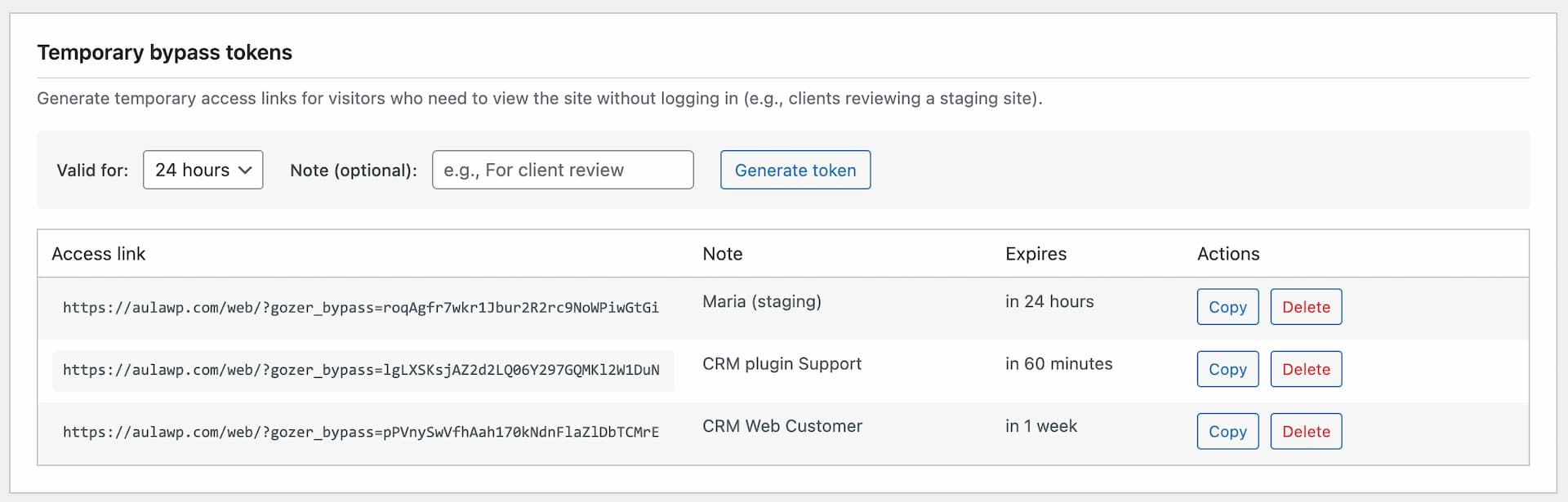
Temporary bypass tokens management 
Redirect behavior options
Ìgbéwọlẹ̀
- Upload the
gozerfolder to/wp-content/plugins/ - Activate the plugin through the ‘Plugins’ menu in WordPress
- Go to Settings > Gozer to configure options
- Enable the “Require login to access the site” checkbox
- Configure exceptions as needed
FAQ
-
Will this break my site?
-
The plugin is designed with safe defaults. Critical functionality like REST API, WP-Cron, and AJAX are allowed by default to prevent breaking the block editor or scheduled tasks.
-
Can search engines still index my site?
-
Yes, if you enable the “Allow search engine crawlers” option. Major search engine bots (Google, Bing, etc.) will be able to access and index your content.
-
How do I allow specific pages to be public?
-
Go to Settings > Gozer and add paths to the “Allowed paths” field. Enter one path per line, like
/contact/or/about/. -
How do I whitelist an entire IP range?
-
Use CIDR notation (e.g.,
192.168.1.0/24for a /24 subnet) or wildcards (e.g.,192.168.*for all IPs starting with 192.168). -
How do bypass tokens work?
-
Generate a token in Settings > Gozer, then share the generated URL. Anyone with that link can access the site without logging in until the token expires.
-
Can I use it on a multisite network?
-
Yes, the plugin works on multisite installations. Each site can have its own configuration.
-
Why “Gozer”?
-
Gozer the Gozerian is the supernatural entity from Ghostbusters (1984) who asked “Are you a god?” before denying access to mere mortals. Just like our plugin does with your site visitors.
Àwọn àgbéyẹ̀wò
Kò sí àwọn àgbéyẹ̀wò fún plugin yìí.
Àwọn Olùkópa & Olùgbéejáde
“Force login to make the site private Ìtumọ̀ Yorùbá: – Gozer” jẹ́ ètò ìṣàmúlò orísun ṣíṣí sílẹ̀. Àwọn ènìyàn wọ̀nyí ti ṣe ìkópa sí plugin yìí.
Àwọn Olùkópa

A ti túmọ̀ “Force login to make the site private Ìtumọ̀ Yorùbá: – Gozer” sí àwọn èdè agbègbè 2. Ọpẹ́lọpẹ́ fún àwọn atúmọ̀ èdè fún àwọn ìkópa wọn.
Túmọ̀ “Force login to make the site private Ìtumọ̀ Yorùbá: – Gozer” sí èdè rẹ.
Ṣe o nífẹ̀ẹ́ sí ìdàgbàsókè?
Ṣàwárí koodu, ṣàyẹ̀wò ibi ìpamọ́ SVN, tàbí ṣe àgbékalẹ̀ sí àkọsílẹ̀ ìdàgbàsókè nípasẹ̀ RSS.
Àkọsílẹ̀ àwọn àyípadà
1.0.3
- Fix: Fixed promotional banner button alignment on WordPress 7.0 due to core CSS specificity changes
- Tested up to WordPress 7.0
1.0.2
- Improved: Better name to make it easier to find the plugin
1.0.1
- Improved: Tokens table layout for better responsiveness on smaller screens
- Improved: Copy tokens button moved to Actions column for a better user experience
- Improved: The recommendations banner now displays plugins and services randomly
1.0.0
- Initial release
- Force login functionality with configurable exceptions
- Admin bar indicator with quick toggle switch
- System exceptions (REST API, WP-Cron, WP-CLI, AJAX, XML-RPC)
- SEO exceptions (sitemaps, robots.txt, feeds, search bots)
- Technical exceptions (HEAD requests, static files)
- Custom exceptions (paths, IPs with CIDR/wildcards, user agents)
- Temporary bypass tokens with expiration
- Redirect options (login, 403, custom URL)
- Two-column settings layout