

Àpèjúwe
Every order placed in your WooCommerce store becomes a QuickBooks Online invoice and a
shipping label, with no manual work on your end. Connect your store once, and from then
on Fuldash creates the invoice, records the payment, picks a carrier, box, and rate,
prints the label, and marks the order Completed back in WooCommerce when itÌtumọ̀ Yorùbá: ’s done.
Visit Fuldash | Pricing & free trial | Terms of Service | Privacy Policy
What happens on every order, automatically:
- Creates a QuickBooks Online invoice and records the payment
- Picks a carrier, box, and rate, then generates the shipping label
- Marks the order Completed back in WooCommerce once fulfillment finishes
Product, payment, and expense mapping are configured once from your Fuldash dashboard,
where all order tracking and fulfillment status live – this pluginÌtumọ̀ Yorùbá: ’s only job is getting
order data there and marking orders complete once fulfillment finishes.
Requirements
Fuldash is a paid platform with a 30-day free trial on every plan, no credit card
required. To use this plugin youÌtumọ̀ Yorùbá: ’ll need:
- A Fuldash account – see plans and pricing
- A QuickBooks Online account to connect
- A ShipEngine account with your carriers connected, for rate shopping and label generation
How it works:
- A customer places an order in your WooCommerce store.
- When the order is created, the plugin forwards the order to your Fuldash platform.
- Fuldash creates a QuickBooks invoice, records the payment, and generates a shipping
label – choosing carrier, box, and rate automatically – all in the background. - Once fulfillment finishes, Fuldash marks the order Completed in your store
automatically – no manual updates needed.
Setup takes under two minutes:
- Install and activate this plugin.
- Go to WooCommerce Settings Fuldash.
- Paste your API Key from your Fuldash merchant dashboard (Settings Profile).
- Click Save changes, then click Activate to connect your store to the platform.
Channel control:
Use the Activate / Deactivate button on the settings page to connect or disconnect your
store from Fuldash at any time. Deactivating stops order forwarding without removing
your credentials – you can reactivate instantly when ready.
External Services
This plugin sends data to the Fuldash platform, an external
third-party service.
What is sent and when:
- Channel activation / deactivation – when you click Activate or Deactivate, a
request is sent to the Fuldash platform to record your storeÌtumọ̀ Yorùbá: ’s connection status. - Order data – when an order is created and the channel is active, the orderÌtumọ̀ Yorùbá: ’s
line items, addresses, payment method, and totals are sent to the Fuldash platform
for fulfillment processing.
What Fuldash can request from your store:
FuldashÌtumọ̀ Yorùbá: ’s fulfillment platform also requests information from your store, used to help
you configure product, payment, and expense mappings in your Fuldash dashboard, and to
keep your order statuses in sync:
- Product catalog – product names and SKUs, so you can map them to your accounting
items in the Fuldash dashboard. - Payment gateways – the ID, title, and enabled status of your configured WooCommerce
payment gateways, so you can map them to accounting payment methods. - Recent order fee data – certain fields on your 25 most recent orders, used to
detect payment-processor fees (e.g. Stripe or PayPal fees) for expense tracking.
No customer personal data is included in this scan. - Order completion – once fulfillment finishes, Fuldash marks the corresponding
order Completed in your store.
Service information:
- Service URL: https://fuldash.com
- Terms of Service: https://fuldash.com/terms
- Privacy Policy: https://fuldash.com/privacy
Àwọn àwòrán ìbòjú
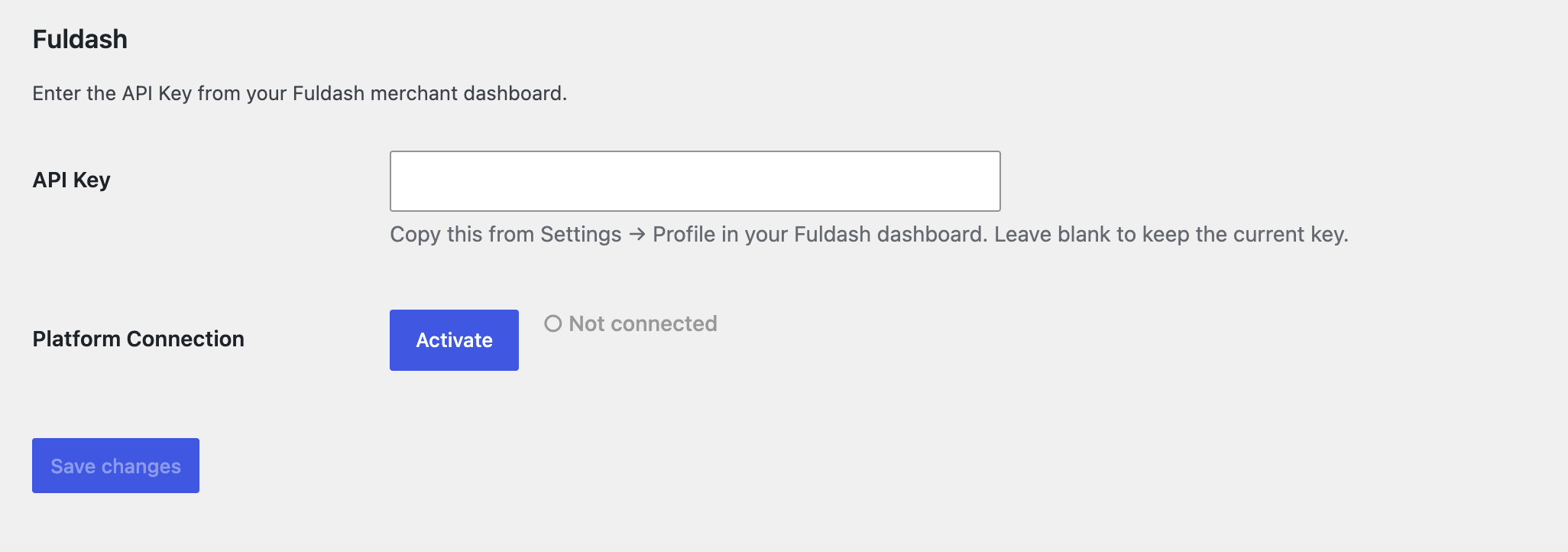
Ìgbéwọlẹ̀
- Upload the
fuldashfolder to/wp-content/plugins/. - Activate the plugin via the Plugins menu in WordPress Admin.
- Go to WooCommerce Settings Fuldash and enter your credentials.
- Click Activate to connect your store to the Fuldash platform.
FAQ
-
Where do I find my API Key?
-
Log in to your Fuldash merchant dashboard and open Settings Profile.
Your API Key is displayed there with a one-click copy button. -
What order data is forwarded?
-
The plugin sends your complete order details, including line items, billing and
shipping addresses, payment method, and order totals. -
What happens if my API Key is invalid or the platform is unreachable?
-
Clicking Activate with a key that doesnÌtumọ̀ Yorùbá: ’t match your Fuldash dashboard shows “API
key not recognized” – enter the correct key in Settings and save before trying again.
If the platform canÌtumọ̀ Yorùbá: ’t be reached, it shows “Server unreachable – try again later”; your
key is unaffected, so just click Activate again once the platform is back. -
What happens if an order fails to forward?
-
The order is still created normally in WooCommerce. The failure is logged to
WooCommerce Status Logs (source: fuldash), and the orderÌtumọ̀ Yorùbá: ’s forwarding status is
visible in your Fuldash dashboard. -
Can I temporarily stop forwarding orders without losing my credentials?
-
Yes. Click Deactivate on the settings page. Your API Key remains saved.
Click Activate at any time to resume forwarding. -
Does this plugin store any data?
-
The plugin stores your API Key, connection status, and a forwarding status on each
order. No order data is stored by the plugin itself – it is forwarded to Fuldash and
not retained locally. Uninstalling the plugin removes the saved API Key and connection
status from your store. -
Does my order get marked as completed automatically?
-
Yes. Once Fuldash finishes creating the QuickBooks invoice and generating the shipping
label, it calls back to your store to mark the order Completed – you donÌtumọ̀ Yorùbá: ’t need to
update order status by hand.
Àwọn àgbéyẹ̀wò
Kò sí àwọn àgbéyẹ̀wò fún plugin yìí.
Àwọn Olùkópa & Olùgbéejáde
“Fuldash” jẹ́ ètò ìṣàmúlò orísun ṣíṣí sílẹ̀. Àwọn ènìyàn wọ̀nyí ti ṣe ìkópa sí plugin yìí.
Àwọn Olùkópa
Ṣe o nífẹ̀ẹ́ sí ìdàgbàsókè?
Ṣàwárí koodu, ṣàyẹ̀wò ibi ìpamọ́ SVN, tàbí ṣe àgbékalẹ̀ sí àkọsílẹ̀ ìdàgbàsókè nípasẹ̀ RSS.
Àkọsílẹ̀ àwọn àyípadà
1.1.0
- Order line items and your product catalog now include weight and dimension data,
used for shipping label generation on the Fuldash platform. - API keys are now validated when you click Activate instead of when you save them.
- Removed the per-order forwarding status column from the WooCommerce orders list –
fulfillment status is tracked in your Fuldash dashboard.
1.0.0
- Initial release.