

Àpèjúwe
Live Demo: View Live Demo
WPYog Fleet is a simple booking and vehicle operations plugin for WordPress, built for taxi operators, cab rental companies, tour agencies, transport businesses, and small travel companies.
If you are still managing cab bookings in Excel, WhatsApp messages, paper registers, or scattered notes, WPYog Fleet gives you a simple WordPress-based system to record bookings, assign vehicles and drivers, track payments, manage advances, monitor pending balances, and record trip expenses.
Unlike generic appointment booking plugins, WPYog Fleet is focused on the daily back-office workflow of transport businesses. A dedicated frontend staff panel is also included (via shortcode), so your booking staff can manage the same records from a normal WordPress page without needing access to the wp-admin dashboard.
Key Features
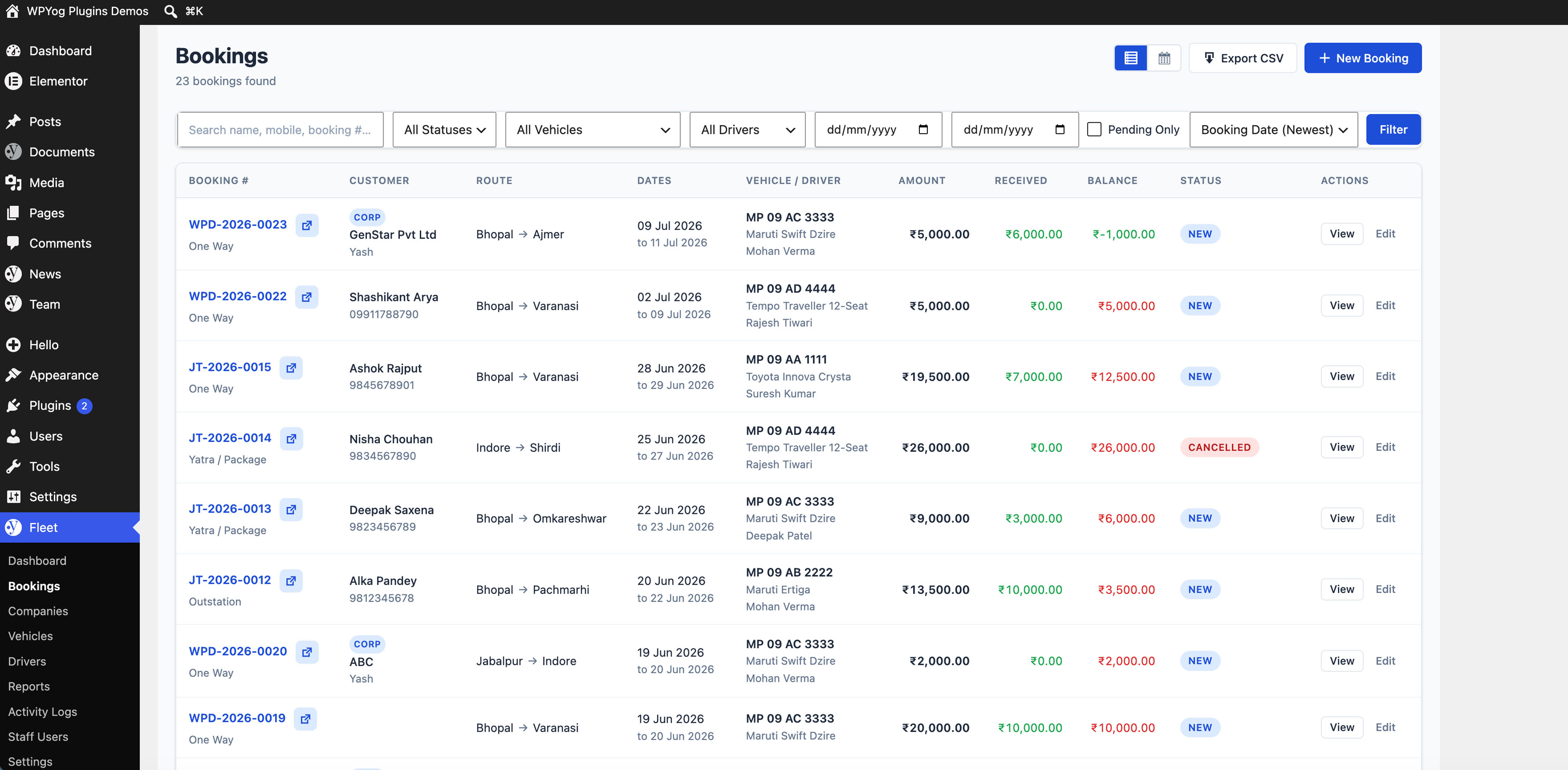
- Create and manage booking records
- Add customer name and mobile number
- Record pickup and drop details
- Add booking start and end dates
- Assign vehicles to bookings
- Assign drivers to bookings
- Track booking amount
- Record advance payments
- Track pending balance
- Add payment details
- Record trip expenses
- Manage booking status
- Search and filter booking records
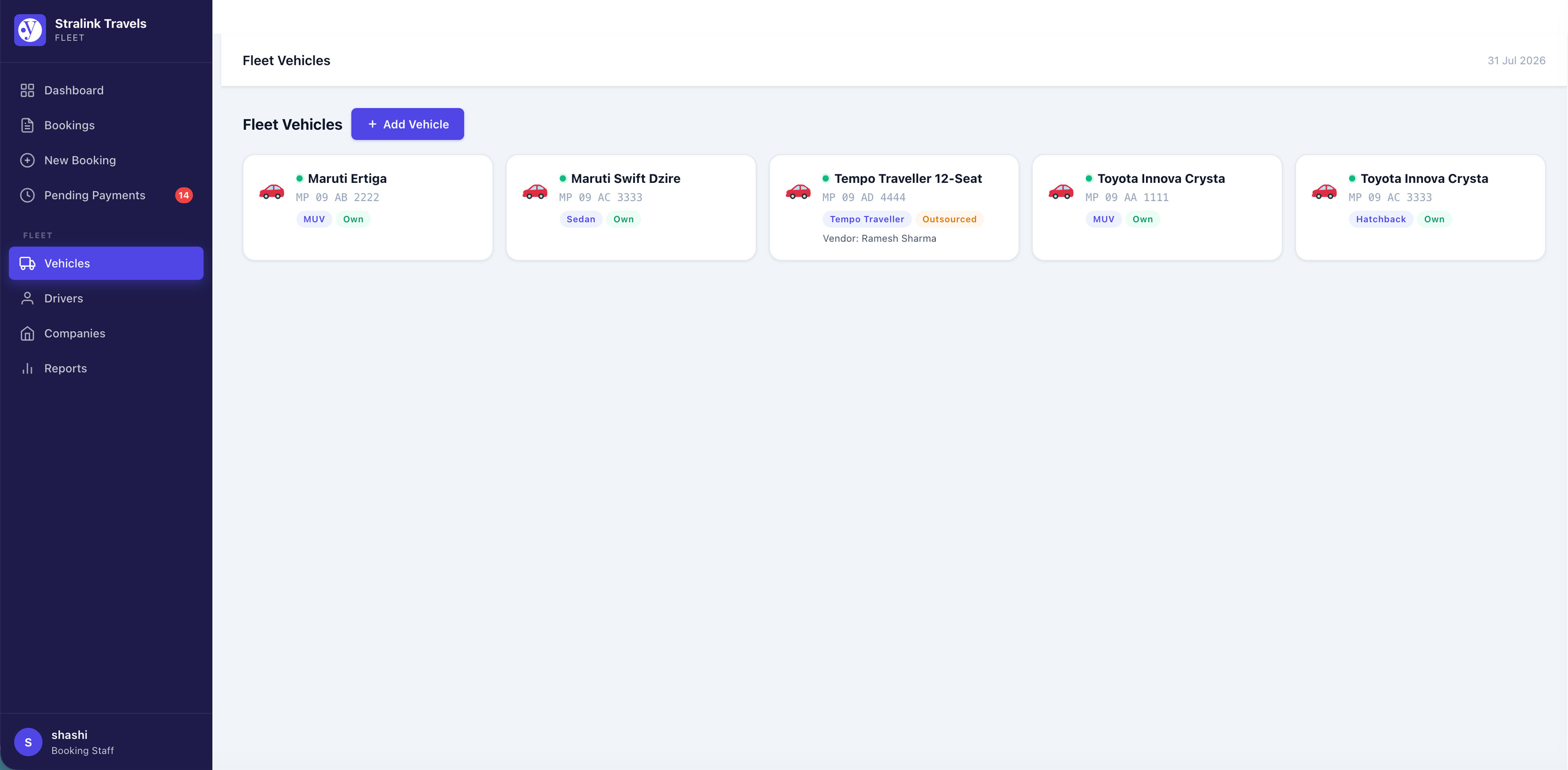
- Maintain driver and vehicle information
- Use WordPress as a simple booking operations dashboard
- Optional frontend staff panel (shortcode) for booking staff who donÌtumọ̀ Yorùbá: ’t need wp-admin access
Built For
WPYog Fleet is useful for:
- Taxi operators
- Cab rental businesses
- Local travel agencies
- Tour operators
- Tempo traveller operators
- Small fleet owners
- Transport businesses
- Businesses managing bookings manually through calls, WhatsApp, Excel, or registers
Why Use WPYog Fleet?
Many small transport businesses do not need a complex online booking engine at the beginning. They need a practical system to manage bookings received through phone calls, WhatsApp, agents, and repeat customers.
WPYog Fleet helps you keep your operational records organized inside WordPress.
With WPYog Fleet, you can manage:
- Who booked the trip
- Which vehicle is assigned
- Which driver is assigned
- How much the customer has paid
- How much balance is pending
- What expenses were added for the trip
- Current booking status
- Past booking history
Use Cases
WPYog Fleet can be used for:
- Daily taxi booking management
- Outstation cab booking records
- Airport transfer bookings
- Tour package vehicle assignments
- Tempo traveller booking records
- Driver-wise trip tracking
- Vehicle-wise booking history
- Payment and pending balance tracking
- Internal booking management for travel businesses
Frontend Staff Panel
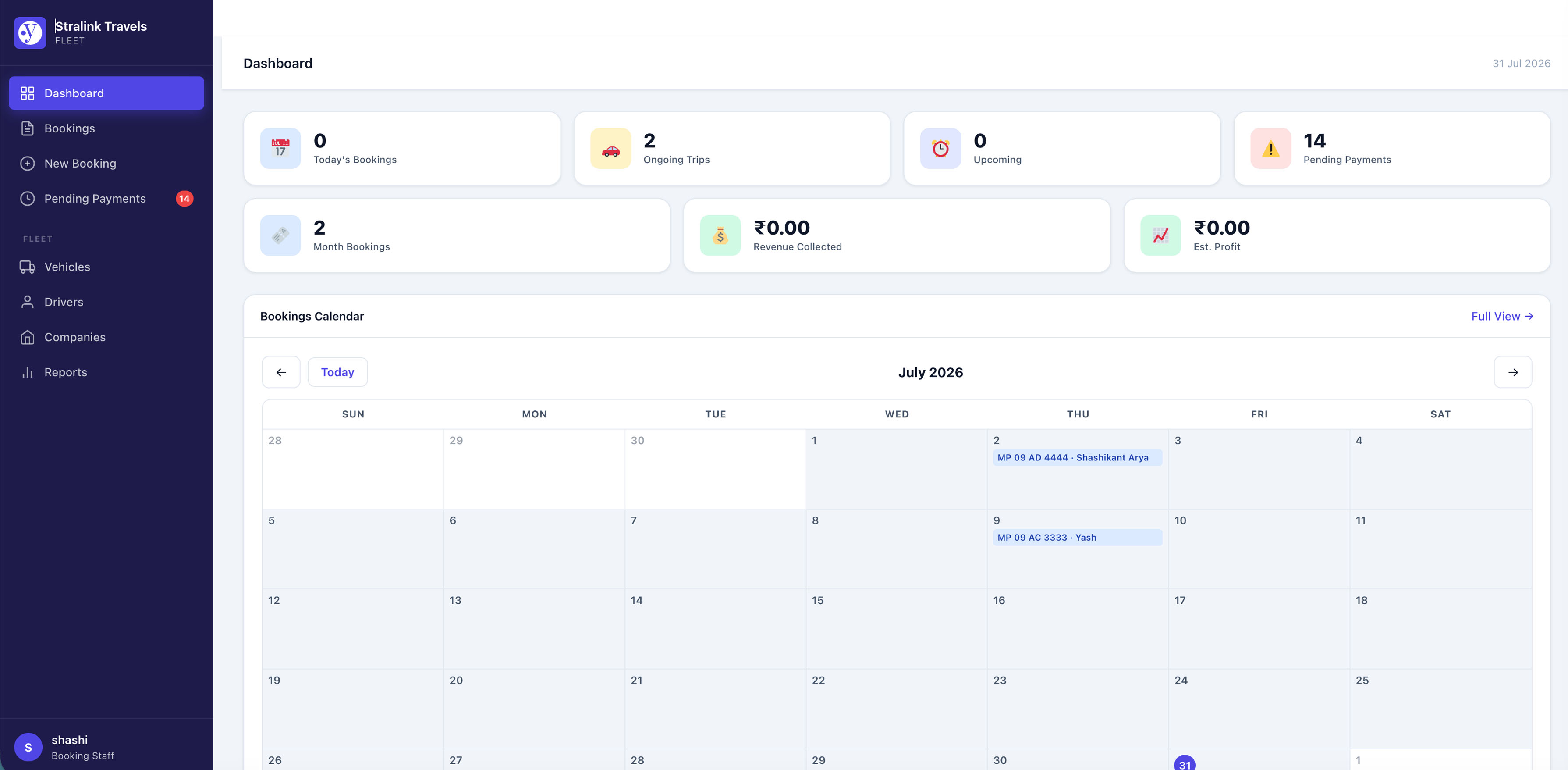
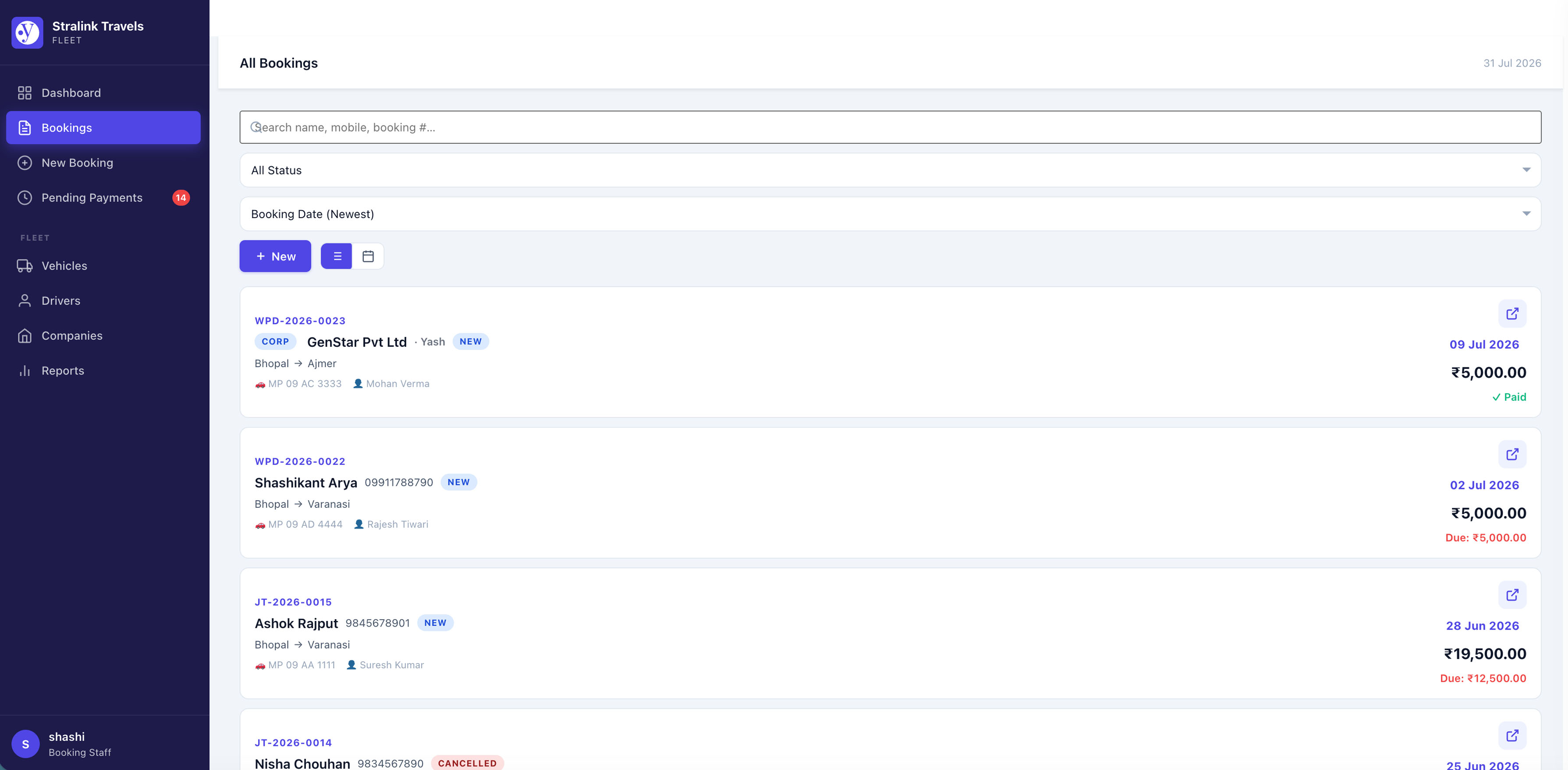
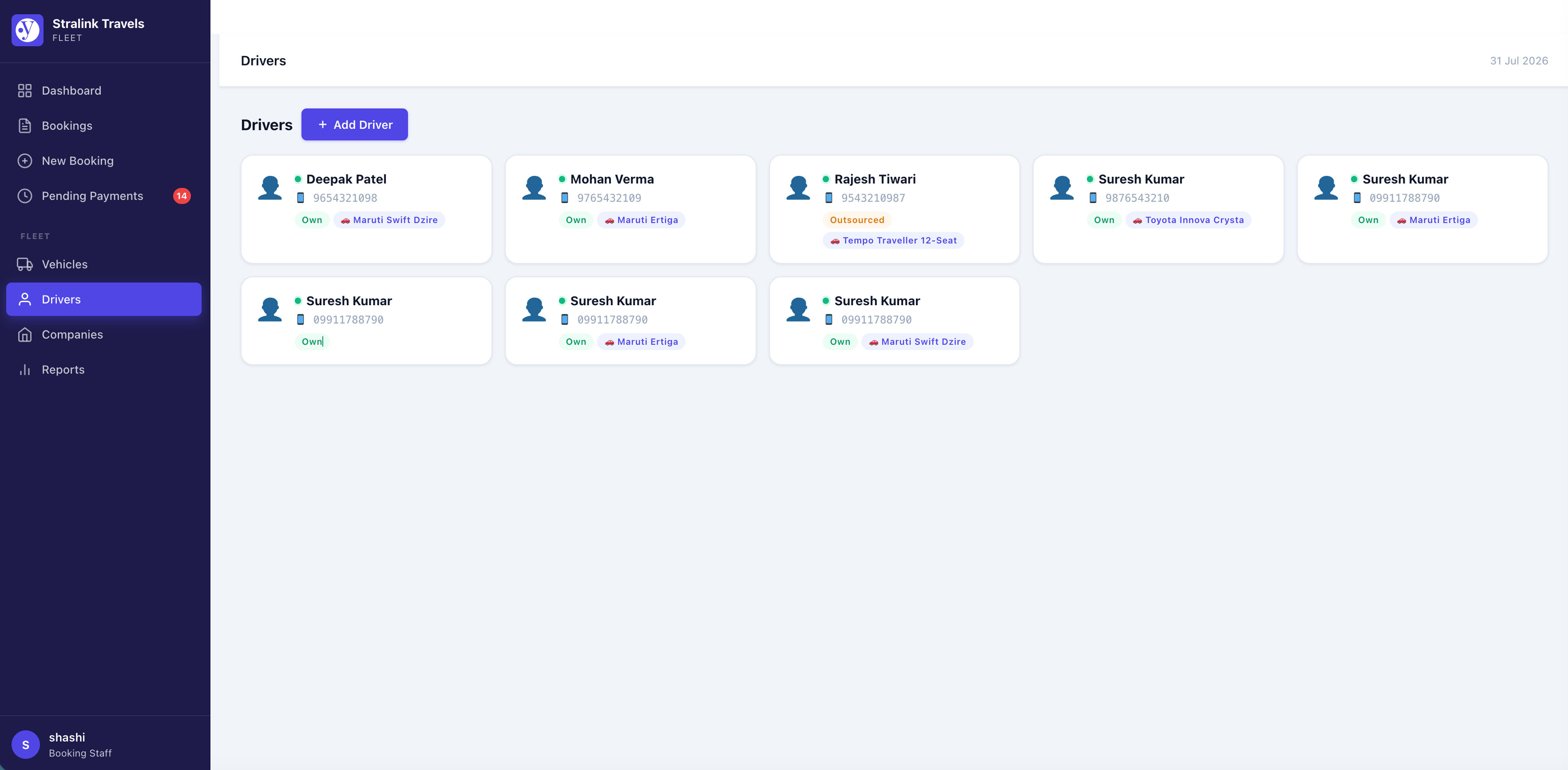
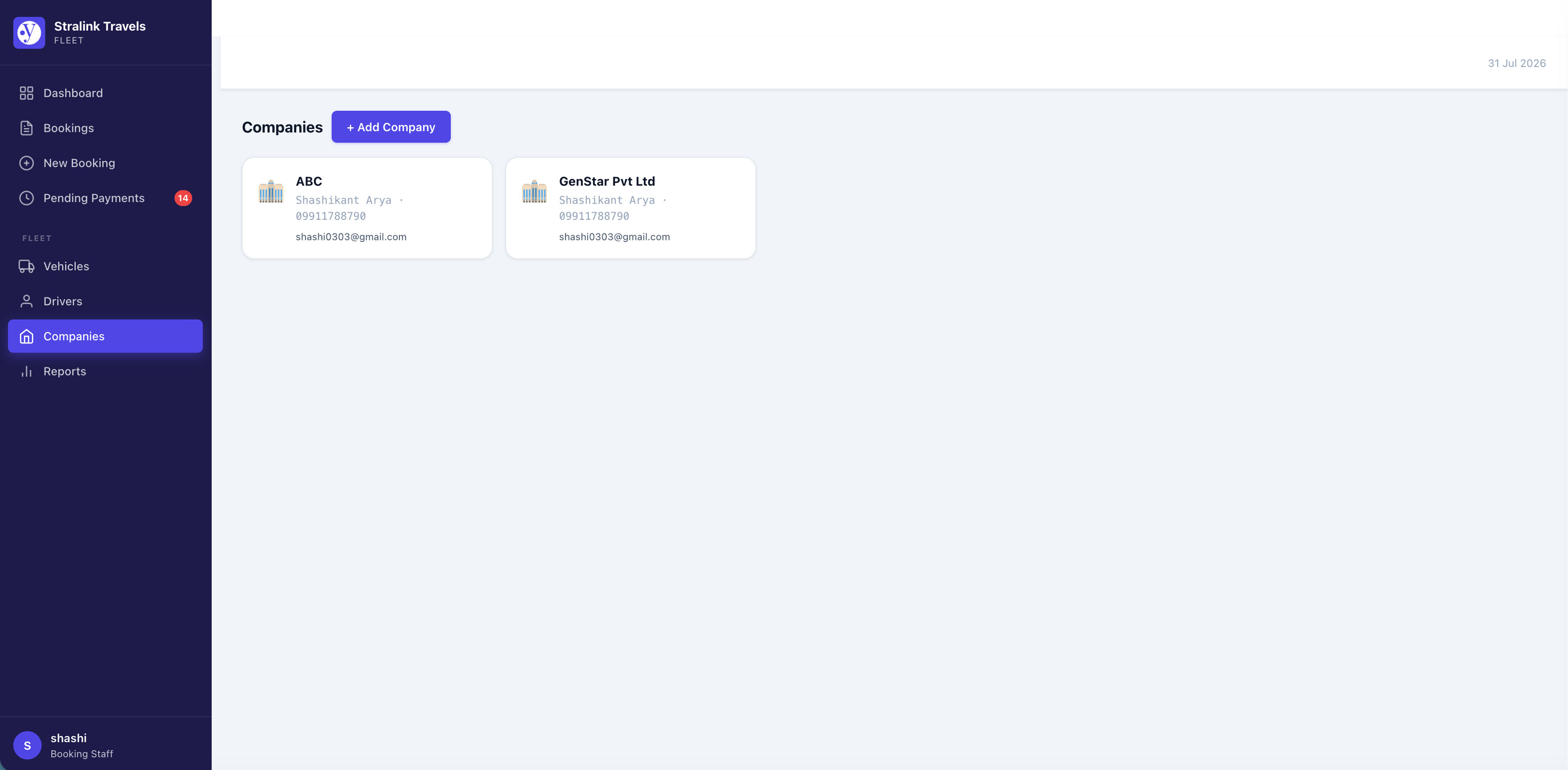
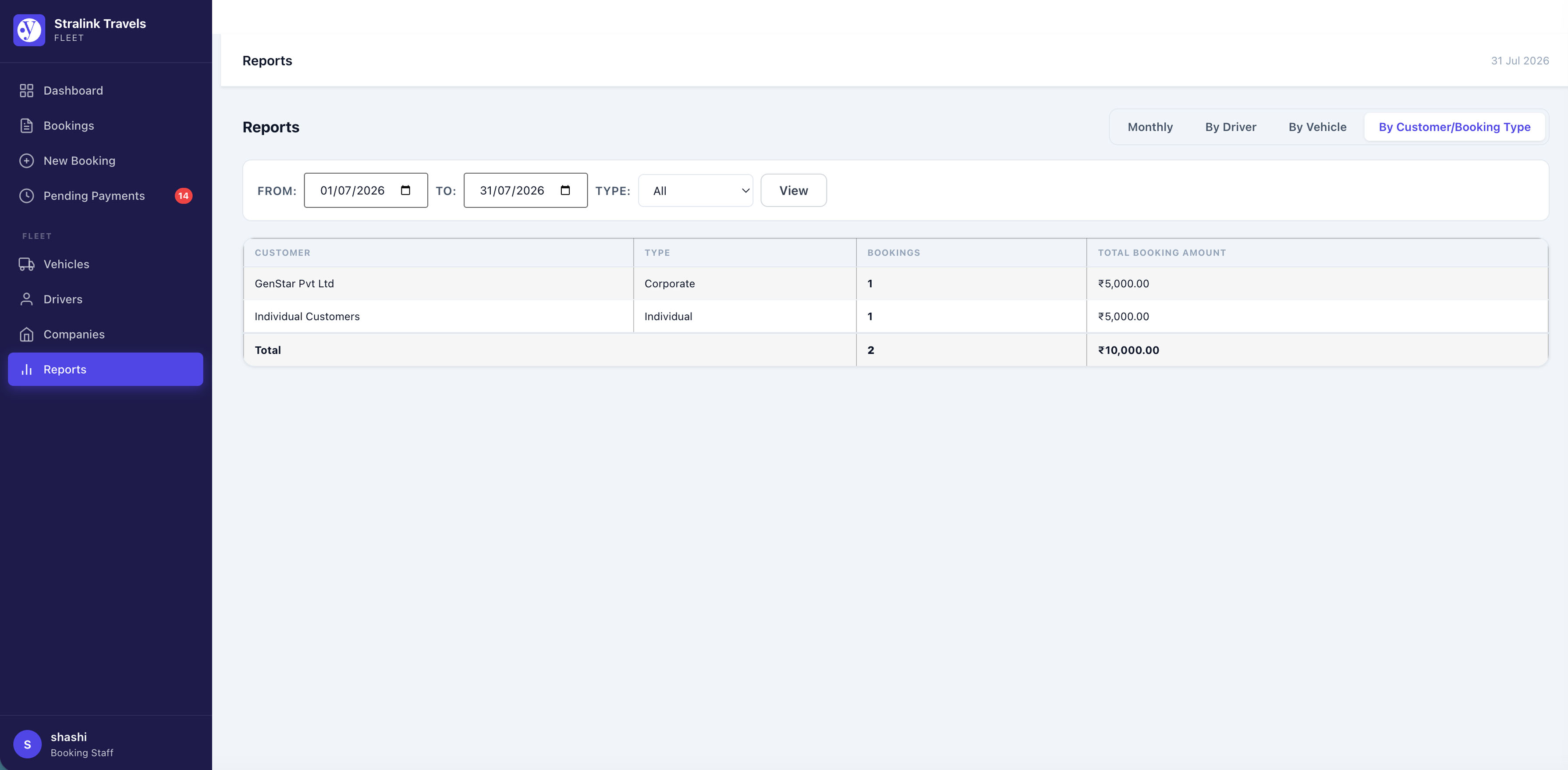
Place the shortcode [wpyog_fleet] on any WordPress page to give your booking staff a full-featured panel without WordPress admin access. The panel is role-protected: only users with the Booking Staff role (or WordPress administrators) can access it. It includes the dashboard, bookings list and calendar, payments, expenses, WhatsApp/email sharing, vehicles, drivers, companies, and reports — mirroring the admin panel, with a mobile-responsive layout.
Practical WordPress Plugin For Business Workflows
WPYog Fleet is part of the WPYog plugin ecosystem by Poppins Digital. WPYog plugins are built for practical business workflows, helping organizations manage real operational needs directly from WordPress.
Current WPYog plugins include:
User Roles
- Administrator (
jtb_admincapability) — full access including hard-delete of payments, expenses, and bookings - Booking Staff (
jtb_managecapability) — full create/edit/void access; no hard-delete
Translation Ready
A .pot file is included in the languages/ folder. The plugin uses the text domain wpyog-fleet.
Database
The plugin creates its own database tables on activation and runs automatic migrations when the version changes. No existing WordPress data is modified.
External Services
This plugin connects to the following external service to enable WhatsApp sharing:
WhatsApp Send API — https://api.whatsapp.com/send/
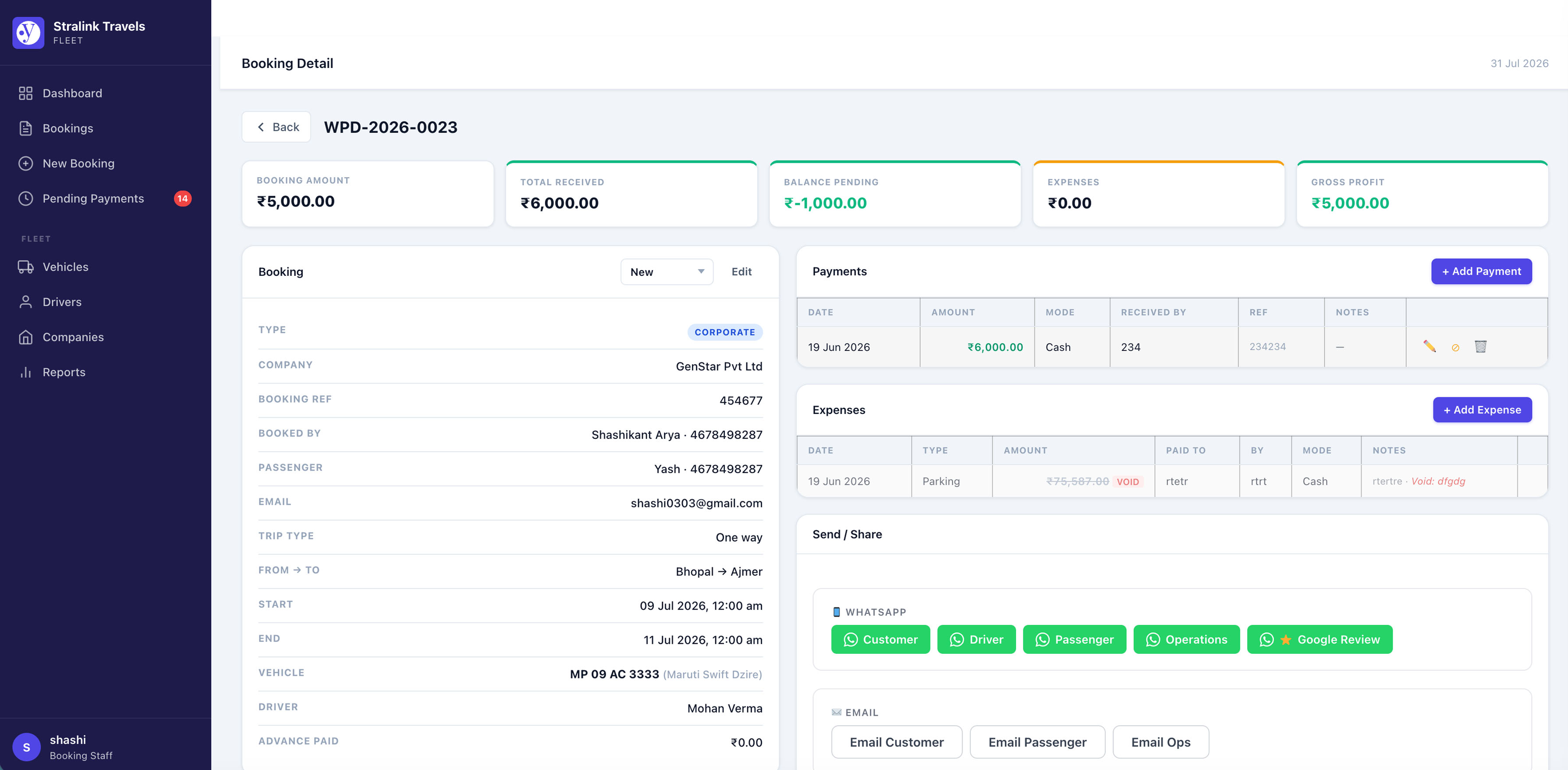
Used to generate a pre-filled WhatsApp message link for sharing booking details with customers, drivers, and operations contacts. Clicking a WhatsApp button in the booking detail screen opens a new browser tab or the WhatsApp application with a pre-composed message; no data is sent automatically without the user clicking the button.
- Service provider: Meta Platforms, Inc. (WhatsApp)
- Privacy policy: https://www.whatsapp.com/legal/privacy-policy
- Terms of service: https://www.whatsapp.com/legal/terms-of-service
No data is sent to WPYog or Poppins Digital via this integration.
Àwọn àwòrán ìbòjú
Ìgbéwọlẹ̀
- Upload the plugin files to the
/wp-content/plugins/wpyog-fleet/directory, or install the plugin through the WordPress Plugins screen. - Activate the plugin through the Plugins screen in WordPress.
- On first activation you will be redirected to a Setup Wizard — enter your company name, booking number prefix, and operations contact details.
- Go to the WPYog Fleet menu in your WordPress dashboard to add your vehicles and drivers.
- Start creating booking records.
- Optional: create a WordPress page (e.g. “Staff Panel”), add the shortcode
[wpyog_fleet]to it, then go to WPYog Fleet Staff Users and assign the Booking Staff role to any user who should have frontend panel access.
FAQ
-
Is WPYog Fleet a front-end taxi booking plugin?
-
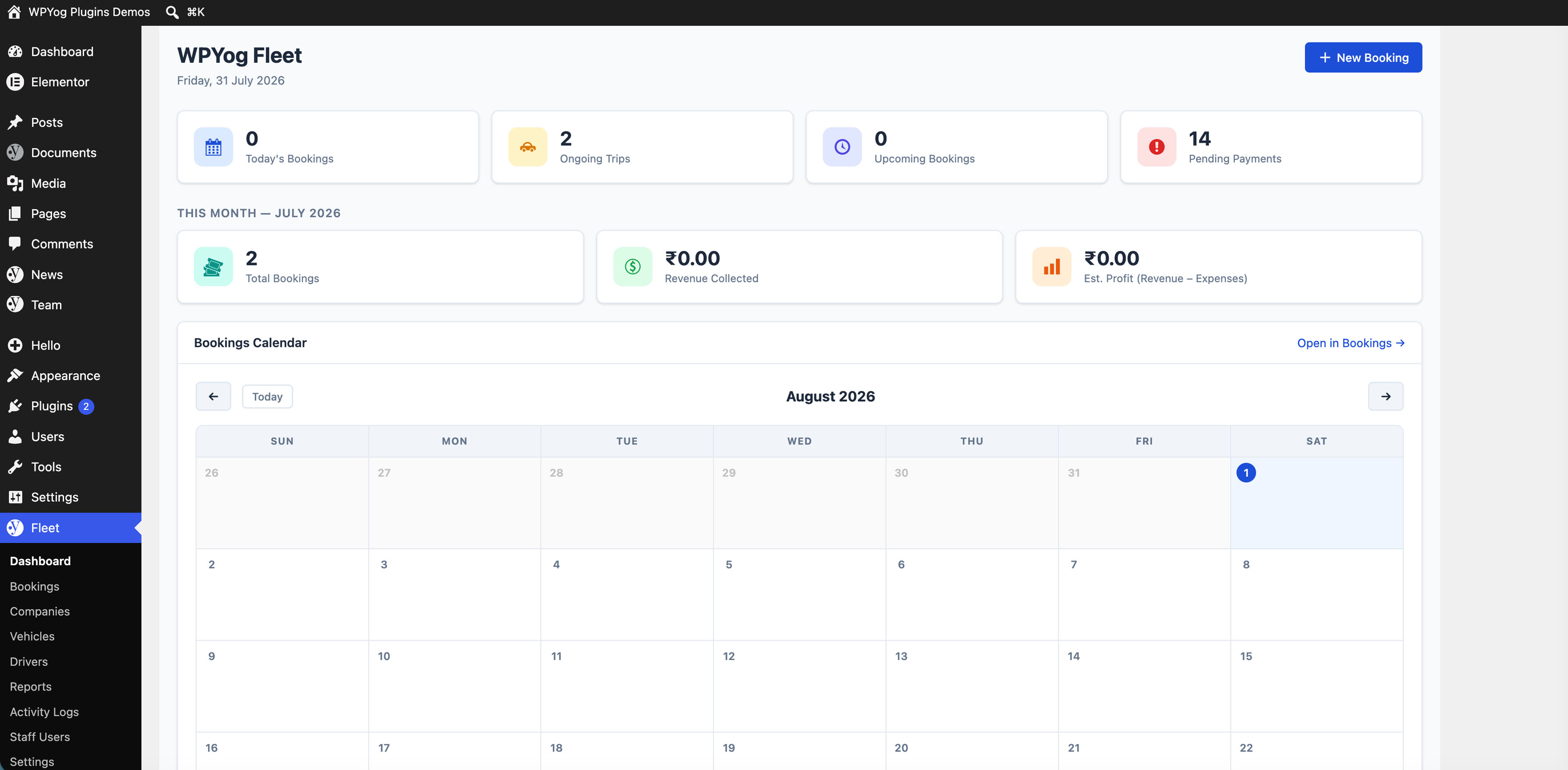
WPYog Fleet is primarily designed as an internal booking and operations manager for transport businesses. It helps you manage bookings, drivers, vehicles, payments, and expenses from the WordPress dashboard (or from the optional frontend staff panel).
-
Can customers book directly from the website?
-
The current version is focused on admin-side and staff-side booking management. Front-end customer-facing booking forms may be added in a future version.
-
Can I assign drivers and vehicles to bookings?
-
Yes. WPYog Fleet allows you to maintain vehicle and driver records and assign them to bookings.
-
Can I track advance payments and pending balances?
-
Yes. You can record booking amount, advance amount, payment details, and pending balance.
-
Can I record trip expenses?
-
Yes. WPYog Fleet allows you to add expenses related to bookings so you can keep better operational records.
-
Is this plugin only for taxi businesses?
-
No. It can also be used by cab rental companies, travel agencies, tour operators, tempo traveller operators, and small transport businesses.
-
Does WPYog Fleet require WooCommerce?
-
No. WPYog Fleet is designed to work independently inside WordPress and does not require WooCommerce.
-
Can I export reports?
-
Bookings and pending payments can be exported to CSV from the admin panel today. Additional export and advanced reporting features may be added in future versions or a Pro version.
-
How do I give a staff member access to the frontend panel?
-
Go to WPYog Fleet Staff Users and click Add Staff User, or assign the Booking Staff role to any user from Users All Users. Once assigned, the user can log in at the page where you placed the
[wpyog_fleet]shortcode. -
Can I customise the booking number format?
-
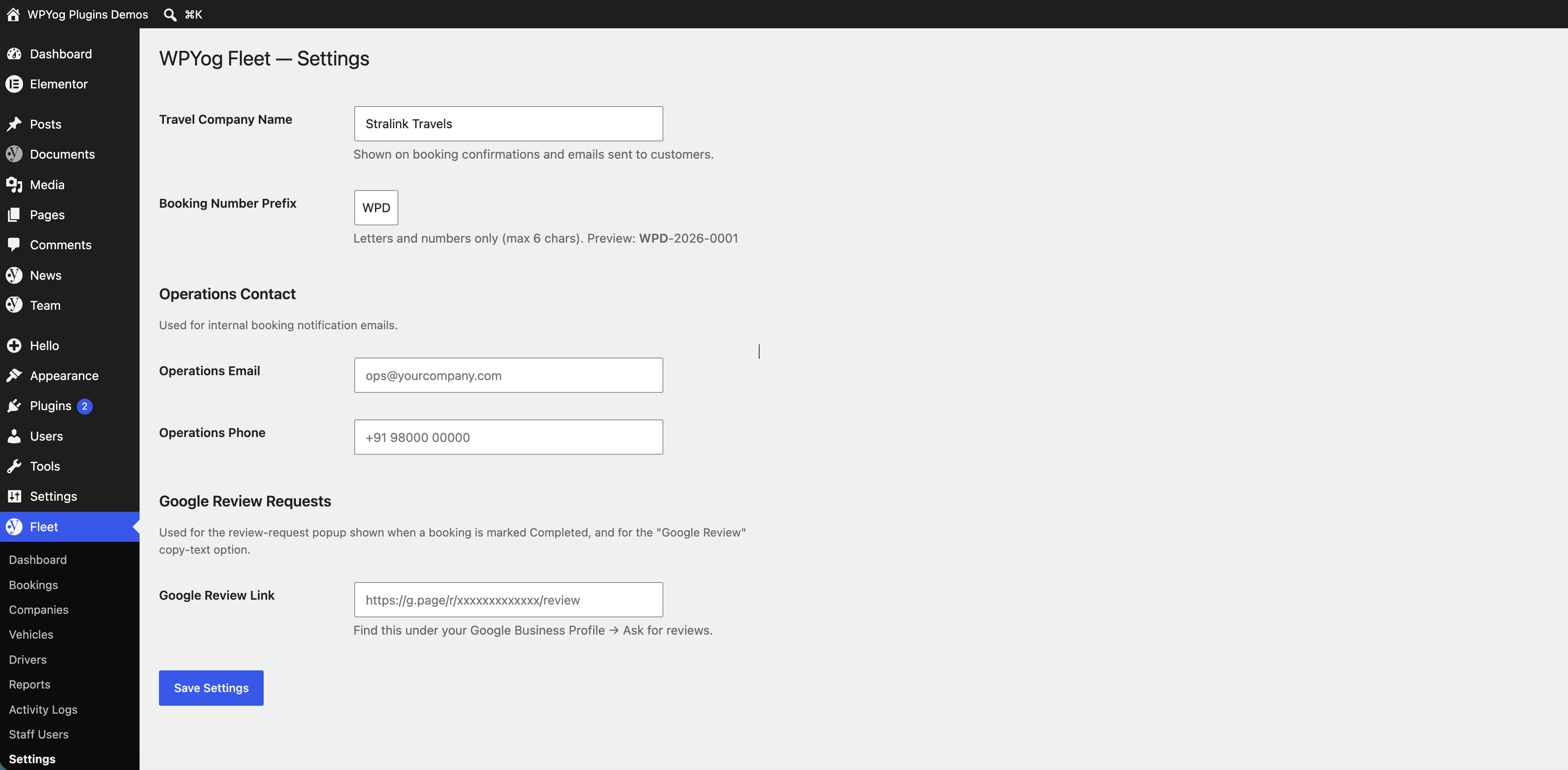
Yes. Go to WPYog Fleet Settings and update the Booking Prefix field. For example, a prefix of
JTproduces booking numbers likeJT-2026-0001. Existing booking numbers are not affected. -
Can Booking Staff delete payments or expenses?
-
No. Booking Staff can add, edit, and soft-void (with reason) payments and expenses. Hard-delete is available to WordPress Administrators only. Soft-voided records are preserved in the history for audit purposes.
-
Is the plugin translation ready?
-
Yes. All strings are internationalised using the
wpyog-fleettext domain and a.potfile is included in thelanguages/folder.
Àwọn àgbéyẹ̀wò
Kò sí àwọn àgbéyẹ̀wò fún plugin yìí.
Àwọn Olùkópa & Olùgbéejáde
“WPYog Fleet – Booking Manager for Taxi, Cab & Travel Businesses” jẹ́ ètò ìṣàmúlò orísun ṣíṣí sílẹ̀. Àwọn ènìyàn wọ̀nyí ti ṣe ìkópa sí plugin yìí.
Àwọn Olùkópa
Túmọ̀ “WPYog Fleet – Booking Manager for Taxi, Cab & Travel Businesses” sí èdè rẹ.
Ṣe o nífẹ̀ẹ́ sí ìdàgbàsókè?
Ṣàwárí koodu, ṣàyẹ̀wò ibi ìpamọ́ SVN, tàbí ṣe àgbékalẹ̀ sí àkọsílẹ̀ ìdàgbàsókè nípasẹ̀ RSS.
Àkọsílẹ̀ àwọn àyípadà
3.5.7
- readme.txt: moved the Live Demo link inside the Description section — it was placed between the tagline and the Description heading, which WordPress.org treats as page metadata (it got swallowed into the meta description as plain text instead of rendering as a link on the plugin page)
- No functional or visual changes — this is a readme/metadata-only release
3.5.6
- readme.txt: removed
poppinsdigitalfrom Contributors (not a valid WordPress.org username — was triggering an import warning);wpyogremains as the sole contributor - readme.txt: added links to the other WPYog plugins (WPYog Team, WPYog Docs, WPYog News) in the “Practical WordPress Plugin For Business Workflows” section, and removed the pluginÌtumọ̀ Yorùbá: ’s own self-referencing entry from that list
- readme.txt: added a Live Demo link at the top of the readme
- No functional or visual changes — this is a readme/metadata-only release
3.5.5
- WordPress.org Plugin Review: replaced the “sanitized downstream” pattern (raw
wp_unslash( $_POST )passed into a save function, with per-field sanitization happening inside that function) with a new WPYOGFLEET_Input class that sanitizes every field individually and directly at the point it is read from $_POST, using sanitize_text_field()/sanitize_textarea_field() wrapped around each $_POST access. Applied across all 28 form/AJAX save paths for vehicles, drivers, companies, bookings, payments, expenses, and settings. The previous phpcs:ignore-suppressed pattern was correct in that data was genuinely sanitized before use, but reviewers cannot verify sanitization that happens inside a separately-called function — this update makes the sanitization visible and verifiable at the exact line the input is read, which is what WordPress.org requires - No functional or visual changes — this is a code-quality and compliance release
3.5.4
- Frontend dashboard: Reports tab (By Driver, By Vehicle, By Customer/Booking Type) now defaults its date range to month-to-date (1st of current month through today), matching the wp-admin Reports page, instead of loading with a blank range that pulled all-time data
3.5.3
- Reports (Driver-wise, Vehicle-wise, By Customer/Booking Type) now default to month-to-date (1st of current month through today) instead of showing all-time data when no date filter has been applied yet
3.5.2
- WordPress.org Plugin Check: replaced phpcs:ignore suppression comments on read-only “saved/deleted/cleared” admin notices and the activity log pagination links with real nonce generation and verification (wp_create_nonce()/wp_verify_nonce()), since Plugin Check does not consistently honor inline suppression annotations for nonce-related warnings
- No functional or visual changes — this is a code-quality and compliance release
3.5.1
- WordPress.org Plugin Check: addressed NonPrefixedVariableFound notices in all admin view/template files with a documented justification — these files are only ever loaded via PHP include() inside the admin render method, so their variables are function-local, not real globals
- No functional or visual changes — this is a code-quality and compliance release
3.5.0
- WordPress.org review fixes: renamed all short “jtb” prefixed identifiers (constants, class names, capabilities, option and transient keys, nonce and AJAX action names, admin menu slugs, script handles) to a unique “wpyogfleet” prefix, per plugin review guidelines. Existing installations keep their settings and staff access automatically on upgrade — nothing needs to be redone.
- WordPress.org review fixes: every form submission is now explicitly unslashed before use, and all dynamic values are escaped at the point of output (previously some relied on internal escaping without an explicit call at the output line)
- No functional or visual changes — this is a code-quality and compliance release
3.4.1
- Google review WhatsApp button: added a direct “Google Review” WhatsApp button next to Customer/Driver/Ops in the Send/Share section (admin panel and frontend staff panel), in addition to the copy-text option
- Version bump to force browsers to load the latest staff-panel script (cache-busting)
3.4.0
- New: Google review requests — send a ready-made review-request message straight to WhatsApp, or copy the text, from the Send/Share section on any booking
- New: when a booking is marked Completed, a popup opens with the customerÌtumọ̀ Yorùbá: ’s name, mobile number, and an auto-generated review message, with a button to open WhatsApp and a checkbox to mark the review request as sent
- Bookings list and booking detail (admin panel and frontend staff panel) show a Review Request Sent / Review Request Pending badge for completed and closed bookings
- Settings: new “Google Review Requests” field to set your Google review link (used in the auto-generated message)
3.3.2
- Frontend staff panel: removed the background chip behind the booking date on the bookings list for a cleaner look
3.3.1
- By Customer/Booking Type report: added the Total row (bookings + amount) to the frontend staff panel, matching the admin panel
- “Open in new tab” icon on the bookings list is now bigger and always visible (previously only appeared on hover), in both the admin panel and the frontend staff panel, with touch-friendly sizing on mobile
3.3.0
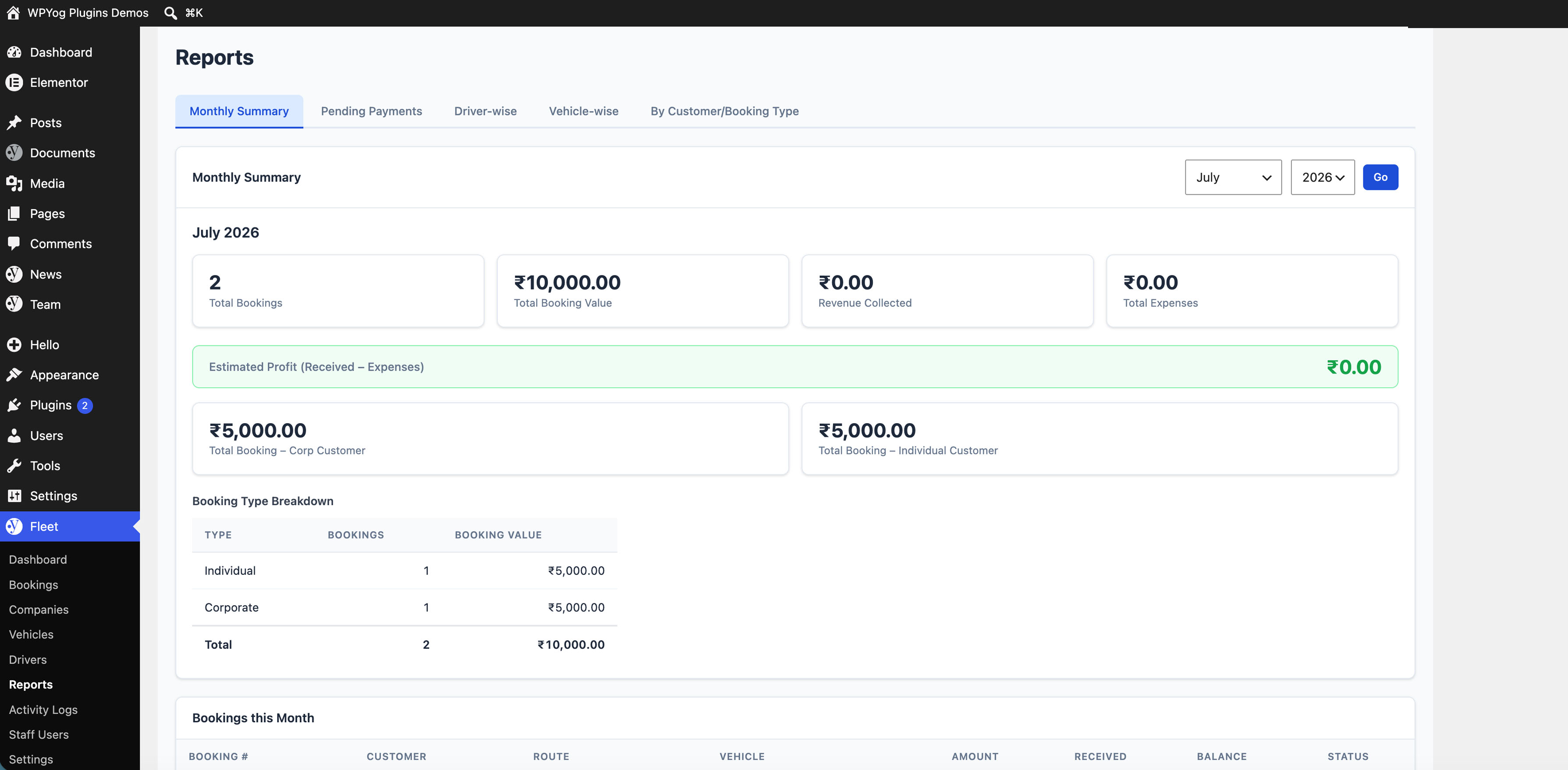
- Reports fix: Monthly Summary now counts bookings by trip start date instead of booking-created date, matching the Driver-wise, Vehicle-wise and By Customer/Booking Type reports so all report tabs reconcile for the same period
- New booking status “Closed” — marks a trip as finished and fully paid; blocked while a balance is still due
- Bookings list: added a Sort by dropdown (Booking Date or Booking ID, newest/oldest) in both the admin panel and the frontend staff panel
- Bookings list: hover a booking row to reveal an “open in new tab” icon, so the detail view can be opened without leaving the list
- New Booking: added an Own Fleet / Outsourced toggle — outsourced trips let staff type the driver name and vehicle number directly instead of picking from the vehicle/driver database; these details are included in the customer, driver and ops messages
3.2.3
- Admin sidebar menu label shortened from “WPYog Fleet” to “Fleet” (icon + Fleet)
3.2.2
- By Customer / Booking Type report (admin): Bookings and Total Booking Amount columns are now left-aligned. Other tables in the plugin are unaffected.
3.2.1
- By Customer / Booking Type report: added a Type filter (All / Corporate / Individual) in both the admin panel and the frontend staff panel
3.2.0
- Monthly Summary report: added Total Booking – Corp Customer and Total Booking – Individual Customer stat boxes
- Reports: added new “By Customer / Booking Type” tab — lists total booking amount per corporate customer, plus a single aggregated row for all individual customers
- Same additions available in the frontend staff panel Reports section
3.1.0
- Renamed plugin from WPYog Travels Booking to WPYog Fleet – Booking Manager for Taxi, Cab & Travel Businesses
- Updated plugin slug, text domain, and admin menu labels to WPYog Fleet
- Renamed frontend staff panel shortcode from
[wpyog_travels_booking]to[wpyog_fleet] - Updated readme, descriptions, tags, and FAQ for the new branding
3.0.6
- Vehicle registration number shown as primary identifier in bookings list and calendar (vehicle name as secondary)
- Corporate bookings: added Booking ID / PO Reference field
- Bookings list: corporate bookings now show company name + passenger name
- Booking detail: customer/passenger info shown for all booking types (individual and corporate)
- WhatsApp/copy messages restructured into three variants — Customer, Driver, Operations — each with tailored content
- Operations message includes corporate name, Booking ID, and financial summary (Total / Paid / Balance)
- Reports: added Corporate vs Individual booking type breakdown table in monthly summary
- Payments and expenses: soft-void with reason (preserves financial history); edit existing records with audit note
- Advance payment: added payment mode and received-by fields
- Booking form: start/end datetime split into separate date + optional time inputs (time is no longer required)
- Calendar: date cell shows vehicle registration + passenger/customer name; popup shows registration in vehicle meta
- DB migration: new columns added automatically on existing installs (advance_payment_mode, advance_received_by, booking_ref, is_voided, void_reason, voided_by, voided_at)
3.0.5
- Fixed individual booking customer name/mobile not saving (duplicate field name conflict)
- Existing bookings correctly display customer name in list and detail views
3.0.4
- Fixed PHP syntax error in vehicles, drivers, companies views (broken esc_url call prevented pages from loading)
- Fixed duplicate customer_name/mobile form fields causing individual bookings to save with empty customer name
- Fixed missing closing parenthesis for esc_url() in delete links across admin views
2.9.0
- Added Bookings Calendar in admin dashboard and bookings page
- Added Frontend calendar in staff panel (dashboard widget + bookings toggle)
- Added Setup Wizard for first-run configuration
- Added Settings page (company name, booking prefix, ops email/phone)
- Added Staff Users management page
- Added frontend login form (replaces static access-denied message)
- Fixed blank page after saving drivers/vehicles/companies (moved redirects to admin_init)
2.8.4
- Added Corporate booking type with company, booked-by, and passenger fields
- Added Companies management (backend + frontend)
- Added WhatsApp and email sharing from booking detail
2.7.0
- Added soft-delete for bookings
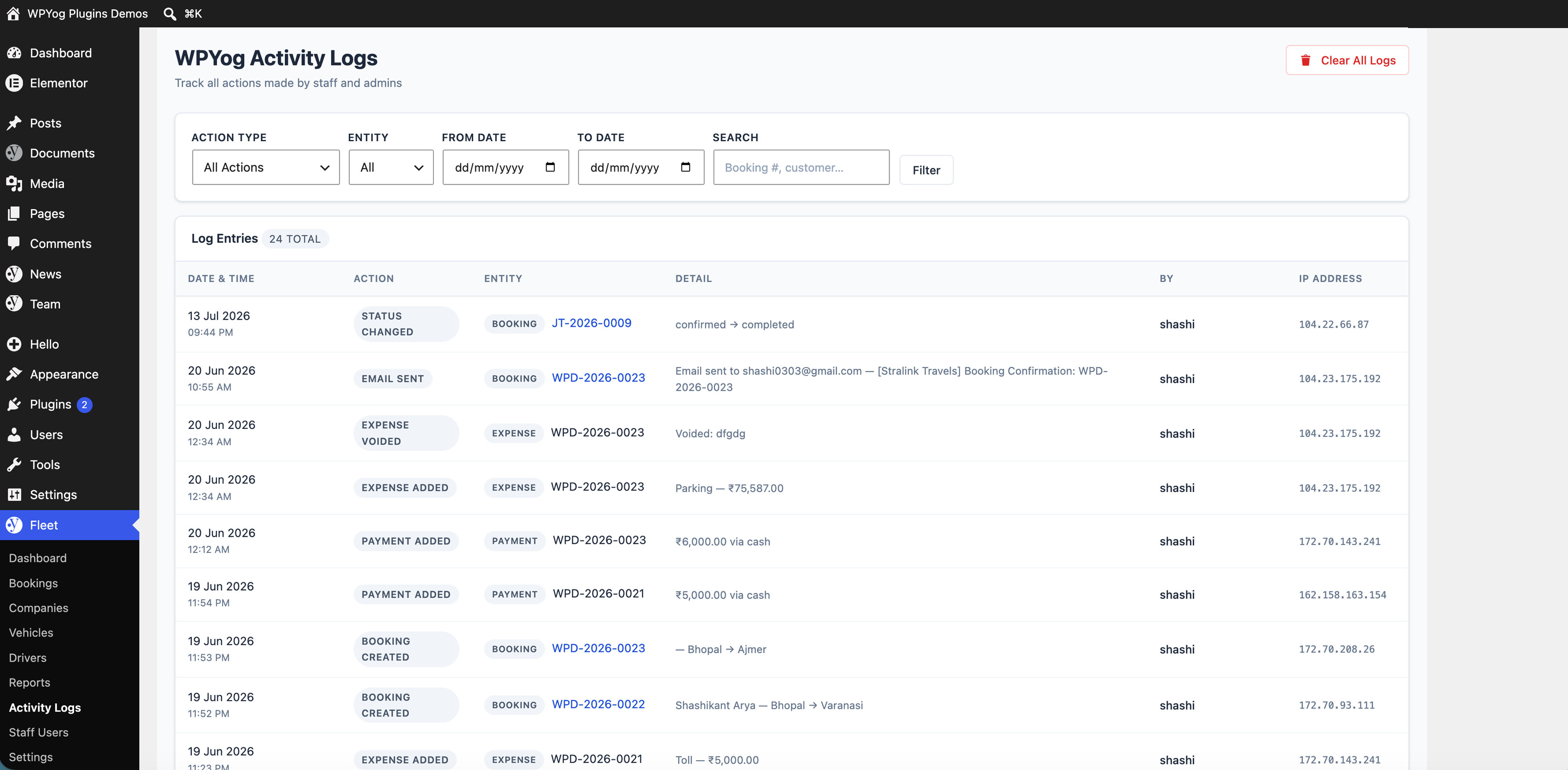
- Added activity logs
2.6.0
- Added expenses per booking
- Added profit calculation in reports
2.0.0
- Initial public release