

Àpèjúwe
Easily create and display video playlists on your WordPress site using media files or YouTube videos.
Features
- Add video items to a playlist directly from your media files.
- Include YouTube videos in your playlist.
Shortcodes
Use the following shortcode to display the video playlist anywhere on your site:
[videoplayer]
Àwọn àwòrán ìbòjú


Àwọn ìdí
Plugin yìí pèsè 1 ìdí.
- WP Video Playlist
Ìgbéwọlẹ̀
- Download the plugin
.zipfile. - Log in to your WordPress admin panel.
- Navigate to Plugins Add New Upload Plugin.
- Upload the
.zipfile and install the plugin. - Activate the WP Video Playlist plugin from the plugin list.
- Go to Video Player, add your videos, and enjoy!
FAQ
-
How do I add videos to the playlist?
-
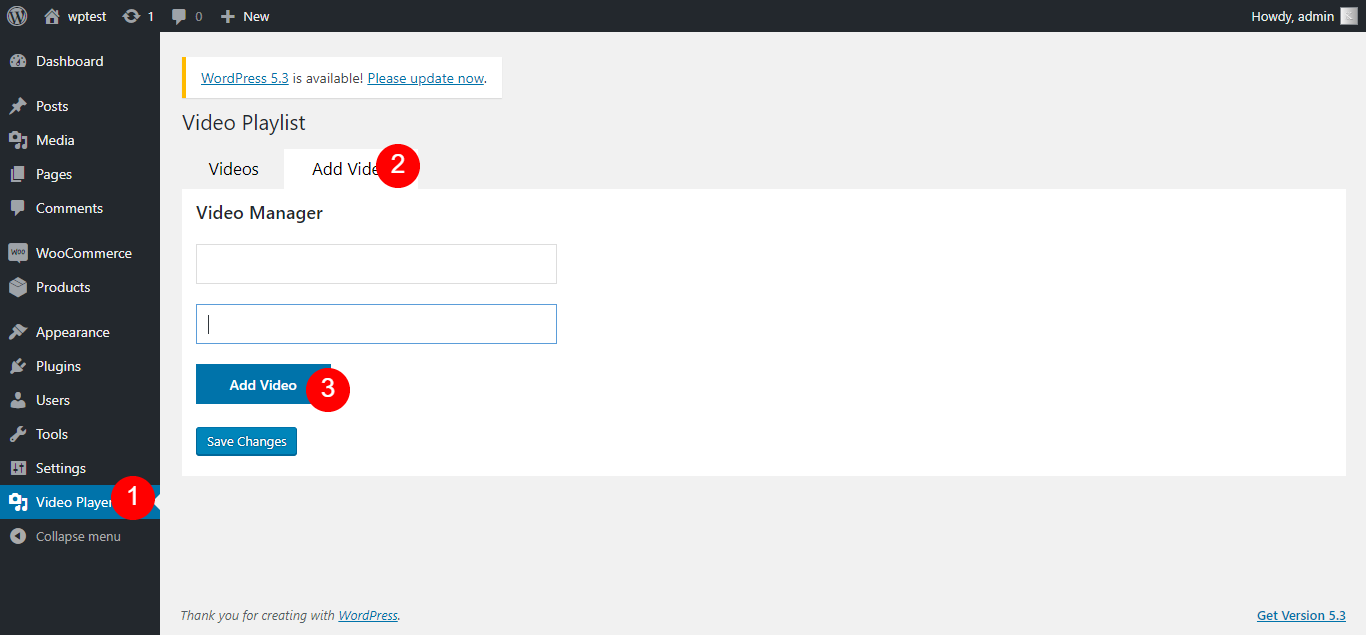
- Navigate to Video Player from the WordPress sidebar.
- Click Add Video beside the Videos section.
- Click the Add Video button and select the video you want to add.
- Optionally, add a custom title and URL:
- The first field is for the video title.
- The second field is for the video URL.
- Click Save to finalize your playlist.
- Copy the generated shortcode and paste it wherever you want to display the video player.
-
How do I add the video player in Elementor?
-
- Open the page where you want to add the Video Player.
- Locate the FDK category in the Elementor sidebar.
- Drag and drop the Video Player widget into your desired location on the page.
-
How do I add the video player in Gutenberg?
-
- Open the page or post where you want to add the WP Video Playlist block.
- Click the Add Block button (the + icon).
- Search for WP Video Playlist in the block search bar.
- Click on the WP Video Playlist block to add it to your content.
- Configure the block settings as needed.
- Publish or update the page to display the video playlist.
Àwọn àgbéyẹ̀wò

Agẹmọ 1, 2022
I found this plug-in in the corner of the iceberg. After I downloaded it and tried it, wow! Find out how this plug-in can be so simple and wonderful. Install it and use it immediately. Without any unnecessary settings, the list is automatically created and sneaked in when it is published! What I admire most is the authorÌtumọ̀ Yorùbá: ’s mind, which turns out to be open source. I give this plug-in a full score of 100!
Àwọn Olùkópa & Olùgbéejáde
“WP Video Playlist” jẹ́ ètò ìṣàmúlò orísun ṣíṣí sílẹ̀. Àwọn ènìyàn wọ̀nyí ti ṣe ìkópa sí plugin yìí.
Àwọn Olùkópa
Túmọ̀ “WP Video Playlist” sí èdè rẹ.
Ṣe o nífẹ̀ẹ́ sí ìdàgbàsókè?
Ṣàwárí koodu, ṣàyẹ̀wò ibi ìpamọ́ SVN, tàbí ṣe àgbékalẹ̀ sí àkọsílẹ̀ ìdàgbàsókè nípasẹ̀ RSS.
Àkọsílẹ̀ àwọn àyípadà
1.1.2
- Added Elementor category FDK.
1.0.9
- Added support for Elementor and Gutenberg widgets.
1.0.8
- Performance improvements.