
Àpèjúwe
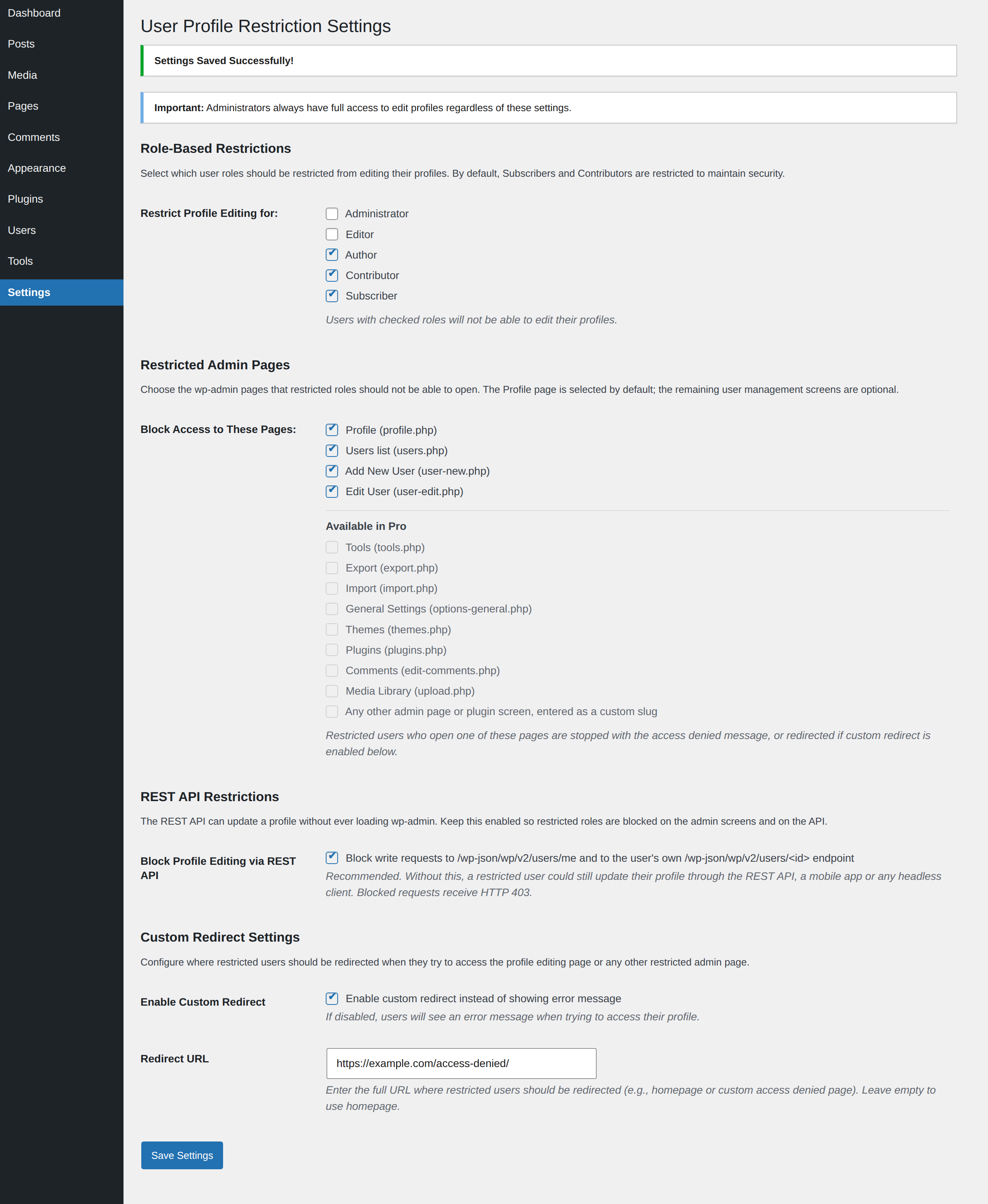
WP User Profile Restriction is a powerful yet simple plugin that allows you to restrict profile editing capabilities for specific user roles. Perfect for demo sites, membership websites, or any WordPress installation where you need to maintain control over user profile modifications.
Key Features
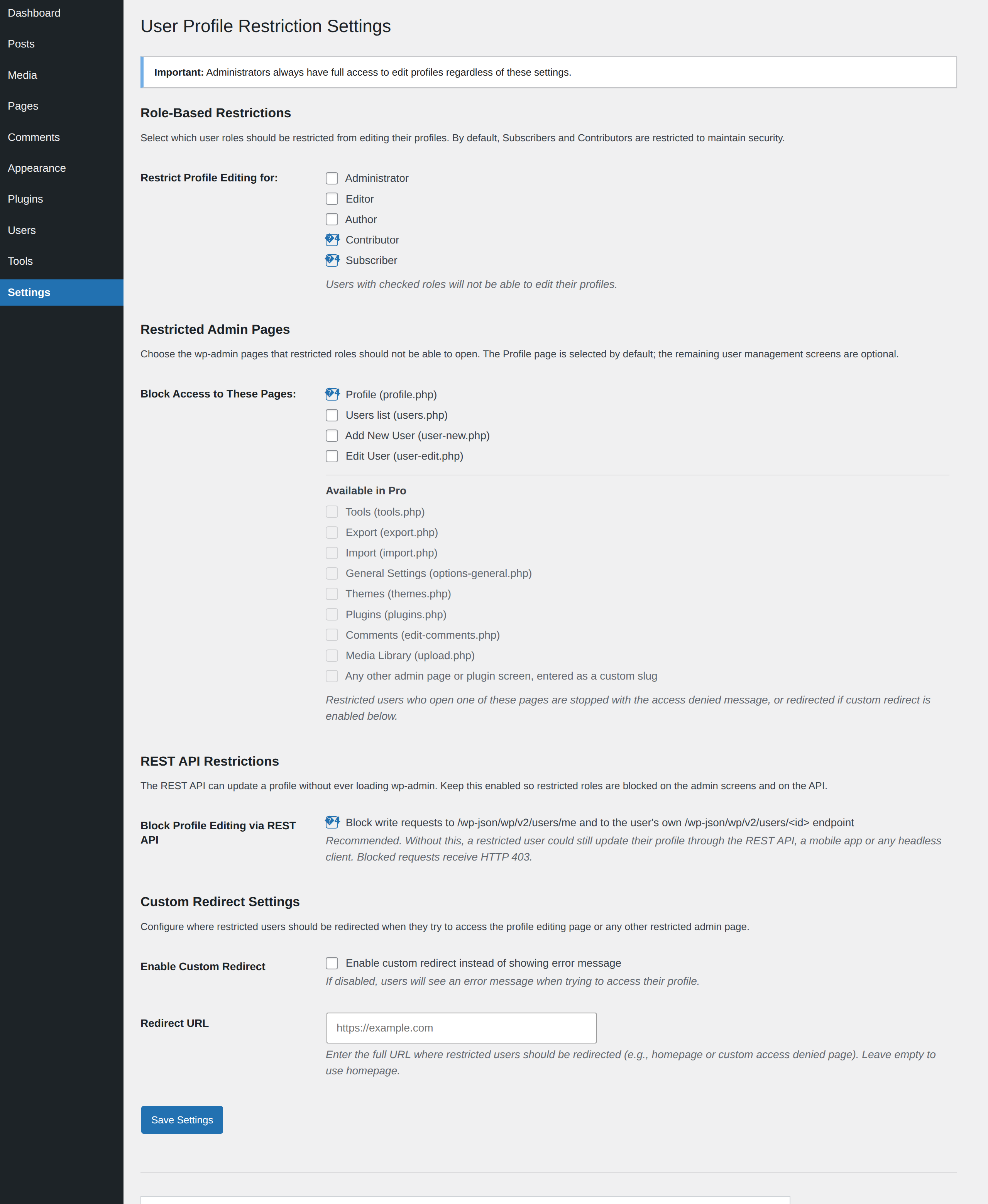
- Granular Role-Based Restrictions Ìtumọ̀ Yorùbá: – Choose exactly which user roles should be restricted from editing their profiles
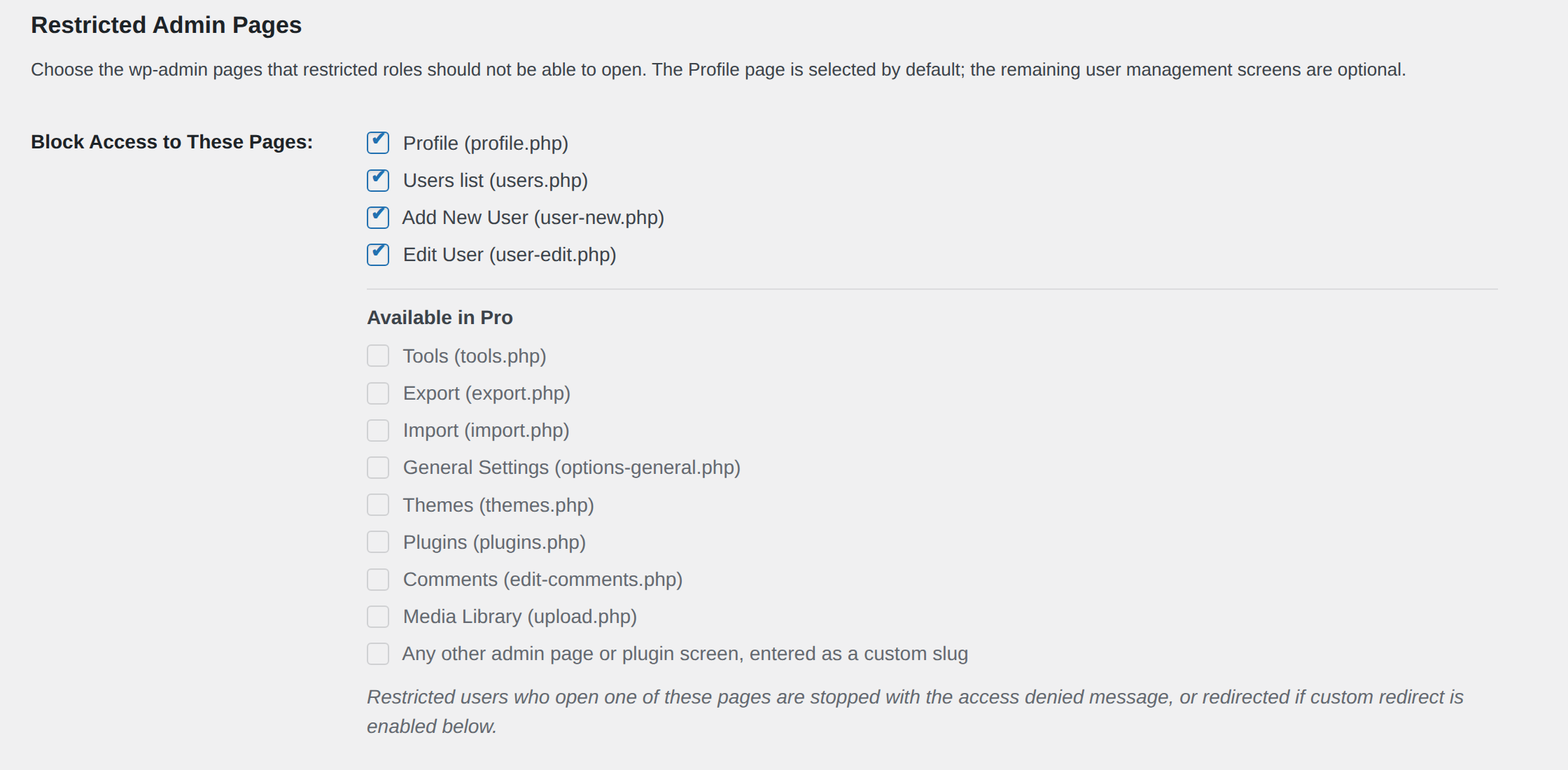
- Restricted Admin Pages Ìtumọ̀ Yorùbá: – Block restricted roles from the user management screens: Profile (enabled by default), Users list, Add New User and Edit User
- REST API Restriction Parity Ìtumọ̀ Yorùbá: – Profile updates sent to
/wp-json/wp/v2/users/meor to the userÌtumọ̀ Yorùbá: ’s own/wp-json/wp/v2/users/<id>endpoint are rejected with HTTP 403, so the restriction cannot be bypassed through the API, a mobile app or a headless client - Custom Redirect Options Ìtumọ̀ Yorùbá: – Redirect restricted users to a specific URL instead of showing an error message
- Automatic Menu Hiding Ìtumọ̀ Yorùbá: – Profile links are automatically hidden from admin bar and dashboard menu for restricted users
- Easy Settings Page Ìtumọ̀ Yorùbá: – Configure all options from a user-friendly settings page in WordPress admin
- Built-in Contact Form Ìtumọ̀ Yorùbá: – Send a question or a feature suggestion to the plugin author straight from the settings page, without leaving your dashboard
- Backward Compatible Ìtumọ̀ Yorùbá: – Maintains default security by restricting Subscribers and Contributors by default
- No Coding Required Ìtumọ̀ Yorùbá: – Simple checkbox interface for all configurations
- Lightweight & Fast Ìtumọ̀ Yorùbá: – Minimal impact on site performance
How It Works
- Install and Activate Ìtumọ̀ Yorùbá: – The plugin works immediately with secure defaults
- Configure Settings Ìtumọ̀ Yorùbá: – Go to Settings > Profile Restriction to customize
- Select Roles Ìtumọ̀ Yorùbá: – Check which user roles should be restricted
- Select Pages Ìtumọ̀ Yorùbá: – Profile is blocked out of the box; optionally also check the Users list, Add New User and Edit User screens
- Keep REST Protection On Ìtumọ̀ Yorùbá: – Leave the REST API restriction enabled so the same rules apply to API requests
- Optional Redirect Ìtumọ̀ Yorùbá: – Set a custom redirect URL if desired
- Done! Ìtumọ̀ Yorùbá: – Restricted users can no longer edit their profiles from the dashboard or the API
Default Behavior
By default, the plugin restricts Subscribers and Contributors from editing their profiles. This maintains security while allowing Editors, Authors, and Administrators full access. You can customize this behavior at any time from the settings page.
Perfect For
- Demo and staging websites
- Membership sites
- Multi-author blogs
- Educational institutions
- Client websites
- Any site requiring profile editing restrictions
What Gets Restricted
- Direct access to profile.php page
- Any additional user management pages you select: the Users list, Add New User and Edit User
- Profile update requests sent through the WordPress REST API
- Profile link in admin bar
- Profile submenu in dashboard
- All profile editing capabilities for selected roles
Administrator Protection
Administrators always retain full access to edit any profile, regardless of plugin settings. This ensures you never lock yourself out of critical functionality.
Additional Information
Support
The quickest way to reach us is the contact form in the settings page (Dashboard > Settings > User Profile Restriction) sidebar, which emails your question or feature suggestion directly to the plugin author. You can also visit the pluginÌtumọ̀ Yorùbá: ’s support forum on WordPress.org.
Reviews
If the plugin is doing its job on your site, a five star review on WordPress.org helps other site owners find it and is genuinely appreciated.
Privacy
This plugin does not collect, store, or transmit any user data, and all settings are stored locally in your WordPress database. The only exception is the contact form on the settings page: when an administrator chooses to submit it, the name, email address and message they type are emailed to the plugin author, together with your site URL, plugin version and WordPress version so we can reproduce the issue. Nothing is sent unless the form is submitted.
Credits
Developed and maintained by TheInnovs | WPCommerz
Àwọn àwòrán ìbòjú


Ìgbéwọlẹ̀
Automatic Installation (Recommended)
- Log in to your WordPress dashboard
- Navigate to Plugins > Add New
- Search for “WP User Profile Restriction”
- Click “Install Now” and then “Activate”
- Go to Settings > Profile Restriction to configure
Manual Installation
- Download the plugin ZIP file
- Log in to your WordPress dashboard
- Navigate to Plugins > Add New > Upload Plugin
- Choose the downloaded ZIP file and click “Install Now”
- Activate the plugin
- Go to Settings > Profile Restriction to configure
FTP Installation
- Download and unzip the plugin file
- Upload the
wp-user-profile-restrictionfolder to/wp-content/plugins/directory - Activate the plugin through the Plugins menu in WordPress
- Go to Settings > Profile Restriction to configure
FAQ
-
Does this plugin require any configuration?
-
No! The plugin works immediately upon activation with secure defaults (Subscribers and Contributors are restricted). However, you can customize the behavior from Settings > Profile Restriction.
-
Which user roles are restricted by default?
-
By default, Subscribers and Contributors are restricted from editing their profiles. This provides security while maintaining backward compatibility with version 1.0.6.
-
Can I choose which roles to restrict?
-
Yes! Version 2.0 introduces a settings page where you can select exactly which user roles should be restricted using simple checkboxes.
-
Can administrators still edit profiles?
-
Yes, administrators always have full access to edit any profile, regardless of plugin settings.
-
What happens when a restricted user tries to access their profile?
-
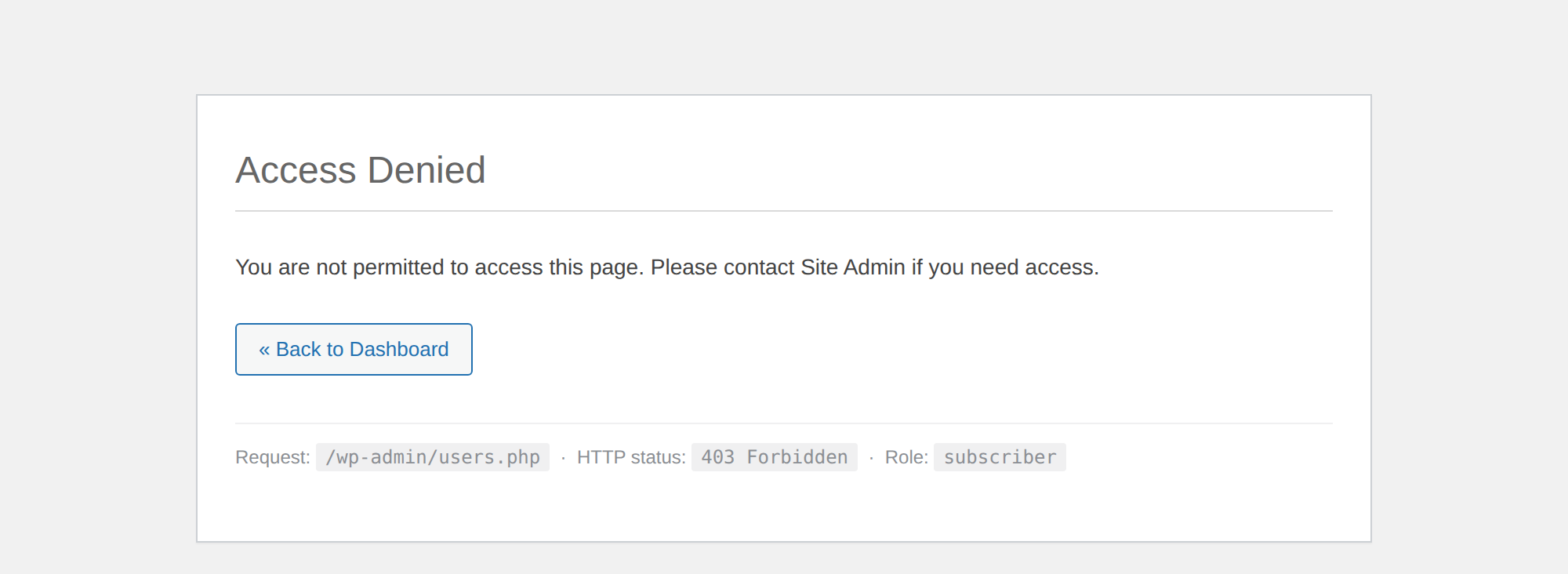
By default, they see an error message. Optionally, you can enable custom redirect to send them to a specific page (like the homepage or a custom access denied page).
-
No, the Profile link is automatically hidden from both the admin bar and the dashboard sidebar menu for all restricted users.
-
Can I redirect restricted users to a custom page?
-
Yes! In the settings page, you can enable custom redirect and specify any URL where restricted users should be redirected.
-
Is this plugin compatible with the latest WordPress version?
-
Yes, the plugin is regularly tested and updated to ensure compatibility with the latest WordPress releases.
-
Will this affect my existing users?
-
If youÌtumọ̀ Yorùbá: ’re upgrading from version 1.0.6, the plugin maintains the same default behavior (restricting Subscribers and Contributors). Your existing security settings remain intact.
-
Can restricted users still edit their profile through the REST API?
-
No. Since version 2.0.1 the plugin also blocks write requests (POST, PUT, PATCH and DELETE) to
/wp-json/wp/v2/users/meand to the userÌtumọ̀ Yorùbá: ’s own/wp-json/wp/v2/users/<id>endpoint, returning HTTP 403. This closes a real bypass in which the profile.php screen was blocked but the API endpoint was not. The protection is enabled by default and can be toggled from the settings page. -
Which additional wp-admin pages can I restrict?
-
This version provides checkboxes for the four user management screens: Profile (
profile.php), Users list (users.php), Add New User (user-new.php) and Edit User (user-edit.php). The Profile page is selected by default. Further screens such as Tools, Export, Import, General Settings, Themes, Plugins, Comments and Media Library, along with free-form custom page slugs, are listed on the settings page as options planned for the Pro version. -
Could I accidentally lock myself out of the plugin settings?
-
No. The pluginÌtumọ̀ Yorùbá: ’s own settings screen is always exempt from page restrictions, and administrators are only affected if you explicitly add the Administrator role to the restricted roles list.
-
Yes, you can select any combination of user roles to restrict from the settings page.
-
Does this work with custom user roles?
-
Yes, the plugin automatically detects all user roles on your site, including custom roles created by other plugins.
-
How do I contact the developer about a question or a feature idea?
-
Use the contact form in the sidebar of the settings page. Fill in your name, email address and the details of your question, then press Submit. The message is emailed to the plugin author with your address as the reply-to, so any answer comes straight back to you. Only administrators can see and use the form.
-
The contact form says the message could not be sent. What now?
-
That message means your WordPress site could not hand the email to a mail server, which is common on hosts without a configured mailer. Installing an SMTP plugin usually resolves it. In the meantime you can email theinnovs@gmail.com directly.
-
Does the contact form send any of my site data automatically?
-
No. Nothing leaves your site unless an administrator fills in the form and presses Submit. When that happens the message includes your site URL, plugin version and WordPress version so we can reproduce the issue you are describing.
Àwọn àgbéyẹ̀wò


Àwọn Olùkópa & Olùgbéejáde
“WP User Profile Restriction” jẹ́ ètò ìṣàmúlò orísun ṣíṣí sílẹ̀. Àwọn ènìyàn wọ̀nyí ti ṣe ìkópa sí plugin yìí.
Àwọn Olùkópa
Túmọ̀ “WP User Profile Restriction” sí èdè rẹ.
Ṣe o nífẹ̀ẹ́ sí ìdàgbàsókè?
Ṣàwárí koodu, ṣàyẹ̀wò ibi ìpamọ́ SVN, tàbí ṣe àgbékalẹ̀ sí àkọsílẹ̀ ìdàgbàsókè nípasẹ̀ RSS.
Àkọsílẹ̀ àwọn àyípadà
2.0.1
- Added: Restricted Admin Pages Ìtumọ̀ Yorùbá: – block restricted roles from wp-admin screens beyond profile.php, with checkboxes for the Users list, Add New User and Edit User screens
- Added: The Profile page (profile.php) is now restricted by default on new installs, matching the pluginÌtumọ̀ Yorùbá: ’s long-standing behaviour
- Added: Preview of further restrictable screens (Tools, Export, Import, General Settings, Themes, Plugins, Comments, Media Library and custom page slugs) shown as options reserved for the Pro version
- Added: REST API restriction parity Ìtumọ̀ Yorùbá: – write requests to /wp-json/wp/v2/users/me and to the userÌtumọ̀ Yorùbá: ’s own /wp-json/wp/v2/users/ endpoint are now rejected with HTTP 403, closing the API bypass of the profile.php restriction
- Added: Settings toggle to enable or disable the REST API restriction, enabled by default
- Added: Developer hooks Ìtumọ̀ Yorùbá: – wpupr_default_settings, wpupr_available_admin_pages, wpupr_pro_admin_pages, wpupr_custom_pages_available, wpupr_restricted_pages, wpupr_before_restrict_admin_page, wpupr_after_pro_page_checkboxes, wpupr_rest_write_methods, wpupr_is_restricted_rest_route, wpupr_rest_access_denied_message, wpupr_rest_access_denied_response and wpupr_rest_access_denied
- Improved: Access denial logic centralised so redirects and error messages behave identically on the profile page and on other restricted pages
- Improved: Settings are merged with defaults on read, so options saved by earlier versions keep working without a database upgrade
- Improved: Page entries are sanitized against path traversal, only pages offered by this version can be saved or enforced, and the pluginÌtumọ̀ Yorùbá: ’s own settings screen can never be blocked
- Added: Contact form in the settings sidebar for questions and feature suggestions, delivered to the plugin author by email with your address set as the reply-to
- Added: Five star review request on the settings page, opening WordPress.org in a new tab
- Added: “New” badges on the Restricted Admin Pages and REST API Restrictions sections
- Added: Developer hooks Ìtumọ̀ Yorùbá: – wpupr_new_badge, wpupr_settings_page_url, wpupr_review_url, wpupr_before_sidebar, wpupr_after_sidebar, wpupr_contact_form_before_submit, wpupr_contact_form_processed, wpupr_contact_email_to, wpupr_contact_from_email, wpupr_contact_from_name, wpupr_contact_email_subject, wpupr_contact_email_message and wpupr_contact_email_headers
- Improved: Settings page now uses a two column layout, placing the support and review boxes in the previously empty space beside the settings
- Updated: Tested with WordPress 7.0.2
2.0.0 (2024-11-09)
- Major Update Ìtumọ̀ Yorùbá: – Complete rewrite with new features
- Added: Settings page for easy configuration
- Added: Granular role-based restriction controls
- Added: Custom redirect option for restricted users
- Added: Automatic hiding of Profile menu for restricted users
- Added: Checkbox interface for selecting restricted roles
- Improved: Code structure using OOP approach
- Improved: Security with proper sanitization and validation
- Improved: User experience with informative settings page
- Maintained: Backward compatibility with default restrictions
- Updated: Tested with WordPress 6.8.3
1.0.6
- Fix: Compatibility with the latest WordPress version
1.0.5
- Compatibility fix with WordPress 5.8.2
1.0.4
- Compatibility fix with latest WordPress
1.0.3
- Compatibility check
1.0.2
- Compatibility with WordPress 5.3.2
1.0.1
- Compatibility with WordPress 5.1
1.0.0
- Initial release