Skip to Àkóónú
WordPress.org

Yorùbá

  • Themes
  • Plugins
  • Àtìlẹ́yìn
  • Nípa
  • Ìwé Ìtónisónà
  • Egbé
  • Kàn síwa
  • Gba WordPress
Wa WordPress jáde
WordPress.org

Plugin Directory

WP ShareX

  • Fi plugin sílẹ̀
  • Àwọn ààyò mi
  • Wọlé
  • Fi plugin sílẹ̀
  • Àwọn ààyò mi
  • Wọlé

Plugin yìí kò tíì ṣe àyẹ̀wò pẹ̀lú àwọn ìtújáde mẹ́ta pàtàkì tó kẹ́yìn ti WordPress. Ó lè jẹ́ pé a kò tọ́jú tàbí ṣe àtìlẹ́yìn fún un mọ́, ó sì lè ní àwọn ọ̀ràn ìbámu nígbà tí a bá lò ó pẹ̀lú àwọn ẹ̀yà WordPress tuntun.

WP ShareX

Láti ọwọ́ joomdev
Ṣe ìgbàsílẹ̀
  • Àwọn àlàyé
  • Àwọn àgbéyẹ̀wò
  • Ìgbéwọlẹ̀
  • Ìdàgbàsókè
Ìrànlọ́wọ́

Àpèjúwe

WP ShareX is an advanced WordPress Social Share plugin enables you to add social share buttons on Posts and pages. You can assign buttons on Top of the Content, Bottom of the Content, Sidebar and on media.

Features of WP Social Share by JoomDev
1. 24 Social Network
2. You have the option to select either Icons or Icons with Text
3. 3 Button Shapes
4. 4 Button Animations
5. URL Shortening Option with Bitly and Goo.gl
6. Embed Twitter Handle and desired tags with Tweet
7. 4 Button display Location e.i. Top of the Content, Bottom of the content, Media, and Sidebar
8. Hide On Mobile Ability
9. Default Share Count Option. (You can play with your userÌtumọ̀ Yorùbá: ’s mind)
10. Encourage your Audience to share your content with Share Incentive Feature

Àwọn àwòrán ìbòjú
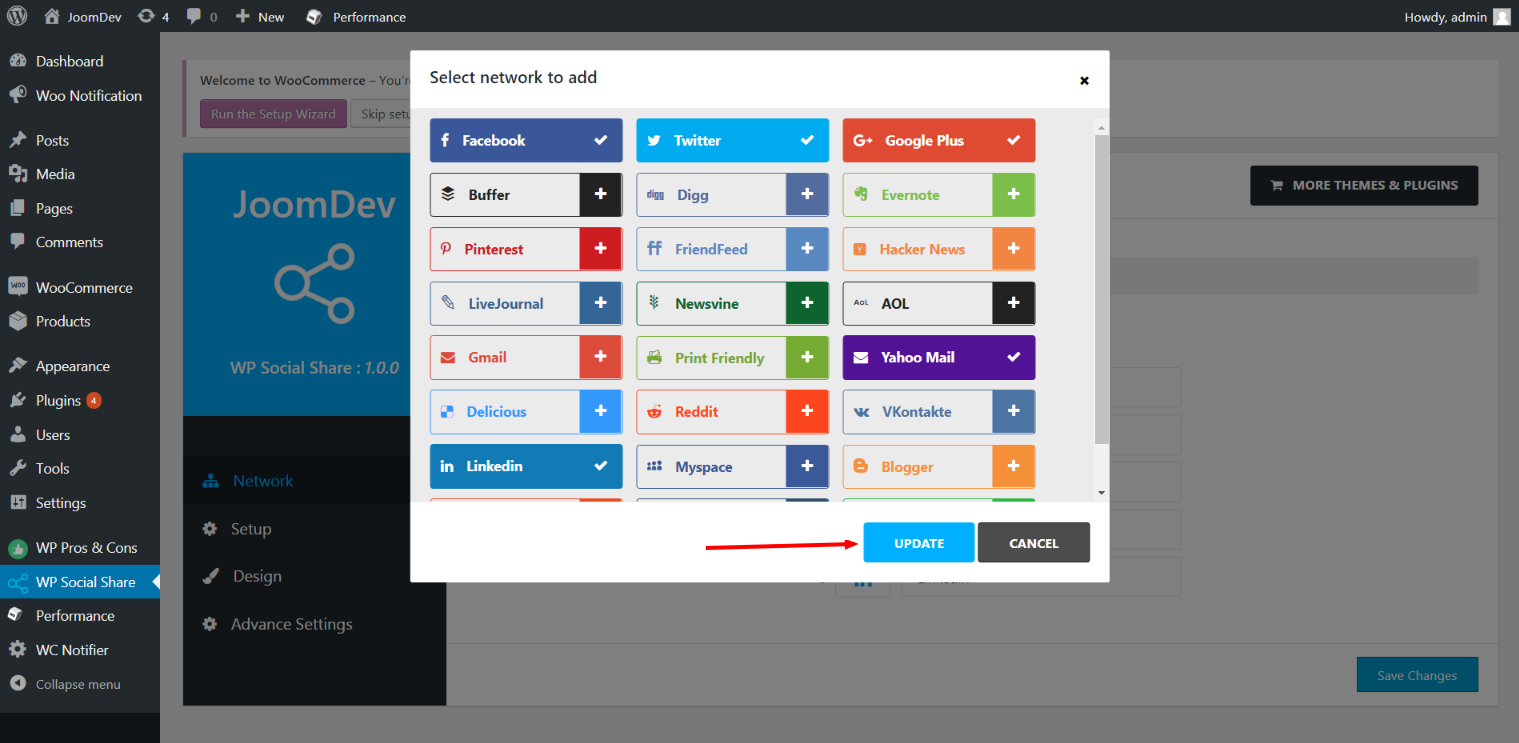
  • Click here to select networks
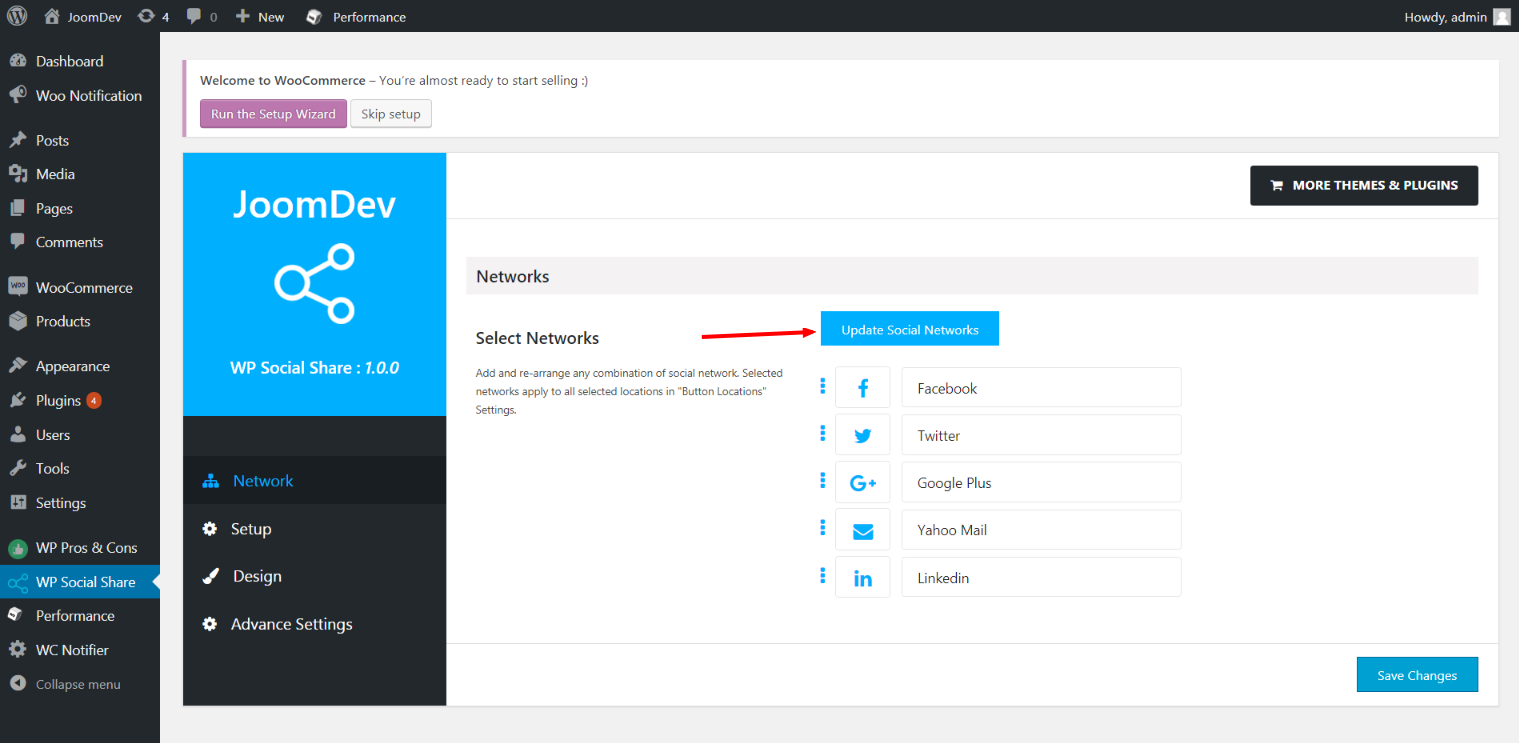
  • Update networks after selecting them.
  • Setup plugin and api settings.
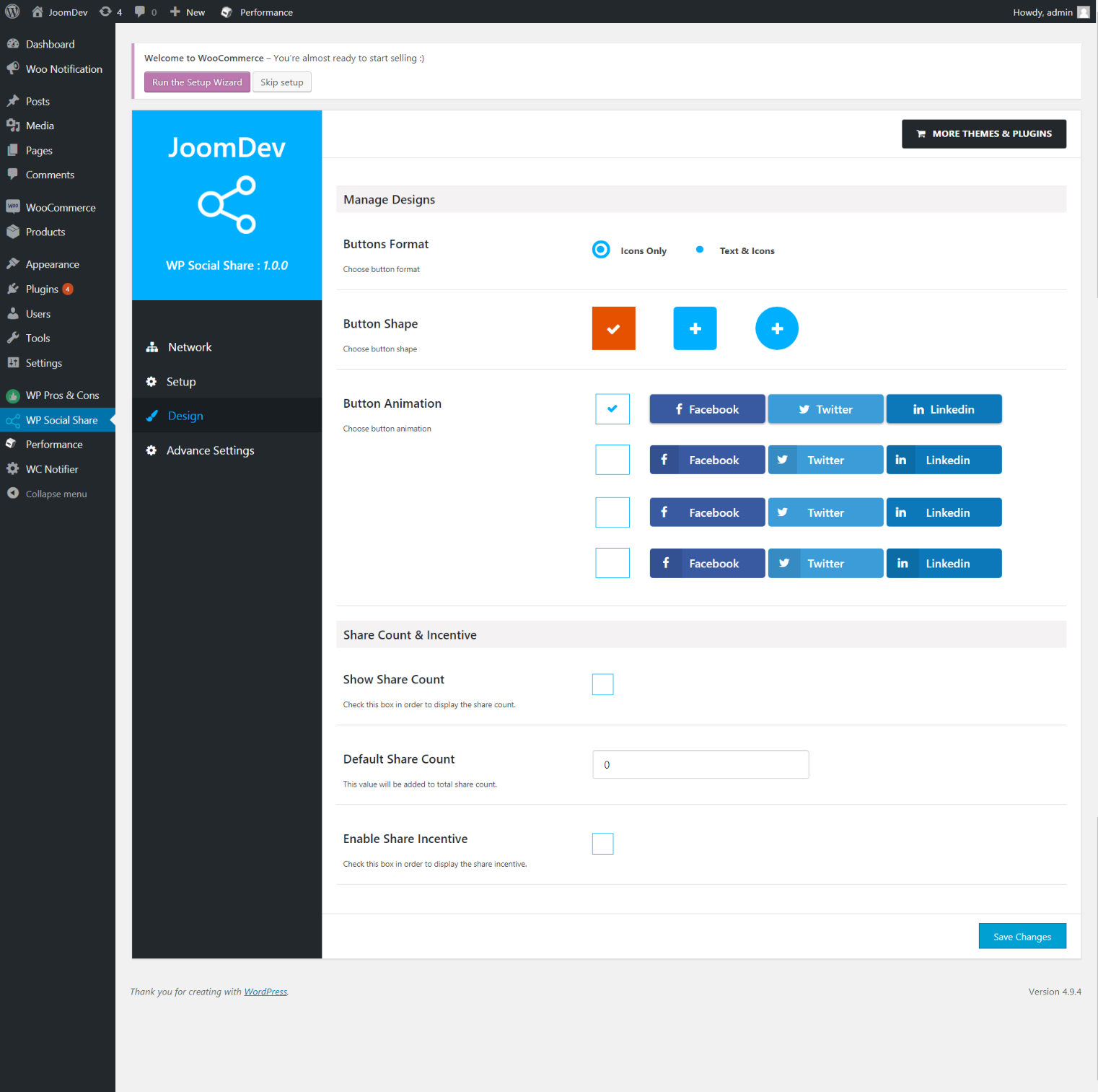
  • Select any design to display the buttons.
  • For mobile

Ìgbéwọlẹ̀

Way 1:
1. Upload joomdev-wp-social-share.zip to the /wp-content/plugins/ directory
2. Extract the zip file.
3. Activate the plugin from wordpress plugins page. And you have done.

Way 2:
1. Go to plugins page in admin.
2. Click on Add New button.
3. Search for “WP ShareX”.
4. Click install on WP Social Share.
5. Activate the plugin.

FAQ

Installation Instructions

Way 1:
1. Upload joomdev-wp-social-share.zip to the /wp-content/plugins/ directory
2. Extract the zip file.
3. Activate the plugin from wordpress plugins page. And you have done.

Way 2:
1. Go to plugins page in admin.
2. Click on Add New button.
3. Search for “WP ShareX”.
4. Click install on WP Social Share.
5. Activate the plugin.

How do I use this plugin?

See description.

Àwọn àgbéyẹ̀wò

Excellent!

Arnab Mohapatra Ẹrẹ́nà 16, 2018 1 ìdáhùn
Incredible plugin. It allows to add any sharing button on the page simply and fast!
Ka gbogbo àgbéyẹ̀wò 1

Àwọn Olùkópa & Olùgbéejáde

“WP ShareX” jẹ́ ètò ìṣàmúlò orísun ṣíṣí sílẹ̀. Àwọn ènìyàn wọ̀nyí ti ṣe ìkópa sí plugin yìí.

Àwọn Olùkópa
  • joomdev

Túmọ̀ “WP ShareX” sí èdè rẹ.

Ṣe o nífẹ̀ẹ́ sí ìdàgbàsókè?

Ṣàwárí koodu, ṣàyẹ̀wò ibi ìpamọ́ SVN, tàbí ṣe àgbékalẹ̀ sí àkọsílẹ̀ ìdàgbàsókè nípasẹ̀ RSS.

Àkọsílẹ̀ àwọn àyípadà

1.0.0

  • New Plugin initialized.

Àkójọpọ̀ Meta

  • Ẹ̀yà 1.0.0
  • Ìgbàgbọ́hùn tó kẹ́yìn ọdún 8 sẹ́yìn
  • Àwọn ìgbéwọlẹ̀ tó ṣiṣẹ́ 10+
  • Ẹ̀yà WordPress 3.0 tàbí ju bẹ́ẹ̀ lọ
  • Dánwò dé 4.9.29
  • Èdè
    English (US)
  • Àwọn àmì
    sharesocialsocial share
  • Ìwòye Tó Péye

Àwọn ìbò

5 lára àwọn ìràwọ̀ 5.
  • 1 5-star review àwọn ìràwọ̀ 5 1
  • 0 4-star reviews àwọn ìràwọ̀ 4 0
  • 0 3-star reviews àwọn ìràwọ̀ 3 0
  • 0 2-star reviews àwọn ìràwọ̀ 2 0
  • 0 1-star reviews ìràwọ̀ 1 0

Your review

See all reviews

Àwọn Olùkópa

  • joomdev

Ìrànlọ́wọ́

Nǹkan wà tí o fẹ́ sọ? Ṣé o nílò ìrànlọ́wọ́?

Wo àpéjọ ìrànlọ́wọ́

Ṣe ìtọrẹ

Ṣé o fẹ́ ṣe àtìlẹ́yìn fún ìlọsíwájú plugin yìí?

Ṣe ìtọrẹ sí plugin yìí

  • Nípa Wa
  • Iroyin
  • Hosting
  • Privacy
  • Àfihàn
  • Themes
  • Plugins
  • Patterns
  • Kọ ẹkọ
  • Atilẹyin
  • Developers
  • WordPress.tv ↗
  • Kópa
  • Àwọn ìṣẹ̀lẹ̀
  • Ṣètọrẹ ↗
  • Five for the Future
  • WordPress.com ↗
  • Matt ↗
  • bbPress ↗
  • BuddyPress ↗
WordPress.org
WordPress.org

Yorùbá

  • Ṣabẹwo sí àkàùntù X (Twitter tẹ́lẹ̀) wa
  • Bẹwo akanti Bluesky wa
  • Lọ sí àkáǹtì Mastodon wa
  • Bẹwo akanti Threads wa
  • Ṣabẹwo si Facebook wa
  • Visit our Instagram account
  • Visit our LinkedIn account
  • Bẹwo akanti TikTok wa
  • Visit our YouTube channel
  • Bẹwo akanti Tumblr wa
Koodu jẹ Ewi.
The WordPress® trademark is the intellectual property of the WordPress Foundation.