Àpèjúwe
Speed Up Your WordPress Site by 300% or More! 🚀
WP Plugin Manager is a powerful WordPress performance optimization tool that gives you complete control over which plugins load on each page of your website. Stop unnecessary plugins from loading where theyÌtumọ̀ Yorùbá: ’re not needed and dramatically improve your siteÌtumọ̀ Yorùbá: ’s speed and user experience.
Boost your WordPress site speed by selectively disabling plugins on specific pages, posts, and devices. The ultimate plugin optimization tool for better performance.
🚀 Get Pro Version | 📹 Watch Video Tutorial | 📚 Documentation | 💬 Support
Why Your Site Needs Plugin Manager
Every active plugin on your WordPress site loads its CSS and JavaScript files on EVERY page – even where theyÌtumọ̀ Yorùbá: ’re not needed. This creates:
- ❌ Slower page load times
- ❌ Higher server resource usage
- ❌ Poor user experience
- ❌ Lower conversion rates
- ❌ Negative SEO impact
Plugin Manager solves this problem by letting you disable plugins on specific pages, posts, or device types where theyÌtumọ̀ Yorùbá: ’re not required.
🎯 Key Benefits
- ⚡ Faster Loading Speed: Reduce page load time by up to 90%
- 📈 Better SEO Rankings: Google loves fast-loading websites
- 💰 Higher Conversion Rates: Every second of load time matters
- 🖥️ Reduced Server Load: Lower hosting costs and better stability
- 📱 Device-Specific Optimization: Different rules for mobile, tablet, and desktop
🛠️ Core Features (Free Version)
Plugin Control
* Selectively disable any plugin on specific pages or posts
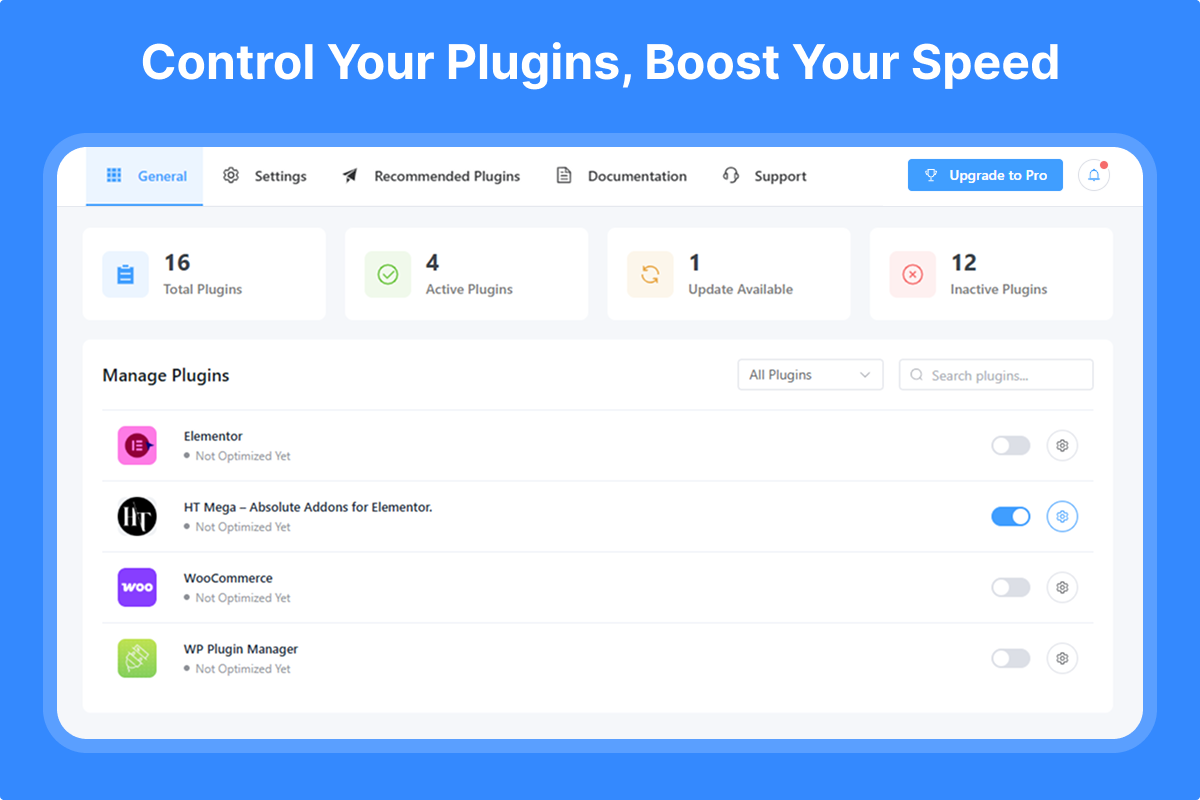
* Easy toggle switches for quick plugin management
* Visual dashboard showing all plugin statuses
* Search and filter plugins instantly
Page & Post Management
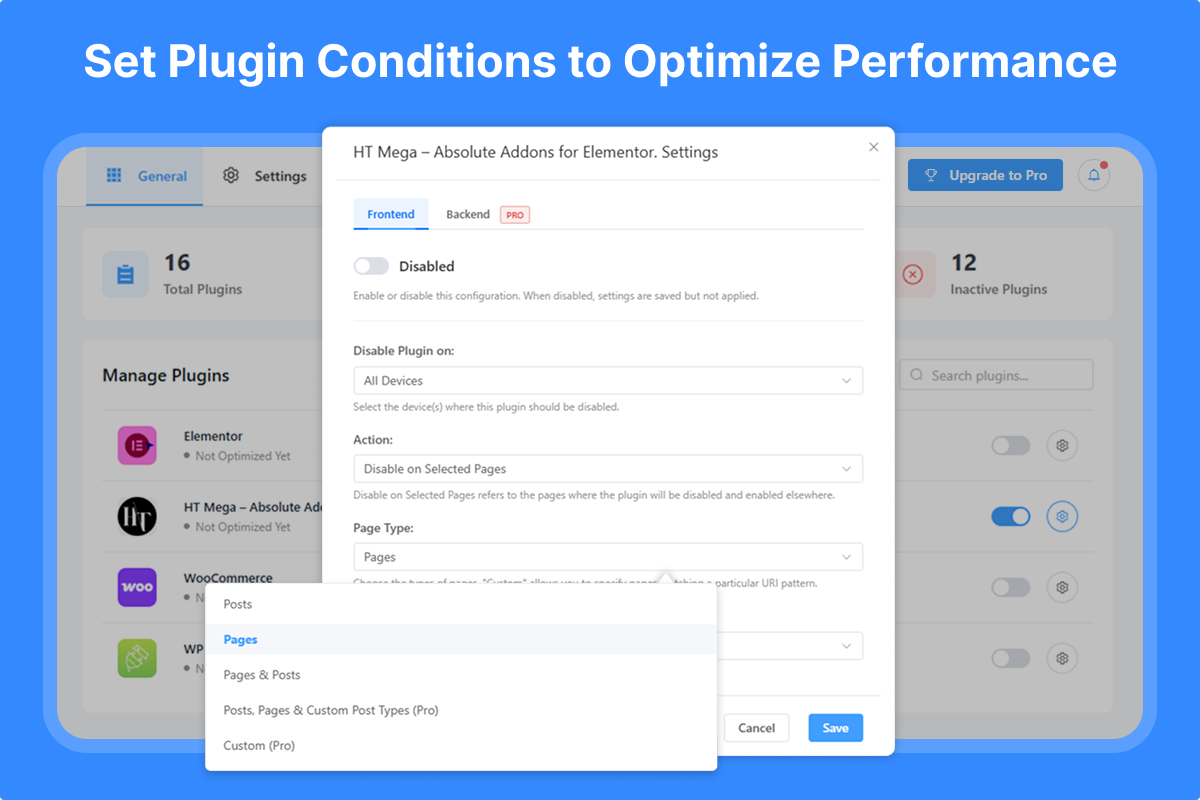
* Disable plugins on individual pages
* Disable plugins on specific posts
* Bulk selection for multiple pages/posts
* Support for custom post types
User-Friendly Interface
* Intuitive plugin management dashboard
* Clear visual indicators
* No coding required
* Lightweight and fast
💎 Pro Features Ìtumọ̀ Yorùbá: – Unlock All Features
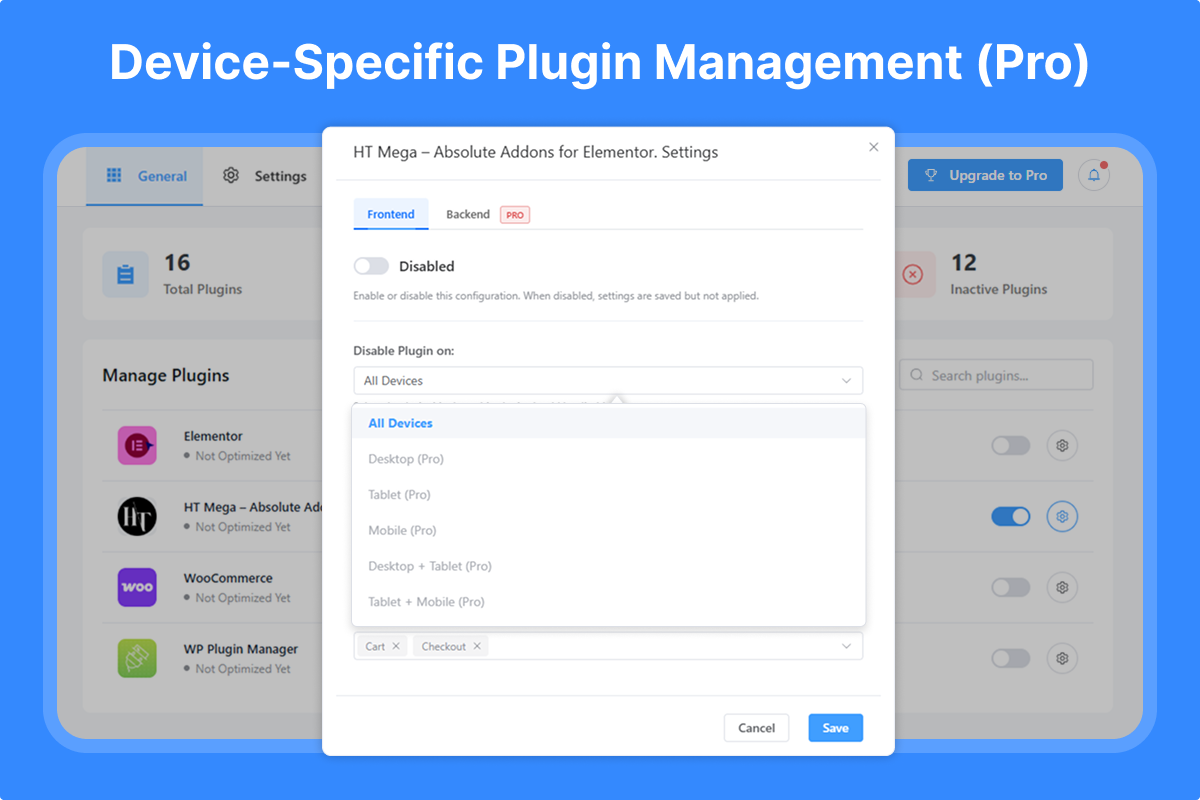
🔥 Advanced Device Targeting
* Desktop-only rules
* Tablet-specific optimization
* Mobile-focused settings
* Combined device rules (Desktop + Tablet, etc.)
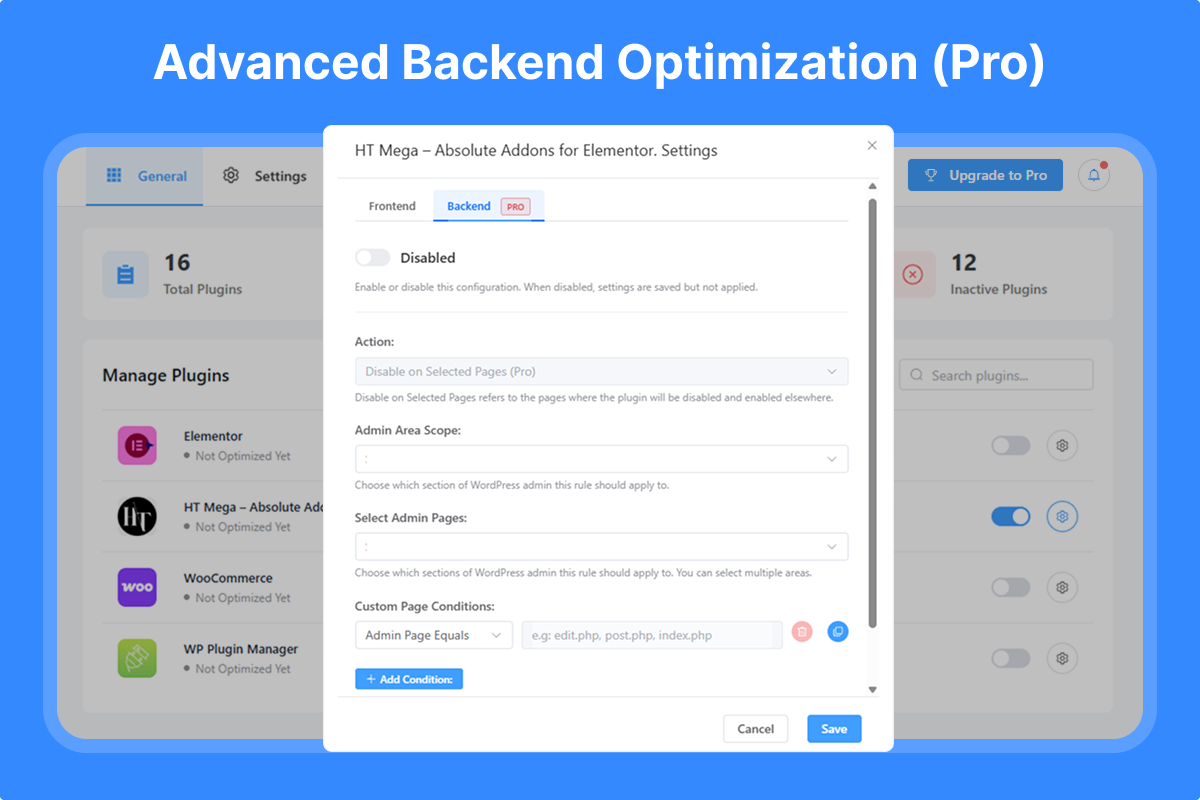
🔥 Backend/Admin Optimization
* Control plugins in WordPress admin area
* Specific admin page targeting
* Custom PHP file conditions
* Reduce admin panel load time
🔥 Advanced URL & Path Control
* Custom URL pattern matching
* Directory-based rules
🔥 Enhanced Features
* Enable plugins on selected pages (inverse logic)
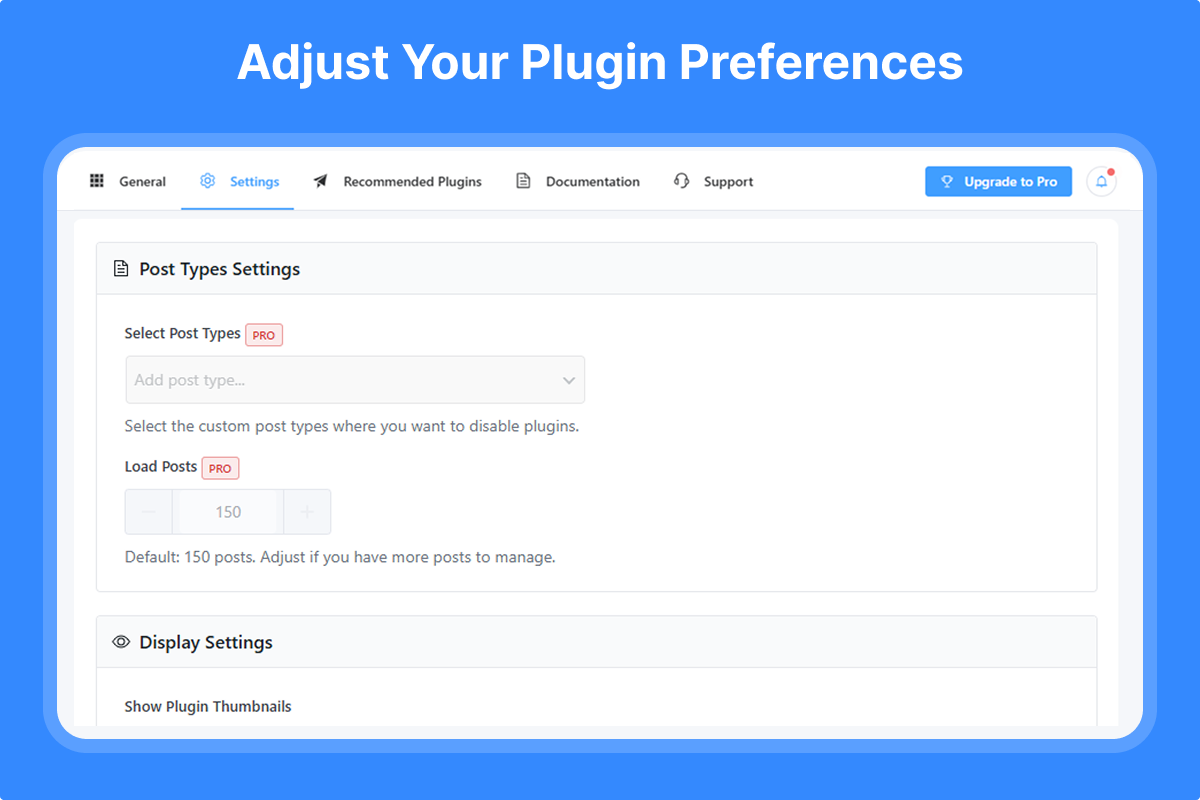
* Extended post loading (manage 150+ posts)
* Multiple conditional rules
* Priority support
🏆 Why Choose Plugin Manager?
- Proven Results: Users report 50-90% improvement in page load times
- Easy to Use: No technical knowledge required
- Safe & Reliable: DoesnÌtumọ̀ Yorùbá: ’t modify plugin files
- Instant Impact: See results immediately
- Regular Updates: Actively maintained and improved
- Expert Support: Professional help when you need it
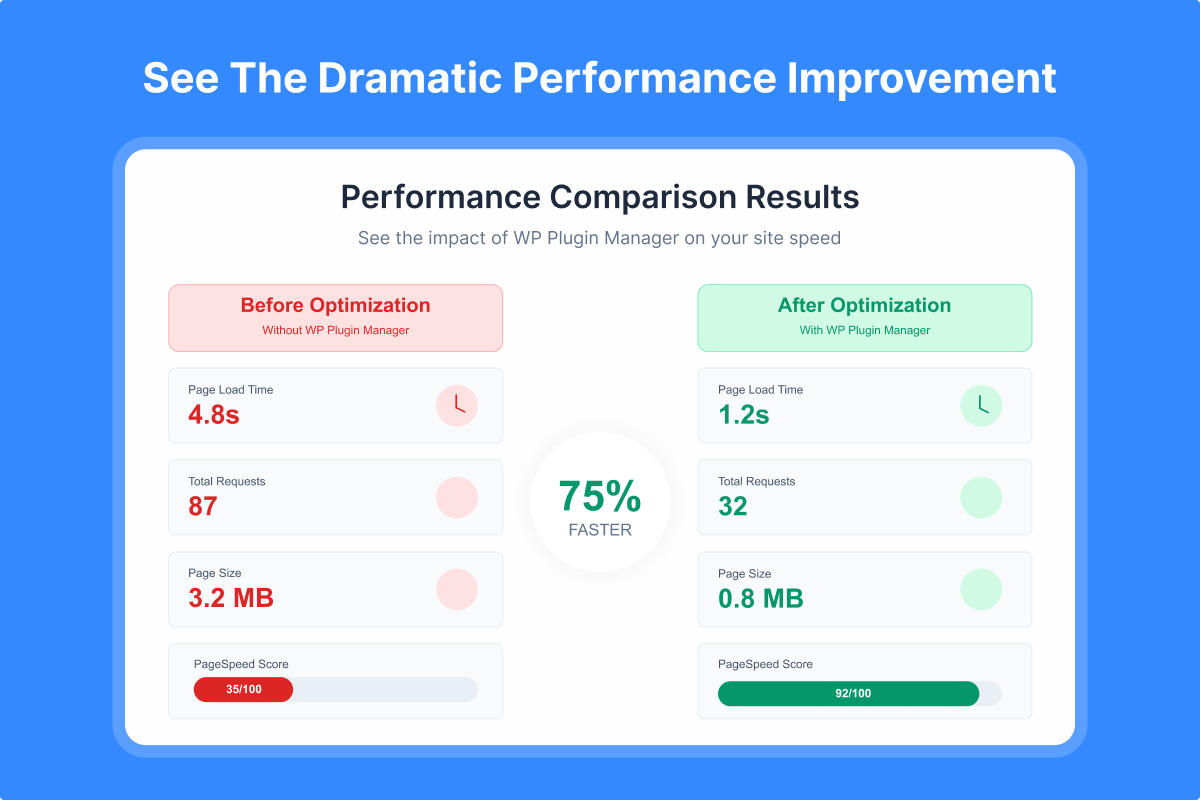
📊 Performance Impact
Before Plugin Manager:
* All plugins load on every page
* Unnecessary CSS/JS files everywhere
* Slow page load times
* High server resource usage
After Plugin Manager:
* Plugins load only where needed
* Minimal CSS/JS files per page
* Lightning-fast page loads
* Optimized server performance
🔧 Perfect For
- eCommerce Sites: Disable checkout plugins on blog pages
- Membership Sites: Control member-only plugin loading
- Business Websites: Optimize contact form plugin loading
- Blogs: Disable unnecessary plugins on article pages
- Portfolio Sites: Load gallery plugins only where needed
🌟 Join Thousands of Optimized WordPress Sites
Stop letting unnecessary plugins slow down your website. Install Plugin Manager today and experience the difference a well-optimized site can make!
Need Help? Check our documentation or contact our support team.
Other Products
Explore our other WordPress solutions to enhance your website:
- 🛍️ WooLentor Ìtumọ̀ Yorùbá: – Transform your WooCommerce store with 125+ widgets, 85+ Gutenberg blocks, 34+ Modules and 110+ templates. Features include wishlist, product compare, variation swatches, and multi-step checkout. The ultimate alternative to ShopReady, Kadence, and JetWidgets.
- 🎨 HT Mega Ìtumọ̀ Yorùbá: – Supercharge Elementor with 135+ widgets, 795+ ready made blocks, header/footer builders, and mega menus. Create stunning websites with post grids, sliders, forms, and more. Works seamlessly like HappyAddons, ElementsKit and Essential Addons.
- 📢 HashBar Ìtumọ̀ Yorùbá: – Create unlimited notification bars for announcements, promotions, and alerts. Fully customizable with multiple display options.
- 📧 Extensions for CF7 Ìtumọ̀ Yorùbá: – Extend Contact Form 7 with database storage, conditional fields, and Mailchimp integration. Capture and manage leads effectively.
- 💼 Whols Ìtumọ̀ Yorùbá: – Professional wholesale pricing solution for WooCommerce. Set wholesale prices, minimum requirements, and custom registration fields. Alternative to Wholesale Suite and B2Bking.
- 📊 JustTables Ìtumọ̀ Yorùbá: – Display products in customizable tables with pre-built columns. Perfect for catalogs and bulk ordering.
- 🎨 Swatchly Ìtumọ̀ Yorùbá: – Add beautiful color, image, and label swatches to product variations. Enhance the shopping experience with visual selection options.
- 🎯 HT Slider Ìtumọ̀ Yorùbá: – Create responsive sliders with custom styling, navigation, and pagination options. Display content by ID or category.
- 📝 HT Contact Form Ìtumọ̀ Yorùbá: – Seamlessly integrate Contact Form 7 with Elementor. Drag, drop, and style your forms with ease.
Àwọn àwòrán ìbòjú
Ìgbéwọlẹ̀
Automatic Installation (Recommended)
- Go to Plugins > Add New in your WordPress admin
- Search for “Plugin Manager”
- Click Install Now and then Activate
- Navigate to Plugin Manager in your admin menu
Manual Installation
- Download the plugin ZIP file
- Go to Plugins > Add New > Upload Plugin
- Choose the downloaded file and click Install Now
- Activate the plugin
- Find Plugin Manager in your WordPress admin menu
First Steps
- After activation, visit the Plugin Manager dashboard
- Select a plugin you want to optimize
- Choose pages/posts where it should be disabled
- Configure device-specific rules (Pro)
- Save your settings and enjoy faster load times!
FAQ
-
Will this break my website?
-
No! Plugin Manager safely controls plugin loading without modifying any plugin files. If you disable a required plugin by mistake, simply re-enable it.
-
Can I use this with caching plugins?
-
Yes! Plugin Manager works perfectly with all major caching plugins. Clear your cache after making changes for the best results.
-
Does it work with all plugins?
-
Plugin Manager works with 99% of WordPress plugins. Some security or system plugins may need to remain active on all pages.
-
Can I disable plugins in the admin area?
-
Yes, but this is a Pro feature. The Pro version allows complete backend/admin area optimization.
-
Is there a performance impact from using this plugin?
-
No. Plugin Manager is extremely lightweight and actually improves performance by preventing unnecessary plugin loading.
-
Can I set different rules for mobile devices?
-
Yes! Device-specific targeting is available in the Pro version, allowing different rules for desktop, tablet, and mobile.
-
How much speed improvement can I expect?
-
Results vary based on your site, but users typically see 30-90% improvement in page load times.
Àwọn àgbéyẹ̀wò


Àwọn Olùkópa & Olùgbéejáde
“WP Plugin Manager Ìtumọ̀ Yorùbá: – Deactivate plugins per page” jẹ́ ètò ìṣàmúlò orísun ṣíṣí sílẹ̀. Àwọn ènìyàn wọ̀nyí ti ṣe ìkópa sí plugin yìí.
Àwọn Olùkópa


A ti túmọ̀ “WP Plugin Manager Ìtumọ̀ Yorùbá: – Deactivate plugins per page” sí àwọn èdè agbègbè 3. Ọpẹ́lọpẹ́ fún àwọn atúmọ̀ èdè fún àwọn ìkópa wọn.
Túmọ̀ “WP Plugin Manager Ìtumọ̀ Yorùbá: – Deactivate plugins per page” sí èdè rẹ.
Ṣe o nífẹ̀ẹ́ sí ìdàgbàsókè?
Ṣàwárí koodu, ṣàyẹ̀wò ibi ìpamọ́ SVN, tàbí ṣe àgbékalẹ̀ sí àkọsílẹ̀ ìdàgbàsókè nípasẹ̀ RSS.
Àkọsílẹ̀ àwọn àyípadà
Version: 1.4.16 Date: 09 September 2026
- Added: Multisite support — configure plugin rules once at Network Admin level and apply them across every site, with the option to override on individual sites.
- Fixed: Plugins activated at the network level not appearing correctly in the plugin list.
- Fixed: “Optimize Now” quick action not disabling the plugin on the frontend by default.
- Fixed: Selected page/post targeting not matching correctly across different site domains.
- Tested: Compatibility with the latest version of WordPress.
Version: 1.4.15 Date: 23 August 2026
- Fixed: A few minor issues.
- Tested: Compatibility with the latest version of WordPress.
Version: 1.4.14 Date: 23 July 2026
- Fixed: A few minor issues.
- Tested: Compatibility with the latest version of WordPress.
Version: 1.4.13 Date: 17 June 2026
- Fixed: Post type select dropdown in Settings page now hides already-selected items from the list.
- Tested: Compatibility with the latest version of WordPress.
Version: 1.4.12 Date: 25 March 2026
- Fixed: Plugin incorrectly disabled on child pages when parent page was selected.
- Fixed: “All Pages” now applies to homepage and child pages.
- Fixed: “All Posts” incorrectly firing on homepage.
- Fixed: Individual post URL matching not working.
Version: 1.4.11 Date: 26 February 2026
- Improved: Admin notice display.
Version: 1.4.10 Date: 01 January 2026
- Fixed: A few minor issues.
- Tested: Compatibility with the latest version of WordPress.
Version: 1.4.9 Date: 13 November 2025
- Fixed: Admin notice display issue.
Version: 1.4.8 Date: 11 November 2025
- Improved: Code cleanup Ìtumọ̀ Yorùbá: – removed unused legacy code from migration to REST API.
Version: 1.4.7 Date: 23 October 2025
- Improved: Minor UI update and optimizations.
Version: 1.4.6 Date: 07 September 2025
- Updated: Language translation .pot file.
- Fixed: API request status content translation issues.
- Fixed: A few minor issues.
Version: 1.4.5 Date: 24 August 2025
- Updated: Language translation .pot file.
- Fixed: String translation issue.
- Fixed: A few minor issues.
Version: 1.4.4 Date: 11 August 2025
- Improved: Manage plugin list Style.
- Fixed: Plugin Enable/Disable Confirm popup issue in Manage Plugin List.
- Fixed: A few minor issues.
Version: 1.4.3 Date: 29 July 2025
- Updated: Language translation .pot file.
- Fixed: Infinite loading issue when an error occurs while fetching the plugin list.
- Fixed: A few minor issues.
Version: 1.4.2 Date: 14 July 2025
- Improved: Disabled WP Plugin Manager plugin from Manage Plugin List.
- Fixed: A few minor issues.
Version: 1.4.1 Date: 15 June 2025
- Added: Filter Option to optimized, Not Yet Optimized, Frontend Optimized and all plugins.
- Fixed: A few minor issues.
Version: 1.4.0 Date: 21 May 2025
- Improved: UI/UX for better user experience.
- Tested: Compatibility with the latest version of WordPress.
Version: 1.3.1 Date: 17 April 2025
- Updated: Language translation .pot file.
Version: 1.3.0 Date: 17 April 2025
- Updated: Plugin text domain for improved translation support.
- Tested: Compatibility with the latest version of WordPress.
Version: 1.2.9 Date: 09 February 2025
- Improved: User interface for better user experience.
Version: 1.2.8 Date: 03 December 2024
- Added: Option to disable/enable plugin in all Page/Post/Custom Post Type.
- Fixed: “Select Pages” and “Select Posts” options do not appear after selecting “Page & Post” for the “Page Type” setting.
Version: 1.2.7 Date: 04 November 2024
- Enhanced: UI/UX for a better user experience
Version: 1.2.6 Date: 03 September 2024
- Fixed: Escaping issues have been resolved in recommended plugins.
- Improved: Coding standards in some areas.
- Updated: Language translation .pot file.
Version: 1.2.5 Date: 30 July 2024
- Fixed: Escaping issues have been resolved in multiple areas.
Version: 1.2.4 Date: 02 July 2024
- Fixed: Translation issue in multiple areas.
- Updated: Language translation .pot file
Version: 1.2.3 Date: 03 June 2024
- Tweak: Opt-in message to provide non-sensitive diagnostic data.
Version: 1.2.2 Date: 18 Feb 2024
- Updated: Language translation file.
- Fixed: Undefined array key “condition_type” & “device_type” in mu plugin file.
- Tweak: A few enhancements on the settings page.
Version: 1.2.1 Date: 14 Jan 2024
- Fixed: Undefined index HTTP_HOST issue when run on cron job
Version: 1.2.0 Date: 26 Oct 2023
- Fixed: Ajax Request issue
Version: 1.1.9 Date: 06 July 2023
- Updated: Translation Pot file
Version: 1.1.8 Date: 27 Feb 2023
- Fixed: Nonce issue while activating plugin
Version: 1.1.7 Date: 07 Nov 2022
- Capability With the Latest WordPress Version
Version: 1.1.6 Date: 27 Sep 2022
- Updated: Plugin list in the Recommendations menu
- Capability With Latest WordPress Version
Version: 1.1.5 Date: 07 March 2022
- Improved: Typo and button
Version: 1.1.4 Date: 23 Dec 2021
- Improved: MU file function
Version: 1.1.3 Date: 04 Oct 2021
- Improved: Enqueueing JS/CSS file by adding version number considering caching problem
Version: 1.1.2 Date: 08 Sep 2021
- Updated: Translation Pot file
Version: 1.1.1 Date: 12 Aug 2021
- Fixed: Plugin does not activate issue
Version: 1.1.0 Date: 26 Jul 2021
- Added: Posts limit support
- Fixed: Notice button CSS
Version: 1.0.9 Date: 26 Jun 2021
- Fixed: Warning on plugin activation
- Added: message when no plugin is active
Version: 1.0.8 Date: 03 Jun 2021
- Fixed: Recommended plugins class
Version: 1.0.7 Date: 02 Jun 2021
- Moved the submenu to menu page
- Added: recommended plugins
Version: 1.0.5 Date: 06-01-2021
- Capability With Latest WordPress Version
Version: 1.0.4 Date: 5-30-2020
- Plugins Tab Added
Version: 1.0.3 Date: 4-26-2020
- Compatible with the Latest WordPress version
Version: 1.0.2 Date: 3-07-2020
- Compatible with the Latest PHP version
- Add setting page link in plugin menu action
- MU-Plugin directory remove option added
- Suppress errors has been solved
- Free and pro both activation broken issues solved
Version: 1.0.1 Date: 2-01-2020
- Plugin deactivation on the home page added
- New plugin activation issue fixed
Version: 1.0.0
- Initial Release