

Àpèjúwe
Helps to create events and show the events location on google map. Use the given shortcode to show the location map with the location info in a list: [‘event-map-sc’] or <?php echo do_shortcode('[event-map-sc]');?>
Features:
Events : You can create as many events as you want. Events will be a post type.
Map : Each of the events location will be shown in a single google map.
Map Icon : You can show your own custom map icon/pin for each of the events in a map.
Event Date : You can set event start date, event end date as well as time for each of the events.
Location Info : You just need to put latitude and longitude for each of the events location to show them in a map. You can also add additional details about the location.
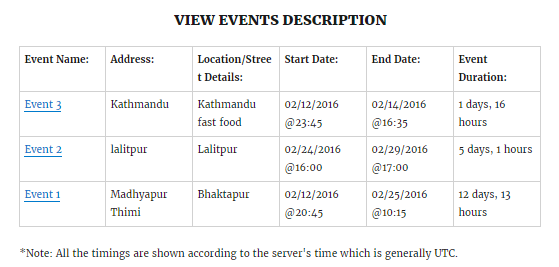
Shortcode : Use the given shortcode to show the location map with their info in a list: ‘event-map-sc’. This will show all the events in a single map with their info such as start date, start time, end date, end time and location info in a list.
Event link : You can navigate to each of the events easily by clicking the event name from the list.
**Note: Al the timings will be shown according to the serverÌtumọ̀ Yorùbá: ’s time.
Àwọn àwòrán ìbòjú

Ìgbéwọlẹ̀
Using The WordPress Dashboard
- Navigate to the ‘Add New’ in the plugins dashboard
- Search for
wp-event-map - Click
Install Now - Activate the plugin on the Plugin dashboard
Uploading in WordPress Dashboard
- Navigate to the ‘Add New’ in the plugins dashboard
- Navigate to the ‘Upload’ area
- Select
wp-event-map.zipfrom your computer - Click ‘Install Now’
- Activate the plugin in the Plugin dashboard
Using FTP
- Download
wp-event-map.zip - Extract the
wp-event-mapdirectory to your computer - Upload the
wp-event-mapdirectory to the/wp-content/plugins/directory - Activate the plugin in the Plugin dashboard
FAQ
- There is something cool you could add…
-
Nice, make a post on the Support Forum and let us know. We are always looking for ways to improve our plugins.
Àwọn àgbéyẹ̀wò
Kò sí àwọn àgbéyẹ̀wò fún plugin yìí.
Àwọn Olùkópa & Olùgbéejáde
“WP Event Map” jẹ́ ètò ìṣàmúlò orísun ṣíṣí sílẹ̀. Àwọn ènìyàn wọ̀nyí ti ṣe ìkópa sí plugin yìí.
Àwọn Olùkópa
Túmọ̀ “WP Event Map” sí èdè rẹ.
Ṣe o nífẹ̀ẹ́ sí ìdàgbàsókè?
Ṣàwárí koodu, ṣàyẹ̀wò ibi ìpamọ́ SVN, tàbí ṣe àgbékalẹ̀ sí àkọsílẹ̀ ìdàgbàsókè nípasẹ̀ RSS.
Àkọsílẹ̀ àwọn àyípadà
1.0.0
- Initial release