

Àpèjúwe
WooCommerce Cross Sell and Upsell is a straightforward and effective sales strategy. WooCommerce Cross Sell and Upsell is a popular marketing technique. The technique used in WooCommerce Cross Sell and Upsell is wisely suggesting or recommending products, stimulating customer purchases, and assisting shop owners in increasing sales. Grasping these demands of online businessmen, VillaTheme developed a special tool for WooCommerce Cross Sell and Upsell that promises to create WooCommerce Cross Sell and Upsell quickly, effectively, and optimally. LetÌtumọ̀ Yorùbá: ’s find out about this plugin.
Boost Sales for WooCommerce stimulates the purchase of customers by up-selling, cross-selling. Increase revenue as well as profitability for your website, stores. Boost Sales for WooCommerce allows you to add WooCommerce Cross Sell and Upsell products in an independent system of WooCommerce.
Up-selling is the practice in which a business tries to persuade customers to purchase a higher-end product, an upgrade, or an additional item in order to make a more rewarding sale. For instance, a salesperson may influence a customer into purchasing the newest version of an item, rather than the less-expensive current model, by pointing out its additional features.
A similar marketing technique is cross-selling, where the salesperson suggests the purchase of additional products for sale. For example, he might say “Would you like some ice cream to go with that cake?” It is beneficial for businesses to use both techniques in order to boost revenue and provide a valued consumer experience. However, research has shown that upselling is generally more effective than cross-selling.
Important Notice:
-
Plugin works based on WooCommerce plugin.
-
It is released on WordPress.org and you can use plugin as free to build themes for sale.
UP-SELL
-
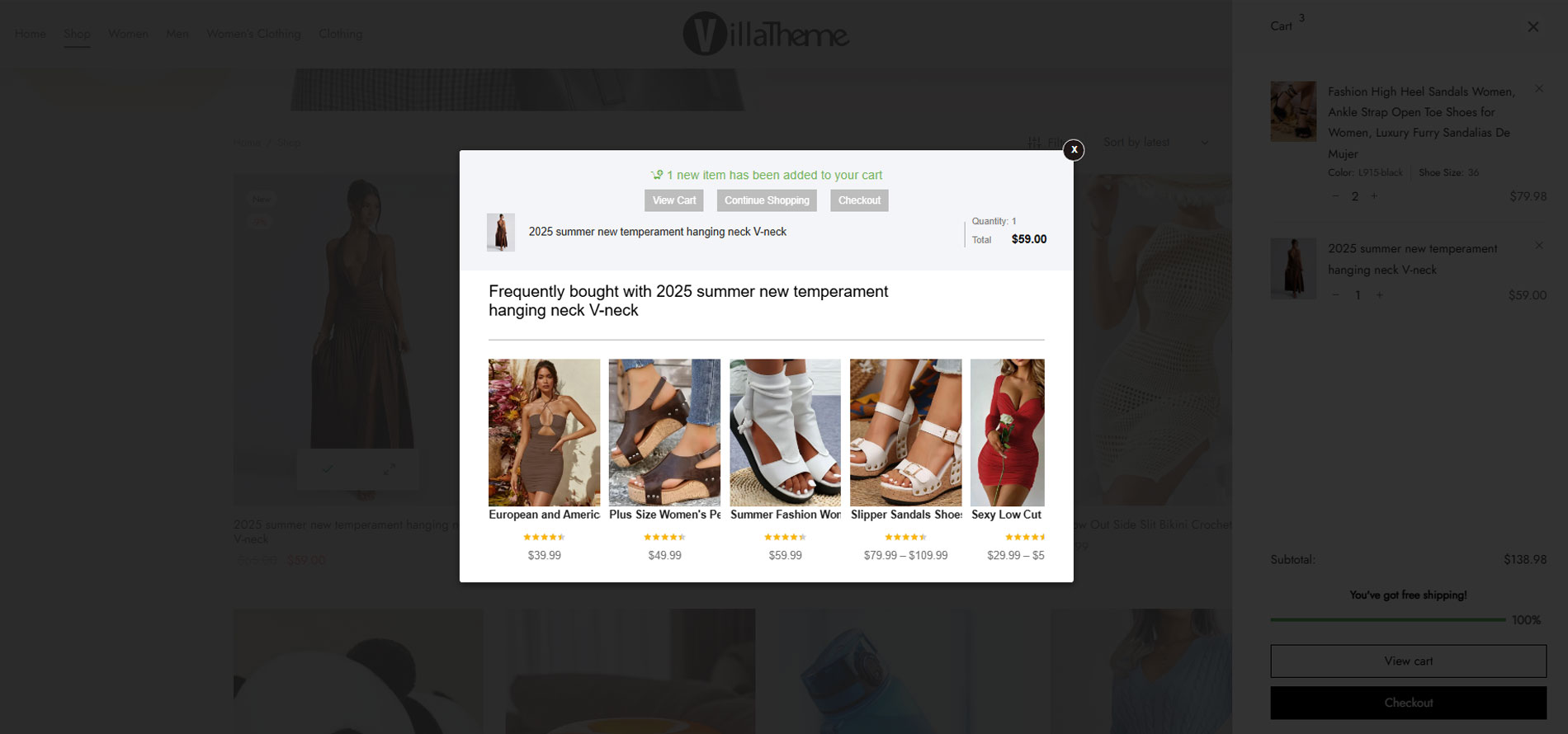
Display up-sells pop-up: Display a WooCommerce upsell pop up which introduces up-sell products when customers hit the Add to Cart button. Up-sells products are similar products but give you more profit.
-
Sync data with WooCommerce: If you have created WooCommerce upsell product before, the plugin allows you to sync and use these products to Boost Sales for WooCommerce.
-
Add up-sell products to each product: Configure which products will appear on the up-sell pop-up of each product.
-
Show all products in the category: Display all products in the category of the product customers just add to cart in up-sell pop-up.
-
Sort by: allows you to select the order of up-sell products on up-sell pop-up. By price, by name, random.
-
Hide Out Of Stock Products: out-of-stocks products will be automatically hidden on up-sell pop-up.
CROSS-SELL
-
Product Bundles: Creating product bundles then selling at discounted prices.
-
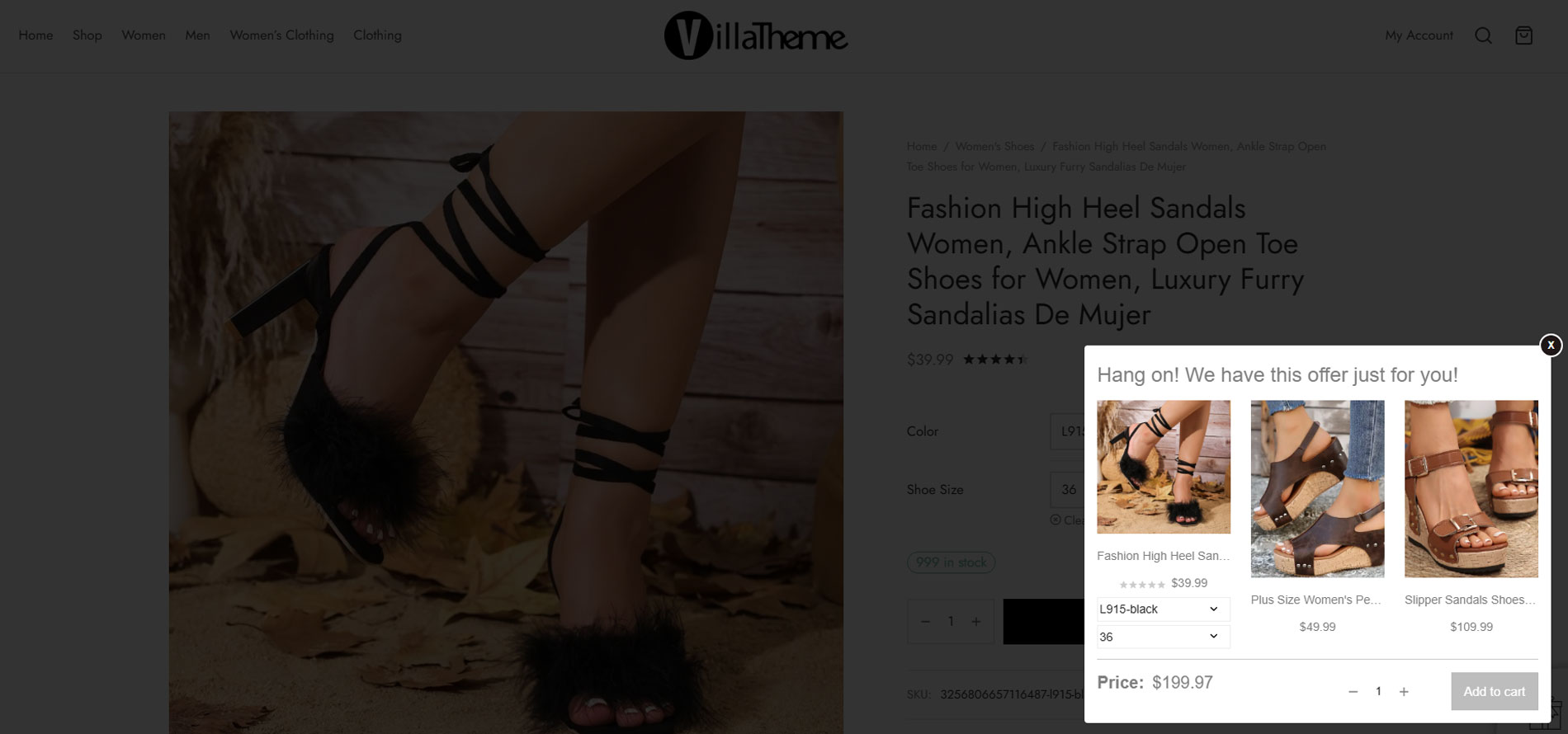
Show Cross-sells popup: Display cross-sell pop-up with a bundled product that includes the product that customers are going to buy.
-
Customize the message: Customize the cross-sell pop-up message (Hang on we have this offer just for you)
-
Bundle name: By default, the bundle will be named “Bundle of …” you are able to change this name.
-
Sync Cross-Sell from WooCommerce: sync cross-sell bundles from WooCommerce cross-sell.
FREQUENTLY BOUGHT TOGETHER
-
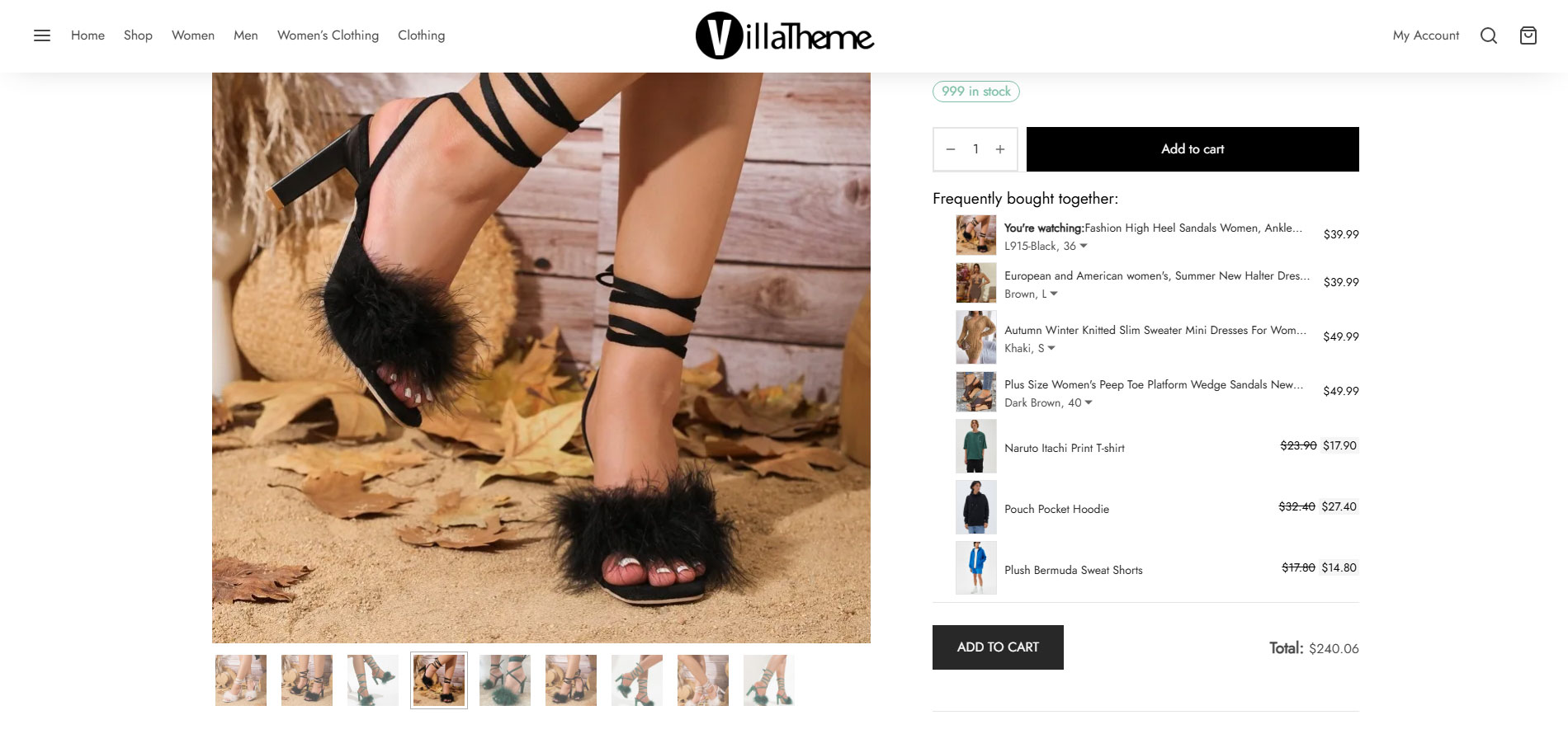
This allows to display upselling products on page, under the add-to-cart button on single product page with an extra button to add both main product and upselling products to cart in just one click
-
Shortcode: Frequently Bought Together shortcode is used to display Frequently Bought Together products of a product and insert every you want.
PREMIUM VERSION FEATURES
The premium version has all the options of the free version
► UP-SELL
-
Bulk add up-sell: allows you to add up-sell for multiple products at once.
-
Hide on Single Product Page: this option allows you to hide the up-sell pop-up on single product pages. The pop-up will appear only on shop/category pages.
-
Hide Products Added to Cart: the products which already in your cart will not be displayed on up-sell pop-up.
-
Redirect after add to cart: automatically redirect to cart/checkout page when an up-sell product is added to cart.
-
Recently Viewed Products: the plugin will automatically display recent viewed product on up-sell product.
-
Only Subcategory: with the display products in the lowest subcategory level on up-sell pop-up. This option works with the option “Up-sell product in same categories” enabled.
-
Upsell by tags: Upsell products which have the same tags as the main product
-
Exclude products to enable upsell: the plugin will not display up-sell pop-up on these products.
-
Exclude products that display in upselling popup: the plugin will not display these products on up-sell pop-up.
-
Hide view more button: select if you want to display the view more button on up-sell product. The button allows the customer to go up-sell product page.
-
AJAX Add To Cart: the plugin works with AJAX add to cart button of WooCommerce.
-
Ajax add to cart for product on up-sell popup: Do not redirect page when customers add upselling products to their cart.
-
Show if empty: Show upsell popup even if thereÌtumọ̀ Yorùbá: ’s no upsells, just tell customers which products they have just added to cart
-
Different templates and add-to-cart style between desktop and mobile
► CROSS-SELL
-
Dynamic price & discount: This makes bundle price more flexible, especially if your bundle contains variable products whose variations have different prices. Discount can be applied or not.
-
Display in the product page: the cross-sell bundle will be displayed in products instead of a pop-up. You can choose to display under add to cart button, above description tab, under the description tab.
-
Show on Product Page: choose if you want to display the cross-sell on the single product page.
-
Show on Cart page: choose if you want to display the cross-sell on the cart page.
-
Show on Checkout page: choose if you want to display the cross-sell on the checkout page.
-
Description: change the description of the cross-sell bundle.
-
Name: change the cross-sell bundle name.
-
Override products: when a bundle is added to cart, a bundle item added individually before can be automatically removed.
-
Ajax adds to cart for bundle: add the bundle to cart without reloading the page.
-
Hide out-of-stock products: if a product in the bundle is out-of-stock, the bundle will not be displayed.
-
Recalculate bundle price: set price rules, then the plugin will automatically calculate a bundle price according price rules when you create a bundle
-
More templates and able to choose different templates between desktop and mobile
-
Customizable color to match with your theme
► FREQUENTLY BOUGHT TOGETHER
-
More options for product source: Beside upsells, you can choose cross-sells, Woo upsells/crossells or any of those source based on different products
-
More styles: Horizontal style is available
-
Add bundle to cart: If you choose cross-sells as source for frequently bought together, a bundle can be added to cart instead of adding products individually
► DISCOUNT BAR
-
Discount progress bar: The discount progress bar displays how much customers need to spend to get the discount. (Base on the discount coupon of WooCommerce system).
-
How much more: Support users know how much they need to spend more to achieve the discount.
-
Sync data with WooCommerce: The plugin sync data with WooCommerce. You can select the coupon created in the WooCommerce system to display on the discount progress bar.
-
Thanks to customers: When a customer achieves a minimum for the discount, a THANK YOU message will display to congrats them.
-
Customize discount progress bar: You can customize the position, color, background, description, and messages of the progress bar.
-
Automatically direct to the checkout page: Allow automatically redirect to the checkout page after reaching the discount.
► MULTILINGUAL SUPPORT
-
All input strings are translatable to all languages created by WPML/Polylang
-
Able to sync configured upsells from the siteÌtumọ̀ Yorùbá: ’s default language to others
MAY BE YOU NEED
VARGAL Ìtumọ̀ Yorùbá: – Additional Variation Gallery for Woo
9MAIL Ìtumọ̀ Yorùbá: – WordPress Email Templates Designer
9Map Ìtumọ̀ Yorùbá: – Map Multi Locations
Abandoned Cart Recovery for WooCommerce
Advanced Product Information for WooCommerce
AFFI Ìtumọ̀ Yorùbá: – Affiliate Marketing for WooCommerce
ALD Ìtumọ̀ Yorùbá: – Dropshipping and Fulfillment for AliExpress and WooCommerce
Bopo Ìtumọ̀ Yorùbá: – WooCommerce Product Bundle Builder
Cart All In One For WooCommerce
Catna Ìtumọ̀ Yorùbá: – Woo Name Your Price and Offers
Checkout Upsell Funnel for WooCommerce
ChinaDS Ìtumọ̀ Yorùbá: – Tmall-Taobao Dropshipping for WooCommerce
Clear Autoptimize Cache Automatically
COMPE Ìtumọ̀ Yorùbá: – WooCommerce Compare Products
Coreem Ìtumọ̀ Yorùbá: – Coupon Reminder for WooCommerce
Customer Coupons for WooCommerce
DEPART Ìtumọ̀ Yorùbá: – Deposit and Part payment for Woo
Email Template Customizer for WooCommerce
EPOI Ìtumọ̀ Yorùbá: – WP Points and Rewards
EPOW Ìtumọ̀ Yorùbá: – Custom Product Options for WooCommerce
EXMAGE Ìtumọ̀ Yorùbá: – WordPress Image Links
FEWC Ìtumọ̀ Yorùbá: – Extra Checkout Fields For WooCommerce
Free Shipping Bar for WooCommerce
GIFT4U Ìtumọ̀ Yorùbá: – Gift Cards All in One for Woo
HANDMADE Ìtumọ̀ Yorùbá: – Dropshipping for Etsy and WooCommerce
HAPPY Ìtumọ̀ Yorùbá: – Helpdesk Support Ticket System
Jagif Ìtumọ̀ Yorùbá: – WooCommerce Free Gift
LookBook for WooCommerce Ìtumọ̀ Yorùbá: – Shoppable with Product Tags
Lucky Wheel for WooCommerce Ìtumọ̀ Yorùbá: – Spin a Sale
Orders Tracking for WooCommerce
Pofily Ìtumọ̀ Yorùbá: – WooCommerce Product Filters
Product Builder for WooCommerce Ìtumọ̀ Yorùbá: – Custom PC Builder
Product Pre-Orders for WooCommerce
Product Size Chart For WooCommerce
Product Variations Swatches for WooCommerce
REDIS Ìtumọ̀ Yorùbá: – WooCommerce Dynamic Pricing and Discounts
REES Ìtumọ̀ Yorùbá: – Real Estate for Woo
S2W Ìtumọ̀ Yorùbá: – Import Shopify to WooCommerce
SUBRE Ìtumọ̀ Yorùbá: – Product Subscription for WooCommerce Ìtumọ̀ Yorùbá: – Recurring Payments
Suggestion Engine for WooCommerce
Thank You Page Customizer for WooCommerce Ìtumọ̀ Yorùbá: – Increase Your Sales
TMDS Ìtumọ̀ Yorùbá: – Dropshipping for TEMU and Woo
W2S Ìtumọ̀ Yorùbá: – Migrate WooCommerce to Shopify
WebPOS Ìtumọ̀ Yorùbá: – Point of Sale for WooCommerce
WordPress Lucky Wheel Ìtumọ̀ Yorùbá: – Spin a Sale
WPBulky Ìtumọ̀ Yorùbá: – WordPress Bulk Edit Post Types
Bulky Ìtumọ̀ Yorùbá: – Bulk Edit Products for WooCommerce
Documentation
Plugin Links
Àwọn àwòrán ìbòjú
Ìgbéwọlẹ̀
- Unzip the download package
- Upload
woo-boost-salesto the/wp-content/plugins/directory - Activate the plugin through the ‘Plugins’ menu in WordPress
Àwọn àgbéyẹ̀wò


Àwọn Olùkópa & Olùgbéejáde
“Boost Sales for WooCommerce Ìtumọ̀ Yorùbá: – Set up Up-Sells & Cross-Sells Popups & Auto Apply Coupon” jẹ́ ètò ìṣàmúlò orísun ṣíṣí sílẹ̀. Àwọn ènìyàn wọ̀nyí ti ṣe ìkópa sí plugin yìí.
Àwọn Olùkópa

A ti túmọ̀ “Boost Sales for WooCommerce Ìtumọ̀ Yorùbá: – Set up Up-Sells & Cross-Sells Popups & Auto Apply Coupon” sí èdè agbègbè 1 kan. Ọpẹ́lọpẹ́ fún àwọn atúmọ̀ èdè fún àwọn ìkópa wọn.
Ṣe o nífẹ̀ẹ́ sí ìdàgbàsókè?
Ṣàwárí koodu, ṣàyẹ̀wò ibi ìpamọ́ SVN, tàbí ṣe àgbékalẹ̀ sí àkọsílẹ̀ ìdàgbàsókè nípasẹ̀ RSS.
Àkọsílẹ̀ àwọn àyípadà
2026.08.17 Ìtumọ̀ Yorùbá: – version 1.3.0
Ìtumọ̀ Yorùbá: – Updated: Compatible WooCommerce 11.0
Ìtumọ̀ Yorùbá: – Updated: Optimize code
2026.06.20 Ìtumọ̀ Yorùbá: – version 1.2.19
Ìtumọ̀ Yorùbá: – Updated: VillaTheme support
2026.05.15 Ìtumọ̀ Yorùbá: – version 1.2.18
Ìtumọ̀ Yorùbá: – Updated: Compatible WooCommerce 10.7
2026.02.27 Ìtumọ̀ Yorùbá: – version 1.2.17
Ìtumọ̀ Yorùbá: – Updated: Compatible with WP 6.9 WooCommerce 10.5
2025.11.26 Ìtumọ̀ Yorùbá: – version 1.2.16
Ìtumọ̀ Yorùbá: – Fixed: PHP 8.1+ deprecated warning “preg_match(): Passing null to parameter #2 ($subject)”
2025.08.15 Ìtumọ̀ Yorùbá: – version 1.2.15
Ìtumọ̀ Yorùbá: – Updated: Minify some source code
Ìtumọ̀ Yorùbá: – Updated: Sanitize, escape data
2025.02.28 Ìtumọ̀ Yorùbá: – version 1.2.14
Ìtumọ̀ Yorùbá: – Updated: Updated support file
2024.12.28 Ìtumọ̀ Yorùbá: – version 1.2.13
Ìtumọ̀ Yorùbá: – Updated: Compatible with WooCommerce 9.4 and WP 6.7
Ìtumọ̀ Yorùbá: – Updated: Updated support
2024.06.27 Ìtumọ̀ Yorùbá: – version 1.2.12
Ìtumọ̀ Yorùbá: – Updated: Compatible with WC 8.9
2024.04.13 Ìtumọ̀ Yorùbá: – version 1.2.11
Ìtumọ̀ Yorùbá: – Updated: Compatible with WP 6.5 and WC 8.7
Ìtumọ̀ Yorùbá: – Updated: Update support class
2023.07.10 Ìtumọ̀ Yorùbá: – version 1.2.10
Ìtumọ̀ Yorùbá: – Updated: Check compatible notice
2023.07.03 Ìtumọ̀ Yorùbá: – version 1.2.9
Ìtumọ̀ Yorùbá: – Updated: Compatible with WooCommerce HPOS(COT)
2022.11.02 Ìtumọ̀ Yorùbá: – version 1.2.8
Ìtumọ̀ Yorùbá: – Updated: Compatibility check with WP 6.1 and WC 7
2022.08.08 Ìtumọ̀ Yorùbá: – version 1.2.7
Ìtumọ̀ Yorùbá: – Fixed: Changing variation from Frequently bought together affects the main product image on product details page
Ìtumọ̀ Yorùbá: – Fixed: Sanitize, escape data
Ìtumọ̀ Yorùbá: – Updated: VillaTheme_Support
2022.05.30 Ìtumọ̀ Yorùbá: – version 1.2.6
Ìtumọ̀ Yorùbá: – Updated: VillaTheme_Support
Ìtumọ̀ Yorùbá: – Updated: Compatible with WP 6.0
2022.04.21 Ìtumọ̀ Yorùbá: – version 1.2.5
Ìtumọ̀ Yorùbá: – Fixed: Compatibility issue with Ajax add to cart plugin
Ìtumọ̀ Yorùbá: – Fixed: Sanitize, escape data
Ìtumọ̀ Yorùbá: – Fixed: Sanitize attribute value correctly
Ìtumọ̀ Yorùbá: – Fixed: Some issues with non-latin attribute name/value
Ìtumọ̀ Yorùbá: – Fixed: Upsells not showing after adding a variable product to cart on product list via WooCommerce Cart All In One plugin
Ìtumọ̀ Yorùbá: – Fixed: Upsells not showing after adding a product to cart on product list on single product page
Ìtumọ̀ Yorùbá: – Updated: VillaTheme_Support
2022.03.29 Ìtumọ̀ Yorùbá: – version 1.2.4
Ìtumọ̀ Yorùbá: – Updated: VillaTheme_Support
2022.03.21 Ìtumọ̀ Yorùbá: – version 1.2.3
Ìtumọ̀ Yorùbá: – Fixed: Action of add-to-cart form of upsells popup in some cases
Ìtumọ̀ Yorùbá: – Updated: VillaTheme_Support
2022.01.15 Ìtumọ̀ Yorùbá: – version 1.2.2
Ìtumọ̀ Yorùbá: – Fixed: Deprecated is_ajax in WC6.1
2022.01.10 Ìtumọ̀ Yorùbá: – version 1.2.1
Ìtumọ̀ Yorùbá: – Updated: VillaTheme_Support
Ìtumọ̀ Yorùbá: – Updated: Prevent bundle item quantity from being changed via cart update
2021.11.12 Ìtumọ̀ Yorùbá: – version 1.2.0
Ìtumọ̀ Yorùbá: – Added: Frequently bought together
Ìtumọ̀ Yorùbá: – Added: Support of overriding templates
Ìtumọ̀ Yorùbá: – Added: Display saved amount of bundle in cart/checkout
Ìtumọ̀ Yorùbá: – Updated: Replace “woocommerce” with “woo” in slugs of all pages of the plugin to match with other VillaTheme plugins on wordpress.org
Ìtumọ̀ Yorùbá: – Updated: Unlock several features of up-sells and cross-sells
2021.08.05 Ìtumọ̀ Yorùbá: – version 1.1.7.10
Ìtumọ̀ Yorùbá: – Updated: Class VillaTheme_Support
Ìtumọ̀ Yorùbá: – Updated: Compatible with WP 5.8 and WC 5.5
2020.08.14 Ìtumọ̀ Yorùbá: – version 1.1.7.9
Ìtumọ̀ Yorùbá: – Updated: Compatible with WP 5.5 and WC4.3
Ìtumọ̀ Yorùbá: – Improved: Product Upsells/Crosssell management page
2020.04.23 Ìtumọ̀ Yorùbá: – version 1.1.7.8
Ìtumọ̀ Yorùbá: – Updated: Class support
2020.03.23 Ìtumọ̀ Yorùbá: – version 1.1.7.7
Ìtumọ̀ Yorùbá: – Updated: Compatible with WP 5.4 and WC4.0
Ìtumọ̀ Yorùbá: – Updated: Class support
2020.02.06 Ìtumọ̀ Yorùbá: – version 1.1.7.6
Ìtumọ̀ Yorùbá: – Fixed: Missing string translation for “View more”, “Frequently bought with {name_product}”
2019.11.16 Ìtumọ̀ Yorùbá: – version 1.1.7.4
Ìtumọ̀ Yorùbá: – Updated: Compatible with WP 5.3 and WooCommerce 3.8
2019.10.07 Ìtumọ̀ Yorùbá: – version 1.1.7.3
Ìtumọ̀ Yorùbá: – Updated: Premium URL
2019.05.10 Ìtumọ̀ Yorùbá: – version 1.1.7.2
Ìtumọ̀ Yorùbá: – Updated: Change plugin name
Ìtumọ̀ Yorùbá: – Updated: Change premium version url
2019.04.03 Ìtumọ̀ Yorùbá: – version 1.1.7.1
Ìtumọ̀ Yorùbá: – Updated: Make admin notices dismissible
2019.02.25 Ìtumọ̀ Yorùbá: – version 1.1.7
Ìtumọ̀ Yorùbá: – Fixed: Tab JS in backend
Ìtumọ̀ Yorùbá: – Updated: Class support
2018.11.10 Ìtumọ̀ Yorùbá: – version 1.1.6.3
Ìtumọ̀ Yorùbá: – Updated: Class support
2018.10.17 Ìtumọ̀ Yorùbá: – version 1.1.6.2
Ìtumọ̀ Yorùbá: – Removed: Upgrade notice
Ìtumọ̀ Yorùbá: – updated: Class support
2018.10.15 Ìtumọ̀ Yorùbá: – version 1.1.6.1
Ìtumọ̀ Yorùbá: – Removed: Upgrade Notice
2018.05.18 Ìtumọ̀ Yorùbá: – version 1.1.6
Ìtumọ̀ Yorùbá: – Fixed: Button flex on Mobile
Ìtumọ̀ Yorùbá: – Fixed: Add first cross-sell product
Ìtumọ̀ Yorùbá: – Fixed: Thumb and Title on upsells
2018.05.11 Ìtumọ̀ Yorùbá: – version 1.1.5.1
Ìtumọ̀ Yorùbá: – Fixed: Class Support
Ìtumọ̀ Yorùbá: – Fixed: Overflow of overlay
2018.05.04 Ìtumọ̀ Yorùbá: – version 1.1.5
Ìtumọ̀ Yorùbá: – Fixed: Ajax JS load upsells
2018.04.11 Ìtumọ̀ Yorùbá: – version 1.1.3.1
Ìtumọ̀ Yorùbá: – Updated: Class support
2018.03.26 Ìtumọ̀ Yorùbá: – version 1.1.3
Ìtumọ̀ Yorùbá: – Added: Upsells with special products
Ìtumọ̀ Yorùbá: – Changed: Icon and banner
2018.03.23 Ìtumọ̀ Yorùbá: – version 1.1.2
Ìtumọ̀ Yorùbá: – Fixed: JS add to cart on archive page
Ìtumọ̀ Yorùbá: – Fixed: Max price of product variation on upsell popup
2018.03.06 Ìtumọ̀ Yorùbá: – version 1.1.1
Ìtumọ̀ Yorùbá: – Fixed: Upsell enable option
Ìtumọ̀ Yorùbá: – Fixed: Description option
Ìtumọ̀ Yorùbá: – Fixed: Class support
2018.03.03 Ìtumọ̀ Yorùbá: – version 1.1.0
Ìtumọ̀ Yorùbá: – Changed: The same with premium version
2017.09.26 Ìtumọ̀ Yorùbá: – version 1.0.2.3
Ìtumọ̀ Yorùbá: – Fixed: Unbind body JS
2017.08.07 Ìtumọ̀ Yorùbá: – version 1.0.2.2
Ìtumọ̀ Yorùbá: – Fixed: Limit product display on popup cross-sells and beautify
2017.07.08 Ìtumọ̀ Yorùbá: – version 1.0.2.1
Ìtumọ̀ Yorùbá: – Fixed: Only display list product publish on up-sells and cross-sells page.
2017.06.12 Ìtumọ̀ Yorùbá: – version 1.0.2
Ìtumọ̀ Yorùbá: – Updated: Add cross-sells product directly on cross sell page and automatic generate product Bundle
Ìtumọ̀ Yorùbá: – Fixed: Reset post query
Ìtumọ̀ Yorùbá: – Fixed: Exactly cross-sells product price on cart page
2017.05.24 Ìtumọ̀ Yorùbá: – version 1.0.1
Ìtumọ̀ Yorùbá: – Fixed: Active pro version