WordPress.org

Yorùbá

  • Themes
  • Plugins
  • Àtìlẹ́yìn
  • Nípa
  • Ìwé Ìtónisónà
  • Egbé
  • Kàn síwa
  • Gba WordPress
Wa WordPress jáde
WordPress.org

Plugin Directory

Where Did You Hear About Us Checkout Field for WooCommerce

  • Fi plugin sílẹ̀
  • Àwọn ààyò mi
  • Wọlé
  • Fi plugin sílẹ̀
  • Àwọn ààyò mi
  • Wọlé

Where Did You Hear About Us Checkout Field for WooCommerce

Láti ọwọ́ wooassist
Ṣe ìgbàsílẹ̀
  • Àwọn àlàyé
  • Àwọn àgbéyẹ̀wò
  • Ìgbéwọlẹ̀
  • Ìdàgbàsókè
Ìrànlọ́wọ́

Àpèjúwe

This plugin adds a custom field in the checkout page to ask your customers where they heard about your store.

This plugin also offers an “Other” field where your customer can provide a specific answer in a separate textbox.

Features:

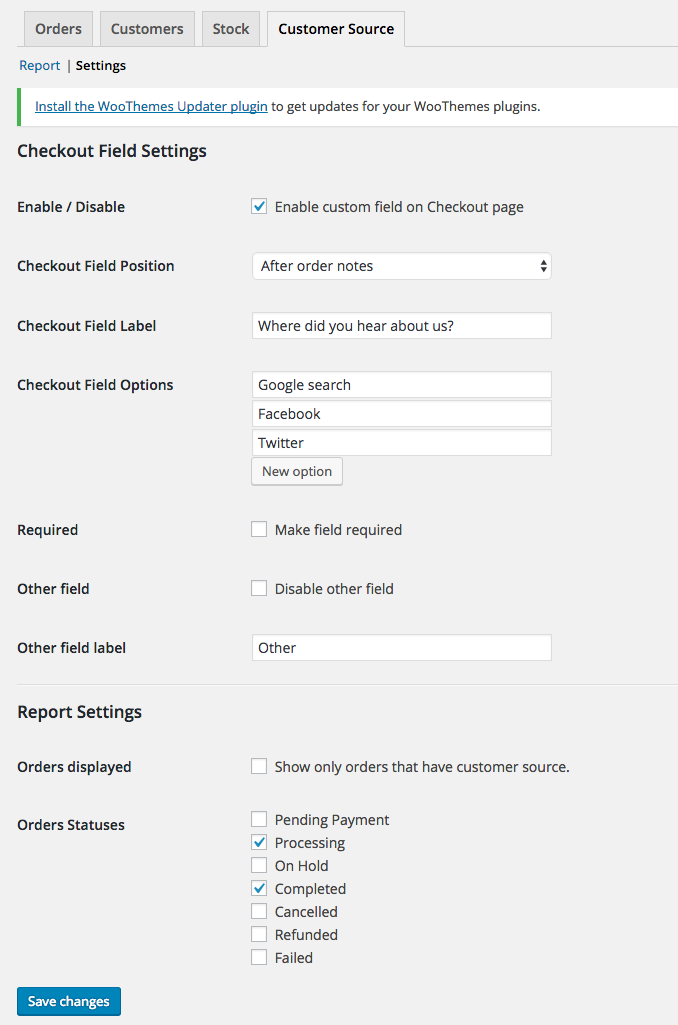
  • Easily change the labels and choices for the custom field in the checkout page.
  • View reports on the “Reports” section in WooCommerce.
  • Enable/disable the custom field to be required on checkout.
  • Enable/disable the “Other” field.
  • Modify order statuses you want to include in the reports.
  • Export Orders with Customer Source field

Àwọn àwòrán ìbòjú

  • The custom field in action on the checkout page.

  • The custom field value displayed on the order edit page.
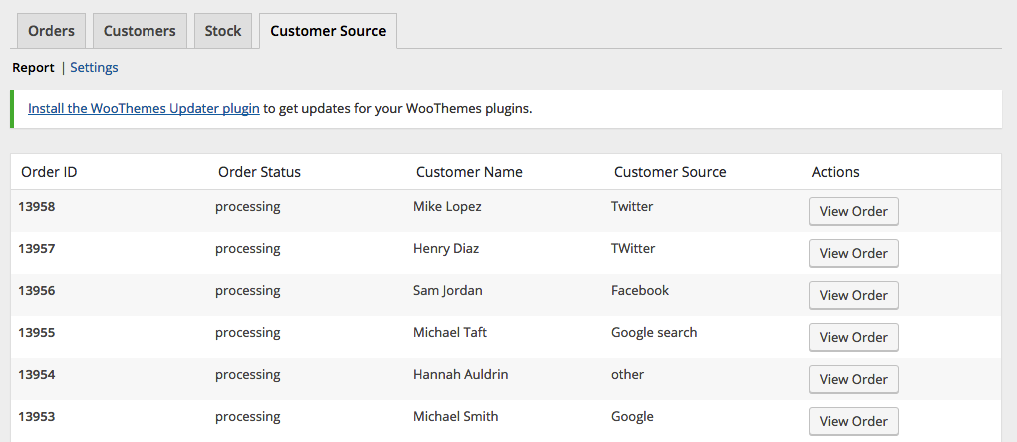
  • Report page.

  • Settings page.

Ìgbéwọlẹ̀

Install via the WordPress Dashboard:

  1. Login to your WordPress Dashboard.
  2. Navigate to Plugins, and select “Add New” to go to the “Add Plugins” page.
  3. In the right side, enter “Where Did You Hear About Us Checkout Field for WooCommerce” in the search input bar, and press Enter.
  4. Click install, and wait for the plugin to download. Once done, activate the plugin.

Install via FTP:

  1. Extract the zip file, login using your ftp client, and upload the storefront-site-logo folder to your /wp-content/plugins/ directory
  2. Login to your WordPress Dashboard.
  3. Go to “Plugins” and activate “Where Did You Hear About Us Checkout Field for WooCommerce” plugin.

FAQ

Where can I find the report page?

You can find the report page by navigating to WooCommerce > Reports and click on the “Customer Source” tab.

Where can I find the settings?

You can find the settings page by navigating to WooCommerce > Reports and click on the “Customer Source” tab, and then click on the “Settings” link on the sub-navigation.

Àwọn àgbéyẹ̀wò

Field meta name/key

vbosch Igbe 16, 2025
Hi there, Thanks for this plugin. We are using another plugin to automatically export and import orders into another system. In this plugin we have the capability to select certain ‘meta fields’, however we do not know what exact meta name / meta key your plugin uses. Could you please tell us? Thanks in advance

Just what we needed

windycitycabinet Agẹmọ 10, 2024
A simple way to get feedback from you customer. Installed and running in 2 minutes.

A great little plugin! 🙂

kira7 Ẹrẹ́nà 20, 2024
No mess, no fuss, straight-forward plugin. Was up and running in around 10 minutes. It’s great that we can now ascertain how people found our site when going through the checkout process. Awesome stuff! 🙂

Does what it needs too

sasko2k Èrèlé 2, 2024
Great simple plugin, does exactly what it says, nothin more, no extra fluff. More plugins should be like this.

Great plugin, needs one small fix

gavie Ọ̀wàrà 24, 2023
Great plugin, works fine. One suggestion: Currently the line “Other” is not translated in the dropdown-menu (only in the field label).. To fix: on wc-customer-source.php, line 589, please change the text-domain from woocommerce-admin to woocommerce, and it will work flawlessly.

Works great

fdittmar Agẹmọ 27, 2021
Works fine. A little more in terms of formatting/design would be great (spacing / alignment on my pages isn’t great).
Ka gbogbo àwọn àgbéyẹ̀wò 8

Àwọn Olùkópa & Olùgbéejáde

“Where Did You Hear About Us Checkout Field for WooCommerce” jẹ́ ètò ìṣàmúlò orísun ṣíṣí sílẹ̀. Àwọn ènìyàn wọ̀nyí ti ṣe ìkópa sí plugin yìí.

Àwọn Olùkópa
  • wooassist

A ti túmọ̀ “Where Did You Hear About Us Checkout Field for WooCommerce” sí àwọn èdè agbègbè 2. Ọpẹ́lọpẹ́ fún àwọn atúmọ̀ èdè fún àwọn ìkópa wọn.

Túmọ̀ “Where Did You Hear About Us Checkout Field for WooCommerce” sí èdè rẹ.

Ṣe o nífẹ̀ẹ́ sí ìdàgbàsókè?

Ṣàwárí koodu, ṣàyẹ̀wò ibi ìpamọ́ SVN, tàbí ṣe àgbékalẹ̀ sí àkọsílẹ̀ ìdàgbàsókè nípasẹ̀ RSS.

Àkọsílẹ̀ àwọn àyípadà

1.0.0

  • initial release

1.0.1

  • Logged Out user can now see the form
  • Tested with WordPress 4.9.2
  • Tested with Storefront 2.2.7
  • Tested with WooCommerce 3.2.6

1.1.0

  • Added Order Export Feature
  • Tested with WordPress 5.2.1
  • Tested with Storefront 2.5.0
  • Tested with WooCommerce 3.6.4

1.1.1

  • Updated code as suggested by @d9media

1.1.2

  • Updated code for tanslations

1.2.0

  • moved menu location due to deprecation of Reports section
  • updated codes for php8 compatibility

1.3.0

  • fixed php 8 compatibility
  • fixed export php notice

1.3.1

  • patched XSS Vulnerability

1.3.2

  • patched XSS Vulnerability (updated escaping code)

1.3.3

  • fixed translation issue of ‘Other’ field

Àkójọpọ̀ Meta

  • Ẹ̀yà 1.3.3
  • Ìgbàgbọ́hùn tó kẹ́yìn ọdún 1 sẹ́yìn
  • Àwọn ìgbéwọlẹ̀ tó ṣiṣẹ́ 1,000+
  • Ẹ̀yà WordPress 4.0.0 tàbí ju bẹ́ẹ̀ lọ
  • Dánwò dé 6.6.4
  • Àwọn èdè

    Danish, Dutch, and English (US).

    Túmọ̀ sí èdè rẹ

  • Àwọn àmì
    brandingcustomcustomizerlogostorefront
  • Ìwòye Tó Péye

Àwọn ìbò

4.6 lára àwọn ìràwọ̀ 5.
  • 6 5-star reviews àwọn ìràwọ̀ 5 6
  • 1 4-star review àwọn ìràwọ̀ 4 1
  • 1 3-star review àwọn ìràwọ̀ 3 1
  • 0 2-star reviews àwọn ìràwọ̀ 2 0
  • 0 1-star reviews ìràwọ̀ 1 0

Add my review

See all reviews

Àwọn Olùkópa

  • wooassist

Ìrànlọ́wọ́

Nǹkan wà tí o fẹ́ sọ? Ṣé o nílò ìrànlọ́wọ́?

Wo àpéjọ ìrànlọ́wọ́

  • Nípa Wa
  • Iroyin
  • Hosting
  • Privacy
  • Àfihàn
  • Themes
  • Plugins
  • Patterns
  • Kọ ẹkọ
  • Atilẹyin
  • Developers
  • WordPress.tv ↗
  • Kópa
  • Àwọn ìṣẹ̀lẹ̀
  • Ṣètọrẹ ↗
  • Five for the Future
  • WordPress.com ↗
  • Matt ↗
  • bbPress ↗
  • BuddyPress ↗
WordPress.org
WordPress.org

Yorùbá

  • Ṣabẹwo sí àkàùntù X (Twitter tẹ́lẹ̀) wa
  • Bẹwo akanti Bluesky wa
  • Lọ sí àkáǹtì Mastodon wa
  • Bẹwo akanti Threads wa
  • Ṣabẹwo si Facebook wa
  • Visit our Instagram account
  • Visit our LinkedIn account
  • Bẹwo akanti TikTok wa
  • Visit our YouTube channel
  • Bẹwo akanti Tumblr wa
Koodu jẹ Ewi.