
Àpèjúwe
Verakta gives any organization — training providers, universities,
event organizers, professional associations — a way to:
- Bulk-upload certificate data via CSV.
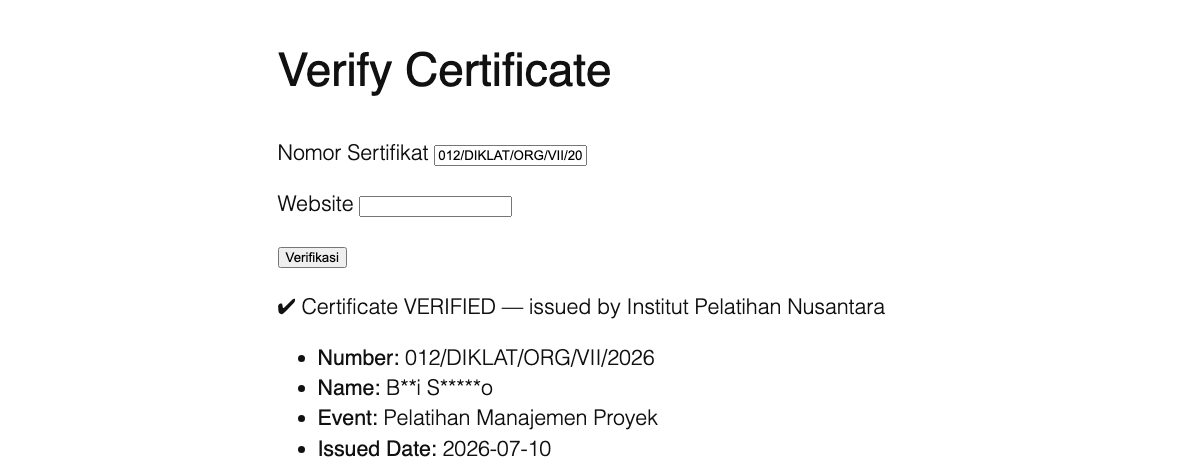
- Offer a public verification page where anyone can enter a certificate
number and get an instant, trustworthy confirmation.
Nothing is hardcoded: no institution name, no number format, no interface
text. Everything is configured from the settings page, so a fresh install
is ready to use without touching any code.
Key features
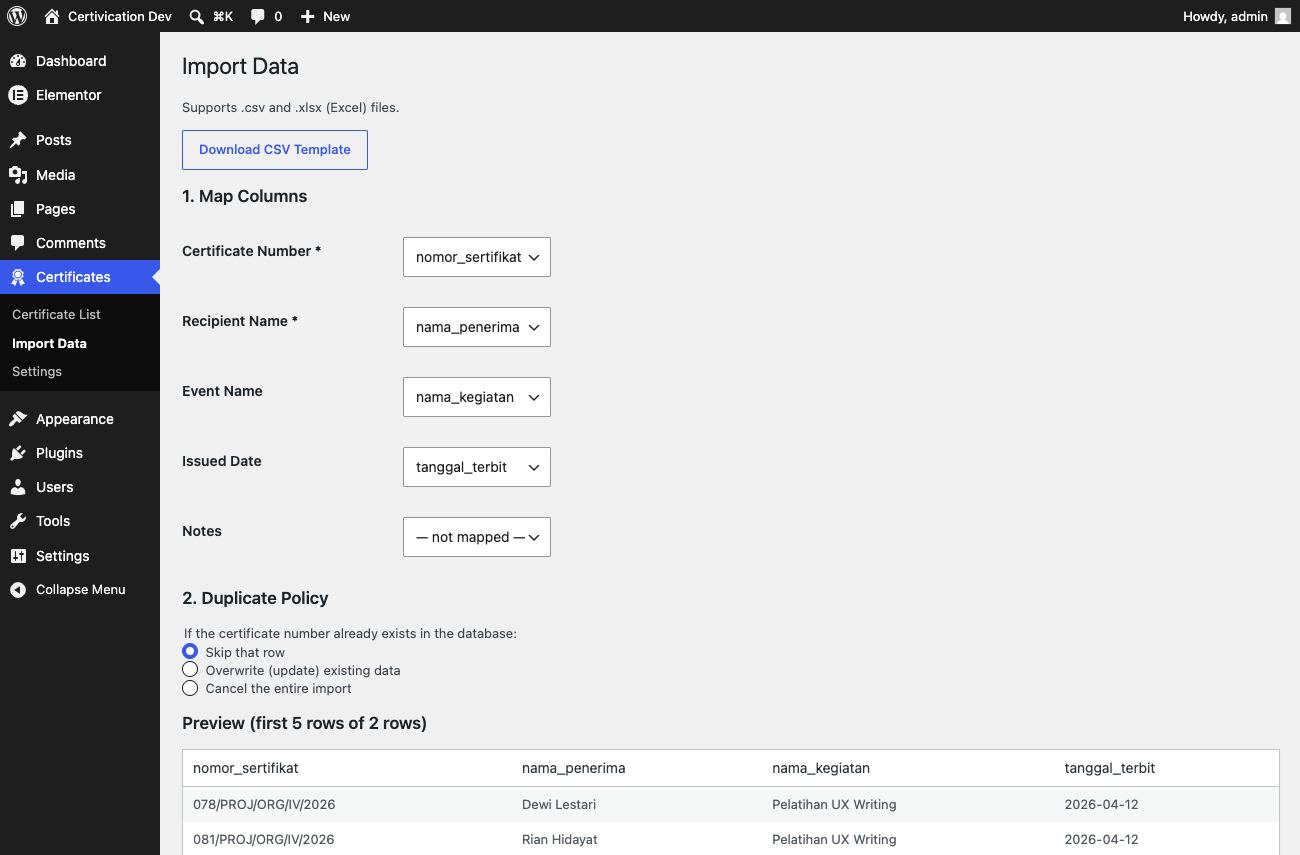
- Bulk import from CSV or Excel (.xlsx) with flexible column mapping,
a preview step before anything is committed, and configurable duplicate
handling (skip, overwrite, or cancel the whole import). Excel date
cells are converted automatically. - Public verification without a page reload (AJAX), with a working
non-JavaScript fallback for accessibility and reliability. - Configurable name privacy: show the full name, a masked name (e.g.
Bu*i Sa****o), or require both the number and the name to match. - Configurable certificate number format: free-form (no validation),
a simple segment-based pattern builder, or a custom regex for unusual
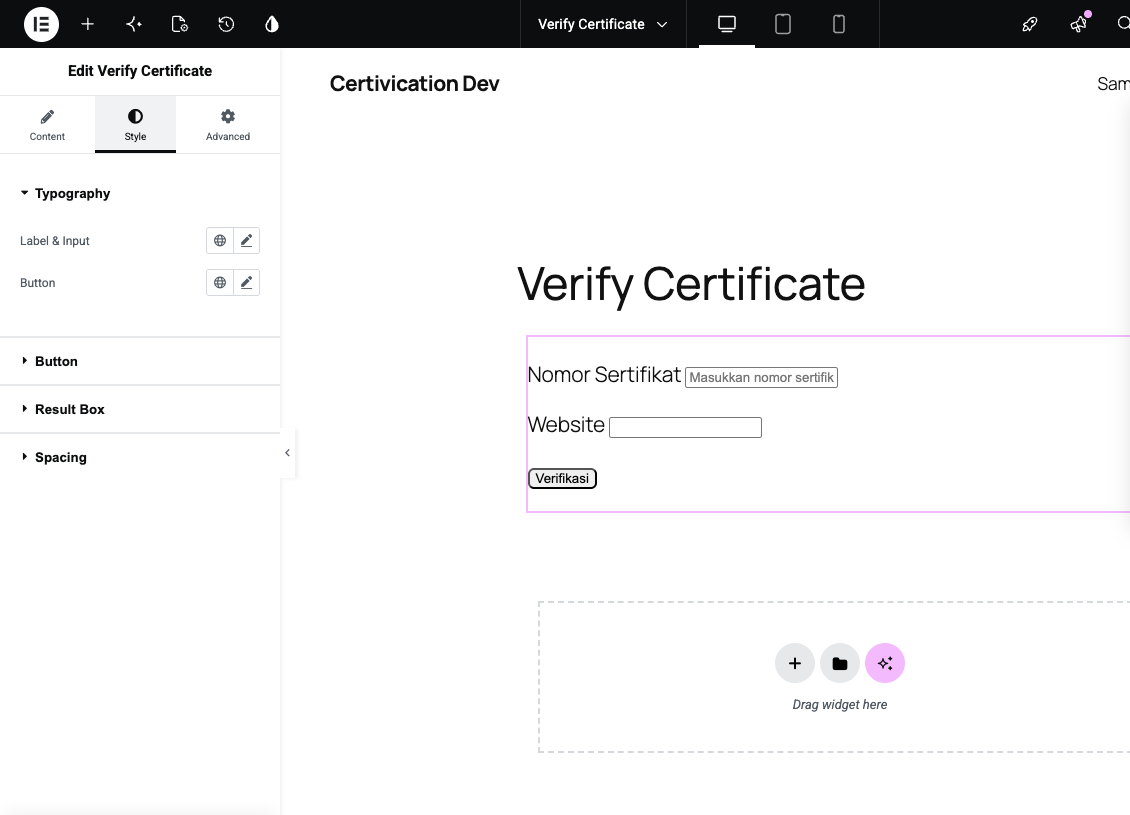
formats. - Native Elementor widget with full styling controls (typography,
colors, border radius, spacing) — plus a Gutenberg block and a
[verakta] shortcode for everywhere else. - Rate limiting per IP and a honeypot field to keep the public
endpoint from being abused. - Audit log recording every import, addition, and edit.
- Translation-ready, shipping with Indonesian and English out of the
box.
Security
Security was treated as a first-class requirement throughout development,
not an afterthought:
- Every database query goes through
$wpdb->prepare()— no SQL string
built by concatenating user input. - All input is sanitized and all output is escaped.
- CSV formula-injection protection on import (cells starting with
=,
+,-, or@are neutralized). - Every admin action is protected by a WordPress nonce and a capability
check. - A dedicated
manage_certificatescapability, so an operator can be
granted access without making them a full Administrator. - Rate limiting and a honeypot field on the public verification endpoint,
with optional trusted-proxy support for sites behind a CDN. - The public AJAX endpoint only ever performs read operations.
- A custom regex number-format pattern is linted for ReDoS risk (nested
quantifiers) both when itÌtumọ̀ Yorùbá: ’s saved and, as a hard backstop, again at
match time via PCRE2 execution limits. - No connection to any external/third-party service — all verification
logic, rate limiting, and data storage happen entirely on your own
WordPress site.
Àwọn àwòrán ìbòjú
Àwọn ìdí
Plugin yìí pèsè 1 ìdí.
- Verifikasi Sertifikat
Ìgbéwọlẹ̀
- Upload the
veraktafolder to/wp-content/plugins/. - Activate the plugin from the Plugins menu in WordPress — a short setup wizard will appear automatically to collect your institution name and preferred number format.
- Place the
[verakta]shortcode, the “Verify Certificate” block, or the “Verify Certificate” Elementor widget on any page.
FAQ
-
Do I need Elementor for this plugin to work?
-
No. Elementor is entirely optional — the plugin works fully through the
[verakta] shortcode or the Gutenberg block. The Elementor widget
only registers itself if Elementor (Free, 3.x or later) is active;
deactivating Elementor never causes an error. -
How is the certificate number format configured?
-
On the Settings page, choose one of three modes: Free (no format
validation), Simple (a No/Division/Institution/Month/Year style pattern
built from ready-made segments), or Advanced (a custom regex for unusual
formats). -
Is the recipientÌtumọ̀ Yorùbá: ’s full name shown to the public?
-
That depends on your settings. The default is a masked name (e.g.
Bu*i Sa****o) to minimize the risk of personal-data harvesting. An
admin can switch this to the full name, or require visitors to type both
the certificate number and the recipientÌtumọ̀ Yorùbá: ’s name, so the two must match
before anything is revealed. -
What data does the plugin actually store?
-
Only the certificate number, recipient name, an optional event name, and
an optional issued date. The plugin never stores national ID numbers,
email addresses, or phone numbers for certificate recipients. -
What happens to my data if I remove the plugin?
-
By default, your certificate data is NOT deleted when the plugin is
uninstalled — itÌtumọ̀ Yorùbá: ’s simply left in place, deactivated. Permanent data
deletion is opt-in via a setting, specifically to prevent accidental data
loss.
Àwọn àgbéyẹ̀wò
Kò sí àwọn àgbéyẹ̀wò fún plugin yìí.
Àwọn Olùkópa & Olùgbéejáde
“Verakta” jẹ́ ètò ìṣàmúlò orísun ṣíṣí sílẹ̀. Àwọn ènìyàn wọ̀nyí ti ṣe ìkópa sí plugin yìí.
Àwọn Olùkópa
Ṣe o nífẹ̀ẹ́ sí ìdàgbàsókè?
Ṣàwárí koodu, ṣàyẹ̀wò ibi ìpamọ́ SVN, tàbí ṣe àgbékalẹ̀ sí àkọsílẹ̀ ìdàgbàsókè nípasẹ̀ RSS.
Àkọsílẹ̀ àwọn àyípadà
0.5.0
- The import screen (now called “Import Data”) accepts Excel .xlsx files
in addition to CSV — same column mapping, preview, and duplicate
handling either way. Read with PHPÌtumọ̀ Yorùbá: ’s built-in ZipArchive/SimpleXML, no
third-party library required. Excel date cells (including genuine date
values, not just text) are converted automatically. - CSV formula-injection neutralization now also applies to values read
from .xlsx cells.
0.4.1
- i18n fix: every string in the CSV import interface (JavaScript) is now
properly translated — some previously stayed in the pluginÌtumọ̀ Yorùbá: ’s source
language even on an English-locale site. - Security fix: an Advanced-mode regex pattern is now validated (ReDoS
linter) at the moment itÌtumọ̀ Yorùbá: ’s saved in Settings, not only the first time
itÌtumọ̀ Yorùbá: ’s actually used to verify a certificate.
0.4.0
- Database schema, dedicated
manage_certificatescapability, configurable
number-format engine (simple/regex/free), CRUD data model, admin menu. - Bulk CSV import with column mapping, preview, duplicate detection, and
formula-injection protection; full audit log. - Public verification (AJAX with non-JS fallback), rate limiting with
trusted-proxy support, honeypot, setup wizard, and a complete
Settings page. - Native Elementor widget with full styling controls, a Gutenberg block,
and English (en_US) translation. - Security hardening: a clean PHPCS run against every WordPress-Extra
security sniff, lightweight penetration testing, documentation.