Skip to Àkóónú
WordPress.org

Yorùbá

  • Themes
  • Plugins
  • Àtìlẹ́yìn
  • Nípa
  • Ìwé Ìtónisónà
  • Egbé
  • Kàn síwa
  • Gba WordPress
Wa WordPress jáde
WordPress.org

Plugin Directory

TLCode Login Logout Menu

  • Fi plugin sílẹ̀
  • Àwọn ààyò mi
  • Wọlé
  • Fi plugin sílẹ̀
  • Àwọn ààyò mi
  • Wọlé

TLCode Login Logout Menu

Láti ọwọ́ Tiago Loss
Ṣe ìgbàsílẹ̀
  • Àwọn àlàyé
  • Àwọn àgbéyẹ̀wò
  • Ìgbéwọlẹ̀
  • Ìdàgbàsókè
Ìrànlọ́wọ́

Àpèjúwe

The TLCode Login Logout Menu is a lightweight, secure plugin designed to add interactive menu items to your WordPress site. It automatically detects user status (logged in or out) and displays appropriate links such as Log In, Log Out, Register, and Profile.

Features:

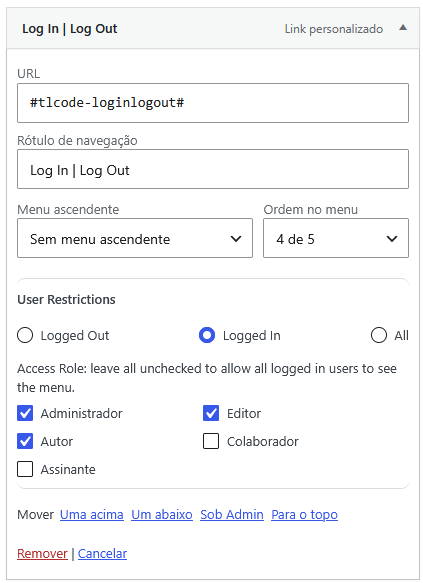
  • Adds dynamic items directly to the WordPress Menus interface (Appearance > Menus).
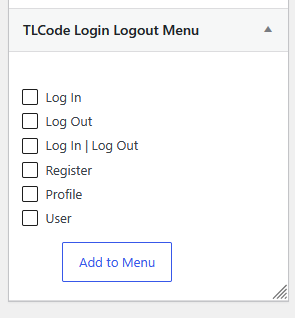
  • Available links: Log In, Log Out, Log In | Log Out, Register, Profile, and User.
  • Safely supports custom redirects based on user context.
  • Redirect to the current page using %current-page%.
  • Display user avatar with the %avatar% tag.
  • Object-Oriented Architecture and robust security constraints out-of-the-box.
  • Available for global localization through WordPress.org language packs.

Àwọn àwòrán ìbòjú
Ìgbéwọlẹ̀

  1. Upload the tlcode-login-logout-menu folder to the /wp-content/plugins/ directory.
  2. Activate the plugin through the ‘Plugins’ menu in WordPress.
  3. Navigate to ‘Appearance’ -> ‘Menus’.
  4. A new sidebar panel named ‘TLCode Login Logout Menu’ will be available to add dynamic links.

Àwọn àgbéyẹ̀wò

Kò sí àwọn àgbéyẹ̀wò fún plugin yìí.

Àwọn Olùkópa & Olùgbéejáde

“TLCode Login Logout Menu” jẹ́ ètò ìṣàmúlò orísun ṣíṣí sílẹ̀. Àwọn ènìyàn wọ̀nyí ti ṣe ìkópa sí plugin yìí.

Àwọn Olùkópa
  • Tiago Loss

A ti túmọ̀ “TLCode Login Logout Menu” sí àwọn èdè agbègbè 3. Ọpẹ́lọpẹ́ fún àwọn atúmọ̀ èdè fún àwọn ìkópa wọn.

Túmọ̀ “TLCode Login Logout Menu” sí èdè rẹ.

Ṣe o nífẹ̀ẹ́ sí ìdàgbàsókè?

Ṣàwárí koodu, ṣàyẹ̀wò ibi ìpamọ́ SVN, tàbí ṣe àgbékalẹ̀ sí àkọsílẹ̀ ìdàgbàsókè nípasẹ̀ RSS.

Àkọsílẹ̀ àwọn àyípadà

1.0.2

  • Security fixes.

1.0.1

  • Compatibility with WordPress 7.1.

1.0.0

  • Initial release.

Àkójọpọ̀ Meta

  • Ẹ̀yà 1.0.2
  • Ìgbàgbọ́hùn tó kẹ́yìn ọ̀sẹ̀ 1 sẹ́yìn
  • Àwọn ìgbéwọlẹ̀ tó ṣiṣẹ́ Tó kéré sí 10
  • Ẹ̀yà WordPress 6.0 tàbí ju bẹ́ẹ̀ lọ
  • Dánwò dé 7.1.1
  • Ẹ̀yà PHP 7.4 tàbí ju bẹ́ẹ̀ lọ
  • Àwọn èdè

    English (US), Italian, Russian, àti Spanish (Spain).

    Túmọ̀ sí èdè rẹ

  • Àwọn àmì
    loginlogoutmenuprofileregister
  • Ìwòye Tó Péye

Àwọn ìbò

Kò sí ìwádìí tí a tíì fi ránṣẹ́.

Your review

Wo gbogbo àwọn àgbéyẹ̀wò

Àwọn Olùkópa

  • Tiago Loss

Ìrànlọ́wọ́

Nǹkan wà tí o fẹ́ sọ? Ṣé o nílò ìrànlọ́wọ́?

Wo àpéjọ ìrànlọ́wọ́

  • Nípa Wa
  • Iroyin
  • Hosting
  • Privacy
  • Àfihàn
  • Themes
  • Plugins
  • Patterns
  • Kọ ẹkọ
  • Atilẹyin
  • Developers
  • WordPress.tv ↗
  • Kópa
  • Àwọn ìṣẹ̀lẹ̀
  • Ṣètọrẹ ↗
  • Swag ↗
  • WordPress.com ↗
  • Matt ↗
  • bbPress ↗
  • BuddyPress ↗
WordPress.org
WordPress.org

Yorùbá

  • Ṣabẹwo sí àkàùntù X (Twitter tẹ́lẹ̀) wa
  • Bẹwo akanti Bluesky wa
  • Lọ sí àkáǹtì Mastodon wa
  • Bẹwo akanti Threads wa
  • Ṣabẹwo si Facebook wa
  • Visit our Instagram account
  • Visit our LinkedIn account
  • Bẹwo akanti TikTok wa
  • Visit our YouTube channel
  • Bẹwo akanti Tumblr wa
Koodu jẹ Ewi.
The WordPress® trademark is the intellectual property of the WordPress Foundation.