

Àpèjúwe
Slider Addons for The Events Calendar is the perfect solution to beautifully showcase your upcoming or past events in a customizable, responsive slider. Whether youÌtumọ̀ Yorùbá: ’re using the Gutenberg Block, Elementor widget, or shortcode, this plugin provides you with flexible options to create eye-catching event sliders with ease.
Features
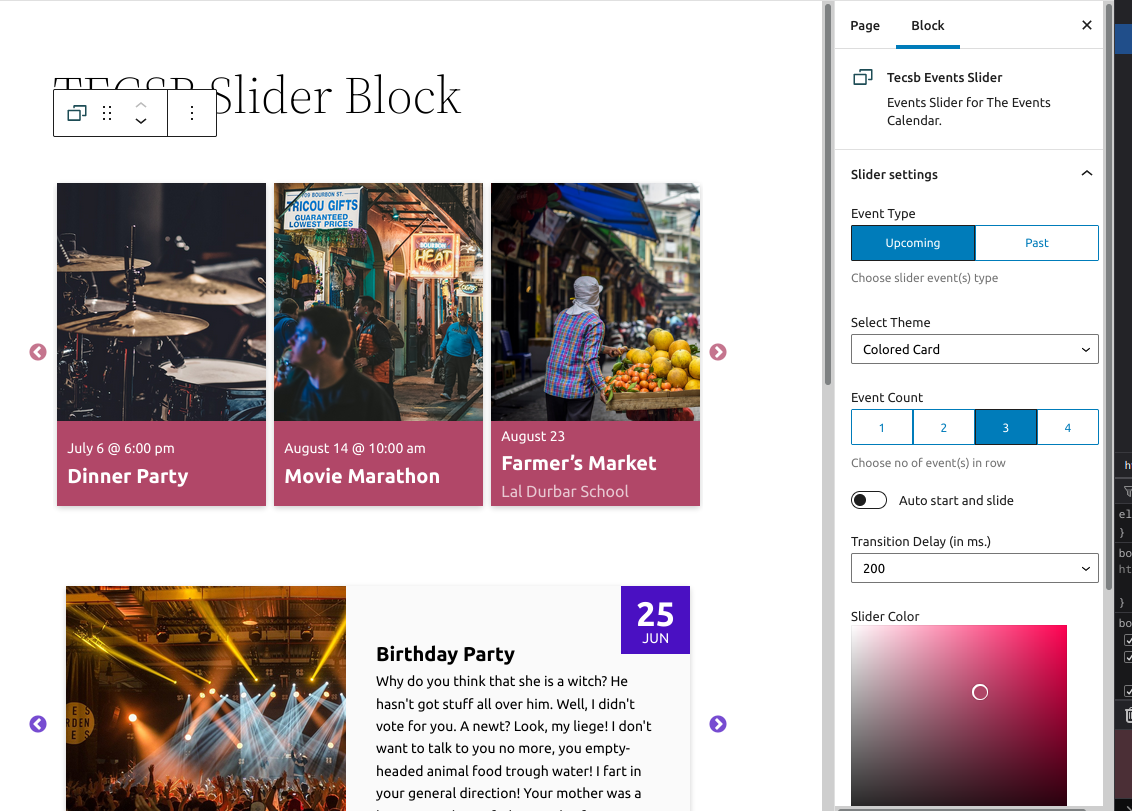
Multiple Display Options
Ìtumọ̀ Yorùbá: – Showcase upcoming or past events.
Ìtumọ̀ Yorùbá: – Works seamlessly with Gutenberg Block, Elementor Widget, or Shortcode.
Customization Options
Ìtumọ̀ Yorùbá: – Adjust the number of events displayed in rows and slides.
Ìtumọ̀ Yorùbá: – Set autoplay and transition delay for sliders.
Ìtumọ̀ Yorùbá: – Customize color schemes with a color picker.
Ìtumọ̀ Yorùbá: – Option to open events in a new tab on click.
Ìtumọ̀ Yorùbá: – Adjust slider height and image height.
Theme Selection
Ìtumọ̀ Yorùbá: – Choose from three pre-designed themes: DateTop, ColoredCard, SingleEvent.
Shortcode Usage
Example Shortcode:
[add_mwt_tec_slider slidertheme="datetop" slidertype="upcoming" eventinrow="3" eventinslide="2" autoplay=true transitiondelay="100" colorscheme="#215455" newtab=true category="party"]
Shortcode Attributes:
- slidertheme: Choose between ‘datetop’, ‘coloredcard’, or ‘singleevent’.
- slidertype: Define the type of event to display (‘upcoming’ or ‘past’).
- eventinrow: Number of events displayed per row.
- eventsinslide: Number of events displayed per slide.
- autoplay: Set autoplay to true or false (Default: true).
- transitiondelay: Adjust the transition delay (in milliseconds, Default: 200).
- colorscheme: Hex code for the color scheme (Default: #5a30f3).
- newtab: Open events in a new tab (Default: true).
- category: Filter events by category using category slug.
- slideheight: Adjust slider height (Default: 300).
- imageheight: Adjust image height (Default: 200).
- displayTime: Display time just below date (datetop only) (true or false).
Want More Features?
Upgrade to the premium version for additional themes, more customization options, and priority support. Learn More
Àwọn àwòrán ìbòjú


Àwọn ìdí
Plugin yìí pèsè 1 ìdí.
- Events Slider for The Evets Calendar Events Slider for The Evets Calendar.
FAQ
Can I display both past and upcoming events in the same slider?
Currently, each slider instance can display either past or upcoming events, not both simultaneously.
Does the plugin work with custom event categories?
Yes, simply use the category slug in the shortcode to filter events by category.
How do I change the slider speed?
You can adjust the transition delay using the
transitiondelayattribute in the shortcode.
Àwọn àgbéyẹ̀wò


Àwọn Olùkópa & Olùgbéejáde
“Slider Addons for The Events Calendar” jẹ́ ètò ìṣàmúlò orísun ṣíṣí sílẹ̀. Àwọn ènìyàn wọ̀nyí ti ṣe ìkópa sí plugin yìí.
Àwọn Olùkópa

Túmọ̀ “Slider Addons for The Events Calendar” sí èdè rẹ.
Ṣe o nífẹ̀ẹ́ sí ìdàgbàsókè?
Ṣàwárí koodu, ṣàyẹ̀wò ibi ìpamọ́ SVN, tàbí ṣe àgbékalẹ̀ sí àkọsílẹ̀ ìdàgbàsókè nípasẹ̀ RSS.
Àkọsílẹ̀ àwọn àyípadà
2.4.1
- Fixed: Corrected time format from
H:s(hours and seconds) toH:i(hours and minutes) in event start time display.
2.4.0
- Fixed: Default height values for initial preview.
- Changed: Replaced …$options_to_show syntax with array_merge() to ensure compatibility with PHP 7.0.
- Added: Date Focused theme. ( Shortcode / Elementor / Gutenberg )
- Fixed: Irregular height of slide.
- Update: Disable click event (on edit) in Elementor.
- Update: Freemius v2.10.1
- Added: Display time option on datetop theme via shortcode
2.3.0
- Fixed: Ticket info error.
- Added: Elementor Widget.
2.2.0
- Added: Display of Event Tickets (if plugin available), temp in shortcodes
- Fixed: Gutenberg Block if premium not activated.
- Update: Freemius sdk to v2.7.0
2.1.1
- Fixed: Category Select option
- Added: Image Height and Slider Height to shortcode
2.1.0
- Fixed: Missing files issue
2.0.0
- Tested up to : v6.4
- Added: Settings Page
1.3.0
- Tested up to : v6.3.0
- Added: Option to select new tab or same tab on event click
- Added: Category Filter ( choose one category slug )
1.2.0
- Added shortcode for slider (for classic editor use)
1.1.0
- Added slidetoscroll options to block and js.
- Choose numebr or events to slide option.
1.0.1
- Security fix
1.0.0
- Initial Release.