
Àpèjúwe
WordPress Survey plugin
Survey Maker by AYS is a WordPress plug-in for creating surveys, questionnaires, and survey forms on your website. The plugin enables you to create your survey through the built-in survey builder with various question types and publishing through a shortcode.
It includes features like multi-page forms, conditional logic, survey analytics, and popup surveys, so you can collect feedback, gather insights, and analyze results without external survey tools.
Create a survey in 3 simple steps:
Create a survey within minutes with the help of our survey builder.
There is no need to know anything about coding; you can simply integrate the survey on your website with just a few clicks.
- Add questions / sections
- Customize settings / design
- Add shortcode to any post or page
Survey shortcode
[ays_survey id=Ìtumọ̀ Yorùbá: ’your survey id’]
Survey Builder Features
You can create surveys of any size with unlimited questions, sections, and surveys.
This means that you will be able to split your survey into multiple pages by simply dragging and dropping questions to different pages. So you can easily arrange questions and sections without any technical knowledge. You will be able to make the questions required, redirect visitors after form submission, and restrict survey submissions based on IP addresses, user roles, and the number of submissions.
Free Features
Survey Creation & Design
- Unlimited Surveys
- Unlimited Sections
- Unlimited Questions
- 14 question types
- Question Image
- Responsive design
- Survey style options (20+)
- Sections with different count of questions
Survey Behavior & Control
- Randomize questions
- Randomize answers
- Result message
- Redirect after submit
- Popup Survey
- Restriction by IP and User id
- Only for logged in users
Responses & Results
- Individual submission
- Submissions summary
[Pro Features](https://ays-pro.com/wordpress/survey-maker)
Advanced Surveys & Logic
- All advanced question types (NPS, Matrix, Ranking, Slider, etc.)
- Logic jump
- Conditional Results
- Conditional Mailing
- URL parameters
- Calculation
- Conversational surveys
- Multilingual Forms
- Text To Speech
- ChatGPT Integration
Integrations & Automation
- Email notifications & configuration
- Mailchimp, Slack, Zapier, Google Sheets, etc.
- WooCommerce integration
- Payment integrations (Stripe, PayPal)
Analytics, Control & Export
- Results with charts
- Export (CSV, PDF, etc.)
- Submission exports
- Schedule survey
- Limit attempts
- User roles & permissions
- Password protection
- User history
DidnÌtumọ̀ Yorùbá: ’t find the feature youÌtumọ̀ Yorùbá: ’re looking for in the Survey Maker plugin? YouÌtumọ̀ Yorùbá: ’re welcome to suggest a new feature.
Survey Demos (Free)
Survey Demos (Pro)
- Conditional Logic Survey (Skip Logic Form)
- Survey with Personalized Results
- Conversational Survey Form (Chat Style Survey)
- Survey with Multiple Question Types
- Net Promoter Score(NPS) Survey
- Simple Contact Form Template
- Popup Survey
- Social Media Survey Template (Modern theme)
- Health Questionnaire (Elegant theme)
- Demographic Survey (Business theme)
- Password-Protected Form
Design & Customization
There are more than 30 options for customizing the look of your survey to fit the theme of your website. The plugin has a number of built-in templates, and you have options to modify the colors, fonts, buttons, and other layout choices to ensure that the survey fits in with your website theme.
You can also control how questions and answers are displayed, which helps improve readability and makes the survey easier to complete.
20+ TYPES OF SURVEY QUESTIONS
The Survey Maker offers the most famous question types for creating successful questionnaires:
- Radio
- Checkbox
- Dropdown
- Paragraph
- Short Text
- Number
- Yes or No
- Date (Pro)
- Time (Pro)
- Date and Time (Pro)
- Star Rating (Pro)
- Ranking (Pro)
- Linear Scale (Pro)
- Matrix Scale (Pro)
- Matrix Scale Checkbox (Pro)
- Slider (Pro)
- File Upload (Pro)
- Star List (Pro)
- Slider List (Pro)
- Hidden (Pro)
- HTML (Pro)
- Phone (Pro)
- Net Promoter Score (Pro)
- Name field
- Email field
and many more are coming!
Survey with different question types Ìtumọ̀ Yorùbá: – Demo
Survey Results & Analytics
You can view all survey submissions directly from your WordPress dashboard. The survey plugin gives you survey results along with their stats and charts so that you donÌtumọ̀ Yorùbá: ’t have to analyze the surveys by looking at each and every response.
All data is stored in one place (in your database). The Pro version of the WordPress Survey plugin allows exporting of results so that you can utilize the data outside your website as well.
Conditional Logic (Pro)
You can have your surveys become much more flexible when using the features of Logic Jump and Conditional Results.
Logic Jump allows you to dictate the following question based on the respondents’ answers; this way, you can avoid unnecessary questions from popping up in your survey.
Conditional Results enable you to specify different results pages, email recipients, and redirects based on AND/OR conditions, giving you the ability to customize the results for each respondent.
The plugin also includes a Calculation feature, which allows you to create formulas based on user answers and display calculated results such as scores or estimated values.
Examples:
- Price / quote calculator
- Score-based surveys
- Result calculation forms
- Simple cost estimation
- Service pricing survey
PRO | DEMO | DOCUMENTATION
Popup Survey
You can display your survey as a popup survey to increase visibility and collect more responses. The popup can be triggered on page load, on click, or on exit intent, determining when the user will get to see the popup.
You will have the ability to show the popup only once upon its response, as well as go for full-screen mode.
Anonymous Survey
Create an anonymous survey and allow users to submit responses without sharing personal information. This ensures that more accurate feedback especially for customer feedback, employee feedback, and internal surveys.
NPS Surveys (Pro)
Use Net Promoter Score (NPS) surveys for evaluating customer satisfaction and loyalty. These kinds of surveys are used to see how likely your product or service will be recommended by your clients.
Based on the responses, users are grouped into promoters, passives, and detractors, giving you a clear overview of your customer satisfaction.
Email Notifications & Integrations (Pro)
Set up email notifications to send survey responses to both the user and the admin. The email content can be customized, and you can include response data in a table format. Also, the administrator can create email summaries with results of surveys sent after predefined time intervals.
In addition, Survey Maker integrates with popular tools such as Mailchimp, Zapier, Google Sheets, Stripe, and PayPal, making it easier to manage data and connect your survey with other services.
Easy-To-Use | User-Friendly |
Not a tech person? No problem. The plugin is 100% beginner-friendly and no coding skills are required. You can easily create engaging and at the same time advanced forms that will fulfill all your needs. Also, this WordPress survey plugin is mobile-friendly, so your responders can take the quiz with all types of screens such as mobile devices or tablets. And, most importantly, our support care specialists are easily accessible and always happy to help you and answer any questions you might have!
For more detailed information please check the Documentation.
DonÌtumọ̀ Yorùbá: ’t forget, in case of any problems or upcoming questions feel free to contact us via the following FREE SUPPORT FORUM.
Àwọn àwòrán ìbòjú
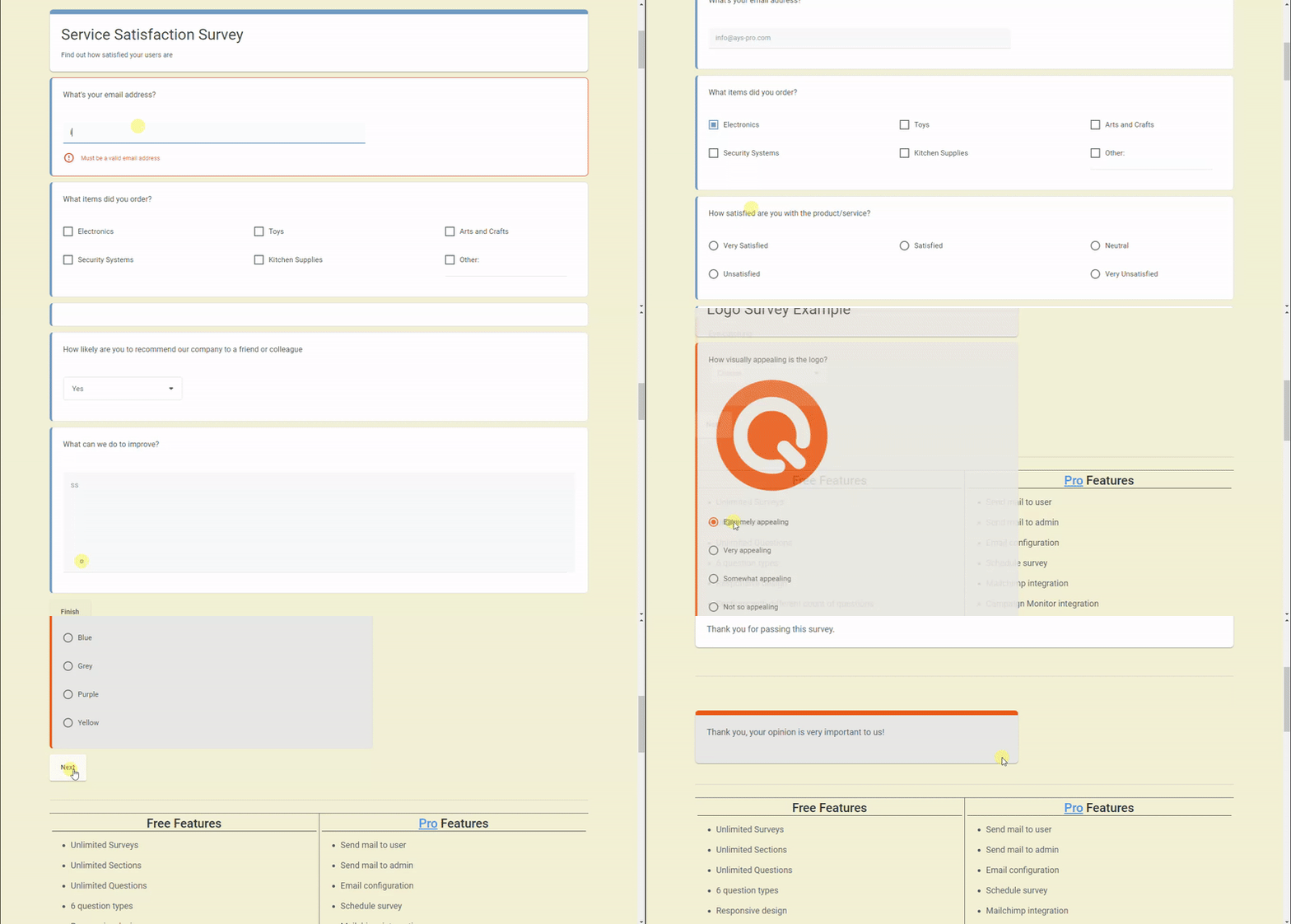
WordPress Survey Plugin Ìtumọ̀ Yorùbá: – front end test preview in action 
WordPress Survey Plugin Ìtumọ̀ Yorùbá: – dashboard survey settings preview in action 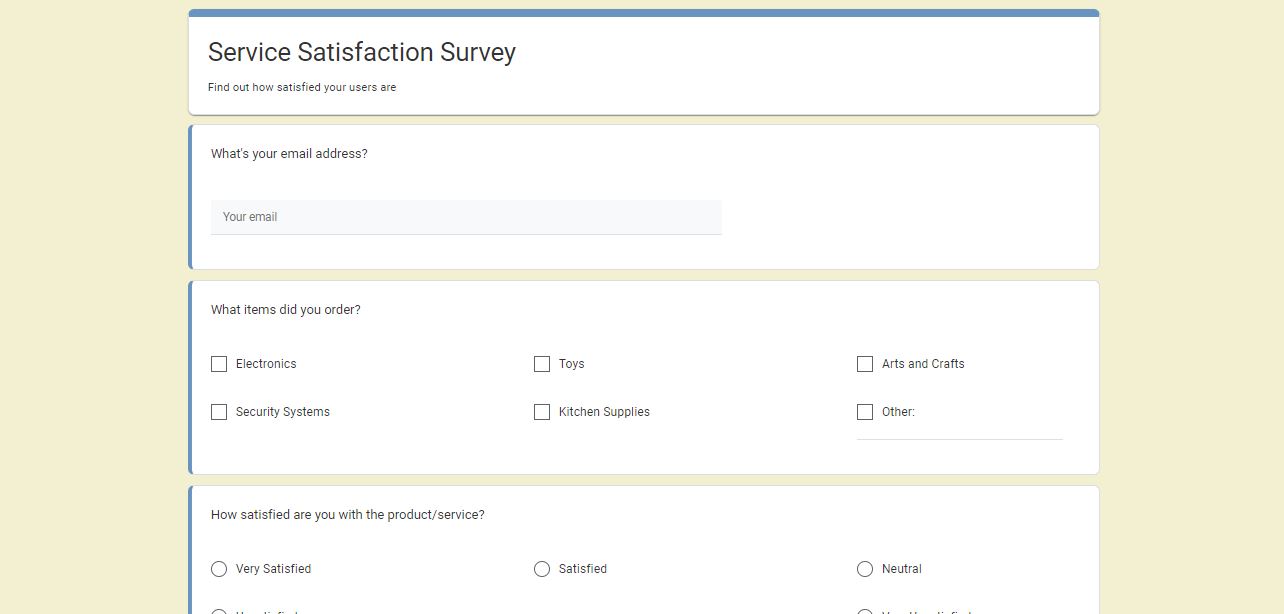
WordPress Survey Plugin Ìtumọ̀ Yorùbá: – questionnaire example with different question types 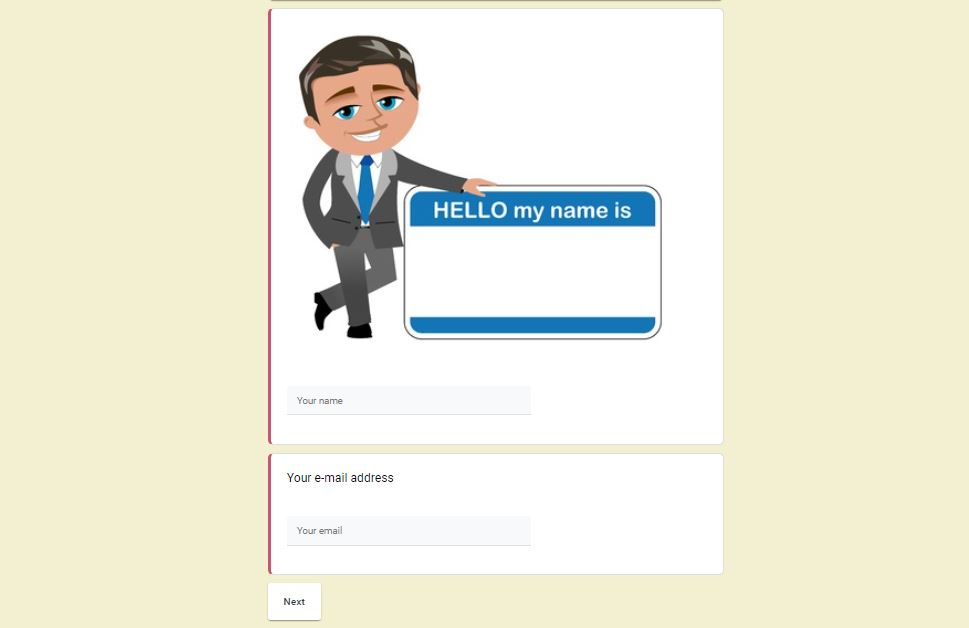
WordPress Survey Plugin Ìtumọ̀ Yorùbá: – questionnaire example with image 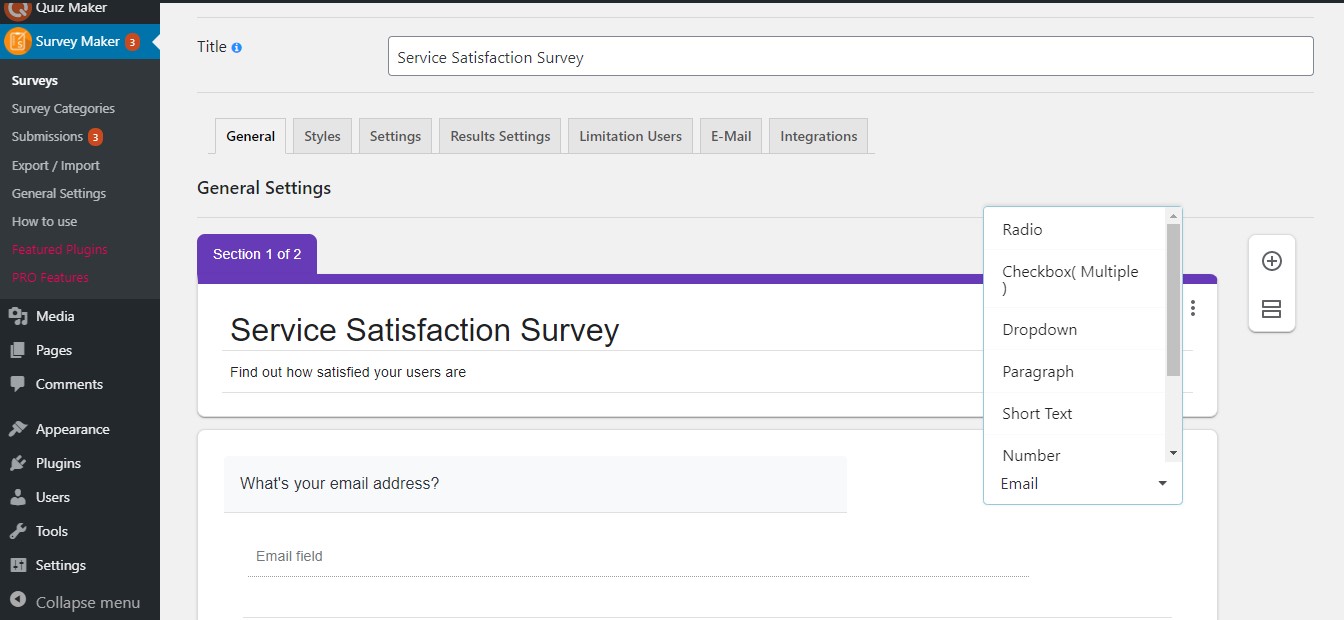
WordPress Survey Plugin Ìtumọ̀ Yorùbá: – survey dashboard 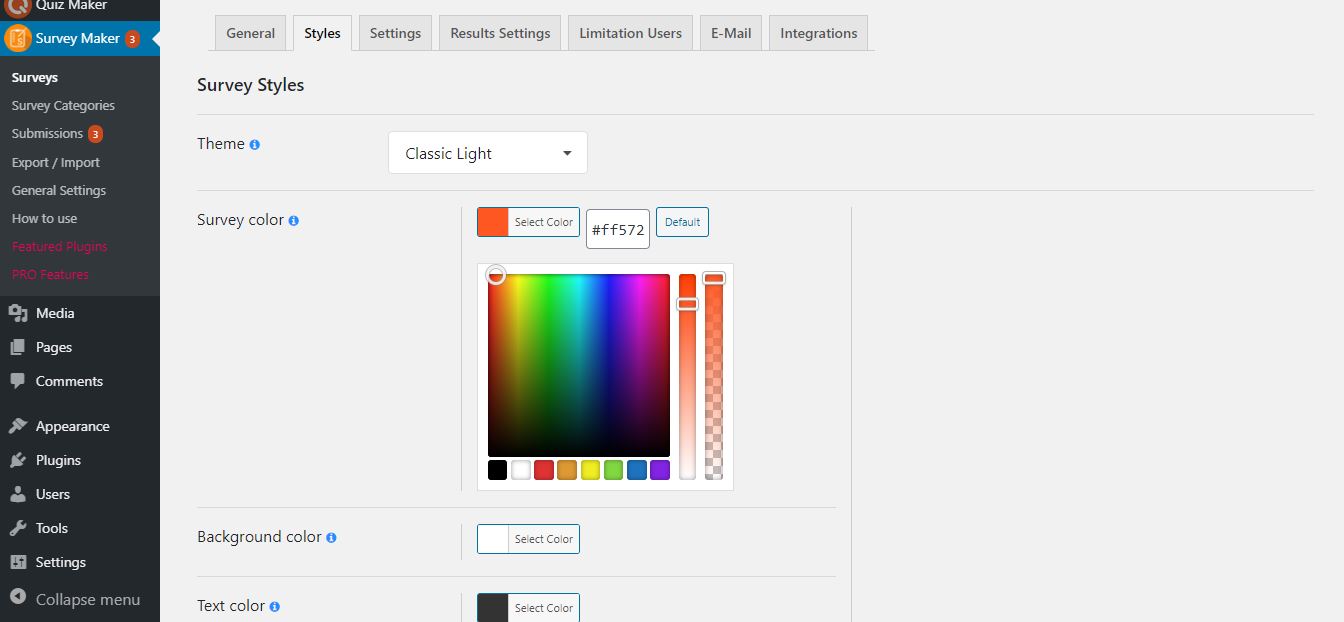
WordPress Survey Plugin Ìtumọ̀ Yorùbá: – survey style options 
WordPress Survey Plugin Ìtumọ̀ Yorùbá: – form submissions summary with charts
Àwọn ìdí
Plugin yìí pèsè 1 ìdí.
- Survey Maker
Ìgbéwọlẹ̀
There are two ways to install Survey maker: the easy way, when you install Survey maker from your WordPress dashboard, and the not so easy way, when you install it from WordPress.org.
- 1.1 The easiest way to enjoy Survey Maker:
- 1.1.1 Login to your WordPress dashboard
- 1.1.2 Go to Plugins
- 1.1.3 Add New
- 1.1.4 Search for Survey maker
- 1.1.5 Click to install
- 1.2 The second way:
- 1.2.1Download the zip file from https://wordpress.org/plugins/survey-maker/
- 1.2.2 Go to Plugins
- 1.2.3 Add New
- 1.2.4 Upload plugin
- 1.2.5 Choose file survey_maker.zip
-
1.2.6 Click to install
-
1.3 In order to install the Survey maker from WordPress.org you must unzip the archive and copy the survey-maker folder into your plugins folder (\wp-content\plugins).
After one ofthis steps you can activate the plugin from the Plugins menu.
Once activated configure any options as desired and you can enjoy our Survey maker.
FAQ
-
1. How to insert a survey into a post or page?
-
There are two ways of inserting the form Ìtumọ̀ Yorùbá: – via shortcode or via block.
In the first case, you should copy the shortcode of your own wp survey, go to the All Posts/All Pages section, click Add New(or go to existing post), and paste the shortcode there. Afterward, you should publish it and go to the generated link. The link will lead you directly to your test, and you will be able to view and take it.In the second case, you should click on the Add Block(+) button and type in a survey in the block search field. Then, click on the Survey Maker block, select your preferred test from the dropdown list and thatÌtumọ̀ Yorùbá: ’s all!
Survey Maker allows you to insert your surveys inside any post, page, or widget area in WordPress. It is one of the best survey plugins 2021. It allows to create free online questionnaire, create a quiz with images and no technical background is required. Start your experience right now and see how quickly and easily you will create your survey! This video is a quick guide on doing a feedback form and inserting it into a post.
-
2. How many types of questions are there?
-
7 different types of questions are available in the free version. Those include Radio type with requires to choose only one correct answer, Checkbox allows to have more than one right answer choice, Dropdown, Paragraph, Short text, Number, Yes or No, plus E-Mail and Name fields. The Pro version provides extra 4 types such as Date, Star Rating, Linear Scale, Matrix Scale. You can create one-page or multi-page advanced questionnaires, gain data and measure customer satisfaction by adding the various types of questions offered by our plugin.
Different types allow creating any kind of tests that you have in your mind. It is one of the most advanced WordPress survey plugins on the market. It has never been so easy to create, send, and analyze data! This free, easy form creator allows you to use a survey maker with unlimited questions, sections and create tests with images. You can create custom forms like Survey Monkey (without the high costs), online petition form, feedback contact form, market research questionnaire, etc. After collecting survey reports, you can make necessary changes to your product or service and boost engagement and traffic.
-
3. How many surveys can I create?
-
You can make unlimited surveys and include as many questions as you want! Both Free and Premium users have the opportunity to create unlimited surveys with unlimited questions! IsnÌtumọ̀ Yorùbá: ’t it amazing? Furthermore, no limitation exists on the number of participants of the questionnaires. DonÌtumọ̀ Yorùbá: ’t lose your chance to try!
Generate an unlimited number of forms for your website and analyze the information from your users with the help of pie charts and bar graphs. Did you know that you can also add photos both to the main questions and answer choices? With Survey Maker, you can make your questions required. Moreover, you can send emails after completion of the test to thank users or redirect them to any page on your WordPress website.
-
4. Can I create a multi-step survey with the Free version?
-
You can! With the help of the plugin, you can create unlimited online tests with multi sections. Quick, easy, and reliable for creating surveys interesting and engaging to take. A drastic increase in conversion rate is guaranteed.
-
5. How do I make one question per page in Survey Maker?
-
To achieve that, you need to divide your survey into separate sections and write one question per section.
If you want to drive more traffic and use it as a lead generator, then the plugin is perfect for your needs. It doesnÌtumọ̀ Yorùbá: ’t require any coding to build your surveys, yet it is easy to customize. -
6. How to create a survey form in WordPress?
-
This question is already an easy answerable one, thanks to the user guide. This WordPress free form plugin is a cheaper alternative to survey monkey. I am happy to inform you that you can easily create surveys forms and analyze the data with interactive reports. The best survey forms are waiting for you! So do not miss your chance to use the best free survey maker plugin!
-
7. Will I lose the data after upgrading to the Pro version?
-
Nope, you will not! All the data(surveys, settings, and submissions) of the plugin will remain unchanged even after switching to the Pro version. You donÌtumọ̀ Yorùbá: ’t need to redo what you have already created with the free version. For further detailed instructions, please check out the upgrade guide of the plugin.
-
8. Where can I find survey statistics?
-
Survey statistics are available on the Submissions page. It consists of 4 different sections; Summary, Individual, Submissions, and Analytics. In the Summary section, you can observe finalized answers. Meanwhile, you can interpret results with graphs and charts. The Submissions section demonstrates all the submissions. In the Analytics section, you can see a graph displaying the submissions count per page and a chart illustrating the passed users by user role. Furthermore, you can export submissions.
Survey Maker is a flexible WordPress plugin for questionnaire surveys. This free online questionnaire survey plugin allows you to create the best anonymous surveys and receive real-time feedback. While using this free tool for online surveys you can create sophisticated surveys and include different types of questions.
-
9. Where can I find the summary report of my submissions?
-
To do that, please go to the Submissions page of the plugin. There you will find plenty of analysis tools. Want to analyze data from a test? The plugin is just what you needed. Collect user feedback and interpret them via reports, charts, and statistics.
-
10. How to transfer all surveys from one site to another?
-
Looking for an amazing and flexible plugin? You are in a right place! We have done our best to make the time of our customers more manageable. You can import and export your already created surveys from one website to another via JSON format. Great plugin, right?
-
11. Is there any documentation or user guide?
-
Sure, there is. You can find a quick user guide document on the official website. It includes a detailed user guide and an explanation about how to create a survey. You can find necessary information about the features offered by Survey Maker; question types, style options, logic jump, popup surveys, and so on.
Survey Maker Free Demo and Pro Demo are available! You can test the samples to make sure of high quality and flexible design. Below the demo versions of surveys, you can find all the features listed for both the Pro and Free versions. By the way, subscribe to our YouTube channel if you want to learn more about the pluginÌtumọ̀ Yorùbá: ’s details.
-
12. Can I get support for the Survey Maker Free version?
-
We happily support our community. Our Support Care specialists are always ready to help you to use the product more efficiently. Though the plugin is easy to set up and use and has a simple interface, please feel free to reach out to us anytime when you have any concerns. The team may respond to your questions within 24 hours. For questions concerning the Free plugin please post it on the WordPress Support Forum, otherwise(pre-sale question/pro support), please contact us via this form. Excellent service is guaranteed!
-
13. How to add unlimited number of questions?
-
You must know that our plugin has no limits Survey Maker offers unlimited number of sections, questions and answers. However, if you came across to such problem, it is connected with your server. To solve that problem you must access to your cPanel, find your PHP values and enhance the number, and in case you are unable to do that yourself then contact your Hosting provider, so that they do the mentioned for you.
max_input_vars 10000
max_execution_time 600
max_input_time 600
post_max_size 256M
Àwọn àgbéyẹ̀wò


Àwọn Olùkópa & Olùgbéejáde
“Survey Maker by AYS” jẹ́ ètò ìṣàmúlò orísun ṣíṣí sílẹ̀. Àwọn ènìyàn wọ̀nyí ti ṣe ìkópa sí plugin yìí.
Àwọn Olùkópa
A ti túmọ̀ “Survey Maker by AYS” sí àwọn èdè agbègbè 10. Ọpẹ́lọpẹ́ fún àwọn atúmọ̀ èdè fún àwọn ìkópa wọn.
Túmọ̀ “Survey Maker by AYS” sí èdè rẹ.
Ṣe o nífẹ̀ẹ́ sí ìdàgbàsókè?
Ṣàwárí koodu, ṣàyẹ̀wò ibi ìpamọ́ SVN, tàbí ṣe àgbékalẹ̀ sí àkọsílẹ̀ ìdàgbàsókè nípasẹ̀ RSS.
Àkọsílẹ̀ àwọn àyípadà
5.2.1.9 ( April 28, 2026 )
- Improved: Some changes on the admin dashboard
- Updated: POT file
5.2.1.8 ( April 21, 2026 )
- Added: User Registered message variable on the general settings
5.2.1.7 ( April 14, 2026 )
- Added: User Website URL message variable on the general settings
5.2.1.6 ( April 07, 2026 )
- Improved: Some changes on the admin dashboard
- Tested: Compatible up to WP 7.0
5.2.1.5 ( March 31, 2026 )
- Added: Current Survey author Website URL message variable on the general settings
5.2.1.4 ( March 24, 2026 )
- Improved: Enhanced HTML sanitization logic in survey editors
- Improved: Extended allowed HTML tags support (audio, video, etc.)
- Improved: Some changes on the admin dashboard
5.2.1.3 ( March 17, 2026 )
- Added: Current Survey author nickname message variable on the general settings
5.2.1.2 ( March 10, 2026 )
- Added: Current Survey author display name message variable on the general settings
5.2.1.1 ( March 03, 2026 )
- Added: Post author Roles message variable on the general settings
5.2.1.0 ( Feb 24, 2026 )
- Improved: Some changes on the admin dashboard
- Updated: POT file
5.2.0.9 ( Feb 17, 2026 )
- Added: Post author Website URL message variable on the general settings
5.2.0.8 ( Feb 11, 2026 )
- Added: Post author Display name message variable on the general settings
5.2.0.7 ( Feb 03, 2026 )
- Added: Post author last name message variable on the general settings
5.2.0.6 ( Jan 27, 2026 )
- Added: Post author first name message variable on the general settings
5.2.0.5 ( Jan 20, 2026 )
- Added: Site Description message variable on the general settings
5.2.0.4 ( Jan 14, 2026 )
- Improved: Some changes on the admin dashboard
5.2.0.3 ( Jan 08, 2026 )
- Added: Admin note option on the admin dashboard
5.2.0.2 ( Dec 24, 2025 )
- Improved: Some changes on the admin dashboard
5.2.0.1 ( Dec 09, 2025 )
- Added: Current Month message variable on the general settings
5.2.0.0 ( Dec 05, 2025 )
- Improved: Some changes on the admin dashboard
- Updated: POT file
5.1.9.9 ( Dec 02, 2025 )
- Added: Current Day message variable on the general settings
- Improved: Some changes on the admin dashboard
- Tested: Compatible up to WP 6.9
5.1.9.8 ( Nov 25, 2025 )
- Improved: Some changes on the admin dashboard
5.1.9.7 ( Nov 20, 2025 )
- Added: “Black Friday Deal” Banner
5.1.9.6 ( Nov 18, 2025 )
- Improved: Some changes on the admin dashboard
- Updated: POT file
5.1.9.5 ( Nov 12, 2025 )
- Improved: Some changes on the admin dashboard
- Fixed: Code correction on the admin dashboard
- Fixed: Capability check in Display survey summary shortcode
5.1.9.4 ( Nov 04, 2025 )
- Added: Change the author of the current survey option
- Improved: Some changes on the admin dashboard
5.1.9.3 ( Oct 28, 2025 )
- Improved: Some changes on the admin dashboard
5.1.9.2 ( Oct 21, 2025 )
- Improved: Some changes on the admin dashboard
5.1.9.1 ( Oct 14, 2025 )
- Added: Survey Maker Welcome page
5.1.9.0 ( Oct 8, 2025 )
- Improved: Some changes on the admin dashboard
5.1.8.9 ( Oct 3, 2025 )
- Updated: POT file
- Fixed: Code correction on the front-end and admin dashboard
5.1.8.8 ( Sep 23, 2025 )
- Improved: Some changes on the admin dashboard
- Improved: The banner style on the admin dashboard
- Tested: Compatible up to 6.8.2
5.1.8.7 ( Sep 16, 2025 )
- Improved: Some changes on the admin dashboard
5.1.8.6 ( Sep 9, 2025 )
- Fixed: Related data now deleted with survey
5.1.8.5 ( Sep 2, 2025 )
- Added: Question border radius option
5.1.8.4 ( Aug 25, 2025 )
- Fixed: Vulnerability issue in survey categories page
5.1.8.3 ( Aug 19, 2025 )
- Improved: Some changes on the admin dashboard
5.1.8.2 ( Aug 12, 2025 )
- Updated: POT file
- Improved: Some changes on the admin dashboard
5.1.8.1 ( Aug 5, 2025 )
- Improved: Some changes on the admin dashboard
5.1.8.0 ( Jul 29, 2025 )
- Fixed: Limitation of the number of characters in numeric types
- Fixed: Date type question width issue
5.1.7.9 ( Jul 14, 2025 )
- Added: Auto-scroll in drag and drop question on admin page
- Improved: Notice functionality behavior
- Fixed: User local language issue
5.1.7.8 ( Jul 8, 2025 )
- Improved: Our products page
- Fixed: Stored XSS vulnerability in survey category description field
5.1.7.7 ( Jun 30, 2025 )
- Added: Question caption text color mobile option
- Improved: Some changes on the admin dashboard
- Fixed: Some styles issue on the admin dashboard
5.1.7.6 ( Jun 26, 2025 )
- Improved: Styles on the admin dashboard
- Updated: POT file
5.1.7.5 ( Jun 23, 2025 )
- Added: Start page title position option for mobile devices
5.1.7.4 ( Jun 19, 2025 )
- Added: Start page title position option
5.1.7.3 ( Jun 16, 2025 )
- Improved: Some changes on the admin dashboard
5.1.7.2 ( Jun 12, 2025 )
- Fixed: Summary shortcode issue with the Modern/Minimal theme
- Fixed: Language translation problem
5.1.7.1 ( Jun 9, 2025 )
- Added: Schedule the Survey functionality
5.1.7.0 ( Jun 5, 2025 )
- Added: Feedback popup after deactivating plugin
- Improved: Some changes on the admin dashboard
5.1.6.9 ( Jun 2, 2025 )
- Added: Popup Title text color option for mobile devices
5.1.6.8 ( May 29, 2025 )
- Fixed: Conflict with Pixel Ebook Store theme
- Fixed: Conflict with Interactive Education theme
- Updated: POT file
5.1.6.7 ( May 26, 2025 )
- Added: Login button text option for each survey
- Improved: Styles on the admin dashboard
5.1.6.6 ( May 22, 2025 )
- Added: Start button text option for each survey
5.1.6.5 ( May 19, 2025 )
- Fixed: CSS conflict with the WP Social Login and Register plugin
- Fixed: Edit question with the wp editor issue
5.1.6.4 ( May 14, 2025 )
- Added: Clear selection button text option for each survey
- Fixed: Code correction on the front-end
5.1.6.3
- Added: Exit button text option for each survey
5.1.6.2
- Added: Restart button text option for each survey
5.1.6.1
- Added: Previous button text option for each survey
5.1.6.0
- Added: Next button text option for each survey
5.1.5.9
- Added: Fox LMS Plugin to the Our Products page
- Added: Finish button text option for each survey
5.1.5.8
- Improved: Styles on the surveys page
5.1.5.7
- Added: Show detailed report popup on the submissions page
- Tested: Compatible up to 6.8
5.1.5.6
- Fixed: CSS conflict with the HTML5 Video Player plugin
5.1.5.5
- Improved: Code correction on the admin dashboard
5.1.5.4
- Fixed: Style issue on the surveys page
5.1.5.3
- Improved: Styles on the surveys page
5.1.5.2
- Added: Date and time question type
5.1.5.1
- Improved: Styles on the admin dashboard
5.1.5.0
- Added: Start button position option for mobile devices
5.1.4.9
- Added: Change Start page button text functionality on the General settings
5.1.4.8
- Added: Time question type
5.1.4.7
- Added: Start page for surveys
5.1.4.6
- Added: Popup title background color option for mobile devices
5.1.4.5
- Improved: Security performance on the submissions page
- Updated: POT file
5.1.4.4
- Added: Pagination items positioning on mobile option
5.1.4.3
- Fixed: Select user filter issue on the submissions page
- Fixed: Style tab style issue on the surveys page
5.1.4.2
- Improved: Security performance on the admin dashboard
5.1.4.1
- Improved: Code correction on the admin dashboard
- Updated: POT file
- Tested: Compatible up to 6.7.2
5.1.4.0
- Added: Customization option for the Redirection Message text
- Fixed: PHP problem on the front-end
5.1.3.9
- Added: Popup Background On Mobile option
5.1.3.8
- Added: Progress bar text color for mobile devices
5.1.3.7
- Fixed: Mobile style issue on the Surveys page
- Updated: POT file
5.1.3.6
- Fixed: Show trashed survey submissions count issue
- Fixed: Email validation error text security issue
5.1.3.5
- Added: Survey logo position option for mobile devices
5.1.3.4
- Fixed: Question title security issue
5.1.3.3
- Added: Global Collapse/Expand functionality on the surveys page
5.1.3.2
- Added: New design for the Surveys page
5.1.3.1
- Added: Progress bar text transform option for mobile devices
5.1.3.0
- Fixed: Styles issue on the settings tab of the Surveys page
5.1.2.9
- Improved: Top banner styles on the admin dashboard
5.1.2.8
- Fixed: Style issue on the surveys page
5.1.2.7
- Added: Button border-radius on mobile option
5.1.2.6
- Added: New style for Survey cover photo image Position
5.1.2.5
- Added: Top save button on the Popup Survey page
5.1.2.4
- Added: Popup title Border radius option for mobile devices
5.1.2.3
- Added: Answer image sizing mobile option
5.1.2.2
- Improved: Styles issue on the surveys page
5.1.2.1
- Fixed: Style issue on the surveys styles page
5.1.2.0
- Added: Question image sizing on mobile option
5.1.1.9
- Improved: Styles on the Surveys page
5.1.1.8
- Added: Question image height on mobile option
5.1.1.7
- Improved: Admin dashboard styles
5.1.1.6
- Added: Question image width on mobile option
- Tested: Compatible up to 6.7.1
5.1.1.5
- Added: Answer image size on mobile option
5.1.1.4
- Added: Date question type
5.1.1.3
- Improved: Some changes on the admin dashboard
5.1.1.2
- Added: Popup height mobile option for Popup Survey
5.1.1.1
- Added: Popup width mobile option for Popup Survey
5.1.1.0
- Added: Confirmation box for unsaved changes on the admin dashboard
5.1.0.9
- Fixed: Survey style issue on Elementor block
5.1.0.8
- Fixed: Styling problem on the Surveys list table page
- Updated: POT file
- Tested: Compatible up to 6.7
5.1.0.7
- Improved: Styles on the Survey style page
5.1.0.6
- Added: Text transform on mobile option for Popup Survey
5.1.0.5
- Added: Minimal theme
5.1.0.4
- Improved: Styles on the Popup Survey page
5.1.0.3
- Added: Question caption text transform on mobile option
5.1.0.2
- Improved: Styles on the Survey page
5.1.0.1
- Added: Buttons top distance on mobile option
5.1.0
- Fixed: Save buttons style issue on the surveys page
5.0.9
- Added: Button alignment on mobile option
5.0.8
- Fixed: Number question type limitation issue on the front page
5.0.7
- Added: Survey section description alignment on mobile option
5.0.6
- Added: Survey section title alignment on mobile option
5.0.5
- Fixed: Styling problem on the Gutenberg page
- Updated: POT file
5.0.4
- Improved: Styles on the admin dashboard
5.0.3
- Improved: Security on the survey categories page
5.0.2
- Added: Answer gap on mobile option
5.0.1
- Added: Star rating question type
5.0.0
- Added: Question padding on mobile option
1.0.1
- Fixed: Some style issues