

Àpèjúwe
This plugin contains a widget for showing off specific Tweets from any Twitter user. If youÌtumọ̀ Yorùbá: ’re like me and donÌtumọ̀ Yorùbá: ’t want every tweet you post showing up on your site, this is for you. I use this plugin on my about page, basically I set ‘#work’ as the term to search my tweets for, so I can tweet using that hashtag and only those Tweets will show up.
With this plugin you can choose to show your avatar, name, specify the number of tweets to show, and change the text color of the tweets. IÌtumọ̀ Yorùbá: ’ll be adding more options as I develop this widget.
Àwọn àwòrán ìbòjú
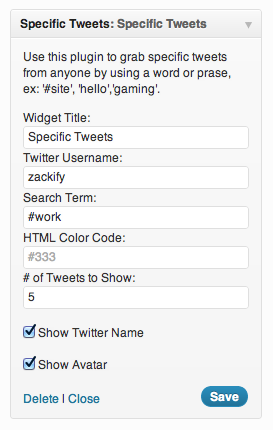
Widget Options 
Viewing the Widget
Ìgbéwọlẹ̀
- Upload
specifictweets.phpto the/wp-content/plugins/directory - Activate the plugin through the ‘Plugins’ menu in WordPress
- Head over the the widgets settings page and enable
Specific Tweets
FAQ
- Are Tweets cached?
-
Currently Tweets are not cached, I plan to update the app with built in caching before version 0.7.
Àwọn àgbéyẹ̀wò
Kò sí àwọn àgbéyẹ̀wò fún plugin yìí.
Àwọn Olùkópa & Olùgbéejáde
“Specific Tweets” jẹ́ ètò ìṣàmúlò orísun ṣíṣí sílẹ̀. Àwọn ènìyàn wọ̀nyí ti ṣe ìkópa sí plugin yìí.
Àwọn Olùkópa
Túmọ̀ “Specific Tweets” sí èdè rẹ.
Ṣe o nífẹ̀ẹ́ sí ìdàgbàsókè?
Ṣàwárí koodu, ṣàyẹ̀wò ibi ìpamọ́ SVN, tàbí ṣe àgbékalẹ̀ sí àkọsílẹ̀ ìdàgbàsókè nípasẹ̀ RSS.
Àkọsílẹ̀ àwọn àyípadà
0.5
- Specify number of Tweets to show
- Choose color of tweet text
- Show Twitter avatar
- Show Twitter name
0.1
- Lets you specify a username, term and widget title
- Auto linkifies @mentions, #hashtags, and URLs in Tweets