

Àpèjúwe
Smart Optimizer is a powerful yet lightweight WordPress optimization plugin that helps improve your websiteÌtumọ̀ Yorùbá: ’s performance through various optimization techniques. It provides both basic and advanced optimization features that can be enabled with a single click or controlled individually.
Key Features
Currently Available Features:
-
Basic Optimization:
- HTML Minification Ìtumọ̀ Yorùbá: – Reduces HTML file size by removing unnecessary whitespace and comments
-
Advanced Optimization:
- Disable WordPress Emojicons Ìtumọ̀ Yorùbá: – Remove unnecessary emoji-related scripts and styles
- Enable Lazy Load for Images Ìtumọ̀ Yorùbá: – Automatically add loading=”lazy” to images for better performance
Coming Soon Features:
-
Essential Features:
- Enable Browser Cache Ìtumọ̀ Yorùbá: – Add appropriate headers for browser caching of static resources
- Smart Image Optimization Ìtumọ̀ Yorùbá: – Automatically optimize and compress images
- GZIP Compression Ìtumọ̀ Yorùbá: – Enable GZIP compression for faster page loads
-
Advanced Features:
- CSS and JS Minification Ìtumọ̀ Yorùbá: – Compress CSS and JavaScript files for better performance
- Database Optimization Ìtumọ̀ Yorùbá: – Clean and optimize your WordPress database
- Preload Critical Resources Ìtumọ̀ Yorùbá: – Preload important resources for faster rendering
-
Monitoring & Analytics:
- Performance Analytics Dashboard Ìtumọ̀ Yorùbá: – Get insights into your siteÌtumọ̀ Yorùbá: ’s performance
- Speed Test Tools Ìtumọ̀ Yorùbá: – Test your siteÌtumọ̀ Yorùbá: ’s speed directly from your dashboard
Who Should Use Smart Optimizer?
- Website owners looking to improve page load times
- Developers seeking a well-structured optimization solution
- Anyone concerned about their WordPress siteÌtumọ̀ Yorùbá: ’s performance
Check out our other Plugins
Enhance your WordPress site with our other powerful plugins:
- Random Quote – Display daily inspirational quotes from ZenQuotes API with Gutenberg block and shortcode support.
- Smart Password Protect – Secure your WordPress site with password protection and IP whitelisting.
- Redirect After Logout – Redirect users to a custom page after logging out for enhanced user experience.
- Access Defender – Advanced security plugin to protect your WordPress site from unauthorized access and malicious attacks.
- Contributors Gallery – Showcase your WordPress contributors in a beautiful and customizable gallery layout.
- Product Spotlight Badge – Highlight your WooCommerce products with eye-catching badges to boost sales.
Additional Information
- Follow the developer on LinkedIn
- For support, feature requests, or bug reports, please visit the pluginÌtumọ̀ Yorùbá: ’s support forum
Privacy Policy
Smart Optimizer does not collect any personal data. It operates entirely within your WordPress installation.
Àwọn àwòrán ìbòjú
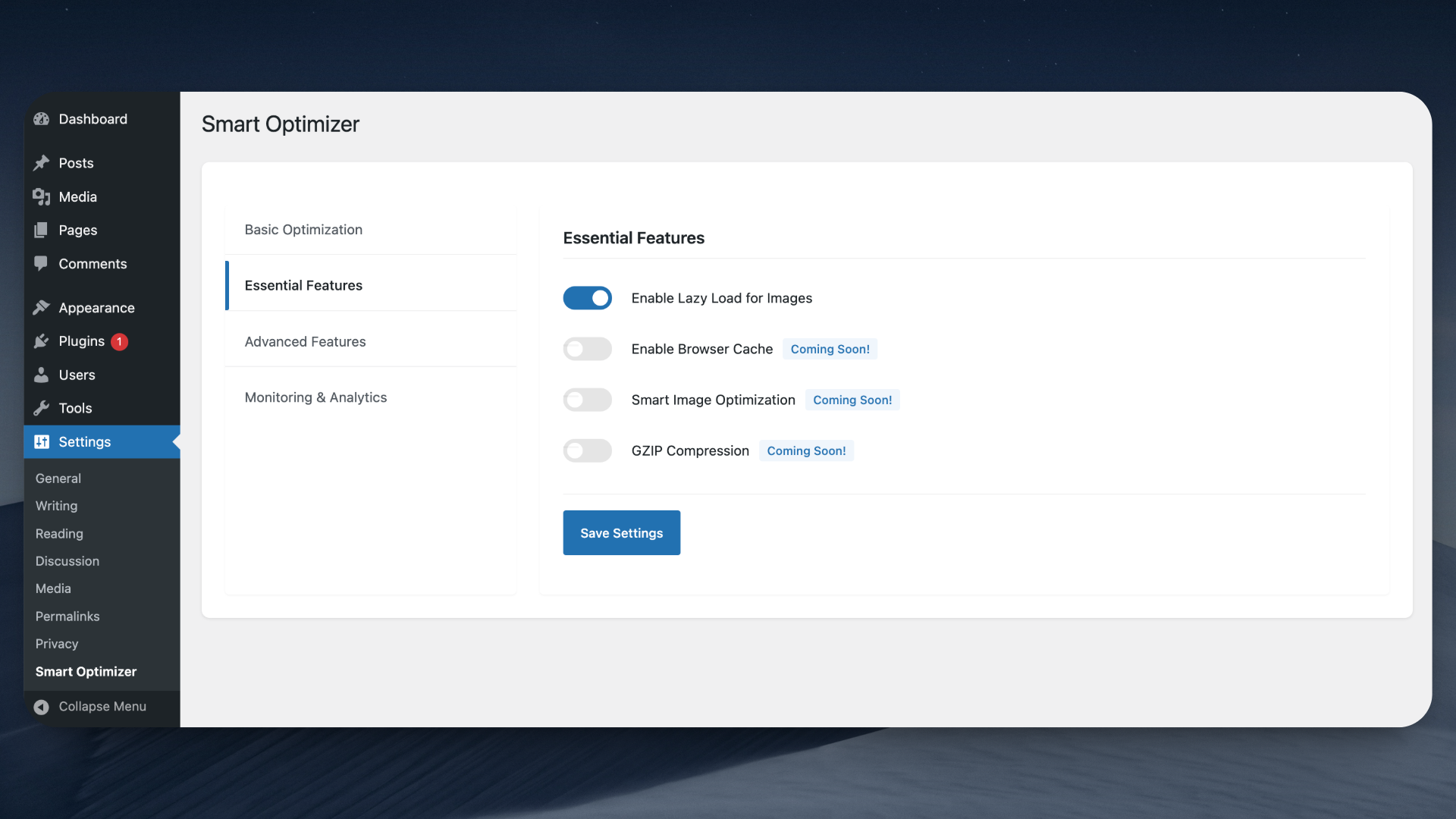
Plugin settings page showing basic optimization options
Ìgbéwọlẹ̀
Via WordPress Repository (Recommended):
- Log in to your WordPress Dashboard
- Navigate to Plugins > Add New
- Search for “Smart Optimizer”
- Click “Install Now” and wait for the installation to complete
- Click “Activate” to enable the plugin
- Navigate to Settings > Smart Optimizer to configure the plugin
Manual Installation
- Download the plugin zip file
- Log in to your WordPress dashboard
- Navigate to Plugins > Add New > Upload Plugin
- Choose the downloaded zip file and click “Install Now”
- After installation, click “Activate”
- Configure the plugin settings under Settings > Smart Optimizer
How to Use
Basic Optimization:
1. Go to Settings > Smart Optimizer
2. Toggle the “Enable Basic Optimization” switch
3. Save changes
4. Your site will now use minified HTML
Advanced Optimization:
1. Navigate to the Essential Features and Advanced Features sections
2. Choose which optimizations to enable:
Ìtumọ̀ Yorùbá: – Enable Lazy Load for Images
Ìtumọ̀ Yorùbá: – Disable WordPress Emojicons
3. Save your settings
4. Test your site to ensure everything works as expected
Note: Several advanced features are currently in development and will be available in upcoming updates.
FAQ
-
Will this plugin slow down my site?
-
No, Smart Optimizer is designed to be lightweight and efficient. All optimizations are performed with minimal server impact and are cached when possible.
-
Is this plugin compatible with caching plugins?
-
Yes, Smart Optimizer works well with most popular caching plugins. We recommend testing the optimization settings with your caching plugin enabled.
-
Will this plugin break my site?
-
No, the plugin is designed to be safe and includes fallback mechanisms. However, we recommend testing on a staging environment first and backing up your site before enabling optimization features.
-
How do I know if the optimizations are working?
-
You can use tools like Google PageSpeed Insights, GTmetrix, or WebPageTest to measure your siteÌtumọ̀ Yorùbá: ’s performance before and after enabling optimizations.
-
When will the “Coming Soon” features be available?
-
WeÌtumọ̀ Yorùbá: ’re actively working on these features and plan to release them in upcoming updates. Follow our changelog for the latest feature additions.
-
Can I disable specific optimizations?
-
Yes, all optimization features can be controlled individually through the plugin settings page.
Àwọn àgbéyẹ̀wò
Kò sí àwọn àgbéyẹ̀wò fún plugin yìí.
Àwọn Olùkópa & Olùgbéejáde
“Smart Optimizer Ìtumọ̀ Yorùbá: – Instantly Boost Page Speed with One-Click Optimization” jẹ́ ètò ìṣàmúlò orísun ṣíṣí sílẹ̀. Àwọn ènìyàn wọ̀nyí ti ṣe ìkópa sí plugin yìí.
Àwọn Olùkópa
Ṣe o nífẹ̀ẹ́ sí ìdàgbàsókè?
Ṣàwárí koodu, ṣàyẹ̀wò ibi ìpamọ́ SVN, tàbí ṣe àgbékalẹ̀ sí àkọsílẹ̀ ìdàgbàsókè nípasẹ̀ RSS.
Àkọsílẹ̀ àwọn àyípadà
1.0.1
- Enhancement: Default settings now enable all optimization features on plugin activation
- Optimization: Centralized default settings to improve code consistency and maintainability
- Code Improvement: Reduced code duplication across the plugin
1.0.0
- Initial release
- Basic optimization features (HTML minification)
- Advanced optimization options (Disable Emojicons, Lazy Load for Images)
- Modern object-oriented architecture implementation
- Full WordPress coding standards compliance