

Àpèjúwe
Simple Job Board provides an efficient solution for showcasing job openings on your careers page, and to receive job applications, ready to use with minimal configuration.
Looking for an easy, user-friendly and robust Job board plugin?
Simple Job Board by PressTigers is an easy, light weight plugin that adds a job board to your WordPress website.
This job board plugin is extendible and easy to use. A customized job board is created to manage various job openings via WordPress with the Simple Job Board. You can add multiple job listings different types of shortcodes. You can add multiple job features and customized application forms for every distinct job post. You can also add notes to an application right from the dashboard.
Why Simple Job Board
Features in free version
- Ready to Use: Pre-configured plugin, just install and start adding jobs.
- Customizable Appearance: Either use themeÌtumọ̀ Yorùbá: ’s style or customize the appearance.
- Manage Jobs: Easily manage jobs with all the information you want to display.
- Multi-Language Support: Fully compatible with WPML and WordPressÌtumọ̀ Yorùbá: ’s native translation features.
- Job Specifications: Add unlimited job specifications to attract potential candidates.
- Multi-Company Job Posting: Feature to associate multiple companies with jobs.
- Application Form Builder: Add unlimited fields to customize the job application form.
- Receive Applications: Applications are received via email and stored in the admin panel.
- View Applicants: View the list of applicants for a specific job.
- Jobs Categories: Taxonomy to add categories to manage jobs.
- Manage Location: Taxonomy to add location for a job.
- Types of Jobs: Taxonomy to manage job types.
- Jobs Tags: Taxonomy to add tags for jobs.
All taxonomies are used in listing filter to search the desired jobs.
The plugin is available in English, French(Français), Arabic (العربية), Brazilian Portuguese(Português do Brasil), Italian(Italiano), Russian(Русский), Chinese(简体中文), Dutch(Nederlands), Serbian(Српски језик), Swedish(Svenska), Urdu(اردو), Japanese(日本語), Polish(Polski) and Galician(Galego).
Shortcodes
[jobpost]: Use this shortcode to show jobs on a page, along with search form.
[jobpost layout=”grid”]: To list all the jobs as a grid view.
[jobpost category=”category-slug”]: To list jobs for a particular category.
[jobpost tag=”tag-slug”]: To list jobs for a particular tag.
[jobpost type=”type-slug”]: To list jobs for a particular type.
[jobpost location=”location-slug”]: To list jobs for a particular location.
[jobpost location=”location-slug” category=”category-slug” type=”type-slug”]: To list jobs with a combinations of taxonomies and terms.
[jobpost posts=”5Ìtumọ̀ Yorùbá: ″]: To limit the number of jobs per page with pagination.
[jobpost show_pagination=”no”]: Use this parameter to hide the pagination.
[jobpost show_search_form=”no”]: Use this parameter to hide the search form.
[job_details job_id=”123Ìtumọ̀ Yorùbá: ″ show_job_form=”yes” show_job_features=”no” job_form_description=”yes” show_job_meta=”no”]: To show individual job anywhere.
Mobile App
Manage your Job Board from anywhere with the Simple Job Board mobile app on Android and iOS.
Simple Job Board Add-ons
Here are some highly useful add-ons for Simple Job Board that can enhance its functionality and capabilities.
Add-ons for Applications Management:
- Email Attachment Ìtumọ̀ Yorùbá: – $20 : Sends applicantÌtumọ̀ Yorùbá: ’s information and the uploaded resume to Admin, HR & Job Author via email.
- How to Apply Ìtumọ̀ Yorùbá: – $15 : Offers detailed instructions to applicants on the application process.
- Multiple Attachment Fields Ìtumọ̀ Yorùbá: – $15 : Enables multiple upload fields in job application form.
- Job Board CAPTCHA Ìtumọ̀ Yorùbá: – $15 : An effective security solution that adds Google reCAPTCHA at the bottom of the job application form.
- Job Application to PDF Ìtumọ̀ Yorùbá: – $15 : Adds a “Print Application PDF” link on the applicant listing & detail page.
- Job Applications CSV Exporter Ìtumọ̀ Yorùbá: – $15 : Downloads the details of all applicants against every job in the CSV file.
- Resume Preview Ìtumọ̀ Yorùbá: – $10 : Enables a resume preview feature for admins on the application page.
- Location Base Hiring Ìtumọ̀ Yorùbá: – $15 : Sends job notification to an HR added to each job location.
- Job Level Filter Ìtumọ̀ Yorùbá: – $10 : Adds a job level filter to your job filters.
- Category Base Hiring Ìtumọ̀ Yorùbá: – $15 : Sends job notifications to an HR added to each job category.
- Custom Job Application Statuses Ìtumọ̀ Yorùbá: – $15 : Gives you the liberty to define custom job application statuses.
- Job Application Deadline Ìtumọ̀ Yorùbá: – $10 : Adds a Job Deadline meta box to one’s job posts at backend.
- Bulk Resume Download Ìtumọ̀ Yorùbá: – $10 : Enables administrators to download multiple resumes simultaneously for efficient review.
- Extend Attachment File Types Ìtumọ̀ Yorùbá: – $10 : Accept more files with different extensions by allowing you to add custom file types instead of only using predefined ones.
- Job Applications Counter Ìtumọ̀ Yorùbá: – $10 : Displays the number of applications received for each job posting.
- Job Seeker Dashboard Ìtumọ̀ Yorùbá: – $35 : Provides applicants with a personalized dashboard to monitor their job applications and manage resume.
- Job Alerts Ìtumọ̀ Yorùbá: – $20 : Allows job seekers to create email alerts for new job openings along with frequency i.e. daily, weekly, fortnightly, or monthly.
- Unique Applications Ìtumọ̀ Yorùbá: – $10 : Prevents duplicate job applications by validating submissions using email, phone number, or both.
- Job Applications Import/Export Ìtumọ̀ Yorùbá: – $15 : Allows you to safely export and import job applications along with resumes and attachments between WordPress websites.
Add-ons for Jobs Management:
- Job Expirator Ìtumọ̀ Yorùbá: – $10 : Adds a Job Expirator meta box to your job posts at the backend.
- Frontend Job Posting Ìtumọ̀ Yorùbá: – $35 : Frontend users can create their profile by Signup/Login to their dashboard and can Add/Edit their jobs and manage the job applications from the frontend.
- Content Replacement Ìtumọ̀ Yorùbá: – $10 : Changes the default placement of the Job Features section on the job detail page.
- Job Listings Import/Export Ìtumọ̀ Yorùbá: – $20 : Facilitates the import and export of job listings for easy data management.
- Job Posting Management Ìtumọ̀ Yorùbá: – $15 : Allows users to manage their jobs with auto re-publish and auto-delete features.
Add-ons for User Experience Enhancements:
- Company Details & Filter Ìtumọ̀ Yorùbá: – $20 : Provides Company listing for Jobs and front end filters.
- Google Job Search and Indexing API Ìtumọ̀ Yorùbá: – $20 : Responsible to integrate the Google Structured Data against each job so google can identify your jobs.
- Remove Job Posted Date Ìtumọ̀ Yorùbá: – $10 : Remove the job posted date for your job post.
- Jobs Sorting Ìtumọ̀ Yorùbá: – $10 : Adds a sorting filter on the jobs listing page.
- Job Industry Filter Ìtumọ̀ Yorùbá: – $10 : Adds a job industry filter to your job filters.
- Job Search Box Ìtumọ̀ Yorùbá: – $15 : Displays a search box with Keywords, Job Category, Job Type, and Job Location filters.
- Salary Range Filter Ìtumọ̀ Yorùbá: – $10 : Adds a salary range filter for your job filter.
- AJAX Job Search Ìtumọ̀ Yorùbá: – $15 : Adds AJAX based job search on the jobs listing page and job listing shortcode.
- Featured Job Listing Ìtumọ̀ Yorùbá: – $15 : Adds featured jobs at top of listing.
- Custom Redirection Ìtumọ̀ Yorùbá: – $10 : Facilitates hassle-free installation and enables convenient redirection of job detail pages to an internal or external destination.
- Custom Apply Link Ìtumọ̀ Yorùbá: – $15 : Allowing site admins/employers to add custom apply links to their job postings.
- Refer a Friend Ìtumọ̀ Yorùbá: – $15 : Enables feature to refer a friend for a job opportunity.
- Geolocation Job Search Ìtumọ̀ Yorùbá: – $15 : Allows the applicants to search for jobs in areas of a selected location within a specific radius.
Add-ons for Integration with Other Tools:
- Add-on for Divi Theme Ìtumọ̀ Yorùbá: – $35 : Allows you to style the job listing page & job detail page with Divi theme.
- Add-on for Elementor Ìtumọ̀ Yorùbá: – $35 : Allows you to style the job listing page & job detail page with Elementor Free version.
- Mobile App Connector Ìtumọ̀ Yorùbá: – $49 : Allows the site administrator to create and browse jobs directly from their mobile devices.
- Add-on for WPBakery Ìtumọ̀ Yorùbá: – $35 : Allows you to style the job listing page & job detail page with WP Bakery plugin.
- Cloud Storage Connector Ìtumọ̀ Yorùbá: – $20 : Lets you upload job attachments to Dropbox and Google Drive at the submission of applications.
Add-ons for Communication Enhancements:
- Email Notification Templates Ìtumọ̀ Yorùbá: – $15 : Makes the email notifications more personalized by allowing you to write custom email templates instead of the predefined one’s.
- Individual Job Email Notifications Ìtumọ̀ Yorùbá: – $15 : Allows users to enhance email notifications ability against individual jobs.
Add-ons Bundles with Discounts:
- Email Notifications Bundle Ìtumọ̀ Yorùbá: – $25 : Contains two Add-ons i.e Individual Job Email Notifications and Email Notification Templates add-ons.
- 3 in 1 Bundle Ìtumọ̀ Yorùbá: – $40 : The bundle with top selling items. Job Board – 3 in 1 solution has the Email Attachment, Multiple Attachment Fields, and Job Expirator add-ons.
- 4 in 1 Bundle Ìtumọ̀ Yorùbá: – $55 : Contains 4 Add-ons i.e Email Attachment, Multiple Attachment Fields, Extend Attachment File Types, and Email Notification Templates add-ons.
- 5 in 1 Bundle Ìtumọ̀ Yorùbá: – $60 : Contains 5 Add-ons i.e Job Application to PDF Add-on, Job Application CSV Add-on, Category Based Hiring, Location Base hiring, and the Content Replacement Add-on.
- 6 in 1 Bundle Ìtumọ̀ Yorùbá: – $75 : Contains 6 Add-ons i.e How to Apply, Featured Job Listing, Job Listings Import/Export, Job Board CAPTCHA, Bulk Resume Download, and Resume Preview add-ons.
- Applications Handling Bundle Ìtumọ̀ Yorùbá: – $70 : Contains 6 Add-ons i.e Job Application to PDF, Job Applications CSV Exporter, Job Application Deadline, Custom Job Application Statuses, Job Applications Counter, and Cloud Storage Connector add-ons.
- Search and Sort Bundle Ìtumọ̀ Yorùbá: – $50 : Contains 4 Add-ons i.e AJAX Job Search, Google Job Search and Indexing API, Jobs Sorting, and Job Search Box add-ons.
- All Filters Bundle Ìtumọ̀ Yorùbá: – $35 : All Filters Add-on Bundle includes Company Details & Filter, Job Level Filter, Job Industry Filter, and Salary Range Filter add-ons.
- All Add-ons Bundle : Purchase all add-ons bundle in just a simple click! and on 20% flat discount rate.
- Custom Bundle : An ultimate must-have add-on set that lets you create your own bundle and get discount as per rules.
Not in the list, for custom add-on please contact us
Can you contribute?
If you are an awesome contributor for translations or plugin development, please contact us at support@presstigers.com
Credits
- International Telephone Input(https://intl-tel-input.com)
- Google Fonts(https://fonts.google.com)
- jQuery UI(https://jqueryui.com)
- WP Color Picker Alpha(https://github.com/23r9i0/wp-color-picker-alpha)
- Created Guten Block by Ahmad Awais(https://github.com/ahmadawais/create-guten-block)
Configurations & Templating
Follow the following steps for a fully functional Job Board:
- After installation, go to “Job Board” menu in the admin panel, and add a new job listing.
- Add multiple job features and a fully customized application form right from the job listing editor.
- To list all the job listings and start receiving applications, add [jobpost] shortcode in an existing page or add a new page and write shortcode anywhere in the page editor.
- After someone fills an application form from the front-end, you will receive it right in the dashboard.
- You can add special notes to an application by opening its detail page.
Job Board Templating
The job board templating feature allows you to change the following file templates. We are providing two UI layouts named as Classical and Modern.
- For modifying classical layout templates, please refer to v1 directory.
-
For modifying modern layout templates, please refer to v2 directory.
-
To change a template, please add “simple_job_board” folder in your activated themeÌtumọ̀ Yorùbá: ’s root directory.
- Add your file from plugin simple-job-board >templates folder keeping the same file directory structure and do whatever you want. Please exclude “templates” while making the directory structure in your theme.
Enjoy your work with Simple Job Board templating.
Àwọn àwòrán ìbòjú
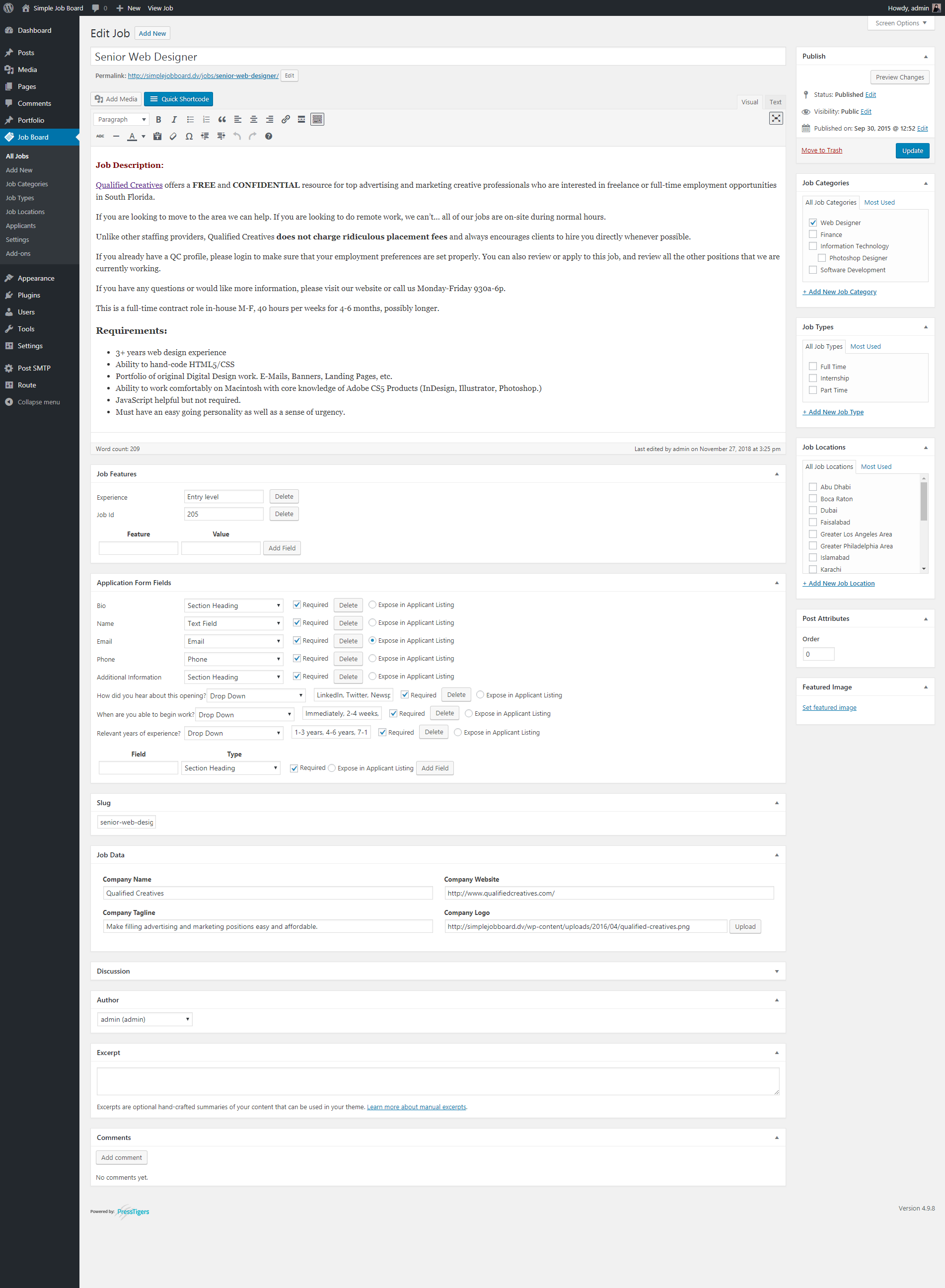
Job Board Creation: Classical Layout Ìtumọ̀ Yorùbá: – Allow users to create a Job Board with ease by using a shortcode. 
Job Board Creation: Modern Layout Ìtumọ̀ Yorùbá: – Allow users to create a Job Board with icon based job features. 
Job Categories Ìtumọ̀ Yorùbá: – Categorize your similar jobs under a group of categories with the help of a shortcode. 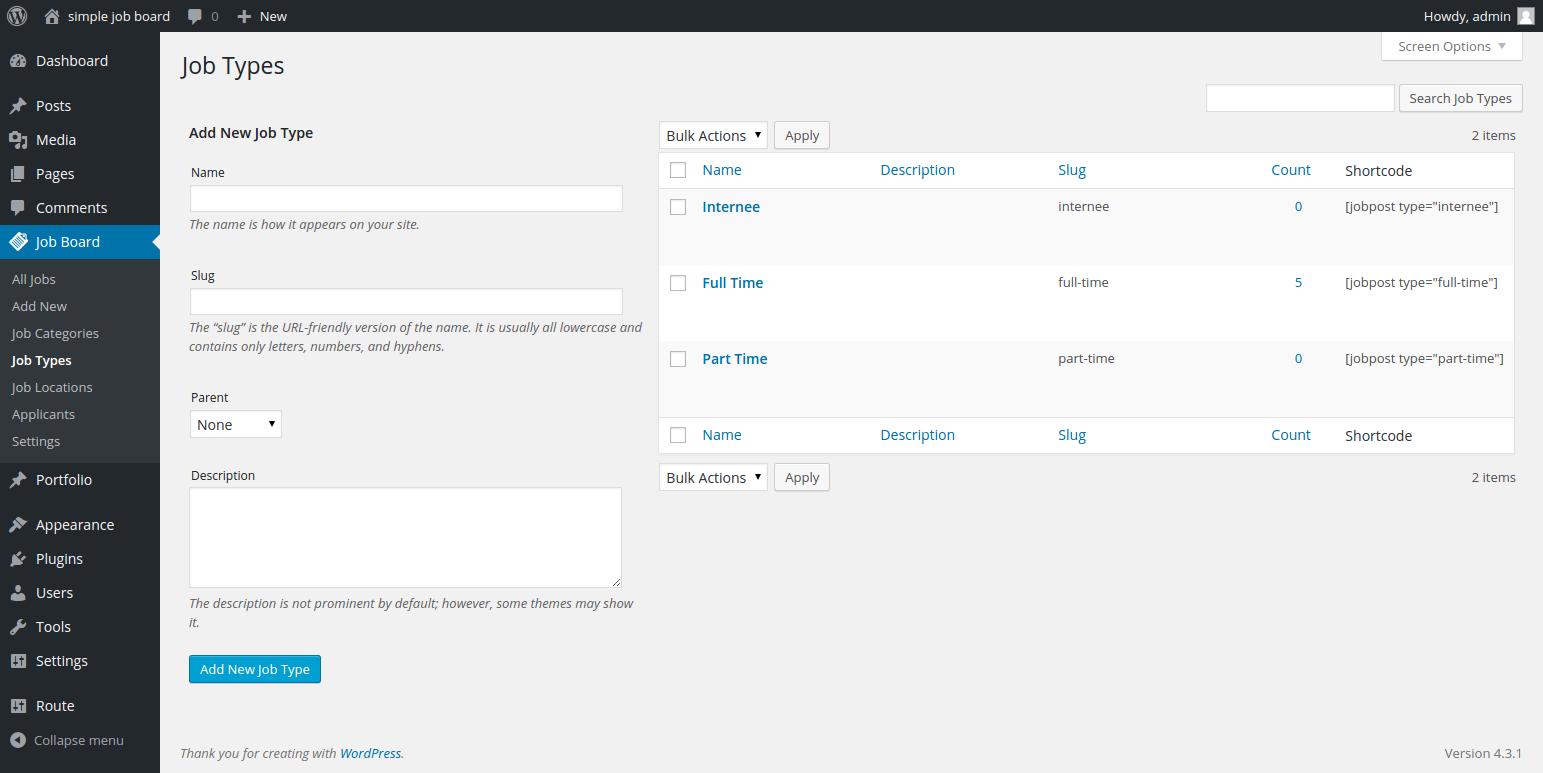
Job Type Ìtumọ̀ Yorùbá: – This allows users to specify the type of jobs you offer to them. 
Job Location Ìtumọ̀ Yorùbá: – Let your users create jobs according to a certain demographic location. 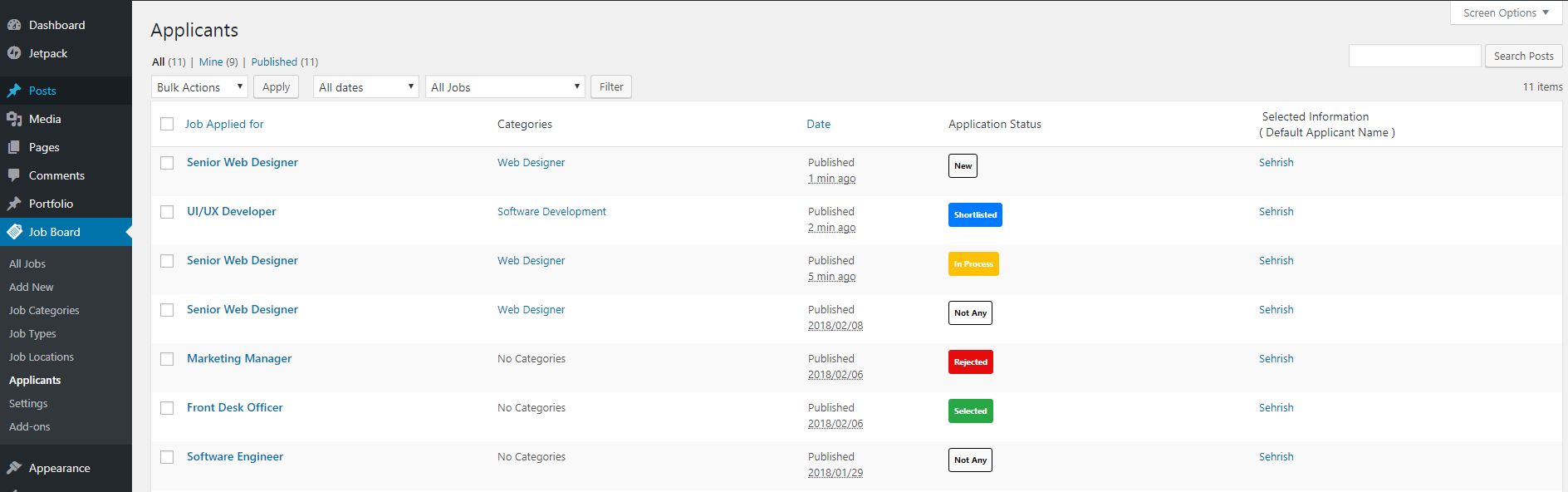
List of Applicants Ìtumọ̀ Yorùbá: – You can get all the applicants applied for jobs over here, by clicking each of applicant you can get further details and download the resume. 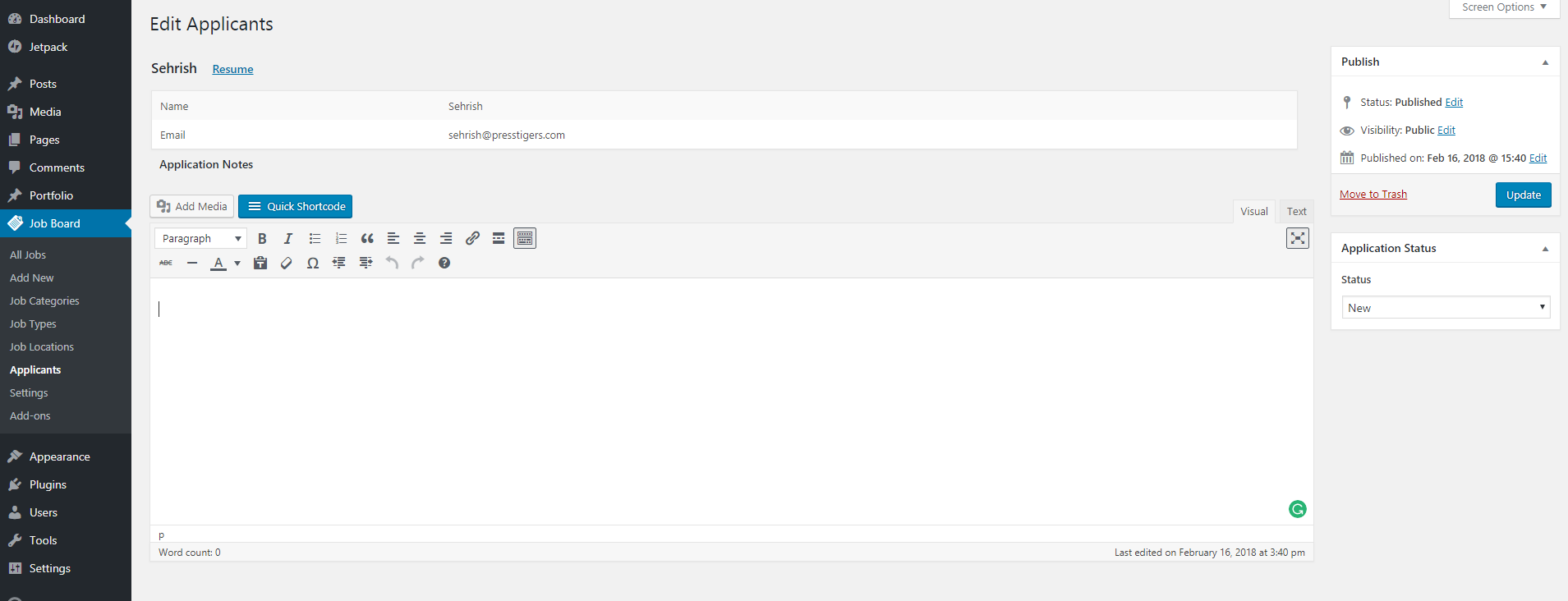
Application Notes Ìtumọ̀ Yorùbá: – This section helps site administrators to add additional notes to received Resumes. 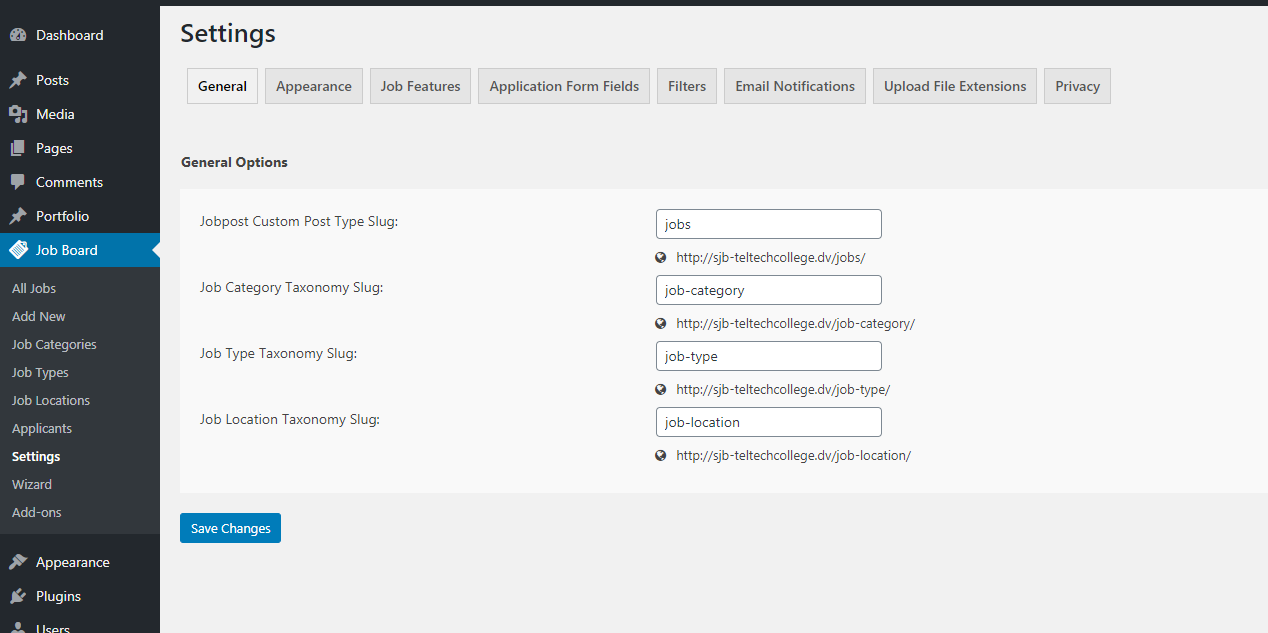
General Ìtumọ̀ Yorùbá: – Allow users to change the slug of custom post types and taxonomy. 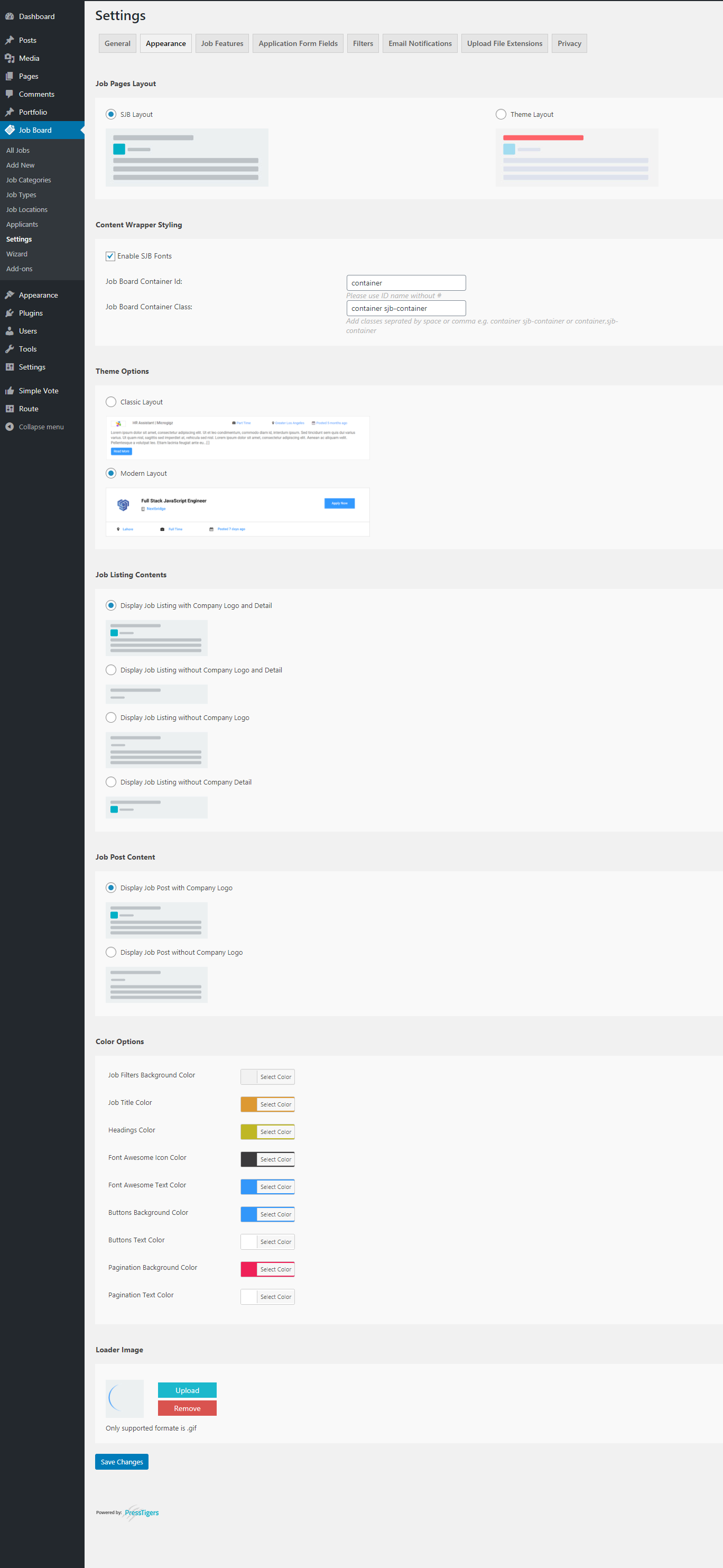
Appearance Ìtumọ̀ Yorùbá: – Let your users change view & typography of job listing on front-end. 
Job Features Ìtumọ̀ Yorùbá: – Allow your users to add their own set of features to a job listing or a single job post. 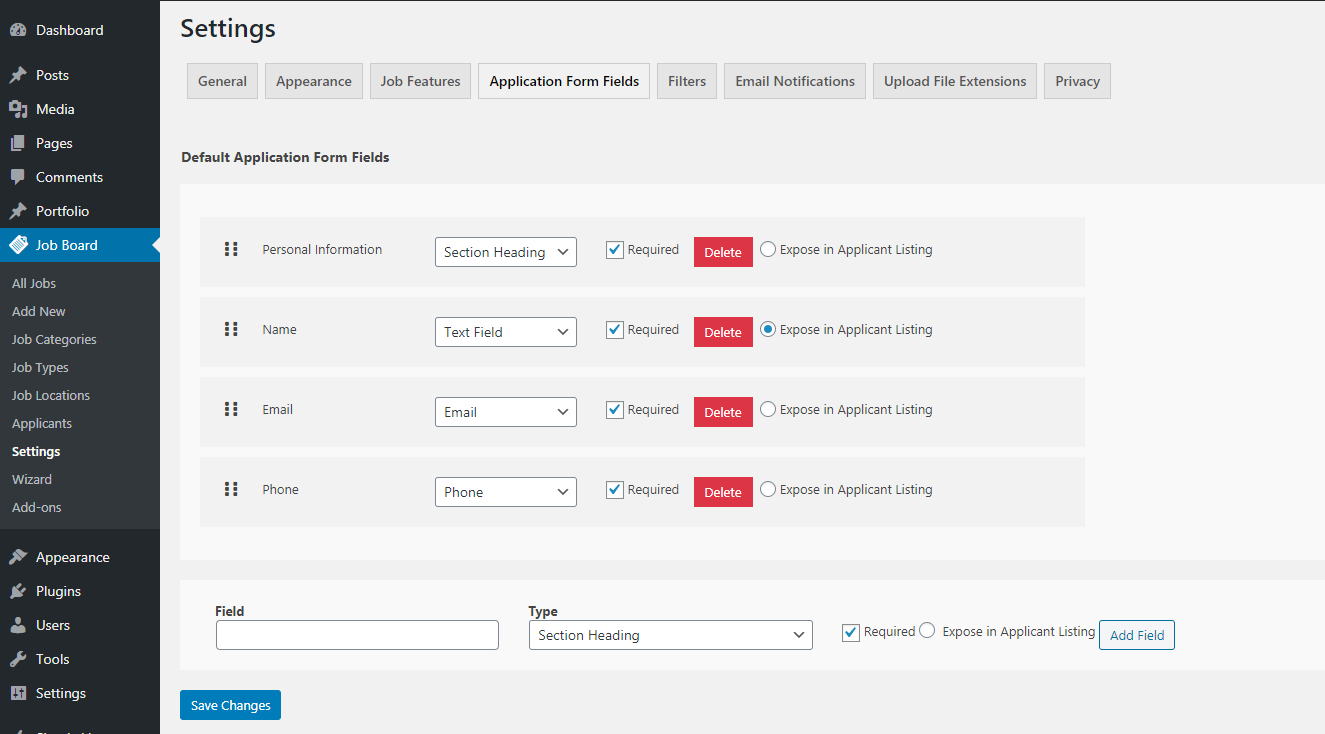
Application Form Fields Ìtumọ̀ Yorùbá: – This will help in creating customized job form. 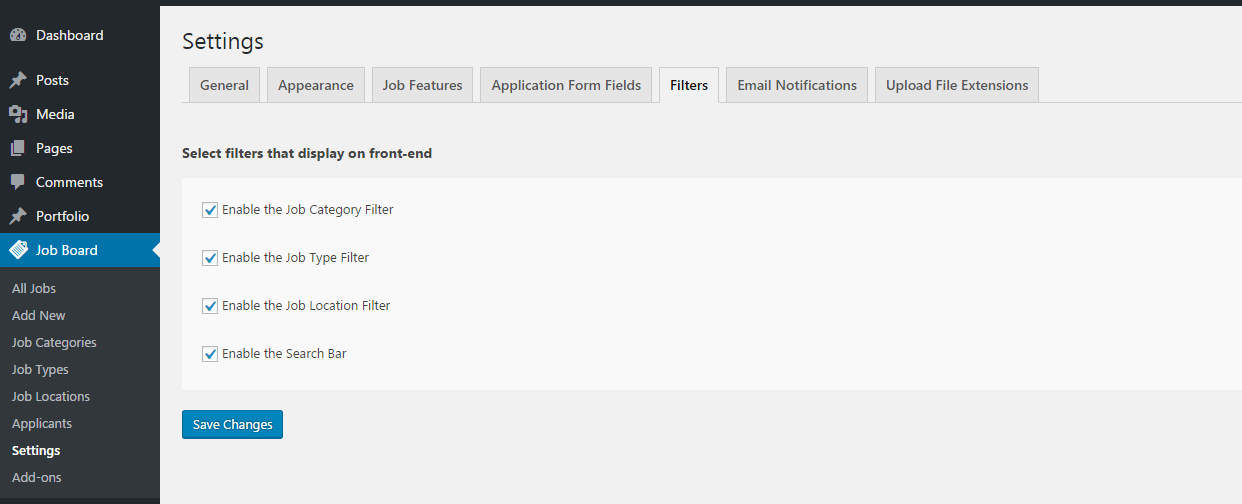
Filters Ìtumọ̀ Yorùbá: – Give your users complete control over job listing filters. 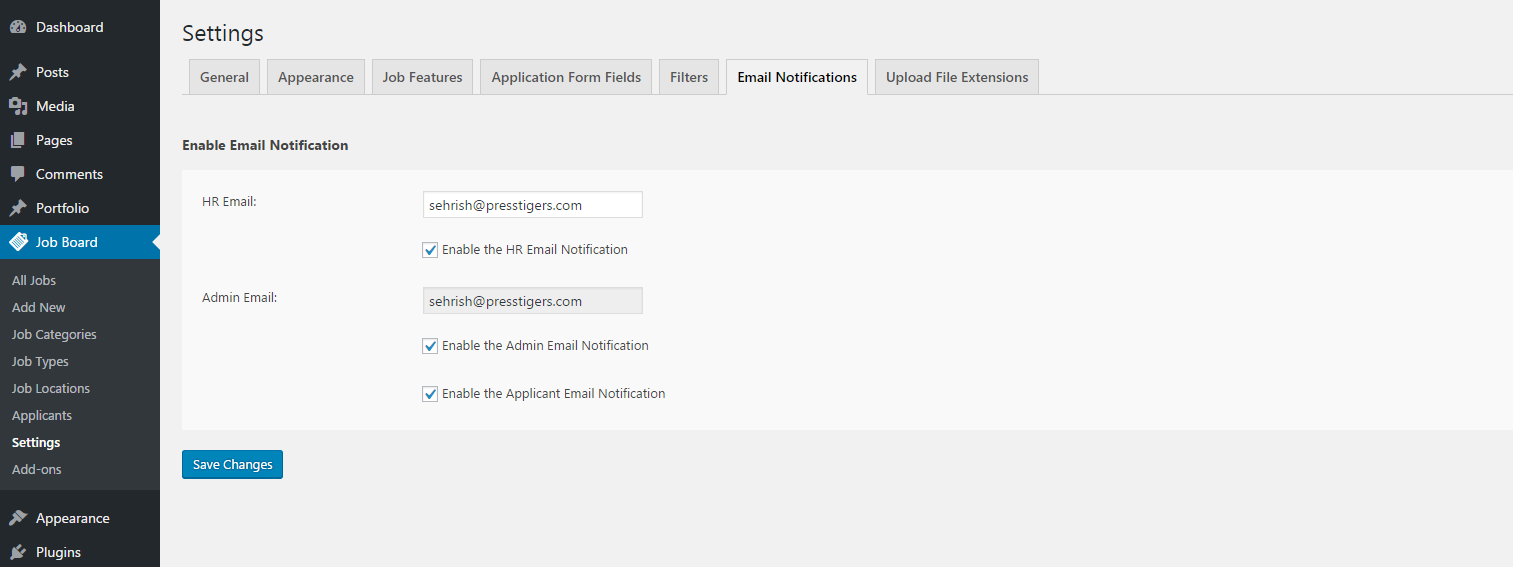
Email Notifications Ìtumọ̀ Yorùbá: – This section will enable various notification options for users. 
File Extensions Ìtumọ̀ Yorùbá: – Upload Documents with various extensions along with document security. 
Privacy Ìtumọ̀ Yorùbá: – Set privacy policy and terms & conditions text for your job. 
Classical Job Listing List View Ìtumọ̀ Yorùbá: – Classical layout of job listing list view. 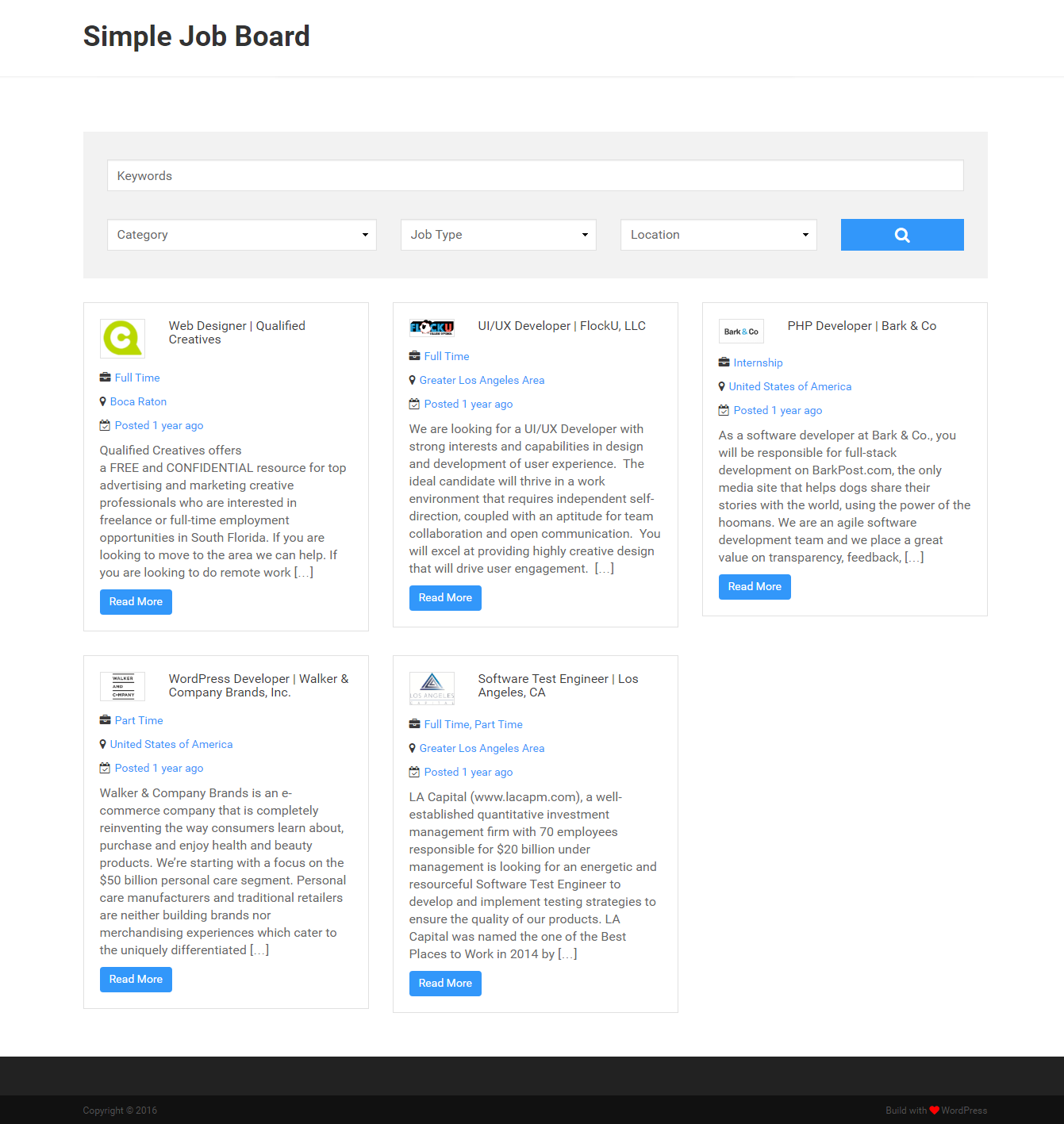
Classical Job Listing Grid View Ìtumọ̀ Yorùbá: – Classical layout of job listing grid view. 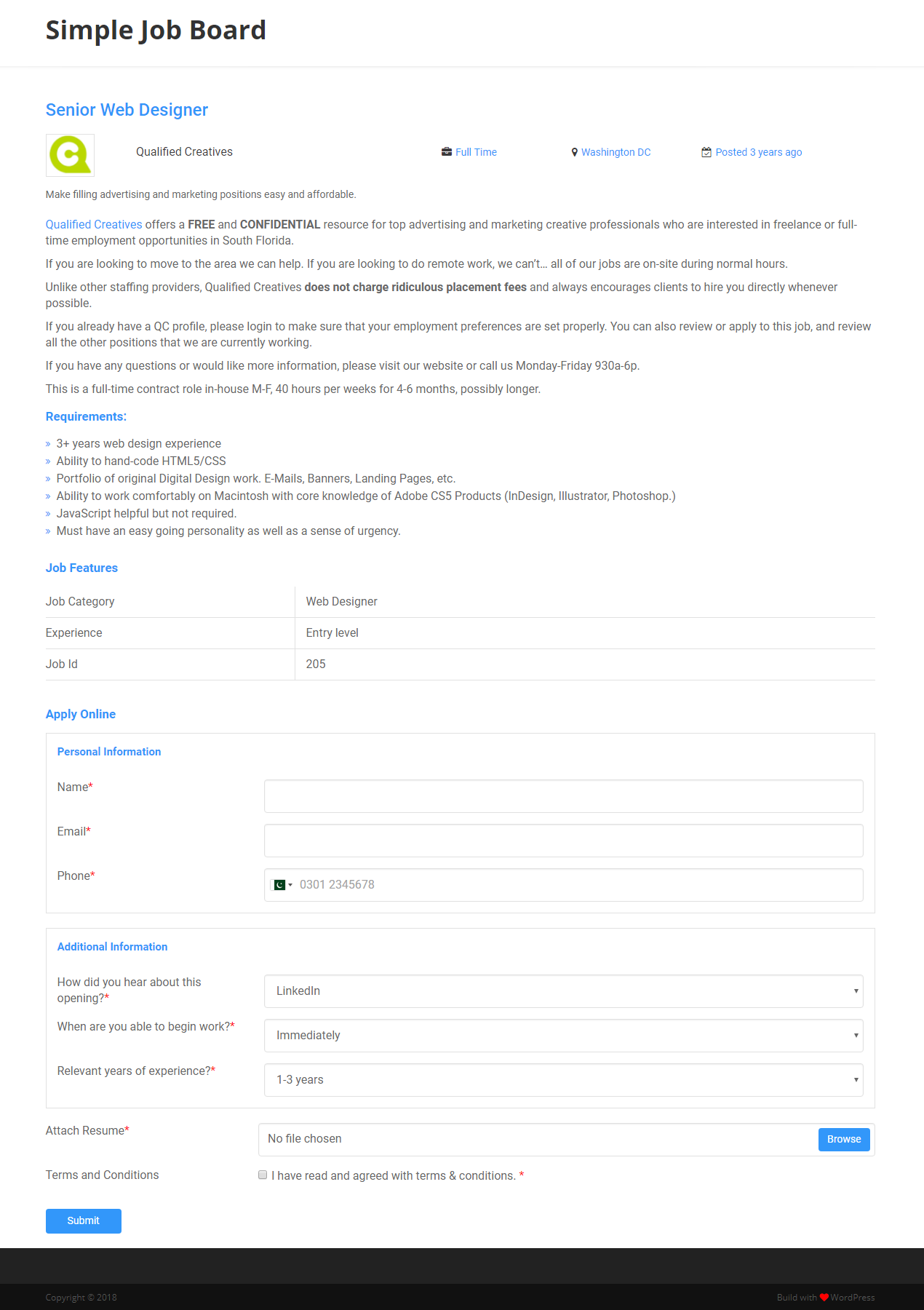
Classical Job details page Ìtumọ̀ Yorùbá: – Job board detail/single page. Job features and job application form is placed on it. 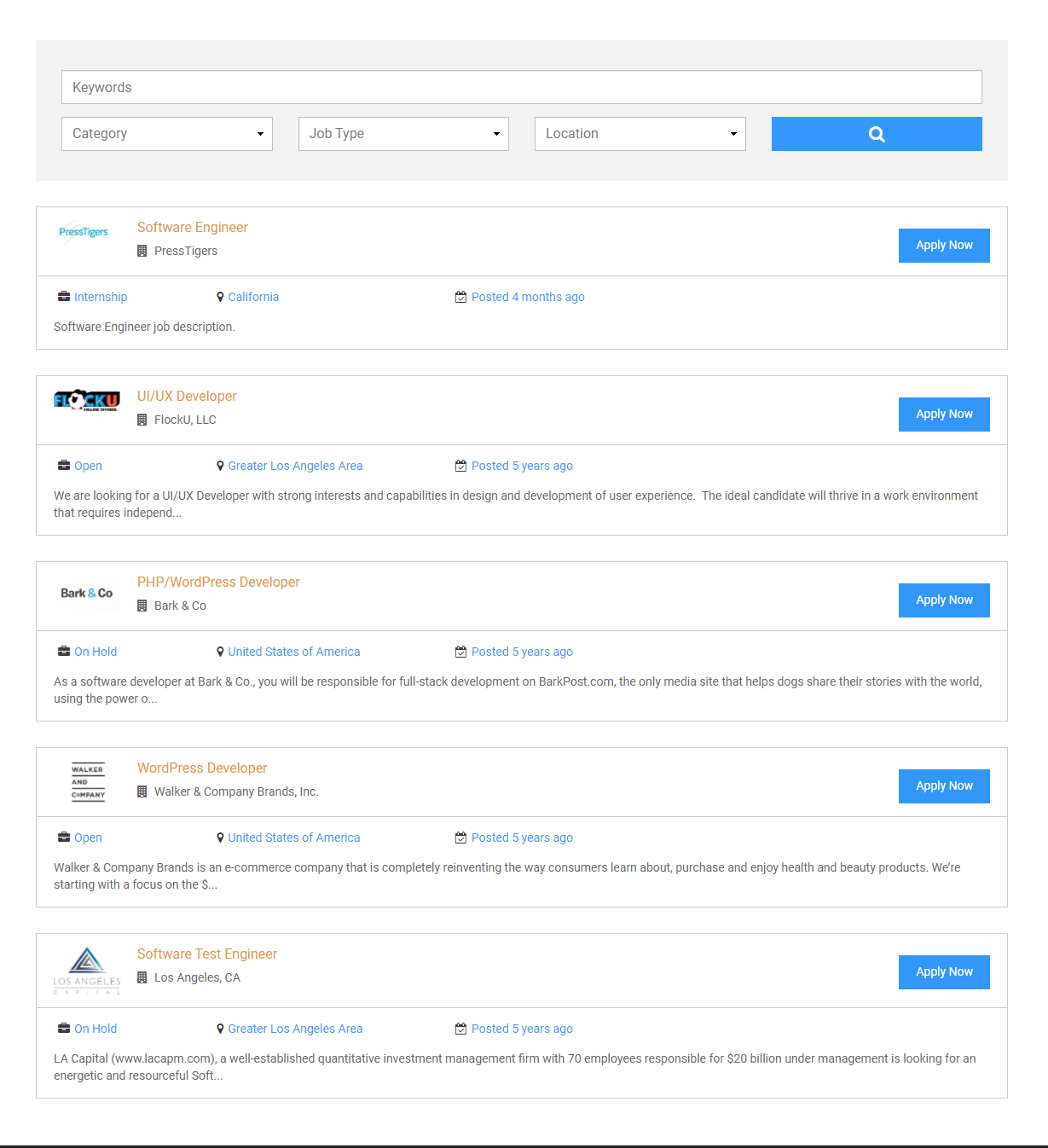
Modern Job Listing List View Ìtumọ̀ Yorùbá: – Modified layout of job listing list view. 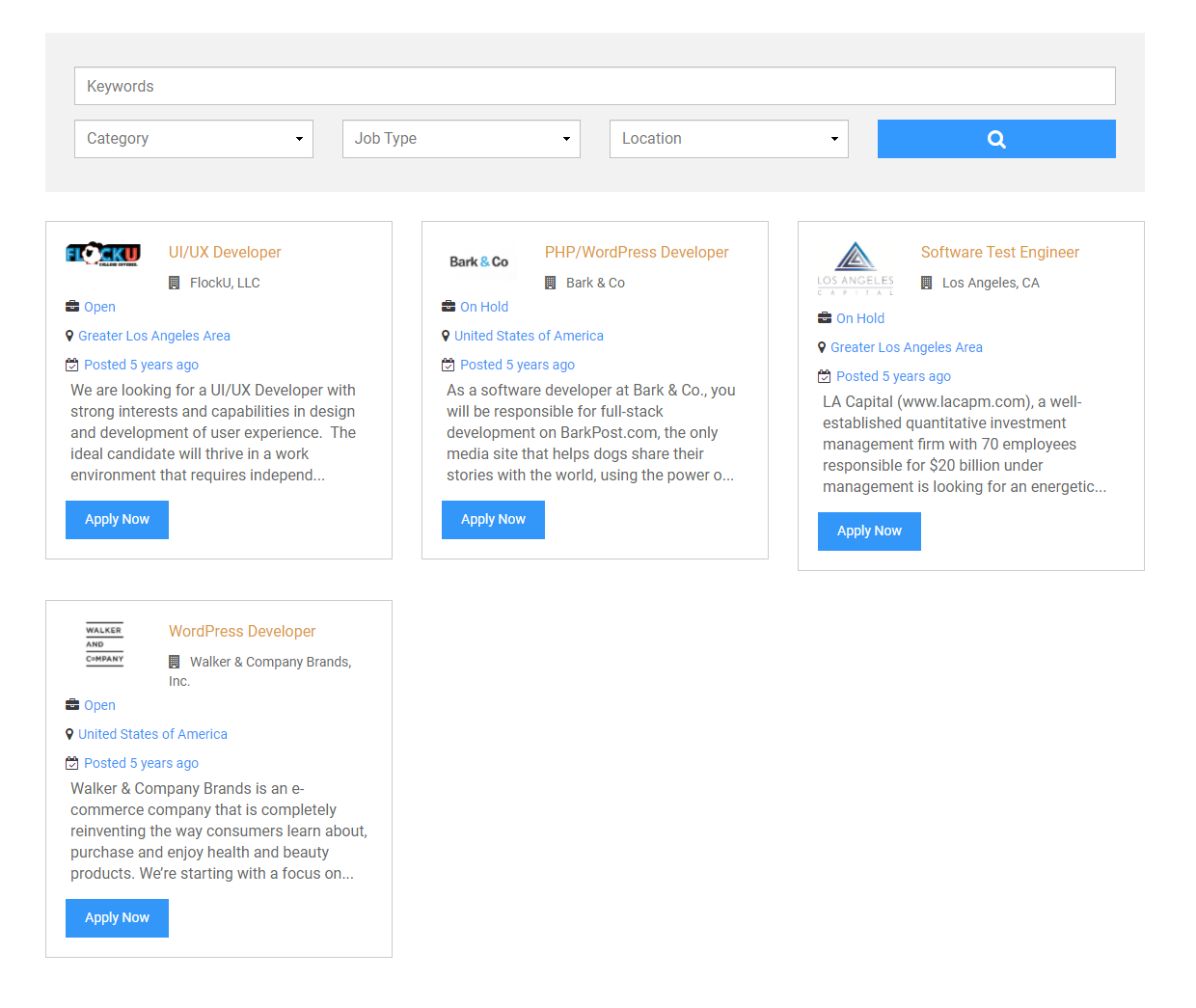
Modern Job Listing Grid View Ìtumọ̀ Yorùbá: – Modified layout of job listing grid view. 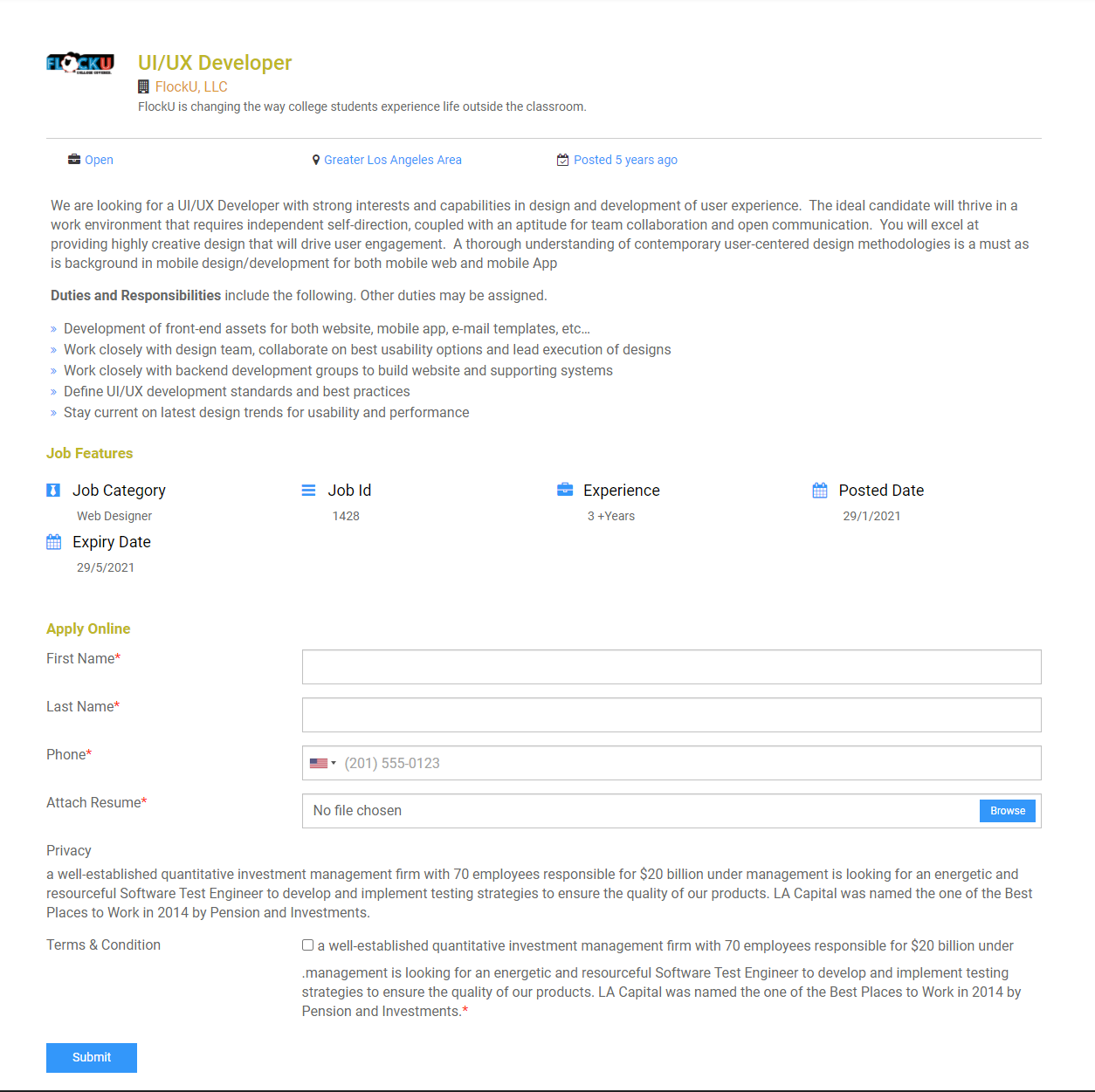
Modern Job details page Ìtumọ̀ Yorùbá: – Modified layout of Job board detail/single page. Icon based job features are placed on it.
Àwọn ìdí
Plugin yìí pèsè 1 ìdí.
- SJB Listing
Ìgbéwọlẹ̀
- Download plugin.
- Upload
simple-job-board.zipto the/wp-content/plugins/directory to your web server. - Activate the plugin through the ‘Plugins’ menu in WordPress.
- Add a standard WordPress page or post and use the [jobpost] shortcode in the editor to make it a Job Board.
FAQ
-
How to show job listings on the front-end?
-
To list all the job listings and start receiving applications, add [jobpost] shortcode in an existing page or add a new page and write shortcode anywhere in the page editor.
-
Job Page Expands Across Entire Page
-
ItÌtumọ̀ Yorùbá: ’s container class naming issue. We canÌtumọ̀ Yorùbá: ’t set all websites container classes because every website has its own CSS and naming conventions.
So, we are giving the facility to Job BoardÌtumọ̀ Yorùbá: ’s users for adding container class or Id under Settings> Appearance tab. Please add your website container class in “Job Board Container Class:” under Job Board> Settings> Appearance tab.
-
Where can I assign global settings for same job posts?
-
You can assign global job listing settings to each job post through settings.
-
Can I upload a resume with different extensions?
-
Yes, you can upload a resume document with .pdf, .odt, .txt, .rtf, .doc, .docx extensions from the settings page.
-
Can I show only 5 latest jobs on front-end with pagination?
-
Yes, you can show any number of posts on your website with pagination feature by using shortcode with “posts” attribute i.e. [jobpost posts=”5Ìtumọ̀ Yorùbá: ″]
-
Can I show job listing grid view using a shortcode?
-
Yes, you can use a shortcode on post page i.e. [jobpost layout=”grid”]
-
Can I show job listings for particular “Category” using a shortcode?
-
Yes, you can use a shortcode on post page i.e. [jobpost category=”category-slug”]
-
Can I show job listings for particular “Type” using a shortcode?
-
Yes, you can use a shortcode on post page i.e. [jobpost type=”type-slug”]
-
Can I show job listings for particular “Location” using a shortcode?
-
Yes, you can use a shortcode on post page i.e. [jobpost location=”location-slug”]
-
Can I use combination for various shortcodes to display job listings?
-
Yes, you can use various combinations of shortcodes with spaces i.e. [jobpost location=”location-slug” category=”category-slug” type=”type-slug” tag=”tag-slug”]
-
How Can I view the Applicant list for a Job Post?
-
In your WordPress admin panel, go to “Job Board” menu and “Applicants” section
-
How can I configure default fields for the job application form displayed on all jobs?
-
To set default fields for the job application form shown on every job post, navigate to Settings and click on Application Form Fields. Under the “Default Application Form Fields” section, you can configure the input fields with full flexibility.
-
How can I disable formatting or flags in the phone number input field?
-
To remove formatting and flags from the phone number input, navigate to Settings and select Application Form Fields. In the “Disable formatting for Phone Number” section, check the checkbox and click the Save Settings button at the bottom.
Àwọn àgbéyẹ̀wò


Àwọn Olùkópa & Olùgbéejáde
“Simple Job Board” jẹ́ ètò ìṣàmúlò orísun ṣíṣí sílẹ̀. Àwọn ènìyàn wọ̀nyí ti ṣe ìkópa sí plugin yìí.
Àwọn Olùkópa
A ti túmọ̀ “Simple Job Board” sí àwọn èdè agbègbè 11. Ọpẹ́lọpẹ́ fún àwọn atúmọ̀ èdè fún àwọn ìkópa wọn.
Túmọ̀ “Simple Job Board” sí èdè rẹ.
Ṣe o nífẹ̀ẹ́ sí ìdàgbàsókè?
Ṣàwárí koodu, ṣàyẹ̀wò ibi ìpamọ́ SVN, tàbí ṣe àgbékalẹ̀ sí àkọsílẹ̀ ìdàgbàsókè nípasẹ̀ RSS.
Àkọsílẹ̀ àwọn àyípadà
2.14.2
- Feature – Added an option to manage job features/details from Settings instead of updating each job individually.
- Tweak Ìtumọ̀ Yorùbá: – Updated the styling to better match the active theme’s typography.
- Fix Ìtumọ̀ Yorùbá: – Adjusted bullet styling to align with the active theme.
2.14.1
- Tweak Ìtumọ̀ Yorùbá: – Enhanced HTML content handling for email delivery.
- Fix Ìtumọ̀ Yorùbá: – Resolved a Spanish translation issue.
- Fix Ìtumọ̀ Yorùbá: – Resolved an issue related to the optional file input field.
2.14.0
- Feature Ìtumọ̀ Yorùbá: – Added an option to manage application form fields from Settings, rather than updating each job individually.
- Tweak Ìtumọ̀ Yorùbá: – Enhanced the style to align with the existing theme.
2.13.9
- Feature Ìtumọ̀ Yorùbá: – Improved jobpost shortcode for job listings to show jobs from specific tags.
- Feature Ìtumọ̀ Yorùbá: – Added two new parameters in jobpost shortcode to hide the search form and pagination.
- Tweak Ìtumọ̀ Yorùbá: – If the shortcode displays jobs from specific categories, then the search dropdown will only show those categories instead of all and if only one categoryÌtumọ̀ Yorùbá: ’s job displayed then categories dropdown will not show into the search form.
- Tweak Ìtumọ̀ Yorùbá: – Updated the single job post styling to better match the active themeÌtumọ̀ Yorùbá: ’s style.
- Tweak Ìtumọ̀ Yorùbá: – Added a Close button alongside Submit in the Quick Apply popup for better user convenience
- Fix Ìtumọ̀ Yorùbá: – Removed extra spaces from the Quick Apply popup content.
- Fix Ìtumọ̀ Yorùbá: – Fixed occasional issue with single job title display.
- Fix Ìtumọ̀ Yorùbá: – Updated jQuery Validation library to address security vulnerability.
- Fix Ìtumọ̀ Yorùbá: – Updated Gutenberg block code to fix a security vulnerability.
- Fix Ìtumọ̀ Yorùbá: – Improved layout for tablet and mobile devices.
2.13.8
- Tweak Ìtumọ̀ Yorùbá: – Improved support for page builder plugins.
- Fix Ìtumọ̀ Yorùbá: – Implemented a security enhancement.
2.13.7
- Feature Ìtumọ̀ Yorùbá: – Added setting to toggle phone field formatting (with or without country code and formatting).
- Feature Ìtumọ̀ Yorùbá: – Introduced helper functions for handling time and timezone based on WordPress settings.
- Tweak Ìtumọ̀ Yorùbá: – Refined form submission process to address intermittent submission issues.
- Tweak Ìtumọ̀ Yorùbá: – Improved the layout of applicant details in the admin panel’s application view area.
2.13.6
- Fix Ìtumọ̀ Yorùbá: – Add settings to enable or disable additional security check.
2.13.5
- Fix Ìtumọ̀ Yorùbá: – Fixed the application form submission.
2.13.4
- Fix Ìtumọ̀ Yorùbá: – Fixed the is required translation issue.
- Fix Ìtumọ̀ Yorùbá: – Fixed the resume optional issue.
- Tweak Ìtumọ̀ Yorùbá: – Modified according to EU regulations.
- Tweak Ìtumọ̀ Yorùbá: – Enhanced the security
- Tweak Ìtumọ̀ Yorùbá: – Updated the Jquery validation library.
- Tweak Ìtumọ̀ Yorùbá: – Made wp editor compatible with gutenberg editor.
- Tweak Ìtumọ̀ Yorùbá: – Enhanced the compatibility with Elementor.
2.13.3
- Fix Ìtumọ̀ Yorùbá: – Resolved a logical issue that was causing a fatal error..
- Fix Ìtumọ̀ Yorùbá: – Fixed the quick edit.
- Tweak Ìtumọ̀ Yorùbá: – Added distinct classes to different sections to assist developers.
2.13.2
- Fix Ìtumọ̀ Yorùbá: – Fixed the default application form fields issue.
- Fix Ìtumọ̀ Yorùbá: – Fixed the default job features issue.
- Tweak Ìtumọ̀ Yorùbá: – Improved drag & drop sorting for application form fields and job features.
- Tweak Ìtumọ̀ Yorùbá: – Included the pre-filled application form data for the logged-in user.
- Tweak Ìtumọ̀ Yorùbá: – Adjusted the default style to better align with the active theme.
2.13.1
- Fix Ìtumọ̀ Yorùbá: – Fixed default layout.
- Fix Ìtumọ̀ Yorùbá: – Fixed the quick apply form issue.
- Tweak Ìtumọ̀ Yorùbá: – Improved notification for add-ons updates.
2.13.0
- Feature Ìtumọ̀ Yorùbá: – JavaScript validation has been added to the application form.
- Feature Ìtumọ̀ Yorùbá: – The themeÌtumọ̀ Yorùbá: ’s style is enabled upon first-time activation.
- Feature Ìtumọ̀ Yorùbá: – Added the ability to merge default job features into previously added jobs.
- Feature Ìtumọ̀ Yorùbá: – Added the ability to merge default application form fields into previously added jobs.
- Feature Ìtumọ̀ Yorùbá: – Added options to customize headings.
- Tweak Ìtumọ̀ Yorùbá: – Reorganized the settings options to enhance the user experience.
2.12.7
- Tweak Ìtumọ̀ Yorùbá: – Added add-ons update notifications.
- Fix Ìtumọ̀ Yorùbá: – Fixed the widget issue.
2.12.6
- Fix Ìtumọ̀ Yorùbá: – Updated year directory files access.
2.12.5
- Fix Ìtumọ̀ Yorùbá: – Fixed year directory files access.
2.12.4
- Fix Ìtumọ̀ Yorùbá: – Enhanced security.
2.12.3
- Fix Ìtumọ̀ Yorùbá: – Enhanced security as a continuation of the previous fix.
2.12.2
- Fix Ìtumọ̀ Yorùbá: – Fixed a security issue.
2.12.1
- Fix Ìtumọ̀ Yorùbá: – Fixed the quick apply issue.
- Fix Ìtumọ̀ Yorùbá: – Fixed the values of multiple checkboxes in job features.
2.12.0
- Feature Ìtumọ̀ Yorùbá: – Included predefined fields for job application form.
- Feature Ìtumọ̀ Yorùbá: – Set the single job post in a container by default.
- Feature Ìtumọ̀ Yorùbá: – Built the capability to adjust width of the container for single job post.
2.11.1
- Fix Ìtumọ̀ Yorùbá: – Fixed a security issue.
- Fix Ìtumọ̀ Yorùbá: – Posted date compatibility with SJB Elementor Addon.
2.11.0
- Feature Ìtumọ̀ Yorùbá: – Added the tag based search.
- Feature Ìtumọ̀ Yorùbá: – Settings for enabling/disabling of tags feature.
- Fix Ìtumọ̀ Yorùbá: – Fixed the security issue.
- Fix Ìtumọ̀ Yorùbá: – Improved the performance issue regarding flush_rewrite_rules().
2.10.8
- Fix Ìtumọ̀ Yorùbá: – Fixed the add-on listing page issue.
2.10.7
- Fix Ìtumọ̀ Yorùbá: – Fixed the Cross Site Request Forgery (CSRF) vulnerability issue.
2.10.6
- Feature Ìtumọ̀ Yorùbá: – Added option to remove the data on uninstalling the plugin.
- Fix Ìtumọ̀ Yorùbá: – Fixed the security issues.
- Tweak Ìtumọ̀ Yorùbá: – Improved the functionality of Simple Job Board.
2.10.5
- Feature Ìtumọ̀ Yorùbá: – Added a view less/more functionality on job listing page.
- Feature Ìtumọ̀ Yorùbá: – Added a settings for view less/more functionality on job listing page.
- Fix Ìtumọ̀ Yorùbá: – Fixed the “Expose in Applicant Listing” issue where the button is not working.
- Fix Ìtumọ̀ Yorùbá: – Resolved the layout adjustment issue when no company data is entered.
- Tweak Ìtumọ̀ Yorùbá: – Rename the “Applicant” menu to “Applications” in the dashboard.
2.10.4
- Fix Ìtumọ̀ Yorùbá: – Resolved CSRF security issue.
- Fix Ìtumọ̀ Yorùbá: – Resolved Font Awesome icons issue with V5 library.
2.10.3
- Fix Ìtumọ̀ Yorùbá: – Fixed the Font Awesome V5 icons issue with search icons and bullets.
- Fix Ìtumọ̀ Yorùbá: – Fixed the “Apply Now”, “Read More” & “Quick View” buttons disappearing issue on job listing page.
2.10.2
- Fix Ìtumọ̀ Yorùbá: – Fixed the issue where resume files were not uploading.
2.10.1
- Feature Ìtumọ̀ Yorùbá: – Added feature to set resume attachment maximum size.
- Feature Ìtumọ̀ Yorùbá: – Added a feature to make email and phone number fields hyperlink.
- Feature Ìtumọ̀ Yorùbá: – Added feature to clear job search results.
- Fix Ìtumọ̀ Yorùbá: – Fixed the issue where loader stuck on infinite loop while uploading large files.
- Fix Ìtumọ̀ Yorùbá: – Fixed the issue where date format wasnÌtumọ̀ Yorùbá: ’t selected by default.
- Fix Ìtumọ̀ Yorùbá: – Fixed the issue where job application and feature fields were unable to delete on post edit page.
- Fix Ìtumọ̀ Yorùbá: – Fixed the issue where few settings fields were unable to be saved when empty.
- Fix Ìtumọ̀ Yorùbá: – Fixed the issue where quick apply, read more and apply now text doesnÌtumọ̀ Yorùbá: ’t fetched properly.
- Fix Ìtumọ̀ Yorùbá: – Fixed the issue where no jobs found image were not loading for after design templating.
2.10.0
- Feature Ìtumọ̀ Yorùbá: – Added feature to quick apply for the job right away from the job listing page.
- Feature Ìtumọ̀ Yorùbá: – Added new dashboard widget to display quick stats of the plugin.
- Feature Ìtumọ̀ Yorùbá: – Added feature to allow users to set custom date format for job listings.
- Feature Ìtumọ̀ Yorùbá: – Added option in settings to update “Job Archive” page title.
- Tweak Ìtumọ̀ Yorùbá: – Revamped the “No job found” design.
- Tweak Ìtumọ̀ Yorùbá: – Made the columns of the table of All Jobs and Applicants sortable.
- Tweak Ìtumọ̀ Yorùbá: – Changed the position of the job submit button from left to the right side of the form.
- Tweak Ìtumọ̀ Yorùbá: – Enhanced upload file naming mechanism to improve security.
- Fix Ìtumọ̀ Yorùbá: – Resolved the authenticated directory traversal issue for NGINX and IIS servers.
- Fix Ìtumọ̀ Yorùbá: – Fixed the “Read More” or “Apply Now” buttons layout issue with Safari browser.
- Fix Ìtumọ̀ Yorùbá: – Fixed the issue where google fonts remain enables even SJB fonts option in settings is disabled.
- Fix Ìtumọ̀ Yorùbá: – Fixed the issue where icons are not visible due to the conflict between FontAwesome 4 and 5 libraries.
- Fix Ìtumọ̀ Yorùbá: – Fixed the issue where job features appears twice when job detail page is designed through the Elementor.
- Fix Ìtumọ̀ Yorùbá: – Fixed the issue where on multilingual site the listed jobs redirected to the site home URL instead on the job detail page.
- Fix Ìtumọ̀ Yorùbá: – Fixed the issue where HTML tags were not working on the applicant detail page.
- Fix Ìtumọ̀ Yorùbá: – Fixed the issue where jobs of any status were visible on the Job Archive page. Now only published jobs will be listed.
- Fix Ìtumọ̀ Yorùbá: – Fixed the issue where quick download icon always visible under the Action column even no job resume is attached.
- Fix Ìtumọ̀ Yorùbá: – Fixed the issue where in grid view the jobs layout is disturbed.
- Fix Ìtumọ̀ Yorùbá: – Fixed the issue where the array is fetched instead of the icon value on job detail and job features settings.
- Fix Ìtumọ̀ Yorùbá: – Fixed the issue where wrong translation were added for “Send” in dutch.
- Fix Ìtumọ̀ Yorùbá: – Fixed the issue where read more button doesnÌtumọ̀ Yorùbá: ’t appear on the mobile view..
- Fix Ìtumọ̀ Yorùbá: – Removed the isolated code and files from the package.
2.9.6
- Feature Ìtumọ̀ Yorùbá: – Made it compatible with WordPress Multisite Network.
- Feature Ìtumọ̀ Yorùbá: – Added feature to search application by searching input fields values.
- Tweak Ìtumọ̀ Yorùbá: – Added support for “class” attribute for tag.
- Tweak Ìtumọ̀ Yorùbá: – Updated international telephone numbers library to support more country numbers and dial codes.
- Fix Ìtumọ̀ Yorùbá: – Fixed the issue where application features and application forms were not editable after addition.
- Fix Ìtumọ̀ Yorùbá: – Fixed the issue where when new application features and application forms are added the selected field type reverted back to default “Section Heading”.
- Fix Ìtumọ̀ Yorùbá: – Secured the input/output values in Simple Job Board.
- Fix Ìtumọ̀ Yorùbá: – Added server side error handling to prevent loader from stucking in infinite loop.
- Fix Ìtumọ̀ Yorùbá: – Fixed the issue where HTML tags are not working for privacy policy or terms and condition.
- Fix Ìtumọ̀ Yorùbá: – Fixed the pagination layout issue on mobile view.
2.9.5
- Feature Ìtumọ̀ Yorùbá: – Added “Action” column on application listing page and displayed an option to download resume.
- Fix Ìtumọ̀ Yorùbá: – Fixed Cross-site scripting security vulnerability in SJB.
- Fix Ìtumọ̀ Yorùbá: – Fixed layout issue of “Privacy Policy” settings.
- Fix Ìtumọ̀ Yorùbá: – Added support for
tag for wp editor. - Fix Ìtumọ̀ Yorùbá: – Resolved the issue where applications fields required option and field name canÌtumọ̀ Yorùbá: ’t be altered after addition.
- Fix Ìtumọ̀ Yorùbá: – Resolved the issue where admin is unable to un-check “Expose in Applicant Listing” after clicks on “Add Field” button on settings and wizard page.
- Fix Ìtumọ̀ Yorùbá: – Fixed layout issue of search bar and button when only search filter is enabled.
- Fix Ìtumọ̀ Yorùbá: – Resolved the issue where color appearance settings doesnÌtumọ̀ Yorùbá: ’t take effect on Search and Browse button.
- Fix Ìtumọ̀ Yorùbá: – Resolved the textual mistake that was confusing company detail with job detail in “Job Listing Contents” under appearance tab in settings.
- Fix Ìtumọ̀ Yorùbá: – Resolved the issue where user is not redirected to file using resume link when logged out.
- Fix Ìtumọ̀ Yorùbá: – Fixed the textual mistake of “application” in the privacy tab in settings.
- Fix Ìtumọ̀ Yorùbá: – Resolved the issue where loader gif does not load without uploading again.
2.9.4
- Fix Ìtumọ̀ Yorùbá: – Resolved the authenticated directory traversal issue.
- Tweak Ìtumọ̀ Yorùbá: – Applied filter to change the resume download capability for a user role.
- Fix Ìtumọ̀ Yorùbá: – Added search filter parameters to job & archive query filter.
- Fix Ìtumọ̀ Yorùbá: – Resolved the Typo issues.
2.9.3
- Fix Ìtumọ̀ Yorùbá: – Resolved the job application & features saving issue in case of new job.
- Tweak Ìtumọ̀ Yorùbá: – Applied hooks to applicant email headers.
2.9.2
- Feature Ìtumọ̀ Yorùbá: – Added Galician language translation.
- Tweak Ìtumọ̀ Yorùbá: – Updated .pot file with new added string.
- Fix Ìtumọ̀ Yorùbá: – Reverted changes for Job Features and Application Form Field.
- Fix Ìtumọ̀ Yorùbá: – Resolved the “Read More” button html structure issue.
- Fix Ìtumọ̀ Yorùbá: – Removed the duplicate action hook from Settings> Appearance tab.
2.9.1
- Fix Ìtumọ̀ Yorùbá: – Fixed the widget issue.
- Fix Ìtumọ̀ Yorùbá: – Fixed the “Read More” button issue on Classic layout.
2.9.0
- Feature Ìtumọ̀ Yorùbá: – Implemented new UI for SJB listing and detail pages.
- Feature Ìtumọ̀ Yorùbá: – Added WPML plugin compatibility.
- Feature Ìtumọ̀ Yorùbá: – Added Wizard for the global configuration of the Job Board.
- Feature Ìtumọ̀ Yorùbá: – Revamped the whole Settings UI.
- Feature Ìtumọ̀ Yorùbá: – Added icon based featured listing for Modern layout.
- Feature Ìtumọ̀ Yorùbá: – Added mechanism to select the settings’ job features from backend job detail page.
- Feature Ìtumọ̀ Yorùbá: – Added mechanism to select the settings’ job application form from backend job detail page.
- Tweak Ìtumọ̀ Yorùbá: – Added new French translation strings.
- Fix Ìtumọ̀ Yorùbá: – Removed the double serialization from whole SJB code.
- Fix Ìtumọ̀ Yorùbá: – Fixed the pagination conflict with search query.
2.8.3
- Fix – Removed the font-awesome that was include twice.
- Fix Ìtumọ̀ Yorùbá: – Resolved the checkbox and radio buttons issue after WP 5.5
- Fix Ìtumọ̀ Yorùbá: – Resolved the data sanitization issue in case of privacy policy and term and condition settings.
- Fix Ìtumọ̀ Yorùbá: – Added missing hook in job archive page.
2.8.2
- Fix – Fixed the Gutenberg block issue with WP 5.5
- Fix Ìtumọ̀ Yorùbá: – Resolved the jQuery conflicts with WP 5.5
- Fix Ìtumọ̀ Yorùbá: – Resolved the pagination issue with WP 5.5
- Tweak Ìtumọ̀ Yorùbá: – Updated .pot file with missing strings.
2.8.1
- Tweak – Added compatibility for WordPress 5.5
2.8.0
- Feature Ìtumọ̀ Yorùbá: – Added Gutenberg Block for Job Listing
- Feature Ìtumọ̀ Yorùbá: – Added layout attribute in SJB shortcode to manage the layout independently.
- Tweak Ìtumọ̀ Yorùbá: – Removed List View Settings Section from the SJB Appearance Tab.
- Dev Note Ìtumọ̀ Yorùbá: – Removed ‘sjb_job_listing_view’ hook after introducing Layout attributes in shortcode & block.
- Fix Ìtumọ̀ Yorùbá: – Fixed SJB Shortcode Inserter issue in Gutenberg Classic Editor Block6
2.7.4
- Fix Ìtumọ̀ Yorùbá: – Resolved the SJB styling issue in case of theme layout settings.
2.7.3
- Fix Ìtumọ̀ Yorùbá: – Resolved the SJB add-ons page 404 error.
- Dev Notes Ìtumọ̀ Yorùbá: – Removed the unused template files single-job-wrapper-start.php & single-job-wrapper-end.php from simple-job-board/templates/single-jobpost directory.
2.7.2
- Fixed the compatibility issues with PHP 7.3
- Fix Ìtumọ̀ Yorùbá: – Fixed the wrapping issue in Admin Script to avoid from conflict.
2.7.1
- Fix Ìtumọ̀ Yorùbá: – Fixed the job application HTML issue.
2.7.0
- Feature Ìtumọ̀ Yorùbá: – Added heading sections on job application form fields.
- Feature Ìtumọ̀ Yorùbá: – Revamped the job application HTML design.
- Feature Ìtumọ̀ Yorùbá: – Added HTML support to Privacy and Term & Condition content section.
- Feature Ìtumọ̀ Yorùbá: – Added loader image and settings for it.
- Tweak Ìtumọ̀ Yorùbá: – Removed the submitting text and added loader image there.
- Dev Note Ìtumọ̀ Yorùbá: – Added hooks to job exported and erased data.
- Dev Note Ìtumọ̀ Yorùbá: – Added hook to applicant email.
- Fix Ìtumọ̀ Yorùbá: – Display [deleted] resume error message in case of deletion.
- Fix Ìtumọ̀ Yorùbá: – Resolved applicant email issue.
- Fix Ìtumọ̀ Yorùbá: – Updated resume post meta in case of data eraser.
2.6.0
- Feature Ìtumọ̀ Yorùbá: – Compliance job board plugin according to GDPR rules & regulation.
- Feature Ìtumọ̀ Yorùbá: – Integrated application data export with WP core export tool.
- Feature Ìtumọ̀ Yorùbá: – Integrated & erased application data and resume with WP core eraser tool.
- Feature Ìtumọ̀ Yorùbá: – Added Privacy settings tab for privacy policy and term & condition on the job application.
- Feature Ìtumọ̀ Yorùbá: – Set REST API parameters to enable Gutenberg editor functionality.
- Fix Ìtumọ̀ Yorùbá: – Fixed the email sending issues regarding the email field.
- Fix Ìtumọ̀ Yorùbá: – Resolved the empty HR/Admin emails issue in case of email notification settings.
2.5.0
Feature Ìtumọ̀ Yorùbá: – Added support for theme compatible HTML structure for job detail page.
Feature Ìtumọ̀ Yorùbá: – Setting for the switching the job detail page layout to theme/sjb provided layout under Appearance tab.
Feature Ìtumọ̀ Yorùbá: – Added job title dropdown to filter applications on the basis of job title.
Feature Ìtumọ̀ Yorùbá: – Added “View Applications” link to get all applicants against each job on the admin job listing page.
Feature Ìtumọ̀ Yorùbá: – Added statuses for the job application.
Tweak Ìtumọ̀ Yorùbá: – Made admin email address field editable.
Tweak Ìtumọ̀ Yorùbá: – Added action hooks for job features and application form fields sections.
Fix Ìtumọ̀ Yorùbá: – Fixed the archive page search issue in case of no job found.
Fix Ìtumọ̀ Yorùbá: – Resolved the required email asterisk issue.
Fix Ìtumọ̀ Yorùbá: – Increase the year range of datepicker for utilizing it for DOB.
Fix Ìtumọ̀ Yorùbá: – Resolved the backend styling conflicts of SJB plguin with other plugins.
Fix Ìtumọ̀ Yorùbá: – Encoded email subject title.
Fix Ìtumọ̀ Yorùbá: – Displayed default company logo on job detail page when no settings option is selected from the backend.
Note Ìtumọ̀ Yorùbá: – Updated missing strings for French translations.
2.4.6
WP 4.9 Compatibility Ìtumọ̀ Yorùbá: – Resolved the color picker issue in settingsÌtumọ̀ Yorùbá: ’s appearance tab.
Fix Ìtumọ̀ Yorùbá: – Resolved the container class uppercase naming issue.
Fix Ìtumọ̀ Yorùbá: – Added missing parameters for archive page pagination template.
Fix Ìtumọ̀ Yorùbá: – Fixed the SSL certification issues for telinput.
2.4.5
Fix Ìtumọ̀ Yorùbá: – Resolved the resume downloading issue.
Fix Ìtumọ̀ Yorùbá: – Fixed the job application form builder issue with multilingual characters.
Fix Ìtumọ̀ Yorùbá: – Added website Home URL instead of WordPress Site Address in email template.
Tweak – Revised French translation.
Tweak Ìtumọ̀ Yorùbá: – Added post id as a parameter in the filter hooks of email notification templates for developers.
Tweak Ìtumọ̀ Yorùbá: – Breakdown the HR, Amin and Applicant notification templates into modules for developers usage to make customizations easy.
Tweak Ìtumọ̀ Yorùbá: – Introduced new filters in email notification templates.
2.4.4
- Feature Ìtumọ̀ Yorùbá: – Added translations for Serbian and Swedish.
- Tweak Ìtumọ̀ Yorùbá: – Modified the job posted date templates for making it easily customizable for developers.
- Fix Ìtumọ̀ Yorùbá: – Resolved the “File not found.” error while using theme and plugin editor.
- Fix Ìtumọ̀ Yorùbá: – Verified the user authentication before downloading a resume.
- Fix Ìtumọ̀ Yorùbá: – Fixed reflected XSS attack issues in case of keyword search.
- Fix Ìtumọ̀ Yorùbá: – Removed the duplicate arrows of job filters’ selects in Internet Explorer.
2.4.3
- Feature Ìtumọ̀ Yorùbá: – Translated email templates for Dutch( Nederlands ).
- Feature Ìtumọ̀ Yorùbá: – Added a widget for displaying recent jobs.
- Feature Ìtumọ̀ Yorùbá: – Enable/Disable SJB plugin fonts from Appearance settings.
- Tweak Ìtumọ̀ Yorùbá: – Improved the uploaded files(resume) security by restricting fileÌtumọ̀ Yorùbá: ’s direct link access.
- Fix Ìtumọ̀ Yorùbá: – Resolved the CSS conflicts.
- Fix Ìtumọ̀ Yorùbá: – Resolved the long pagination display issue.
- Fix Ìtumọ̀ Yorùbá: – Added missing datepicker scroll arrows.
- Fix Ìtumọ̀ Yorùbá: – Dimmed color for phone number placeholder.
- Note Ìtumọ̀ Yorùbá: – Updated .pot file.
2.4.2
- Fix Ìtumọ̀ Yorùbá: – Resolved the job listing & detail page layout issues.
- Fix Ìtumọ̀ Yorùbá: – Fixed the job listing page layout problem with the content of WP page/post editor.
2.4.1
- Fix Ìtumọ̀ Yorùbá: – Fixed the fatal errors in Settings sections.
2.4.0
- Feature Ìtumọ̀ Yorùbá: – Added email notification From & Reply-to parameters.
- Tweak Ìtumọ̀ Yorùbá: – Revised the whole HTML structure.
- Tweak Ìtumọ̀ Yorùbá: – Revised French translation.
- Fix Ìtumọ̀ Yorùbá: – Resolved the search filters issue with custom permalinks structure.
- Fix/Tweak Ìtumọ̀ Yorùbá: – Resolved applicant name issue with multilingual by providing a solution with an additional field on SJB form builder( Expose in Applicant Listing ).
- Fix Ìtumọ̀ Yorùbá: – Resolved cross-browser compatibility issue for datepicker.
- Fix Ìtumọ̀ Yorùbá: – Improved user experience on company logo & details hide/show for both job listing & detail pages.
- Note Ìtumọ̀ Yorùbá: – Updated .pot file.
- Note Ìtumọ̀ Yorùbá: – Improved plugin security.
2.3.2
- Feature Ìtumọ̀ Yorùbá: – Added label editable feature to job features and application form sections.
- Feature Ìtumọ̀ Yorùbá: – Logo enable/disable settings for job detail page.
- Note Ìtumọ̀ Yorùbá: – Added SJB add-ons listing section.
- Tweak Ìtumọ̀ Yorùbá: – Applied more filters for email notifications setting.
- Fix Ìtumọ̀ Yorùbá: – Resolved the job feature label auto capitalization problem.
2.3.1
- Fix Ìtumọ̀ Yorùbá: – Resolved appearance settings issue.
- Fix Ìtumọ̀ Yorùbá: – Resolved CSS float property issue.
2.3.0
- Feature Ìtumọ̀ Yorùbá: – Introduced plugin level templating.
- Feature Ìtumọ̀ Yorùbá: – Added support for RTL languages.
- Feature Ìtumọ̀ Yorùbá: – Added translation for Dutch.
- Feature Ìtumọ̀ Yorùbá: – Added more filters for email notifications.
- Tweak Ìtumọ̀ Yorùbá: – Resolved permalinks reset issue on plugin activation.
- Tweak Ìtumọ̀ Yorùbá: – Revised notification templates for Applicant, Admin, and HR.
- Tweak Ìtumọ̀ Yorùbá: – Revised Job Board CSS for optimized typography.
- Tweak Ìtumọ̀ Yorùbá: – Optimized validation for resume upload.
- Fix Ìtumọ̀ Yorùbá: – Resolved cross-browser compatibility issue for admin field types dropdown.
- Fix Ìtumọ̀ Yorùbá: – Resolved required validation issue of multiple checkboxes.
- Fix Ìtumọ̀ Yorùbá: – Resolved the application form label auto capitalization problem.
2.2.4
- Fix Ìtumọ̀ Yorùbá: – Resolved the pagination issue with the job search.
- Fix Ìtumọ̀ Yorùbá: – Resolved the required field validation issue in case of radio button and checkbox.
- Tweak Ìtumọ̀ Yorùbá: – Revised the uploaded resume validation.
- Tweak Ìtumọ̀ Yorùbá: – Added complete field types dropdown in application formÌtumọ̀ Yorùbá: ’s settings.
- Tweak Ìtumọ̀ Yorùbá: – Added pagination as the default behavior of job listing.
2.2.3
- Feature Ìtumọ̀ Yorùbá: – Added “sjb_applicant_details_notification” filter in email template.
- Feature Ìtumọ̀ Yorùbá: – Added “sjb_category_filter_dropdown_after” & “sjb_job_type_filter_dropdown_after” action hooks in job filter template.
- Feature Ìtumọ̀ Yorùbá: – Made compatible with other pluginÌtumọ̀ Yorùbá: ’s shortcode in job editor.
- Feature Ìtumọ̀ Yorùbá: – Job listing and detail page typography settings under Appearance tab.
- Feature Ìtumọ̀ Yorùbá: – Added translation for Chinese.
- Feature Ìtumọ̀ Yorùbá: – Added Job Board shortcode generator in TinyMCE editor.
- Tweak Ìtumọ̀ Yorùbá: – Updated anti-hotlinking rules for more specific to job board uploaded data.
- Tweak Ìtumọ̀ Yorùbá: – Set phone input default country flag to userÌtumọ̀ Yorùbá: ’s country based on their IP address.
- Tweak Ìtumọ̀ Yorùbá: – Revised the job detail page template parts directory structure.
- Fix Ìtumọ̀ Yorùbá: – Resolved the Job board CSS conflicting issue with phone field country flag listing.
- Fix Ìtumọ̀ Yorùbá: – Resolved the uploaded file path and URL issues.
- Fix Ìtumọ̀ Yorùbá: – Resolved the company logo uploading issue on WP admin job detail page.
- Fix Ìtumọ̀ Yorùbá: – Resolved the HTML structure breaking issue.
- Fix Ìtumọ̀ Yorùbá: – Resolved checkboxes missing data issue on applicant detail page.
2.2.2
- Fix Ìtumọ̀ Yorùbá: – Resolved the single-jobpost.php templating issue.
- Feature Ìtumọ̀ Yorùbá: – Added Settings for job board templates container class and id.
2.2.1
- Fix Ìtumọ̀ Yorùbá: – Resolved the website sidebar break issue.
- Fix Ìtumọ̀ Yorùbá: – Resolved the CSS conflict issue.
- Fix Ìtumọ̀ Yorùbá: – Loaded the job board resources(CSS & JavaScript) only to job board pages.
- Fix Ìtumọ̀ Yorùbá: – Updated missing translations in Arabic, French, Italian,Russian and Portuguese languages.
- Fix Ìtumọ̀ Yorùbá: – Added missing Hooks and Filters.