
Àpèjúwe
Servix Market Data connects a customer-controlled WordPress site to an active
Servix API subscription. Site owners can select licensed currency, gold, and
coin values and display them through a Gutenberg block or shortcode.
The plugin provides Persian-first administration, RTL and LTR presentation,
table and card layouts, configurable colors and typography, optional Solar
Hijri business time and attribution, server-side caching, and a stale-data
fallback.
This plugin requires a Servix account, API key, and active API entitlement.
Servix may provide time-limited test access and paid plans with different
external market-data quotas.
Licensed customers may display selected values as text on their own website,
subject to their active Servix plan and terms. The API key remains on the
WordPress server and is not placed in browser requests or rendered markup.
External Service
Servix Market Data depends on the external service at https://servix.cc. It
makes server-to-server HTTPS requests when an administrator tests the
connection, the editor discovers supported assets, or a configured display
needs fresh market data. Activation and simply opening the settings page do not
contact Servix.
The plugin requests the supported asset catalog from
/api/v1/assets/supported and current market values from /api/v1/assets. A
request transmits the configured API key in the X-API-Key header, the requested
API route, the site URL in the integration user agent, and ordinary connection
metadata such as the WordPress server IP address. It does not intentionally
send visitor information and does not add telemetry.
Servix terms: https://servix.cc/terms
Servix privacy policy: https://servix.cc/privacy
Servix API documentation: https://servix.cc/docs
Site owners remain responsible for their own privacy notice and for displaying
licensed data according to their active Servix plan.
Àwọn àwòrán ìbòjú
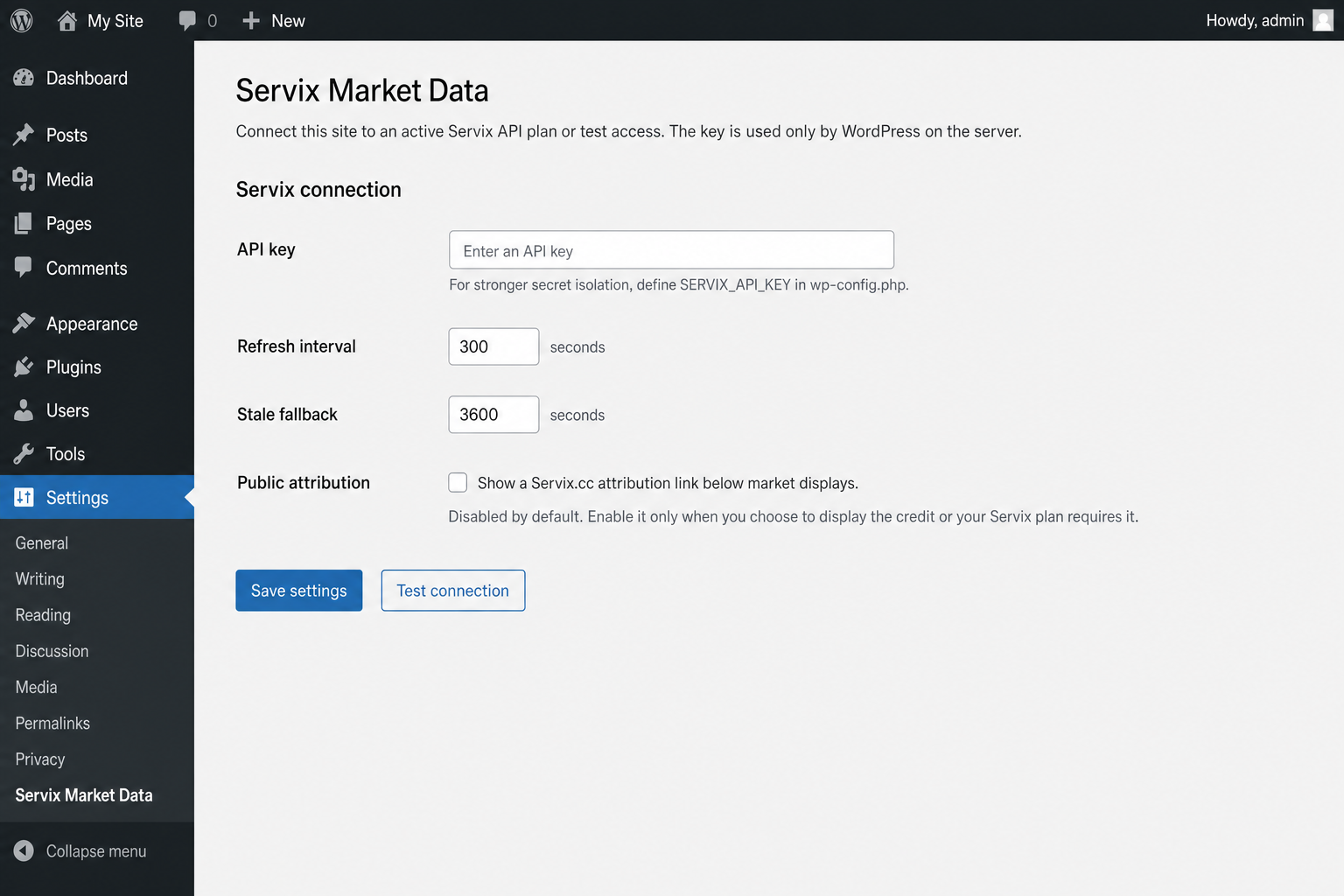
Ìgbéwọlẹ̀
- Install and activate Servix Market Data from the WordPress plugin screen.
- Define
SERVIX_API_KEYinwp-config.php, or enter a key under Settings > Servix Market Data. - Select Test connection to validate the subscription.
- Add the Servix Market Prices block and select and arrange the required assets.
- Attribution is disabled by default. Enable it in plugin settings only when you choose to display it or your active Servix plan requires it.
- For a sidebar, place the block in the themeÌtumọ̀ Yorùbá: ’s sidebar template part or widget area.
For the Classic Editor or a page builder, use:
[servix_prices assets=”USD_RLS,EUR_RLS” layout=”cards” language=”fa” unit=”source” show_time=”1Ìtumọ̀ Yorùbá: ″]
Supported layouts are cards and table. Set unit=”toman” to convert only RLS-quoted values to Toman. Values with another quote unit remain in their source unit and are labeled explicitly.
FAQ
-
Is an active Servix API entitlement required?
-
Yes. The plugin requires an API key with active test or paid access. Current
availability, duration, and quotas are described on the Servix website. -
Does the plugin add a public Servix credit?
-
Not by default. A site owner may explicitly enable the Servix.cc attribution
link under Settings > Servix Market Data. The setting does not change data
access or disable plugin functionality. If an active Servix plan requires
attribution, enable the setting before displaying that planÌtumọ̀ Yorùbá: ’s data. -
Can customers display values as text?
-
Yes. A customer with an active API entitlement may display selected values on a
customer-controlled website under the active plan and Servix terms. -
Is the API key sent to visitors?
-
No. Requests originate from WordPress PHP and the plugin never places the key in
HTML, JavaScript, URLs, or public responses. -
When does the plugin contact Servix?
-
Only when an administrator tests the connection, the block editor requests the
supported catalog or a preview, or a frontend display needs data that is not
available in its valid cache. -
What remains after deactivation or uninstall?
-
Deactivation preserves settings for later reactivation. Uninstalling through
WordPress removes plugin settings, the stored API key, and plugin-owned cache
entries. Existing posts retain only asset codes, shortcode text, and
presentation options; they do not contain the API key or complete API responses. -
How can I request support safely?
-
Contact info@servix.cc with the plugin version, WordPress and PHP versions, safe
diagnostic code, and request time. Never send an API key or complete
authenticated API response. -
How are Persian translations delivered?
-
WordPress.org provides approved Persian translations as a separate language
pack. Persian sites may temporarily show the English source text until the
community translation is reviewed and the language pack becomes available.
Àwọn àgbéyẹ̀wò
Kò sí àwọn àgbéyẹ̀wò fún plugin yìí.
Àwọn Olùkópa & Olùgbéejáde
“Servix Market Data” jẹ́ ètò ìṣàmúlò orísun ṣíṣí sílẹ̀. Àwọn ènìyàn wọ̀nyí ti ṣe ìkópa sí plugin yìí.
Àwọn Olùkópa
Túmọ̀ “Servix Market Data” sí èdè rẹ.
Ṣe o nífẹ̀ẹ́ sí ìdàgbàsókè?
Ṣàwárí koodu, ṣàyẹ̀wò ibi ìpamọ́ SVN, tàbí ṣe àgbékalẹ̀ sí àkọsílẹ̀ ìdàgbàsókè nípasẹ̀ RSS.
Àkọsílẹ̀ àwọn àyípadà
1.2.1
- Align translation packaging with WordPress.org language packs and exclude bundled locale files from release ZIPs.
- Load PHP and editor-script translations through the canonical
servix-market-datatext domain.
1.2.0
- Make public Servix attribution an explicit site-owner opt-in that is disabled by default.
- Remove the plan-entitlement request previously used to force attribution.
- Align release metadata, complete uninstall cleanup, and harden release-package checks.
1.1.0
- Add Free Starter support with 50 authenticated requests per day.
- Add a bounded server-side entitlement cache and plan-aware Servix.cc attribution.
- Fail safely by retaining attribution when entitlement cannot be confirmed.
1.0.0
- Add authenticated Servix API settings and safe server-side key handling.
- Add asset discovery, latest-value retrieval, caching, and stale fallback.
- Add the Servix Market Prices Gutenberg block and shortcode.
- Add Persian and English output, RTL and LTR layouts, and Solar Hijri time.
- Add configurable layouts, colors, typography, titles, units, and time visibility.