

Àpèjúwe
Scroll Triggered Widget is not an actual widget. It defines a new widget area when activated. You can drag and drop any widget you wish like a normal widget area. The widget area gets triggered when you scroll down to the bottom of the page by default. But you can control the location where it gets triggered in the plugin options page. The plugin comes with lot of customization options.
Plugin features
Ìtumọ̀ Yorùbá: – 25 unique animation effects
Ìtumọ̀ Yorùbá: – Change the background color of the widget
Ìtumọ̀ Yorùbá: – Change the Border color and width
Ìtumọ̀ Yorùbá: – Choose where the widget should display
Ìtumọ̀ Yorùbá: – Drag and drop any widget of your choice
Ìtumọ̀ Yorùbá: – Controll how long the widget area should be remain hidden when closed
Ìtumọ̀ Yorùbá: – Users can click the moving arrow in the bottom to revert the widget area
Àwọn àwòrán ìbòjú
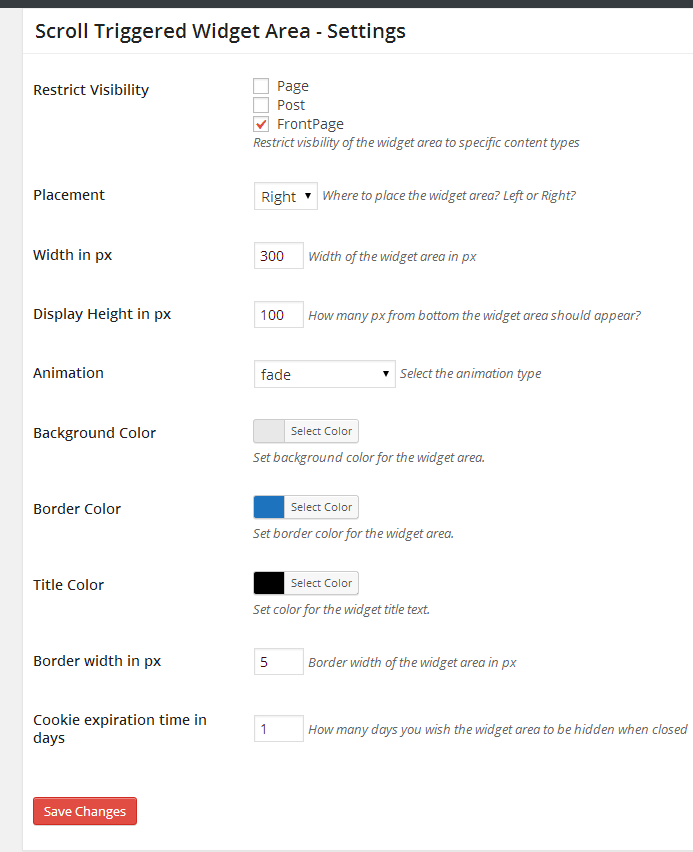

Ìgbéwọlẹ̀
Using The WordPress Dashboard
- Navigate to the ‘Add New’ in the plugins dashboard
- Search for ‘scroll-triggered-widget-area’
- Click ‘Install Now’
- Activate the plugin on the Plugin dashboard
Uploading in WordPress Dashboard
- Navigate to the ‘Add New’ in the plugins dashboard
- Navigate to the ‘Upload’ area
- Select ‘scroll-triggered-widget-area.zip’ from your computer
- Click ‘Install Now’
- Activate the plugin in the Plugin dashboard
Using FTP
- Download ‘scroll-triggered-widget-area.zip’
- Extract the ‘scroll-triggered-widget-area’ directory to your computer
- Upload the ‘scroll-triggered-widget-area’ directory to the ‘/wp-content/plugins/’ directory
- Activate the plugin in the Plugin dashboard
Àwọn àgbéyẹ̀wò
Kò sí àwọn àgbéyẹ̀wò fún plugin yìí.
Àwọn Olùkópa & Olùgbéejáde
“Scroll Triggered Widget Area” jẹ́ ètò ìṣàmúlò orísun ṣíṣí sílẹ̀. Àwọn ènìyàn wọ̀nyí ti ṣe ìkópa sí plugin yìí.
Àwọn Olùkópa

Túmọ̀ “Scroll Triggered Widget Area” sí èdè rẹ.
Ṣe o nífẹ̀ẹ́ sí ìdàgbàsókè?
Ṣàwárí koodu, ṣàyẹ̀wò ibi ìpamọ́ SVN, tàbí ṣe àgbékalẹ̀ sí àkọsílẹ̀ ìdàgbàsókè nípasẹ̀ RSS.
Àkọsílẹ̀ àwọn àyípadà
=1.0.1=
Bug Fix Ìtumọ̀ Yorùbá: – Setting menu not displaying in plugins page