

Àpèjúwe
Random Content is the easiest way to keep your WordPress site feeling fresh and dynamic. Create content groups, add as many items as you want, and display a random selection anywhere on your site with a single shortcode or widget.
Every time a visitor loads the page, they see something different. That means higher engagement, more clicks, and a site that never feels stale.
What can you do with it?
- Rotate testimonials — Show a different customer quote on every page load
- Randomize banners — Keep sidebar and header promotions fresh without manual updates
- Cycle CTAs — Test different calls-to-action to see what gets clicks
- Display tips or quotes — Add variety to any page, post, or widget area
- Shuffle FAQs — Surface different questions each visit
Free features
- Display random content anywhere with the
[random_content]shortcode - Use in posts, pages, sidebars, or widget areas
- Organize content into groups for separate rotation sets
- Control how many items display at once
- Full WordPress editor support — text, images, HTML, shortcodes, embeds
- Lightweight and fast with built-in caching
- No coding required
Getting started
- Create entries under the Random Content post type
- Organize them into Groups (works like categories)
- Add
[random_content group_id="123"]wherever you want random content to appear
ThatÌtumọ̀ Yorùbá: ’s it. Your content rotates automatically on every page load.
Need more control?
Random Content Pro gives you complete control over what visitors see and when they see it:
- Scheduling — Set start and end dates so content appears and disappears automatically. Run time-limited campaigns without touching your site.
- Visitor targeting — Show different content based on user role, login status, UTM parameters, referrer, or page type.
- Frequency controls — Prevent the same item from showing twice in a row. Set cooldown periods between displays.
- Weighted selection — Assign weights (1–10) to each item. Higher weight = shown more often. Perfect for A/B testing.
- Display rules — Control visibility per group: logged-in only, specific roles, specific page types.
- Fallback content — Define what shows when all items are filtered out. Never display an empty space.
- Automatic updates — Get new features and fixes delivered directly to your WordPress dashboard.
Learn more about Random Content Pro
Shortcode usage
Display a random item from all entries:
[random_content]
Display from a specific group:
[random_content group_id=”64Ìtumọ̀ Yorùbá: ″]
Display multiple items at once:
[random_content group_id=”13Ìtumọ̀ Yorùbá: ″ num_posts=”3Ìtumọ̀ Yorùbá: ″]
Load content via AJAX (useful for sites with page caching):
[random_content group_id=”64Ìtumọ̀ Yorùbá: ″ ajax=”yes”]
Widget usage
Navigate to Appearance Widgets, add the Random Content widget to any sidebar, and select a group from the dropdown. Leave the group empty to pull from all entries.
Àwọn àwòrán ìbòjú

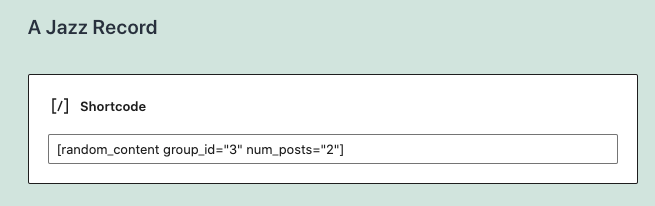
Ìgbéwọlẹ̀
- Upload the
random-contentfolder to/wp-content/plugins/ - Activate the plugin through the Plugins menu in WordPress
- Go to Random Content Add New to create your first entry
- Organize entries into Groups under Random Content Groups
- Place the
[random_content]shortcode in any post, page, or widget
FAQ
-
How do I group entries together?
-
Create a Group under Random Content Groups, then assign entries to that group. It works just like post categories.
-
How do I find the group ID?
-
Go to Random Content Groups in your WordPress admin. The ID is listed in the table.
-
Can I show more than one item at a time?
-
Yes. Use the
num_postsparameter:[random_content group_id="13" num_posts="3"]. In the widget, enter a number in the “Number of Posts” field. -
Can I schedule content to appear at specific times?
-
Scheduling is available in Random Content Pro. Set start and end dates for any content item, and it will appear and disappear automatically.
-
Can I show different content to logged-in vs. logged-out users?
-
Yes — with Random Content Pro. Pro adds visitor targeting based on user role, login status, UTM parameters, referrer domain, and page type.
-
Can I control how often a specific item is shown?
-
Random Content Pro includes weighted selection (assign weights 1–10 to each item) and frequency controls (prevent the same item from showing consecutively).
-
What does the ajax parameter do?
-
By default, content is rendered server-side with the page for the best performance. If your site uses full-page caching (e.g., WP Super Cache, W3 Total Cache, or a CDN), the random content may get cached and stop rotating. Add
ajax="yes"to load content dynamically after the page loads, bypassing the cache:[random_content group_id="64" ajax="yes"]. -
Will this slow down my site?
-
No. Random Content uses efficient PHP randomization and built-in transient caching. No extra database queries on the front end beyond whatÌtumọ̀ Yorùbá: ’s needed.
-
Does Random Content Pro require the free version?
-
No. Random Content Pro is a standalone plugin that includes everything from the free version plus all Pro features. If you have the free version installed, deactivate it before activating Pro.
Àwọn àgbéyẹ̀wò


Àwọn Olùkópa & Olùgbéejáde
“Random Content” jẹ́ ètò ìṣàmúlò orísun ṣíṣí sílẹ̀. Àwọn ènìyàn wọ̀nyí ti ṣe ìkópa sí plugin yìí.
Àwọn Olùkópa
Túmọ̀ “Random Content” sí èdè rẹ.
Ṣe o nífẹ̀ẹ́ sí ìdàgbàsókè?
Ṣàwárí koodu, ṣàyẹ̀wò ibi ìpamọ́ SVN, tàbí ṣe àgbékalẹ̀ sí àkọsílẹ̀ ìdàgbàsókè nípasẹ̀ RSS.
Àkọsílẹ̀ àwọn àyípadà
1.6.5
- Fixed compatibility issue with Elementor and other page builders where editor content would not display
1.6.4
- Fixed multiple posts displaying in chronological order instead of random order
1.6.3
- Fix bug for memory exhaustion from infinite recursion
1.6.2
- Restored server-side rendering as default for better performance
- AJAX loading is now opt-in via ajax=”yes” shortcode parameter
- JavaScript and REST API requests only load when AJAX mode is active
1.6.1
- Fixed AJAX content loading on sites without pretty permalinks
1.6.0
- Added AJAX-based content loading via REST API for full compatibility with page caching
- Front-end JavaScript loads random content dynamically with noscript fallback
- Updated Plugin URI to randomcontentpro.com
1.5.0
- Replaced ORDER BY RAND() with efficient PHP randomization
- Added transient caching
- Added multiple code improvements
1.4.1
- Ensure compatibility with latest WP version
1.4.0
- Add support for block editor
- Update widget settings
1.3.2
- Update tested to version
1.3.1
- Fix shortcode output so that multiple posts will display
1.3
- Add rc_content filter for extending the plugin output in both the shortcode and the widget
- Add content filter to widget output to allow for oembed support
1.2
- Add localization files for translation support
1.1
- Add num_posts parameter to old version of shortcode for backwards compatibility
1.0
- Update shortcode to [random_content] to help prevent conflicts with other plugins
- Added a num_posts paramenter to the shortcode so that more than one post can show at a time
- Added the ability to not choose a group in a widget, even if a group exists
- Added the ability to control the number of posts that show in the widget
- Rebuilt the plugin using OOP principles based on the WordPress plugin boilerplate
- Added plugin banner graphic
- Updated screenshot image
0.4
- Update input text syntax in widget
0.3
- Add shortcode functionality.
- Reset post data after widget query.
0.1
- First released into the wild.