
Àpèjúwe
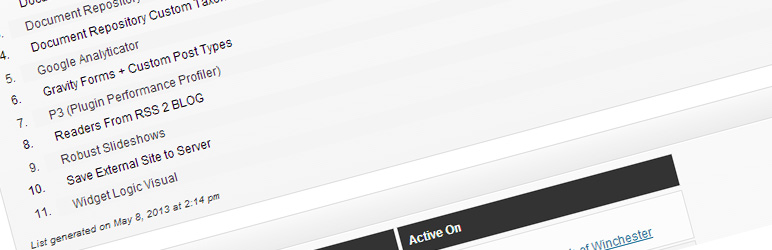
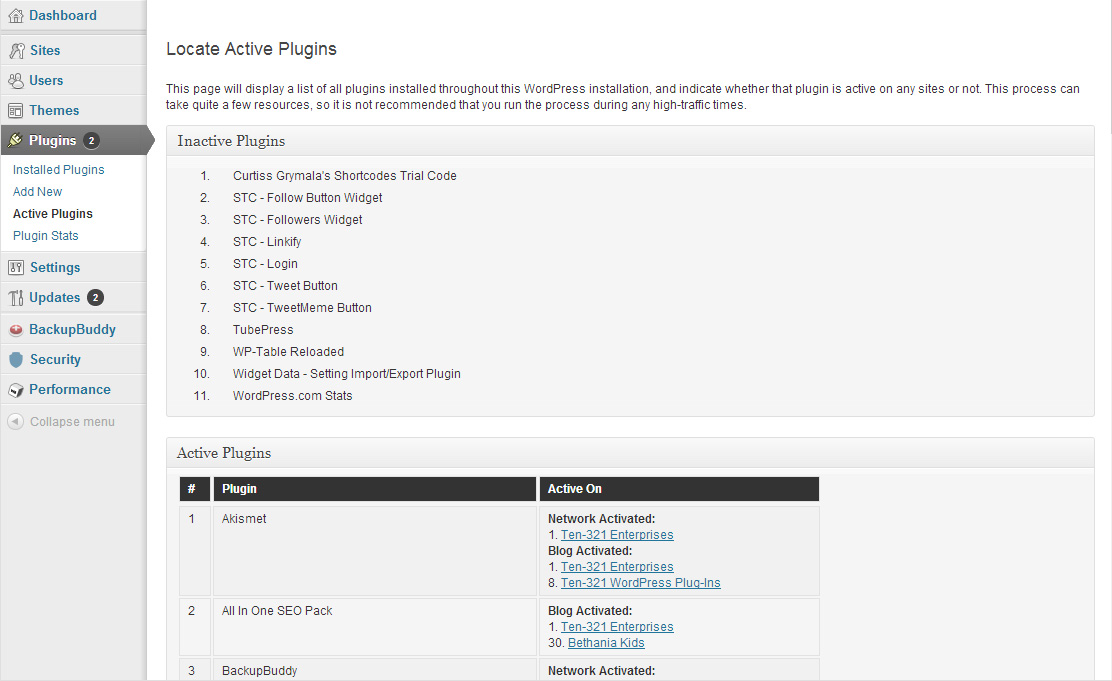
Plugin Activation Status makes it easier for owners of multisite and multi-network WordPress installations to perform plugin audits on their installations. The plugin generates a list of plugins that are not currently active on any sites or networks. It generates a separate list of plugins that are active somewhere within the installation, and provides details about where and how those plugins are activated.
This plugin first retrieves a full list of all of the plugins that are network-activated throughout your installation. Then, it loops through all of the sites in your installation, retrieving a list of all of the active plugins on each site. Next, it runs a diff between the full list of installed plugins and the list of all active plugins.
Once it retrieves all of that information, it outputs two separate lists.
The first list is the list of Inactive Plugins; all plugins that are installed, but not activated anywhere within WordPress will be listed there. The second list shows all of the Active Plugins; all plugins that are installed and activated somewhere within WordPress are shown there.
Within the Active Plugins list, each plugin also has a list of all of the places the plugin is active (at the top, a list of all of the places itÌtumọ̀ Yorùbá: ’s network-active; at the bottom, all of the places itÌtumọ̀ Yorùbá: ’s normally-activated).
When the plugin generates the lists of plugins, it stores those lists as site options in the database, so the lists can be retrieved for reference without using any additional server resources. If you would like to remove those cached lists and generate new lists, you simply have to click the Continue button on the admin page.
Àwọn àwòrán ìbòjú
Ìgbéwọlẹ̀
Standard Installation
- Upload
plugin-activation-statusfolder to the/wp-content/plugins/directory - Network-activate the plugin through the ‘Plugins’ menu in WordPress
MU-Plugins Installation
- Upload the
plugin-activation-statusfolder to the/wp-content/mu-plugins/directory (if that directory does not exist, you can create it) - Move
plugin-activation-status.phpout of/wp-content/mu-plugins/plugin-activation-status/and directly into/wp-content/mu-plugins/
FAQ
- Installation Instructions
-
Standard Installation
- Upload
plugin-activation-statusfolder to the/wp-content/plugins/directory - Network-activate the plugin through the ‘Plugins’ menu in WordPress
MU-Plugins Installation
- Upload the
plugin-activation-statusfolder to the/wp-content/mu-plugins/directory (if that directory does not exist, you can create it) - Move
plugin-activation-status.phpout of/wp-content/mu-plugins/plugin-activation-status/and directly into/wp-content/mu-plugins/
- Upload
- Why donÌtumọ̀ Yorùbá: ’t I see the new Plugins -> Active Plugins menu item?
-
That menu item will only appear in the Network Admin area for the primary (root/main) network. If you are running a multi-network installation and you activated the plugin on a network other than the first, you wonÌtumọ̀ Yorùbá: ’t see that menu item.
- Will this work on a non-multisite installation?
-
No. If you need to see the activation status of plugins in a standard WP install, you can simply go to Plugins -> Installed Plugins in your admin area. This plugin is specifically developed for multisite and multi-network installs of WordPress, where itÌtumọ̀ Yorùbá: ’s much more difficult to get a clear, accurate picture of which plugins are active and where theyÌtumọ̀ Yorùbá: ’re active.
- Why do I see file paths at the bottom of the list of Active Plugins?
-
When a plugin is installed and activated, WordPress uses that file path as the indicator that the plugin has been activated, and stores that information in the database. If a plugin file is removed or renamed after itÌtumọ̀ Yorùbá: ’s been activated on a site, WordPress doesnÌtumọ̀ Yorùbá: ’t know that it has to remove that old path from the list of active plugins until you visit the Plugins page on each site where it was active.
To make a long story short (too late!), those are plugins that are still considered “active” by WordPress, but no longer exist in your
/wp-content/plugins/directory.
Àwọn àgbéyẹ̀wò


Àwọn Olùkópa & Olùgbéejáde
“Plugin Activation Status” jẹ́ ètò ìṣàmúlò orísun ṣíṣí sílẹ̀. Àwọn ènìyàn wọ̀nyí ti ṣe ìkópa sí plugin yìí.
Àwọn Olùkópa
Túmọ̀ “Plugin Activation Status” sí èdè rẹ.
Ṣe o nífẹ̀ẹ́ sí ìdàgbàsókè?
Ṣàwárí koodu, ṣàyẹ̀wò ibi ìpamọ́ SVN, tàbí ṣe àgbékalẹ̀ sí àkọsílẹ̀ ìdàgbàsókè nípasẹ̀ RSS.
Àkọsílẹ̀ àwọn àyípadà
1.0.2.1
- Adds i18n and l10n features
1.0.2
- Tested compatibility with WordPress 4.9.x
- Fixes undefined constant warning as pointed out by @chenryahts
- Fixes undefined index warning as pointed out by @cliffpaulick
- Begins adding compatibility with core implementation of multi-network (uses the
is_main_network()function)
1.0
- Tested compatibility with WordPress 4.0
- Added link allowing you to delete inactive plugins
0.3
- Added new buttons allowing you to deactivate plugins on all sites/networks from within the list
- Tested with WP 3.8.2 to ensure everything still works
0.2
- Moved styles to their own style sheet
- Changed name of plugin to “Plugin Activation Status”
- Split plugin into separate files
0.1
- First beta release of “UMW Plugin Locator”