

Àpèjúwe
It is possible to use this plugin to just sync images without integrating data, however, if you are looking to sync Project or Employee data to your website, it requires writing code for frontend integration. It is therefore advised that you do not install directly on your live website. Install onto a development environment first. Ensure your integration is fully tested before you deploy live.
Anyone can download this plugin but in order to install and configure, it requires you to be an OpenAsset customer and have a specific OpenAsset license. If you are interested in the obtaining the license please reach out to your OpenAsset Customer Success Manager or submit this form
OpenAsset is a leading provider of Digital Asset Management solutions designed to meet the unique needs of the Architecture, Engineering, and Construction (AEC) industries. Our vision is to supercharge productivity of AEC marketing and business pursuit teams so they can win more business.
OpenAssetÌtumọ̀ Yorùbá: ’s Website Connector for WordPress enables AEC companies to sync project and employee profiles with relevant details, experience, and marketing-ready images directly from OpenAsset to their public-facing website. This eliminates data redundancy, ensuring that high-quality assets are maintained centrally, streamlining workflows and boosting efficiency.
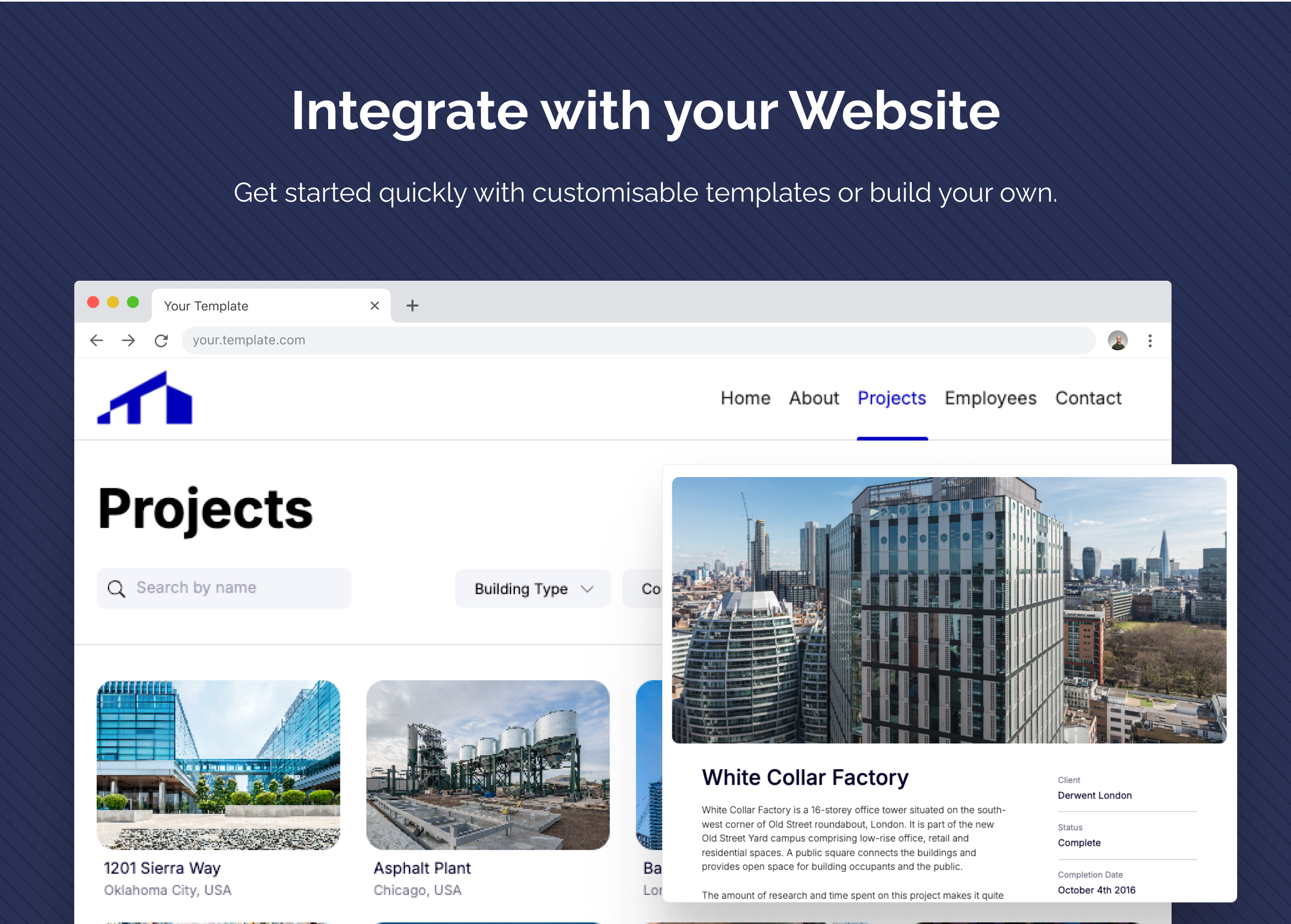
Effortless Project Showcase: Showcase your AEC projects seamlessly on your website with a few clicks. The connector enables display of approved and consistent project details, enhancing your online presence.
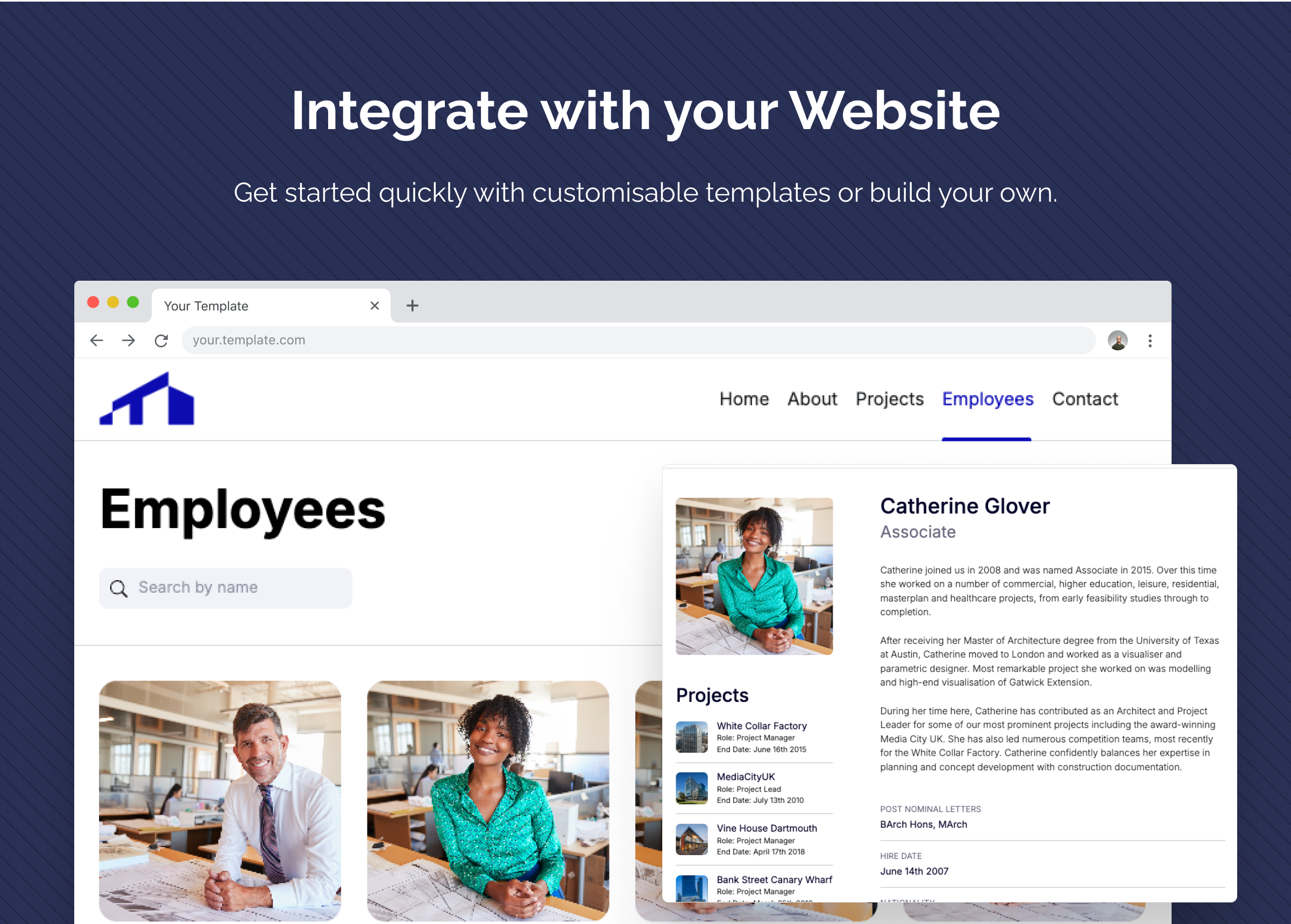
Employee Profiles that Stand Out: Highlight your teamÌtumọ̀ Yorùbá: ’s expertise by effortlessly publishing employee profiles directly from the DAM. Keep your team information up-to-date and impress your clients with the talent behind your projects.
Marketing-Ready Images: Present your projects with stunning visuals. The connector enables you to select and publish marketing-ready images directly from your DAM, ensuring consistency and professionalism across your web presence.
Data Consistency and Centralization: Say goodbye to inconsistency. The connector synchronizes with your OpenAsset instance, ensuring that the information on your website is up-to-date and reflective of your latest projects and team members.
Presentation and web design in your control: The connector offers a simple UI template that you are free to modify or your web developer is able to integrate the data into your fully custom website UI.
Links
- openasset.com
- Using OpenAssetÌtumọ̀ Yorùbá: ’s Website Connector for WordPress
- Using the templates bundled with OpenAssetÌtumọ̀ Yorùbá: ’s Website Connector for WordPress
- Creating a fully custom UI with OpenAssetÌtumọ̀ Yorùbá: ’s Website Connector for WordPress
Support
Support OpenAssetÌtumọ̀ Yorùbá: ’s Website Connector for WordPress is provided directly from OpenAssetÌtumọ̀ Yorùbá: ’s support team.
If you have questions pertaining to downloading, installing, configuring and syncing the plugin, please reach out to: support@openasset.com
Note: We do not offer support for modifying or customizing your web pages including issues relating to the presentation of your information or images. Please contact your web developer for this.
3rd Party Services
OpenAssetÌtumọ̀ Yorùbá: ’s Website Connector for WordPress makes use of OpenAssetÌtumọ̀ Yorùbá: ’s API to retrieve and display data from your OpenAsset instance. By using this plugin you agree to OpenAssetÌtumọ̀ Yorùbá: ’s terms of service and privacy policy.
Using this plugin means that you do not need to interact with OpenAssetÌtumọ̀ Yorùbá: ’s API in code but for reference it is documented here
Àwọn àwòrán ìbòjú

Ìgbéwọlẹ̀
It is possible to use this plugin to just sync images without integrating data, however, if you are looking to sync Project or Employee data to your website, it requires writing code for frontend integration. It is therefore advised that you do not install directly on your live website. Install onto a development environment first. Ensure your integration is fully tested before you deploy live.
Anyone can download this plugin but in order to install and configure, it requires you to be an OpenAsset customer and have a specific OpenAsset license. If you are interested in the obtaining the license please reach out to your OpenAsset Customer Success Manager or submit this form
Plugin Installation
To install, from your WordPress dashboard:
- Visit Plugins > Add New
- Search “OpenAsset”
- Install and Activate “OpenAsset” from your plugins page.
- In your OpenAsset instance, create an OpenAsset API token.
- Add your API credentials to the plugin installation page.
Website installation
Installing OpenAssetÌtumọ̀ Yorùbá: ’s Website Connector for WordPress into your website will require work from your web developer. The connector makes it easy to configure the data and images that you would like to sync from OpenAsset. There are a couple of options available to you when displaying this on your website:
- The connector is bundled with some simple templates. These can either be used as a quick proof of concept, or your web developer is free to modify them to suit the look and branding of your website. Read more here
- Alternatively the data made available by the plugin can be built into a fully custom website frontend. Read more here
Àwọn àgbéyẹ̀wò
Kò sí àwọn àgbéyẹ̀wò fún plugin yìí.
Àwọn Olùkópa & Olùgbéejáde
“OpenAsset” jẹ́ ètò ìṣàmúlò orísun ṣíṣí sílẹ̀. Àwọn ènìyàn wọ̀nyí ti ṣe ìkópa sí plugin yìí.
Àwọn Olùkópa
Ṣe o nífẹ̀ẹ́ sí ìdàgbàsókè?
Ṣàwárí koodu, ṣàyẹ̀wò ibi ìpamọ́ SVN, tàbí ṣe àgbékalẹ̀ sí àkọsílẹ̀ ìdàgbàsókè nípasẹ̀ RSS.
Àkọsílẹ̀ àwọn àyípadà
6.2.0
- Fix Ìtumọ̀ Yorùbá: – “Select” option removed from Auto Sync Frequency menu.
- Fix Ìtumọ̀ Yorùbá: – Smoothed transition to welcome page on first login.
- Fix Ìtumọ̀ Yorùbá: – File caption and description now gated by options.
- Fix Ìtumọ̀ Yorùbá: – Project Keywords now sync when no Project Fields are selected.
- Fix Ìtumọ̀ Yorùbá: – When you initially install the plugin and choose to use Text Assets, the fields are deselected by default.
- Fix Ìtumọ̀ Yorùbá: – Text Asset Name and Body Text fields are now locked selected.
- Fix Ìtumọ̀ Yorùbá: – Role options now load correctly before first sync is run.
- Fix Ìtumọ̀ Yorùbá: – Role title field now locked to sync by default.
- Fix Ìtumọ̀ Yorùbá: – Roles now only sync when the connected Project is set to “Show on Website”.
- Enhancement Ìtumọ̀ Yorùbá: – OpenAsset Logo updated to latest branding.
- Enhancement Ìtumọ̀ Yorùbá: – Images update on WordPress.org plugin page.
- Enhancement Ìtumọ̀ Yorùbá: – Advice notice added when updating the plugin version.
6.1.2
- Fix Ìtumọ̀ Yorùbá: – Incremental syncs now complete quickly on mid-sized datasets. Previously, sites with a few hundred projects or employees could stall during change detection on hosts with strict PHP execution time limits.
- Fix Ìtumọ̀ Yorùbá: – Deleted employees in OpenAsset are now cleaned up in WordPress on the next sync, matching how deleted projects are already handled.
- Fix Ìtumọ̀ Yorùbá: – Sync error messages that previously required detailed logging to see (queue initiation errors, API credential issues, term assignment failures, aborted syncs after repeated API errors) now appear in the standard log automatically.
- Fix Ìtumọ̀ Yorùbá: – Plugin, WordPress, and PHP versions are now logged at the start of every sync to make debug logs easier to triage.
6.1.1
- Fix Ìtumọ̀ Yorùbá: – Resolved issue of long-running syncs staying stuck on “Pending” in the dashboard eventhough they completed successfully.
- Fix Ìtumọ̀ Yorùbá: – Image-heavy and large dataset syncs now complete reliably on managed hosting with strict PHP execution time limits.
6.1.0
- New Ìtumọ̀ Yorùbá: – Option to enable detailed logging.
- New Ìtumọ̀ Yorùbá: – Debug Log Preview.
- New Ìtumọ̀ Yorùbá: – Download Debug Log.
- Enhancement Ìtumọ̀ Yorùbá: – Basic logging is now persistent.
- Fix Ìtumọ̀ Yorùbá: – Sync timestamps are now consistent with OpenAsset.
6.0.0
- New Ìtumọ̀ Yorùbá: – Welcome screen for newly installed plugins.
- New Ìtumọ̀ Yorùbá: – Dashboard that reports on sync stats.
- New Ìtumọ̀ Yorùbá: – Links to help pages from the welcome screen and dashboard.
- Enhancement Ìtumọ̀ Yorùbá: – Design and style overhaul for the entire plugin UI.
- Fix Ìtumọ̀ Yorùbá: – Project $post_content is now not updated by the plugin and therefore free to be used as you wish.
- Fix Ìtumọ̀ Yorùbá: – New method to identify keywords in order to avoid clashes with duplicate names across categories.
5.0.0
- New Ìtumọ̀ Yorùbá: – Video Syncing for Projects and Employees
- New Ìtumọ̀ Yorùbá: – Email sync notifications
- New Ìtumọ̀ Yorùbá: – Sync Logs with error reporting
- Fix Ìtumọ̀ Yorùbá: – Project Name Field prevented from being unset
4.1.0
- New Ìtumọ̀ Yorùbá: – Default syncing now checks for changes in OpenAsset in order to speed it up.
- New Ìtumọ̀ Yorùbá: – Improved progress reporting for syncs.
- New Ìtumọ̀ Yorùbá: – Full syncs are now available as “maintenance syncs” that can be run manually or on a schedule.
- New Ìtumọ̀ Yorùbá: – Support for using alternative Featured Images for Projects and Employees.
- New Ìtumọ̀ Yorùbá: – Support for excluding Image Sizes from sync.
- Enhancement Ìtumọ̀ Yorùbá: – WordPress Image Alt field now populated by OpenAsset caption in the bundled templates.
- Enhancement Ìtumọ̀ Yorùbá: – The Text Asset “show on website” field can now be a reference field.
- Enhancement Ìtumọ̀ Yorùbá: – Date fields are now easier to read on the individual Text Asset wpadmin pages.
- Enhancement Ìtumọ̀ Yorùbá: – Text Asset creation in wpadmin disabled.
- Fix Ìtumọ̀ Yorùbá: – Intermittent issue where the “Sync Projects/Employees” menus would not have options on first install.
4.0.0
- New Ìtumọ̀ Yorùbá: – Support for Text Asset Syncing.
- Enhancement Ìtumọ̀ Yorùbá: – Asset sections in WP Admin sidebar have icons.
- Enhancement Ìtumọ̀ Yorùbá: – Logging extended to better assist debugging.
- Fix Ìtumọ̀ Yorùbá: – On completion of initial sync, asset sections appear automatically in the WP Admin sidebar.
- Fix Ìtumọ̀ Yorùbá: – Fixed max images for Projects and Employees being 1 more than it should.
- Fix Ìtumọ̀ Yorùbá: – Only the selected Project Keyword Categories sync.
3.3.0
- New Ìtumọ̀ Yorùbá: – Support for using an alternative field for Project titles.
- Fix Ìtumọ̀ Yorùbá: – Fixed autocomplete field values now populate the Employee sync filter
- Fix Ìtumọ̀ Yorùbá: – Max images per Employee now works correctly when “Show on Website” is set to “yes”
3.2.0
- New Ìtumọ̀ Yorùbá: – Support for choosing to sync Project Hero Images and Employee Primary Photos.
- Enhancement Ìtumọ̀ Yorùbá: – Notification if you switch admin screen with unsaved settings.
- Enhancement Ìtumọ̀ Yorùbá: – Limitless Project / Employee sync. (250 limit removed).
- Enhancement Ìtumọ̀ Yorùbá: – Sync functionality optimised.
- Fix Ìtumọ̀ Yorùbá: – Keywords with the same name in different categories now sync.
3.1.0
- New Ìtumọ̀ Yorùbá: – Support for filtering Projects by Project Keyword.
- New Ìtumọ̀ Yorùbá: – Support for syncing images that are closest to 3000x3000px.
- New Ìtumọ̀ Yorùbá: – Support for syncing Project lat/long coordinates (Location Data).
- Enhancement Ìtumọ̀ Yorùbá: – Consistent order of search and filter controls in different Media Library views.
- Enhancement Ìtumọ̀ Yorùbá: – Notifications about missing “Show on Website” fields are now inline with sync options.
- Enhancement Ìtumọ̀ Yorùbá: – Sync status bar now reports on number of records to sync at the point that numbers are received.
3.0.0
- New Ìtumọ̀ Yorùbá: – In the Media Library, images can be filtered by Project/Employee and by Project and Employee name.
- Enhancement Ìtumọ̀ Yorùbá: – Project and Employee posts can now be edited meaning SEO plugins can be used on them.
- Enhancement Ìtumọ̀ Yorùbá: – In the General Settings, the visibility status can now be set for newly synced Project and Employee posts.
- Fix Ìtumọ̀ Yorùbá: – Minor copy fixes on Settings pages.
- Fix Ìtumọ̀ Yorùbá: – Minor style fixes to templates.
2.0.0
- New Ìtumọ̀ Yorùbá: – Support for syncing custom file fields from OpenAsset.
- New Ìtumọ̀ Yorùbá: – Support for filtering Project and Employee sync by custom field.
- Enhancement Ìtumọ̀ Yorùbá: – Support for choosing to sync Roles.
- Enhancement Ìtumọ̀ Yorùbá: – Support for choosing the number of Roles to sync.
- Enhancement Ìtumọ̀ Yorùbá: – Post types for Projects and Employees are now registered so they can be added to the top menu in the wp-admin.
- Enhancement Ìtumọ̀ Yorùbá: – Project, Employee and Role Data Options are now only shown if they are set to sync in the General Settings.
- Enhancement Ìtumọ̀ Yorùbá: – Hyperlinked OpenAsset Instance URL on the General Settings.
- Enhancement Ìtumọ̀ Yorùbá: – Various UI enhancements to the admin UI.
- Enhancement Ìtumọ̀ Yorùbá: – Various code enhancements.
- Fix Ìtumọ̀ Yorùbá: – On admin pages, red error messages no longer flash up then go away.
- Fix Ìtumọ̀ Yorùbá: – Date sorting now working correctly
- Fix Ìtumọ̀ Yorùbá: – Authentication step now cleans OpenAsset URL.
- Fix Ìtumọ̀ Yorùbá: – List page formatting in template formatted correctly.
- Fix Ìtumọ̀ Yorùbá: – Sync banner no longer appears when switching admin tabs.
- Fix Ìtumọ̀ Yorùbá: – Note copy is a consistent size on the admin pages.
1.1.2
- Fix Ìtumọ̀ Yorùbá: – Project keywords now syncing when changed in OpenAsset.
- Fix Ìtumọ̀ Yorùbá: – Projects & Employees can now sync without any metadata selected.
- Fix Ìtumọ̀ Yorùbá: – Projects & Employees can no be sorted by options other than name.
1.1.1
- Enhancement Ìtumọ̀ Yorùbá: – Creation and deletion of oa-project and oa-employee custom post types are now linked to “Sync Projects” and “Sync Employees”.
- Enhancement Ìtumọ̀ Yorùbá: – Various code enhancements.
- Fix Ìtumọ̀ Yorùbá: – Projects and Employees can be synced fully independently of each other.
1.1.0
- Enhancement Ìtumọ̀ Yorùbá: – Images directly replaced in OpenAsset will now re-sync to WordPress.
- Enhancement Ìtumọ̀ Yorùbá: – “Save” and “Save & Sync” buttons moved to the top of the admin pages for easier use.
- Enhancement Ìtumọ̀ Yorùbá: – Project and Employee name fields are now locked as these always must be synced so that you can identify them.
- Enhancement Ìtumọ̀ Yorùbá: – The default max image options changed to Projects Ìtumọ̀ Yorùbá: – 4, Employees Ìtumọ̀ Yorùbá: – 0 (note the hero images / primary photos sync by default).
- Enhancement Ìtumọ̀ Yorùbá: – The instance URL field is now not editable once installed. (To connect to another instance of OpenAsset, you need to uninstall the plugin first).
- Enhancement Ìtumọ̀ Yorùbá: – Templates now support OpenAsset Demo theme.
- Enhancement Ìtumọ̀ Yorùbá: – Template project keyword navigation simplified.
- Enhancement Ìtumọ̀ Yorùbá: – Various code enhancements.
- Fix Ìtumọ̀ Yorùbá: – Custom post types created by the plugin are now called oa-project and oa-employee rather than project and employee.
- Fix Ìtumọ̀ Yorùbá: – File Description field not selected on new install.
- Fix Ìtumọ̀ Yorùbá: – Navigation to admin pages via the wp-admin sidebar goes to correct pages.
- Fix Ìtumọ̀ Yorùbá: – Template the “Meet the Team” and “Keywords” headings will not show if thereÌtumọ̀ Yorùbá: ’s no information beneath.
- Fix Ìtumọ̀ Yorùbá: – Template Employee primary photo display when there are no projects associated.
- Fix Ìtumọ̀ Yorùbá: – Template Employee primary photo do not display incorrect image when there isnÌtumọ̀ Yorùbá: ’t one.
1.0.5
- Fix Ìtumọ̀ Yorùbá: – Minor edits to readme.txt
1.0.4
- Fix Ìtumọ̀ Yorùbá: – Minor edits to readme.txt
1.0.3
General Availability Ìtumọ̀ Yorùbá: – June 3rd 2024
- Enhancement Ìtumọ̀ Yorùbá: – Various code enhancements
1.0.2
- Enhancement Ìtumọ̀ Yorùbá: – Various code enhancements.
- Fix Ìtumọ̀ Yorùbá: – Incorrect headshot display on template when no headshot is set.
- Fix Ìtumọ̀ Yorùbá: – Issue of missing headshots when no projects are associated.
- Fix Ìtumọ̀ Yorùbá: – Image “Show on Website” is off issue.
1.0.1
- New Ìtumọ̀ Yorùbá: – Record sync counter during sync process.
- Enhancement Ìtumọ̀ Yorùbá: – Various code enhancements.
- Fix Ìtumọ̀ Yorùbá: – Missing Copyright Holder and Photographer syncing.
1.0.0
Beta release Ìtumọ̀ Yorùbá: – April 8th 2024