
Àpèjúwe
Transform Your WordPress Site with Professional Notification Management
Notification Master is the most comprehensive WordPress notification plugin designed to dramatically increase user engagement and site activity. Whether youÌtumọ̀ Yorùbá: ’re running a blog, eCommerce store, or community site, our plugin ensures your users never miss important updates through intelligent, automated notifications.
Why Choose Notification Master?
✅ 12+ Notification Channels Ìtumọ̀ Yorùbá: – Reach users everywhere they are
✅ Real-Time Browser Push Notifications Ìtumọ̀ Yorùbá: – Instant alerts even when users arenÌtumọ̀ Yorùbá: ’t on your site
✅ Advanced Automation Ìtumọ̀ Yorùbá: – Set up once, notify forever
✅ Personalized Messages Ìtumọ̀ Yorùbá: – Dynamic content with smart merge tags
✅ Zero Coding Required Ìtumọ̀ Yorùbá: – User-friendly interface for all skill levels
✅ Mobile Optimized Ìtumọ̀ Yorùbá: – Perfect notifications on any device
🎥 Watch Our Complete Setup Tutorial
Learn how to maximize your WordPress notifications in under 10 minutes:
🚀 Key Features & Notification Channels
Web Push Notifications (Browser Notifications)
- Send instant browser alerts to subscribers even when theyÌtumọ̀ Yorùbá: ’re not on your website
- Works on desktop and mobile browsers (Chrome, Firefox, Safari, Edge)
- Customizable notification appearance with your site branding
- Smart subscription management with floating buttons
- Welcome messages for new subscribers
Email Notification System
- Rich HTML email templates with WordPress Classic Editor
- Multiple recipient management (roles, individual users, custom addresses)
- Email exclusion options for targeted messaging
- Test email functionality before sending
- Background processing for improved performance
Social Media & Communication Integrations
- Discord Notifications Ìtumọ̀ Yorùbá: – Keep your community updated instantly
- Slack Integration Ìtumọ̀ Yorùbá: – Team notifications and updates
- WhatsApp Notifications Ìtumọ̀ Yorùbá: – Direct messaging to users
- Facebook Page Updates Ìtumọ̀ Yorùbá: – Automatic social media posting
- Twitter/X Integration Ìtumọ̀ Yorùbá: – Auto-tweet important updates
- Instagram Auto-Posting Ìtumọ̀ Yorùbá: – Visual content automation
Advanced Automation & Workflows
- Zapier Integration Ìtumọ̀ Yorùbá: – Connect with 5000+ apps and services
- Make (Integromat) Ìtumọ̀ Yorùbá: – Advanced workflow automation
- Webhook Support Ìtumọ̀ Yorùbá: – Custom integrations and API connections
- Twilio SMS Ìtumọ̀ Yorùbá: – Text message notifications
- Conditional Logic Ìtumọ̀ Yorùbá: – Smart notification rules
📋 Complete Trigger System Ìtumọ̀ Yorùbá: – Never Miss Important Events
Content Management Triggers
- New Post Published Ìtumọ̀ Yorùbá: – Alert subscribers about fresh content
- Post Updates Ìtumọ̀ Yorùbá: – Notify about content changes
- Comment Activity Ìtumọ̀ Yorùbá: – New comments, approvals, replies
- Media Management Ìtumọ̀ Yorùbá: – File uploads, updates, deletions
- Draft & Review Process Ìtumọ̀ Yorùbá: – Editorial workflow notifications
User Activity Triggers
- User Registration Ìtumọ̀ Yorùbá: – Welcome new members
- Profile Updates Ìtumọ̀ Yorùbá: – Account changes
- Login/Logout Activity Ìtumọ̀ Yorùbá: – Security and engagement tracking
- User Management Ìtumọ̀ Yorùbá: – Administrative notifications
WordPress System Triggers
- Plugin Management Ìtumọ̀ Yorùbá: – Installation, activation, updates
- Theme Changes Ìtumọ̀ Yorùbá: – New themes, switches, updates
- Taxonomy Management Ìtumọ̀ Yorùbá: – Categories, tags, custom taxonomies
- Privacy Compliance Ìtumọ̀ Yorùbá: – GDPR data export/erasure notifications
WooCommerce Integration (eCommerce Notifications)
- Order status changes and updates
- New customer registrations
- Product inventory alerts
- Payment confirmations
- Shipping notifications
🏷️ Smart Personalization with Merge Tags
Create highly personalized notifications using our extensive merge tag system:
Content Tags:
* {{post.title}} Ìtumọ̀ Yorùbá: – Dynamic post titles
* {{post.content}} Ìtumọ̀ Yorùbá: – Excerpt or full content
* {{post_author.nickname}} Ìtumọ̀ Yorùbá: – Author information
* {{post.permalink}} Ìtumọ̀ Yorùbá: – Direct links to content
User Tags:
* {{user.email}} Ìtumọ̀ Yorùbá: – User email addresses
* {{user.display_name}} Ìtumọ̀ Yorùbá: – Display names
* {{user.role}} Ìtumọ̀ Yorùbá: – User roles and permissions
System Tags:
* {{general.blogname}} Ìtumọ̀ Yorùbá: – Your website name
* {{general.current_time}} Ìtumọ̀ Yorùbá: – Current date and time
Advanced Custom Fields (ACF) Support:
* Custom field values for personalized content
* Dynamic product information
* User meta data integration
📚 Comprehensive Documentation & Support
Access our complete knowledge base for detailed setup guides:
- Quick Start Guide Ìtumọ̀ Yorùbá: – Get up and running in minutes
- Channel Configuration Ìtumọ̀ Yorùbá: – Detailed integration setup
- Trigger Reference Ìtumọ̀ Yorùbá: – Complete trigger documentation
- Web Push Setup Ìtumọ̀ Yorùbá: – Browser notification configuration
- Email Templates Ìtumọ̀ Yorùbá: – Email design and customization
- Social Media Integration Ìtumọ̀ Yorùbá: – Complete social setup guides
- WooCommerce Notifications Ìtumọ̀ Yorùbá: – eCommerce-specific triggers
- API & Webhooks Ìtumọ̀ Yorùbá: – Advanced integrations
Àwọn àwòrán ìbòjú
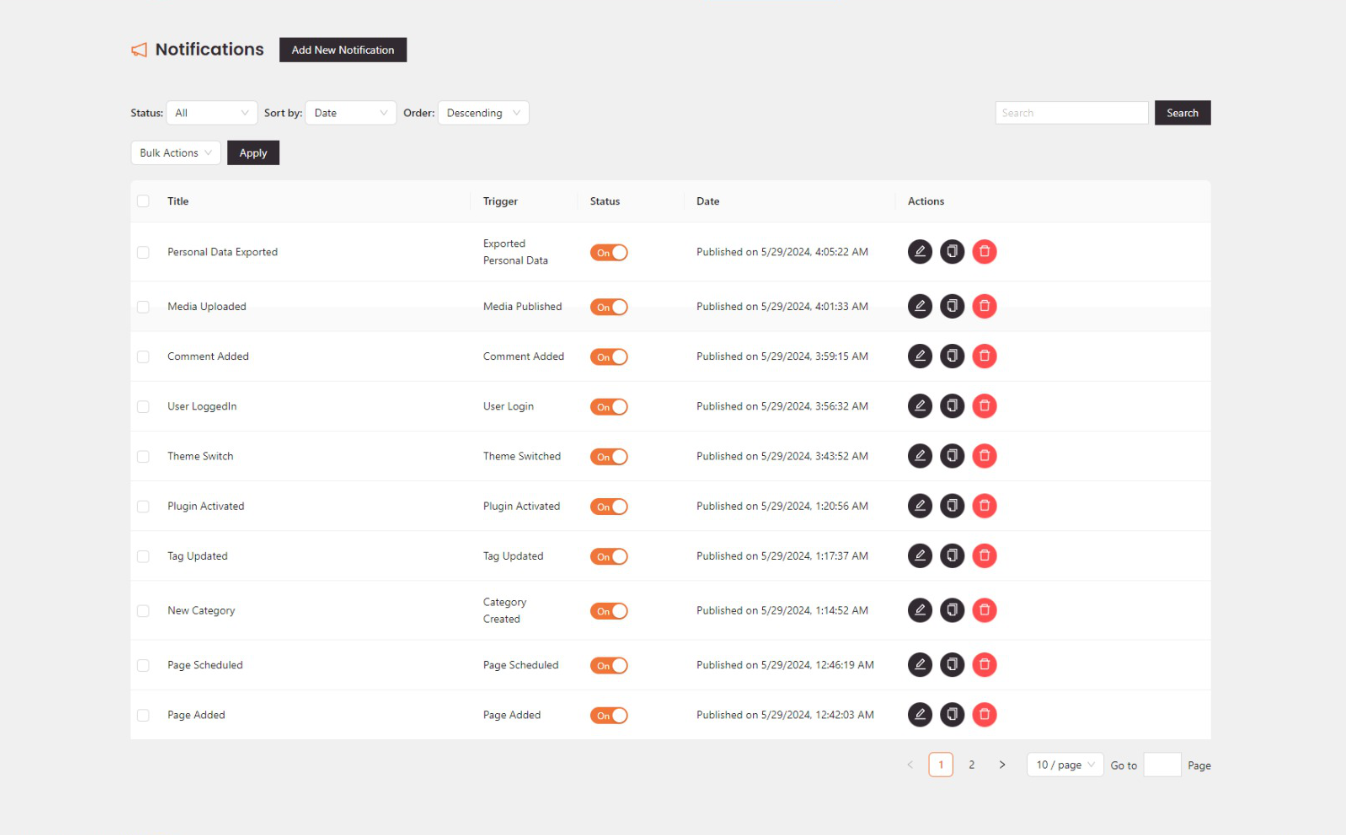
Notification Master Ìtumọ̀ Yorùbá: – Notifications Dashboard 
Notification Master Ìtumọ̀ Yorùbá: – Notification Configuration 
Notification Master Ìtumọ̀ Yorùbá: – Integration Settings 
Notification Master Ìtumọ̀ Yorùbá: – Merge Tags Selection
Ìgbéwọlẹ̀
Automatic Installation (Recommended)
- Login to your WordPress admin dashboard
- Navigate to Plugins > Add New
- Search for “Notification Master”
- Click “Install Now” and then “Activate”
Manual Installation
- Download the plugin ZIP file
- Upload to
/wp-content/plugins/notification-masterdirectory - Activate through the WordPress ‘Plugins’ menu
FAQ
-
What makes Notification Master different from other WordPress notification plugins?
-
Notification Master offers the most comprehensive channel support (12+ integrations), advanced personalization with merge tags, and professional features like conditional logic, background processing, and responsive design optimization.
-
Can I send notifications to multiple channels simultaneously?
-
Yes! You can configure multiple notification channels for each trigger. For example, send a web push notification AND an email AND a Discord message when a new post is published.
-
Do web push notifications work on mobile devices?
-
Absolutely! Our web push notifications work perfectly on both desktop and mobile browsers, including Chrome, Firefox, Safari, and Edge.
-
Is there a limit to how many notifications I can send?
-
Notification Master doesnÌtumọ̀ Yorùbá: ’t impose artificial limits. However, some third-party services (like email providers or SMS services) may have their own rate limits.
-
Can I customize the appearance of notifications?
-
Yes! You can customize web push notification appearance, email templates with HTML, and personalize all content using our extensive merge tag system.
-
Does it work with WooCommerce?
-
Yes! We have dedicated WooCommerce triggers for order updates, customer registration, inventory alerts, and more eCommerce-specific events.
-
Can I test notifications before sending them live?
-
Absolutely! We provide test functionality for all notification types, so you can verify appearance and content before activating.
-
Is Notification Master GDPR compliant?
-
Yes! We include privacy triggers for personal data export/erasure and respect user subscription preferences and unsubscribe options.
Àwọn àgbéyẹ̀wò


Àwọn Olùkópa & Olùgbéejáde
“Notification Master Ìtumọ̀ Yorùbá: – Real-Time WordPress Notifications With Email, SMS, Webhooks & More” jẹ́ ètò ìṣàmúlò orísun ṣíṣí sílẹ̀. Àwọn ènìyàn wọ̀nyí ti ṣe ìkópa sí plugin yìí.
Àwọn Olùkópa
Ṣe o nífẹ̀ẹ́ sí ìdàgbàsókè?
Ṣàwárí koodu, ṣàyẹ̀wò ibi ìpamọ́ SVN, tàbí ṣe àgbékalẹ̀ sí àkọsílẹ̀ ìdàgbàsókè nípasẹ̀ RSS.
Àkọsílẹ̀ àwọn àyípadà
1.6.10
- Added: WordPress 6.9 compatibility.
- Added: New option to allow custom SVG icon for the notification floating button.
1.6.8
- Added: Review notice for users to leave a rating and review the plugin.
1.6.7
- Added: Changed admin notice text.
1.6.6
- Fixed: Plugin Title issue.
1.6.5
- Added: Smart auto-delete system for failed web push subscriptions to maintain clean subscriber lists and improve delivery rates.
- Added: Configurable failure threshold setting (1-50 attempts) before automatic subscription removal.
- Added: Success tracking that resets failure count when notifications are delivered successfully.
- Added: Automatic cleanup of old failed subscriptions with daily maintenance task.
- Enhanced: Web push notification reliability with intelligent subscription management.
- Enhanced: Database performance with new indexes for subscription status and failure tracking.
1.6.4
- Fixed: Small bug in readme.txt file.
1.6.3
- Enhanced: Fully optimized the responsive design of all settings pages for better mobile usability.
1.6.2
- Added: WhatsApp integration for sending notifications to WhatsApp.
1.6.1
- Added: ACF (Advanced Custom Fields) integration for sending notifications based on ACF fields.
1.6.0
- Added: Instagram integration for auto posting to Instagram.
1.5.0
- Added: Added twilio integration for sending SMS and WhatsApp notifications.
- Fixed: WooCommerce triggers option not working in some cases.
1.4.12
- Added: Responsive positioning for the floating button. Now you can change the buttonÌtumọ̀ Yorùbá: ’s position based on the device type (Desktop, Mobile, etc.).
- Added: Option to customize the floating button animation color.
- Fixed: Text alignment in the normal button; now properly centered.
1.4.11
- Fixed: Notification connections save issue.
1.4.10
- Fixed: Web push welcome message in auto mode.
- Fixed: Web push welcome message disable option not working.
1.4.9
- Added: Web push floating button hide on devices option.
- Added: Responsive options for web push floating button positions (top, right, bottom, left).
- Added: Welcome message for web push notifications.
- Enhanced: Users can now send web push notifications to all subscribers or specific users.
1.4.8
- Fixed: Resolved an issue where the email notification content, including HTML formatting, was not saved or displayed correctly.
1.4.7
- Enhanced: The background processing for notifications.
- Fixed: Resolved a privacy issue where email notifications displayed all recipients’ email addresses.
1.4.6
- Added: WordPress Classic Editor for email notifications, enabling users to add rich content, images, and more.
- Added: Test email notifications feature to verify email formatting and content.
- Added: Conditional logic for notifications, allowing users to send notifications based on specific conditions.
- Fixed: Post Updated trigger not working in some cases.
1.4.5
- Added: Push notifications floating button option.
- Added: Customization options for push notifications floating button and normal button.
- Added: Allow users to unsubscribe from push notifications.
1.4.4
- Added: Help links for the integrations.
- Improved: Integration settings UI.
1.4.3
- Improved: Dashboard and settings page UI.
- Fixed: Delete logs by selected IDs not working.
1.4.2
- Fixed: Web push keys generation not working in some cases.
- Fixed: Email notification email address not saved.
1.4.1
- Fixed: Web push notifications not working in some cases.
1.4.0
- Added: Web push notifications subscriptions management.
1.3.3
- Fixed: Some plugin trigger merge tags not working.
- Improved: Code Improvements.
1.3.2
- Fixed: Changelog issue.
1.3.1
- Fixed: WooCommerce product triggers conflict with custom post type triggers.
- Added: Current time and date merge tags for notifications.
1.3.0
- Added: WebPush notifications Feature.
- Improved: Settings page.
1.2.1
- Improved: Enhanced the dashboard navigation bar styling.
1.2.0
- Improved: Email notifications now support multiple recipients, allowing selection based on user roles, individual users, custom email addresses, or merge tags.
- Improved: Added the ability to exclude email addresses from notifications, with options to exclude based on user roles, individual users, custom email addresses, or merge tags.
1.1.4
- Feature: Added the ability to delete logs by selected IDs.
- Feature: Added the ability to delete notification logs by selected IDs.
1.1.3
- Fixed: Issue when updating notifications.
1.1.2
- Added: Background processing for notifications to improve performance.
1.1.1
- Fixed: Some Admin UI issues
1.1.0
- Added: Facebook integration
- Added: Twitter integration
- Added: Zapier integration
- Added: Slack integration
- Added: Make (formerly Integromat) integration
- Added: WooCommerce triggers
1.0.1
- Added: Support for WordPress 6.6
- Added: Documentation links
1.0.0
- Initial release