

Àpèjúwe
Layout Loom is an add-on for WPBakery Page Builder. It adds two content types, Headers and Footers, that can be used to build Header and Footer respectively. Headers and Footers automatically relies on WPBakeryÌtumọ̀ Yorùbá: ’s own “Blank Page Layout by WPBakery/ Blank Page Canvas”.
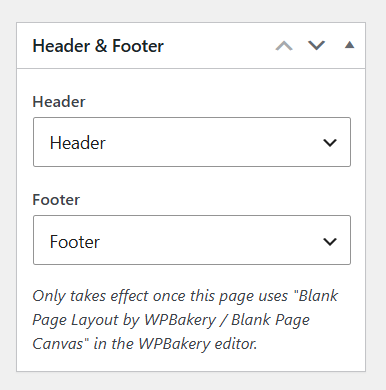
On the Page edit screen, a “Header & Footer” box in the side column lets you assign a saved Header and/or Footer once that page is also using WPBakeryÌtumọ̀ Yorùbá: ’s native “Blank Page Layout by WPBakery” (selected from the “Select the layout and start building” screen in the WPBakery editor). The assigned Header renders above, and the Footer below, that pageÌtumọ̀ Yorùbá: ’s own WPBakery content.
This plugin requires WPBakery Page Builder (js_composer) to be installed and active. If WPBakery Page Builder is not active, an admin notice is shown and the pluginÌtumọ̀ Yorùbá: ’s features remain inactive until it is.
Àwọn àwòrán ìbòjú
Ìgbéwọlẹ̀
- Make sure WPBakery Page Builder is installed and active.
- Upload the plugin files to the
/wp-content/plugins/layout-loomdirectory, or install the plugin zip through the WordPress “Plugins > Add New > Upload Plugin” screen. - Activate the plugin through the “Plugins” screen in WordPress.
- Create your Header(s) and Footer(s) under the new “Headers” and “Footers” admin menu items using the WPBakery editor.
- Edit a Page, choose “Blank Page Layout by WPBakery” in the WPBakery editor, then pick the Header and/or Footer for that page in the “Header & Footer” box in the side column.
FAQ
-
Does this work without WPBakery Page Builder?
-
No. The plugin checks whether WPBakery Page Builder is active and shows an admin notice if it is not; its features stay dormant until WPBakery Page Builder is active.
-
No, a page can have exactly one assigned header and one assigned footer at a time.
-
They only appear once the page is using WPBakeryÌtumọ̀ Yorùbá: ’s own “Blank Page Layout by WPBakery”. Until then, the box shows a reminder to select that layout in the WPBakery editor.
Àwọn àgbéyẹ̀wò
Kò sí àwọn àgbéyẹ̀wò fún plugin yìí.
Àwọn Olùkópa & Olùgbéejáde
“Layout Loom” jẹ́ ètò ìṣàmúlò orísun ṣíṣí sílẹ̀. Àwọn ènìyàn wọ̀nyí ti ṣe ìkópa sí plugin yìí.
Àwọn Olùkópa
Túmọ̀ “Layout Loom” sí èdè rẹ.
Ṣe o nífẹ̀ẹ́ sí ìdàgbàsókè?
Ṣàwárí koodu, ṣàyẹ̀wò ibi ìpamọ́ SVN, tàbí ṣe àgbékalẹ̀ sí àkọsílẹ̀ ìdàgbàsókè nípasẹ̀ RSS.
Àkọsílẹ̀ àwọn àyípadà
1.0.0
- Initial release.