
Àpèjúwe
使用快捷代码[jinshuju]在wordpress中方便又快速的嵌入金数据表单, 登陆到金数据,到您所想要嵌入表单的分享页面,获得嵌入wordpress的代码。
Example:
[jinshuju form=WXDJRa height=458]
Àwọn àwòrán ìbòjú
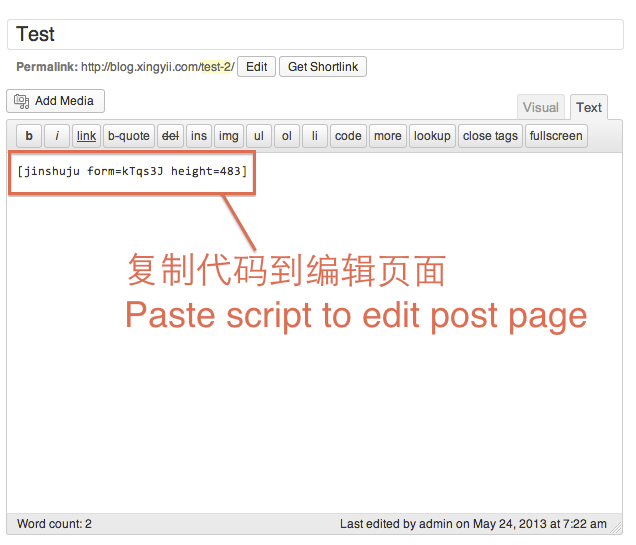
插件使用介绍 
如何获得代码
Ìgbéwọlẹ̀
For old school manual installation people: copy the folder “Jinshuju_shortcode” into the /wp-content/plugins/ folder. Then go to the Plugins area of the Admin and activate. Otherwise, search for “Jinshuju Shortcode Plugin” from the admin area of your WordPress site in Plugins > Add New.
FAQ
- What is Jinshuju?
-
Jinshuju is a web app that helps anybody build amazing online forms. ItÌtumọ̀ Yorùbá: ’s great for people who need to collect data, analyze data and share data quickly, but donÌtumọ̀ Yorùbá: ’t want to deal with programming or servers.
- Why is this useful?
-
Shortcodes are clean! You can already copy and paste JavaScript or iframe code to embed a Jinshuju form onto a WordPress page, but you need to make sure to be in the “HTML” tab of the writing area. If a user is in the “Visual” (default) tab, the embed code will not work. Short codes will work either way.
Àwọn àgbéyẹ̀wò
Kò sí àwọn àgbéyẹ̀wò fún plugin yìí.
Àwọn Olùkópa & Olùgbéejáde
“金数据” jẹ́ ètò ìṣàmúlò orísun ṣíṣí sílẹ̀. Àwọn ènìyàn wọ̀nyí ti ṣe ìkópa sí plugin yìí.
Àwọn Olùkópa
Ṣe o nífẹ̀ẹ́ sí ìdàgbàsókè?
Ṣàwárí koodu, ṣàyẹ̀wò ibi ìpamọ́ SVN, tàbí ṣe àgbékalẹ̀ sí àkọsílẹ̀ ìdàgbàsókè nípasẹ̀ RSS.
Àkọsílẹ̀ àwọn àyípadà
1.0 Ìtumọ̀ Yorùbá: – 首次发布