

Àpèjúwe
LetÌtumọ̀ Yorùbá: ’s say youÌtumọ̀ Yorùbá: ’ve just logged in and youÌtumọ̀ Yorùbá: ’re on the dashboard. You want to get to a child page of your about page called “mission”, but you canÌtumọ̀ Yorùbá: ’t remember if itÌtumọ̀ Yorùbá: ’s on page 2 or 5. With Jarvis itÌtumọ̀ Yorùbá: ’s simple. Open Jarvis and start typing “mission” and your page will show up immediately.
Once Jarvis is installed all you have to do to start using it is hit the quick key “/”, type in your search (eg, “settings”) and select the page youÌtumọ̀ Yorùbá: ’re looking for. ItÌtumọ̀ Yorùbá: ’s the fastest way to get from the dashboard to editing your anything on the admin side.
- Access the settings for permalinks:
/+Permalinks+ enter and youÌtumọ̀ Yorùbá: ’re there. - Edit your contact page:
/+Contact+ enter and youÌtumọ̀ Yorùbá: ’re there. - Access your post about caving in Nigeria from last year:
/+Nigeria Caving+ enter and youÌtumọ̀ Yorùbá: ’re there. - Flush the site rewrite rules:
/+Flush Rewrite Rules+ enter
The idea is to make it easier for anyone using the admin side of WordPress to get to the pages theyÌtumọ̀ Yorùbá: ’re looking for.
Each user can also cusomize their own quick key, and color scheme!
Learn more about The Web Development Group
Àwọn àwòrán ìbòjú

First click the Jarvis button or hit the / button.
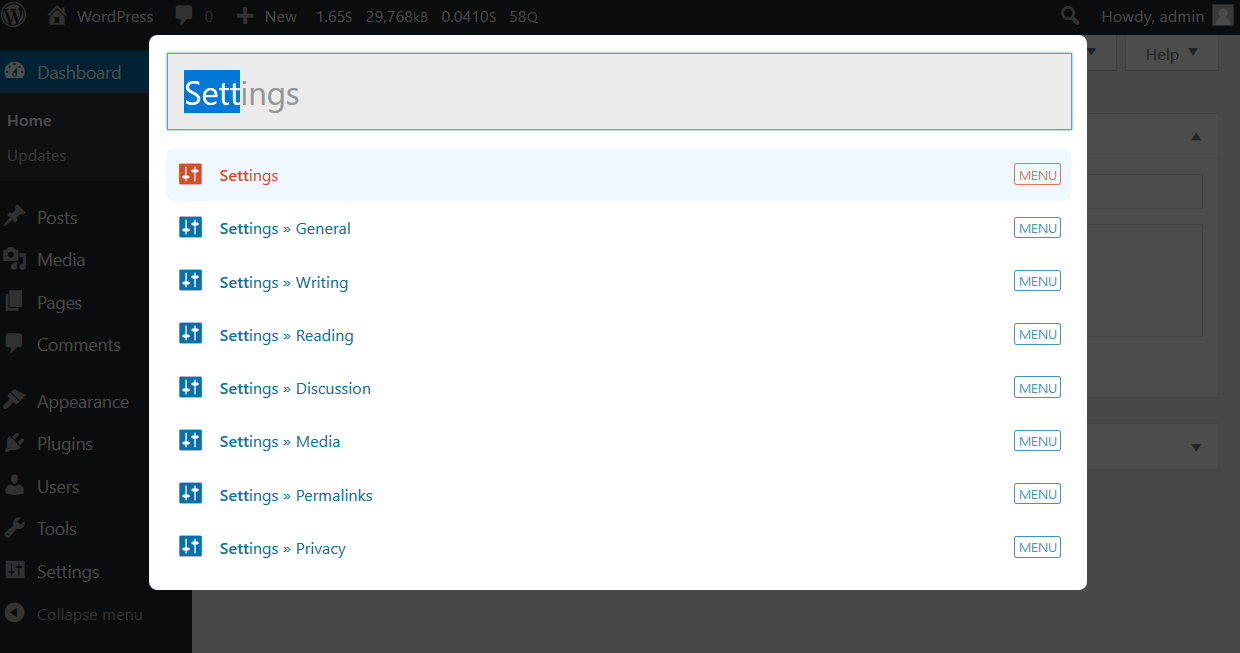
Then start typing your search query. Results will show up below the search box.

Ectoplasm theme Ìtumọ̀ Yorùbá: – showing the Flush Rewrite Rules action

View image thumbnails for both attachments and featured images

Jarvis on mobile
Ìgbéwọlẹ̀
- Upload the plugin folder to the /wp-content/plugins/ directory
- Activate the plugin through the ‘Plugins’ menu in WordPress
- Type
/anywhere in the admin section of WordPress or click the Jarvis button in the toolbar. or
Install using the Plugin Installer.
FAQ
-
How do I access Jarvis
-
Hit the
/key in the admin section or click the Jarvis button in the admin toolbar. -
ItÌtumọ̀ Yorùbá: ’s still not working…
-
You may be on a page thatÌtumọ̀ Yorùbá: ’s focusing on a text area or input box. If this is the case just click somewhere on the page outside of these boxes and the hit /.
Àwọn àgbéyẹ̀wò


Àwọn Olùkópa & Olùgbéejáde
“Jarvis” jẹ́ ètò ìṣàmúlò orísun ṣíṣí sílẹ̀. Àwọn ènìyàn wọ̀nyí ti ṣe ìkópa sí plugin yìí.
Àwọn Olùkópa
Ṣe o nífẹ̀ẹ́ sí ìdàgbàsókè?
Ṣàwárí koodu, ṣàyẹ̀wò ibi ìpamọ́ SVN, tàbí ṣe àgbékalẹ̀ sí àkọsílẹ̀ ìdàgbàsókè nípasẹ̀ RSS.
Àkọsílẹ̀ àwọn àyípadà
1.1.1
- Fix PHP 8.1 compatibility
1.1.0
- Drop IE11 support
- Add Modern and Dracula color schemes
- Refactor themes to use CSS variables
- Refactor the build process from a gulp build to es modules with rollup and bundle typeahead/bloodhound dependencies
- Introduce composer for autoloading and build scripts
- Introduce phpcs with WP Coding Standards
1.0.6
- Hotfix for missing svn change
1.0.5
- Update build dependencies
- Add permission_callback on rest api routes for 5.5 update
- Add capability checks to instant actions
1.0.4
- fix the autoloader to support web roots with underscore characters
1.0.3
- exclude hidden taxonomies from the search results and implement a new jarvis/taxonomies filter the list of taxonomies to be included in the search
1.0.2
- Send attachment suggestions to the ‘Edit more details’ page instead of the grid view as wp.media-grid throws an error if the item is not already loaded in the grid
1.0.1
- Fix an installation issue some users were reporting
1.0.0
- Rewrite most of Jarvis
- New Ìtumọ̀ Yorùbá: – User search
- New Ìtumọ̀ Yorùbá: – Mobile compatibility
- New Ìtumọ̀ Yorùbá: – Add Instant Actions that can be selected that are not in the admin menu
- New Ìtumọ̀ Yorùbá: – Nonce security for searches
- New Ìtumọ̀ Yorùbá: – Theme support!
- Improved Ìtumọ̀ Yorùbá: – icon detection methods such as dashicons with custom fonts
- Improved Ìtumọ̀ Yorùbá: – Hi-DPI loading icon
- Drop support for IE < 11
- New gulp build pipeline
- Remove Hogan in favor of underscore templates
- Removed Ìtumọ̀ Yorùbá: – support for old versions of wordpress
- Removed Ìtumọ̀ Yorùbá: – support for IE < 11
0.51.0
- Add post type check to search query to only query post types shown in wp-admin
0.50.0
- Refactored to use the latest Twitter Typeahead
0.40
- Code maintenance
- Ability to search by post_id
- add user setting for invoking jarvis
0.31
- Quick bug fix for icon issue that lead to database results not being shown
0.3
- Updated to work with dashicons of WP 3.8+
- Use search icon instead of J as a more intuitive icon
0.2
- Official initial release.
0.1
- Internal testing at WDG.