

Àpèjúwe
Enhance your WordPress siteÌtumọ̀ Yorùbá: ’s image security and branding. Image Watermark allows you to apply image or text overlays to new uploads and bulk process existing Media Library images with ease.
Key Features:
- Watermark Types: Choose from image-based or text-based watermarks with full customization.
- Flexible Application: Automatic watermarking on uploads, manual/bulk apply/remove via Media Library.
- Advanced Customization: Position watermarks precisely, adjust sizes, opacity, and more.
- Backup & Restore: Secure backups for easy watermark removal.
- Image Protection: Prevent copying via right-click, drag-and-drop, and developer tools.
- Technical Excellence: Supports JPEG, PNG, WebP; ImageMagick/GD engines; preserves metadata.
Perfect for photographers, bloggers, and businesses looking to safeguard their visual content.
For more information, check out the plugin page, documentation, or support forum.
Feature Breakdown:
Watermarking Types:
* Support for image-based watermarks (upload custom images as watermarks)
* Support for text-based watermarks (customizable fonts, colors, and sizes)
* Automatic watermarking on new uploads to the Media Library
* Manual and bulk watermarking for existing images (apply or remove via Media Library actions)
Customization & Settings:
* Flexible watermark positioning (9 alignment options with pixel or percentage-based offsets)
* Three watermark size modes: original, custom dimensions, or scaled to image size
* Adjustable watermark transparency and opacity
* Watermark image preview for real-time adjustments
* Selective application: Choose specific post types or enable everywhere (including frontend uploads)
* Image format selection (baseline or progressive JPEG)
* Configurable image quality settings
Backup & Management:
* Automatic image backup functionality (stores originals for easy restoration)
* Option to remove watermarks (restores from backups when available)
* Secure backup storage with .htaccess protection
Image Protection:
* Disable right-click context menus on images
* Prevent image copying via drag-and-drop
* Block access to developer tools for image inspection
* Customizable protection notice/toast message displayed to users attempting to copy images
Technical Information:
* Support for JPEG, PNG, and WebP image formats
* Dual image processing engines: ImageMagick (preferred) with GD library fallback
* EXIF and IPTC metadata preservation (where supported)
* Cache-busting for immediate thumbnail updates after watermark changes
* Translation-ready with included .pot file
Àwọn àwòrán ìbòjú
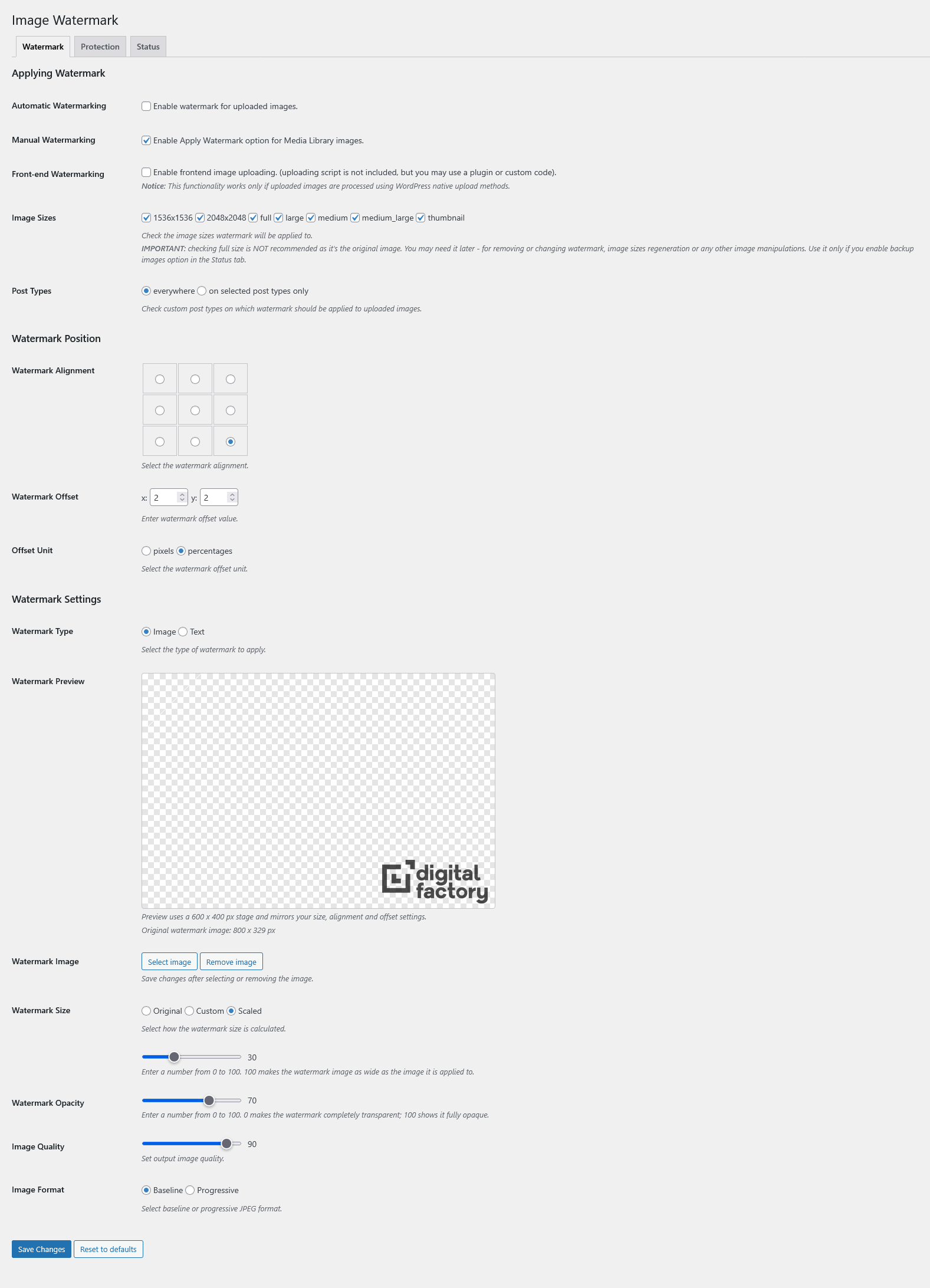
screenshot-1.png 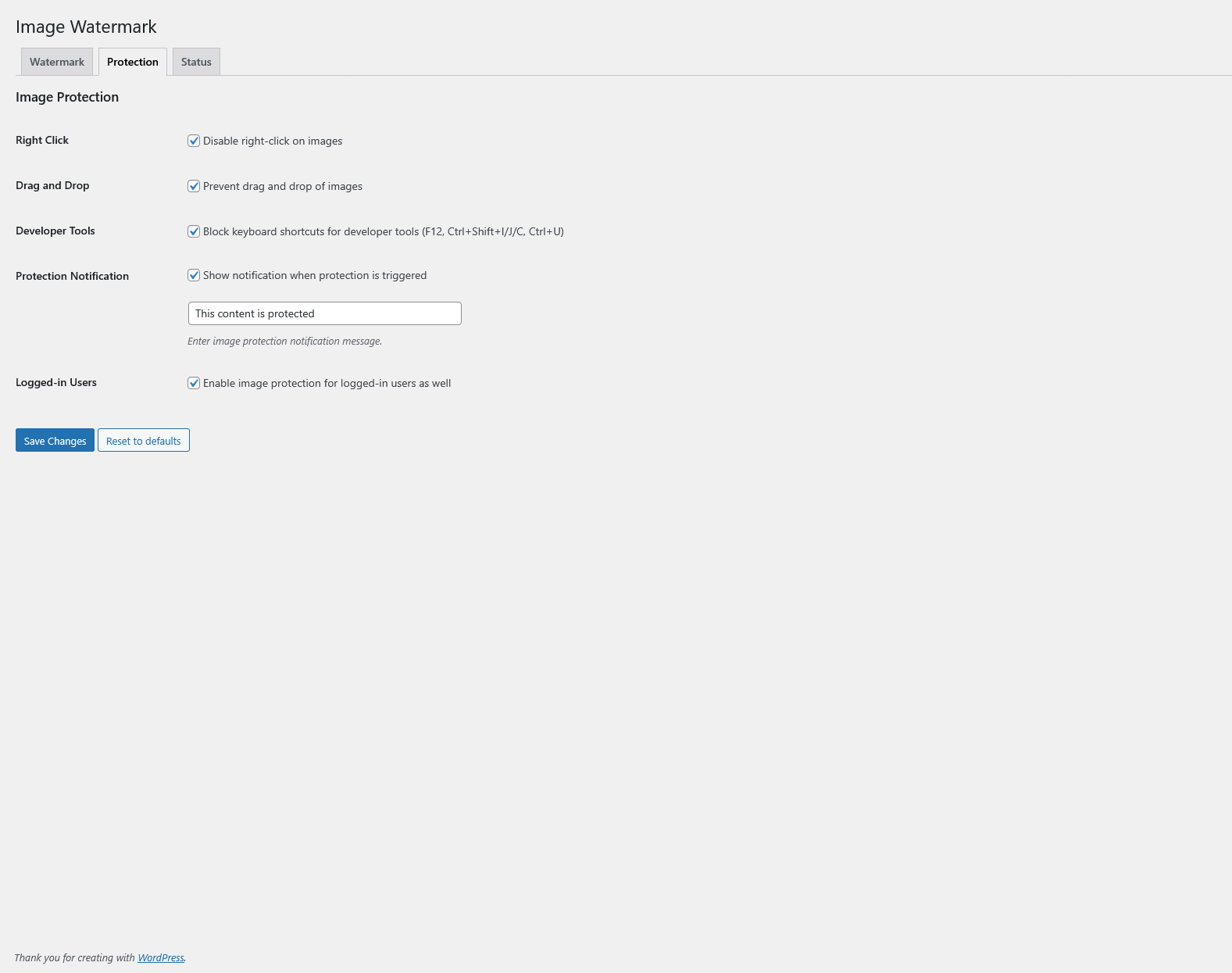
screenshot-2.png 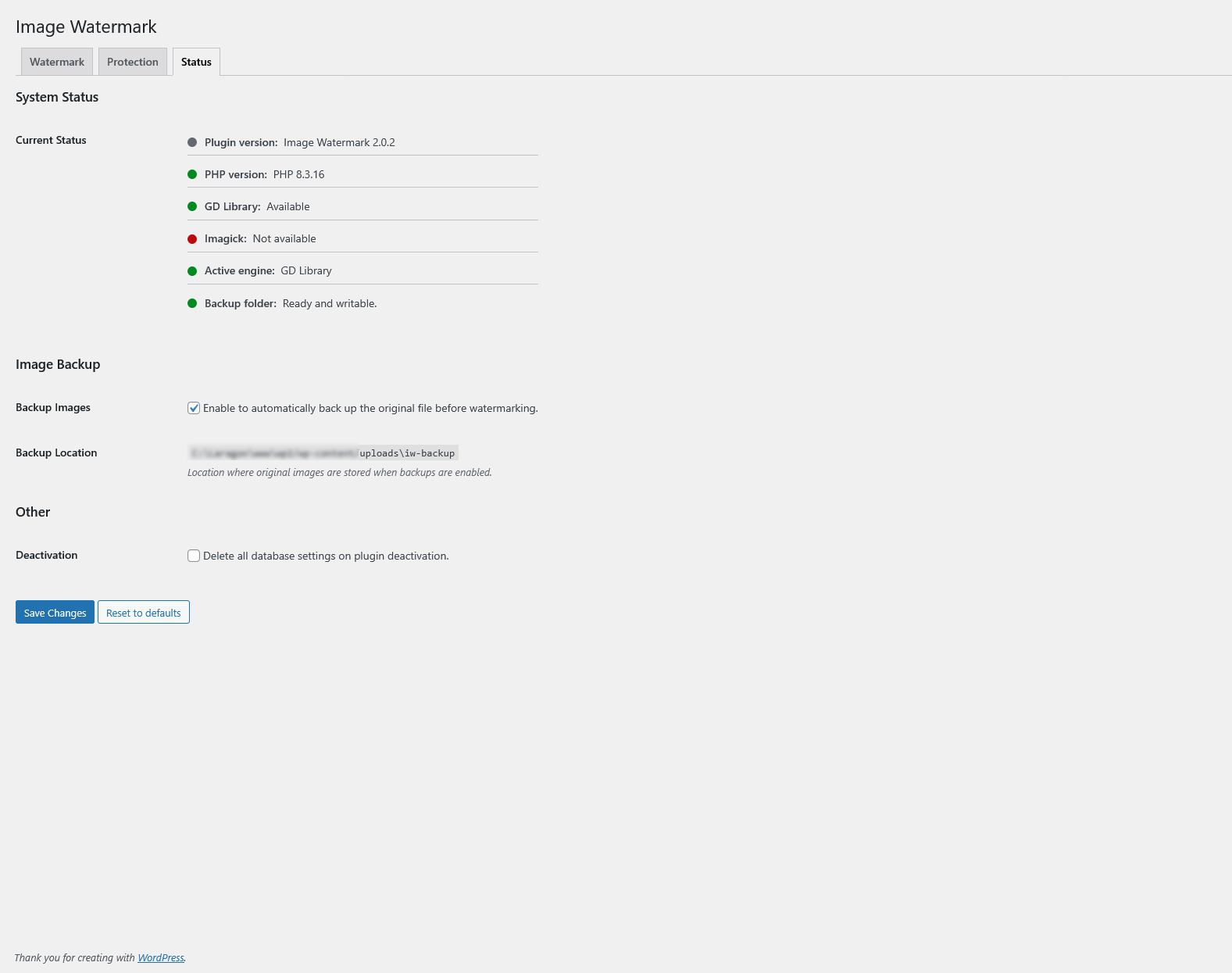
screenshot-3.png
Ìgbéwọlẹ̀
-
Install the Plugin:
- Via WordPress.org: Go to Plugins > Add New, search for “Image Watermark,” and click Install Now.
- Manual Upload: Download the plugin ZIP from WordPress.org, then upload it via Plugins > Add New > Upload Plugin.
-
Activate the Plugin:
- After installation, activate Image Watermark through the ‘Plugins’ menu in WordPress.
-
Configure Settings:
- Navigate to Settings > Watermark in your WordPress admin dashboard.
- Choose your watermark type (image or text) and upload/select a watermark image if using image-based.
- Adjust positioning, size, opacity, and other options as needed.
- Select post types for automatic watermarking or enable for all uploads.
-
Enable and Test:
- Toggle the plugin on to start automatic watermarking for new uploads.
- For existing images, go to Media Library > Bulk Select, choose images, and use the “Apply Watermark” bulk action.
- Preview watermarks in the settings page and test on a sample image to ensure everything works.
Requirements: WordPress 6.0+, PHP 7.4+, and either GD or ImageMagick library. If issues arise, check server compatibility in Settings > Watermark > Status tab.
FAQ
No questions yet.
Àwọn àgbéyẹ̀wò


Àwọn Olùkópa & Olùgbéejáde
“Image Watermark” jẹ́ ètò ìṣàmúlò orísun ṣíṣí sílẹ̀. Àwọn ènìyàn wọ̀nyí ti ṣe ìkópa sí plugin yìí.
Àwọn Olùkópa
A ti túmọ̀ “Image Watermark” sí àwọn èdè agbègbè 9. Ọpẹ́lọpẹ́ fún àwọn atúmọ̀ èdè fún àwọn ìkópa wọn.
Túmọ̀ “Image Watermark” sí èdè rẹ.
Ṣe o nífẹ̀ẹ́ sí ìdàgbàsókè?
Ṣàwárí koodu, ṣàyẹ̀wò ibi ìpamọ́ SVN, tàbí ṣe àgbékalẹ̀ sí àkọsílẹ̀ ìdàgbàsókè nípasẹ̀ RSS.
Àkọsílẹ̀ àwọn àyípadà
2.0.10
- New: Add small-image threshold controls for watermark eligibility
2.0.9
- Fix: Gutenberg auto-watermarking for admin media uploads
- Fix: Admin media frame state guard on post editor screens
- Tweak: Add WordPress PHPUnit coverage and unified test command
2.0.8
- New: Optional preservation of file timestamps for backup and restore
2.0.7
- Fix: GD text alpha cast issue in watermark rendering
- Fix: Text watermark validation blocking legitimate inputs
- Tweak: Shared watermark validation and improved error handling
- Tweak: Enhanced nav tab styling with slug-specific classes
2.0.6
- Fix: “You are not allowed to perform this action” errors with specific validation messages
- Fix: False-positive success responses for apply/remove watermark failures
- Fix: Error message display bug in single-image watermark actions
- Tweak: Enhanced error messages (backup not found, unsupported file type)
- Tweak: Added debug logging capability for watermark actions (WP_DEBUG_LOG)
2.0.5
- Fix: Persist review notice dismissal in options sanitizer to prevent notice reappearing
2.0.4
- New: Apply Watermark To radio control for better UI clarity
- Fix: Settings persistence issue with checkbox options
- Fix: JavaScript scope pollution in settings page
2.0.3
- New: Improved settings UI
- Fix: Apply/remove watermark for post media modal
- Fix: Improve media modal watermark actions UI and messaging
- Tweak: New color picker and switch field type in settings.
2.0.2
- Fix: Preserve PNG transparency when applying watermark using GD library.
- Fix: Prevent applying watermark during watermark image upload
- Fix: Migrate legacy watermark image setting into 2.0.x options
2.0.1
- Fix: Settings save issue for unchecked options and CPT scope
2.0.0
- New: Text watermark support
- New: Enhanced watermark preview with real-time updates.
- New: Support for additional watermark alignment options and percentage-based scaling.
- Tweak: Improved user interface for settings page with modern design elements.
- Tweak: Optimized image processing for faster bulk operations.
- Fix: Enhanced error handling for unsupported image formats.
1.9.1
- New: Bulk Apply/Remove Watermark buttons in Media Library grid view with native styling.
- Fix: Cache-busting for thumbnails and attachment details so watermark changes show immediately.
- Fix: Bulk actions now ignore unsupported/non-image files for safer processing.
1.9.0
- Fix: Watermarked image not refreshing in attachment edit screen after watermark is applied or removed
- Fix: Updated image reload selectors to support modern WordPress attachment details page structure
- Tweak: Complete modern rewrite of Right click blocking feature
1.8.0
- New: WebP image files support
1.7.4
- Fix: Potential security issue with capability check Ìtumọ̀ Yorùbá: – props WordFence
- Fix: Saving post types settings issue
- Tweak: WordPress 6.5 compatibility
1.7.3
- Tweak: WordPress 6.2 compatibility
- Tweak: PHP 8.2 compatibility
1.7.2
- Fix: Missing admin-media.js file
1.7.1
- Fix: Watermark option not available in Media Library
1.7.0
- Tweak: WordPress 5.9 compatibility
- Tweak: PHP 8.x compatibility
1.6.6
- Tweak: PHP 7.3 compatibility
1.6.5
- Fix: Improved support for PHP 7 and above
- Fix: Backup folders handling of date based organized uploads
1.6.4
- Fix: Transparent PNG issues with ImageMagick library
1.6.3.1
- Fix: The plugin directory upload fix.
1.6.3
- Fix: PNG files watermarking issue
1.6.2
- New: Option to select watermark offset unit Ìtumọ̀ Yorùbá: – pixels or percentages
- Tweak: Added values to slider settings fields
1.6.1
- Fix: Minor bug with AJAX requests, thanks to JoryHogeveen
- Fix: Prevent watermarking the watermark image, thanks to JoryHogeveen
- Tweak: Code cleanup
1.6.0
- New: Image backup functionality, thanks to JoryHogeveen
- New: Option to remove watermark (if backup is available)
1.5.6
- New: PHP image processing library option, if more than one available.
- Fix: Manual / Media library watermarking not working.
- Fix: Image sizes not being generated properly in GD library.
1.5.5
- Fix: Determine AJAX frontend or backend request
- Tweak: Remove Polish and Russian translations, in favor of GlotPress
1.5.4
- Fix: Use of undefined constant DOING_AJAX
1.5.3
- New: ImageMagic support
1.5.2
- Tweak: Switch from wp_get_referer() to DOING_AJAX and is_admin().
1.5.1
- New: Introducing plugin documentation
- Tweak: Improved transparent watermark support
1.5.0
- Tweak: Plugins setting adjusted to WP settings API
- Tweak: General code cleanup
- Tweak: Added Media Library bulk watermarking notice
1.4.1
- New: Hungarian translation, thanks to Meszaros Tamas
1.4.0
- New: Option to donate this plugin 🙂
1.3.3
- New: Russian translation, thanks to Sly
1.3.2
- New: Chinese translation, thanks to xiaoyaole
1.3.1
- Fix: Option to disable right click on images not working
1.3.0
- Tweak: Manual watermarking now works even if selected post types are selected
- Tweak: UI improvements for WP 3.8
- Fix: Image protection options not saving properly
1.2.1
- New: German translation, thanks to Matthias Siebler
1.2.0
- New: Frontend watermarking option (for front-end upload plugins and custom front-end upload code)
- New: Introducing iw_watermark_display filter
- New: Option to delete all plugin data on deactivation
- Tweak: Rewritten watermark application method
- Tweak: UI enhancements for settings page
1.1.4
- New: Arabic translation, thanks to Hassan Hisham
1.1.3
- New: Introducing API hooks: iw_before_apply_watermark, iw_after_apply_watermark, iw_watermark_options
- Fix: Wrong watermark watermark path
- Fix: Final fix (hopefully) for getimagesize() error
1.1.2
- New: Image quality option
- New: Image format selection (progressive or baseline)
- Fix: Error when getimagesize() is not available on some servers
- Tweak: Files & class naming conventions
1.1.1
- New: Added option to enable or disable manual watermarking in Media Library
- Fix: Apply watermark option not visible in Media Library actions
- Fix: Warning on full size images
1.1.0
- New: Bulk watermark Ìtumọ̀ Yorùbá: – Apply watermark in Media Library actions
- New: Watermark images already uploaded to Media Library
1.0.3
- Fix: Error during upload of file types other than images (png, jpg)
- Fix: Limit watermark file types to png, gif, jpg
- Tweak: Validation for watermark size and transparency values
- Tweak: Remove unnecessary functions
- Tweak: Code cleanup
- Tweak: Added more code comments
- Tweak: Small css changes
1.0.2
- New: Add watermark to custom image sizes registered in theme
- Tweak: Admin notices on settings page if no watermark image selected
- Tweak: JavaScript enqueuing on front-end
- Tweak: General code cleanup
- Tweak: Changed label for enabling image protection for logged-in users
1.0.1
- Fix: Using image ID instead of image URL during image upload
1.0.0
Initial release