

Àpèjúwe
IC Post Launcher turns WordPress into a hands-off publishing machine. Instead of manually setting dates on every post, you define your publishing rhythm once — what time posts go live, how many per day, how many days apart — and IC Post Launcher queues everything into the next open slot automatically.
Built by Inbound Creative, makers of agentic AI software and WordPress plugins, and a full-service web marketing agency. Made for content teams that batch-write and drip-publish.
⚡ Auto-Queue
- Set a default publish time, spacing (daily / every X days / weekly), and posts-per-day limit
- Auto-schedule posts when theyÌtumọ̀ Yorùbá: ’re marked Pending Review, or every new draft
- A queue start date lets your whole schedule begin on any day, month, and year you choose
- Bulk action: select any drafts and Add to Schedule Queue in one click
🎯 Per-Post Control
Every post gets a IC Post Launcher box in the editor with four modes:
- Auto — drop into the next open slot at your default time
- Custom date & time — pick the exact minute, day, month, and year for that post
- Off — protect a post from ever being auto-scheduled
- Default — follow your global settings
A IC Post Launcher column on the Posts list shows every postÌtumọ̀ Yorùbá: ’s mode at a glance, with Enable/Disable bulk actions.
🚀 One-Click Publish
- Publish TodayÌtumọ̀ Yorùbá: ’s Posts button in the admin bar (with a live count)
- Publish Entire Queue button in settings
- Publish Now bulk action to fire specific posts instantly
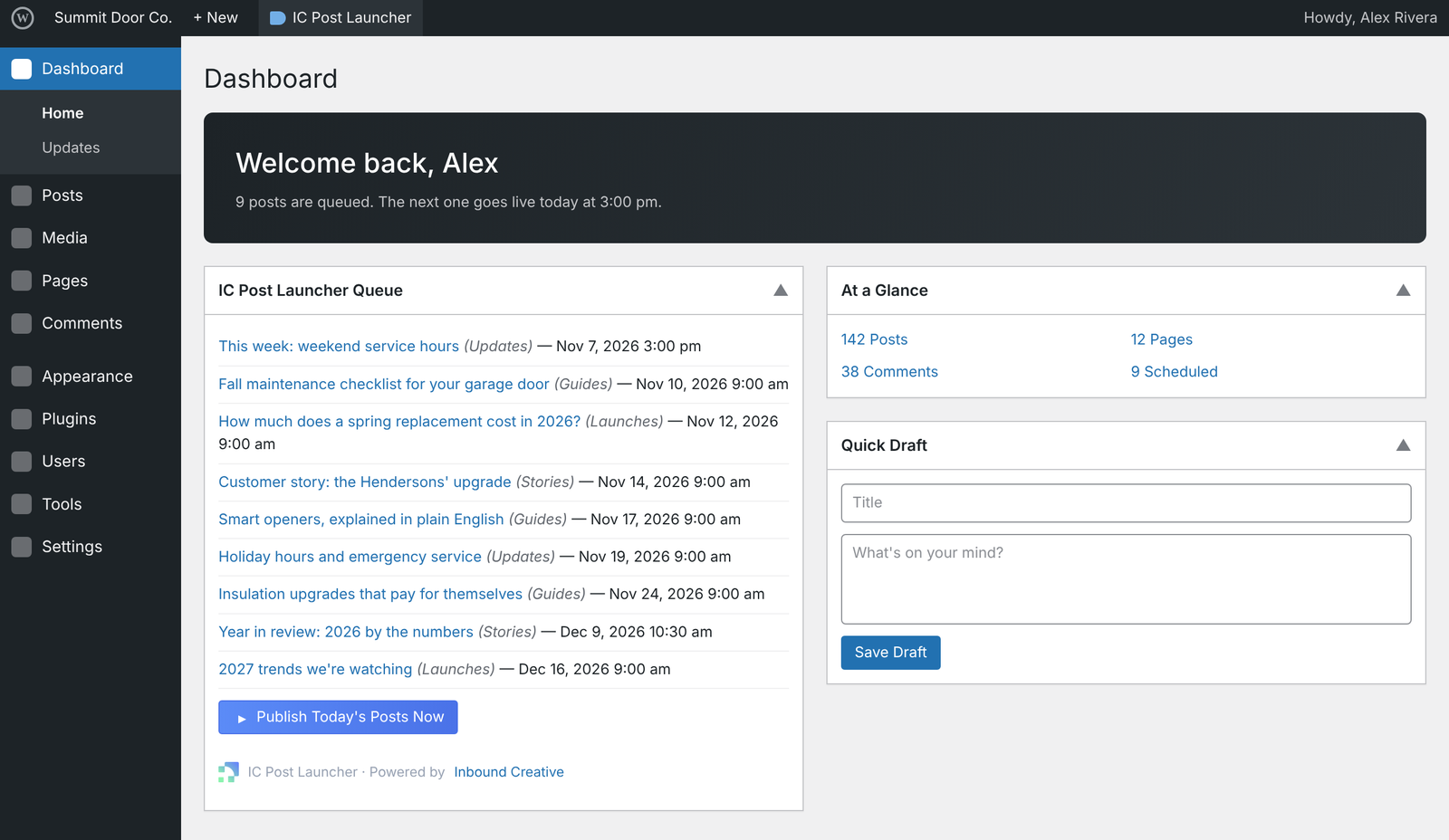
- Dashboard widget showing your upcoming queue
🛠 Fine-Tune Anything
The settings page lists every queued post with an inline date/time picker — retime any post to any minute, day, month, or year without opening it.
⭐ IC Post Launcher Pro
Need more for a content team or client sites? IC Post Launcher Pro adds:
- Category Release Campaigns — release a set number of posts from a category by a deadline, oldest-first or newest-first
- Activity Log — a complete audit trail of who created, edited, scheduled, or published every post, and how
- Launch Calendar — a monthly timeline of everything going live, plus an upcoming-months overview
- Publish date control — keep planned dates or stamp the actual publish time
- Mass Post Deletion — bulk-remove posts by category or date & time range, with preview and trash/permanent options
About Inbound Creative
Inbound Creative builds software and runs marketing for businesses and agencies:
- Agentic AI software that takes routine marketing and website work off your teamÌtumọ̀ Yorùbá: ’s plate
- WordPress plugins, including IC Post Launcher, built from real client work
- Web marketing agency services: website design and development, SEO, conversion rate optimization, paid search, and AI search optimization
Want help with your website or marketing? Visit inboundcreative.com.
Àwọn àwòrán ìbòjú


Ìgbéwọlẹ̀
- Upload the plugin files to
/wp-content/plugins/post-launcher/, or install through Plugins Add New in WordPress. - Activate the plugin through the Plugins screen.
- Go to Settings IC Post Launcher to set your publish time, spacing, and triggers.
- Optional but recommended for low-traffic sites: set up a real server cron job hitting
wp-cron.phpevery 5 minutes so scheduled posts fire exactly on time.
FAQ
-
Does this work with the block editor (Gutenberg)?
-
Yes. The IC Post Launcher box appears in both the block editor and the classic editor.
-
What happens if a scheduled time has already passed?
-
The post is published immediately instead of getting stuck in “Missed Schedule.”
-
Can I stop one specific post from being auto-scheduled?
-
Yes — set that postÌtumọ̀ Yorùbá: ’s IC Post Launcher mode to Off. It will be skipped by all auto-queue triggers.
-
Does it support custom post types?
-
Version 2.0 supports the standard
posttype. Custom post type support is on the roadmap. -
Why arenÌtumọ̀ Yorùbá: ’t my scheduled posts publishing on time?
-
WordPress relies on WP-Cron, which only runs when your site gets a visit. On low-traffic sites, add a real server cron job that requests
wp-cron.phpevery few minutes.
Àwọn àgbéyẹ̀wò
Kò sí àwọn àgbéyẹ̀wò fún plugin yìí.
Àwọn Olùkópa & Olùgbéejáde
“IC Post Launcher” jẹ́ ètò ìṣàmúlò orísun ṣíṣí sílẹ̀. Àwọn ènìyàn wọ̀nyí ti ṣe ìkópa sí plugin yìí.
Àwọn Olùkópa
Túmọ̀ “IC Post Launcher” sí èdè rẹ.
Ṣe o nífẹ̀ẹ́ sí ìdàgbàsókè?
Ṣàwárí koodu, ṣàyẹ̀wò ibi ìpamọ́ SVN, tàbí ṣe àgbékalẹ̀ sí àkọsílẹ̀ ìdàgbàsókè nípasẹ̀ RSS.
Àkọsílẹ̀ àwọn àyípadà
1.1.2
- Branding: credits now read Inbound Creative, linked to inboundcreative.com.
1.1.1
- Housekeeping: simplified the edition-conflict messages.
1.1.0
- Added an IC Post Launcher item to the admin toolbar for quick access to the queue.
- Added a safeguard so IC Post Launcher and IC Post Launcher Pro canÌtumọ̀ Yorùbá: ’t run at the same time — activating one while the other is active is blocked with a clear message.
1.0.0
- Initial release: auto-queue posts into time slots with configurable time, spacing, and posts-per-day; queue start date; per-post Auto / Custom date & time / Off / Default modes; one-click publish for todayÌtumọ̀ Yorùbá: ’s posts or the entire queue; Posts list column, bulk actions, admin bar button, and dashboard widget. Fully internationalized.