

Àpèjúwe
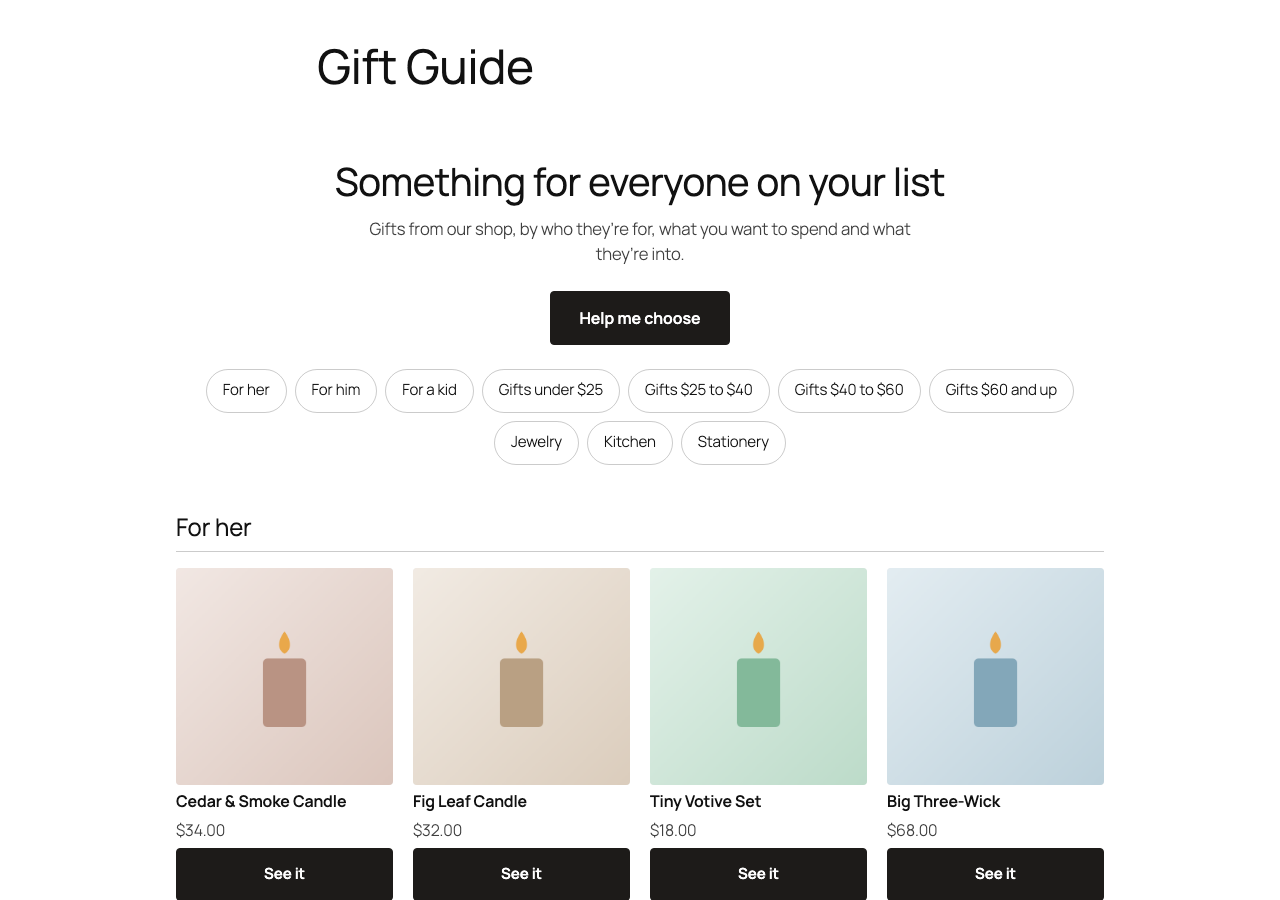
Shoppers looking for a gift often donÌtumọ̀ Yorùbá: ’t know what to pick. Giftlight builds a gift guide from the products you already sell, so they can browse it the way they think about gifts:
- Who itÌtumọ̀ Yorùbá: ’s for: her, him, a kid, a pet, read from your category names, product names and tags.
- What to spend: price bands made from your own prices, like “Gifts under $50”.
- What theyÌtumọ̀ Yorùbá: ’re into: your own categories, like Kitchen, Candles or Outdoors.
A short gift quiz sits one tap away (“Help me choose”) for shoppers whoÌtumọ̀ Yorùbá: ’d rather be asked. Each pick opens its product page.
It follows your shop by itself. Add a product, change a price or sell out, and the guide changes with it. There are no questions to write and nothing to keep up to date.
Set up in one click. Go to WooCommerce > Giftlight and click “Make the gift guide page”. You get a draft page with the guide on it; check it and publish. Or add the “Gift guide” block, or the [giftlight] shortcode, anywhere.
Private by design. The guide is built in the shopperÌtumọ̀ Yorùbá: ’s browser from your product data. Giftlight sends nothing anywhere: no tracking, no cookies, no outside requests, no account.
What it reads
Products that are published, visible in the shop, in stock, with a photo and a price (up to 300, in your shopÌtumọ̀ Yorùbá: ’s own order), their categories and tags. Category names that say nothing about a gift (“Sale”, “New”, “Uncategorized”, “Wholesale” and the like) are left out.
Àwọn àwòrán ìbòjú


Àwọn ìdí
Plugin yìí pèsè 1 ìdí.
- Gift guide Your shop's gift guide, built from your own products: by who it's for, what to spend and what they're into, with a gift quiz one tap away.
Ìgbéwọlẹ̀
- Install and activate Giftlight (WooCommerce must be active).
- Go to WooCommerce > Giftlight.
- Click “Make the gift guide page”, check the draft and publish it.
- Add the page to your menu.
FAQ
-
Can I try it before I install it?
-
Yes. Open the demo shop: a temporary WordPress in your browser with WooCommerce, 90 sample products and the Gift Guide page Giftlight made from them. Nothing is installed on your site, and itÌtumọ̀ Yorùbá: ’s gone when you close the tab. It takes a minute or two to load.
-
Will it slow my shop down?
-
It adds one deferred script (about 30 KB) and one small stylesheet, and only on pages that show the guide or the quiz. The product list it reads is cached for 12 hours and refreshed when you change a product or category.
-
Do I have to write the questions?
-
No. Giftlight reads your categories, tags and prices and only asks what your catalog can answer. A question appears only when its choices each lead to at least two products.
-
Can I show the quiz instead of the guide?
-
Yes. In the blockÌtumọ̀ Yorùbá: ’s sidebar choose “Gift quiz”, or use
[giftlight layout="quiz"]. The default for the shortcode is on WooCommerce > Giftlight. -
Can I change the heading and intro?
-
Yes, in the blockÌtumọ̀ Yorùbá: ’s sidebar, or with
[giftlight title="Holiday gifts" intro="Something for everyone on your list."]. -
Why donÌtumọ̀ Yorùbá: ’t I see some of my products?
-
The guide only uses products that are in stock and have a photo and a price. Hidden products and products marked “Search results only” are left out.
-
Does it work with variable products?
-
Yes. A variable product counts at its lowest price, and a budget section shows the price of a variation that fits.
-
Does it send any data?
-
No. Nothing leaves your site.
Àwọn àgbéyẹ̀wò
Kò sí àwọn àgbéyẹ̀wò fún plugin yìí.
Àwọn Olùkópa & Olùgbéejáde
“Giftlight – Gift Guide & Gift Finder for WooCommerce” jẹ́ ètò ìṣàmúlò orísun ṣíṣí sílẹ̀. Àwọn ènìyàn wọ̀nyí ti ṣe ìkópa sí plugin yìí.
Àwọn Olùkópa
Túmọ̀ “Giftlight – Gift Guide & Gift Finder for WooCommerce” sí èdè rẹ.
Ṣe o nífẹ̀ẹ́ sí ìdàgbàsókè?
Ṣàwárí koodu, ṣàyẹ̀wò ibi ìpamọ́ SVN, tàbí ṣe àgbékalẹ̀ sí àkọsílẹ̀ ìdàgbàsókè nípasẹ̀ RSS.
Àkọsílẹ̀ àwọn àyípadà
1.0.1
- Sections share out your products: a gift already shown in a section above gives way to one that hasnÌtumọ̀ Yorùbá: ’t been, so shoppers see more of your shop.
1.0.0
- First release: the gift guide block and shortcode, the gift quiz, and the one-click Gift Guide page.