

Àpèjúwe
GenerateBot is a companion plugin that connects your WordPress site to the GenerateBot content platform. Once connected, you can publish articles created in GenerateBot directly to WordPress without leaving the GenerateBot editor.
Features
- Secure token-based authentication Ìtumọ̀ Yorùbá: – A unique integration token is generated on activation. All communication between GenerateBot and your site is authenticated.
- Publish or draft Ìtumọ̀ Yorùbá: – Choose whether articles land as drafts for review or publish immediately. Set a site-wide default or override per article.
- Featured images Ìtumọ̀ Yorùbá: – Automatically downloads and attaches featured images from external URLs.
- Categories and tags Ìtumọ̀ Yorùbá: – Assign categories and tags during publishing. Missing categories are created automatically.
- Author mapping Ìtumọ̀ Yorùbá: – Map articles to any WordPress user who can edit posts.
- Health-check endpoint Ìtumọ̀ Yorùbá: – Verify the connection is working from your GenerateBot dashboard at any time.
How it works
- Install and activate this plugin on your WordPress site.
- Go to Settings > GenerateBot to find your Integration Token.
- In your GenerateBot dashboard, go to Integrations > Connect WordPress.
- Enter your WordPress site URL and paste the Integration Token.
- Articles you publish from GenerateBot will appear in your WordPress Posts.
REST API Endpoints
The plugin registers four endpoints under the generatebot/v1 namespace. All endpoints require a valid Bearer token in the Authorization header.
GET /wp-json/generatebot/v1/statusÌtumọ̀ Yorùbá: – Connection health-checkPOST /wp-json/generatebot/v1/publishÌtumọ̀ Yorùbá: – Create a postGET /wp-json/generatebot/v1/authorsÌtumọ̀ Yorùbá: – List available authorsGET /wp-json/generatebot/v1/categoriesÌtumọ̀ Yorùbá: – List categories
Requirements
- WordPress 5.8 or higher
- PHP 7.4 or higher
- A GenerateBot account (sign up at generatebot.com)
Àwọn àwòrán ìbòjú
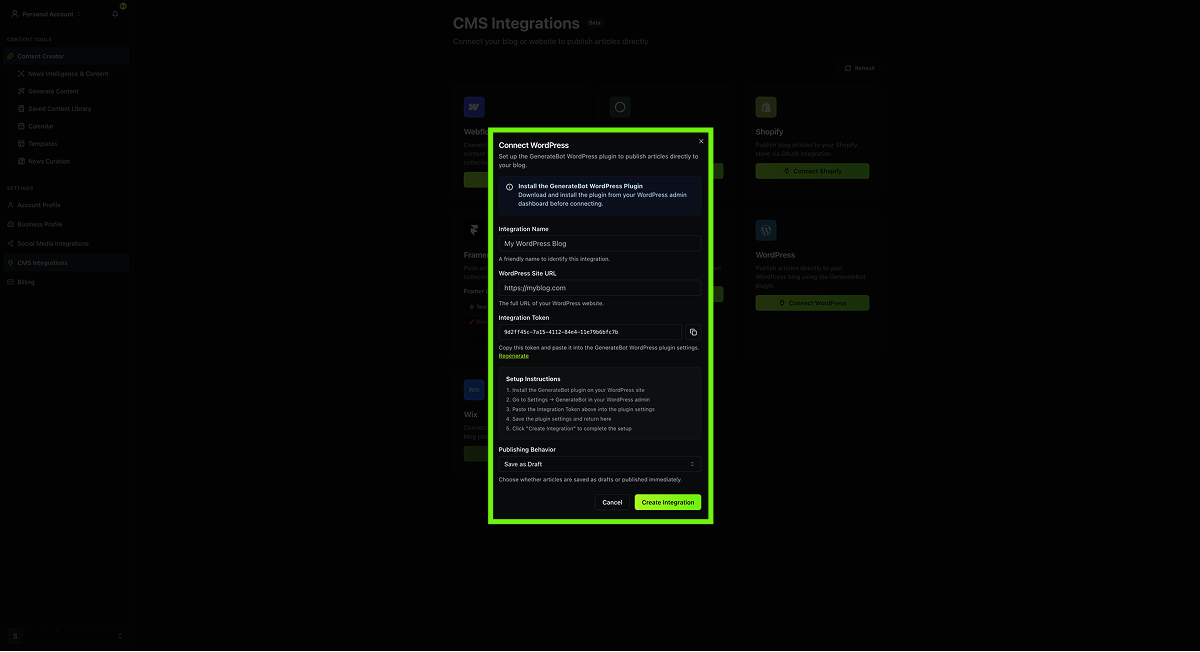
The GenerateBot settings page showing the Integration Token and publishing defaults. 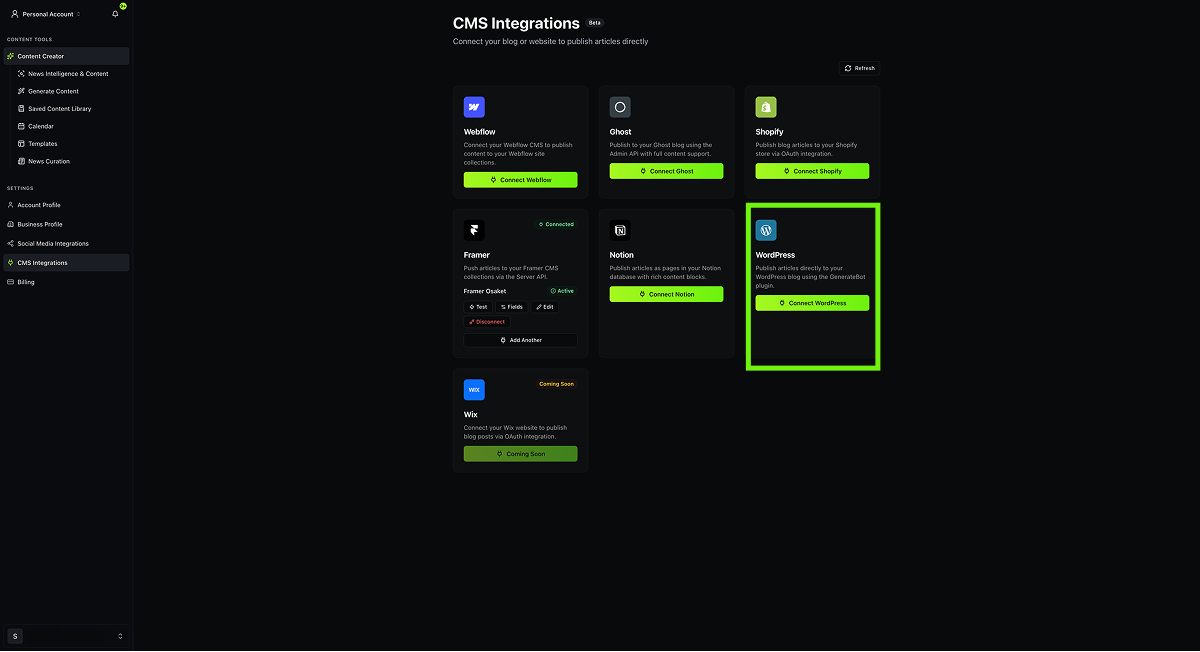
Connecting your WordPress site from the GenerateBot dashboard.
Ìgbéwọlẹ̀
From the WordPress Plugin Directory
- Go to Plugins > Add New in your WordPress admin.
- Search for “GenerateBot”.
- Click Install Now, then Activate.
- Go to Settings > GenerateBot to view your Integration Token.
Manual Installation
- Download the plugin zip file.
- Go to Plugins > Add New > Upload Plugin.
- Upload the zip file and click Install Now.
- Activate the plugin.
- Go to Settings > GenerateBot to view your Integration Token.
Via FTP
- Extract the
generatebotfolder from the zip file. - Upload it to
/wp-content/plugins/on your server. - Activate the plugin through the Plugins menu in WordPress.
- Go to Settings > GenerateBot to view your Integration Token.
FAQ
-
How do I connect GenerateBot to my WordPress site?
-
After activating the plugin, go to Settings > GenerateBot. Copy the Integration Token shown there and paste it into the GenerateBot Integrations page along with your site URL.
-
Can I choose whether articles are published as drafts?
-
Yes. You can set the default publish status in the plugin settings (draft or publish immediately), and you can also override it per article from the GenerateBot editor.
-
Does the plugin support featured images?
-
Yes. If you include a featured image URL when publishing from GenerateBot, the plugin will automatically download the image and set it as the postÌtumọ̀ Yorùbá: ’s featured image.
-
What happens if a category does not exist?
-
The plugin will create the category automatically when it receives an article with a category name that does not exist on your site.
-
Is my data secure?
-
All API communication is authenticated with a unique token generated per site. The plugin uses WordPressÌtumọ̀ Yorùbá: ’s built-in
hash_equalsfor constant-time token comparison. We recommend using HTTPS on your WordPress site for encrypted communication. -
Can multiple GenerateBot accounts connect to the same site?
-
Currently, the plugin supports a single integration token per site. All GenerateBot accounts that need to publish to the same site should share the same token.
-
Where can I get support?
-
Visit generatebot.com/support or email support@generatebot.com.
Àwọn àgbéyẹ̀wò
Kò sí àwọn àgbéyẹ̀wò fún plugin yìí.
Àwọn Olùkópa & Olùgbéejáde
“GenerateBot” jẹ́ ètò ìṣàmúlò orísun ṣíṣí sílẹ̀. Àwọn ènìyàn wọ̀nyí ti ṣe ìkópa sí plugin yìí.
Àwọn Olùkópa
Túmọ̀ “GenerateBot” sí èdè rẹ.
Ṣe o nífẹ̀ẹ́ sí ìdàgbàsókè?
Ṣàwárí koodu, ṣàyẹ̀wò ibi ìpamọ́ SVN, tàbí ṣe àgbékalẹ̀ sí àkọsílẹ̀ ìdàgbàsókè nípasẹ̀ RSS.
Àkọsílẹ̀ àwọn àyípadà
1.0.0
- Initial release.
- REST API endpoints for publishing, status check, authors, and categories.
- Token-based authentication.
- Admin settings page with default author, category, and publish status.
- Automatic featured image import from external URLs.
- Auto-creation of missing categories.