
Àpèjúwe
For latest updates and fixes, please use the FV Player 8 plugin from WordPress.org:
https://wordpress.org/plugins/fv-player
Additional Technical information
- Core video engine: open source Flowplayer 7.
- Supported video formats are MP4, WebM and OGV (read about HTML5 video formats).
- Supported video streaming formats are HLS (Flash and JavaScript fallback available for incompatible devices), MPEG DASH and RTMP.
- Default options for all the embedded videos can be set in comprehensive administration menu.
-
In comparison with WordPress Flowplayer plugin, there are several improvements:
- Allows user to display clickable splash screen at the beginning of video (which not only looks good, but improves the performance significantly).
- Allows user to display popup box after the video ends, with any HTML content (clickable links, images, styling, etc.)
- Does not use configuration file, but WordPress Options
- Does not drive you to use an in-house proprietary CDN but supports all CDN.
- Includes advanced built-in social sharing.
- Inexpensive pro support available.
- Includes an advanced built-in video encoding and theme checker to make sure your videos are encoded properly and your site is set up for video playback.
Additional Documentation at Foliovision.com
Support |
Change Log |
Installation|
User Guide |
Detailed FAQ
This new version uses Flowplayer 5 running on HTML5, so we recommend you read first two questions of FAQ first.
Once the plugin is uploaded and activated, there will be a submenu of settings menu called FV Player. In that submenu, you can modify following settings:
- AutoPlay – decides whether the video starts playing automatically, when the page/post is displayed.
- AutoBuffering – decides whether the video starts buffering automatically, when the page/post is displayed. If AutoPlay is set to true, you can ignore this setting.
- Popup Box – decides whether a popup box with “replay” and “share” buttons will be displayed when video ends.
- Enable Full-screen Mode – select false if you do not wish the fullscreen option to be displayed.
- Allow User Uploads – select true if you like to upload new videos via Media Library.
- Enable Post Thumbnail – select true if you wish the screen shot appear as post thumbnail. Works only when uploading new splash image via Media Library.
- Convert old shortcodes with commas – older versions of this plugin used commas to separate shortcode parameters. This option will make sure it works with current version.
- Commercial Licence Key – enter your licence key here to get the completely unbranded version of the player
- Colors of all the parts of flowplayer instances on page/post (controlbar, canvas, sliders, buttons, mouseover buttons, time and total time, progress and buffer sliders).
On the right side of this screen, you can see the current visual configuration of flowplayer. If you click Apply Changes button, this player’s looks refreshes.
Àwọn àwòrán ìbòjú
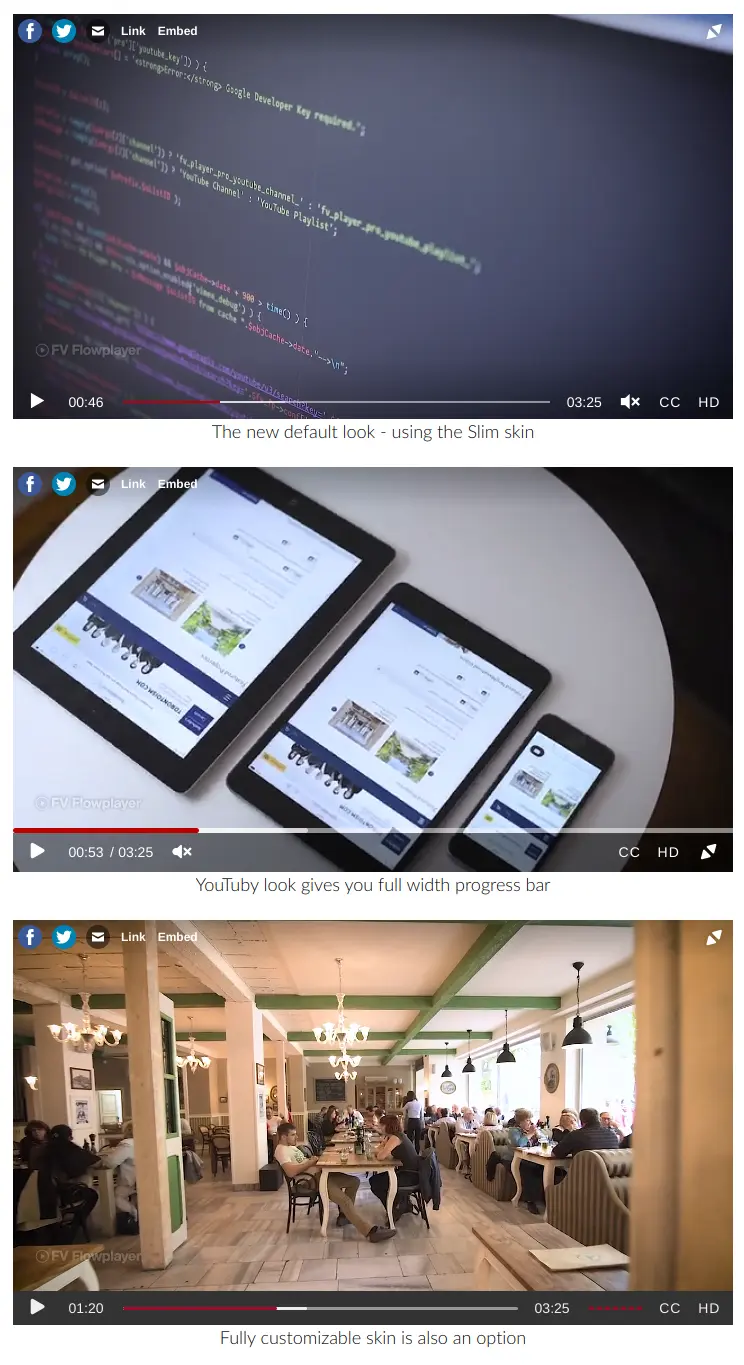
FV Player different skin options 
FV Player shortcode in post content 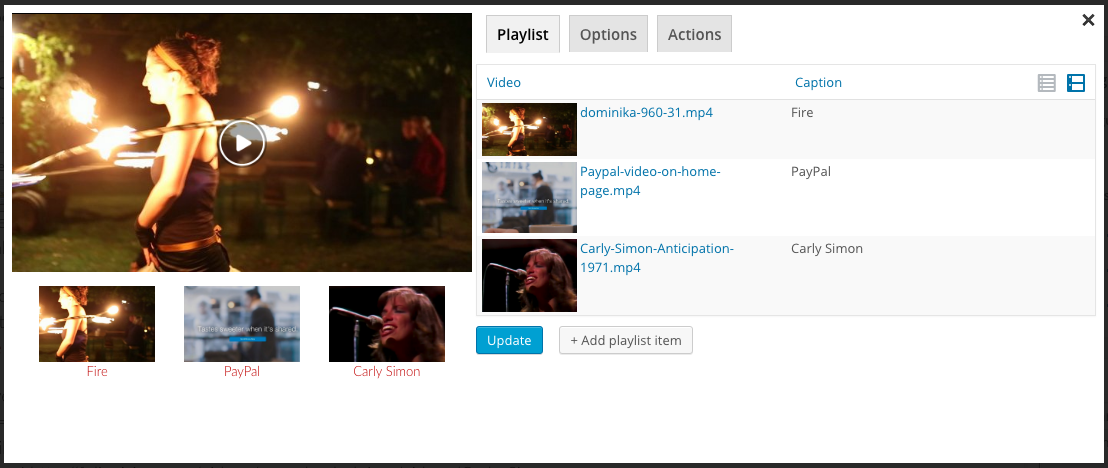
ItÌtumọ̀ Yorùbá: ’s easy to use our shortcode editor to add videos 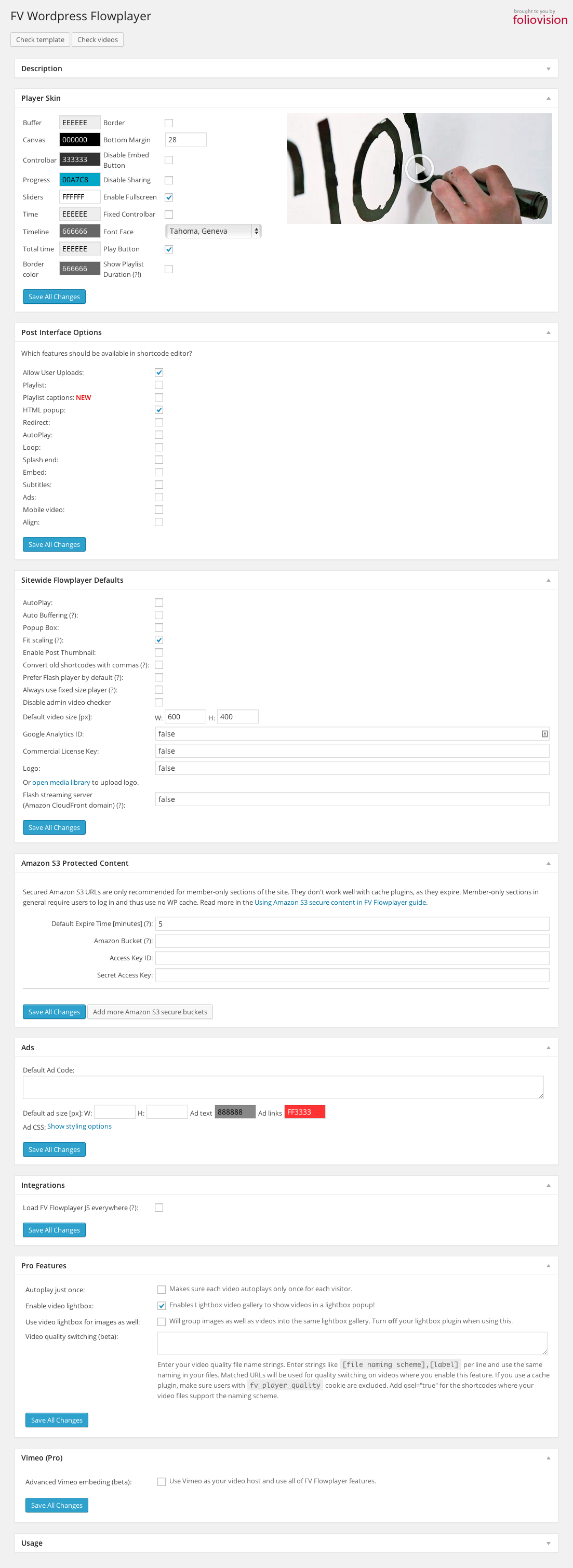
Plugin settings screen 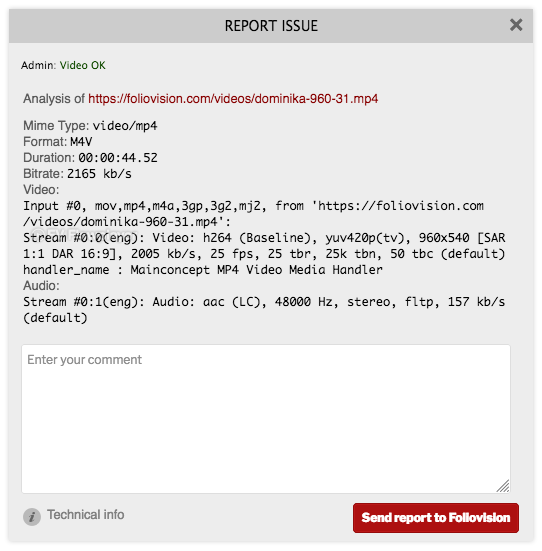
Video checker helps you find issues with your video encoding
Àwọn ìdí
Plugin yìí pèsè 1 ìdí.
- FV Player
Ìgbéwọlẹ̀
There arenÌtumọ̀ Yorùbá: ’t any special requirements for FV Player to work, and you donÌtumọ̀ Yorùbá: ’t need to install any additional plugins.
- Download and unpack zip archive containing the plugin.
- Upload the fv-wordpress-flowplayer directory into wp-content/plugins/ directory of your wordpress installation.
- Go into WordPress plugins setup in WordPress administration interface and activate FV Player plugin.
- If you want to embed videos denoted just by their filename, you can create the /videos/ directory located directly in the root of your domain and place your videos there(you use complete URL of video files).
- Go to plugin Settings screen and click both “Check template” and “Check videos” buttons to check your template and videos mime type.
Visit our site for a fully featured guide with screenshots and more!
FAQ
-
1. My video doesnÌtumọ̀ Yorùbá: ’t play in some browsers.
-
This should be related to your video format or mime type issues.
Each browser supports different video format, MP4 is the recommended format. In general, itÌtumọ̀ Yorùbá: ’s recommended to use constant frame rate. Detailed instructions about video encoding for HTML 5.
HTML5 is pickier about what video it can play than Flash.
Please note that MP4 is just a container, it might contain various streams for audio and video. You should check what audio and video stream are you using. Read next question to find out how.
-
1) This can happen if your site is at www.domain.com, but the CSS is loaded from your CDN at cdn.domain.com. Based on CSS3 and HTML5 specs not all the resources can be shared between domains.
So you need to set the following on your CDN for web fonts (woff, eot, ttf, svg):
Access-Control-Allow-Origin: *
Or you can allow your domain only (but in that case it might be good to also allow it with https):
Access-Control-Allow-Origin: http://www.domain.com
Or you can exclude wp-content/plugins/fv-wordpress-flowplayer/css/flowplayer.css from CDN.
2) Second cause might be that your webfonts are served with bad mimetype
AddType application/x-font-woff woff AddType application/x-font-ttf ttf AddType application/vnd.ms-fontobject eot AddType image/svg+xml svg -
3. I want to align my player (left/right/middle).
-
By default the player is positioned in the middle. To change alignment of the player to either left or right:
Go to FV Player settings > scroll down to post interface options > tick “Align”. Now you can insert your video. In the interface you can now choose you alignment from the drop down menu: default (middle), left, or right.
You can check demo in here. -
4. How to check my video properties using the built-in checker and how to report video not playing
-
The video checker works automatically when youÌtumọ̀ Yorùbá: ’re logged in as admin. YouÌtumọ̀ Yorùbá: ’ll see a text in upper left corner of any video on your site. All the necessary info can be found in this guide.
-
5. My video doesnÌtumọ̀ Yorùbá: ’t play in Internet Explorer 9 and 10.
-
Most of the issues is caused by bad mime type on the server which serves your video files. Our plugin contains an automated checked for this Ìtumọ̀ Yorùbá: – just click the “Check Videos” button on the plugin Settings screen.
HereÌtumọ̀ Yorùbá: ’s how to fix the mime type:
If your videos are hosted on a standard server:
You need to put the following into your .htaccess:
AddType video/mp4             .mp4
AddType video/webm            .webm
AddType video/ogg             .ogv
AddType application/x-mpegurl .m3u8
AddType video/x-m4v           .m4v
AddType video/mp2t            .ts
If you use Microsoft IIS, add following into web.config (one should be in your root website folder) into configuration/system.webServer/staticContent section:
<remove fileExtension=".mp4" />
<mimeMap fileExtension=".mp4" mimeType="video/mp4" />
<remove fileExtension=".webm" />
<mimeMap fileExtension=".webm" mimeType="video/webm" />
<remove fileExtension=".ogg" />
<mimeMap fileExtension=".ogg" mimeType="video/ogg" />
<remove fileExtension=".m4v" />
<mimeMap fileExtension=".m4v" mimeType="video/x-m4v" />
<remove fileExtension=".ts" />
<mimeMap fileExtension=".ts" mimeType="video/mp2t" />
This can be also done in the Apache configuration. If you are on Microsoft IIS, you need to use the IIS manager.
If you host videos on Amazon AWS:
They might be served with bad mime type too Ìtumọ̀ Yorùbá: – “application/octet-stream”. This largely depends on the tool which you use to upload your videos. Using your Amazon AWS Management Console, you can go though your videos and find file content type under the “Metadata” tab in an objectÌtumọ̀ Yorùbá: ’s “Properties” pane and fix it to “video/mp4” (without the quotes, of course different video formats need different mime type, this one is for MP4). There are also tools for this, like S3 Browser Freeware, good place for start is here: https://forums.aws.amazon.com/thread.jspa?messageID=224446
Good example can be seen in our support forum: https://foliovision.com/support/fv-wordpress-flowplayer/how-to/how-to-set-correct-mime-type-on-videos-hosted-by-amazon
Also for Internet Explorer, itÌtumọ̀ Yorùbá: ’s not recommended to use MPEG-4 Visual or MPEG-4 Part 2 video stream codecs.
-
6. How do I fix the bad metadata (moov) position?
-
This means that the video information (such as what codecs are used) is not stored at the beginning of the file. In our experience, video with bad meta data position might be slow to load in Flash engine (check some browser which doesnÌtumọ̀ Yorùbá: ’t play MP4 format in Flash Ìtumọ̀ Yorùbá: – like Opera) and Firefox. Although Safary and iOS (iPAd, iPhone) may play it just fine.
In general we recommend you to re-encode your video as per our instructions, but here are some quick tools:
If you are using Mac, try Lillipot (just remember to rename the file back to .mp4 extension): http://www.qtbridge.com/lillipot/lillipot.html
If you have Quick Time Pro, just open the video and in the Movie Properties -> Video Track -> Other Settings turn on the “Cache (hint)” Ìtumọ̀ Yorùbá: – screenshot.
If you are using Windows, try MP4 FastStart: http://www.datagoround.com/lab/
There are also server-side tools for fixing of this written in Python and there one for PHP, but it fails on videos bigger than the PHP memory limit.
-
7. IÌtumọ̀ Yorùbá: ’m getting error about ‘HTTP range requests’.
-
Please check with your technical support if your web server supports HTTP range requests. Most of the modern web servers support this feature (Apache, Nginx, Lighttpd, Litespeed…). ItÌtumọ̀ Yorùbá: ’s important for fast seeking in HTML5 video playback.
Other possible cause is that you are using some membership plugin to protect downloading of your videos (Premise and others). While this might seem like a good solution, we donÌtumọ̀ Yorùbá: ’t recommend it as it increases the load of your server and it wonÌtumọ̀ Yorùbá: ’t allow seeking in the videos. You can use Amazon S3 with privacy settings, just hit the link to read our illustrated guide.
-
8. Are there any known compatibility issues?.
-
We heard about problems when using some fancy pro templates like OptimizePress (read below for fixing instructions) or Gantry framework. These templates often break the WordPress conventions (probably as they often try to add too many non-template functions, like video support built-in into the template). We can debug the issues for you, just head over to our website and order the pro support.
Full list of conflicting plugins is available here: https://foliovision.com/player/compatibility
-
9. IÌtumọ̀ Yorùbá: ’m using OptimizePress version 1 template.
-
First click the “Check template” button on the pluging settings screen. It will likely report an issue like:
It appears there are multiple Flowplayer scripts on your site, your videos might not be playing, please check. There might be some other plugin adding the script.
Flowplayer script http://site.com/wp-content/themes/OptimizePress/js/flowplayer-3.2.4.min.js is old version and won't play. You need to get rid of this script.
The problem with this template is that it includes that old Flowplayer library without using the proper WordPress function to add a new script (wp_enqueue_script). You need to go through the template and make sure the script is not loading. Typically it will be in any of the header.php files Ìtumọ̀ Yorùbá: – including header-myheader.php, header-singleheader.php or similar files.
There is also a workaround Ìtumọ̀ Yorùbá: – on each page what is using one of the OptimizePress custom templates, check Launch Page & Sales Letter Options Ìtumọ̀ Yorùbá: –> Video Options Ìtumọ̀ Yorùbá: –> “Activate Video” and enter “<!Ìtumọ̀ Yorùbá: – FV Flowplayer Ìtumọ̀ Yorùbá: –>” into Launch Page & Sales Letter Options Ìtumọ̀ Yorùbá: –> Video Options Ìtumọ̀ Yorùbá: –> “External Player Code” field. That way the template thinks the video is external and will not try to put in the Flowplayer library and the video will play.
-
10. IÌtumọ̀ Yorùbá: ’m using OptimizePress version 2 template.
-
FV Flowplayer will handle all the videos inserted by the Live Edit.
-
11. Does this plugin support Shoutcast?.
-
Unfortunatelly HTML5 does not support live broadcasting. Please read about it here under “Flash. The good parts”: http://flowplayer.org/docs/#flash
-
12. I get an error message like this when activating the plugin: Parse error: parse error, unexpected T_STRING, expecting T_OLD_FUNCTION or T_FUNCTION or T_VAR or ‘}’ in /wp-content/plugins/fv-wordpress-flowplayer/models/flowplayer.php on line 4.
-
You need to use at least PHP 5, your site is probably still running on old PHP 4.
-
13. I get “CanÌtumọ̀ Yorùbá: ’t create temporary file for video analysis” in admin video checker.
-
This temporary file is required as our plugin contains a video checker for admin users Ìtumọ̀ Yorùbá: – it checks the video format and other information and warns you about potential issues why your video might not play for everybody.
The error message means the WordPress media uploads directory (by default wp-content/uploads) is not writable by PHP. We use this standard WordPress path as it should work for nearly all the websites. Most of people use the standard WordPress Media Library, so this should really work.
You can try to set the permissions of that folder to allow writing for everybody and see if that helps. If you are not sure, ask your web host support about what PHP permission model you use.
-
14. I installed the plugin, inserted the video, but itÌtumọ̀ Yorùbá: ’s not working Ìtumọ̀ Yorùbá: – there is no control bar or only a gray box appears.
-
Go to plugin Settings screen and hit “Check template” button. It will check if both jQuery library and Flowplayer JavaScript is loading properly.
Also, check “IÌtumọ̀ Yorùbá: ’m using OptimizePress template” question above.
-
15. Your player works just fine, but there are some weird display issues.
-
Please check if these issues also appear when using the default WordPress template. There seems to be some sort of conflict between the Flowplayer CSS and your theme CSS.
-
16. Fullscreen is not working properly for me.
-
Are you using some old lightbox plugin like http://www.4mj.it/slimbox-wordpress-plugin/ ? Or are you putting the video into Iframe? Also, the video should not be placed in an HTML element with lowered z-index.
-
17. How to make this plugin WPMU compatible?.
-
Just copy the plugin into wp-content/plugins and then activate it on each blog where you want to use it.
-
18. Is there a way to force pre-buffering to load a chunk of the video before the splash screen appears?.
-
This option is not available. With autobuffer, it means every visitor on every visit to your page will be downloading the video. This means that you use a lot more bandwidth than on demand. I know that I actually watch the video on only about 1/3 of the pages with video that I visit. That saves you money (no bandwidth overages) and means that people who do want to watch the video and other visitors to your site get faster performance.
If you want to autobuffer, you can turn that on in the options (we turn it off by default and recommend that it stays off). -
19. My videos are hosted with Amazon S3 service. How can I fill the details into shortcode?.
-
Just enter the URL of your video hosted on Amazon S3 as the video source.
-
Currently there is no support for other languages.
-
21. Where can I change the default directory for videos?.
-
You can change this manually in the the models/flowplayer.php in the flowplayer_head function. It you use videos in widgets you might need to edit the function flowplayer_content in controller/frontend.php as well. Please be carefull when editing source codes.
-
You need to use following code to include the shortcode into a sidebar:
echo apply_filters(‘the_content’, ‘[flowplayer src=yourvideo.mp4 width=240 height=320]’);
Fill the Flowplayer shortcode part according to your needs. The apply filter needs to be called because the flowplayer shortcodes are not parsen outside posts automatically. Also, please do not forget to add the echo at the beginning.
-
23. How can I style the popup or ad?
-
Check out .wpfp_custom_popup and .wpfp_custom_ad in /fv-wordpress-flowplayer/css/flowplayer.css. You might want to move your changes to your template CSS Ìtumọ̀ Yorùbá: – make sure you use ID of container element, so your declarations will work even when the flowplayer.css is loaded later in the head section of your webpage.
-
Yes, thereÌtumọ̀ Yorùbá: ’s a global option in settings to disable sharing/embed. We plan to add an individual flag on a per video basis to allow sharing when sharing is turned off globally and vice versa.
-
25. My videos are taking long time to load.
-
- Check your hosting for download speed.
- Try to use different settings when encoding the videos, try to turn on the cache when encoding with Quick Time
-
26. How can I change the play icon?
-
You need to copy the CSS from the Flowplayer CSS (default theme) and put it into your theme CSS. Also add some element ID in front of it to make sure it overrides the default Flowplayer CSS:
#content .is-paused.flowplayer .fp-ui{background-image:url({PATH TO YOUR IMAGE}.png)}
#content .is-rtl.is-splash.flowplayer .fp-ui, #content .is-rtl.is-paused.flowplayer .fp-ui{background-image:url({PATH TO YOUR IMAGE-rtl}.png)}
@media (-webkit-min-device-pixel-ratio: 2){
  #content .is-splash.flowplayer .fp-ui, #content .is-paused.flowplayer .fp-ui{background-image:url({PATH TO YOUR IMAGE@2x}.png)}
  #content .is-rtl.is-splash.flowplayer .fp-ui, #content .is-rtl.is-paused.flowplayer .fp-ui{background-image:url({PATH TO YOUR IMAGE-rtl@2x}.png)}
}
The image needs to be 100x106px normal version nad 200x212px hi res version. You only have to include the RTL version if your site runs in such language.
-
27. How can I change position of my custom logo?
-
Check out Settings -> FV Player -> Sitewide Flowplayer Defaults -> Logo.
-
28. Volume control in player looks weird.
-
Make sure you are not using obsolete tags like <center> to wrap the video. Such tag is not supported in HTML5, you have to use CSS to center elements.
-
29. How do I get rid of the ‘Hit ? for help’ tooltip on the player box?
-
You can put this into your templateÌtumọ̀ Yorùbá: ’s functions.php file, if you know a bit of PHP. It will disable the tooltip.
add_filter( 'fv_flowplayer_attributes', 'tweak_fv_flowplayer_attributes', 10, 2 ); function tweak_fv_flowplayer_attributes( $attrs ) { $attrs['data-tooltip'] = 'false'; return $attrs; } -
Just put this code into the templateÌtumọ̀ Yorùbá: ’s functions.php file. If you know a bit of PHP, it should not be a problem for you:
add_filter( 'fv_flowplayer_attributes', 'tweak_controlbar_fv_flowplayer_attributes', 10, 2 );
function tweak_controlbar_fv_flowplayer_attributes( $attrs ) {
    $attrs['class'] .= ' play-button';
    return $attrs;
}
It simply adds a class “play-button” to the player DIV element and then it knows to use the play button. The other options are:
no-mute no-time no-volume -
31. Minify plugins are interfering with FV Player
-
Read our guide Using FV Player with Minify Plugins. There youÌtumọ̀ Yorùbá: ’ll find how to set up plugins such as Autoptimize or WP Rocket so they work properly with the FV Player.
-
32. What if the FV Player doesnÌtumọ̀ Yorùbá: ’t work for me?
-
No worries.
- You can always downgrade to version the Flash version (delete the plugin then grab older version here and install from the ZIP file). If you downgrade to version 1.x you do lose a lot of mobile and iOS capability but you didnÌtumọ̀ Yorùbá: ’t have it in the first place.
- Contact us via support. We are actively investigating and fixing peopleÌtumọ̀ Yorùbá: ’s sites now during the initial release period. We will help you to get FV Player 7 working in your environment.
-
33. I canÌtumọ̀ Yorùbá: ’t see overlay ads on my videos
-
The problem is probably in AdBlock. If itÌtumọ̀ Yorùbá: ’s active, the overlay ads will be blocked. Once AdBlock is deactivated for the particular domain where the video is played, the overlay ads will be displayed (page refresh needed).
-
34. My YouTube video doesnÌtumọ̀ Yorùbá: ’t show properly in fullscreen
-
There is an possible issue with some themes: YouTube video opens in fullscreen, but after minimizing and opening fullscreen again, the video is shrinked in the left part of the screen (as in this example). You need to copy this CSS into your theme style sheet:
iframe.fvyoutube-engine {
    width: 100% !important;
}
You can optionally edit your themeÌtumọ̀ Yorùbá: ’s JS to prevent the shrinking.
FV Player Pro comes with a money back guarantee so you can even try the commercial no-branding version risk free. Or make it work first with the free versions.
Thank you for being part of the HMTL 5 mobile video revolution!
Àwọn àgbéyẹ̀wò


Àwọn Olùkópa & Olùgbéejáde
“FV Flowplayer Video Player” jẹ́ ètò ìṣàmúlò orísun ṣíṣí sílẹ̀. Àwọn ènìyàn wọ̀nyí ti ṣe ìkópa sí plugin yìí.
Àwọn Olùkópa

A ti túmọ̀ “FV Flowplayer Video Player” sí àwọn èdè agbègbè 6. Ọpẹ́lọpẹ́ fún àwọn atúmọ̀ èdè fún àwọn ìkópa wọn.
Túmọ̀ “FV Flowplayer Video Player” sí èdè rẹ.
Ṣe o nífẹ̀ẹ́ sí ìdàgbàsókè?
Ṣàwárí koodu, ṣàyẹ̀wò ibi ìpamọ́ SVN, tàbí ṣe àgbékalẹ̀ sí àkọsílẹ̀ ìdàgbàsókè nípasẹ̀ RSS.
Àkọsílẹ̀ àwọn àyípadà
7.5.49.7212 Ìtumọ̀ Yorùbá: – 2024-11-21
- Bugfix Ìtumọ̀ Yorùbá: – iOS 18: Playback failing if ‘Use native fullscreen on mobile’ setting is enabled and the video has subtitles
- Bugfix Ìtumọ̀ Yorùbá: – PHP warnings
7.5.48.7212 Ìtumọ̀ Yorùbá: – 2024-10-01
- Security Ìtumọ̀ Yorùbá: – FancyBox title stored XSS vulnerability fixed
- Bugfix Ìtumọ̀ Yorùbá: – PHP warnings
- Bugfix Ìtumọ̀ Yorùbá: – XML sitemap: Exclude Elementor templates
- Bugfix Ìtumọ̀ Yorùbá: – XML sitemap: Fix for URLs with &
- Bugfix Ìtumọ̀ Yorùbá: – YouTube: Facebook in-app browser fix
7.5.47.7212 Ìtumọ̀ Yorùbá: – 2024-07-18
- Security Ìtumọ̀ Yorùbá: – Bunny Stream Ìtumọ̀ Yorùbá: – avoid authenticated user SQL injection
- CSS Ìtumọ̀ Yorùbá: – better markup for splash screen showing at the end
- Tested up to: 6.6
7.5.46.7212 Ìtumọ̀ Yorùbá: – 2024-05-20
- Security Ìtumọ̀ Yorùbá: – Redirection Ìtumọ̀ Yorùbá: – improving the admin notice
- Security Ìtumọ̀ Yorùbá: – XSS fix for stats export
- Bugfix Ìtumọ̀ Yorùbá: – bug when removing player form post
- Bugfix Ìtumọ̀ Yorùbá: – fixes for custom sharing links
- Bugfix Ìtumọ̀ Yorùbá: – fix FV Player list screen performance
- Bugfix Ìtumọ̀ Yorùbá: – HTML lightbox should not work with the “glightbox” class, only “lightbox” and “colorbox”
- Bugfix Ìtumọ̀ Yorùbá: – Playlist Tabs: Fix video position restoring
- Bugfix Ìtumọ̀ Yorùbá: – Video duration check fix after the server ports scanning security fix
- Bugfix Ìtumọ̀ Yorùbá: – YouTube: DonÌtumọ̀ Yorùbá: ’t loop in playlist on video errors
7.5.45.7212 Ìtumọ̀ Yorùbá: – 2024/03/28
- Security Ìtumọ̀ Yorùbá: – Redirection Ìtumọ̀ Yorùbá: – Contributor level user is able to post a FV Player video with malicious redirection URL at the end of a video. Then the Editor or Administrators reviewing ContributorÌtumọ̀ Yorùbá: ’s post before publication would be taken to that URL. We have added a confirmation prompt for redirection URLs for Editors and Administrators.
- Security Ìtumọ̀ Yorùbá: – prevent server port scanning by logged in users
- Compatbility Ìtumọ̀ Yorùbá: – WP Rocket Ìtumọ̀ Yorùbá: – Fix for Removed Unused CSS to never remove FV Player CSS
- Bugfix Ìtumọ̀ Yorùbá: – Fix timeline not responding to clicks for Vimeo videos in rare cases
- Bugfix Ìtumọ̀ Yorùbá: – “Use native fullscreen on mobile” not working when used with “Force fullscreen on mobile” on iPhone with iOS 17
- Bugfix Ìtumọ̀ Yorùbá: – Show full error message when upload fails
7.5.43.7212 Ìtumọ̀ Yorùbá: – 2024/02/28
- Security Ìtumọ̀ Yorùbá: – fix XSS in the redirection at the end of video is bad URL is posted by authenticated user
- Security Ìtumọ̀ Yorùbá: – fix XSS in the video loading code if using DigitalOcean Spaces or Linode Object Storage
- AWS SDK update Ìtumọ̀ Yorùbá: – PHP 7.4 is now required for the DigitalOcean Spaces/AWS S3 browser and uploader
- HLS Ìtumọ̀ Yorùbá: – Keep showing splash until the video really plays
- Translations Ìtumọ̀ Yorùbá: – adding Arabic, thanks to dubaiglobalnews.com
- Bugfix Ìtumọ̀ Yorùbá: – Handle WordPress audio/video setting Ìtumọ̀ Yorùbá: – fix for player HTML showing in excerpts
- Bugfix Ìtumọ̀ Yorùbá: – SEO Ìtumọ̀ Yorùbá: – Schema.org Ìtumọ̀ Yorùbá: – better date format
- Bugfix Ìtumọ̀ Yorùbá: – Uploads Ìtumọ̀ Yorùbá: – avoid duplicate job submissions for FV Player Coconut
7.5.41.7212 Ìtumọ̀ Yorùbá: – 2023/10/04
- YouTube Ìtumọ̀ Yorùbá: – fixing playback glitches on Android and iOS, tested with iOS 12.5.7 to 17.0
7.5.40.7212 Ìtumọ̀ Yorùbá: – 2023/09/29
- YouTube Ìtumọ̀ Yorùbá: – fix videos not starting properly on Android
- Bugfix Ìtumọ̀ Yorùbá: – stale pending video encoding jobs removing video URLs when using Gutenberg block
7.5.39.7212 Ìtumọ̀ Yorùbá: – 2023/08/23
- Security Ìtumọ̀ Yorùbá: – prevent XSS when “Enable profile videos” is on
- Allow DB tables to be fixed with WP_ALLOW_REPAIR
- Bugfix Ìtumọ̀ Yorùbá: – Amazon S3 Ìtumọ̀ Yorùbá: – fix when using commas in the URLs
- Bugfix Ìtumọ̀ Yorùbá: – Video Checker Ìtumọ̀ Yorùbá: – fix checking of dynamic URLs (Amazon S3, or FV Player Pro CDNs like Bunny CDN)
7.5.37.7212 Ìtumọ̀ Yorùbá: – 2023/08/02
- HLS.js Ìtumọ̀ Yorùbá: – upgrade to 1.4.10
- Optimize FV Flowplayer JS loading Ìtumọ̀ Yorùbá: – disabled if using WP Rocket “Delay JavaScript execution”
- Remember video position Ìtumọ̀ Yorùbá: – on by default for now plugin users
- Sticky player Ìtumọ̀ Yorùbá: – option to enable for mobile users. Thanks to Dennis Isseult https://www.dmimedia.nl
- Bugfix Ìtumọ̀ Yorùbá: – Safari Ìtumọ̀ Yorùbá: – disable HLS.js for Safari 16.5 and above due to playback issues on some websites
7.5.36.7212 Ìtumọ̀ Yorùbá: – 2023/05/03
- Bugfix Ìtumọ̀ Yorùbá: – DigitalOcean Spaces/AWS S3 browser broken after AWS SDK update, fixing tests too
7.5.35.7212 Ìtumọ̀ Yorùbá: – 2023/04/26
- AWS SDK update Ìtumọ̀ Yorùbá: – PHP 7.3 is now required for the DigitalOcean Spaces/AWS S3 browser
- Bugfix Ìtumọ̀ Yorùbá: – Avoid PHP fatal errors if plugin PHP files are opened directly
- Bugfix Ìtumọ̀ Yorùbá: – Fix audio-only playlist detection
- Bugfix Ìtumọ̀ Yorùbá: – Sticky player behavior when VAST ad is playing
- Security Ìtumọ̀ Yorùbá: – prevent XSS for logged in editors
7.5.32.7212 Ìtumọ̀ Yorùbá: – 2023/03/31
- Tested up to WordPress 6.2. Note that the FV Player Editor is not available in the Block Themes Site Editor and you have to put in the shortcode by hand.
- Video Stats Ìtumọ̀ Yorùbá: – CSV export function
- Video Stats Ìtumọ̀ Yorùbá: – recording each logged in user separately, see wp-admin -> FV Player -> User Stats
- Video Stats Ìtumọ̀ Yorùbá: – recording video watch duration
7.5.31.7212 Ìtumọ̀ Yorùbá: – 2023/01/30
- New feature Ìtumọ̀ Yorùbá: – [fvplayer_watched] to give list of watched/unfinished/finished videos with their post links
- PHP 8.2 fixes
- Security fix Ìtumọ̀ Yorùbá: – video intelligence ads settings box could be removed with XSS
- Video Custom Fields Ìtumọ̀ Yorùbá: – fix autoplay not working
- YouTube Ìtumọ̀ Yorùbá: – check live stream status
7.5.30.7210 Ìtumọ̀ Yorùbá: – 2022/12/23
- Using Freedom Video Player 7.2.12
- Chromecast Ìtumọ̀ Yorùbá: – fix for HLS streams with multiple audio tracks
- Click to unmute Ìtumọ̀ Yorùbá: – showing for 10 instead of just 5 seconds if audible autoplay has been blocked by browser
- Compatibility Ìtumọ̀ Yorùbá: – SiteGround Optimizer
- CSS Ìtumọ̀ Yorùbá: – making the timeline easier to tap on mobile
- Handle WordPress audio/video setting Ìtumọ̀ Yorùbá: – Support Vimeo Gutenberg block
- Handle WordPress audio/video setting Ìtumọ̀ Yorùbá: – Support Vimeo iframes
- Lightbox Ìtumọ̀ Yorùbá: – support text links to images with class=”colorbox”
- MPEG-DASH Ìtumọ̀ Yorùbá: – upgrade to Dash.js 3.2.2
- Schema.org Ìtumọ̀ Yorùbá: – adding video duration
- Sticky player Ìtumọ̀ Yorùbá: – also working when scrolling up
- YouTube Ìtumọ̀ Yorùbá: – fullscreen fix if your theme uses CSS transform or z-index
- Bugfix Ìtumọ̀ Yorùbá: – duplicate preview with Gutenberg
- Bugfix Ìtumọ̀ Yorùbá: – MPEG-DASH Ìtumọ̀ Yorùbá: – Vimeo volume unmuting for iPad
- Bugfix Ìtumọ̀ Yorùbá: – YouTube Ìtumọ̀ Yorùbá: – “Live in XY hours” message not appearing for some users on scheduled live streams
- Bugfix Ìtumọ̀ Yorùbá: – YouTube Ìtumọ̀ Yorùbá: – Shorts support for mobile
7.5.29.7210 Ìtumọ̀ Yorùbá: – 2022/09/23
- AWS SDK update and size reduction
- Full-featured YouTube player (moved in from FV Player Pro)
- HLS.js Ìtumọ̀ Yorùbá: – upgrade to 1.2.3 to fix playback on iOS 16
- iPhone Ìtumọ̀ Yorùbá: – avoid accidental drag of on-screen home button when in fullscreen
- Seek back/forward button on controlbar Ìtumọ̀ Yorùbá: – allowing for DVR live streams
- SiteGround Security Ìtumọ̀ Yorùbá: – putting track.php on their exclusions list
- Bugfix Ìtumọ̀ Yorùbá: – Dash.js Safari autoplay fix
- Bugfix Ìtumọ̀ Yorùbá: – fixing missing “no play” icon
- Bugfix Ìtumọ̀ Yorùbá: – Preloading Ìtumọ̀ Yorùbá: – fix player not appearing when using 100% width and height, assuming 16:9 aspect ratio
- Bugfix Ìtumọ̀ Yorùbá: – Volume control appearing for iOS 16 where itÌtumọ̀ Yorùbá: ’s not possible to control volume using JavaScript
7.5.27.7210 Ìtumọ̀ Yorùbá: – 2022/08/22
- CSS Ìtumọ̀ Yorùbá: – do not preload in header if FV Player is in one of the Widgets and not in page content
- CSS Ìtumọ̀ Yorùbá: – fix subtitles position on mobile when controlbar visible
- Editor Ìtumọ̀ Yorùbá: – show save errors
- Featured Image Ìtumọ̀ Yorùbá: – FV Player will only use itÌtumọ̀ Yorùbá: ’s splash image if there is no Featured Image only once per post Ìtumọ̀ Yorùbá: – making it easy to remove if you do not want it
- Updating settings help screen and help links
- Bugfix Ìtumọ̀ Yorùbá: – Bunny Stream video splash images not showing in job browser when using FV Player Pro function for URL tokens
- Bugfix Ìtumọ̀ Yorùbá: – iOS video recovery Ìtumọ̀ Yorùbá: – was not working for HLS live streams
- Bugfix Ìtumọ̀ Yorùbá: – Preloading Ìtumọ̀ Yorùbá: – fix play button not appearing for Slim and YouTuby skins
- Bugfix Ìtumọ̀ Yorùbá: – reducing database row size
7.5.26.7210 Ìtumọ̀ Yorùbá: – 2022/07/06
- Using Freedom Video Player 7.2.10
- AWS SDK update
- CSS Ìtumọ̀ Yorùbá: – make sure the seek buttons work with button color setting
- Editor Ìtumọ̀ Yorùbá: – download splash image from Vimeo or YouTube for FV Player Pro users
- Featured image Ìtumọ̀ Yorùbá: – only set once for each player in the post, allowing you to prevent the FV Player Splash Image from becoming the Featured Image anytime you save the post
- Safari Ìtumọ̀ Yorùbá: – avoid WebM , it might have VP9 Ìtumọ̀ Yorùbá: – wonÌtumọ̀ Yorùbá: ’t play
- Security Ìtumọ̀ Yorùbá: – hide sensitive information in settings pannels (the Secure Access Keys, requires FV Player Pro 7.5.25.727 if installed)
- SEO Ìtumọ̀ Yorùbá: – 30 instead of just 10 words for schema.org/description
- Bugfix Ìtumọ̀ Yorùbá: – PHP 8.1 deprecation fixes
7.5.22.727 Ìtumọ̀ Yorùbá: – 2022/05/11
- Mobile Ìtumọ̀ Yorùbá: – “Force landscape orientation in fullscreen” is now always on and no longer a setting
- Mobile Ìtumọ̀ Yorùbá: – showing “To enjoy fullscreen swipe up to hide location bar.” for iPhone users when location bar appears in fullscreen mode
- Updating to Flowplayer 7.2.8
- Styling Ìtumọ̀ Yorùbá: – fullscreen exit button is now an X symbol
- Styling Ìtumọ̀ Yorùbá: – fullscreen exit button is now easier to tap on mobile
- Styling Ìtumọ̀ Yorùbá: – mobile now has more spacing between timeline and control bar buttons
- Video Position Saving Ìtumọ̀ Yorùbá: – also remember the top position in the video
- Video upload Ìtumọ̀ Yorùbá: – Support folder creation for FV Player Coconut
- Video upload Ìtumọ̀ Yorùbá: – Support uploading into folders for FV Player Coconut
- Bugfix Ìtumọ̀ Yorùbá: – Editor Ìtumọ̀ Yorùbá: – creating duplicate drafts
- Bugfix Ìtumọ̀ Yorùbá: – Editor Ìtumọ̀ Yorùbá: – empty subtitles field appearing
- Bugfix Ìtumọ̀ Yorùbá: – Editor Ìtumọ̀ Yorùbá: – missing action hook on player save, causing issues with FV Player Pay Per View
- Bugfix Ìtumọ̀ Yorùbá: – “Load FV Flowplayer JS everywhere” setting Ìtumọ̀ Yorùbá: – was not loading rewind/fastforward and playlist repeat buttons
7.5.21.727 Ìtumọ̀ Yorùbá: – 2022/04/07
- Bugfix Ìtumọ̀ Yorùbá: – Position saving Ìtumọ̀ Yorùbá: – issues with position restore when multiple players on the page
- Bugfix Ìtumọ̀ Yorùbá: – CSS Ìtumọ̀ Yorùbá: – ensure the controlbar fonts load before video starts playing
- Bugfix Ìtumọ̀ Yorùbá: – LearnDash LMS support Ìtumọ̀ Yorùbá: – fix FV Player Pro video ads to not affect lesson completion button
7.5.20.727 Ìtumọ̀ Yorùbá: – 2022/03/25
- Urgent Bugfix Ìtumọ̀ Yorùbá: – video splash screens not disappearing for non-Pro users
7.5.19.727 Ìtumọ̀ Yorùbá: – 2022/03/24
- Security Ìtumọ̀ Yorùbá: – player editing permission checks for Contributors and Authors
- Security Ìtumọ̀ Yorùbá: – XSS fix Ìtumọ̀ Yorùbá: – users with the Contributor role (or above) were able to insert rudimentary JavaScript into FV Player. Thanks to m0ze (Patchstack) for the report!
- Autoplay Ìtumọ̀ Yorùbá: – only remove splash once video really plays to prevent empty black video from showing
- LearnDash LMS support Ìtumọ̀ Yorùbá: – fix display issues with playlist
- Bugfix Ìtumọ̀ Yorùbá: – Position saving Ìtumọ̀ Yorùbá: – skip playlist position restore for YouTube playlist Ìtumọ̀ Yorùbá: – for now
- Bugfix Ìtumọ̀ Yorùbá: – Position saving Ìtumọ̀ Yorùbá: – fix for invalid player index for non-logged in users
7.5.18.727 Ìtumọ̀ Yorùbá: – 2022/03/18
- Security Ìtumọ̀ Yorùbá: – fix for SQL injection vulnerability when saving player in editor Ìtumọ̀ Yorùbá: – for Author user level and above. Thanks to Tien Nguyen Anh for the report!
- Elementor Ìtumọ̀ Yorùbá: – Bring back the FV Player into Elementor Elements search
- Media Library Ìtumọ̀ Yorùbá: – optimized images loading
- Shortcode to database conversion tool fixes
- wp-admin -> FV Player Ìtumọ̀ Yorùbá: – allow search by player ID
- Bugfix Ìtumọ̀ Yorùbá: – bad values coming from the background video duration scanner
- Bugfix Ìtumọ̀ Yorùbá: – JavaScript compatibility fixes
- Bugfix Ìtumọ̀ Yorùbá: – Picture button stopped working
- Bugfix Ìtumọ̀ Yorùbá: – Sticky player Ìtumọ̀ Yorùbá: – fix when closing sticky mode
- Bugfix Ìtumọ̀ Yorùbá: – Sticky player Ìtumọ̀ Yorùbá: – fix when scrolling too fast
- Bugfix Ìtumọ̀ Yorùbá: – Volume restoration not working if default volume set to zero
7.5.15.727 Ìtumọ̀ Yorùbá: – 2022/01/27
- HLS.js Ìtumọ̀ Yorùbá: – upgrade to 1.1.4 to fix playback on Apple Silicon M1 computers
- LearnDash LMS support Ìtumọ̀ Yorùbá: – add FV Player directly in your lesson Video Progression settings
- Shortcode to database conversion tool Ìtumọ̀ Yorùbá: – use FV Player -> Tools -> Conversion to upgrade from [fvplayer src=”…”] to [fvplayer id=”…”]
- Video Sitemap XML Ìtumọ̀ Yorùbá: – Elementor support
- Bugfix Ìtumọ̀ Yorùbá: – Amazon S3 Ìtumọ̀ Yorùbá: – fix bucket name being matched in the file name
- Bugfix Ìtumọ̀ Yorùbá: – Settings screen Ìtumọ̀ Yorùbá: – fix boxes not opening in rare cases
7.5.14.727 Ìtumọ̀ Yorùbá: – 2021/01/06
- Bunny Stream Ìtumọ̀ Yorùbá: – show video collections
- Bugfix Ìtumọ̀ Yorùbá: – Editor Ìtumọ̀ Yorùbá: – show HLS stream checkboxes if the stream cannot be checked as itÌtumọ̀ Yorùbá: ’s not available
7.5.13.727 Ìtumọ̀ Yorùbá: – 2021/12/20
- New feature Ìtumọ̀ Yorùbá: – drag&drop video upload and encoding with the Bunny Stream service!
- New feature Ìtumọ̀ Yorùbá: – Editor now detects the HLS stream type to show Live stream and Audio stream checkboxes only when needed
- Compatibility Ìtumọ̀ Yorùbá: – Editor Ìtumọ̀ Yorùbá: – jQuery 3.6 fixes
- Bugfix Ìtumọ̀ Yorùbá: – Editor Ìtumọ̀ Yorùbá: – prevent autosave attempt right after opening the editor
7.5.12.727 Ìtumọ̀ Yorùbá: – 2021/11/25
- Bugfix Ìtumọ̀ Yorùbá: – Playlist tabs not pausing the old tab player properly
- Bugfix Ìtumọ̀ Yorùbá: – Position Saving Ìtumọ̀ Yorùbá: – do not use index.m3u8 as the video ID
- Bugfix Ìtumọ̀ Yorùbá: – Video link issue for videos over 1 hour
- Compatibility Ìtumọ̀ Yorùbá: – Bunny.net WordPress CDN Plugin
- Compatibility Ìtumọ̀ Yorùbá: – WP Rocket Used CSS
- Lightbox Ìtumọ̀ Yorùbá: – Fancybox updated Ìtumọ̀ Yorùbá: – double tap on image zooms in
- Linode Object Storage support
- Video upload support for FV Player Coconut and FV Player Bunny Stream
7.5.11.727 Ìtumọ̀ Yorùbá: – 2021/10/14
- Click to unmute Ìtumọ̀ Yorùbá: – adding translations
- Click to unmute Ìtumọ̀ Yorùbá: – only show on hover
- Click to unmute Ìtumọ̀ Yorùbá: – only show once in playlist
- Live streams Ìtumọ̀ Yorùbá: – fix buffer indicator bug for long streams
- Media Library Ìtumọ̀ Yorùbá: – fix for picking of old FV Player Coconut jobs
- PHP warnings Ìtumọ̀ Yorùbá: – fix multibyte functions used without check
- Store dismissed wp-admin popup notices also in cookies
- Support for FV Player Coconut video uploads Ìtumọ̀ Yorùbá: – fixes
7.5.10.727 Ìtumọ̀ Yorùbá: – 2021/10/06
- Airplay Ìtumọ̀ Yorùbá: – removing the button if the video type is not supported
- Click to unmute Ìtumọ̀ Yorùbá: – shows when a video playback starts muted
- Flash is no longer the default video type
- Support for FV Player Coconut video uploads
7.5.7.727 Ìtumọ̀ Yorùbá: – 2021/09/27
- Bugfix Ìtumọ̀ Yorùbá: – HLS Ìtumọ̀ Yorùbá: – live stream check Ìtumọ̀ Yorùbá: – countdown fix
- Bugfix Ìtumọ̀ Yorùbá: – Lightbox Ìtumọ̀ Yorùbá: – image lightbox picks proper image caption for [caption] shortcodes
- Bugfix Ìtumọ̀ Yorùbá: – Matomo/Piwik support Ìtumọ̀ Yorùbá: – fix when running in subfolder
- Bugfix Ìtumọ̀ Yorùbá: – Subtitles Ìtumọ̀ Yorùbá: – remember disabled subtitles state even if subtitles on by default
7.5.5.727 Ìtumọ̀ Yorùbá: – 2021/09/09
- Appearance Ìtumọ̀ Yorùbá: – player interface is now a bit smaller on desktop devices
- CSS Ìtumọ̀ Yorùbá: – fix gap between player and controlbar for fixed controls and full timeline
- Mobile Ìtumọ̀ Yorùbá: – keep rewind button even on narrow displays
- Support for chapters on video timeline (Pro feature)
- Uninstall Ìtumọ̀ Yorùbá: – adding the missing feature
- Bugfix Ìtumọ̀ Yorùbá: – native fullscreen not working on iOS
7.5.4.727 Ìtumọ̀ Yorùbá: – 2021/08/18
- Bugfix Ìtumọ̀ Yorùbá: – CSS Ìtumọ̀ Yorùbá: – timeline dragging causing display issues on some websites with Gutenberg
- Bugfix Ìtumọ̀ Yorùbá: – Elementor FV Player widget not considered for the “Embedded on” column of wp-admin -> FV Player
- Bugfix Ìtumọ̀ Yorùbá: – Embedded post ID missing when editing player with FV Player Pay Per View enabled
- Bugfix Ìtumọ̀ Yorùbá: – Lightbox should not use left/right align
- Bugfix Ìtumọ̀ Yorùbá: – Video Stats Ìtumọ̀ Yorùbá: – clear scheduled job hook if setting not active
- Bugfix Ìtumọ̀ Yorùbá: – Video Stats Ìtumọ̀ Yorùbá: – do not track video recovery as another play
- Bugfix Ìtumọ̀ Yorùbá: – Video Stats Ìtumọ̀ Yorùbá: – track video replay as another play
7.5.3.727 Ìtumọ̀ Yorùbá: – 2021/08/10
- Security Ìtumọ̀ Yorùbá: – fix for XSS vulnerability in stats screen
- Bugfix Ìtumọ̀ Yorùbá: – Force landscape orientation in fullscreen setting fix
- Bugfix Ìtumọ̀ Yorùbá: – bad scroll position after leaving fullscreen
- Bugfix Ìtumọ̀ Yorùbá: – Sticky player code should not run on mobile
7.5.2.727 Ìtumọ̀ Yorùbá: – 2021/07/28
- Bugfix Ìtumọ̀ Yorùbá: – editor auto-save for FV Player Pay Per View and FV Player Pay Per View for WooCommerce
7.5.1.727 Ìtumọ̀ Yorùbá: – 2021/07/21
- Google Analytics Ìtumọ̀ Yorùbá: – compatibility with Google Analytics 4
- WordPress 5.8 Ìtumọ̀ Yorùbá: – fix for the Widgets screen loading issues and FV Player widgets preview
- Bugfix Ìtumọ̀ Yorùbá: – Android landscape fullscreen lock not working with HLS
- Bugfix Ìtumọ̀ Yorùbá: – popup notice on 7.5 upgrade not going away when dismissed Ìtumọ̀ Yorùbá: – possibly due to object cache issues, but we added a browser cookie to prevent it
- Bugfix Ìtumọ̀ Yorùbá: – some encrypted HLS streams failing to start properly in Safari
7.5.0.727 Ìtumọ̀ Yorùbá: – 2021/06/21
- New feature Ìtumọ̀ Yorùbá: – Daily video play stats, just enable Settings -> FV Player -> Sidewide Flowplayer Defaults -> Video Stats
- New feature Ìtumọ̀ Yorùbá: – Multiple video playback, just enable Settings -> FV Player -> Sidewide Flowplayer Defaults -> Multiple video playback
- Improved editing experience with autosave and autopreview
- Improved Gutenberg integration Ìtumọ̀ Yorùbá: – with player preview, we still look forward for a proper Gutenberg block
- Improved handling of multiple players on page Ìtumọ̀ Yorùbá: – previously played video will pause and not go back to beginning
- Improved HLS quality remembering
- Improved JavaScript loading Ìtumọ̀ Yorùbá: – player only loads files once the user is actually using the page
7.4.47.727 Ìtumọ̀ Yorùbá: – 2021/05/18
- Custom video fields Ìtumọ̀ Yorùbá: – setting default hook priority to ensure boxes are placed higher up
- Deprecated jQuery calls fix
- HLS.js Ìtumọ̀ Yorùbá: – upgrade to 1.0.4 to fix autoplay issues with some streams
- Bugfix Ìtumọ̀ Yorùbá: – Editor Ìtumọ̀ Yorùbá: – Video Screenshot Ìtumọ̀ Yorùbá: – fix for new crossOrigin requirement for MP4
- Bugfix Ìtumọ̀ Yorùbá: – Playlist Ìtumọ̀ Yorùbá: – fixes when the playlist item fails to play and it auto-advances to next
- Bugfix Ìtumọ̀ Yorùbá: – Sticky player Ìtumọ̀ Yorùbá: – subtitles sizing
7.4.46.727 Ìtumọ̀ Yorùbá: – 2021/04/09
- DASH.js Ìtumọ̀ Yorùbá: – allowing it to recover from blocked autoplay on Safari
- Handle WordPress audio/video Ìtumọ̀ Yorùbá: – improved the setting to also work with YouTube oEmbed
- Migration Wizard Ìtumọ̀ Yorùbá: – improved to handle subtitles too
- Bugfix Ìtumọ̀ Yorùbá: – duplicate FV Player DB wp_fv_player_videometa rows being created
- Bugfix Ìtumọ̀ Yorùbá: – Lightbox Ìtumọ̀ Yorùbá: – respect dimensions stored in FV Player DB
- Bugfix Ìtumọ̀ Yorùbá: – Position Saving Ìtumọ̀ Yorùbá: – safer way of restoring position (for HLS.js)
7.4.45.727 Ìtumọ̀ Yorùbá: – 2021/03/24
- Bugfix Ìtumọ̀ Yorùbá: – YouTube.com iframe embeds broken after adding support for youtube-nocokie.com in previous release
- Bugfix Ìtumọ̀ Yorùbá: – YouTube controlbar fix for iPad with Chrome for FV Player Pro
7.4.44.727 Ìtumọ̀ Yorùbá: – 2021/03/23
- Chromecast Ìtumọ̀ Yorùbá: – support for video subtitles added
- FV Player Pro 7.4.44.727 required for encrypted HLS with multiple audio tracks
- Google Analytics Ìtumọ̀ Yorùbá: – compatibility with websites using ga.js or gtag.js
- HLS.js Ìtumọ̀ Yorùbá: – upgrade to 0.14.17 to fix subtle audio sync issues
- Matomo tracking support (Piwik)
- New Feature Ìtumọ̀ Yorùbá: – Migration Wizard Ìtumọ̀ Yorùbá: – found in Settings -> FV Player -> Tools, useful to mass replace video URLs
- Bugfix Ìtumọ̀ Yorùbá: – editor screenshots and video checker reports broken after PHP 8 fixes
7.4.42.727 Ìtumọ̀ Yorùbá: – 2021/03/10
- Custom CSS Ìtumọ̀ Yorùbá: – added field for easy player CSS customizations in wp-admin -> Settings -> FV Player -> Skin -> Custom CSS
- Subtitles Ìtumọ̀ Yorùbá: – using native language names for the menu
- Bugfix Ìtumọ̀ Yorùbá: – CSS Ìtumọ̀ Yorùbá: – scrollbars appearing on player in some cases
- Bugfix Ìtumọ̀ Yorùbá: – PHP 8 Ìtumọ̀ Yorùbá: – fixing warnings
7.4.41.727 Ìtumọ̀ Yorùbá: – 2021/03/08
- Compatibility Ìtumọ̀ Yorùbá: – Brizy editor preview support
- CSS Ìtumọ̀ Yorùbá: – controlbar menus should get scrollbars automatically
- Google Analytics Ìtumọ̀ Yorùbá: – only run if configured Ìtumọ̀ Yorùbá: – but allow custom tracking events (fv_track_events)
- Mobile Ìtumọ̀ Yorùbá: – Fullscreen orientation lock Ìtumọ̀ Yorùbá: – fix for portrait videos
- Video linking Ìtumọ̀ Yorùbá: – added milisecond precision for FV Player Pro AB Loop Link
- Bugfix Ìtumọ̀ Yorùbá: – CSS Ìtumọ̀ Yorùbá: – put controlbar menus above controlbar in fullscreen
- Bugfix Ìtumọ̀ Yorùbá: – Lightbox Ìtumọ̀ Yorùbá: – fixing embed links to work (without lightbox)
- Bugfix Ìtumọ̀ Yorùbá: – PHP warnings Ìtumọ̀ Yorùbá: – prevent when unknown properties set via editor
- Bugfix Ìtumọ̀ Yorùbá: – Video checker Ìtumọ̀ Yorùbá: – unable to type when mouse hover on player
7.4.40.727 Ìtumọ̀ Yorùbá: – 2021/02/18
- Bugfix Ìtumọ̀ Yorùbá: – Fullscreen Ìtumọ̀ Yorùbá: – bad scroll position after leaving fullscreen of YouTube with FV Player Pro
- Bugfix Ìtumọ̀ Yorùbá: – Google Analytics Ìtumọ̀ Yorùbá: – only load when configured
- Bugfix Ìtumọ̀ Yorùbá: – prevent PHP notices for position and timeline_preview
7.4.39.727 Ìtumọ̀ Yorùbá: – 2021/01/21
- Chromecast Ìtumọ̀ Yorùbá: – icon fix
- Chromecast Ìtumọ̀ Yorùbá: – retain playback position when enabling/disabling
- Chromecast Ìtumọ̀ Yorùbá: – support replaying the video and playlists
- Chromecast Ìtumọ̀ Yorùbá: – support switching of audio tracks in multiple audio track HLS streams
- Skin settings Ìtumọ̀ Yorùbá: – adding Helvetica as an option
- Bugfix Ìtumọ̀ Yorùbá: – removing exception trigger for missing FV_Player_Db_Player_Meta()
7.4.38.727 Ìtumọ̀ Yorùbá: – 2021/01/14
- Security Ìtumọ̀ Yorùbá: – Security Ìtumọ̀ Yorùbá: – XSS fix for wp-admin -> FV Player screen from logged in editors/admins. Thanks to Arcangelo Saracino for the report!
- Compatibility Ìtumọ̀ Yorùbá: – Avada builder (wp-admin) fixes
- Google Analytics Ìtumọ̀ Yorùbá: – switching from ga.js to analytics.js
- Bugfix Ìtumọ̀ Yorùbá: – Audio splash screen fix for HLS audio-only streams
- Bugfix Ìtumọ̀ Yorùbá: – Fullscreen subtitles font size
- Bugfix Ìtumọ̀ Yorùbá: – Video duration scanning issues with certain HLS streams
7.4.37.727 Ìtumọ̀ Yorùbá: – 2020/11/20
- Added Settings into wp-admin -> FV Player menu
- Compatibility Ìtumọ̀ Yorùbá: – Safari fullscreen fix for Twenty Twenty
- Bugfix Ìtumọ̀ Yorùbá: – HLS quality remembering Ìtumọ̀ Yorùbá: – fix when remembered stream number doesnÌtumọ̀ Yorùbá: ’t exist
- Bugfix Ìtumọ̀ Yorùbá: – iOS video recovery Ìtumọ̀ Yorùbá: – was causing issues with playback of MP4 videos
- Bugfix Ìtumọ̀ Yorùbá: – Playlist style selection not working for FV Player Pro Vimeo Channel parsing
- Bugfix Ìtumọ̀ Yorùbá: – S3 Browser Ìtumọ̀ Yorùbá: – fix for CloudFront domains when using S3 path with region name
7.4.36.727 Ìtumọ̀ Yorùbá: – 2020/10/28
- Bugfix Ìtumọ̀ Yorùbá: – typo in OGV video parsing resulting in bad video type
- Bugfix Ìtumọ̀ Yorùbá: – “Use native fullscreen on mobile” not working after last release
7.4.35.727 Ìtumọ̀ Yorùbá: – 2020/10/22
- Audio Ìtumọ̀ Yorùbá: – splash screen now stays up for the full duration of audio files
- Compatiblity Ìtumọ̀ Yorùbá: – Fullscreen appearance fix for Google Pixel 4
- HLS Ìtumọ̀ Yorùbá: – live stream check Ìtumọ̀ Yorùbá: – countdown translation fixes
- iOS video recovery Ìtumọ̀ Yorùbá: – improved for expired MP4 file links
- Playlist Ìtumọ̀ Yorùbá: – show item splash when manually switching items
- Translations Ìtumọ̀ Yorùbá: – quality menu, speed menu and subtitles menu label
- Bugfix Ìtumọ̀ Yorùbá: – Compatiblity Ìtumọ̀ Yorùbá: – Elementor editor CSS conflict fix
- Bugfix Ìtumọ̀ Yorùbá: – Editor Ìtumọ̀ Yorùbá: – fix for picking of timeline previews in FV Player Pro
- Bugfix Ìtumọ̀ Yorùbá: – FV Player wp-admin screen Ìtumọ̀ Yorùbá: – screen options per page setting fix
- Bugfix Ìtumọ̀ Yorùbá: – Video durations are now respecting FV Player ProÌtumọ̀ Yorùbá: ’s custom start/end time
- Bugfix Ìtumọ̀ Yorùbá: – Video Position Saving Ìtumọ̀ Yorùbá: – improvements to work with FV Player ProÌtumọ̀ Yorùbá: ’s custom start/end time
7.4.34.727 Ìtumọ̀ Yorùbá: – 2020/09/23
- FV Player wp-admin Screen Ìtumọ̀ Yorùbá: – search fixes and improvements Ìtumọ̀ Yorùbá: – you can multiple words or quotes
- HLS Ìtumọ̀ Yorùbá: – live stream check Ìtumọ̀ Yorùbá: – improving display and behavior when multiple video playbacks is enabled
- Compatibility Ìtumọ̀ Yorùbá: – AWS Ìtumọ̀ Yorùbá: – library update
- Compatibility Ìtumọ̀ Yorùbá: – jQuery migrate fixes
- Compatibility Ìtumọ̀ Yorùbá: – Elementor fixes
7.4.33.727 Ìtumọ̀ Yorùbá: – 2020/08/24
- Bugfix Ìtumọ̀ Yorùbá: – Autoplay Ìtumọ̀ Yorùbá: – hide initial play arrow animation when autoplaying a video did also hide the loading progress indicator
- DASH.js library downgrade to 3.0.0 as some videos wouldnÌtumọ̀ Yorùbá: ’t play on macOS 10.5.6 with Safari 13.1.2
7.4.32.727 Ìtumọ̀ Yorùbá: – 2020/08/14
- Bugfix Ìtumọ̀ Yorùbá: – Editor Ìtumọ̀ Yorùbá: – WordPress 5.5 fix for dropdown settings (HTML select tag)
7.4.31.727 Ìtumọ̀ Yorùbá: – 2020/08/12
- Autoplay Ìtumọ̀ Yorùbá: – hide initial play arrow animation when autoplaying a video
- DASH.js library update to 3.1.2
- Keyboard controls Ìtumọ̀ Yorùbá: – disabled when controlbar hidden
- Loop fix for FV Player Pro YouTube engine
- Video Position Saving Ìtumọ̀ Yorùbá: – remember if logged in user saw the video already
- WordPress 5.5 fixes
7.4.24.727 Ìtumọ̀ Yorùbá: – 2020/06/09
- AWS Ìtumọ̀ Yorùbá: – adding new regions
- HLS Ìtumọ̀ Yorùbá: – live stream check Ìtumọ̀ Yorùbá: – shows countdown and retries automatically if itÌtumọ̀ Yorùbá: ’s not up
- List table Ìtumọ̀ Yorùbá: – changing user interface text labels “Playlist” to “Player”
- MPEG-DASH Ìtumọ̀ Yorùbá: – partial fix for Disable HTML5 autoplay Chrome extension for Vimeo videos in FV Player Pro
- Settings Ìtumọ̀ Yorùbá: – Check template Ìtumọ̀ Yorùbá: – fix when using Google PageSpeed module or SCRIPT_DEBUG
- Bugfix Ìtumọ̀ Yorùbá: – Editor Ìtumọ̀ Yorùbá: – bugfix, couldnÌtumọ̀ Yorùbá: ’t save Prev/Next playlist style properly
- Bugfix Ìtumọ̀ Yorùbá: – iOS video recovery Ìtumọ̀ Yorùbá: – bugfix, it was not allowing you to pause the video
- Bugfix Ìtumọ̀ Yorùbá: – Multiple video playback Ìtumọ̀ Yorùbá: – would mute videos in playlist
7.4.21.727 Ìtumọ̀ Yorùbá: – 2020/05/07
- HLS Ìtumọ̀ Yorùbá: – improved parsing of video qualities for video quality menu in case your m3u8 has video resolution information
- Skin settings Ìtumọ̀ Yorùbá: – allowing 0 for marginBottom
- Bugfix Ìtumọ̀ Yorùbá: – CSS Ìtumọ̀ Yorùbá: – playlist font color setting not working
- Bugfix Ìtumọ̀ Yorùbá: – CSS Ìtumọ̀ Yorùbá: – 2014 design titles background color in some themes
- Bugfix Ìtumọ̀ Yorùbá: – MPEG-DASH Ìtumọ̀ Yorùbá: – fix for recovery of Vimeo videos in FV Player Pro
7.4.17.727 Ìtumọ̀ Yorùbá: – 2020/04/08
- New setting Ìtumọ̀ Yorùbá: – Multiple video playback Ìtumọ̀ Yorùbá: – enable to allow multiple videos to play at the same time, only the last played video remains audible, the others are muted
- Editor Ìtumọ̀ Yorùbá: – Preview is now using a simpler and faster code
- Iframe embedding Ìtumọ̀ Yorùbá: – when you embed a playlist, it remembers which video did you play when obtaining the iframe embed code
- iOS Ìtumọ̀ Yorùbá: – better way of detecting 403 HTTP errors during playback
- Subtitles Ìtumọ̀ Yorùbá: – improving to show the first matching subtitle line when subtitles are first enabled, until now it would wait before playback time reaches another subtitle line
- Volume control Ìtumọ̀ Yorùbá: – dragging it down to zero mutes the video and shows the un-mute icon, which restores the last volume when clicked
- Bugfix Ìtumọ̀ Yorùbá: – Lightbox Ìtumọ̀ Yorùbá: – Proper sizing for mobile landscape view
- Bugfix Ìtumọ̀ Yorùbá: – Video duration scanning when posting new files using editor and not using FV Player Pro
- Bugfix Ìtumọ̀ Yorùbá: – Video Position Saving Ìtumọ̀ Yorùbá: – not working for logged in users in Chrome version >= 80
7.4.14.727 Ìtumọ̀ Yorùbá: – 2020/01/28
- HLS.js Ìtumọ̀ Yorùbá: – enabling on iOS 13 and Safari above version 8
- Bugfix Ìtumọ̀ Yorùbá: – CSS Ìtumọ̀ Yorùbá: – avoiding borders on splash images
- Bugfix Ìtumọ̀ Yorùbá: – Editor Ìtumọ̀ Yorùbá: – Preview fix when using Lazy Load by WP Rocket
- Bugfix Ìtumọ̀ Yorùbá: – Sharing Ìtumọ̀ Yorùbá: – fixing the custom URL and title in frontend, fixing link to Tweet
- Bugfix Ìtumọ̀ Yorùbá: – Splash screen code cleanup for FV Player Pro
7.4.9.727 Ìtumọ̀ Yorùbá: – 2019/12/12
- AWS Ìtumọ̀ Yorùbá: – adding new regions
- New setting Ìtumọ̀ Yorùbá: – Force HD Streaming for websites who prefer video quality over buffering speed
- Playlist Ìtumọ̀ Yorùbá: – add sort=”reverse” to shortcode to shows the playlist in reverse item order
- Bugfix Ìtumọ̀ Yorùbá: – invisible menus trapping click events below the player on mobile
- Bugfix Ìtumọ̀ Yorùbá: – Playlist menu Ìtumọ̀ Yorùbá: – not adding when there is a single video with ads
- Bugfix Ìtumọ̀ Yorùbá: – S3 Bucket browser Ìtumọ̀ Yorùbá: – fix for missing styling
- Bugfix Ìtumọ̀ Yorùbá: – Vimeo/MPEG-DASH mute button fix
7.4.8.727 Ìtumọ̀ Yorùbá: – 2019/10/23
- Playlist menu Ìtumọ̀ Yorùbá: – fixing to not include the FV Player Pro Video Ads
7.4.7.727 Ìtumọ̀ Yorùbá: – 2019/10/22
- Compatibility Ìtumọ̀ Yorùbá: – Elementor fixes
- Editor Ìtumọ̀ Yorùbá: – removing playlist name field for single videos
- FV Player wp-admin Screen Ìtumọ̀ Yorùbá: – Screen Option to show player author
- FV Player wp-admin Screen Ìtumọ̀ Yorùbá: – only showing players for which the user has edit permissions
- Lightbox Ìtumọ̀ Yorùbá: – compatibility if your website already loads Fancybox 2
- Lightbox Ìtumọ̀ Yorùbá: – sizing fix for single video Ìtumọ̀ Yorùbá: – respect desired size
- HLS Ìtumọ̀ Yorùbá: – going back to HLS.js 0.11.0 library due to encrypted HLSv4 issues
- Maintenance Ìtumọ̀ Yorùbá: – split the master JS file into modules for development, kept a single fv-flowplayer.min.js for normal use
- MPEG-DASH Ìtumọ̀ Yorùbá: – upgrading Dash.js to 3.0.0
- Translations Ìtumọ̀ Yorùbá: – adding hooks for the playlist repeat button
- Video Speed Ìtumọ̀ Yorùbá: – removing bad 0.25x speed when 0.5x speed step is set
- Video Checker Ìtumọ̀ Yorùbá: – code refactoring, making it work in FV Player Editor
7.4.6.727 Ìtumọ̀ Yorùbá: – 2019/09/17
- Chromecast Ìtumọ̀ Yorùbá: – disabled by default for new installs, use the “Enable google chromecast” setting
- HLS Ìtumọ̀ Yorùbá: – updated the HLS.js library
- Muted autoplay Ìtumọ̀ Yorùbá: – adding the global and per-player setting
- Subtitles Ìtumọ̀ Yorùbá: – remembering the last subtitle language selected and using that
- Bugfix Ìtumọ̀ Yorùbá: – Database Ìtumọ̀ Yorùbá: – cloning a player should omit the “Embedded on” information
- Bugfix Ìtumọ̀ Yorùbá: – Editor Ìtumọ̀ Yorùbá: – bad position of the video meta data loading indicator
- Bugfix Ìtumọ̀ Yorùbá: – Polaroid and Season playlist styles Ìtumọ̀ Yorùbá: – fix when you exit fullscreen too early
- Bugfix Ìtumọ̀ Yorùbá: – Splash screen Ìtumọ̀ Yorùbá: – covering the video during playback due to theme CSS with !important rules
- Bugfix Ìtumọ̀ Yorùbá: – Video Links Ìtumọ̀ Yorùbá: – issues when clicking different links pointing to a single video
- Bugfix Ìtumọ̀ Yorùbá: – Volume bar Ìtumọ̀ Yorùbá: – fixing what happens on mobile when you tap video to pause after changing volume
7.4.2.727 Ìtumọ̀ Yorùbá: – 2019/08/28
- Google Analytics Ìtumọ̀ Yorùbá: – using video titles rather than file names
- iOS 12 fullscreen fix
- Playlist Ìtumọ̀ Yorùbá: – adding recovery routine Ìtumọ̀ Yorùbá: – missing video will no longer cause the whole playlist to stop playing
- Playlist Ìtumọ̀ Yorùbá: – fixing Season style font sizes
- Handle WordPress shortcodes Ìtumọ̀ Yorùbá: – fixed to also handle the [audio] shortcodes
- Video linking Ìtumọ̀ Yorùbá: – using the video ID if available
- Bugfix Ìtumọ̀ Yorùbá: – splash image not appearing when using 100% for global width or height
7.4.0.727 Ìtumọ̀ Yorùbá: – 2019/07/30
- New mobile setting Ìtumọ̀ Yorùbá: – Force landscape orientation in fullscreen
- New playlist style Ìtumọ̀ Yorùbá: – Polaroid
- New playlist style Ìtumọ̀ Yorùbá: – Vertical Season
- New video field Ìtumọ̀ Yorùbá: – DVR stream Ìtumọ̀ Yorùbá: – available for m3u8 and mpd streams
- New video field Ìtumọ̀ Yorùbá: – synopsis Ìtumọ̀ Yorùbá: – used for Vertical Season playlist
- Styling Ìtumọ̀ Yorùbá: – changed splash images from CSS background to actual IMG tags for easier lazyloading and future retina support
- Styling Ìtumọ̀ Yorùbá: – making sure any menu fits into the player height
- Styling Ìtumọ̀ Yorùbá: – moving Airplay button next to fullscreen button
- Styling Ìtumọ̀ Yorùbá: – showing full-width timeline if there are too many buttons on a narrow screen
- Ads Ìtumọ̀ Yorùbá: – showing overlay ad for each playlist item
- Lightbox Ìtumọ̀ Yorùbá: – showing playlist (player and playlist items) as a single item
- Handle WordPress shortcodes Ìtumọ̀ Yorùbá: – fixed to also cover Gutenberg video block in front-end
- Bugfix Ìtumọ̀ Yorùbá: – bad default sort on the wp-admin -> FV Player screen
7.3.19.727 Ìtumọ̀ Yorùbá: – 2019/07/11
- Security Ìtumọ̀ Yorùbá: – fix for SQL injection vulnerability on the wp-admin FV Player screen for users with access Ìtumọ̀ Yorùbá: – thanks to Tin Duong
- Removing setting Ìtumọ̀ Yorùbá: – Enable old interface
- Bugfix Ìtumọ̀ Yorùbá: – Speed menu Ìtumọ̀ Yorùbá: – enabling for Android
- Bugfix Ìtumọ̀ Yorùbá: – Video Position Saving Ìtumọ̀ Yorùbá: – disabling for live streams
- Bugfix Ìtumọ̀ Yorùbá: – Video Speed Ìtumọ̀ Yorùbá: – not restoring the last video speed for players without speed menu
= 7.3.18.727 …