

Àpèjúwe
Beautiful galleries, video, sliders, portfolio and much more Ìtumọ̀ Yorùbá: – in one plugin
Whether youÌtumọ̀ Yorùbá: ’re a developer building for clients, a photographer showcasing your work, or a store displaying products Ìtumọ̀ Yorùbá: – FotoGrids delivers everything you need. Beautifully. In one plugin.
We built FotoGrids to respect your time, your site speed, and your creative vision. It looks stunning the moment you activate it, gives developers the hooks and APIs they actually need, and never pads its features with bloat.
No artificial limits. No dark patterns. No fake urgency timers. Just a gallery plugin built to earn its place on your site.
View Live Demos | Documentation | Free vs Pro
🖼️ Every layout your photos deserve
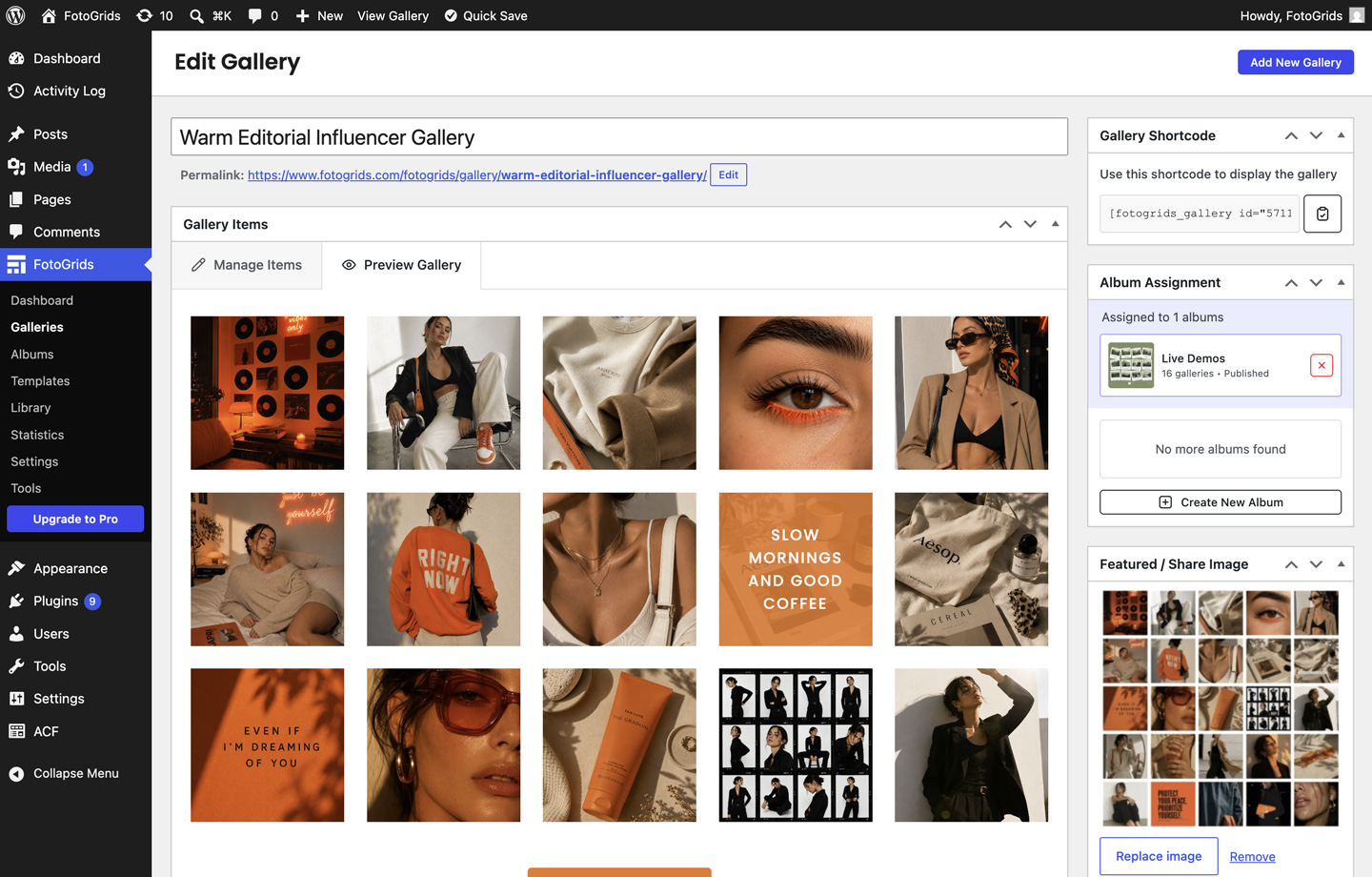
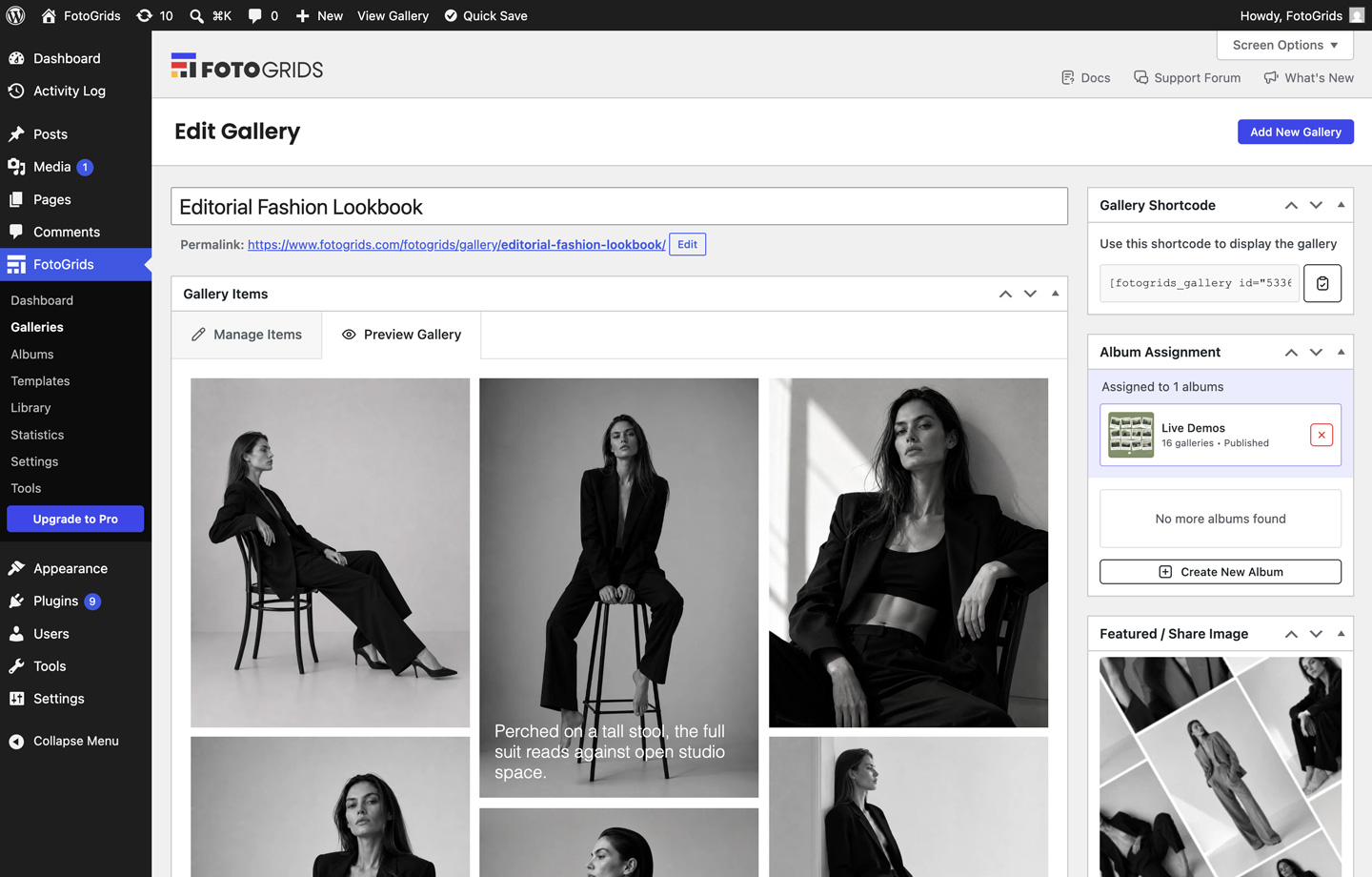
FotoGrids ships eight fully responsive layouts in the free version, each crafted to make your images look their absolute best on every device:
- Grid Ìtumọ̀ Yorùbá: – evenly spaced items in straight rows and columns Ìtumọ̀ Yorùbá: – the classic, predictable, clean look.
- Masonry Ìtumọ̀ Yorùbá: – Pinterest-style columns that fit items snugly without cropping. Ideal for editorial layouts.
- Justified Ìtumọ̀ Yorùbá: – equal-height rows that fill each line edge-to-edge. Great for big galleries of mixed proportions.
- Slider Ìtumọ̀ Yorùbá: – flexible, highly interactive slider with full control over items per view, timing, and navigation.
- Image Viewer Ìtumọ̀ Yorùbá: – distraction-free single-image view with subtle controls, built to keep focus on the photo.
- Single Item Ìtumọ̀ Yorùbá: – shows one item at a time. Best paired with random sort for a rotating spotlight on each load.
- Featured Item Ìtumọ̀ Yorùbá: – Lead with a featured photo beside a compact grid, reveal everything on Show All.
- Instant Photos Ìtumọ̀ Yorùbá: – turns any gallery into a playful wall of instant-style prints, perfect for a relaxed, casual feel.
Pick the one that fits and fine-tune spacing, aspect ratios, and hover effects Ìtumọ̀ Yorùbá: – without writing a single line of CSS.
🎬 Photos and video, side by side
FotoGrids isnÌtumọ̀ Yorùbá: ’t image-only. Add videos straight from your Media Library, or embed from YouTube and Vimeo Ìtumọ̀ Yorùbá: – they sit right alongside your photos in the same gallery and open in the same lightbox.
🔍 An immersive lightbox, built in
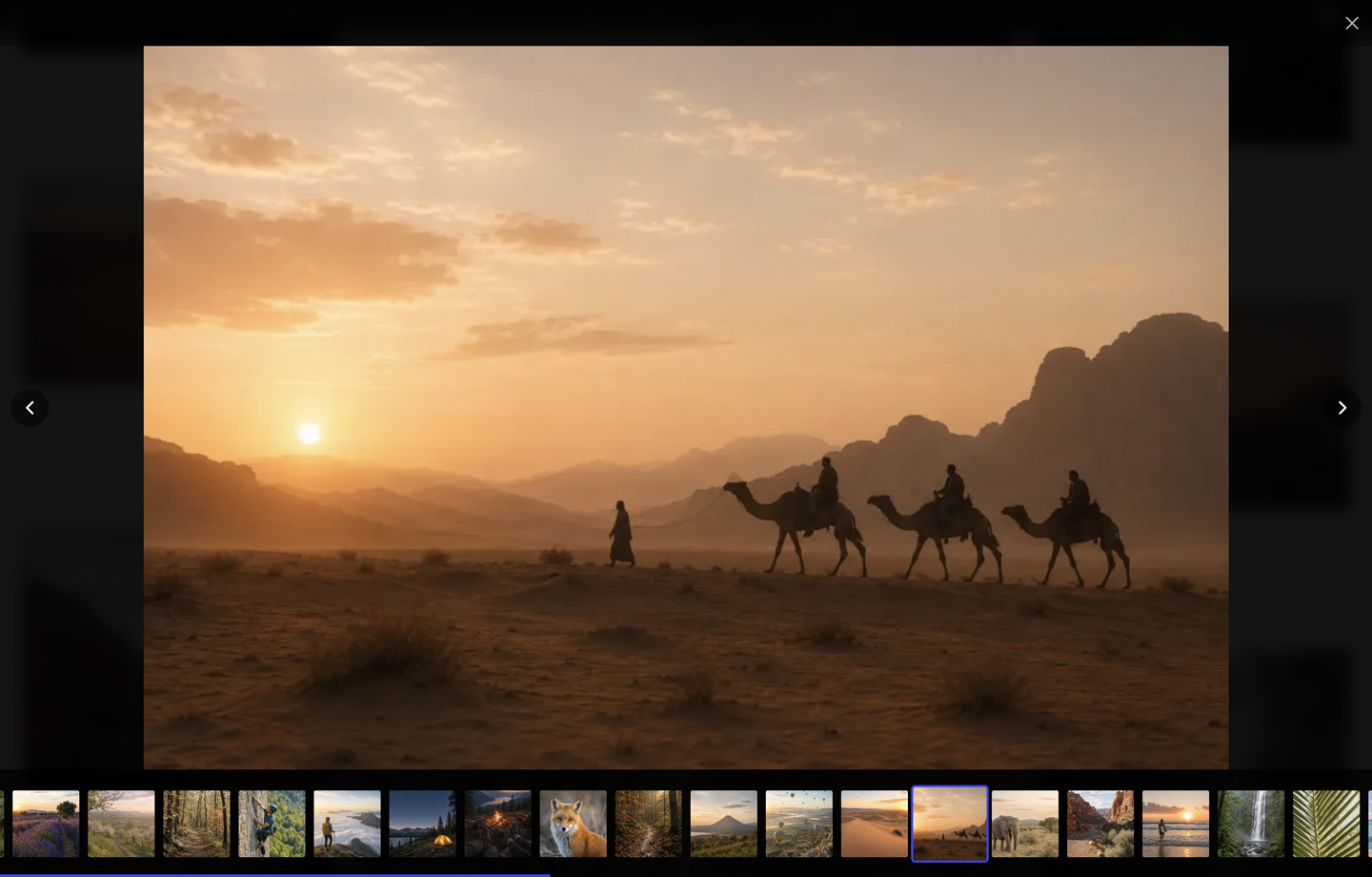
Click any image to open a full-screen fully-customizable lightbox with swipe gestures, keyboard navigation, captions and descriptions, an autoplay slideshow, and a share bar. It works on every device, loads instantly, and respects your visitors’ accessibility out of the box.
- Keyboard friendly Ìtumọ̀ Yorùbá: – arrow keys to navigate, Esc to close.
- Social sharing Ìtumọ̀ Yorùbá: – share any image to Facebook, X, Pinterest, LinkedIn, WhatsApp, Telegram, Reddit, email, and copy-link. Free, and built in.
- Deep linking Ìtumọ̀ Yorùbá: – link straight to a single image inside a gallery.
🏷️ Sorting, filtering, and EXIF Ìtumọ̀ Yorùbá: – standard with FotoGrids
- Sorting Ìtumọ̀ Yorùbá: – order items by date, title, filename, manually, or at random.
- Filtering Ìtumọ̀ Yorùbá: – let visitors filter a gallery by tag, person (Pro), or location (Pro), right on the page.
- EXIF details Ìtumọ̀ Yorùbá: – capture and display camera, lens, aperture, shutter speed, ISO, focal length, flash, white balance, metering, exposure and GPS data from your originals. Pick which fields a gallery shows, and in what order.
🖱️ Effortless by design
Whether youÌtumọ̀ Yorùbá: ’re a solo photographer with 10,000 images or an agency juggling 20 client sites, FotoGrids fits how you already work.
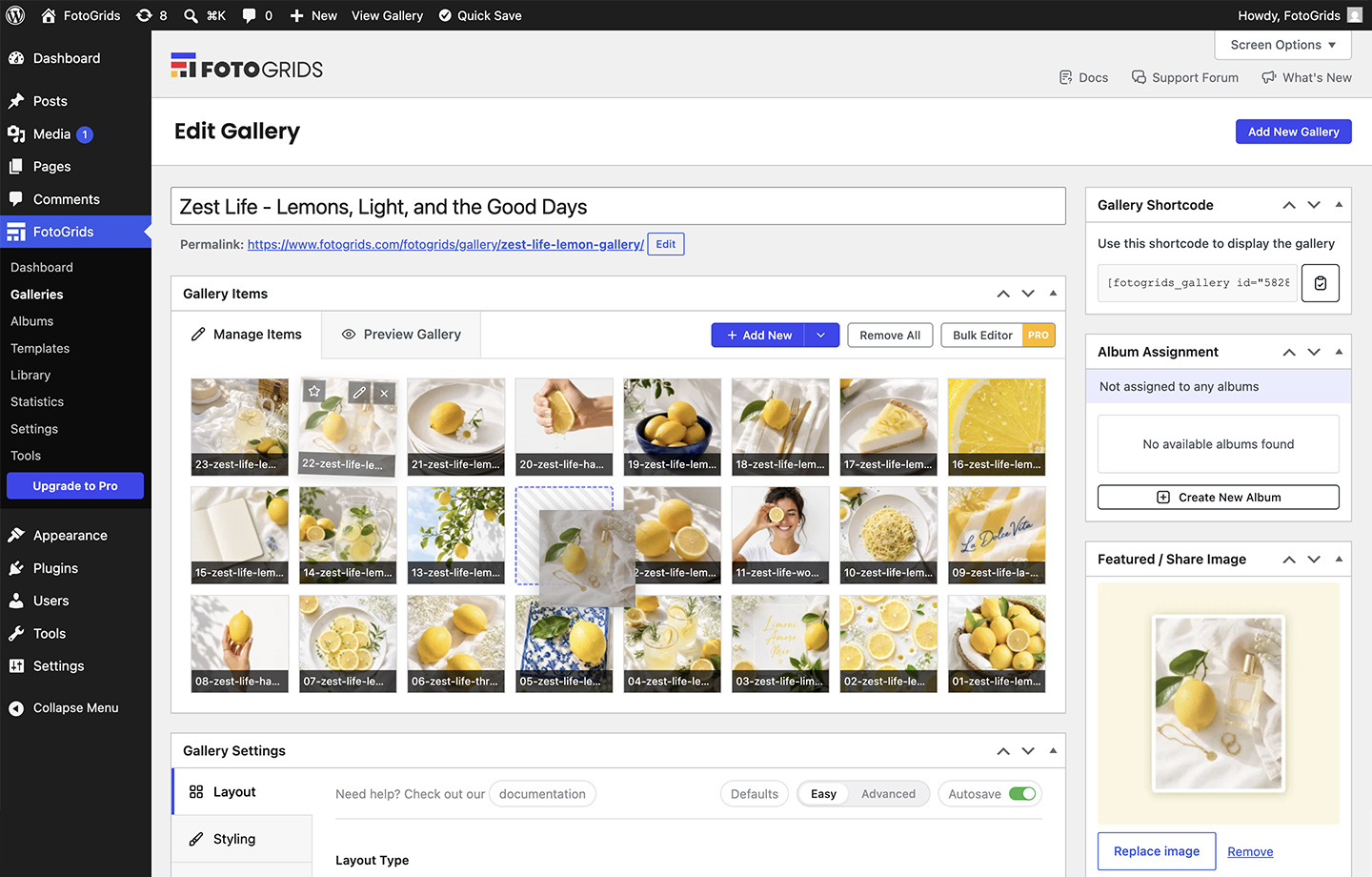
- Drag & drop everything Ìtumọ̀ Yorùbá: – upload from your computer or the Media Library, then sort, reorder, and organize in seconds.
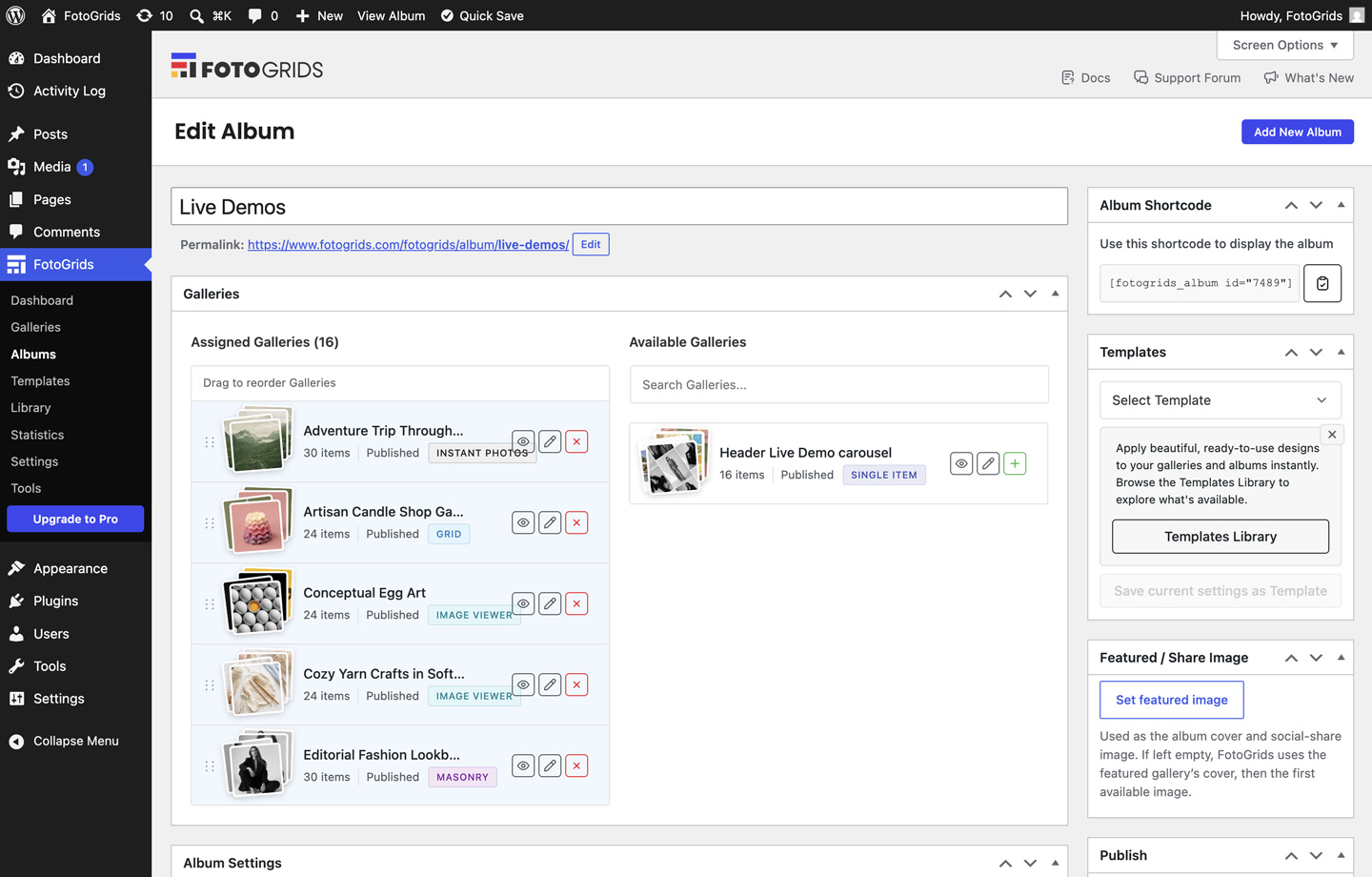
- Unlimited albums & collections Ìtumọ̀ Yorùbá: – group related galleries into albums and display an entire collection with a single shortcode. No caps on galleries or albums. Perfect for portfolios, product catalogs, and event series.
- Rich image details Ìtumọ̀ Yorùbá: – add per-image captions, descriptions, alt text, tags, people, and location data. Great for SEO and accessibility.
🧩 Start from a template
You donÌtumọ̀ Yorùbá: ’t have to build from a blank canvas. FotoGrids ships with a library of ready-made templates Ìtumọ̀ Yorùbá: – pick one, drop in your images, swap a few colors, and publish. The free version includes templates to get you going, and Pro adds 30+ more designed for portfolios, shops, real estate, and editorial work.
With Pro you can even save your own settings as a reusable template, so every gallery on your site shares the same look.
⚡ Built for speed and search engines
FotoGrids renders your galleries server-side as clean, semantic HTML, then loads only the assets each gallery actually needs. Your galleries work as hard for Google as they do for your visitors.
- Server-side rendered, SEO-friendly markup.
- Conditional asset loading Ìtumọ̀ Yorùbá: – no bloat on pages without a gallery.
- Lazy loading Ìtumọ̀ Yorùbá: – images load only when they enter the viewport.
- Pagination for large galleries.
- Built with vanilla JavaScript Ìtumọ̀ Yorùbá: – no jQuery dependency.
📊 Analytics without a third party
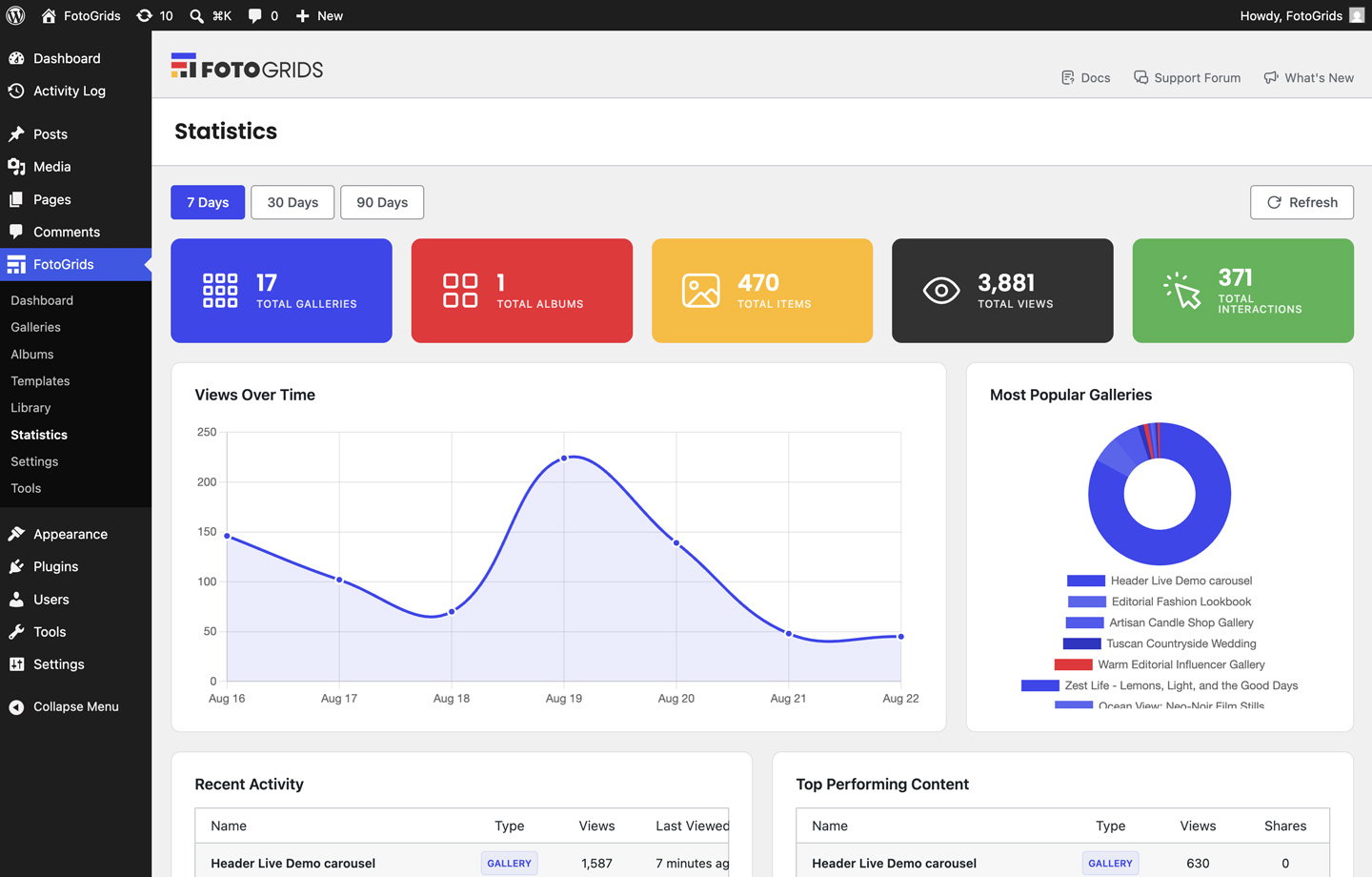
Track views and interactions per gallery right inside your WordPress dashboard. Know which galleries perform and which images get the most attention Ìtumọ̀ Yorùbá: – no Google Analytics account required.
🔌 Works everywhere you build
- Gutenberg blocks Ìtumọ̀ Yorùbá: – add a gallery or album block in the WordPress editor.
- Shortcodes Ìtumọ̀ Yorùbá: – drop
[fotogrids_gallery id="123"]or[fotogrids_album id="123"]into any post, page, or widget. - Any theme Ìtumọ̀ Yorùbá: – galleries inherit your siteÌtumọ̀ Yorùbá: ’s width and styling.
- Page builders Ìtumọ̀ Yorùbá: – Elementor and Divi work in the free version; Pro adds enhanced widgets and controls.
🧰 A complete toolkit, not just a plugin
From drag-and-drop simplicity to REST API power, FotoGrids is built to handle anything, for anyone:
- Photographers Ìtumọ̀ Yorùbá: – showcase portfolios and deliver client galleries.
- Developers & agencies Ìtumọ̀ Yorùbá: – a drag-and-drop interface clients can manage themselves, plus a REST API, hooks, filters, and CSS controls you can depend on.
- Bloggers & creators Ìtumọ̀ Yorùbá: – beautiful galleries the same day you publish, no code required.
- Online shops Ìtumọ̀ Yorùbá: – display products beautifully, then sell them with Pro.
🔥 FotoGrids Pro
The free version is a full kit on its own. Pro layers on the rest Ìtumọ̀ Yorùbá: – more layouts, more analytics insights, more control and conversion tools.
- 4 additional layouts Ìtumọ̀ Yorùbá: – Video Playlist, Mixed Tiles, Carousel, and Product Gallery.
- 30+ premium templates plus reusable and highly customizable theme templates for galleries and albums.
- 36 advanced hover effects and dynamic captions with EXIF data.
- Professional gallery SEO with AI-powered optimization, structured data, and ImageGallery schema.
- Global styling Ìtumọ̀ Yorùbá: – Global Color Palette, Global Typography, and custom CSS controls.
- Full e-commerce kit Ìtumọ̀ Yorùbá: – sell prints, downloads, and licenses with WooCommerce and Easy Digital Downloads, with secure gallery downloads.
- Image protection Ìtumọ̀ Yorùbá: – text watermarking and password protection are free; Pro adds image watermarks and right-click protection.
- Comments, ratings & reviews, advanced user permissions, security, and an activity log.
- Performance Ìtumọ̀ Yorùbá: – automatic image optimizer, advanced pagination, and smart preloading.
- Integrations Ìtumọ̀ Yorùbá: – import from Google Photos, Dropbox, Instagram, Lightroom, and many more, with bulk import and editing.
- Agency tools Ìtumọ̀ Yorùbá: – white label, client proofing, multisite management, and many more for gallery management at scale.
🛠️ Development
FotoGrids is developed in the open. The complete, human-readable source Ìtumọ̀ Yorùbá: – PHP, un-minified JavaScript, and SCSS Ìtumọ̀ Yorùbá: – together with the build tooling lives in our public repository:
https://github.com/fotogrids/fotogrids
The compiled JavaScript and CSS shipped in the pluginÌtumọ̀ Yorùbá: ’s assets directory are built from the source under src/assets/ using Webpack 5 and Babel. To regenerate them, clone the repository, run npm install, then npm run build. Full instructions are in the repository README.
Bundled third-party libraries:
- Chart.js 4.4.0 (https://www.chartjs.org/) Ìtumọ̀ Yorùbá: – MIT License Ìtumọ̀ Yorùbá: – used for the admin analytics charts.
- Freemius WordPress SDK (https://github.com/Freemius/wordpress-sdk) Ìtumọ̀ Yorùbá: – GPLv2-or-later Ìtumọ̀ Yorùbá: – used for activation, updates, and licensing.
🔗 External Services
FotoGrids connects to a few external services. What each one does, when it runs, and what it sends is listed below.
- Freemius
This plugin uses Freemius to handle activation, license management for FotoGrids Pro, and optional usage analytics. On activation you are shown an opt-in screen and can skip it. If you opt in, Freemius collects information such as your site URL, WordPress and PHP versions, active theme and plugins, and your administrator email. If you skip, this data is not sent. You can turn this on or off later with the “Share usage data” setting in FotoGrids > Settings > Advanced. This service runs on plugin activation and when checking for updates or validating a license.
Freemius terms of service: https://freemius.com/terms/
Freemius privacy policy: https://freemius.com/privacy/
- FotoGrids usage statistics (optional, off by default)
If you enable “Share usage data” in FotoGrids > Settings > Advanced (this is disabled by default), the plugin periodically sends anonymous usage data to FotoGrids to help us improve the plugin. The data sent includes a random identifier created when the plugin is activated, plugin version, WordPress version, PHP version, and aggregate gallery usage counts. No personal data and no gallery content is sent, and the report does not include your site address. Nothing is sent unless you turn this setting on.
The same setting also controls the Freemius tracking described above. Turning it on opts your site in to Freemius, which registers the site and sends the data listed in section 1, including your administrator name and email address. Turning it off stops that tracking.
FotoGrids privacy policy: https://go.fotogrids.com/privacy/
- Google Fonts
a) Admin font picker (metadata): When you open the FotoGrids settings where you choose a font, the plugin requests the public Google Fonts metadata list (https://fonts.google.com/metadata/fonts) from your server (not your visitors’ browsers) to populate the font picker. The request is cached and sends no personal data. It runs only in wp-admin when the font picker is loaded.
b) Front-end font loading: When a gallery uses a Google Font (an administrator selects one in its Font Family setting), FotoGrids loads that fontÌtumọ̀ Yorùbá: ’s stylesheet from https://fonts.googleapis.com for your visitors, which causes their browsers to contact Google. No request is made for galleries that use system fonts. You can turn this off entirely with the “Load Google Fonts” setting in FotoGrids > Settings > Advanced Ìtumọ̀ Yorùbá: – when disabled, Google Fonts are removed from the editor font picker and are never loaded on the front end.
Google privacy policy: https://policies.google.com/privacy
Google Fonts FAQ: https://developers.google.com/fonts/faq/privacy
- YouTube and Vimeo oEmbed
When you add a YouTube or Vimeo video to a gallery, FotoGrids calls the relevant providerÌtumọ̀ Yorùbá: ’s public oEmbed endpoint to fetch the videoÌtumọ̀ Yorùbá: ’s title and thumbnail. The video URL you entered is sent to that provider. This runs only when you add or resolve a video embed in the editor.
YouTube/Google privacy policy: https://policies.google.com/privacy
Vimeo privacy policy: https://vimeo.com/privacy
- FotoGrids Template Library
When you browse the template library in the FotoGrids admin, the plugin requests the current template catalog from the FotoGrids library service (https://library.fotogrids.com). The request is made from your server (not your visitors’ browsers), carries no personal data or site information, and the result is cached for 12 hours. If the service is unavailable, FotoGrids falls back to the templates bundled with the plugin. It runs only in wp-admin when the template library is loaded.
FotoGrids privacy policy: https://go.fotogrids.com/privacy/
- FotoGrids news
To fill the “News & Updates” list in the FotoGrids dashboard widget and the “WhatÌtumọ̀ Yorùbá: ’s New” panel, the plugin requests the latest posts in the News category from the public FotoGrids blog (https://www.fotogrids.com). The request is made from your server (not your visitors’ browsers), carries no personal data or site information, and the result is cached for 12 hours. It runs only in wp-admin, when the dashboard widget or the WhatÌtumọ̀ Yorùbá: ’s New panel is opened. If the site is unavailable, the announcements bundled with the plugin are shown instead. You can turn it off with the “Show news” setting in FotoGrids > Settings > Advanced Ìtumọ̀ Yorùbá: – when disabled, no request is made and neither surface shows news.
FotoGrids privacy policy: https://go.fotogrids.com/privacy/
🔒 Privacy Policy
- Gallery statistics (views and shares) are stored locally in your own WordPress database.
- No personal data is collected or sent to FotoGrids without your consent. The “Share usage data” setting is off by default.
- External services are listed in the “External Services” section above, along with what each one sends and when.
- FotoGrids is built to support GDPR and other privacy requirements.
For more details, see our Privacy Policy.
Àwọn àwòrán ìbòjú
Àwọn ìdí
Plugin yìí pèsè 2 àwọn ìdí.
- FotoGrids Album Insert a FotoGrids album.
- FotoGrids Gallery Insert a FotoGrids gallery.
Ìgbéwọlẹ̀
- Upload the plugin files to the
/wp-content/plugins/fotogridsdirectory, or install the plugin directly through the WordPress Plugins screen. - Activate the plugin through the ‘Plugins’ screen in WordPress.
- Go to FotoGrids in your WordPress admin menu and create your first gallery.
- Add images from your Media Library and choose a layout.
- Copy the shortcode or add the FotoGrids block to any post or page.
FAQ
-
Is FotoGrids really free?
-
Yes, and it stays extremely useful on its own. The free version includes unlimited galleries and albums, eight layouts, video support, the full lightbox with social sharing, sorting and filtering, EXIF details, templates, statistics, lazy loading, and Gutenberg blocks Ìtumọ̀ Yorùbá: – with no artificial limits. FotoGrids Pro adds four more layouts, e-commerce, SEO tools, and more when you need them.
-
Do I need to know how to code?
-
No. You build galleries visually in the admin and add them with a block or a shortcode. ThereÌtumọ̀ Yorùbá: ’s nothing to write by hand. Developers who want more can reach for the REST API, hooks, filters, and custom CSS.
-
Will it slow down my site?
-
No. FotoGrids renders galleries server-side, loads assets only on pages that contain a gallery, lazy-loads images, and uses no jQuery Ìtumọ̀ Yorùbá: – so your site stays fast even with large galleries.
-
What image formats are supported?
-
FotoGrids supports every image format WordPress handles natively, including JPEG, PNG, GIF, WebP, and SVG.
-
Does it work with page builders?
-
Yes. FotoGrids includes dedicated widgets for Elementor and Divi in the free version, and works through shortcodes in any other page builder. Pro adds enhanced widgets and controls.
-
Is it mobile-friendly?
-
Yes. Every layout and the lightbox are fully responsive and built for touch.
-
Can I migrate from another gallery plugin?
-
Yes. FotoGrids includes an import tool. It can import from your existing WordPress Media Library today, and the tool lists other popular gallery plugins with importers being added over upcoming releases (shown as “Coming soon” until available). See our documentation for step-by-step guides.
-
Where can I get support?
-
Free users can post in the WordPress.org support forum. Pro users get priority support at fotogrids.com.
Àwọn àgbéyẹ̀wò
Kò sí àwọn àgbéyẹ̀wò fún plugin yìí.
Àwọn Olùkópa & Olùgbéejáde
“FotoGrids – Photo & Video Galleries, Lightboxes, Sliders & More” jẹ́ ètò ìṣàmúlò orísun ṣíṣí sílẹ̀. Àwọn ènìyàn wọ̀nyí ti ṣe ìkópa sí plugin yìí.
Àwọn Olùkópa
Túmọ̀ “FotoGrids – Photo & Video Galleries, Lightboxes, Sliders & More” sí èdè rẹ.
Ṣe o nífẹ̀ẹ́ sí ìdàgbàsókè?
Ṣàwárí koodu, ṣàyẹ̀wò ibi ìpamọ́ SVN, tàbí ṣe àgbékalẹ̀ sí àkọsílẹ̀ ìdàgbàsókè nípasẹ̀ RSS.
Àkọsílẹ̀ àwọn àyípadà
1.1.2
New
- Every EXIF field your camera records. FotoGrids used to read four Ìtumọ̀ Yorùbá: – camera, aperture, shutter speed, ISO Ìtumọ̀ Yorùbá: – through a WordPress helper that carries no lens, flash, white balance, metering or GPS at all. Tags now come from the file directly, through a 22-field registry shared by the settings panel, the item editor and the lightbox. The Exif tabÌtumọ̀ Yorùbá: ’s four checkboxes become one sortable list, and that order is the order the lightbox renders them.
Improved
- The settings vocabulary is now translatable. 759 of the 853 strings in the gallery and album settings panel were missing from the translation template, because they live in JSON the string extractor never read. The whole vocabulary is now extracted and translated server-side.
- Importing now asks before it discards edits. From Folder, From ZIP and Video Embed threw a part-filled form away on any exit, with nothing recoverable. Each now asks first.
- The render cache cleans up after itself. Expired rows were filtered out on read but never deleted, so the table grew without bound; a daily purge now runs. Deactivating or uninstalling also clears FotoGrids’ scheduled events, which it previously left behind.
Fixed
- Autosave is now applied in settings. The editor read the setting from three places that do not exist, so it never saw what you had chosen, and switching it off did not stick. The toggle and the editor now read and write one source, and the setting applies.
- Saving Gallery Defaults turned off other settings. One click on Save Defaults cleared autosave, Google Fonts, usage-data sharing and the general, permission and integration settings Ìtumọ̀ Yorùbá: – the form posted to a WordPress settings group that owns seven options while carrying a field for one, and WordPress writes every option in a posted group. Defaults now saves over REST.
- Video playback settings were not affecting the player. Autoplay, mute, loop and controls never reached it, and autoplay was forced on regardless of the toggle.
- Alt text now uses the WordPress alt field. FotoGrids kept its own copy, seeded once when an item was first added to a gallery and never refreshed, while the lightbox and the collection renderer read WordPress’ Ìtumọ̀ Yorùbá: – so an alt edit updated the grid while the front end served the old text indefinitely. There is one alt field now, WordPress’, everywhere.
- Editing an item didnÌtumọ̀ Yorùbá: ’t refresh the cached gallery. The cache listened for an event nothing fires, so logged-out visitors kept the pre-edit render until it expired.
- Uninstall left data behind Ìtumọ̀ Yorùbá: – gallery, album and embed posts, and four meta keys on attachments. The cleanup queries also passed
_to SQLLIKEunescaped, where it matches any single character.
Security and hardening
- An admin screen carried more user data than it needed. The whole
WP_Userobject was being passed towp_localize_script, putting the current userÌtumọ̀ Yorùbá: ’s account record into the page source of every FotoGrids admin screen. Nothing read it, so it is removed, with a build guard and an end-to-end test against a recurrence. - Three REST routes returned data without checking who was asking.
GET /lightbox/item/{id}served any attachmentÌtumọ̀ Yorùbá: ’s metadata to anyone, andPOST /gallery/lightbox/slideschecked only that a gallery was published Ìtumọ̀ Yorùbá: – so slide data for password-protected and registered-users-only galleries was public. All three are now authorised at the route level.
1.1.1
New
- Editable gallery and album addresses. View pages were fixed at
/fotogrids/gallery/{slug}and/fotogrids/album/{slug}, and the only way to change them was to write a filter. Settings > View Pages now has an editable prefix and one segment per collection type, each with a live preview of the resulting address. Any of the three may be empty, soexample.com/{slug}is reachable. The base is validated on save against existing pages and posts, the rewrite slugs of other post types and taxonomies, and the roots WordPress reserves for itself; a collision is rejected with the conflicting owner named rather than saved. Addresses built on the old base, or ending in a collection ID rather than a slug, redirect to the current permalink. - Add items from a folder or a ZIP. The Add New menuÌtumọ̀ Yorùbá: ’s From Folder and From ZIP entries now work. From Folder browses your uploads directory on the server, with breadcrumbs, sub-folder image counts and per-file selection; files already in the Media Library are reused and the rest are registered where they sit, so nothing on disk is copied, moved or deleted. From my computer uploads a whole folder from your machine, and From ZIP imports the images out of an archive.
- An SEO checkup in the item editor. The SEO tab held four Pro cards and an upgrade button, while every field Google actually weighs sat one tab away in Free. It now runs seven checks against the item Ìtumọ̀ Yorùbá: – alt text, filename, title, caption, description, credit and file weight Ìtumọ̀ Yorùbá: – grades it Bad, Needs improvement or Good, and gives every failing row a Fix link that jumps to the field and focuses it. The Pro badge is gone.
Improved
- Statistics follows the period filter. Views and Interactions report the selected 7, 30 or 90 days rather than all time, each with a percentage change against the preceding window of equal length; the lifetime figure moves to a footnote, shown only when it differs. Top content tables are sortable, and the donut palette ranks by value.
- Choosing a template during setup now creates the gallery. The wizardÌtumọ̀ Yorùbá: ’s Choose a template card led to the Templates page, whose only action is Apply Ìtumọ̀ Yorùbá: – and Apply needs a gallery a first-time user does not have. The card now opens the page in a mode where every template reads Use this template and creates the gallery for you.
- Freemius SDK updated to 2.13.4.
Fixed
- Galleries lost their layout for logged-out visitors. A cached gallery replayed its HTML without the inline custom properties it was built with, so
--fg-colswas missing and the grid collapsed to a single column. Editors never saw it, because the cache is bypassed for anyone who can manage galleries. Galleries cached before this release re-render rather than replaying. - Random sorting was frozen by caching. A seeded order was chosen while the page was built, and every cache in front of it stored that one order Ìtumọ̀ Yorùbá: – so “random” was the same on every visit.
- The offline template set listed 46 templates that could not be applied. When the remote catalogue is unreachable and nothing is cached, the bundled fallback served 46 Pro entries that carry no settings and no thumbnail, so they rendered as grey placeholder cards and applying them did nothing. The bundled set is now 23 gallery and 5 album templates, all with real settings. The Pro upsell is unaffected Ìtumọ̀ Yorùbá: – it comes from the remote catalogue, not from disk.
- Every chart in wp-admin was blank Ìtumọ̀ Yorùbá: – Library, Statistics and the dashboard widgets Ìtumọ̀ Yorùbá: – because the vendored Chart.js bundle threw on load. Rebuilt, and updated to 4.5.1.
- The Featured Item layoutÌtumọ̀ Yorùbá: ’s Show all images button did nothing when clicked.
Security and hardening
- Frontend JavaScript now validates URLs at the DOM sinks it writes to rather than relying only on the server having escaped them, so the guarantee still holds if a filter, page builder or template edit sits downstream.
- Cleared six high-severity advisories in the build toolchain. All were in development tooling; the shipped output is unchanged.
1.1.0
New
- System Info tool Ìtumọ̀ Yorùbá: – Tools > System Info reports your WordPress, server, database and media environment alongside FotoGrids’ own state, and can be copied or downloaded as plain text for a support ticket. A second tab lists PHP and browser errors raised by FotoGrids code, plus a read-only tail of the WordPress debug log.
- Media tab in the item editor Ìtumọ̀ Yorùbá: – see every image size WordPress generated for an item, with preview, dimensions, file size and origin, and copy or open any URL. Sizes that were never produced are flagged as Not generated, File missing or Source too small, and link straight to Regenerate Thumbnails.
- News & Updates on the dashboard, plus a WhatÌtumọ̀ Yorùbá: ’s New panel in the FotoGrids header. Both are opt-out under Settings > Advanced.
- The Interactions tab now warns when a per-item link is saved under a click behavior that will never follow it.
Improved
- Verified against WordPress 7.1.
- Faster gallery uploads Ìtumọ̀ Yorùbá: – the uploader now uses WordPress’ own media uploader, so a batch of photos uploads in parallel instead of one at a time, brings your siteÌtumọ̀ Yorùbá: ’s mime and file-size validation with it, and no longer strands the rest of a batch when one file fails.
- Permissions Manager now lists what FotoGrids actually gates. Tools are named rather than shown as capability slugs, the twenty-six capabilities WordPress derives from the post types collapse into four plain-language rows per collection type, and every row carries a description. Existing role grants are unchanged.
- Statistics keeps the selected period in the URL, so a reload or a shared link opens on the same range. “Recent Activity” is renamed “Recently Viewed”, which is what the table has always shown.
- Import / Export log reads at a glance Ìtumọ̀ Yorùbá: – coloured Export and Import pills, one chip per data type with a correctly singularised label, and styled status pills.
- Debug Log panel always renders now, and reports WP_DEBUG and WP_DEBUG_LOG as status lights. Each channel row names its FOTOGRIDS_DEBUG_* constant.
- Lighter, sharper admin fonts Ìtumọ̀ Yorùbá: – Poppins now ships as woff2 instead of TTF, cutting the admin font payload from 748 KB to 241 KB, and JetBrains Mono is bundled and self-hosted for every monospace surface. Both are served from your own site, so no admin data reaches Google.
- Tooltips now appear on the link / unlink and desktop / tablet / mobile controls in the collection settings panel, and open on focus as well as hover.
- Each Tools card carries its own colour instead of three of the four looking identical.
Fixed
- EXIF and XMP data was missing from large photos. Both were read from the
-scaledcopy WordPress creates for images over the big-image threshold, and WordPress strips metadata when it makes that file Ìtumọ̀ Yorùbá: – so camera, lens, aperture, shutter and ISO came back empty for essentially every modern camera photo. They are now read from the preserved original. - Watermarking under WordPress 7.1 no longer runs before the image sizes exist, which previously left it recording no variants on the first pass.
- Complete Your Setup Ìtumọ̀ Yorùbá: – three of the five dashboard steps could never be ticked, and the progress bar could never reach 100%.
- The plugins screen lists only links that lead somewhere. The bundled Freemius SDK added an Add-Ons link and an empty Add-Ons submenu for add-ons that do not exist Ìtumọ̀ Yorùbá: – Pro is the premium version, not an add-on Ìtumọ̀ Yorùbá: – and an Opt In link that could leave your usage-data choice out of step with the setting in Settings > Advanced. Both are gone, and consent stays in one place.
- Switching between YouTube and Vimeo in the video embed modal no longer discards the URL, caption, poster and playback options you had already entered.
- The upgrade modal now has a close button.
- The “Drop here” label in the Manage Items grid is centred instead of wrapping into a narrow left-aligned column.
- Buttons using the extra-small size render at that size, most visibly in the Library Actions column.
- The Featured / Share Image metabox now aligns with the templates metaboxes.
- Galleries and albums with no title show “Untitled Gallery #123” in Statistics and Recently Edited instead of a blank line.
- Tool scripts and styles are cache-busted per build, so a rebuilt asset is no longer served from the browser cache.
Security and hardening
- Table names interpolated into direct SQL are now prepared or quoted, and the JS error endpoint unslashes the user agent before sanitising it.
- WordPress Plugin Check now runs on every pull request instead of by hand before a release.
1.0.0
- Initial release.
- Eight gallery layouts: Grid, Masonry, Justified, Slider, Image Viewer, Single Item, Featured Item, and Instant Photos.
- Video support: Media Library video files plus YouTube and Vimeo embeds, in galleries and the lightbox.
- Unlimited albums for grouping galleries.
- Ready-made templates and reusable saved templates.
- Immersive lightbox with keyboard navigation, autoplay, swipe gestures, and social sharing.
- Sorting, on-page filtering, and EXIF details.
- Text watermarking and password protection.
- Page builder widgets for Elementor and Divi.
- View and share statistics.
- Gutenberg blocks and shortcodes.
- Drag-and-drop image reordering.
- Image details: captions, descriptions, tags, people, and location.
- Lazy loading and pagination.
- Server-side rendered, SEO-friendly markup.
- React-based admin interface and REST API.