

Àpèjúwe
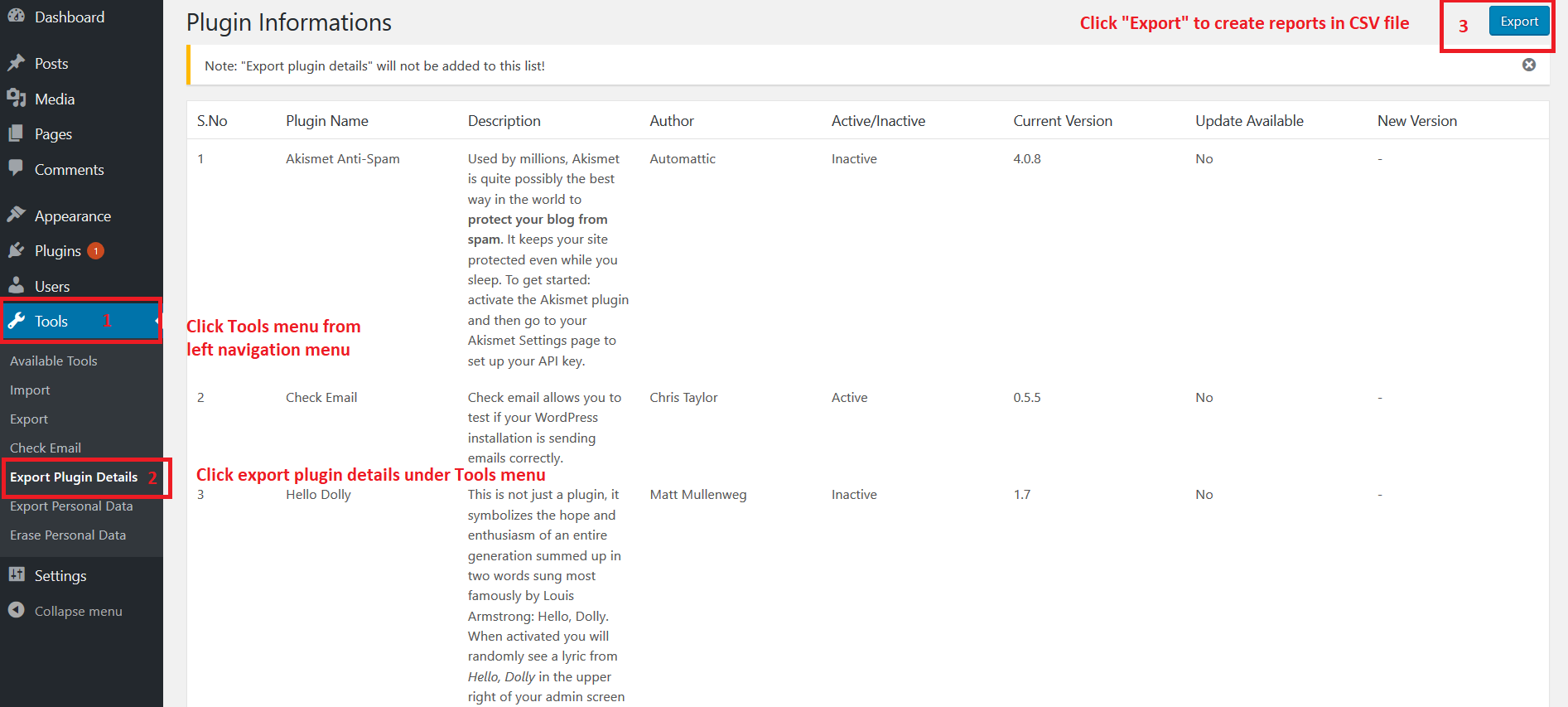
This plugin allows you to export your installed plugin list in CSV format. CSV file having the following fields
- Plugin Name
- Description
- Author
- Active/Inactive
- Current Version
- Update Available(Yes/No)
- New Version
Kindly let us know your feedback or comments to add more features in this plugin.
Àwọn àwòrán ìbòjú
Ìgbéwọlẹ̀
- Log in to your WordPress admin panel and go to Plugins -> Add New
- Type Export Plugin Details in the search box and click on search button.
- Find Export Plugin Details plugin.
- Then click on Install Now after that activate the plugin.
Àwọn àgbéyẹ̀wò

Ṣẹrẹ 29, 2026
I use this all the time when I need to review all the plugins or document what is on the site. Works like a charm. Thanks for the plugin.

Bélú 2, 2025
excellent simple plugin.
I usually do not write reviews for plugins, but I have tried this plugin for several years and I find it very helpful.
I hope we can bring more attention to it from the WP community.

Ọ̀wàrà 22, 2025
I tend to have to write plugin audits for clients and they can be really time consuming to do by hand. This plugin saves me so much time. I only wish I had found this plugin sooner.
Huge thank you to you for this plugin Boopathi Rajan!

Ọ̀wàrà 1, 2024
Nice work on this plugin.

Ògún 29, 2023
1 ìdáhùn
Excellent… awesome… incredible… plugin

Ẹrẹ́nà 9, 2023
Thank you very much for creating this unique and free plugin! ItÌtumọ̀ Yorùbá: ’s so perfect as is. 2 suggestions if you decide to extend its abilities:Version of Wordpress and a similar list of themes could be included.
Àwọn Olùkópa & Olùgbéejáde
“Export Plugin Details” jẹ́ ètò ìṣàmúlò orísun ṣíṣí sílẹ̀. Àwọn ènìyàn wọ̀nyí ti ṣe ìkópa sí plugin yìí.
Àwọn Olùkópa
Túmọ̀ “Export Plugin Details” sí èdè rẹ.
Ṣe o nífẹ̀ẹ́ sí ìdàgbàsókè?
Ṣàwárí koodu, ṣàyẹ̀wò ibi ìpamọ́ SVN, tàbí ṣe àgbékalẹ̀ sí àkọsílẹ̀ ìdàgbàsókè nípasẹ̀ RSS.