

Àpèjúwe
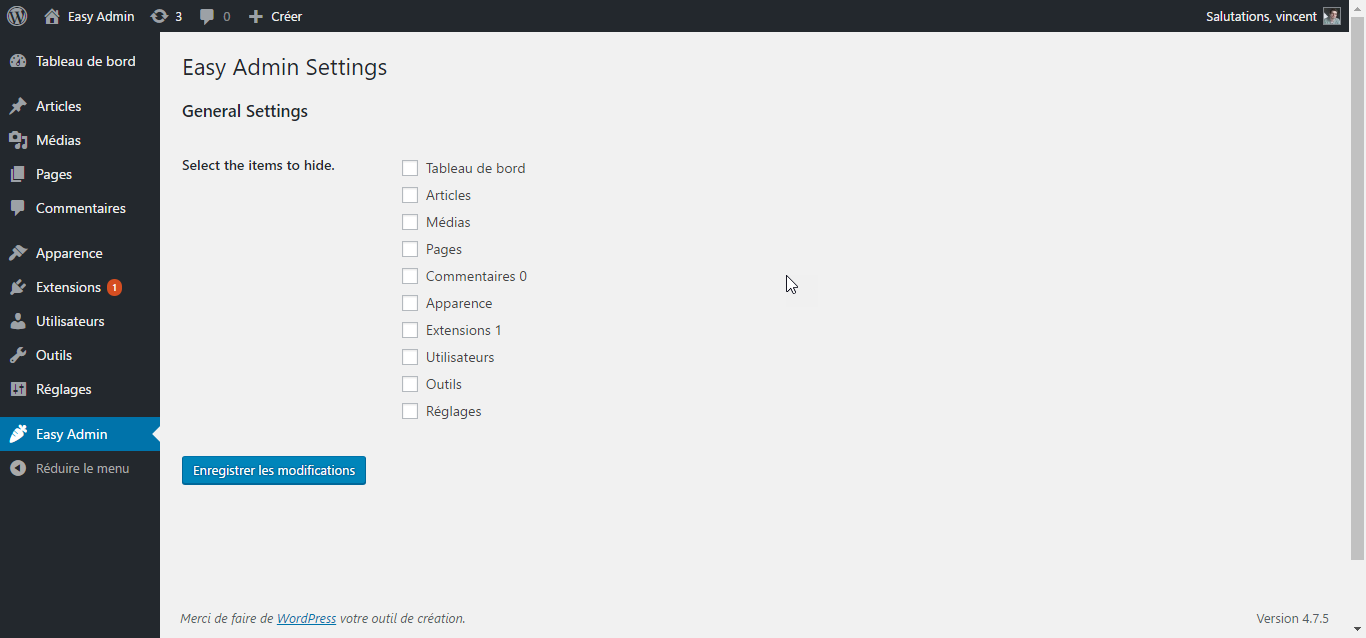
- Activating this plugin will create a ‘Easy Admin’ entry in your admin area.
- Click it to go to the settings page.
- Simply select the menu entry you want to hide.
- Save your settings, and youÌtumọ̀ Yorùbá: ’re done !
Of course, the Easy Admin settings page is always available, so you can always go back and show menu items you need.
If you have any questions, contact me via my website at https://vincentdubroeucq.com
Àwọn àwòrán ìbòjú


Ìgbéwọlẹ̀
- Download the zip file and unzip it.
- Upload the plugin folder to the
/wp-content/plugins/directory, or install the plugin through the WordPress plugins screen directly. - Activate the plugin through the ‘Plugins’ screen in WordPress
- ThatÌtumọ̀ Yorùbá: ’s it ! Go to the settings page and clean your admin menu !
FAQ
- Does Easy Admin offer granular control over sub-items ?
-
No. Else it wonÌtumọ̀ Yorùbá: ’t be ‘Easy’ anymore. Not yet. But why not later ?
Àwọn àgbéyẹ̀wò
Kò sí àwọn àgbéyẹ̀wò fún plugin yìí.
Àwọn Olùkópa & Olùgbéejáde
“Easy Admin” jẹ́ ètò ìṣàmúlò orísun ṣíṣí sílẹ̀. Àwọn ènìyàn wọ̀nyí ti ṣe ìkópa sí plugin yìí.
Àwọn Olùkópa
Ṣe o nífẹ̀ẹ́ sí ìdàgbàsókè?
Ṣàwárí koodu, ṣàyẹ̀wò ibi ìpamọ́ SVN, tàbí ṣe àgbékalẹ̀ sí àkọsílẹ̀ ìdàgbàsókè nípasẹ̀ RSS.
Àkọsílẹ̀ àwọn àyípadà
1.0.3
- Tested with WordPress 5.3.2.
1.0.2
- Tested with WordPress 5.0.1.
1.0.1
- Fixed compatibility issue with older versions of PHP.
1.0.0
- Initial release.