

Àpèjúwe
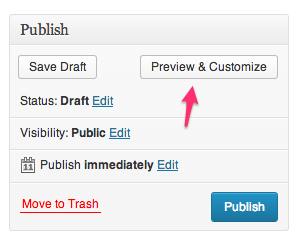
The “Preview” button when editing a post is replaced with a “Preview & Customize” button,
which opens the customizer with the current postÌtumọ̀ Yorùbá: ’s preview loaded into the customizer preview window.
A separate window is opened for each edited post being previewed, as opposed to all previews going into the same window named wp-preview.
When a customizer preview is opened for previewing a post, clicking the Back (Close or Cancel) button in the
customizer controls, the opened window will close and the opener window will be focused on. This will rapidly take
you back to the page from which you opened the preview, assuming it is still open.
It is not helpful to see in browser tabs “Customize Twenty Twelve — WordPress”. This title assumes the primary
purpose of the customizer is to preview themes, when in reality it seems the primary purpose is to customize your
already-selected theme. In this latter case, it makes much more sense for the title to reflect the page currently
being previewed. So when in the customizer, the parent document title will reflect the title of the page currently
being previewed. As you navigate around the site within the preview iframe, the pageÌtumọ̀ Yorùbá: ’s title will update. This allows
you to see which page is being customized just by looking at the label on your browserÌtumọ̀ Yorùbá: ’s tab.
In the Admin Bar, the “Customize” link is promoted from a submenu to a top-level position right after the Edit post
link.
This prominent placement of the “Customize” link in the admin bar, along with the customizer being opened when
previewing a post/page, are designed to encourage the use of the customizer in many more places than just the siteÌtumọ̀ Yorùbá: ’s
front page. The Widget Customizer plugin conditionally shows
control sections in the customizer based on whether or not that sidebar is currently rendered in the customizer
preview. Therefore, for some customizer controls to be accessed, the user must navigate—either within the customizer
or outside—to a page that has the element which a control customizes.
Development of this plugin is done on GitHub. Pull requests welcome. Please see issues reported there before going to the plugin forum.
Àwọn àwòrán ìbòjú


Àwọn àgbéyẹ̀wò
Kò sí àwọn àgbéyẹ̀wò fún plugin yìí.
Àwọn Olùkópa & Olùgbéejáde
“Customizer Everywhere” jẹ́ ètò ìṣàmúlò orísun ṣíṣí sílẹ̀. Àwọn ènìyàn wọ̀nyí ti ṣe ìkópa sí plugin yìí.
Àwọn Olùkópa

Túmọ̀ “Customizer Everywhere” sí èdè rẹ.
Ṣe o nífẹ̀ẹ́ sí ìdàgbàsókè?
Ṣàwárí koodu, ṣàyẹ̀wò ibi ìpamọ́ SVN, tàbí ṣe àgbékalẹ̀ sí àkọsílẹ̀ ìdàgbàsókè nípasẹ̀ RSS.
Àkọsílẹ̀ àwọn àyípadà
0.1.2
Improve logic for filtering preview_post_link
0.1.1
Add Travis CI integration and pre-commit with various tests
0.1
First Release