
Àpèjúwe
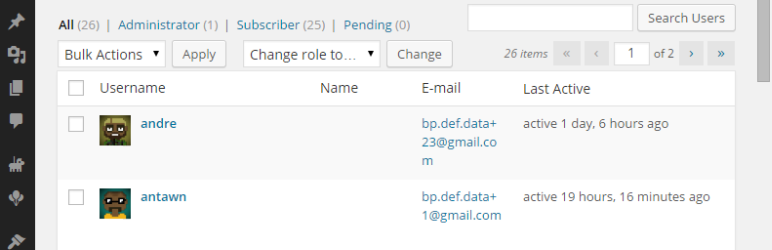
Display BuddyPress last active date for a user on wp-admin/users.php page
BuddyPress is required for plugin to work. If BuddyPress is not installed Ìtumọ̀ Yorùbá: – plugin will not display any information.
WordPress MultiSite supported.
Àwọn àwòrán ìbòjú

Users Admin Page with Last Active data
Ìgbéwọlẹ̀
- Upload plugin folder
/buddypress-last-active-users-wp-admin/to the/wp-content/plugins/directory - Activate the plugin through the ‘Plugins’ menu in WordPress
- Go to “Users” page in your WordPress admin area and check the new
Last Activecolumn

Àwọn Olùkópa & Olùgbéejáde
“BuddyPress Last Active Users (wp-admin)” jẹ́ ètò ìṣàmúlò orísun ṣíṣí sílẹ̀. Àwọn ènìyàn wọ̀nyí ti ṣe ìkópa sí plugin yìí.
Àwọn Olùkópa
Túmọ̀ “BuddyPress Last Active Users (wp-admin)” sí èdè rẹ.
Ṣe o nífẹ̀ẹ́ sí ìdàgbàsókè?
Ṣàwárí koodu, ṣàyẹ̀wò ibi ìpamọ́ SVN, tàbí ṣe àgbékalẹ̀ sí àkọsílẹ̀ ìdàgbàsókè nípasẹ̀ RSS.
Àkọsílẹ̀ àwọn àyípadà
1.1 (05.01.2015)
- Added: WP MS support
1.0 (04.01.2015)
- Initial release