

Àpèjúwe
BravesChat is the bridge between your WordPress site and your N8N workflows: connect any AI agent you have built with your visitors, without extra code and in minutes.
Designed for the N8N community
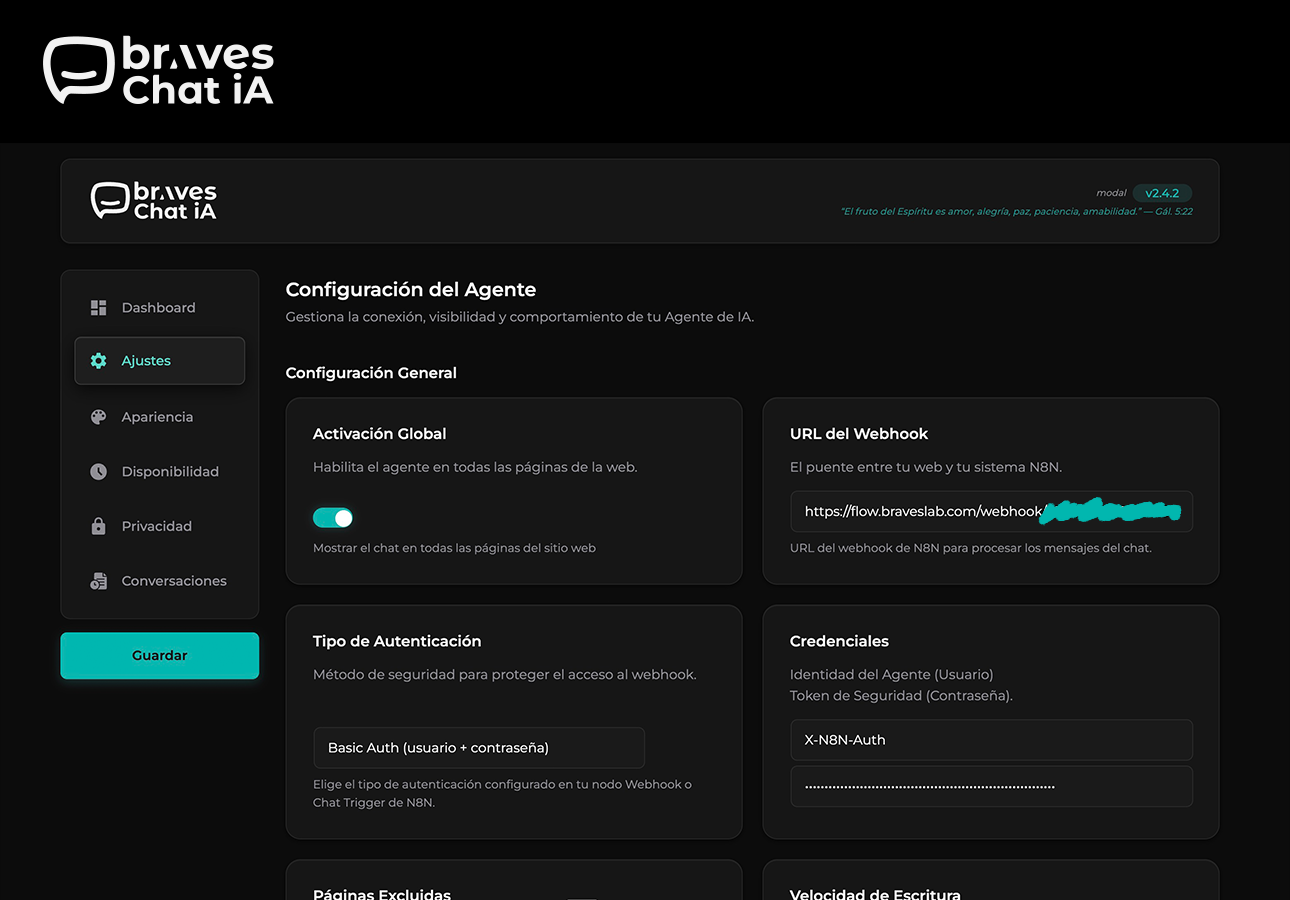
- N8N-ready webhook: Point BravesChat to your workflow URL and start receiving messages instantly. Supports an authentication token in the header (
X-N8N-Auth) to protect your endpoints. - Complete payload on every message: Each request includes the current message and the userÌtumọ̀ Yorùbá: ’s unique
sessionId— everything your N8N nodes need to maintain conversation context. - Markdown responses: Your agentÌtumọ̀ Yorùbá: ’s messages are rendered with rich formatting — bold, lists, links, and code — with no extra configuration.
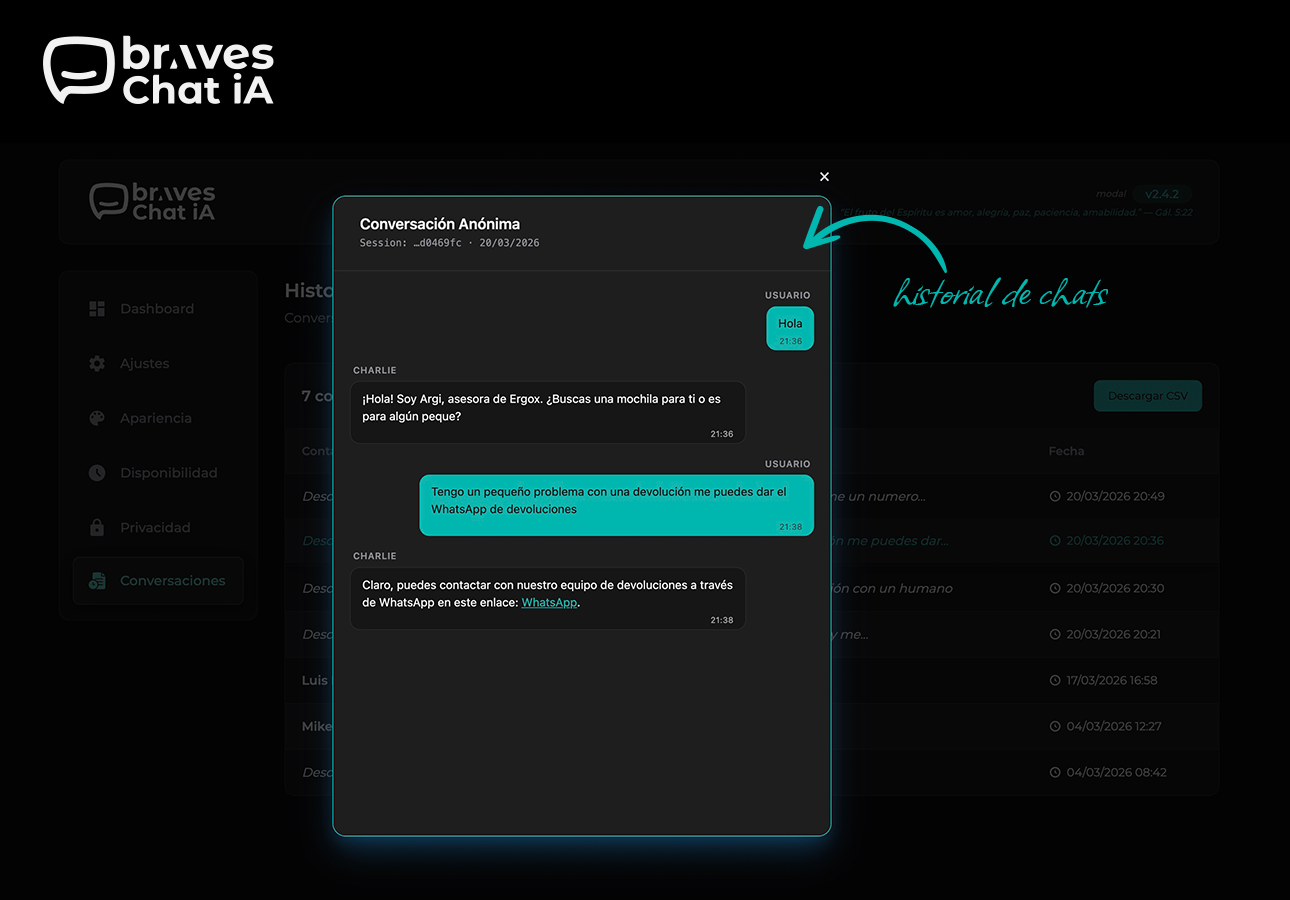
- Conversation history with CSV export: Browse all sessions from the WordPress dashboard and export them to your CRM, spreadsheet, or database with one click.
Production-ready
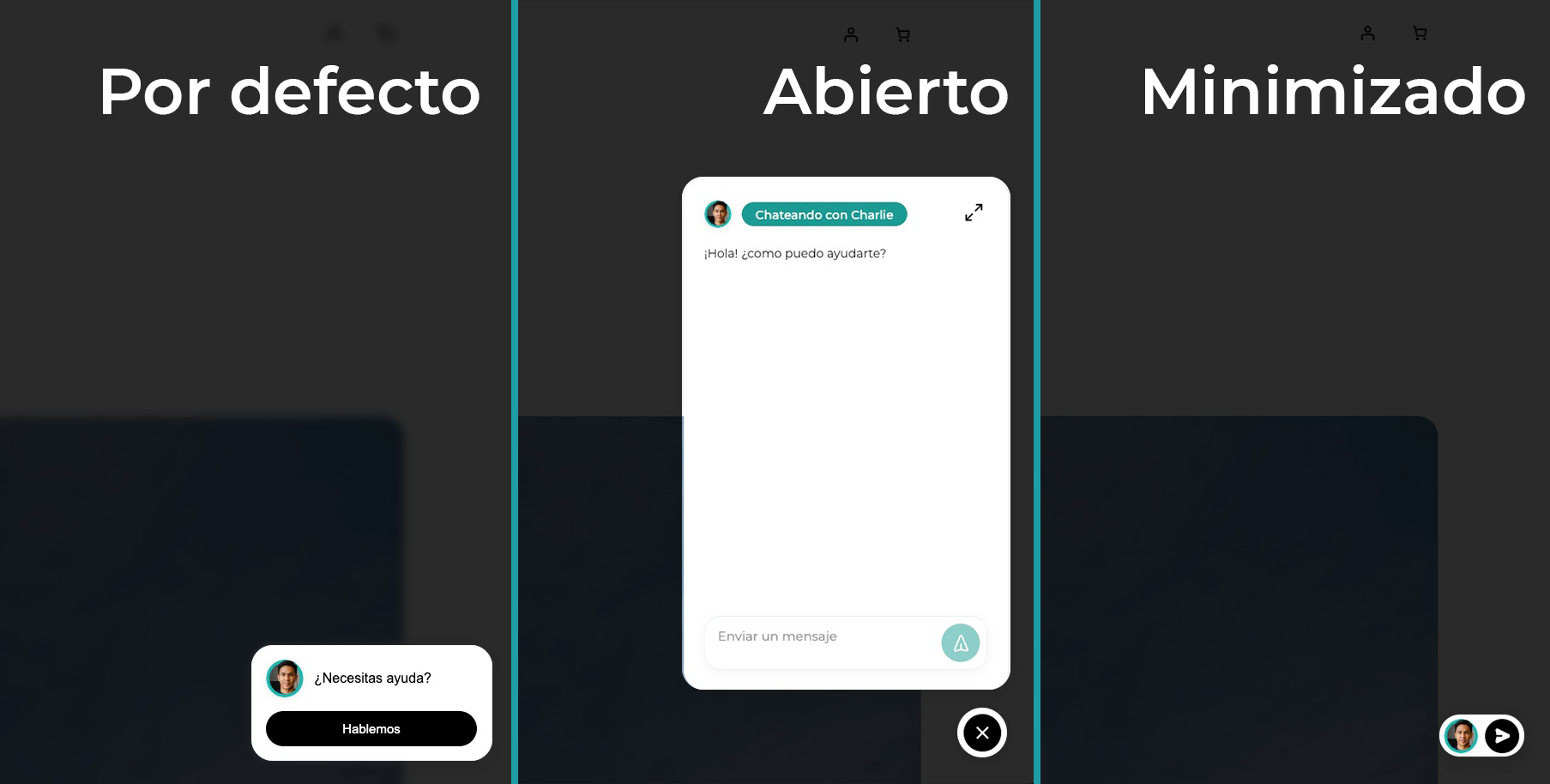
- Three display modes: Floating widget, full screen, or mixed — global bubble with full screen on specific pages via a Gutenberg block.
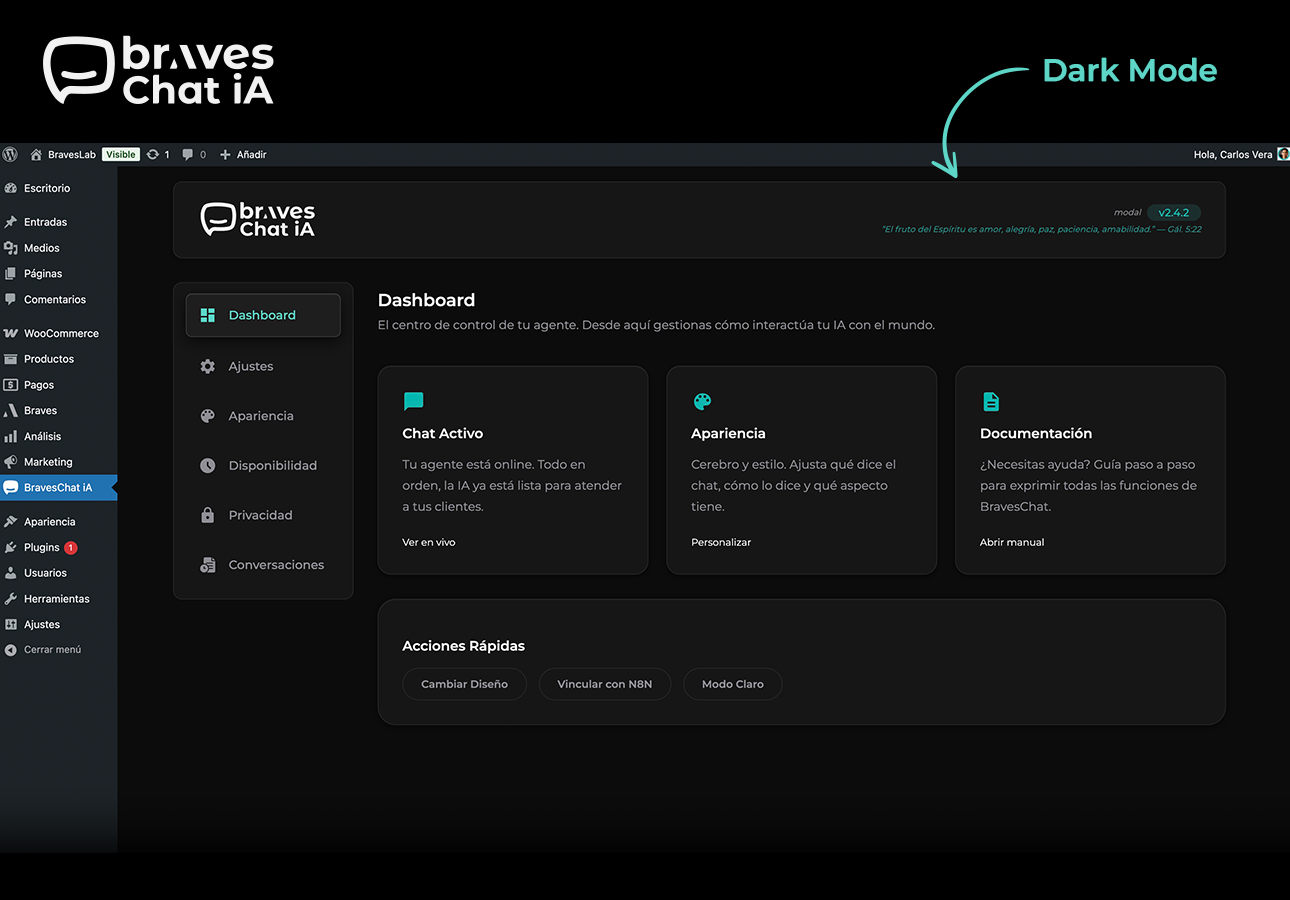
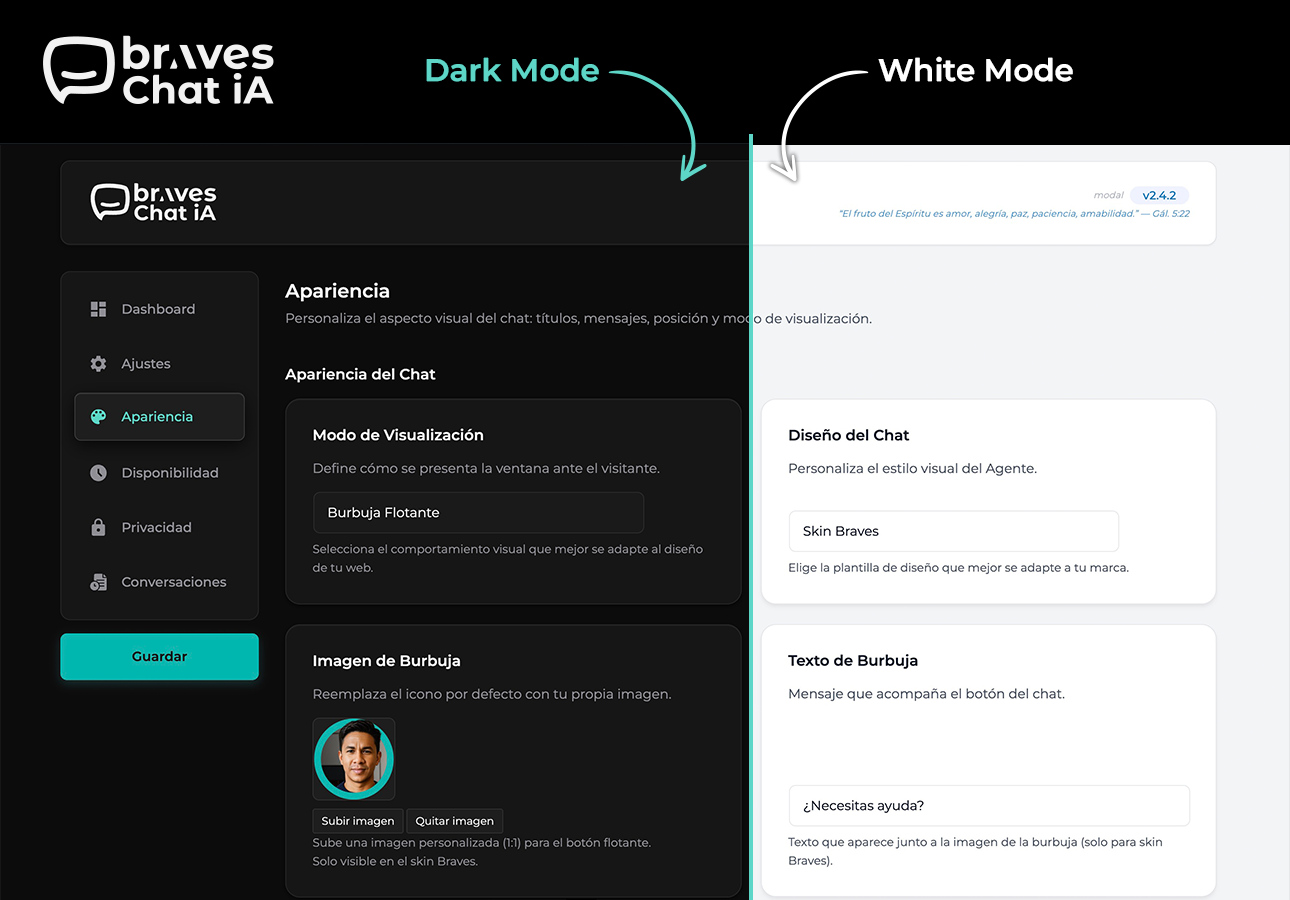
- Dark mode admin panel: Toggle between light and dark theme. Preference is saved per user and restored without flash.
- Configurable business hours: Define when the chat is active and show a custom message outside those hours — ideal if your agent depends on a human in the loop.
- Built-in GDPR compliance: Consent banner that blocks the chat until the user accepts. Montserrat font loaded locally, no external requests.
- Full brand customization: Colors, texts, position, skin, and display mode — all adjustable without touching code.
- Reinforced security: The N8N authentication token travels only on the server — it is never exposed in the page HTML.
- WooCommerce compatible: Works in WooCommerce stores without conflicts, enabling conversational assistance throughout the purchase process.
Session identification with Fingerprinting
BravesChat generates a unique sessionId per visitor based on browser characteristics (SHA-256 hash), without storing personal data. This allows N8N to maintain conversation context even if the user reloads the page.
External services
N8N Webhook (user-configured)
This plugin sends chat messages to an N8N webhook URL configured by the site administrator.
What data is sent: The visitorÌtumọ̀ Yorùbá: ’s chat message, conversation history, an anonymous session identifier (fingerprint), and the current page URL.
When: On every message sent by a visitor through the chat widget, but only if the administrator has configured a webhook URL.
Why: To forward the conversation to the administratorÌtumọ̀ Yorùbá: ’s N8N workflow for AI processing.
The webhook URL, destination server, and all data processing are fully controlled by the site administrator. No data is sent to any Braves-operated server.
Àwọn àwòrán ìbòjú
Àwọn ìdí
Plugin yìí pèsè 1 ìdí.
- BravesChat — Full Screen Displays the BravesChat widget in full screen on this page. Configure the webhook, colors and title from the plugin panel.
Ìgbéwọlẹ̀
- Upload the
braveschatfolder to the/wp-content/plugins/directory. - Activate the plugin from the Plugins menu in WordPress.
- Go to BravesChat Settings and enter your N8N webhook URL.
- (Optional) Customize colors, texts, and position under Appearance.
- (Optional) Configure the consent banner under GDPR.
FAQ
-
Do I need an N8N account to use BravesChat?
-
Yes. BravesChat acts as the chat widget on your WordPress, but the intelligence and responses are managed by your own N8N workflow. You can use N8N Cloud or your self-hosted instance.
-
Does it work with any AI agent in N8N?
-
Yes. BravesChat sends the message and the conversation
sessionIdto the webhook URL you configure. The agent can be connected to OpenAI, Claude, Gemini, Ollama, or any model your workflow supports — BravesChat imposes no restrictions. -
What data is sent to the webhook on each message?
-
Each request includes: the userÌtumọ̀ Yorùbá: ’s message (
chatInput) and the unique session identifier (sessionId). Conversation history is managed by N8N via thesessionId. -
Is the conversation history saved in the WordPress database?
-
No. The history shown in the admin panel is fetched directly from your N8N data source (e.g., PostgreSQL) via a separate webhook that you configure.
-
Can I hide the chat on certain pages?
-
Yes. In the Settings section you can specify pages where the widget should not appear.
-
Is it compatible with WooCommerce?
-
Yes, BravesChat is compatible with WooCommerce and does not generate conflicts with the checkout process or store styles.
-
Does the plugin comply with GDPR?
-
Yes. You can enable a consent banner that blocks the chat until the user accepts. User fingerprinting does not collect personal data. The Montserrat font is loaded locally, with no requests to Google Fonts.
-
Can I use BravesChat without N8N?
-
Technically yes: the webhook can point to any HTTP endpoint that returns JSON with the
outputfield. However, the plugin is optimized and documented for N8N workflows. -
Is the N8N authentication token secure?
-
Yes. The token travels only on the server — it is never exposed in the page HTML or JavaScript. The frontend sends messages to the WordPress AJAX endpoint, which acts as a proxy and adds the token before contacting N8N.
Àwọn àgbéyẹ̀wò
Kò sí àwọn àgbéyẹ̀wò fún plugin yìí.
Àwọn Olùkópa & Olùgbéejáde
“BravesChat” jẹ́ ètò ìṣàmúlò orísun ṣíṣí sílẹ̀. Àwọn ènìyàn wọ̀nyí ti ṣe ìkópa sí plugin yìí.
Àwọn Olùkópa
A ti túmọ̀ “BravesChat” sí èdè agbègbè 1 kan. Ọpẹ́lọpẹ́ fún àwọn atúmọ̀ èdè fún àwọn ìkópa wọn.
Ṣe o nífẹ̀ẹ́ sí ìdàgbàsókè?
Ṣàwárí koodu, ṣàyẹ̀wò ibi ìpamọ́ SVN, tàbí ṣe àgbékalẹ̀ sí àkọsílẹ̀ ìdàgbàsókè nípasẹ̀ RSS.
Àkọsílẹ̀ àwọn àyípadà
2.5.0
- IMPROVED: Full compatibility with WordPress 7.0 — the chat block now keeps the editor running smoothly inside its iframe.
- IMPROVED: The chat block now shows a live preview in the block inserter.
- FIXED: The conversation history screen no longer appears blank when the webhook is not yet configured; setup hints are now visible.
- IMPROVED: Now requires WordPress 5.9 or higher.
2.4.6
- FIXED: Chat links from AI responses with non-HTTP protocols (e.g. javascript:) are no longer rendered — only https:// and http:// are accepted. Prevents potential XSS from malicious agent responses.
- FIXED: Auth header name sanitized before use to prevent header injection.
- FIXED: History modal no longer shows hardcoded Spanish labels (“Conversación Anónima”, “Session:”, “Usuario”) — all strings are now translatable.
- ADDED: Bible verses in the admin header now appear in English when WordPress is not set to Spanish.
- IMPROVED: Changelog timeline in the About page no longer requires manual spacing values — adding a new entry is as simple as setting braves-tl-right or braves-tl-left.
2.4.5
- FIXED: Bible API dependency removed — verses now served from a local file with 365 NVI verses. No external requests.
- ADDED: Full English translation of the admin UI with i18n support for es_ES.
- ADDED: About page translated to English; Spanish translations preserved in the .po file.
- FIXED: N8N auth token no longer exposed via console.log in the browser.
- FIXED: HTTP/HTTPS scheme validation added before wp_remote_get() calls.
- FIXED: $_GET[‘page’] sanitized and boolean values properly escaped in hidden inputs.
- FIXED: i18n pattern in admin.js updated to use const { __ } = wp.i18n — compatible with wp i18n make-json.
2.4.4
- IMPROVED: All user-visible strings in the admin panel JavaScript are now fully translatable via WordPress i18n (wp.i18n.__).
- IMPROVED: Admin script registered with translation support — JSON language files loaded automatically for the active locale.
- FIXED: Hardcoded default text for bubble, screen footer, and settings fields is now translatable — no more untranslated strings in non-English installs.
2.4.3
- ADDED: Mixed display mode — floating bubble on all pages, fullscreen chat on pages with the Gutenberg block.
- IMPROVED: Chat widget now forces light color scheme, preventing iOS Safari dark mode from inverting widget colors.
- IMPROVED: GDPR banner colors are now fully isolated from theme dark mode — text colors stay consistent on all themes.
- FIXED: Fullscreen block mode now renders a background overlay that hides the white page background while the chat loads.
- FIXED: Chat input placeholder color no longer inherits from the active theme.
- FIXED: Screen CSS is now always loaded on pages using the fullscreen Gutenberg block, regardless of global display mode setting.
2.4.2
- ADDED: Dark mode for the admin panel — toggle between light and dark theme. Preference is saved per user and restored on every page load without flash.
- IMPROVED: Admin UI uses semantic CSS variables throughout — dark mode adapts automatically with no hardcoded colors.
- IMPROVED: Select/deselect all pages buttons in Settings are now styled consistently with the rest of the admin panel.
- IMPROVED: Inline styles removed from field help text and range labels — styles now come from CSS classes for better dark mode support.
- IMPROVED: Message preview no longer injects hardcoded inline styles — uses CSS class instead.
2.4.0
- ADDED: Mobile fullscreen mode — on devices up to 480px the chat opens as a full-screen overlay with its own header, back/close buttons, and iOS safe-area support.
- IMPROVED: WooCommerce compatibility — z-index adjusted so WooCommerce cart and checkout elements always render on top of the chat widget.
- IMPROVED: Logo now rendered as a standard img tag instead of inline SVG — compatible with strict Content Security Policy configurations.
- IMPROVED: Admin scripts moved from PHP templates to wp_add_inline_script — resolves Plugin Check (PCP) warnings about inline scripts in templates.
- IMPROVED: Menu icon SVG sanitized before encoding as data URI to prevent rendering issues in some browsers.
- IMPROVED: Style version added to wp_register_style for reliable cache busting on plugin updates.
- FIXED: Daily verse selection now uses gmdate instead of date for correct UTC-based rotation.
- FIXED: External service disclosure added to API.Bible integration for WordPress.org compliance.
2.3.8
- ADDED: A Bible verse (NIV) appears in the header of the panel every day. It updates automatically—no setup required.
2.3.7
- ADDED: Agent Name field in Appearance — label your agent to identify conversations in History.
- IMPROVED: Status notices (configuration warnings, save confirmations) moved to the header bar — cleaner page layout across all admin sections.
- IMPROVED: Sidebar navigation labels updated — “Schedules” “Availability”, “GDPR” “Privacy”, “History” “Conversations”.
- IMPROVED: Version badge in the header highlights when you are on the About page.
- IMPROVED: Display mode and skin option labels rewritten for clarity.
- IMPROVED: Changelog in the About page redesigned as a two-column timeline layout.
2.3.5
- FIXED: Image upload button in Appearance now correctly opens the WordPress Media Library.
2.3.4
- IMPROVED: Chat bubble is now smaller on mobile devices — default skin shrinks to 48×48px, Braves skin switches to a compact avatar + button layout.
2.3.3
- FIXED: Text domain updated to
braveschatacross all files to match the WordPress.org assigned slug. Resolves all Plugin Check (PCP) text domain errors.
2.3.2
- FIXED: Plugin Check text domain mismatch — the distributed ZIP now uses the correct plugin slug (
braves-chat) so the text domain validates correctly on WordPress.org.
2.3.1
- IMPROVED: Input field stays active while the bot is responding — users can type and interrupt at any time.
2.3.0
- ADDED: N8N authentication token now travels server-side only — never exposed in the browser.
- ADDED: Three authentication methods for N8N: custom header, Basic Auth, or none.
- IMPROVED: Simplified frontend JavaScript by removing streaming/NDJSON logic — all N8N connection complexity is now handled server-side.
- IMPROVED: Plugin images converted to PNG for better browser and WordPress.org compatibility.
- IMPROVED: License updated to GPL-2.0-or-later, aligned with WordPress.org requirements.
- FIXED: Removed ZIP export detection class that caused false positives.
2.2.3
- ADDED: “View details” link in the plugins list with full plugin information.
- IMPROVED: Rich text editor for GDPR messages and out-of-hours messages.
2.2.2
- ADDED: Protection class detects ZIP export plugins installed on the site and shows a security notice in the admin panel.
2.2.1
- FIXED: Notices from other plugins no longer appear inside the BravesChat panel.
2.2.0
- ADDED: Full conversation history viewer with per-session modal.
- ADDED: History export to CSV with all relevant fields.
- IMPROVED: Conversations ordered from most recent to oldest.
2.1.5
- ADDED: History page replaces Statistics — open any session and read the full conversation thread with chat bubbles, timestamps, and sender labels.
- ADDED: CSV export with all fields: session ID, client name, updated at, full chat history JSON.
- IMPROVED: Messages displayed in chronological order inside the session modal.
- FIXED: Internal N8N tool calls and JSON responses filtered from the conversation viewer.
2.1.4
- ADDED: Statistics tab with live conversation history fetched from your N8N/Postgres webhook.
- ADDED: CSV export with all fields: session_id, client_mail, last_message, updated_at, chat_history, metadata.
2.1.3
- FIXED: GitHub Actions release workflow now correctly triggers on v* tags — automated ZIP generation working.
2.1.2
- IMPROVED: CSS isolation system to prevent conflicts with themes.
2.1.1
- IMPROVED: Incremental real-time Markdown rendering.
2.1.0
- ADDED: Configurable typing speed slider.
- ADDED: HTML/Markdown support in the GDPR banner message.
- ADDED: Montserrat loaded locally (GDPR compliance).
2.0.0
- MAJOR: Complete system restructuring with new BravesChat namespace.
- ADDED: Maximize button, textarea auto-growth, minimized state.
1.2.4
- ADDED: Bubble tooltip customizable from the Appearance panel.
- ADDED: Automatic detection and deactivation of older plugin versions on activation.
- IMPROVED: Default icon color updated to #f2f2f2.
1.2.3
- ADDED: Full color customization — bubble, primary, background, and text colors with native color pickers.
- ADDED: SVG icon selector with four styles (original, circle, happy, bubble).
- FIXED: Removed Lottie Player CDN dependency — replaced with static SVG.
1.2.2
- FIXED: Critical — form inputs not rendering on Settings, Appearance, Schedules, and GDPR pages.
- FIXED: Settings from other tabs were lost when saving a partial form.
- IMPROVED: Admin notifications auto-hide after 3 seconds with slide animation.
1.2.1
- IMPROVED: Complete admin panel redesign with Bentō card layout.
- ADDED: Shared sidebar navigation across all admin sections.
- ADDED: Reusable component architecture — Header, Sidebar, Content.
1.2.0
- ADDED: New administration system with modern dashboard and Bentō design.
1.1.2
- CHANGED: Rebranding from Weblandia to BravesLab — updated URLs, author, and copyright.
1.1.1
- ADDED: Cookie system with fingerprinting for session identification.
1.1.0
- ADDED: Availability schedules with timezone support and custom offline message.
- ADDED: Excluded pages — configure which pages should not show the chat widget.
- ADDED: N8N authentication token support via X-N8N-Auth header.
1.0.0
- Initial plugin release.