

Àpèjúwe
Blogtome automatically turns the published posts of a WordPress category into a print-ready PDF book – sorted chronologically, chapter by chapter. Ideal for travel blogs, journals, or project documentation you want to turn into a printed book or ebook.
Good to know
Because blog content can be built very differently depending on the blocks and plugins used, a perfect print result canÌtumọ̀ Yorùbá: ’t be guaranteed 100% for every possible combination – for unusual or highly individual content, itÌtumọ̀ Yorùbá: ’s worth checking the generated PDF before sending it to print.
Chapters & layout
- Uses all published posts of a category as individual chapters, sorted chronologically – individual posts can be excluded, e.g. to leave out posts already included in a previous volume
- Optional, automatically generated table of contents with clickable links and a freely editable heading
- Two output profiles: Screen/Standard (A4, display-resolution images) or Print/HighRes (A4, full-resolution images) for sharper results when actually printing
- One- or two-column layout, automatically switches to one column for chapters containing tables
- Optional header with book title/subtitle, continuous or per-chapter page numbering
- Freely choosable background and text colors for the title page and content
- Optional cover image with adjustable size, plus a freely editable “About this book” text block
Supported block editor content
- TablePress: embedded TablePress tables – including those inserted via shortcode – are recognized and automatically formatted for print
- Spectra (formerly Ultimate Addons for Gutenberg / UAGB): image galleries, single images with captions, and container blocks are natively supported
- Classic Gutenberg images with captions stay together with their caption across page breaks
- Embedded videos are automatically replaced in the PDF with a QR code linking to the original video
Management
- Generated PDFs are saved and can be downloaded or deleted directly from the admin area
- The most recently used settings are remembered automatically
Why this plugin?
Blogtome started out of simple curiosity: how do you turn the posts of a travel blog into an actual, printed book without a huge amount of effort? That question gradually turned into a plugin that now reliably produces print-ready PDFs – even from categories with lots of images, tables, and galleries.
If Blogtome is useful to you and has saved you time, IÌtumọ̀ Yorùbá: ’d appreciate a coffee: Buy Me a Coffee.
Àwọn àwòrán ìbòjú
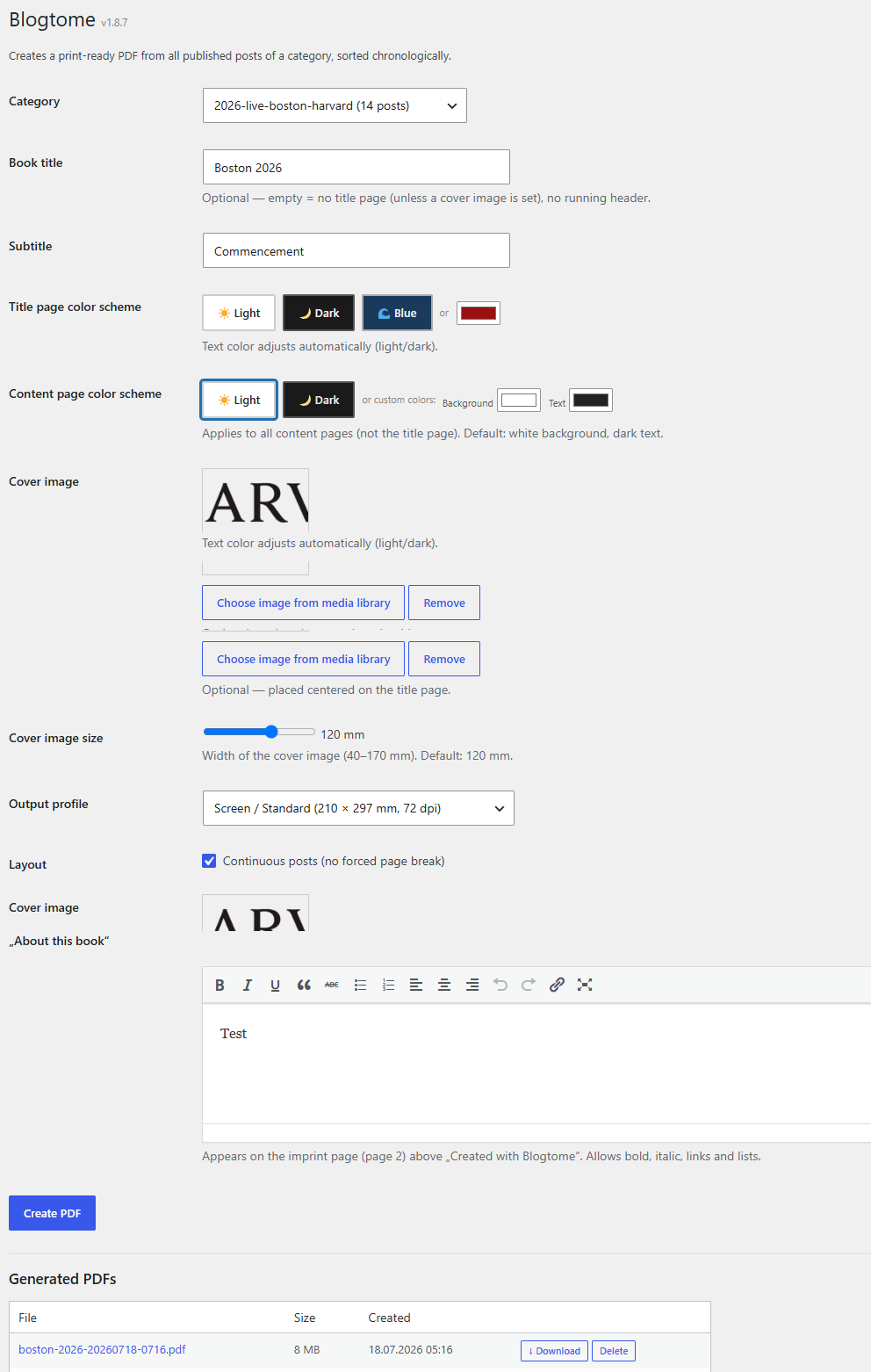
Ìgbéwọlẹ̀
- In the WordPress admin area, go to “Plugins > Add New”, search for “Blogtome” and install it
- Activate the plugin
- Go to “Tools > Blogtome”, select a category and configure the book
Requirements
- PHP 8.0 or higher
- For TablePress support: the TablePress plugin must be installed and active
- For Spectra block support: the Spectra plugin (formerly Ultimate Addons for Gutenberg) must be installed and active
FAQ
-
Do I need TablePress or Spectra for Blogtome to work?
-
No. Blogtome works with regular Gutenberg posts without any additional plugins. TablePress and Spectra are supported in addition, if you use them – their content is then automatically formatted correctly for print.
-
Can I order the PDF directly from a print service?
-
The “Print / HighRes” profile embeds full-resolution images instead of the smaller versions used for on-screen viewing, and produces a regular A4 PDF that most print-on-demand services accept directly, with no special bleed or trim format required. Please still check the exact requirements of your chosen print service before ordering.
-
Where do I find the generated PDFs?
-
All generated books are listed in the admin area under “Tools > Blogtome”, where they can be downloaded or deleted.
Àwọn àgbéyẹ̀wò
Kò sí àwọn àgbéyẹ̀wò fún plugin yìí.
Àwọn Olùkópa & Olùgbéejáde
“Blogtome” jẹ́ ètò ìṣàmúlò orísun ṣíṣí sílẹ̀. Àwọn ènìyàn wọ̀nyí ti ṣe ìkópa sí plugin yìí.
Àwọn Olùkópa
Ṣe o nífẹ̀ẹ́ sí ìdàgbàsókè?
Ṣàwárí koodu, ṣàyẹ̀wò ibi ìpamọ́ SVN, tàbí ṣe àgbékalẹ̀ sí àkọsílẹ̀ ìdàgbàsókè nípasẹ̀ RSS.
Àkọsílẹ̀ àwọn àyípadà
1.9.5
- Added an optional, automatically generated table of contents with clickable links and a freely editable heading (default: “Inhaltsverzeichnis”)
- Individual posts within a category can now be excluded from the generated book, e.g. to leave out posts already included in a previous volume
- Line breaks in the “About this book” text field are now correctly carried over into the generated PDF
- Print/HighRes profile now embeds full-resolution images for every image, not just those inside image galleries
- Simplified page format: removed the special 3 mm bleed / mirrored-margin page format previously tailored to one specific print-on-demand provider – Print/HighRes now uses the same A4 format as Screen/Standard, since most current print services accept a regular PDF directly
- Fixed header/footer sometimes missing on individual pages depending on chapter count and page parity
- Fixed video/link QR-code placeholders occasionally being split across a page or column break
1.9.4
- Fixed excessive PDF size/page count introduced by the 1.9.2/1.9.3 gallery fix: images in detected native galleries now respect the selected profile (Screen/Standard uses the moderate size WordPress already serves, Print/HighRes uses the original resolution) instead of always embedding the largest available image
1.9.3
- Fixed the 1.9.2 gallery detection: page builders like Elementor donÌtumọ̀ Yorùbá: ’t store an enclosing gallery wrapper in the post content (only in their live front-end rendering), so galleries were still not recognized in some cases. Detection no longer depends on that wrapper.
1.9.2
- Image galleries built with page builders that reuse WordPressÌtumọ̀ Yorùbá: ’s native gallery markup (e.g. ElementorÌtumọ̀ Yorùbá: ’s Image Gallery widget) are now recognized and rendered with proper spacing in the PDF, instead of images sticking together with no gap
1.9.1
- Added the German (de_DE) translation, prepared for 1.9.0 but accidentally left out of that build
1.9.0
- Internationalization: all visible strings in the admin interface (and in the generated PDF, e.g. the imprint line and video placeholders) are now translation-ready, using the
blogtometext domain - Translations can now be contributed via the official WordPress.org translation platform (https://translate.wordpress.org/projects/wp-plugins/blogtome/)
1.8.8
- Bundled third-party libraries (mPDF and its dependencies: psr/log, psr/http-message, myclabs/deep-copy, setasign/fpdi, mpdf/qrcode) are now loaded under a plugin-owned namespace prefix (Blgt\Vendor...) instead of their original namespaces, to eliminate any possibility of class/namespace collisions with the same libraries bundled by other plugins
- Removed unused bundled font files (Arabic-script XB Riyaz family, ~4.4MB) that were never reachable from this pluginÌtumọ̀ Yorùbá: ’s font configuration
- Removed dev-only files from bundled libraries (composer.json, phpunit.xml, README, CHANGELOG, static-analysis configs) that are not used at runtime
- Removed unused Doctrine-specific code paths from the bundled deep-copy library (not used by mPDFÌtumọ̀ Yorùbá: ’s actual usage of that library)
1.8.7
- Added a “Donate” action link (Plugins list page) linking to Buy Me a Coffee
1.8.6
- Added a “Documentation” link to the pluginÌtumọ̀ Yorùbá: ’s meta row (Plugins list page), pointing to a dedicated documentation page
1.8.5
- Renamed the plugin from “PrintReady Book Builder” to “Blogtome” — WordPress.org flagged the previous name as too generic and confusable with existing print-industry products; “Blogtome” is a distinctive coined term
- Function/option/nonce prefix changed from
prbb_toblgt_ - Added an “Author URI” link and a direct “Blog to me” action link on the Plugins list page for easier access
- Translated the admin interface from German to English
1.8.4
- Removed special characters (parentheses) from 27 bundled mPDF collation data filenames
- Added direct file access protection (ABSPATH check) to 23 bundled library files that were missing it
1.8.3
- Renamed the plugin from “Book Builder” to “PrintReady Book Builder” following WordPress.org review feedback (name/slug too generic)
- Function/option/nonce prefix changed from
abb_toprbb_ - Inline
<script>blocks replaced with a properly enqueued external admin.js file (wp_enqueue_script) - Renamed bundled mPDF font files that contained spaces
- Removed bundled PHPUnit test fixtures from the qrcode library (unused in production)
1.8.2
- Security and code quality improvements (input validation, escaping, WordPress function wrappers) based on the official Plugin Check tool
1.8.1
- Cleaned up internal admin page slug
- Added text domain
- Simplified print profile label
- Made admin notices dismissible
1.8.0
- Raised minimum requirement to PHP 8.0
1.7.x
- Various layout and stability improvements (captions, galleries, tables, page breaks)