
Àpèjúwe
Activate the plugin and all users who can edit other users posts (editors and admins) will get a new widget on their dashboard showing all draft and pending posts, pages and any custom post types. The standard ‘Recent Drafts’ widget is disabled.
This makes no changes for subscribers, contributors and authors.
Àwọn àwòrán ìbòjú
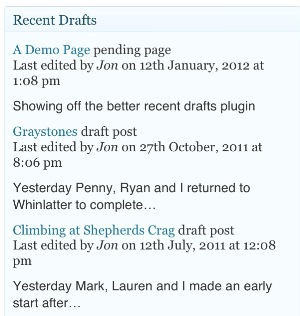
The better recent drafts widget
Ìgbéwọlẹ̀
This section describes how to install the plugin and get it working.
- Go to the Plugins page in the admin area, search for
Better Recent Draftsand install it. - Or Extract
better-recent-drafts.zipin the/wp-content/plugins/directory. This will create a subfolder calledbetter-recent-draftscontaining the plugin files. - Activate the
Better Recent Draftsthrough the ‘Plugins’ menu in WordPress
FAQ
- Where are the options?
-
There are no options at the moment. Just activate the plugin and all users who can edit others posts (editors and admins) will get a new widget on their dashboard showing all draft and pending posts, pages and any custom post types.
- Where to report bugs or ask for support?
-
At the plugin page.
Àwọn àgbéyẹ̀wò

Àwọn Olùkópa & Olùgbéejáde
“Better Recent Drafts” jẹ́ ètò ìṣàmúlò orísun ṣíṣí sílẹ̀. Àwọn ènìyàn wọ̀nyí ti ṣe ìkópa sí plugin yìí.
Àwọn Olùkópa
Túmọ̀ “Better Recent Drafts” sí èdè rẹ.
Ṣe o nífẹ̀ẹ́ sí ìdàgbàsókè?
Ṣàwárí koodu, ṣàyẹ̀wò ibi ìpamọ́ SVN, tàbí ṣe àgbékalẹ̀ sí àkọsílẹ̀ ìdàgbàsókè nípasẹ̀ RSS.
Àkọsílẹ̀ àwọn àyípadà
0.1
Inital version with no options