
Àpèjúwe
Includes a \”spoiler\” button and spoiler shortcode!
Use TinyMCE with bbPress is just what it sounds like Ìtumọ̀ Yorùbá: – a scaled down version of the TinyMCE editor designed specifically for bbPress.
This plugin removes the Text editor and enables TinyMCE, allowing forum members to format their message in a way that\Ìtumọ̀ Yorùbá: ’s more intuitive and more closely resembles other forum software.
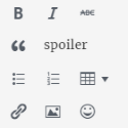
It includes buttons for:
- bold
- italic
- strikethrough
- blockquote
- spoiler button
- bulleted and numbered lists
- table support
- a bbPress-specific \”link\” button (see below)
- insert/edit image
- emoticons
- full screen
Note: the \”insert/edit\” link button in Use TinyMCE with bbPress is not the same button you\Ìtumọ̀ Yorùbá: ’re used to when it comes to editing posts and pages. It ONLY allows your forum users to include the link URL, text, title, and target. There are no options for linking to other internal posts or pages, as these options would most likely just confuse your members.
Use TinyMCE with bbPress is the forum editor I wish I\Ìtumọ̀ Yorùbá: ’d had when I first discovered bbPress.
Àwọn àwòrán ìbòjú


Ìgbéwọlẹ̀
Unzip and then upload the \Ìtumọ̀ Yorùbá: ’bbp-tinymce\’ folder to the \Ìtumọ̀ Yorùbá: ’/wp-content/plugins/\’ directory
Activate the plugin through the \Ìtumọ̀ Yorùbá: ’Plugins\’ menu in WordPress.
That\Ìtumọ̀ Yorùbá: ’s it! Use TinyMCE with bbPress is ready to go!
FAQ
- Installation Instructions
-
-
Unzip and then upload the \Ìtumọ̀ Yorùbá: ’bbp-tinymce\’ folder to the \Ìtumọ̀ Yorùbá: ’/wp-content/plugins/\’ directory
-
Activate the plugin through the \Ìtumọ̀ Yorùbá: ’Plugins\’ menu in WordPress.
That\Ìtumọ̀ Yorùbá: ’s it! Use TinyMCE with bbPress is ready to go!
-

Àwọn Olùkópa & Olùgbéejáde
“Use TinyMCE with bbPress” jẹ́ ètò ìṣàmúlò orísun ṣíṣí sílẹ̀. Àwọn ènìyàn wọ̀nyí ti ṣe ìkópa sí plugin yìí.
Àwọn Olùkópa
Túmọ̀ “Use TinyMCE with bbPress” sí èdè rẹ.
Ṣe o nífẹ̀ẹ́ sí ìdàgbàsókè?
Ṣàwárí koodu, ṣàyẹ̀wò ibi ìpamọ́ SVN, tàbí ṣe àgbékalẹ̀ sí àkọsílẹ̀ ìdàgbàsókè nípasẹ̀ RSS.
Àkọsílẹ̀ àwọn àyípadà
1.0 Ìtumọ̀ Yorùbá: – Initial release