
Àpèjúwe
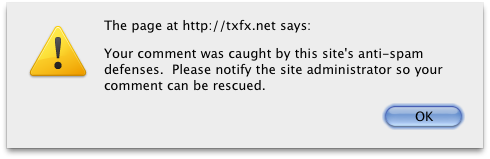
This plugin notifies people when the comment they just left is moderated or marked as spam. The method of notification can be either a Javascript popup, or an HTML notification in the comment area. You can choose whether spam comments, moderated comments, or both will result in the notification. This is especially useful for spam comments, as the human author will know to contact you and have you rescue the comment from the spam bin.
Àwọn àwòrán ìbòjú

Ìgbéwọlẹ̀
- Upload the
antispam-collateral-condolencesfolder to the/wp-content/plugins/directory - Activate the plugin through the ‘Plugins’ menu in WordPress
- Go to Options > Antispam Collateral Condolences to change the options
FAQ
- Can I customize the text that is shown to the user?
-
Not yet… the next version will allow that.
Àwọn àgbéyẹ̀wò
Kò sí àwọn àgbéyẹ̀wò fún plugin yìí.
Àwọn Olùkópa & Olùgbéejáde
“Antispam Collateral Condolences” jẹ́ ètò ìṣàmúlò orísun ṣíṣí sílẹ̀. Àwọn ènìyàn wọ̀nyí ti ṣe ìkópa sí plugin yìí.
Àwọn Olùkópa
Túmọ̀ “Antispam Collateral Condolences” sí èdè rẹ.
Ṣe o nífẹ̀ẹ́ sí ìdàgbàsókè?
Ṣàwárí koodu, ṣàyẹ̀wò ibi ìpamọ́ SVN, tàbí ṣe àgbékalẹ̀ sí àkọsílẹ̀ ìdàgbàsókè nípasẹ̀ RSS.
Àkọsílẹ̀ àwọn àyípadà
0.3
- First release in plugin repository
- Added options page