
Àpèjúwe
AMSites Payment Gateway is a modern WooCommerce payment solution designed for businesses in Pakistan. Accept payments through multiple local payment gateways — including JazzCash, Easypaisa, Direct Bank Transfer, and future payment providers such as Raast — from a single, easy-to-use interface.
The plugin is lightweight, secure, developer-friendly, and built following WordPress coding standards.
Payment methods included in this release
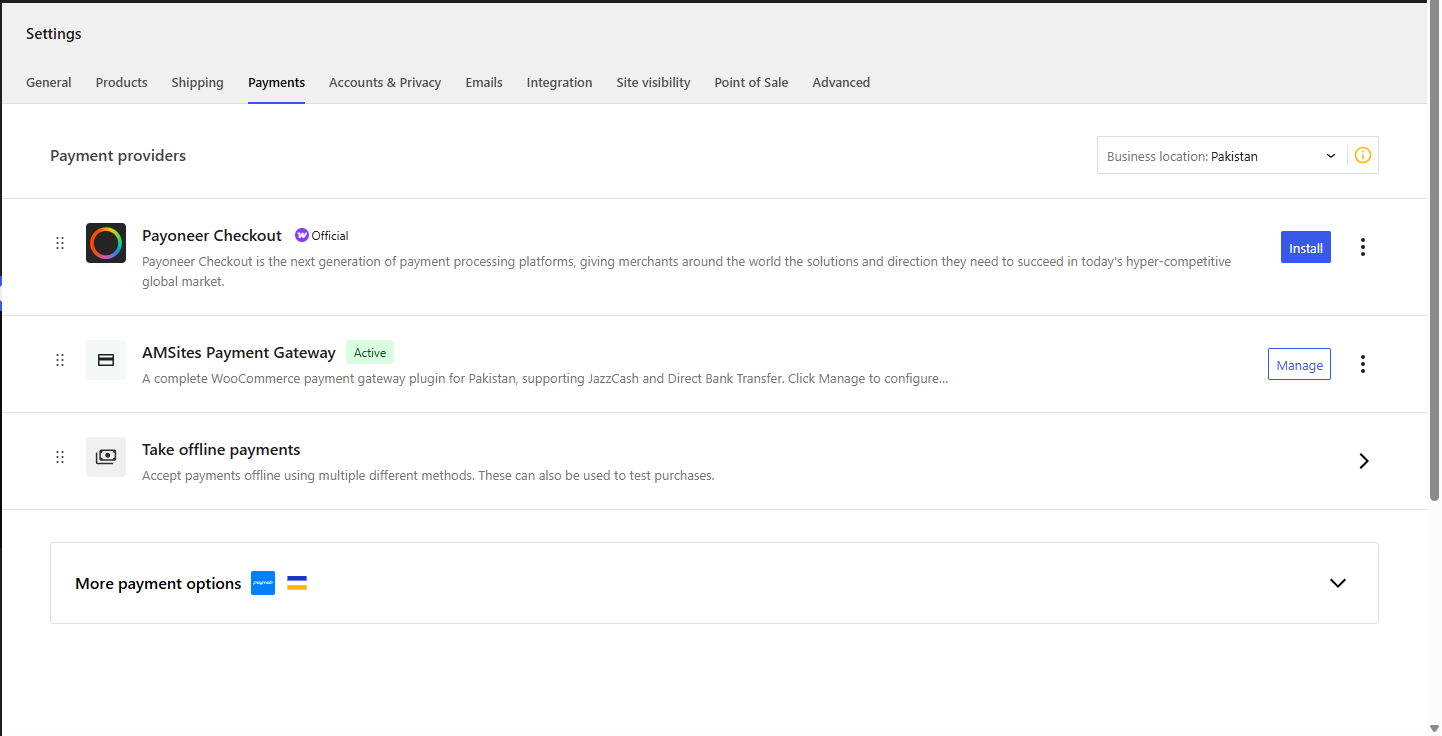
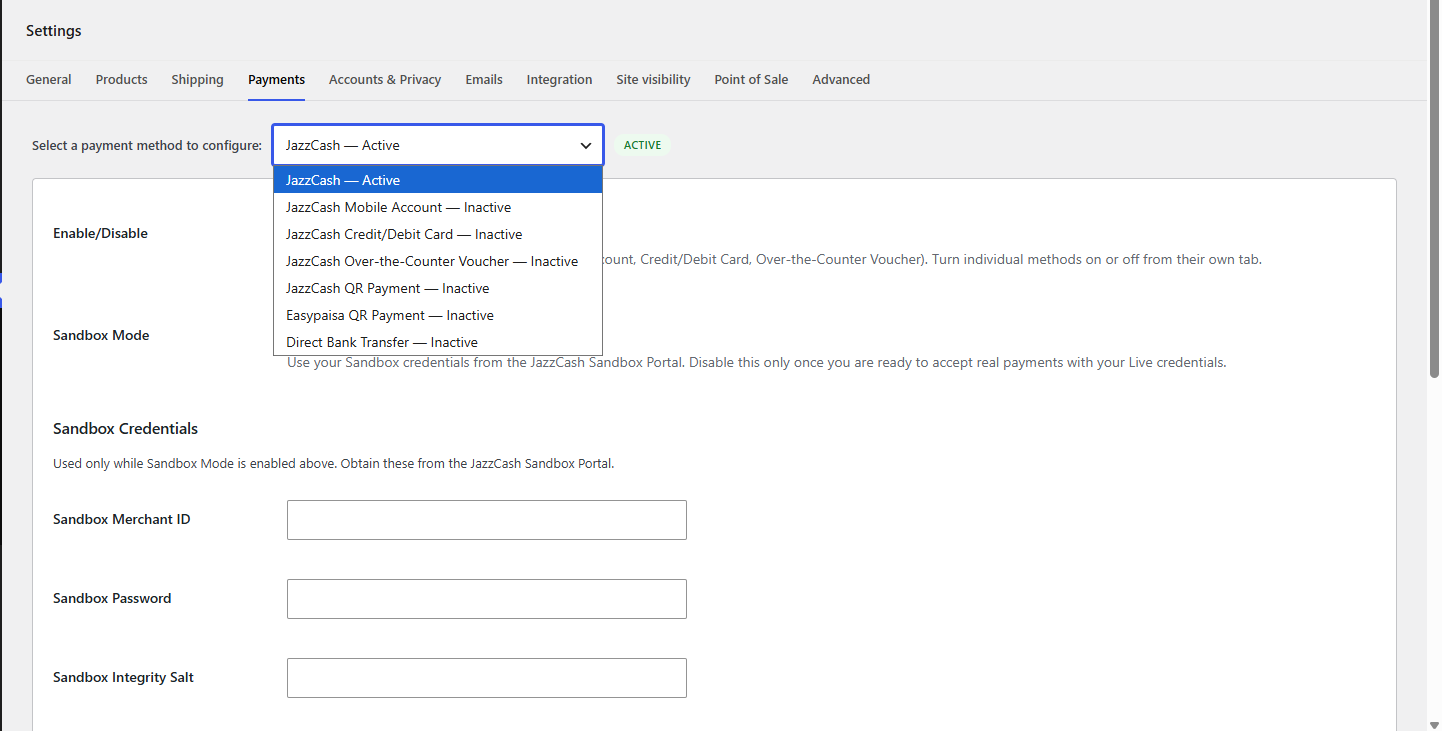
On WooCommerce > Settings > Payments this plugin adds exactly one row: “AMSites Payment Gateway” (Enable/Manage/Disable, exactly like any other WooCommerce gateway). Clicking Manage opens one settings screen with a dropdown to select and configure each payment method — add more methods later and they simply appear as additional dropdown options:
- JazzCash — shared Merchant ID, Password, Integrity Salt and Sandbox/Live mode, entered once and used by all three JazzCash API methods below, plus a master Enable/Disable for JazzCash as a whole.
- JazzCash Mobile Account (mobile wallet balance)
- JazzCash Credit/Debit Card (Visa, Mastercard, via JazzCashÌtumọ̀ Yorùbá: ’s hosted payment page, including 3-D Secure)
- JazzCash Over-the-Counter Voucher (cash payment at any JazzCash outlet)
- JazzCash QR Payment (manual — customer scans your JazzCash QR code, pays, and enters a Transaction ID for you to confirm; no merchant API account needed)
- Easypaisa QR Payment (manual — same flow as above, for Easypaisa)
- Direct Bank Transfer (manual/offline bank deposit, with support for listing multiple bank accounts)
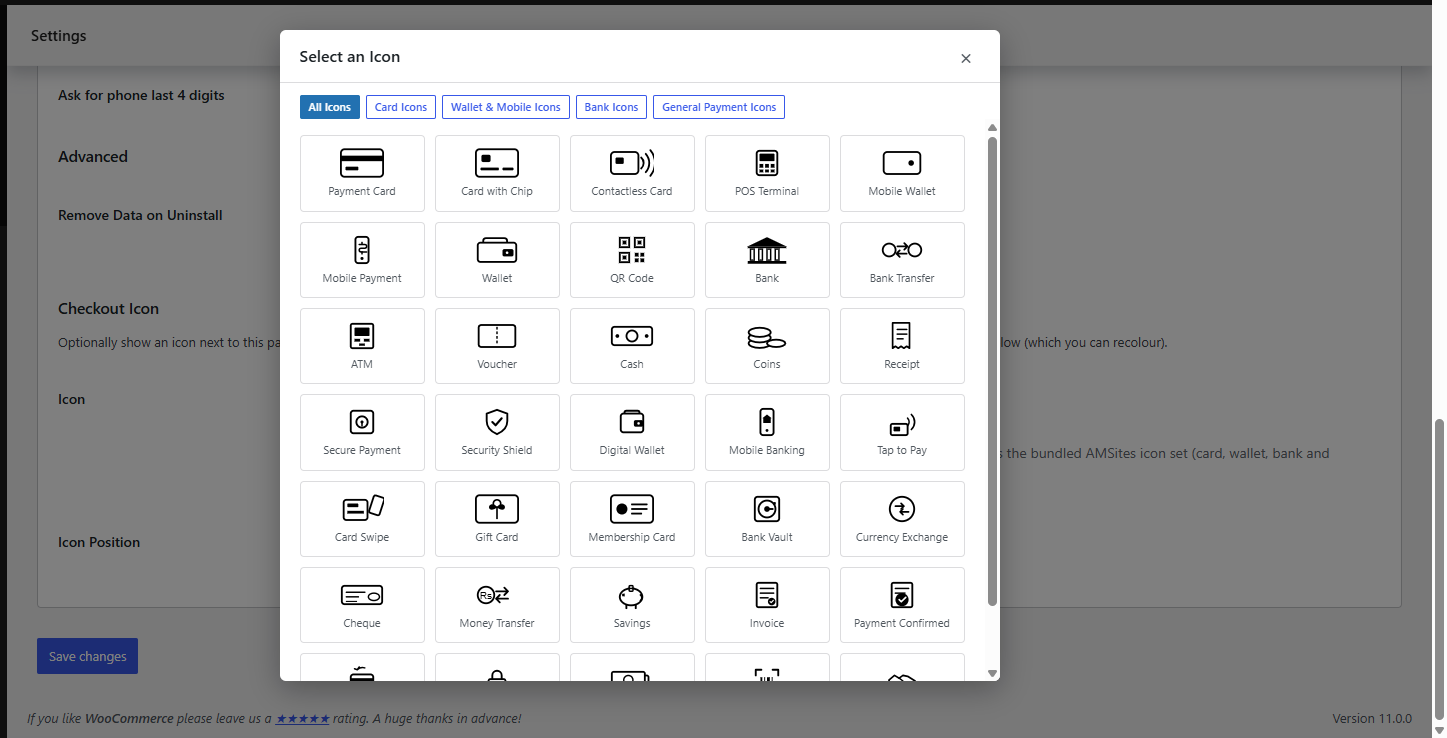
Every method has its own Enable/Disable switch and its own Checkout Icon setting: pick an image from your WordPress Media Library, or choose and recolour one of 35+ bundled preset payment icons (card/wallet/bank/general) — shown before or after the payment method title, your choice.
Coming in future updates
- Easypaisa live API integration (Mobile Account/Card, beyond todayÌtumọ̀ Yorùbá: ’s manual QR option)
- Raast (State Bank of PakistanÌtumọ̀ Yorùbá: ’s instant payment system)
Why this plugin
- PCI-DSS friendly by design. JazzCash card and mobile account credentials are entered on JazzCashÌtumọ̀ Yorùbá: ’s own hosted payment page — your server never receives, stores, or transmits cardholder data.
- Secure Hash on every request and response. Every outgoing JazzCash request and every inbound callback is signed and verified with HMAC-SHA256, exactly as specified in the JazzCash integration guide. Responses that fail verification are rejected and never applied to an order.
- Sandbox Mode built in. Flip a single checkbox per JazzCash gateway to test end-to-end against the JazzCash Sandbox before going live — no code changes required.
- Clean, modern codebase. 100% object-oriented, PSR-4 autoloaded, namespaced, and built strictly against the WordPress Plugin/WooCommerce Payment Gateway APIs. No inline CSS/JS, no direct file access, all output escaped, all input sanitized and validated.
- HPOS ready. Declares compatibility with WooCommerceÌtumọ̀ Yorùbá: ’s High-Performance Order Storage. Uses the classic (shortcode) checkout — the block-based Cart/Checkout is not yet supported, so gateways will not appear there until a dedicated Blocks integration ships in a future release.
- One plugin, one settings area. All local payment methods for your store live under WooCommerce > Settings > Payments, instead of juggling several separate plugins.
How it works (JazzCash)
- The customer chooses Card, Mobile Account, or Voucher at WooCommerce checkout.
- TheyÌtumọ̀ Yorùbá: ’re redirected to JazzCashÌtumọ̀ Yorùbá: ’s secure hosted page to authorize payment (or, for vouchers, to receive a 12-digit voucher number by SMS).
- JazzCash posts the signed result back to your store, the Secure Hash is verified, and the order is updated automatically — no manual reconciliation.
- For vouchers paid later at a JazzCash outlet, an Instant Payment Notification (IPN) webhook updates the order the moment JazzCash confirms settlement.
How it works (Direct Bank Transfer)
- The customer chooses Direct Bank Transfer at checkout and places the order.
- The order is placed on-hold and the customer sees your configured bank account details on the order confirmation page and in their confirmation email.
- Once you confirm the funds have arrived in your account, you manually mark the order as Processing/Completed from the WooCommerce Orders screen.
Requirements
- WooCommerce 7.0+
- For JazzCash: a JazzCash Merchant account (Sandbox account is free — see Getting Started) and store currency set to PKR
- The classic (shortcode) checkout. If your theme/setup uses the WooCommerce Cart & Checkout Blocks, switch that page back to the classic
[woocommerce_checkout]shortcode — block-based checkout support is not yet included in this release.
External services
This plugin connects to JazzCashÌtumọ̀ Yorùbá: ’s hosted payment page (Sandbox: https://sandbox.jazzcash.com.pk/CustomerPortal/transactionmanagement/merchantform/, Live: https://payments.jazzcash.com.pk/CustomerPortal/transactionmanagement/merchantform/) to process JazzCash Card, Mobile Account, and Over-the-Counter Voucher transactions — this is required for the pluginÌtumọ̀ Yorùbá: ’s core purpose, as WooCommerce cannot process JazzCash payments without it. It sends the order amount, currency (PKR), a merchant-generated transaction reference number, the WooCommerce order number, a fixed order-description string, a request timestamp/expiry, your storeÌtumọ̀ Yorùbá: ’s configured Merchant ID and Return URL, and (for Mobile Account/Voucher only) your configured Bank ID and Product ID, each time a customer submits checkout using a JazzCash payment method. No customer name, email, phone number, or billing address is sent. The customerÌtumọ̀ Yorùbá: ’s browser is then redirected to JazzCashÌtumọ̀ Yorùbá: ’s own hosted page to enter card or mobile account credentials directly with JazzCash; those credentials never pass through this plugin or your server. JazzCash sends a signed result back to your storeÌtumọ̀ Yorùbá: ’s Return URL and IPN endpoint to confirm or reject the payment. This service is provided by JazzCash (Private) Limited / Mobilink Microfinance Bank: Terms & Conditions, Privacy Notice.
The Direct Bank Transfer method is a manual/offline payment method and does not connect to any external service.
Àwọn àwòrán ìbòjú
Ìgbéwọlẹ̀
- Upload the plugin files to
/wp-content/plugins/amsites-payment-gateway, or install the zip via Plugins > Add New > Upload Plugin. - Activate the plugin through the Plugins screen in WordPress.
- Go to WooCommerce > Settings > Payments, make sure AMSites Payment Gateway is enabled, then click Manage.
- From the dropdown, select JazzCash: enter your Sandbox credentials (Merchant ID, Password, Integrity Salt) from the JazzCash Sandbox Portal, keeping Sandbox Mode enabled while testing. Add the Return URL / IPN URL shown here to your JazzCash Merchant/Sandbox Portal configuration.
- Select JazzCash Mobile Account, JazzCash Credit/Debit Card, and JazzCash Over-the-Counter Voucher from the dropdown and enable whichever methods you want to offer (they all use the credentials entered on the JazzCash option).
- Select JazzCash QR Payment / Easypaisa QR Payment (optional, no API account needed): enable, then upload a screenshot of your JazzCash/Easypaisa QR code.
- Select Direct Bank Transfer: enable it and enter your bank account details (Bank Name, Account Title, Account Number, IBAN).
- Place a test order to confirm each enabled method works end-to-end.
- When ready to accept real JazzCash payments, go back to the JazzCash option in the dropdown, enter your Live credentials, and disable Sandbox Mode.
FAQ
-
Does this plugin store customer card numbers?
-
No. Card and mobile-account entry happens entirely on JazzCashÌtumọ̀ Yorùbá: ’s hosted payment page. This plugin only ever handles the order total, a transaction reference number, and the signed pass/fail result — never a PAN, CVV, or MPIN.
-
Where do I find my JazzCash Merchant ID, Password, and Integrity Salt?
-
Register for a free account at the JazzCash Sandbox Portal to get Sandbox credentials, and complete merchant verification on the live JazzCash Merchant Portal to get Live credentials.
-
What URL do I give JazzCash for the Return URL / IPN URL?
-
The JazzCash option (under AMSites Payment Gateway > Manage) displays the exact URLs to configure. They follow the pattern
https://yourstore.com/?wc-api=amspg_jazzcash_returnandhttps://yourstore.com/?wc-api=amspg_jazzcash_ipn. -
My JazzCash orders arenÌtumọ̀ Yorùbá: ’t updating after payment — what should I check?
-
Enable Debug Log on the gateway and review WooCommerce > Status > Logs (source:
jazzcash). Most issues trace back to a mismatched Integrity Salt, an incorrect Merchant ID for the selected mode (Sandbox vs Live), or a firewall/security plugin blocking the inbound callback. -
Does Bank Transfer confirm payments automatically?
-
No. Since Pakistani banks do not currently offer a public online payment API, Bank Transfer works like a standard offline/manual payment method: the order is placed on-hold and you confirm receipt of funds yourself before marking the order Processing or Completed.
-
How do JazzCash QR Payment and Easypaisa QR Payment work?
-
TheyÌtumọ̀ Yorùbá: ’re manual methods, like Bank Transfer — no merchant API account, Merchant ID, or credentials required. You upload a screenshot of your own JazzCash or Easypaisa QR code; the customer scans it with their app, pays, and enters the Transaction ID (and optionally the last 4 digits of the phone number they paid from) at checkout. The order is placed on-hold with that Transaction ID saved to the order for you to verify in your JazzCash/Easypaisa app before marking it Processing or Completed.
-
Is this plugin affiliated with JazzCash, Easypaisa, or any bank?
-
No. This is an independent, third-party integration built against publicly published API documentation.
-
Why donÌtumọ̀ Yorùbá: ’t the payment options appear at checkout even though everything is configured correctly?
-
Check whether your Checkout page is using the WooCommerce Cart & Checkout Blocks. This plugin currently supports the classic (shortcode) checkout only; block-based checkout support is not yet included. Edit the Checkout page and confirm it uses the classic
[woocommerce_checkout]shortcode rather than the Checkout block.
Àwọn àgbéyẹ̀wò
Kò sí àwọn àgbéyẹ̀wò fún plugin yìí.
Àwọn Olùkópa & Olùgbéejáde
“AMSites Payment Gateway” jẹ́ ètò ìṣàmúlò orísun ṣíṣí sílẹ̀. Àwọn ènìyàn wọ̀nyí ti ṣe ìkópa sí plugin yìí.
Àwọn Olùkópa
Túmọ̀ “AMSites Payment Gateway” sí èdè rẹ.
Ṣe o nífẹ̀ẹ́ sí ìdàgbàsókè?
Ṣàwárí koodu, ṣàyẹ̀wò ibi ìpamọ́ SVN, tàbí ṣe àgbékalẹ̀ sí àkọsílẹ̀ ìdàgbàsókè nípasẹ̀ RSS.
Àkọsílẹ̀ àwọn àyípadà
1.0.0
- Initial public release.
- One combined “AMSites Payment Gateway” row on WooCommerce > Settings > Payments — Enable/Manage/Disable like any other gateway. “Manage” opens a dropdown-based settings screen covering every payment method below, so the list never gets cluttered as more methods are added.
- JazzCash Mobile Account, Credit/Debit Card, and Over-the-Counter Voucher — hosted-page redirection with HMAC-SHA256 Secure Hash generation and verification on every request/response, Sandbox/Live mode, and automatic order updates via Return URL and IPN webhooks.
- Shared JazzCash Merchant ID, Password, and Integrity Salt entered once and used by all three JazzCash API methods, alongside a master Enable/Disable for JazzCash as a whole.
- JazzCash QR Payment and Easypaisa QR Payment — manual/offline methods, no merchant API account needed. Upload your QR code image; customers scan, pay, and enter a Transaction ID at checkout for you to confirm.
- Direct Bank Transfer — manual/offline, supports multiple bank accounts.
- Checkout Icon picker on every method: choose an image from the WordPress Media Library, or pick and recolour one of 35+ bundled preset icons (card/wallet/bank/payment), shown before or after the payment method title.
- High-Performance Order Storage (HPOS) compatible. Classic (shortcode) checkout only in this release — block-based Cart/Checkout is not yet supported.