
Àpèjúwe
🚀 All-in-one enhancement suite that improves WordPress & Advanced Custom Fields. This plugin aims to provide a powerful administration framework with a wide range of improvements & optimizations.
This plugin requires at least ACF Pro 5.8.
If you donÌtumọ̀ Yorùbá: ’t already own ACF Pro, you should consider it. ItÌtumọ̀ Yorùbá: ’s one of the most powerful WordPress plugin available.
⭐ Highlight
- 14+ New ACF Fields
- 10+ ACF Fields Enhanced
- 4+ New Field Groups Locations
- Self/Multi/Bidirectional Fields
- Advanced Fields Validation
- Flexible Content as Page Builder
- Optimize metadata with Performance Mode
- Advanced Front-End Forms Manager
- ACF Options Pages / Block Types Manager
- ACF & WordPress Meta Overview
- WordPress Post Types / Taxonomies Manager
- WordPress Options Manager
- WordPress Admin Enhancements
- WPML & Polylang Multilingual support
- … And many more features
💎 Pro Highlight
- 20+ New ACF Fields
- 10+ ACF Fields Enhanced
- 20+ New Locations
- Payment Field with Stripe & PayPal Express
- Flexible Content Grid System
- Flexible Content Layouts Locations Rules
- Templates Manager
- Builtin Classic Editor
- Settings UI
- Screen Layouts
- Force Json Sync
- Field Visibility Settings
- Global Field Conditional Rules
- … And many more features
🤟 Philosophy
- Seamless integration
- No extra menu, ads or notices
- Built by developers, for developers
🛠️ Links
- Website
- Documentation
- Guides
- Roadmap
- GitHub
- Twitter (Personal)
- Slack Community
🧰 Tools
📁 Field Groups
Advanced Settings
Enable advanced settings for all fields within the Field Group.
Auto Sync PHP
Automatically synchronize field groups with local PHP files upon field group updates. This feature will create, include and update a local PHP file for each field group.
Auto Sync Json
Control which field groups you want to synchronize with local Json files. Display warnings if the Json file has been manually deleted.
Categories
Spice up your field groups with a custom taxonomy and filter field groups by terms.
Custom Key
Set custom field group key. Example: group_custom_name.
Custom Meta
Add custom metas (key/value) in the field group administration.
Display Title
Display an alternative field group title in post edition screen.
Field Group UI (PRO)
Enable enhancements to the Field Group UI for a better user experience.
Force Sync (PRO)
Always keep Json files synchronized with the Field Groups in the database.
Hide on Screen (FREE / PRO)
Hide Gutenberg Block Editor and 10+ more items to hide in the field group settings.
Instructions Placement
New instruction placements let you display field description “above the fields” or in a “tooltip”.
Location: Advanced Post (PRO)
A collection of multiple new Field Groups locations allowing developers to target posts with specific conditions (Post author, date, slug, path etc…).
Location: Advanced Menu Item (PRO)
Target specific “Menu Item Depth” or “Menu Item Type” from the Field Groups Locations rules.
Location: Advanced Taxonomy Term (PRO)
A collection of multiple new Field Groups locations allowing developers to target taxonomy and terms with specific conditions (Term name, parent, slug etc…).
Location: All post types
Display field groups on all post types edition screen.
Location: Attachment List (PRO)
Display field group on attachment admin list screen.
Location: Dashboard Widgets (PRO)
Display field groups and update ACF Fields from the WP Dashboard.
Location: Field Value (PRO)
Display a field group based on the field value of an another field group.
Location: Post type Archive
Add an Archive Option Page under the Post Type admin menu. Display and save any field groups within it.
Location: Post type List
Display field group on post types admin list screen.
Location: Taxonomy List
Display field group on taxonomies admin list screen.
Location: User List (PRO)
Display field group on user admin list screen.
Location: Woocommerce (PRO)
Display field groups on Woocommerce pages.
Location: WP Settings (PRO)
Display field groups on WP Settings pages: General, Writing, Reading, Discussion, Media and Permalinks.
Local Field Groups
Display local field groups that are loaded by ACF, but not available in the ACF field group administration. Example: Field groups that are registered in the functions.php file, but not in the ACF UI.
Note
Add a personal note in the field group administration. Only visible to administrators.
Permissions
Add permission layer to field groups. Choose which roles can view & edit field groups in the post edition screen.
Raw Data
Display raw field group data in a modal to check your configuration & settings.
⚙️ Fields Settings
Advanced Settings
A more sophisticated field settings based on specified location (administration/front-end). Example: Field is required only in front-end.
Advanced Validation
A more sophisticated validation conditions (AND/OR) with custom error messages based on specified location (administration/front-end).
Self/Multi/Bidirectional fields
An advanced bidirectional setting (also called post-to-post) is available for the following fields: Relationship, Post object, User & Taxonomy terms. Fields will work bidirectionally and automatically update each others. Works in groups & clones.
Field Visibility (PRO)
Get quick access to “Field Visibility”, “Label Visibility”, “Instructions Visibility” and “Required Setting” for the following screens: “Everywhere”, “Front-end” and “Administration”.
Global Condition (PRO)
Enable Global Conditional Logic for a specific field, which can then be used in an another Field Group as condition, both as Field Group Condition and Field Condition.
Instruction Placement (PRO)
Override a specific field instruction placement to any position: Below labels, below fields, above fields or tooltip.
Instruction Read More (PRO)
Allow to expand instructions text with a “Read More” link. This feature is useful for lengthy instructions text.
Min/Max (PRO)
Minimum & maximum items is a global field setting that let you define a specific number of items that can or should be added by the user.
Permissions
Add permission layer to fields. Choose which roles can view & edit fields in the post edition screen. (can be combined with field groups permissions).
Raw data
Display raw field data in a modal to check your configuration & settings.
Required Message (PRO)
This setting allow developers to define a custom error message within the field settings for a more intuitive user experience.
🏷️ Fields
Advanced Link
Display a modern Link Selection in a modal. Posts, Post Types Archives & terms selection can be filtered in the field administration.
Block Editor (PRO)
Display an isolated Block Editor field on admin screen (with Classic Editor enabled) or on the front-end.
Block Types (PRO)
Display an ACF Block Types selector as radio, checkbox or select field type.
Button
Display a custom submit or button. Built-in ajax call setting. Usage example available in the field administration.
Checkbox (FREE / PRO)
Define grouped choices values using ## Title markup in the fieldÌtumọ̀ Yorùbá: ’s choices.
Clone
Allow users to edit clone fields in a modal. Choose the edit button text, display close button and the modal size.
Code Editor
Edit code using the native WP Core Codemirror library. Default languages: Text/HTML, Javascript, CSS, PHP mixed/plain.
Color Picker (PRO)
A collection of advanced settings for the ACF Color Picker. The field can now be displayed as a palette, custom colors can be predefined and RGBA mode is supported.
Columns (FREE / PRO)
Organize and re-arrange your fields using columns and line-breaks. The field acts like the ACF Accordion/Tab field and allow you to create virtually grouped fields which will be displayed inside columns.
Countries (PRO)
Display a Country selector as radio, checkbox or select field type.
Currencies (PRO)
Display a Currency selector as radio, checkbox or select field type.
Date/Timepicker (FREE / PRO)
Display a modern UI of the ACF Datepicker field. CSS and icons have been enhanced to fit WordPress admin UI and colors.
Date Range Picker (PRO)
Display a Date Range Picker. The field support a wide range of customization, such as: Placeholder, Default dates, Range Restriction, Date restriction, No weekends etc.
Dynamic Render
Display custom HTML/PHP content using a simple named hook.
Field Groups (PRO)
Display an ACF Field Groups selector as radio, checkbox or select field type.
Field Types (PRO)
Display an ACF Field Types selector as radio, checkbox or select field type.
Fields (PRO)
Display an ACF Fields selector as radio, checkbox or select field type.
File (FREE / PRO)
Choose the uploader type, enable multi file upload and dropzone.
Flexible Content (FREE / PRO)
Displayed an enhanced version of the native Flexible Content field. Dozens of new settings and settings were added, allowing developers to create the most advanced page builder and fully control the fieldÌtumọ̀ Yorùbá: ’s behavior.
Forms
Select any dynamic form (format: checkbox, radio or select).
Google Map (PRO)
A collection of new settings added to the ACF Google Map Field that allow developers to have more control over the field behavior.
Google reCaptcha
Display a reCaptcha field (compatible v2 & v3).
Group
Allow users to edit group fields in a modal Choose the edit button text, display close button and the modal size
Hidden Input
Display a hidden input with custom name/value
Image (FREE / PRO)
Choose the uploader type, customize the upload folder and set the image as post featured thumbnail
Image Selector (PRO)
Display an Image Selector field.
Image Sizes (PRO)
Display an Image Sizes selector as radio, checkbox or select field type.
Languages (PRO)
Display a Language selector as radio, checkbox or select field type, compatible with WPML & Polylang.
Menu Locations (PRO)
Display a Menu Locations selector as radio, checkbox or select field type.
Menus (PRO)
Display a Menu selector as radio, checkbox or select field type.
Options Pages (PRO)
Display an ACF Options Pages selector as radio, checkbox or select field type.
Payment (PRO)
Display a Payment Field that supports with Stripe & PayPal Express gateways, working on both front-end and back-end.
Payment Cart (PRO)
Display an optional Payment Cart to easily setup an e-commerce solution.
Payment Selector (PRO)
Display an optional Payment Selector which let the user switch the payment gateway.
Phone Number (PRO)
Display a fully customizable international Phone Number field.
Post Field (PRO)
The Post Field is a new field that allow developers to move native WordPress fields such as Post Title, Date, Status, Visibility, Permalink etc.
Post Formats (PRO)
Display a Post Format selector as radio, checkbox or select field type.
Post Object (FREE / PRO)
Allow user to enter custom value which will be saved as a new post, or enable the inline post creation/edit.
Post Status
Select any post status (format: checkbox, radio or select)
Post Types
Select any post type (format: checkbox, radio or select)
Radio (FREE / PRO)
Define grouped choices values using ## Title markup in the fieldÌtumọ̀ Yorùbá: ’s choices.
Relationship (PRO)
The Relationship field includes new settings allowing users to create and edit post on-the-fly from the post edit screen.
Repeater
Add stylised to ‘Add Row’ button, lock rows and remove repeaterÌtumọ̀ Yorùbá: ’s actions.
Select (FREE / PRO)
Change the default “Select” placeholder text and Search Input placeholder and allow user to enter custom values.
Slug
A slug text input (ie: my-text-input).
Tab (PRO)
Disable the last opened tab user preference. Which means that when the user will refresh the page, it will always load the first tab.
Taxonomies
Select any taxonomy (format: checkbox, radio or select)
Taxonomy Terms
Select any terms of any taxonomies, allow specific terms, level or childrens (format: checkbox or select). Terms can be loaded & saved for the current post (just like the native ACF Taxonomy field)
Templates (PRO)
Display an ACF Extended Templates selector as radio, checkbox or select field type.
Textarea
Switch font family to monospace and allow tab indent.
True/False (PRO)
Five new styles have been added to the native True/False field.
User Roles
Select any user role (format: checkbox, radio or select)
WYSIWYG Editor (PRO)
New settings allowing developers to have more control over the field behavior.
🛠️ Modules
Block Types UI (FREE / PRO)
The Dynamic Block Types module allows you to register and manage ACF Block Types from your WordPress admin, in ACF > Block Types menu. Pro version allows to sync Json/PHP files.
Classic Editor (PRO)
ACF Extended is bundled with a custom merged version of the Classic Editor & Disable Gutenberg plugins.
Developer Mode (FREE / PRO)
The Developer Mode allow you to view all Posts, Terms, Users & Options custom metadata in a readable format. This feature is very useful to check what is actually saved in any WordPress Object.
Forms (FREE / PRO)
Manage Advanced ACF Forms from the WordPress administration. This module is an enhanced version of the native ACF Form feature. While all native settings can be used, Dynamic Forms adds many new settings and introduce “Actions” for a complete control over the form behavior.
Options Pages UI (FREE / PRO)
The Dynamic Options Pages module allows you to register and manage ACF Options Pages from your WordPress admin, in ACF > Options Pages menu. Pro version allows to sync Json/PHP files.
Performance Mode (FREE / PRO)
A unique module that allows developers to optimize database load when dealing with hundreds or thousands of metadata with two different methods: Ultra & Hybrid Engines.
Post Types UI (FREE / PRO)
The Dynamic Post Types module allows you to register and manage custom post types from your WordPress admin, in Tools > Post Types menu. Pro version allows to sync Json/PHP files.
All native post types settings can be set within the UI. ACF Extended also adds more advanced settings allowing to manage posts per page, order etc…
Rewrite Rules (PRO)
Get an overview of all WordPress permalinks structures and rules. Test URLs, export rules and flush permalinks from the UI.
Scripts UI (PRO)
Run custom scripts on thousands of posts. Including builtin “Orphan Meta Cleaner”, “Script Launcher” and “Performance Converter” scripts.
Settings UI (FREE / PRO)
The Settings UI allows developers to get an overview of all ACF and ACF Extended settings values from the ACF > Settings menu.
Taxonomies UI (FREE / PRO)
The Dynamic Taxonomies module allows you to register and manage custom taxonomies from your WordPress admin, in Tools > Taxonomies menu. Pro version allows to sync Json/PHP files.
All native taxonomies settings can be set within the UI. ACF Extended also adds more advanced settings allowing to manage posts per page, order etc…
Templates (PRO)
Manage default ACF values in an advanced way and sync templates with Json/PHP files.
🖥️ WordPress
Ajax Author Box
The native WP Author Metabox has been replaced with an Ajax version allowing to manage thousands of users without slowing down the post administration. The new Author box also include an inline search input.
Enhanced UI
The Taxonomy, User profile & Settings views have been enhanced for a more consistent administration experience, using CSS/JS only.
Polylang
ACF Extended adds a new layer of compatibility for Polylang. ACF Options Pages and all ACF Extended Modules (Dynamic Post Type, Taxonomy, Options Pages, Block Type) are compatible.
Screen Layouts (PRO)
Post Edit screens have been enhanced allowing up to 3 columns layout and multiple variations.
WPML
ACF Extended adds a new layer of compatibility for WPML. ACF Options Pages and all ACF Extended Modules (Dynamic Post Type, Taxonomy, Options Pages, Block …
Àwọn àwòrán ìbòjú
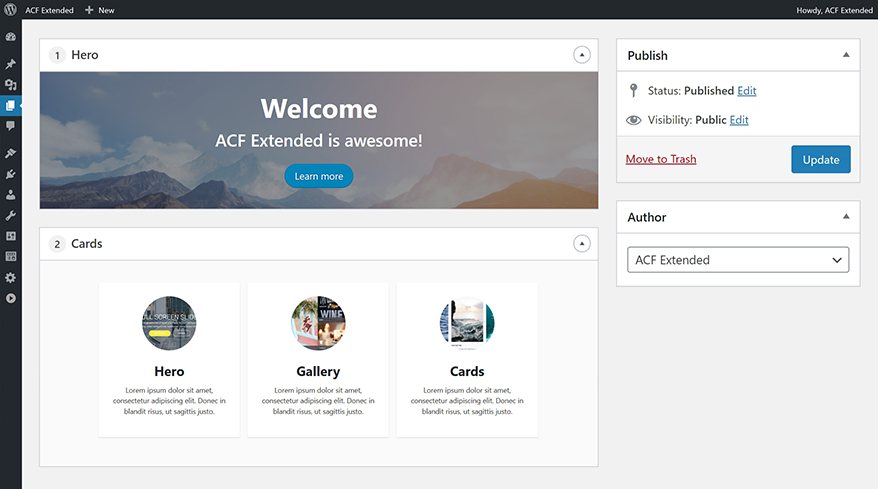
Flexible Content Preview 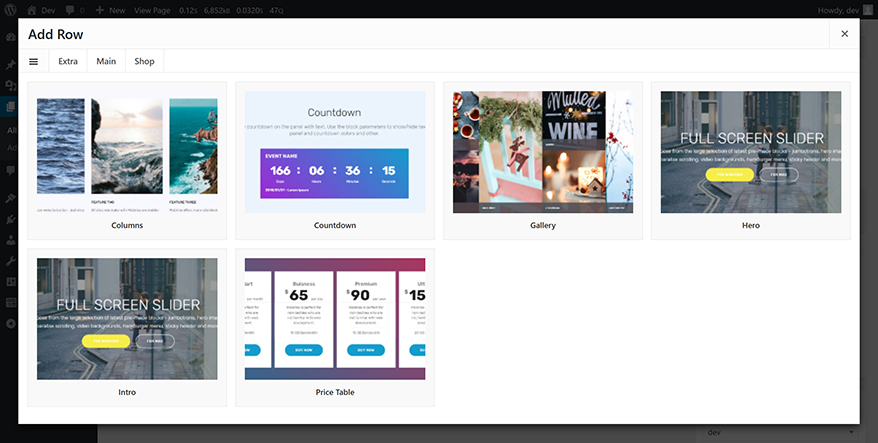
Flexible Content Modal 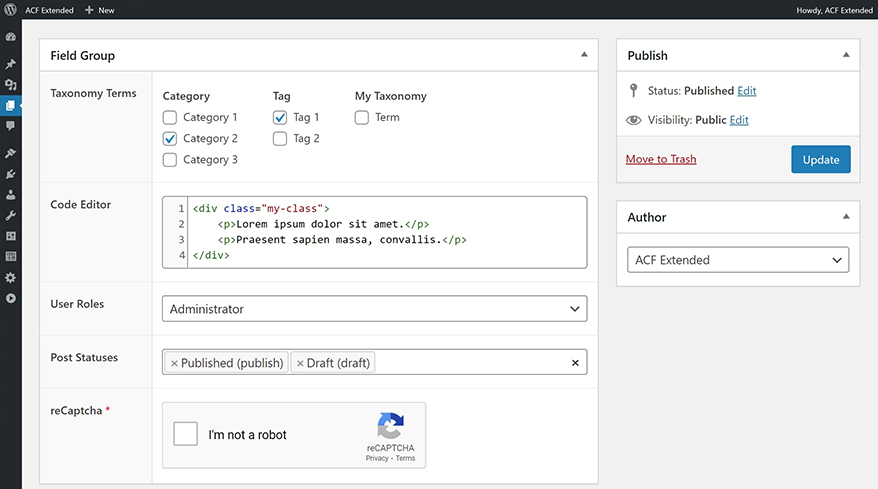
New Fields 
Post Type List Location 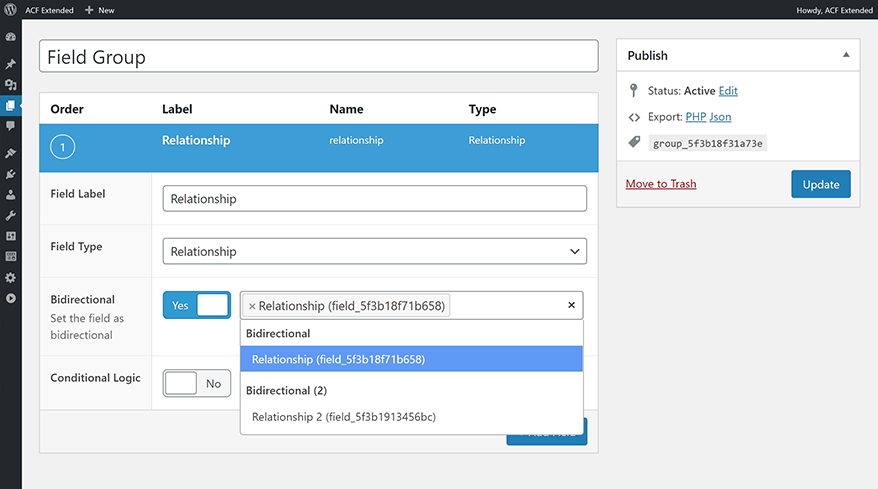
Self/Multi/Bidirectional Fields 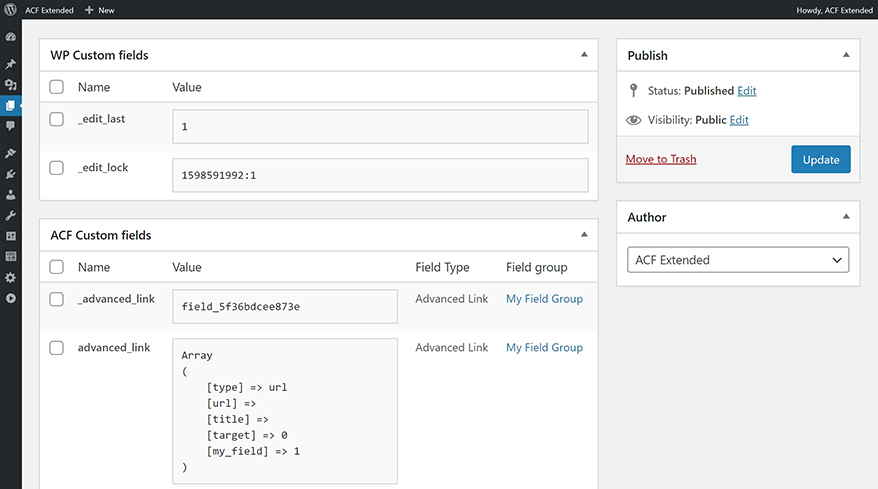
Developer Mode 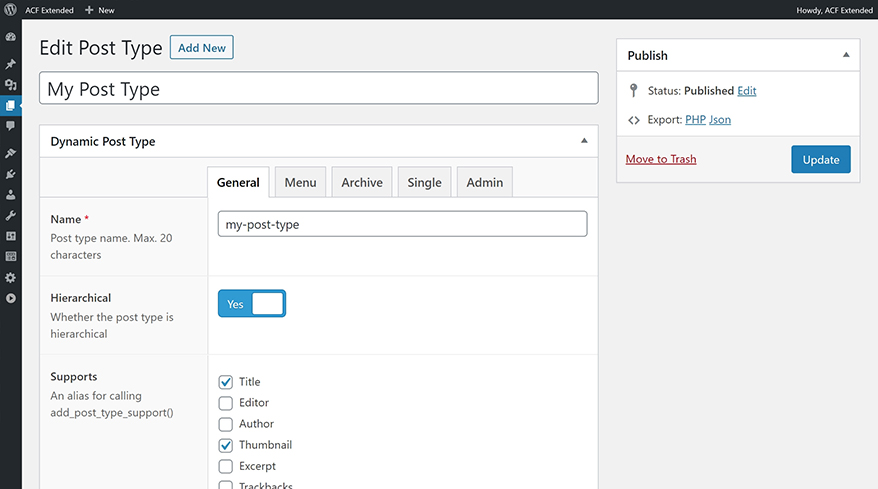
Dynamic Post Types 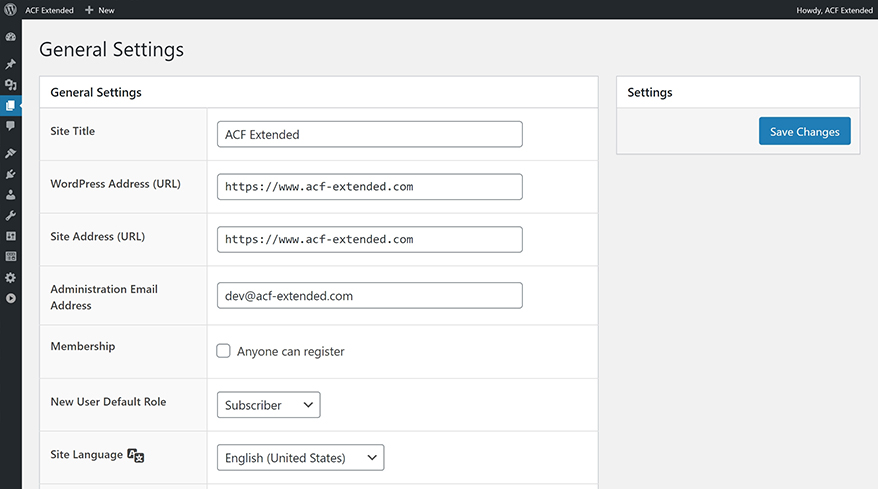
Enhanced WordPress UI
Ìgbéwọlẹ̀
WordPress Install
- Install Advanced Custom Fields: Pro
- Upload the plugin files to the
/wp-content/plugins/acf-extended/directory, or install the plugin through the WordPress plugins screen directly. - Activate the plugin through the ‘Plugins’ screen in WordPress.
- Everything is ready!
FAQ
-
Where can I find the documentation?
-
YouÌtumọ̀ Yorùbá: ’ll find the documentation of every features on the official ACF Extended website.
-
Where can I submit a bug report?
-
You can file a report on the Plugin Support Forum or on the Github Page if you prefer.
-
Where can I submit a feature request?
-
You can submit a feature request on the Plugin Support Forum. Feature requests are all listed on the Official Trello Board.
-
What is planned for the next update?
-
The content of the upcoming patch and work in progress features are all listed on the Official Roadmap (or the Trello Board).
Àwọn àgbéyẹ̀wò


Àwọn Olùkópa & Olùgbéejáde
“Advanced Custom Fields: Extended” jẹ́ ètò ìṣàmúlò orísun ṣíṣí sílẹ̀. Àwọn ènìyàn wọ̀nyí ti ṣe ìkópa sí plugin yìí.
Àwọn Olùkópa
A ti túmọ̀ “Advanced Custom Fields: Extended” sí àwọn èdè agbègbè 6. Ọpẹ́lọpẹ́ fún àwọn atúmọ̀ èdè fún àwọn ìkópa wọn.
Túmọ̀ “Advanced Custom Fields: Extended” sí èdè rẹ.
Ṣe o nífẹ̀ẹ́ sí ìdàgbàsókè?
Ṣàwárí koodu, ṣàyẹ̀wò ibi ìpamọ́ SVN, tàbí ṣe àgbékalẹ̀ sí àkọsílẹ̀ ìdàgbàsókè nípasẹ̀ RSS.
Àkọsílẹ̀ àwọn àyípadà
0.9.2.4
Deprecation Notice:
Support of ACF Pro 5.8 (2019) will be dropped on September 2026. Please upgrade to ACF Pro 5.9 or higher to maintain compatibility with future versions of ACF Extended.
ACF Extended Pro 0.9.2.4:
- Field: Phone Number Ìtumọ̀ Yorùbá: – Reworked Geolocation request and moved to server-side
- Field: Phone Number Ìtumọ̀ Yorùbá: – Updated Geolocation IPInfo.io API endpoint
- Field: Phone Number Ìtumọ̀ Yorùbá: – Intl Tel Input Utils is now loaded locally (instead of CDN)
- Field: Phone Number Ìtumọ̀ Yorùbá: – Fixed country dropdown on mobile
- Field: Phone Number Ìtumọ̀ Yorùbá: – Fixed country dropdown compatibility with other Select2 fields
- Field: Phone Number Ìtumọ̀ Yorùbá: – Added
acfe/fields/phone_number/geolocation/api_paramshook - Field: Phone Number Ìtumọ̀ Yorùbá: – Added
acfe/fields/phone_number/geolocation/custom_queryhook - Field: Phone Number Ìtumọ̀ Yorùbá: – Added
acfe/fields/phone_number/argsJS hook - Field: Phone Number Ìtumọ̀ Yorùbá: – Added
acfe/fields/phone_number/initJS hook - Location: Advanced Locations Ìtumọ̀ Yorùbá: – Fixed PHP notice in custom location rules
- Location: Nav Menu item Type Ìtumọ̀ Yorùbá: – Added “Post Type Archive”, “Front Page” & “Posts Page”
- Location: Nav Menu item Type Ìtumọ̀ Yorùbá: – Added “Post Type” & “Taxonomy” selection
- Location: Nav Menu item Type Ìtumọ̀ Yorùbá: – Added “Top Level”, “Parent” & “Children”
- Location: Nav Menu item Order Ìtumọ̀ Yorùbá: – Added Location Rule Type
- Location: Post Screen Ìtumọ̀ Yorùbá: – Fixed compatibility with ACF Taxonomy Field “Save Terms” setting
- Module: Auto Sync Ìtumọ̀ Yorùbá: – Fixed “Load Source” tooltip HTML
- Module: Auto Sync Ìtumọ̀ Yorùbá: – Fixed “Sync Available” screen columns render
- Module: Auto Sync Ìtumọ̀ Yorùbá: – Added missing text translation
- Module: Scripts Ìtumọ̀ Yorùbá: – Performance Converter Ìtumọ̀ Yorùbá: – Fixed “Individual meta” setting being ignored
- Module: Templates Ìtumọ̀ Yorùbá: – Added compatibility with
get_field()&get_fields()to retrieve values
ACF Extended Basic 0.9.2.4:
- Field: Clone Ìtumọ̀ Yorùbá: – Added Role Permissions compatibility with “Display: Seamless”
- Field: Tab Ìtumọ̀ Yorùbá: – Added Role Permissions compatibility
- Field: Flexible Content Ìtumọ̀ Yorùbá: – Fixed missing “Apply” translation in copy/paste modal
- Field: Flexible Content Ìtumọ̀ Yorùbá: – Added “Async Layouts” nonce check
- Field: Flexible Content Ìtumọ̀ Yorùbá: – Added “Rename Layout” nonce check
- Field Group: Category Ìtumọ̀ Yorùbá: – Fixed error when using a custom admin url in some edge case
- Field Group: Category Ìtumọ̀ Yorùbá: – Removed listed item in the Appearance > Menus UI
- Field Group: Local Tab Ìtumọ̀ Yorùbá: – Fixed “Import” function when a Json file also exists
- Module: Forms Ìtumọ̀ Yorùbá: – Success > Apply Shortcode setting is now disabled by default
- Module: Forms Ìtumọ̀ Yorùbá: – Added
$formargument in theacfe/form/format_valuehook - Module: Performance Ultra Ìtumọ̀ Yorùbá: – Fixed slashes in Post Revisions
- Global: Added
acfe/readyhook triggered once everything is loaded afteracfe/init - Global: Added ACF Pro 5.8 support drop warning on WP Admin > Plugins page
- Global: Fixed ACF Taxonomy “Create Term” modal style
- Global: Updated Translation
0.9.2.3
ACF Extended Pro 0.9.2.3:
- Field: Color Picker Ìtumọ̀ Yorùbá: – Fixed “Color Palette” when copy/pasting with a Flexible Content
- Field: Date Range Picker Ìtumọ̀ Yorùbá: – Added “Return Type: Array (default) / String” setting
- Field: Date Range Picker Ìtumọ̀ Yorùbá: – Fixed popup priority when displayed inside a modal
- Field: Flexible Content Ìtumọ̀ Yorùbá: – Fixed “Search layouts” & “No layouts found” custom text display
- Field: Flexible Content Ìtumọ̀ Yorùbá: – Fixed render issue on multilingual setup with custom textdomain
ACF Extended Basic 0.9.2.3:
- Field: Flexible Content Ìtumọ̀ Yorùbá: – Enhanced “Copy/Paste” feature to display a proper modal
- Field: Repeater Ìtumọ̀ Yorùbá: – Minor CSS tweaks to the “Stylised Button” setting
- Field: Select Ìtumọ̀ Yorùbá: – Fixed selected options when copy/pasting with a Flexible Content
- Field: Select Ìtumọ̀ Yorùbá: – Fixed Select2 becoming disabled when copy/pasting with a Flexible Content
- Module: Enhanced UI Ìtumọ̀ Yorùbá: – Fixed minor issue with Rankmath on the User Edit screen
- Module: Forms Ìtumọ̀ Yorùbá: – Enforced global reCaptcha validation if the field is present in a field group
- Module: Forms Ìtumọ̀ Yorùbá: – Added “Success message: Apply shortcodes” setting (enabled by default)
- Module: Forms Ìtumọ̀ Yorùbá: – Email Ìtumọ̀ Yorùbá: – Shortcodes are now disabled by default in the email content
- Module: Forms Ìtumọ̀ Yorùbá: – Email Ìtumọ̀ Yorùbá: – Added “Apply shortcodes” setting to enable shortcodes in the content
0.9.2.2
ACF Extended Pro 0.9.2.2:
- Field: Fields Ìtumọ̀ Yorùbá: – Added “Group by field group” setting
- Field: Field Types Ìtumọ̀ Yorùbá: – Added “Group by category” setting
- Fields: Fixed missing “Add choice” button when using “Display: Checkbox” and “Allow Custom”
ACF Extended Basic 0.9.2.2:
- Module: Forms Ìtumọ̀ Yorùbá: – Enforced front-end fields validation against their respective “Choices” settings
- Module: Forms Ìtumọ̀ Yorùbá: – Added security measure for forms allowing user role selection
- Module: Forms Ìtumọ̀ Yorùbá: – Added
acfe/form/validate_valuehook to validate fields individually on front - Module: Forms Ìtumọ̀ Yorùbá: – Added
acfe/form/pre_validate_valuehook to bypass enforced validation - Module: Enhanced UI Ìtumọ̀ Yorùbá: – Fixed missing metabox when visiting its own profile via
user-edit.php - Field Group Ìtumọ̀ Yorùbá: – Fixed “Display Title” not being displayed on screens with Enhanced UI (ACF 6.6+)
0.9.2.1
ACF Extended Pro 0.9.2.1:
- Field: Flexible Content Ìtumọ̀ Yorùbá: – Grid System Ìtumọ̀ Yorùbá: – Fixed Copy/Paste “Secondary Button” in small columns
- Field: Flexible Content Ìtumọ̀ Yorùbá: – Grid System Ìtumọ̀ Yorùbá: – Fixed multi-level Flexible Content icons in small columns
- Field: Phone Number Ìtumọ̀ Yorùbá: – Intl Tel Input JS library is now loaded on-demand
- Field: Phone Number Ìtumọ̀ Yorùbá: – Added initialization safe guard logic
ACF Extended Basic 0.9.2.1:
- Field: Flexible Content Ìtumọ̀ Yorùbá: – Legacy Title/Toggle settings are now passed on Field Group update
- Field: Flexible Content Ìtumọ̀ Yorùbá: – Added
acfe/compatibility/legacy_title_toggleto enforce migration - Field: Flexible Content Ìtumọ̀ Yorùbá: – Added js action
acfe/fields/flexible_content/click_action_button - Field: Flexible Content Ìtumọ̀ Yorùbá: – Added js filter
acfe/fields/flexible_content/prevent_action_button - Field: Flexible Content Ìtumọ̀ Yorùbá: – Fixed
acf/fields/flexible_content/layout_titlekeyvariation - Field: Flexible Content Ìtumọ̀ Yorùbá: – Fixed “Copy/Paste” icon visibility in multi-level Flexible Content
- Module: Performance Ultra Ìtumọ̀ Yorùbá: – Fixed Post Revisions saving uncompressed meta with ACF 6.4+
- Module: Form Ìtumọ̀ Yorùbá: – Fixed Form render in the Flexible Content Dynamic Preview
- Field Group: Fixed ACF popup box style on the Field Group screen
- Global: Bump WP version up to 6.9
0.9.2
Upgrade Notice:
This patch implements ACF 6.5+ Flexible Content render style. In case of customized WP Admin style with CSS rules overriding the Flexible Content style, please check your setup.
Security Notice:
This patch fixes a vulnerability affecting users running versions 0.9.0.5 through 0.9.1.1. Please update your plugin to ensure continued security and stability.
ACF Extended Pro 0.9.2:
- Field: Flexible Content Ìtumọ̀ Yorùbá: – Select Modal Ìtumọ̀ Yorùbá: – Added “Search Layouts” feature
- Field: Flexible Content Ìtumọ̀ Yorùbá: – Select Modal Ìtumọ̀ Yorùbá: – Added “Search Layouts Input” setting
- Field: Flexible Content Ìtumọ̀ Yorùbá: – Select Modal Ìtumọ̀ Yorùbá: – Added “Not Found Message” setting
- Field: Flexible Content Ìtumọ̀ Yorùbá: – Iframe Preview Ìtumọ̀ Yorùbá: – Fixed responsive icons when duplicated
- Field: Flexible Content Ìtumọ̀ Yorùbá: – Iframe Preview Ìtumọ̀ Yorùbá: – Fixed instruction tooltip with responsive
- Field: Flexible Content Ìtumọ̀ Yorùbá: – Grid System Ìtumọ̀ Yorùbá: – Enhanced handle icons on small sized columns
- Field: Flexible Content Ìtumọ̀ Yorùbá: – Layouts Locations Ìtumọ̀ Yorùbá: – Added compatibility with Advanced Locations
- Field: Color Picker Ìtumọ̀ Yorùbá: – Added “Advanced Settings” to use ACFE settings instead of ACF
- Field: File Upload Ìtumọ̀ Yorùbá: – Fixed minor CSS render issues
- Module: Enhanced UI Ìtumọ̀ Yorùbá: – Added “Enhanced Post UI” to improve “Save Draft/Preview” integration
- Module: Enhanced UI Ìtumọ̀ Yorùbá: – Added
acfe/modules/post_uisetting - Fields: Countries/Languages/Currency Ìtumọ̀ Yorùbá: – Fixed field initialization when duplicated
- Global: Updates Ìtumọ̀ Yorùbá: – Enhanced integration with ACF 6.3+ styles
- Global: Updates Ìtumọ̀ Yorùbá: – Fixed issue with slovak language on updates page
ACF Extended Basic 0.9.2:
- Field: Flexible Content Ìtumọ̀ Yorùbá: – Implemented new ACF 6.5+ Flexible Content render style
- Field: Flexible Content Ìtumọ̀ Yorùbá: – Added Hide: “Disable”, “Rename”, “Top Actions” settings
- Field: Flexible Content Ìtumọ̀ Yorùbá: – Added Hide: “Expand All”, “Collapse All”, “Top Add Row” settings
- Field: Flexible Content Ìtumọ̀ Yorùbá: – Added “Close Button Label” setting to customize close button
- Field: Flexible Content Ìtumọ̀ Yorùbá: – Migrated ACFE “Edit Title” feature to new ACF 6.5+ logic
- Field: Flexible Content Ìtumọ̀ Yorùbá: – Migrated ACFE “Hide Layout” feature to new ACF 6.5+ logic
- Field: Flexible Content Ìtumọ̀ Yorùbá: – Adjusted ACF 6.5+ style to make it more consistent with WP style
- Field: Flexible Content Ìtumọ̀ Yorùbá: – Fixed various ACF 6.5+ style inconsistencies (border, spacing…)
- Field: Flexible Content Ìtumọ̀ Yorùbá: – Fixed various ACF 6.5+ bugs & added UX QOL
- Field: Flexible Content Ìtumọ̀ Yorùbá: – Unified Flexible Content markup across all ACF versions
- Field: Flexible Content Ìtumọ̀ Yorùbá: – Cleaned/renamed various ACFE Flexible Content class/markup
- Field: Flexible Content Ìtumọ̀ Yorùbá: – Enhanced settings integrations and fixed various visual issues
- Field: Flexible Content Ìtumọ̀ Yorùbá: – Fixed “Add Layout” button from layout actions
- Field: Flexible Content Ìtumọ̀ Yorùbá: – Fixed “Close Button” display when layout is displayed as “Table”
- Field: Flexible Content Ìtumọ̀ Yorùbá: – “Stylised Button” is now only available if “Add Row” isnÌtumọ̀ Yorùbá: ’t “Hidden”
- Field: Flexible Content Ìtumọ̀ Yorùbá: – Edit Modal Ìtumọ̀ Yorùbá: – An “Edit” icon is now displayed by default
- Field: Flexible Content Ìtumọ̀ Yorùbá: – Edit Modal Ìtumọ̀ Yorùbá: – This icon can be hidden using “Hide Collapse” setting
- Field: Flexible Content Ìtumọ̀ Yorùbá: – Select Modal Ìtumọ̀ Yorùbá: – Modal “Title” now default to “Add Row” button label
- Field: Flexible Content Ìtumọ̀ Yorùbá: – Select Modal Ìtumọ̀ Yorùbá: – Layouts are now displayed using grid css
- Field: Flexible Content Ìtumọ̀ Yorùbá: – Select Modal Ìtumọ̀ Yorùbá: – Thumbnails are now displayed as
<img> - Field: Flexible Content Ìtumọ̀ Yorùbá: – Select Modal Ìtumọ̀ Yorùbá: – Thumbnails are now displayed using a
2:1ratio - Field: Flexible Content Ìtumọ̀ Yorùbá: – Select Modal Ìtumọ̀ Yorùbá: – Added
acfe/flexible/modal_select_categorieshook - Field: Flexible Content Ìtumọ̀ Yorùbá: – Settings Modal Ìtumọ̀ Yorùbá: – Added “Default Modal Size” setting
- Field: Flexible Content Ìtumọ̀ Yorùbá: – Settings Modal Ìtumọ̀ Yorùbá: – Added “Close Button” & “Button Label” settings
- Field: Repeater Ìtumọ̀ Yorùbá: – Fixed ACF pagination feature with “Stylised Button” setting
- Module: Enhanced UI Ìtumọ̀ Yorùbá: – Added
acfe/modules/attachment_uisetting - Module: Enhanced UI Ìtumọ̀ Yorùbá: – Added
acfe/modules/term_uisetting - Module: Enhanced UI Ìtumọ̀ Yorùbá: – Added
acfe/modules/settings_uisetting - Module: Enhanced UI Ìtumọ̀ Yorùbá: – Added
acfe/modules/user_uisetting - Module: Enhanced UI Ìtumọ̀ Yorùbá: – Enhanced third party compatibility with
do_meta_boxeson terms - Module: Enhanced UI Ìtumọ̀ Yorùbá: – User Profile Ìtumọ̀ Yorùbá: – Moved “Nickname” into its metabox to avoid confusion
- Module: Forms Ìtumọ̀ Yorùbá: – Enhanced Template Tags value escape logic
- Module: Forms Ìtumọ̀ Yorùbá: – Fixed Ajax Form security vulnerability
- Module: Forms Ìtumọ̀ Yorùbá: – Added Action types
title_altproperty for admin column display - Module: Forms Ìtumọ̀ Yorùbá: – Added Actions admin column
acfe/form/admin_column/action_labelfilters - Module: WP Options Ìtumọ̀ Yorùbá: – Fixed “Edit Option” value type label
- Module: WP Options Ìtumọ̀ Yorùbá: – Added confirm tooltip when deleting an option
- Field Group: Migrated ACFE “Display Title” setting to the native ACF logic (ACF 6.6+)
- Field Group: Added “Display Title” in the Field Group List view (ACF 6.6+)
- Field Settings: Instruction Tooltip Ìtumọ̀ Yorùbá: – Fixed tooltip remaining visible indefinitely (ACF 6.5+)
- Global: Plugins > ACF Tab Ìtumọ̀ Yorùbá: – Fixed deprecated notice on PHP 8.1+
- Global: Fixed HTML escape on various ACFE tooltips
- Global: Updated build tools
0.9.1.1
ACF Extended Pro 0.9.1.1:
- Field Group: Fixed error in the Field Group UI with ACF 6.5+
- Field: Payment Ìtumọ̀ Yorùbá: – Stripe gateway now use the wrapper text color as placeholder color
- Field: Post Object Ìtumọ̀ Yorùbá: – Fixed “Inline Post Edit” feature with ACF 6.5+
ACF Extended Basic 0.9.1.1:
- Field: Flexible Content Ìtumọ̀ Yorùbá: – Added compatibility with ACF 6.5+
- Field: Flexible Content Ìtumọ̀ Yorùbá: – Legacy render style (ACF 6.4) is enforced to maintain compatibility
- Field: Flexible Content Ìtumọ̀ Yorùbá: – New ACF 6.5 render style will be implemented in a future patch
- Field: Flexible Content Ìtumọ̀ Yorùbá: – Fixed “Dynamic Preview” when displaying values with
acfe_form() - Field: Slug Ìtumọ̀ Yorùbá: – Fixed PHP 8 warning during field validation
- Fields: Instructions Tooltip Ìtumọ̀ Yorùbá: – Enhanced text sanitization to allow custom HTML
- Module: Form Ìtumọ̀ Yorùbá: – Reset
$_FILESasarray()to respect PHP standards - Module: Options Pages Ìtumọ̀ Yorùbá: – moved to “Tools” WP admin menu to avoid confusion with ACF Options Pages
- Module: Performance Ìtumọ̀ Yorùbá: – Fixed “Save as Individual Meta” regression on post creation
- Module: Performance Ìtumọ̀ Yorùbá: – Fixed “Save as Individual Meta” revision restoration on an empty post
- Global: Fixed PHP 8 warning during initial setup
- Global: ACFE Modal Ìtumọ̀ Yorùbá: – Small CSS tweaks
- Global: Added compatibility with ACF 6.5+
0.9.1
ACF Extended Pro 0.9.1:
- Field: Flexible Content Ìtumọ̀ Yorùbá: – Added “Dynamic Preview Iframe” feature
- Field: Flexible Content Ìtumọ̀ Yorùbá: – Added “Dynamic Preview Responsive” feature
- Field: Flexible Content Ìtumọ̀ Yorùbá: – “Dynamic Preview Iframe” render previews in isolated iframes
- Field: Flexible Content Ìtumọ̀ Yorùbá: – “Dynamic Preview Responsive” allows to switch container preview size
- Field: Address Ìtumọ̀ Yorùbá: – Cleaned unused argument
- Field: Google Map Ìtumọ̀ Yorùbá: – Added
acfe_render_google_map()compatibility with sub fields - Field: Google Map Ìtumọ̀ Yorùbá: – Enhanced
acfe_render_google_map()compatibility with Dynamic Preview - Field: Radio Ìtumọ̀ Yorùbá: – Fixed “Custom Choice” render
- Field: WYSIWYG Ìtumọ̀ Yorùbá: – Enhanced
source_codemodal reset stylesheet - Field Group Location: Renamed “Dashboard” to “WP Dashboard” for consistency
- Module: Forms Ìtumọ̀ Yorùbá: – Ajax submission now redraw form on submission
ACF Extended Basic 0.9.1:
- Field: Advanced Link Ìtumọ̀ Yorùbá: – Enhanced malformed values handling
- Field: Flexible Content Ìtumọ̀ Yorùbá: – Added
acfe/flexible/toggle_hidefilter to control row visibility - Field: reCaptcha Ìtumọ̀ Yorùbá: – Enhanced error handling when using incorrect API key
- Field: Taxonomy Terms Ìtumọ̀ Yorùbá: – Fixed ajax nonce verification when field is cloned
- Module: Forms Ìtumọ̀ Yorùbá: – Enhanced File/Image/Gallery “Uploaded To” logic using related Form Action
0.9.0.9
ACF Extended Pro 0.9.0.9:
- Field: Address Ìtumọ̀ Yorùbá: – Added new Address Field
- Field: Address Ìtumọ̀ Yorùbá: – Allows to enter/search an address with autocomplete (Google Places API)
- Field: Color Picker Ìtumọ̀ Yorùbá: – Added “Return Format: Slug” setting
- Field: Color Picker Ìtumọ̀ Yorùbá: – Added “Slug” & “RGBA Array” into the “Color Array” return format
- Field: Color Picker Ìtumọ̀ Yorùbá: – Added compatibility with CSS variables for “Palette” display
- Field: Color Picker Ìtumọ̀ Yorùbá: – Added
editor-gradient-presetstheme support - Field: Date Range Picker Ìtumọ̀ Yorùbá: – Enhanced compatibility with custom hooks
- Field: Date Range Picker Ìtumọ̀ Yorùbá: – Allowed to clear to input manually when “Allow null” is enabled
- Field: Date Range Picker Ìtumọ̀ Yorùbá: – Added “x” icon to clear the input when “Allow null” is enabled
- Field: Date Range Picker Ìtumọ̀ Yorùbá: – Added “Prepend” & “Append” settings
- Field: Google Map Ìtumọ̀ Yorùbá: – Added
acfe_render_google_map()helper to display a map on front-end - Field: Google Map Ìtumọ̀ Yorùbá: – Fixed ACF UI settings sync when interacting with the Map Preview
ACF Extended Basic 0.9.0.9:
- Field: Flexible Content Ìtumọ̀ Yorùbá: – Fixed
get_row()&get_row_layout()usage in WP Admin preview - Field: Taxonomy Terms Ìtumọ̀ Yorùbá: – Fixed ajax nonce compatibility with ACF 6.3.10
- Field Group: Small UI/CSS tweaks
0.9.0.8
ACF Extended Pro 0.9.0.8:
- Field: Phone Number Ìtumọ̀ Yorùbá: – Fixed data when querying the “Lightweight Phonenumber Library”
- Field: Image Selector Ìtumọ̀ Yorùbá: – Fixed images with parameters usage when using “Multiple Select”
- Field: Image Selector Ìtumọ̀ Yorùbá: – Enhanced file extension detection when using images with parameters
- Field: Image Selector Ìtumọ̀ Yorùbá: – Reworked image rendering using proper
<img />withobject-fit - Module: Performance Ìtumọ̀ Yorùbá: – Hybrid Ìtumọ̀ Yorùbá: – Restoring a revision doesnÌtumọ̀ Yorùbá: ’t append meta references anymore
ACF Extended Basic 0.9.0.8:
- Field: Flexible Content Ìtumọ̀ Yorùbá: – Dynamic Render Ìtumọ̀ Yorùbá: – Filters can now change
wp_enqueue_style()args - Field: Flexible Content Ìtumọ̀ Yorùbá: – Dynamic Render Ìtumọ̀ Yorùbá: – Filters can now change
wp_enqueue_script()args - Field: Flexible Content Ìtumọ̀ Yorùbá: – Dynamic Render Ìtumọ̀ Yorùbá: – Added
get_row_index()usage compatibility - Field: Flexible Content Ìtumọ̀ Yorùbá: – Dynamic Render Ìtumọ̀ Yorùbá: – Fixed
WP_Queryloop usage withget_field() - Field: Icon Picker Ìtumọ̀ Yorùbá: – Fixed “Media Library” image preview
- Module: Forms Ìtumọ̀ Yorùbá: – Allowed usage of fields using the same name as fields in the back-end
- Module: Forms Ìtumọ̀ Yorùbá: – Fixed field settings nonce verification compatibility with ACF 6.3.10
- Module: Performance Ìtumọ̀ Yorùbá: – Ultra Ìtumọ̀ Yorùbá: – Revisions are now supported when allowing specific post types
- Module: Performance Ìtumọ̀ Yorùbá: – Ultra Ìtumọ̀ Yorùbá: – Revisions are now compatible with “Save as individual meta”
- Module: Performance Ìtumọ̀ Yorùbá: – Ultra Ìtumọ̀ Yorùbá: – Enhanced “Revision Comparison” view with more readable data
- Module: Performance Ìtumọ̀ Yorùbá: – Ultra Ìtumọ̀ Yorùbá: – Enhanced
acfmeta detection when the value is malformed - Field Group: Location Ìtumọ̀ Yorùbá: – Fixed warning when using third party location that is later uninstalled
- General: Enhanced
acfe_include()helper - General: Fixed potentital PHP 8 warning with
acfe_starts_with()helper - General: Updated WP 6.7 metabox order handle positioning
- General: Bump WP version up to 6.7
0.9.0.7
ACF Extended Pro 0.9.0.7:
- Field: Block Editor Ìtumọ̀ Yorùbá: – Added WP 6.6 compatibility
ACF Extended Basic 0.9.0.7:
- General: Updated WP 6.6 metabox order handle positioning
0.9.0.6
ACF Extended Pro 0.9.0.6:
- Field: Flexible Content Ìtumọ̀ Yorùbá: – Grid Ìtumọ̀ Yorùbá: – Added filter to rename columns (1/12, 2/12, 3/12…)
- Field: Google Map Ìtumọ̀ Yorùbá: – Added small UI settings tweaks
- Field: Payment Ìtumọ̀ Yorùbá: – Removed Polyfill library dependency
- Field Settings: Global Condition Ìtumọ̀ Yorùbá: – Fixed Global Field Condition operators with ACF 6.3
- Field Settings: Instructions Tooltip Ìtumọ̀ Yorùbá: – Fixed tooltip always visible when switching tab
- Module: Force Sync Ìtumọ̀ Yorùbá: – Fixed sync from Dashboard with Flexible Content Toggle Layout
- Module: Force Sync Ìtumọ̀ Yorùbá: – Enhanced Force Delete compatibility with Json and PHP sync
ACF Extended Basic 0.9.0.6:
- Field: Flexible Content Ìtumọ̀ Yorùbá: – Added missing “Copy/Toggle Layout” localized strings
- Field: Flexible Content Ìtumọ̀ Yorùbá: – Added JS hook
acfe/flexible/preview/layout=my-layoutvariation - Field: Flexible Content Ìtumọ̀ Yorùbá: – Enhanced ACF UI CSS settings with “Tabs Hidden”
- Field: Forms Ìtumọ̀ Yorùbá: – Fixed potential warning when switching from Checkbox to Radio
- Module: Form Ìtumọ̀ Yorùbá: – Added safe guard logic for ACF fields in “Load” actions
- Module: Form Ìtumọ̀ Yorùbá: – Fixed outsourced Clone Seamless Fields values
- Module: Form Ìtumọ̀ Yorùbá: – Fixed Template Tags warning with PHP 8
- Module: Form Ìtumọ̀ Yorùbá: – User Ìtumọ̀ Yorùbá: – Builtin Validation now check if email is already used
- Module: Form Ìtumọ̀ Yorùbá: – User Ìtumọ̀ Yorùbá: – Builtin Validation now check the login during the insert
- Module: Form Ìtumọ̀ Yorùbá: – User Ìtumọ̀ Yorùbá: – Builtin Validation now check the
illegal_user_loginswp filter - Module: Form Ìtumọ̀ Yorùbá: – User Ìtumọ̀ Yorùbá: – Updating user login now automatically re-log the user
- General: Fixed Ajax Nonce verification compatibility with ACF 6.3.2
0.9.0.5
ACF Extended Pro 0.9.0.5:
- Field Group Location: Added “Dashboard > Widget” Location
- Field Group Location: Dashboard Widget allows to update fields from the WP Dashboard
- Field Group Location: Added “Woocommerce” Cart, Checkout, Account, Shop & Terms
- Modules: AutoSync Ìtumọ̀ Yorùbá: –
acfe/php&acfe/jsonsettings control the AutoSync metabox visbility
ACF Extended Basic 0.9.0.5:
- Module: Form Ìtumọ̀ Yorùbá: – Added ability to load form with ajax
- Module: Form Ìtumọ̀ Yorùbá: – Added “Validation > Global Error” settings to customize error messages
- Module: Form Ìtumọ̀ Yorùbá: – Added Instruction Placement “Tooltip” & “Above Field” options
- Module: Form Ìtumọ̀ Yorùbá: – Cleaned front-end forms HTML markup
- Module: Form Ìtumọ̀ Yorùbá: – Enhanced front-end forms JS logic
- Module: Form Ìtumọ̀ Yorùbá: – Enhanced compatibility for multiple forms on the same page
- Module: Form Ìtumọ̀ Yorùbá: – Enhanced
{field:gallery}formatted value - Module: Form Ìtumọ̀ Yorùbá: – Enhanced “Validation > Grouped Errors” to use the “Errors Class” setting
- Module: Form Ìtumọ̀ Yorùbá: – Fixed missing
l10nacf setting compatibility for export - Module: Form Ìtumọ̀ Yorùbá: – Fixed Shortcode usage in Success Message
- Module: Form Ìtumọ̀ Yorùbá: – Fixed slashed text in Success Message template tags
- Module: Form Ìtumọ̀ Yorùbá: – Post Ìtumọ̀ Yorùbá: – Fixed Image/File/Gallery “Uploaded to” filter in Media Modal
- Module: Form Ìtumọ̀ Yorùbá: – Post Ìtumọ̀ Yorùbá: – Fixed Gallery attachement not being connected to created/updated post
- Module: Form Ìtumọ̀ Yorùbá: – Post Ìtumọ̀ Yorùbá: – Fixed Shortcode usage in Post Content
- Module: Form Ìtumọ̀ Yorùbá: – Post Ìtumọ̀ Yorùbá: – Fixed current post not displaying new data if updated without redirect
- Module: Form Ìtumọ̀ Yorùbá: – Email Ìtumọ̀ Yorùbá: – Fixed Shortcode usage in e-mail content/html
- Module: Form Ìtumọ̀ Yorùbá: – User Ìtumọ̀ Yorùbá: – “Log In” action doesnÌtumọ̀ Yorùbá: ’t require to redirect on success anymore
- Module: Form Ìtumọ̀ Yorùbá: – Added
acfe.renderForm()&acfe.renderFormAjax()JS helpers - Module: Form Ìtumọ̀ Yorùbá: – Added
acfe_enqueue_form()PHP helper - Module: Form Ìtumọ̀ Yorùbá: – Added
acfe_get_form_action()allowing dot notation & default arguments - Module: Form Ìtumọ̀ Yorùbá: – Added
acfe/form/submit_success_dataPHP hook to pass data to the JS - Module: Form Ìtumọ̀ Yorùbá: – Added
acfe/form/validation_beginJS hook to target front-end validation - Module: Form Ìtumọ̀ Yorùbá: – Added
acfe/form/validation_failureJS hook to target front-end validation - Module: Form Ìtumọ̀ Yorùbá: – Added
acfe/form/validation_successJS hook to target front-end validation - Module: Form Ìtumọ̀ Yorùbá: – Added
acfe/form/validation_completeJS hook to target front-end validation - Field Groups: Advanced Settings Ìtumọ̀ Yorùbá: – Added ability to assign fieldÌtumọ̀ Yorùbá: ’s sub array settings using dot notation
- Field Groups: AutoSync Ìtumọ̀ Yorùbá: – Added ability to remove existing Json/PHP sync from the Field Group UI
- Field Groups: AutoSync Ìtumọ̀ Yorùbá: –
acfe/php&acfe/jsonsettings now control the sync metabox visbility - Field Groups: AutoSync Ìtumọ̀ Yorùbá: – Added
acfe/settings/should_delete_phphook to control the file removal - Field Groups: AutoSync Ìtumọ̀ Yorùbá: – Added
acfe/settings/should_delete_jsonhook to control the file removal - Field Groups: AutoSync Ìtumọ̀ Yorùbá: – Fixed Json files not being correctly deleted when Field Group use a custom path
- General: Modal Ìtumọ̀ Yorùbá: – Renamed
new_modaljs hook intoacfe/new_modalfor consistency - General: Enhanced
acfe_get_post_id()helper
0.9.0.4
ACF Extended Pro 0.9.0.4:
- Modules: Added “Bulk Sync Changes from DB/JSON/PHP” feature
- Field: Block Editor Ìtumọ̀ Yorùbá: – Fixed field when copy/pasted within a Flexible Content
- Field: Color Picker Ìtumọ̀ Yorùbá: – Fixed “Palette” tooltip title being duplicated on change
ACF Extended Basic 0.9.0.4:
- Module: Form Ìtumọ̀ Yorùbá: – Fixed
acfe/form/submit_post_argsnot passing newpost_idto fields if changed - Module: Form Ìtumọ̀ Yorùbá: – Fixed
{field:field_6635cd66ba409}not working with group subfields - Module: Form Ìtumọ̀ Yorùbá: – Fixed Post Thumbnail reset when a Form has no post thumbnail
- Field: Flexible Content Ìtumọ̀ Yorùbá: – Fixed “Settings Modal” subfields loop within a sub flexible content
- Field: Flexible Content Ìtumọ̀ Yorùbá: – Fixed “Copy/Paste Layout” not working on non-HTTPS environments
- Field: Taxonomy Terms Ìtumọ̀ Yorùbá: – Enhanced front-end forms compatibility
- Field: Taxonomy Terms Ìtumọ̀ Yorùbá: – Improved
{field:taxonomy_terms}tag format - Field: Taxonomy Ìtumọ̀ Yorùbá: – Enhanced front-end forms compatibility
0.9.0.3
ACF Extended Pro 0.9.0.3:
- Module: Form Ìtumọ̀ Yorùbá: – Added Ajax Submission feature
- Module: Form Ìtumọ̀ Yorùbá: – Ajax Submission can be enabled in the Form “Settings” tab
ACF Extended Basic 0.9.0.3:
- Module: Form Ìtumọ̀ Yorùbá: – Added “Scroll to message” setting in the “Success” tab
- Module: Form Ìtumọ̀ Yorùbá: – Enhanced
acfe/form/load_formstrategy - Module: Form Ìtumọ̀ Yorùbá: – Enhanced
mapargument to allow override loaded values from Actions - Module: Form Ìtumọ̀ Yorùbá: – Enhanced
{render:field_name}to first search within mapped field groups - Module: Form Ìtumọ̀ Yorùbá: – Renamed
acfe/form/success_formtoacfe/form/render_successfor consistency - Module: Form Ìtumọ̀ Yorùbá: – Added
acfe/form/submit_successas very early hook, in page headers - Module: Form Ìtumọ̀ Yorùbá: – Fixed Select field “Custom Value” setting compatibility with forms
- Module: Form Ìtumọ̀ Yorùbá: – Fixed duplicate rows in
{field:repeater}Template Tag - Module: Form Ìtumọ̀ Yorùbá: – Added missing
wpautop()on Success Message - Module: Form Ìtumọ̀ Yorùbá: – Minor CSS compatibility tweaks for mac
- Module: Form Ìtumọ̀ Yorùbá: – User Action Ìtumọ̀ Yorùbá: – Fixed the “Roles” load value as raw array
- Module: AutoSync Ìtumọ̀ Yorùbá: – Fixed PHP files not being correctly deleted when Field Group was removed using a custom path
- Field Groups Ìtumọ̀ Yorùbá: – Local Ìtumọ̀ Yorùbá: – Fixed missing “Local” tab when there are only AutoSync PHP files
- Field Groups: Minor CSS tweaks
- Field: reCaptcha Ìtumọ̀ Yorùbá: – Reworked & enhanced code logic
- Settings UI: Fixed missing reCaptcha ACF settings in the “Fields” tab
0.9.0.2
ACF Extended Pro 0.9.0.2:
- Module: Global Field Location Ìtumọ̀ Yorùbá: – Fixed Field Group Location escaping issues
- Field Groups: Advanced Locations Ìtumọ̀ Yorùbá: – Fixed Field Group Location escaping issues
- Field: Payment Ìtumọ̀ Yorùbá: – Fixed
{field:payment}Template Tag output - Field: Flexible Content Ìtumọ̀ Yorùbá: – Grid Ìtumọ̀ Yorùbá: – Added translatable strings
- General: Country/Currency/Language Ìtumọ̀ Yorùbá: – Added PHP filters to allow customization
ACF Extended Basic 0.9.0.2:
- Module: Form Ìtumọ̀ Yorùbá: – Enhanced load/validate/submit/render hooks strategy
- Module: Form Ìtumọ̀ Yorùbá: – Fixed instruction placement undefined key warning
- Module: Form Ìtumọ̀ Yorùbá: – “Current Post” Target/Source now correctly use the WP Query loop
post_id - Module: Form Ìtumọ̀ Yorùbá: – Enhanced multiple forms on single page support
- Module: Form Ìtumọ̀ Yorùbá: – Added missing
wpautop()on email content when using “Content Editor” - Module: Form Ìtumọ̀ Yorùbá: – Fixed Taxonomy “Load Terms” & Image “Featured Thumbnail” compatibility
- Fields Condition Ìtumọ̀ Yorùbá: – Enhanced
acf.newConditioncloser to native ACF logic - General: Updated French translation
0.9.0.1
- Module: Forms Ìtumọ̀ Yorùbá: – Fixed upgrade issues when using distant Auto Update
- Module: Forms Ìtumọ̀ Yorùbá: – Added safeguard logic when third party plugin enqueue selectWoo
- Field: Flexible Content Ìtumọ̀ Yorùbá: – Added Navigator Clipboard API to allow copy very large layout data
0.9
ACF Extended Pro 0.9:
- Module: Forms Ìtumọ̀ Yorùbá: – Added Json & PHP Sync feature
- Module: Forms Ìtumọ̀ Yorùbá: – PHP sync files are saved/loaded from
/my-theme/acfe-php/forms - Module: Forms Ìtumọ̀ Yorùbá: – Json sync files are saved/loaded from
/my-theme/acf-json/forms - Modules: “View” link in posts list view is now removed when the item disabled
- Field: Block Editor Ìtumọ̀ Yorùbá: – Fixed Woocommerce
get_current_screen()usage on front-end - Field: Block Editor Ìtumọ̀ Yorùbá: – Fixed crash when used within a Flexible Content with Woocommerce
- Field: Block Editor Ìtumọ̀ Yorùbá: – Enhanced Woocommerce compatibility
- Field: Block Editor Ìtumọ̀ Yorùbá: – Fixed blocks arguments being stripped when submitted on front-end
- Field: Block Editor Ìtumọ̀ Yorùbá: – Added WP 6.5 compatibility
- Field: Flexible Content Ìtumọ̀ Yorùbá: – Grid Ìtumọ̀ Yorùbá: – Fixed “No Wrap” setting not using “Default size: 12” when adding a layout
- Field: Image Sizes Ìtumọ̀ Yorùbá: – Fixed field not using the correct “Display Format” setting
ACF Extended Basic 0.9:
- Module: Forms Ìtumọ̀ Yorùbá: – Updated module to v3
- Module: Forms Ìtumọ̀ Yorùbá: – Ability to register/render forms using PHP code only
- Module: Forms Ìtumọ̀ Yorùbá: – Updated Template Tags logic with a new API, allowing developers to create their own tag
- Module: Forms Ìtumọ̀ Yorùbá: – New Template Tags:
{render},{get_post},{get_term},{get_user}&{date} - Module: Forms Ìtumọ̀ Yorùbá: – Ability to use Tags in Tags. Ie:
{get_field:my_field:{action:post:ID}:false} - Module: Forms Ìtumọ̀ Yorùbá: – Ability to render submit button with
{render:submit}anywhere in the form - Module: Forms Ìtumọ̀ Yorùbá: – ACF Group subfields can now be saved/loaded individually in Forms Actions UI
- Module: Forms Ìtumọ̀ Yorùbá: – New Email Action settings: “Content Editor/Raw HTML Editor” switch
- Module: Forms Ìtumọ̀ Yorùbá: – New Post Action settings: “Post Date/Schedule”, “Post Thumbnail” & “Append Post terms”
- Module: Forms Ìtumọ̀ Yorùbá: – New User Action settings: “Built-in Validation” & “Log user once created”
- Module: Forms Ìtumọ̀ Yorùbá: – Reworked form arguments for better readability and usability
- Module: Forms Ìtumọ̀ Yorùbá: – All hooks have been deprecated and renamed. New hooks are simplified and provide more context
- Module: Forms Ìtumọ̀ Yorùbá: – Added
acfe/modules/forms/top_levelsetting to set the “Forms” admin menu as top level - Module: Performance Mode Ìtumọ̀ Yorùbá: – Deprecated
acfe_is_single_meta_enabled()now allow generic call (without id) - Module: Added safeguard logic to double-check
WP_Postobject inadd_meta_boxes - Field: Advanced Link Ìtumọ̀ Yorùbá: – Fixed URL value in Flexible Content Preview Mode
- Field: Flexible Content Ìtumọ̀ Yorùbá: – Toggle Layout Ìtumọ̀ Yorùbá: – Enhanced CSS effect to allow fields edit
- Field: Forms Ìtumọ̀ Yorùbá: – Field now store forms names as value instead of IDs, for portability
- Field: WYSIWYG Ìtumọ̀ Yorùbá: – Fixed editor being delayed inside a Flexible Content > Sub Repeater
- Field Settings: Enhanced escaping logic in the “Data” modal
- Field Settings: Enhanced “Permissions” setting to allow new lines
- Field Groups: Local Ìtumọ̀ Yorùbá: – “Sync Back to DB” feature now correctly ignore Inline Hooks
- Settings UI: Enhanced array settings values render
- General: Fixed ACF postboxes setting icon alignment in WP 6.5
- General: Bump WP version up to 6.5
0.8.9.5
ACF Extended Pro 0.8.9.5:
- Field: Block Editor Ìtumọ̀ Yorùbá: – Added WP 6.4 compatibility
- Field: Block Editor Ìtumọ̀ Yorùbá: – Enhanced compatibility with custom blocks
- Field: Block Editor Ìtumọ̀ Yorùbá: – Fixed Media Upload not working in front-end form
- Field: Block Editor Ìtumọ̀ Yorùbá: – Fixed shortcodes not applied with
get_field() - Field: Block Editor Ìtumọ̀ Yorùbá: – Fixed Embed Block preview height
- Field: Block Editor Ìtumọ̀ Yorùbá: – Fixed “Allowed Block Types” setting not working in WP 6.3
- Field: Block Editor Ìtumọ̀ Yorùbá: – Fixed Inserter Block Preview popup position
- Field: Payment Ìtumọ̀ Yorùbá: – Enhanced Conditional logic & Tab logic compatibility
- Field: Payment Ìtumọ̀ Yorùbá: – Fixed PayPal Checkout button being disabled when form has no submit button
- Field: Payment Ìtumọ̀ Yorùbá: – Added “Paypal Checkout” button text setting
- Field: Payment Cart Ìtumọ̀ Yorùbá: – Added quotes compatibility in Items name
- Field: Phone Number Ìtumọ̀ Yorùbá: – Updated Intl Tel Input library and Utilities with latest area codes
ACF Extended Basic 0.8.9.5:
- Field: Google reCaptcha v3 Ìtumọ̀ Yorùbá: – Added token refresh logic
- Module: Developer Mode Ìtumọ̀ Yorùbá: – Enhanced handle of incomplete class in meta values
- Module: Options UI Ìtumọ̀ Yorùbá: – Enhanced handle of incomplete class in options values
- Module: Performance Ultra Ìtumọ̀ Yorùbá: – Fixed slash values in WP Preview & WP Revisions
- General: Bump WP version up to 6.4
- General: Updated french translation
- General: Enhanced internal tools
0.8.9.4
ACF Extended Pro 0.8.9.4:
- Field: Block Editor Ìtumọ̀ Yorùbá: – Fixed WP 6.3 compatibility
- Field: Block Editor Ìtumọ̀ Yorùbá: – Enhanced WP 6.0 / 6.1 / 6.2 compatibility
- Field: Block Editor Ìtumọ̀ Yorùbá: – Fixed duplicated field when using “Duplicate” action with a Flexible Content/Repeater
- Field: Color Picker Ìtumọ̀ Yorùbá: – Fixed Theme Json Resolver deprecated notice since WP 6.2
- Field: Payment Ìtumọ̀ Yorùbá: – Fixed PayPal credentials field settings width for better usability
- Field: Phone Number Ìtumọ̀ Yorùbá: – Updated Libphonenumber PHP Addon to latest 8.13.21 version
- Field: Phone Number Ìtumọ̀ Yorùbá: – Fixed Libphonenumber PHP Addon deprecated notice
- Module: Performance Ìtumọ̀ Yorùbá: – Added auto upgrade for
single_metaintoperformance ultrawhen using Settings UI - Core: Fixed PHP 8 deprecated notice on ACF/ACFE Updates admin page
ACF Extended Basic 0.8.9.4:
- Module: Form Ìtumọ̀ Yorùbá: – Fixed PHP 8 deprecated notice when creating a new form
- Module: Form Ìtumọ̀ Yorùbá: – Fixed escaping in
[acfe_form]attributes shortcode - Module: Performance Ìtumọ̀ Yorùbá: – Removed unnecessary “Save as individual meta” field setting when module is disabled
- Compatibility: ACF 6.2 Ìtumọ̀ Yorùbá: – Added sidebar column in the new ACF Options Pages UI
- Compatibility: Profile Builder Ìtumọ̀ Yorùbá: – Fixed PHP notice in settings page
- Compatibility: Query Monitor Ìtumọ̀ Yorùbá: – Updated internal trigger notice function to correctly register as “Doing it wrong”
- Core: Updated Readme
0.8.9.3
ACF Extended Pro 0.8.9.3:
- Module: Performance Ìtumọ̀ Yorùbá: – Added “Hybrid” Engine
- Module: Performance Ìtumọ̀ Yorùbá: – Hybrid Engine divides post meta per 2 while being compatible with search plugins &
WP_Query - Module: Scripts Ìtumọ̀ Yorùbá: – Fixed submit button not being disabled on start
- Module: Template Ìtumọ̀ Yorùbá: – Template Location can now be used in middle of other locations
- Field: Block Editor Ìtumọ̀ Yorùbá: – Force array when empty “allow blocks”
- Field: Color Picker Ìtumọ̀ Yorùbá: – Fixed default black & white color picker on “Palette Display”
- Field: Flexible Content Ìtumọ̀ Yorùbá: – Grid Ìtumọ̀ Yorùbá: – Fixed resizable area when column has only “auto” size
- Field: Google Map Ìtumọ̀ Yorùbá: – Fixed PHP warning when importing field with a “default value”
- Field: Phone Number Ìtumọ̀ Yorùbá: – Fixed JS initialization in repeater/flexible content on Gutenberg screen
- Field: Post Field Ìtumọ̀ Yorùbá: – Fixed UI empty space when using Title + Permalink
- Field: Post …