
Àpèjúwe
ATR Cookie Notice is a powerful and user-friendly cookie consent management plugin designed to help WordPress websites align with the Israeli Privacy Protection Law (PPL), including Amendment 13, and related privacy best practices. The plugin provides a customizable cookie banner with granular consent options for different types of cookies.
Key Features
- Israel Privacy Law Aligned Ìtumọ̀ Yorùbá: – Oriented to IsraelÌtumọ̀ Yorùbá: ’s Privacy Protection Law (PPL), including Amendment 13
- Granular Cookie Control Ìtumọ̀ Yorùbá: – Separate consent options for Essential, Analytics, and Marketing cookies
- Customizable Design Ìtumọ̀ Yorùbá: – Full control over colors, positioning, and styling with WordPress color pickers
- Live Preview Ìtumọ̀ Yorùbá: – Real-time floating preview that updates as you customize settings
- Customizable Content Ìtumọ̀ Yorùbá: – Full control over banner text, buttons, and footer HTML with token support
- Multiple Banner Positions Ìtumọ̀ Yorùbá: – Bottom, top, or overlay positioning options
- Auto-hide Functionality Ìtumọ̀ Yorùbá: – Optional automatic banner dismissal
- Responsive Design Ìtumọ̀ Yorùbá: – Works perfectly on all devices and screen sizes
- RTL Support Ìtumọ̀ Yorùbá: – Proper right-to-left language support
- Multilingual Support Ìtumọ̀ Yorùbá: – Built-in Hebrew and English translations
- Developer Friendly Ìtumọ̀ Yorùbá: – Extensive hooks and filters for customization
- Privacy Policy Integration Ìtumọ̀ Yorùbá: – Built-in privacy policy management with customizable footer
- Cookie Expiry Management Ìtumọ̀ Yorùbá: – Configurable consent duration
- Debug Mode Ìtumọ̀ Yorùbá: – Development tools for testing and troubleshooting
- Consent Modes Ìtumọ̀ Yorùbá: – Choose between Full (blocking non-essential until consent) and Simple (informational only)
- Tools Ìtumọ̀ Yorùbá: – One-click “Purge caches and refresh assets” with cache busting, styling reset to defaults
Cookie Categories
The plugin manages three main cookie categories:
- Essential Cookies Ìtumọ̀ Yorùbá: – Always enabled, required for basic website functionality
- Analytics Cookies Ìtumọ̀ Yorùbá: – Optional, for website analytics and performance monitoring
- Marketing Cookies Ìtumọ̀ Yorùbá: – Optional, for advertising and marketing purposes
Customization Options
- Visual Customization Ìtumọ̀ Yorùbá: – WordPress color pickers for primary color, text color, background color with live preview
- Position Control Ìtumọ̀ Yorùbá: – Choose from bottom, top, or center overlay positioning
- Behavior Settings Ìtumọ̀ Yorùbá: – Auto-hide delay, cookie expiry duration
- Custom CSS Ìtumọ̀ Yorùbá: – Add your own styling rules
- Default States Ìtumọ̀ Yorùbá: – Set default consent states for each cookie category
- Content Customization Ìtumọ̀ Yorùbá: – Customize banner text, buttons, and footer HTML with token support ({site_name}, {privacy_url}, {privacy_link})
- Styling Presets Ìtumọ̀ Yorùbá: – Light, Dark, Minimal, High Contrast presets for quick setup
Privacy & Compliance
- Consent Management Ìtumọ̀ Yorùbá: – Proper consent tracking and storage
- Privacy Policy Ìtumọ̀ Yorùbá: – Built-in privacy policy templates in Hebrew and English
- Data Protection Ìtumọ̀ Yorùbá: – Secure handling of user consent data
- Regulatory Alignment Ìtumọ̀ Yorùbá: – Oriented to IsraelÌtumọ̀ Yorùbá: ’s Privacy Protection Law (PPL), including Amendment 13 (not legal advice)
Developer Features
- WordPress Coding Standards Ìtumọ̀ Yorùbá: – Follows WPCS and best practices
- Extensive Hooks Ìtumọ̀ Yorùbá: – Customize behavior with WordPress actions and filters
- Clean Code Ìtumọ̀ Yorùbá: – Well-documented, maintainable codebase
- Performance Optimized Ìtumọ̀ Yorùbá: – Minimal impact on site performance
Perfect for businesses, agencies, and developers who need a reliable cookie consent solution aligned with Israeli privacy law that can be easily customized to match any website design.
Liability Statement
This plugin is provided “as is” without warranties of any kind, express or implied. It is intended to help site owners align cookie consent UX and behavior with IsraelÌtumọ̀ Yorùbá: ’s Privacy Protection Law (including Amendment 13). It does not constitute legal advice, nor does it guarantee compliance. You are solely responsible for verifying your legal obligations and configuring the plugin to meet your specific requirements. The author and contributors are not liable for any damages, losses, or non-compliance resulting from the use of this plugin.
Àwọn àwòrán ìbòjú
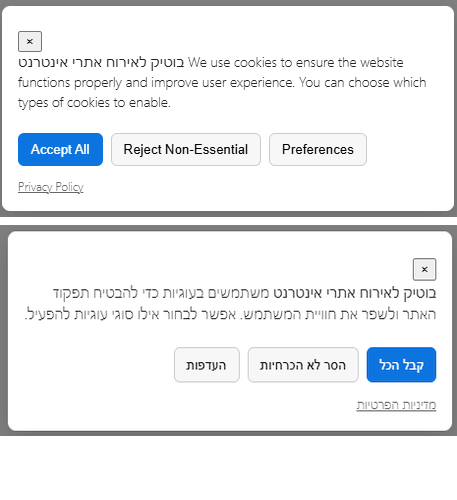
Cookie banner displayed at the bottom of the website with consent options for different cookie categories 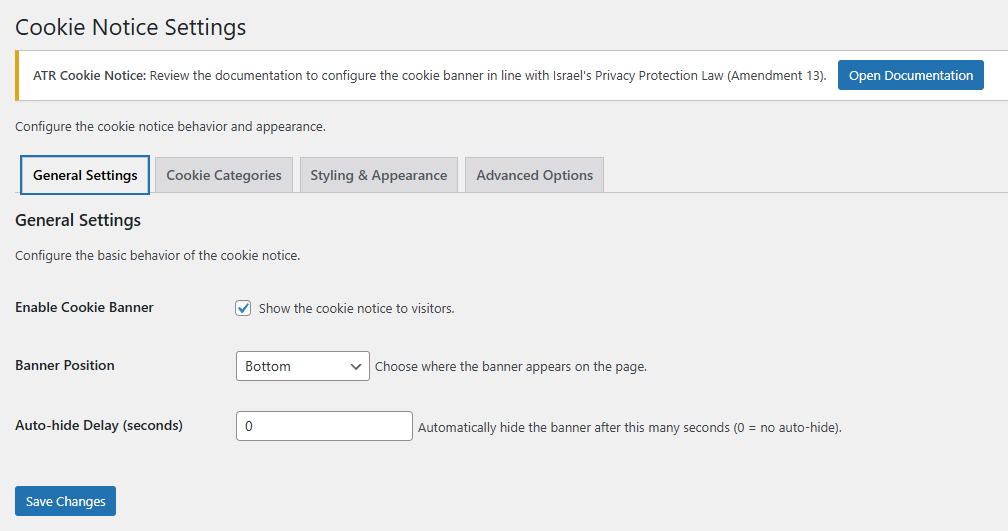
Plugin settings page showing the General Settings tab with banner configuration options
Ìgbéwọlẹ̀
- Upload the plugin files to the
/wp-content/plugins/atr-cookie-noticedirectory, or install the plugin through the WordPress plugins screen directly. - Activate the plugin through the ‘Plugins’ screen in WordPress
- Navigate to Settings > ATR Cookie Notice in the WordPress admin menu to configure the plugin
- Check Enable Cookie Banner to show the cookie notice to visitors
- Customize the banner appearance, behavior, and cookie categories as needed
- Use the live preview to see changes in real-time
- Click Save Settings to apply your changes
- The cookie banner will appear on your website frontend
FAQ
-
Do I need to configure anything after installation?
-
The plugin works out of the box with default settings, but we recommend customizing the appearance and cookie categories to match your websiteÌtumọ̀ Yorùbá: ’s design and compliance needs. Visit the plugin settings page (Settings > ATR Cookie Notice) to configure colors, positioning, content, and cookie categories.
-
Does this plugin help with Israel privacy law compliance?
-
ATR Cookie Notice is designed to help websites align with IsraelÌtumọ̀ Yorùbá: ’s Privacy Protection Law (including Amendment 13). It provides granular consent options, consent tracking, and privacy policy resources. It is not legal advice—verify your requirements with a legal professional.
-
Absolutely! The plugin offers extensive customization options including WordPress color pickers with live preview, positioning, custom CSS, and styling presets (Light, Dark, Minimal, High Contrast). You can also customize the banner text, buttons, and footer HTML using tokens like {site_name}, {privacy_url}, and {privacy_link}.
-
What are the available content tokens?
-
You can use the following tokens in custom banner text and footer HTML:
* {site_name} Ìtumọ̀ Yorùbá: – Your website name
* {privacy_url} Ìtumọ̀ Yorùbá: – URL of your Privacy Policy page
* {privacy_link} Ìtumọ̀ Yorùbá: – Full anchor tag linking to Privacy Policy
* [ok_button] Ìtumọ̀ Yorùbá: – OK button (Simple mode)
* [accept_all_button] Ìtumọ̀ Yorùbá: – Accept All button (Full mode)
* [reject_button] Ìtumọ̀ Yorùbá: – Reject button (Full mode)
* [preferences_button] Ìtumọ̀ Yorùbá: – Preferences button (Full mode)
* [privacy_link] Ìtumọ̀ Yorùbá: – Privacy Policy link (Simple mode) -
Does the plugin support multiple languages?
-
Yes, the plugin includes built-in support for Hebrew and English with proper RTL layout support. Additional translations can be added through the WordPress translation system.
-
Yes, you can configure whether analytics and marketing cookies are enabled or disabled by default. Essential cookies are always enabled as theyÌtumọ̀ Yorùbá: ’re required for basic website functionality.
-
How long does the plugin remember user consent?
-
By default, consent is remembered for 365 days, but this can be customized in the plugin settings. Users can change their preferences at any time.
-
Is there a way to test the plugin before going live?
-
Yes, the plugin includes a debug mode that provides detailed information in the browser console, making it easy to test and troubleshoot during development.
-
First, clear your page cache/CDN as usual (and any optimizer caches). If the issue persists, use the plugin Tools on the settings page:
- Go to Settings > ATR Cookie Notice
- Click “Purge caches and refresh assets” (adds a cache-busting timestamp to CSS/JS and triggers safe cache purges)
- Reload the frontend in a private window; asset URLs should include
?ver={pluginVersion}-{timestamp}
-
If using cache, minification, or JS optimization plugins, you may need to exclude the pluginÌtumọ̀ Yorùbá: ’s JavaScript files from:
* Minify/Combine
* Defer/Delay loading
* Async loading
* CDN deliveryExclude these files:
*/wp-content/plugins/atr-cookie-notice/public/js/atr-cookie-notice-public.js
*/wp-content/plugins/atr-cookie-notice/admin/js/atr-cookie-notice-admin.jsAfter making changes, use the “Purge caches and refresh assets” tool and test in a private browser window.
-
Can I customize a preset style?
-
Yes, but you must save the preset first before making custom changes. If you select a preset style (Light, Dark, Minimal, or High Contrast) and want to customize it further in the Styling & Appearance tab, follow these steps:
- Select your desired preset from the dropdown
- Click Save Settings to apply the preset
- Make your custom changes in the Styling & Appearance tab
- Click Save Settings again to save your customizations
If you make changes without saving the preset first, youÌtumọ̀ Yorùbá: ’ll lose the preset values.
-
Can I reset styling settings to defaults?
-
Yes! In the Tools section of the plugin settings, youÌtumọ̀ Yorùbá: ’ll find a “Reset Styling to defaults” button that resets only the Styling & Appearance settings while keeping all other configurations intact. A confirmation prompt prevents accidental resets.
Àwọn àgbéyẹ̀wò


Àwọn Olùkópa & Olùgbéejáde
“ATR Cookie Notice” jẹ́ ètò ìṣàmúlò orísun ṣíṣí sílẹ̀. Àwọn ènìyàn wọ̀nyí ti ṣe ìkópa sí plugin yìí.
Àwọn Olùkópa
A ti túmọ̀ “ATR Cookie Notice” sí èdè agbègbè 1 kan. Ọpẹ́lọpẹ́ fún àwọn atúmọ̀ èdè fún àwọn ìkópa wọn.
Túmọ̀ “ATR Cookie Notice” sí èdè rẹ.
Ṣe o nífẹ̀ẹ́ sí ìdàgbàsókè?
Ṣàwárí koodu, ṣàyẹ̀wò ibi ìpamọ́ SVN, tàbí ṣe àgbékalẹ̀ sí àkọsílẹ̀ ìdàgbàsókè nípasẹ̀ RSS.
Àkọsílẹ̀ àwọn àyípadà
1.2.0
- New: Customizable banner content Ìtumọ̀ Yorùbá: – full control over banner text, buttons, and footer HTML
- New: Content tokens support ({site_name}, {privacy_url}, {privacy_link}, button placeholders)
- New: WordPress color pickers with live preview in Styling & Appearance tab
- New: Floating live preview that follows active field and updates in real-time
- New: Styling presets (Light, Dark, Minimal, High Contrast) for quick setup
- New: “Reset Styling to defaults” tool with confirmation prompt (resets only styling settings)
- New: Cache reminder notice after saving settings with direct “Purge caches” button
- New: Sticky live preview on Styling tab (follows scrolling)
- Improvement: Moved plugin settings under WordPress Settings menu (Settings > ATR Cookie Notice)
- Improvement: Better RTL layout support with proper CSS positioning
- Improvement: Cache/optimization compatibility warnings and JS exclusion guidance in Tools tab
- Improvement: Advanced JavaScript optimization when Simple mode is active Ìtumọ̀ Yorùbá: – unnecessary functions return early without executing (better cache compatibility)
- Improvement: Unique CSS classes matching IDs for all front-end elements
- Improvement: Security enhancements Ìtumọ̀ Yorùbá: – ABSPATH checks, index.php files in all directories
- Improvement: CSS compliance Ìtumọ̀ Yorùbá: – class-only selectors (no ID selectors)
- Improvement: Proper HTML sanitization with wp_kses for custom content
- Improvement: Multiple customization filters for banner HTML (atr_cookie_notice_text_html_simple, atr_cookie_notice_footer_html_full, etc.)
1.1.0
- New: Consent Mode setting — choose between Full (blocking non-essential until consent) and Simple (informational only)
- New: Simple mode banner with OK button; no blocking or script changes
- New: Tools “Purge caches and refresh assets” (adds asset-buster to CSS/JS and triggers safe cache purges)
- Improvement: Advanced JS no-ops when Simple mode is active (helps with caches)
- Fix: Ensure localized settings (e.g., autoHideDelay) are read correctly
1.0.0
- Initial release
- GDPR compliant cookie consent management
- Granular cookie category control (Essential, Analytics, Marketing)
- Customizable banner design and positioning
- Multiple banner positions (bottom, top, overlay)
- Auto-hide functionality with configurable delay
- Responsive design for all devices
- Hebrew and English language support
- Privacy policy integration
- Custom CSS support
- Debug mode for development
- WordPress Coding Standards compliance
- Extensive customization options
- Developer-friendly hooks and filters