

Àpèjúwe
Unify is a WordPress/WooCommerce plugin which integrates advanced features in your checkout to enhance the experience for your customers and increase your sales potential. With Unify you can process transactions through a supported CRM, process subscription-type orders, set up customer portals where you can access the light-weight support ticket system and support chat. In addition to the free features, the Unify Pro plugin allows you to set up 1-click upsells, sync between your CRM and WooCommerce, and much more. A full list of the features can be found below. Learn more about Unify WordPress >
Supported CRMS
External Service
- We are using ipinfo to get the location country for registration. Click here to check the terms and contitions.
BUILT-IN FEATURES
- Connect to a supported CRM
- Process regular and subscription-based orders through your CRM
- Map products between your storefront and CRM
- Batch import products
- Support for Sticky.io Billing Model
- Reverse synchronization between storefront and CRM
UNIFY PRO FEATURES
- All features from the free tier
- Set up true 1-click upsells
- Coupon/promo code manager
- Recover abandoned carts via third-party services
- And various other add-ons to enhance your checkout!
- Customer portal integration for users to:
- Manage their subscriptions and orders
- Request cancellation, return or refund on a subscription or order
- Submit a support ticket
- Message support through the chat system
- View order details and history
- Manage account and address
- Switch to a different subscription product
- “Skip a cycle” also available
- Store and manage user preferences
- Various portal templates available; Physical, Digital, Membership Boxes
If you are interested in Unify Pro, get in touch with CodeClouds today!
Àwọn àwòrán ìbòjú

Add New Connection 
Product Mapping Manually 
Product Mapping by Inline Editor 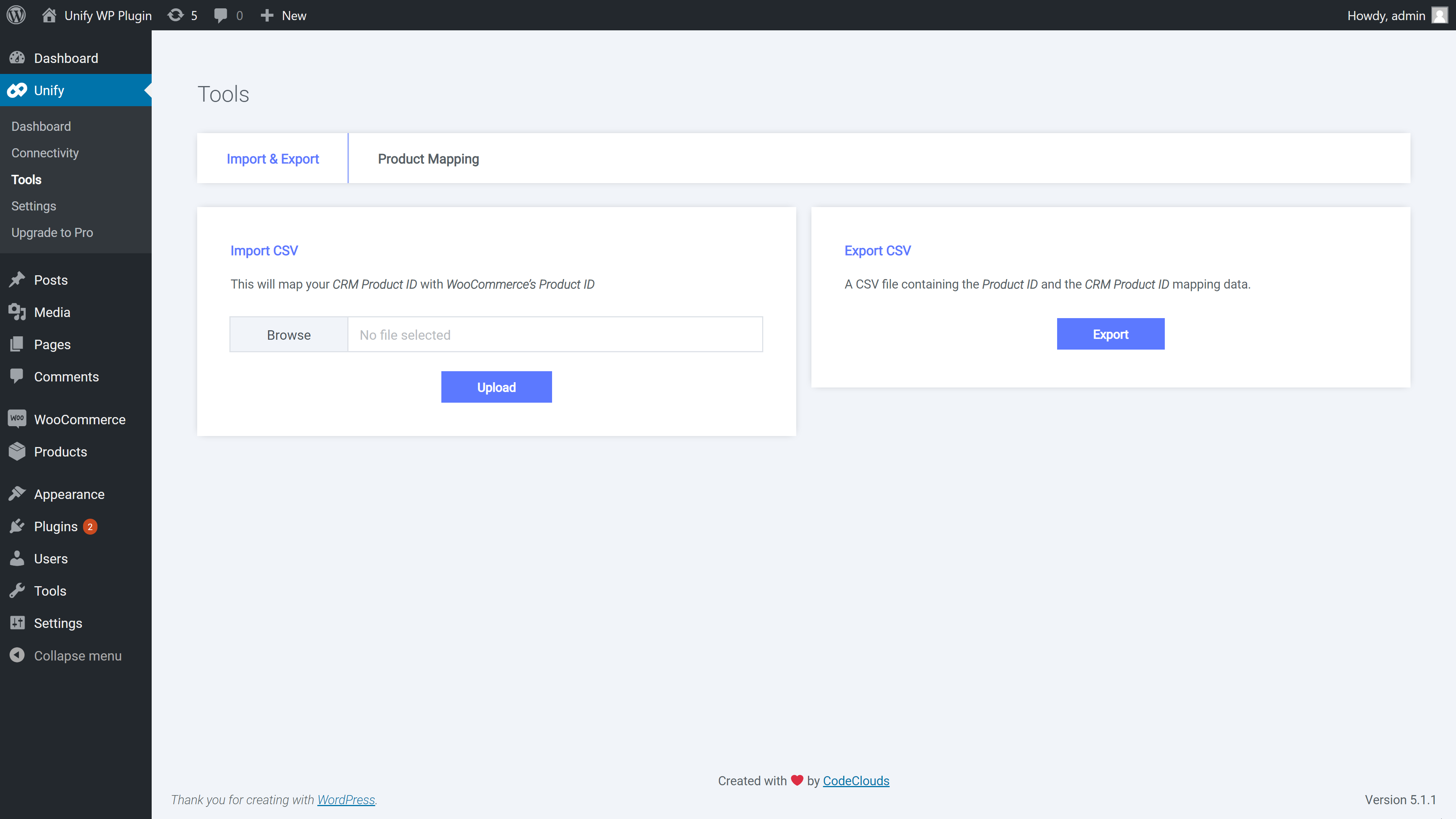
Product Mapping by Bulk Import 
Configuration
Ìgbéwọlẹ̀
This section describes how to install the plugin and get it working.
Installation
- Upload files: Upload the entire unify folder to the /wp-content/plugins/ directory.
- Activation: Activate the plugin through the Plugins menu in WordPress.
Configuration
- Add Connection: Open your Admin Panel and go to Unify > Add New Connection. Please have a look at the below screenshot.
-
Product Mapping: Now, you need to map your product(s) with connection’s product(s). You can do mapping in 3 ways.
- One By One: Go to Products > Add/Edit Product > Linked Products and add your ConnectionÌtumọ̀ Yorùbá: ’s Product ID.
- Inline Editor: Go to Unify > Tools > Product Mapping and click on a row.
- Bulk Import: Go to Unify > Tools > Import/Export and import CSV file. Before upload you can export products as a CSV file & update that file with your connection’s product ID.
- Configuration: Now you are in the last step. Go to Unify > Settings and scroll to the bottom. You can see Unify Payment Method. Add a title, select your connection, credit card types, etc.
Àwọn àgbéyẹ̀wò


Àwọn Olùkópa & Olùgbéejáde
“Unify” jẹ́ ètò ìṣàmúlò orísun ṣíṣí sílẹ̀. Àwọn ènìyàn wọ̀nyí ti ṣe ìkópa sí plugin yìí.
Àwọn Olùkópa
Ṣe o nífẹ̀ẹ́ sí ìdàgbàsókè?
Ṣàwárí koodu, ṣàyẹ̀wò ibi ìpamọ́ SVN, tàbí ṣe àgbékalẹ̀ sí àkọsílẹ̀ ìdàgbàsókè nípasẹ̀ RSS.
Àkọsílẹ̀ àwọn àyípadà
3.4.10
- Security Ìtumọ̀ Yorùbá: – Update.
3.4.9
- Fix Ìtumọ̀ Yorùbá: – PayPal payment redirection issue addressed.
3.4.8
- Optimization Ìtumọ̀ Yorùbá: – Check the plugin.
3.4.7
- Stability Ìtumọ̀ Yorùbá: – Check for WordPress.
3.4.6
- Enhancement Ìtumọ̀ Yorùbá: – Checkout performance enhanced.
3.4.5
- Security Ìtumọ̀ Yorùbá: – Update some API calls.
3.4.4
- Add Ìtumọ̀ Yorùbá: – Introduced a provision in the settings to manage the default order status.
- Enhacement Ìtumọ̀ Yorùbá: – Optimization for managing the license key.
3.4.3
- Enhacement Ìtumọ̀ Yorùbá: – Unify Checkout promo code enhacement.
3.4.2
- Enhacement Ìtumọ̀ Yorùbá: – Optimized warning error.
3.4.1
- Enhacement Ìtumọ̀ Yorùbá: – Woocommerce variant product image with Unify Hosted Checkout.
- Fix Ìtumọ̀ Yorùbá: – Resolved payment form conflict with NMI payment form.
3.4.0
- Feature Ìtumọ̀ Yorùbá: – Now support Multi Currency for Pro plugin.
3.3.5
- Fix Ìtumọ̀ Yorùbá: – Product mapping saving issue.
3.3.4
- Enhacement Ìtumọ̀ Yorùbá: – Updated License management links.
3.3.3
- Enhacement Ìtumọ̀ Yorùbá: – Account License Key.
3.3.2
- Add Ìtumọ̀ Yorùbá: – Added validation messages for paypal payments.
- Add Ìtumọ̀ Yorùbá: – Added browser agent in order note for sticky.io
3.3.1
- Tweak Ìtumọ̀ Yorùbá: – Made compatible for wordpress multisite.
3.3.0
- Compatible Ìtumọ̀ Yorùbá: – Made it comfortable for PHP above 8.
- Fix Ìtumọ̀ Yorùbá: – Updated from CURL to HTTP API.
- Add Ìtumọ̀ Yorùbá: – Added proper Sanitized, Escaped, and Validated.
- Enhacement Ìtumọ̀ Yorùbá: – Updated file calling.
- Fix Ìtumọ̀ Yorùbá: – Converted from obfuscated codes to minified version.
3.2.5
- Fix Ìtumọ̀ Yorùbá: – Product mapping tool pricing round off issue.
3.2.4
- Add Ìtumọ̀ Yorùbá: – Added sorting feature in product mapping tool.
3.2.3
- Add Ìtumọ̀ Yorùbá: – Introduced an area to check the Plugin status and Server status.
3.2.2
- Fix Ìtumọ̀ Yorùbá: – Activation issue for WPEngine.
3.2.1
- New Ìtumọ̀ Yorùbá: – Support for WordPress 5.8.
- New Ìtumọ̀ Yorùbá: – Support for WooCommerce 5.9.
3.2.0
- Feature – Unify plugin now supports Sublytics CRM.
3.1.4
- Tweak Ìtumọ̀ Yorùbá: – added product variation image data for cart.
3.1.3
- Fix Ìtumọ̀ Yorùbá: – Order creation with variant product for pro version.
3.1.2
- Enhancement Ìtumọ̀ Yorùbá: – Compatibility with ReferralCandy(Unify Pro).
- Fix Ìtumọ̀ Yorùbá: – Trial License Email Address Checking.
3.1.1
- Enhancement Ìtumọ̀ Yorùbá: – API details encryption for more security.
3.1.0
- Enhancement Ìtumọ̀ Yorùbá: – Enhanced UI for better user experience.
3.0.1
- Enhancement Ìtumọ̀ Yorùbá: – Enhanced affiliate param feature.
3.0.0
- Feature Ìtumọ̀ Yorùbá: – Unify Pro released.
2.6.0
- Feature Ìtumọ̀ Yorùbá: – Introduced WooCommerce shipping method to connect with Sticky.io (Formally Limelight).
- Feature Ìtumọ̀ Yorùbá: – Introduced trial license.
- Enhancement Ìtumọ̀ Yorùbá: – Enhanced UI for better user experience.
- Enhancement Ìtumọ̀ Yorùbá: – Enhanced the PayPal payment method section.
2.5.2
- Enhancement Ìtumọ̀ Yorùbá: – Enhanced validation for CRM settings.
2.5.1
- Enhancement Ìtumọ̀ Yorùbá: – Enhanced the log management for PayPal Payments with Sticky.io (Formally Limelight).
2.5.0
- Feature Ìtumọ̀ Yorùbá: – PayPal Payments support for Sticky.io (Formally Limelight).
2.4.1
- New Ìtumọ̀ Yorùbá: – Support for WordPress 5.5.
- New Ìtumọ̀ Yorùbá: – Support for WooCommerce 4.4.
2.4.0
- Enhancement Ìtumọ̀ Yorùbá: – Unify plugin now supports Affiliate Parameters.
2.3.2
- Enhancement Ìtumọ̀ Yorùbá: – Enhanced the feature to support the latest Response CRM.
2.3.1
- Enhancement Ìtumọ̀ Yorùbá: – Enhanced the shipping ID feature for each product with Sticky.io (Formally Limelight).
2.3.0
- Feature Ìtumọ̀ Yorùbá: – Now order note is available in Unify plugin with Sticky.io (Formally Limelight) Legacy CRM for same product multiple variation.
- Enhancement Ìtumọ̀ Yorùbá: – Made shipping profile optional for Konnektive CRM.
2.2.0
- Feature Ìtumọ̀ Yorùbá: – Unify plugin now supports Konnektive CRM product variation.
- Enhancement Ìtumọ̀ Yorùbá: – Payment page escaping special character.
2.1.1
- Fix Ìtumọ̀ Yorùbá: – Connection typo, which was causing issue for Limelight legecy version.
2.1.0
- Feature Ìtumọ̀ Yorùbá: – Unify plugin now supports Response CRM.
- Dev Ìtumọ̀ Yorùbá: – Updated Author Name and Email ID in library file.
- Fix Ìtumọ̀ Yorùbá: – validation.required error message on validation failure.
- Enhancement Ìtumọ̀ Yorùbá: – Optimized the Limelight CRM library.
2.0.4
- Enhancement Ìtumọ̀ Yorùbá: – Showing error messages from CRM.
- Localization Ìtumọ̀ Yorùbá: – Changed few labels.
2.0.3
- Fix Ìtumọ̀ Yorùbá: – The issue for console error in checkout page.
- Tweak Ìtumọ̀ Yorùbá: – Changed the validate jquery library path.
2.0.2
- Fix Ìtumọ̀ Yorùbá: – The issue with WooCommerce Logger.
2.0.1
- Template Ìtumọ̀ Yorùbá: – Added Email templates.
2.0
- Template Ìtumọ̀ Yorùbá: – Plugin New Admin UI.
- Feature Ìtumọ̀ Yorùbá: – Added debugging option to log API request and response.
- Fix Ìtumọ̀ Yorùbá: – Upsell ID issue for empty Shipment Price Settings.
1.2.4
- Feature Ìtumọ̀ Yorùbá: – Custom note for Konnektive CRM
1.2.3
- Feature Ìtumọ̀ Yorùbá: – Added support for custom shipping price changed for Konnktive CRM
- Fix Ìtumọ̀ Yorùbá: – Undefined Index title in Product Mapping
- Fix Ìtumọ̀ Yorùbá: – The issue with special character in API password
- Fix Ìtumọ̀ Yorùbá: – Added ipAddress key in order creation for Konnektive CRM
- Fix Ìtumọ̀ Yorùbá: – Updated CVV validation so that number starting with zero do not throw any integer error in Konnektive CRM
- Fix Ìtumọ̀ Yorùbá: – ‘Invalid UPSELL product id of 0 found’ for Limelight Billing Model
1.2.2
- Fix Ìtumọ̀ Yorùbá: – Decryption issue.
1.2.1
- Fix Ìtumọ̀ Yorùbá: – Setting of default card type for Test card.
1.2.0
- Fix Ìtumọ̀ Yorùbá: – American Express CVV checking error.
- Fix Ìtumọ̀ Yorùbá: – Credit Card 2 digit month checking.
- Fix Ìtumọ̀ Yorùbá: – Undefined index type in MetaBox
- Fix Ìtumọ̀ Yorùbá: – Undefined index required in Input
- Feature Ìtumọ̀ Yorùbá: – Added Product Variant Support for Limelight CRM
- Feature Ìtumọ̀ Yorùbá: – Added Limelight CRM Offer and Billing Model Support
1.1.1
- Fix Ìtumọ̀ Yorùbá: – Notice for undefined index.
- Performance Ìtumọ̀ Yorùbá: – Prevented calling of un-necessary Class.
1.1.0
- Feature Ìtumọ̀ Yorùbá: – A new feature has been added for various shipping method for a product.
- Fix Ìtumọ̀ Yorùbá: – Notice of calling id incorrectly of Order properties.
- Enhancement Ìtumọ̀ Yorùbá: – Enhanced the validation for card expiry date in checkout page.
1.0.2
- Made it comfortable for PHP 7.2
1.0.1
- Made it comfortable for PHP 5.6
1.0.0
- First public release