
Àpèjúwe
This plug-in you can change words font attributes easily. You only need to write correct CSS codes for font colors, font faces and font sizes.
The Color Keywords SEO plugin was developed so that important blog post keywords on a WordPress blog could be optimized using the HTML , and tags.
Related Links:
Colors
You can write color codes in two ways.
-
Color name : blue, red
-
Color hexadecimal (HEX) code : #0000CD,#00FF00
this plug-in also supports other CSS color codings.
Font section, you can manage your posts font names. You only need to write the font name.
Examples
-
“Times New Roman”, Times, serif
-
Arial
Size section you can manage your fonts size.
Examples
-
250%
-
12px
Àwọn àwòrán ìbòjú
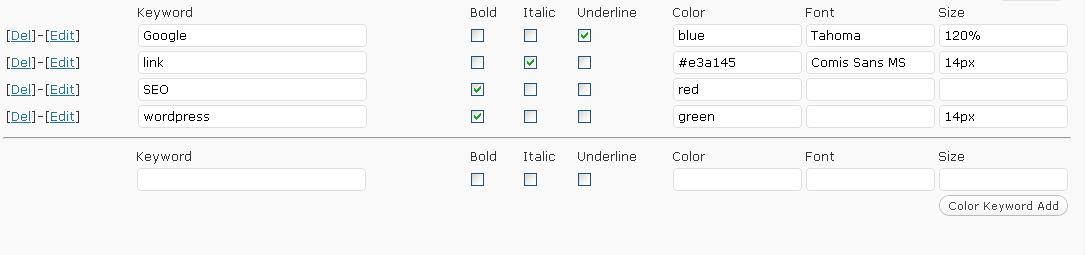
Administration interface in WordPress 
Page interface in WordPress
Ìgbéwọlẹ̀
-
Upload
color-keywordsfolder to the/wp-content/plugins/directory -
Activate the plug-in through the
Plug-insmenu in WordPress -
Visit your Color Keywords Settings (Settings/Color Keywords)
-
Configure options
-
That is it!
Àwọn àgbéyẹ̀wò
Kò sí àwọn àgbéyẹ̀wò fún plugin yìí.
Àwọn Olùkópa & Olùgbéejáde
“Color Keywords” jẹ́ ètò ìṣàmúlò orísun ṣíṣí sílẹ̀. Àwọn ènìyàn wọ̀nyí ti ṣe ìkópa sí plugin yìí.
Àwọn Olùkópa
Túmọ̀ “Color Keywords” sí èdè rẹ.
Ṣe o nífẹ̀ẹ́ sí ìdàgbàsókè?
Ṣàwárí koodu, ṣàyẹ̀wò ibi ìpamọ́ SVN, tàbí ṣe àgbékalẹ̀ sí àkọsílẹ̀ ìdàgbàsókè nípasẹ̀ RSS.