
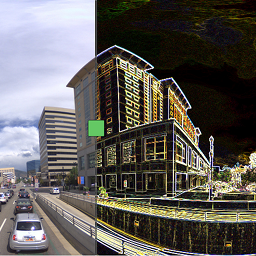
Àpèjúwe
Sravnitel is a WordPress plugin by Elphel Inc. based on a jQuery plugin jquery.sravnitel.js.
Features
- Compare 2+ images
- Zoom and pan
- Initial zoom and offset
- Touch events: click, drag, pinch to zoom
Tips
- Click on the view area to quickly switch between left and right image
- Click on the zoom info in the top right to zoom-to-fit the view area
- To place several instances of the plugin assign unique ids: [sravnitel id=Ìtumọ̀ Yorùbá: ’test1Ìtumọ̀ Yorùbá: ′ …], [sravnitel id=Ìtumọ̀ Yorùbá: ’test2Ìtumọ̀ Yorùbá: ′ …]
Working demo
Quick examples
- Fit image into the view window, w/o titles:
[sravnitel images=”ID0,ID1,ID2Ìtumọ̀ Yorùbá: ″ width=640 height=480] - Fit image into the view window, with titles and toggle button:
[sravnitel images=”ID0,ID1,ID2Ìtumọ̀ Yorùbá: ″ width=640 height=480 showtitles=true showtoggle=true] - Also fit image, with titles:
[sravnitel images=”ID0,ID1,ID2Ìtumọ̀ Yorùbá: ″ width=640 height=480 showtitles=true zoom=0] - Zoom 30%, with titles, x=0 and y=0 in the center of the view window:
[sravnitel images=Ìtumọ̀ Yorùbá: ’ID0,ID1,ID2Ìtumọ̀ Yorùbá: ′ width=640 height=480 showtitles=true zoom=0.3 center_x=0 center_y=0]
Shortcode Parameters
- id Ìtumọ̀ Yorùbá: – int Ìtumọ̀ Yorùbá: – 0 Ìtumọ̀ Yorùbá: – wrapperÌtumọ̀ Yorùbá: ’s <div> element id
- images Ìtumọ̀ Yorùbá: – str Ìtumọ̀ Yorùbá: – ” Ìtumọ̀ Yorùbá: – (required) list of images ids (attachment_id), comma separated
- width Ìtumọ̀ Yorùbá: – int Ìtumọ̀ Yorùbá: – 530 Ìtumọ̀ Yorùbá: – view window width px
- height Ìtumọ̀ Yorùbá: – int Ìtumọ̀ Yorùbá: – 300 Ìtumọ̀ Yorùbá: – view window height px
- showtitles Ìtumọ̀ Yorùbá: – bool Ìtumọ̀ Yorùbá: – false Ìtumọ̀ Yorùbá: – show/hide titles
- showtoggle Ìtumọ̀ Yorùbá: – bool Ìtumọ̀ Yorùbá: – false Ìtumọ̀ Yorùbá: – show/hide button Ìtumọ̀ Yorùbá: – switch between left and right image
- index_l Ìtumọ̀ Yorùbá: – int Ìtumọ̀ Yorùbá: – 0 Ìtumọ̀ Yorùbá: – init, left image Ìtumọ̀ Yorùbá: – is the index of the images array, starting from 0
- index_r Ìtumọ̀ Yorùbá: – int Ìtumọ̀ Yorùbá: – 1 Ìtumọ̀ Yorùbá: – init, right image Ìtumọ̀ Yorùbá: – is the index of the images array, starting from 0
- zoom Ìtumọ̀ Yorùbá: – float Ìtumọ̀ Yorùbá: – 0 Ìtumọ̀ Yorùbá: – init, zoom, 0 Ìtumọ̀ Yorùbá: – fit to view window, 1.0 Ìtumọ̀ Yorùbá: – 100%
- center_x Ìtumọ̀ Yorùbá: – int Ìtumọ̀ Yorùbá: – 0 Ìtumọ̀ Yorùbá: – init, x coordinate of the original image to be placed in the center of the view window
- center_y Ìtumọ̀ Yorùbá: – int Ìtumọ̀ Yorùbá: – 0 Ìtumọ̀ Yorùbá: – init, y coordinate of the original image to be placed in the center of the view window
Àwọn àwòrán ìbòjú

Working plugin 
Shortcode 
Description field in the attachment details
Ìgbéwọlẹ̀
- Upload the plugin files to the
/wp-content/plugins/sravniteldirectory, or install the plugin through the WordPress plugins screen directly. - Activate the plugin through the ‘Plugins’ screen in WordPress.
FAQ
- How is it implemented?
-
Same as Twenty20 plugin Ìtumọ̀ Yorùbá: – stacks two selected images so they are displayed as if one is lying on top of another. As the slider moves the compared images are displayed on the opposite sides of the divider.
Image titles are taken from description or title (if description is empty) of the attached image.
- How to find the ID of the attached image?
-
ItÌtumọ̀ Yorùbá: ’s an integer number. Insert an image into a post and look for “wp-image-NN”. Or find the permalink of the attachment. Type in NNs into the pluginÌtumọ̀ Yorùbá: ’s shortcode.
- Examples
-
- Fit image into the view window, w/o titles:
[sravnitel id=”test” images=”ID0,ID1,ID2Ìtumọ̀ Yorùbá: ″ width=640 height=480] - Fit image into the view window, with titles and toggle button:
[sravnitel images=”ID0,ID1,ID2Ìtumọ̀ Yorùbá: ″ width=640 height=480 showtitles=true showtoggle=true] - Also fit image, with titles:
[sravnitel images=”ID0,ID1,ID2Ìtumọ̀ Yorùbá: ″ width=640 height=480 showtitles=true zoom=0] - Zoom 30%, with titles, x=0 and y=0 in the center of the view window:
[sravnitel images=Ìtumọ̀ Yorùbá: ’ID0,ID1,ID2Ìtumọ̀ Yorùbá: ′ width=640 height=480 showtitles=true zoom=0.3 center_x=0 center_y=0]
- Fit image into the view window, w/o titles:
- Shortcode Parameters
-
- id Ìtumọ̀ Yorùbá: – int Ìtumọ̀ Yorùbá: – 0 Ìtumọ̀ Yorùbá: – wrapperÌtumọ̀ Yorùbá: ’s <div> element id
- images Ìtumọ̀ Yorùbá: – str Ìtumọ̀ Yorùbá: – ” Ìtumọ̀ Yorùbá: – (required) list of images ids (attachment_id), comma separated
- width Ìtumọ̀ Yorùbá: – int Ìtumọ̀ Yorùbá: – 530 Ìtumọ̀ Yorùbá: – view window width px
- height Ìtumọ̀ Yorùbá: – int Ìtumọ̀ Yorùbá: – 300 Ìtumọ̀ Yorùbá: – view window height px
- showtitles Ìtumọ̀ Yorùbá: – bool Ìtumọ̀ Yorùbá: – false Ìtumọ̀ Yorùbá: – show/hide titles
- showtoggle Ìtumọ̀ Yorùbá: – bool Ìtumọ̀ Yorùbá: – false Ìtumọ̀ Yorùbá: – show/hide button Ìtumọ̀ Yorùbá: – switch between left and right image
- index_l Ìtumọ̀ Yorùbá: – int Ìtumọ̀ Yorùbá: – 0 Ìtumọ̀ Yorùbá: – init, left image Ìtumọ̀ Yorùbá: – is the index of the images array, starting from 0
- index_r Ìtumọ̀ Yorùbá: – int Ìtumọ̀ Yorùbá: – 1 Ìtumọ̀ Yorùbá: – init, right image Ìtumọ̀ Yorùbá: – is the index of the images array, starting from 0
- zoom Ìtumọ̀ Yorùbá: – float Ìtumọ̀ Yorùbá: – 0 Ìtumọ̀ Yorùbá: – init, zoom, 0 Ìtumọ̀ Yorùbá: – fit to view window, 1.0 Ìtumọ̀ Yorùbá: – 100%
- center_x Ìtumọ̀ Yorùbá: – int Ìtumọ̀ Yorùbá: – 0 Ìtumọ̀ Yorùbá: – init, x coordinate of the original image to be placed in the center of the view window
- center_y Ìtumọ̀ Yorùbá: – int Ìtumọ̀ Yorùbá: – 0 Ìtumọ̀ Yorùbá: – init, y coordinate of the original image to be placed in the center of the view window
Àwọn àgbéyẹ̀wò

Àwọn Olùkópa & Olùgbéejáde
“Sravnitel” jẹ́ ètò ìṣàmúlò orísun ṣíṣí sílẹ̀. Àwọn ènìyàn wọ̀nyí ti ṣe ìkópa sí plugin yìí.
Àwọn Olùkópa
Ṣe o nífẹ̀ẹ́ sí ìdàgbàsókè?
Ṣàwárí koodu, ṣàyẹ̀wò ibi ìpamọ́ SVN, tàbí ṣe àgbékalẹ̀ sí àkọsílẹ̀ ìdàgbàsókè nípasẹ̀ RSS.
Àkọsílẹ̀ àwọn àyípadà
1.3
- Allow more than one instance on the page
- Set title table margin to 0px
- Fixed [… showtitles=false …] showing titles
- Added delayed images place updating due to drag event lagging.
1.2
- Fixed view size when titles are disabled (showtitles=false)
- Fixed divider containment area Ìtumọ̀ Yorùbá: – offset() instead of position()
1.1
- Fixed coordinates not rounding while dragging
- Added single touch events by enabling ‘jquery-touch-punch’ in enqueue.php
- Added multi touch Ìtumọ̀ Yorùbá: – zoom by pinching (tested on Android)
- Added a toggle button Ìtumọ̀ Yorùbá: – to switch between images (hidden by default)
- Changed handle look
1.0
- Initial release.