

Àpèjúwe
CFPro Invoice Sender is a powerful and lightweight WooCommerce extension that automates sending order notifications, invoices, and payment links directly to your customers’ WhatsApp numbers.
Enhance your storeÌtumọ̀ Yorùbá: ’s customer experience by providing instant updates on their order statuses (Processing, On-Hold, Completed, etc.) with beautifully formatted WhatsApp messages.
Features
- Automated Customer Notifications: Automatically send WhatsApp messages to customers when their order status changes.
- Admin Order Alerts: Get instant WhatsApp notifications whenever a new order is placed on your WooCommerce store.
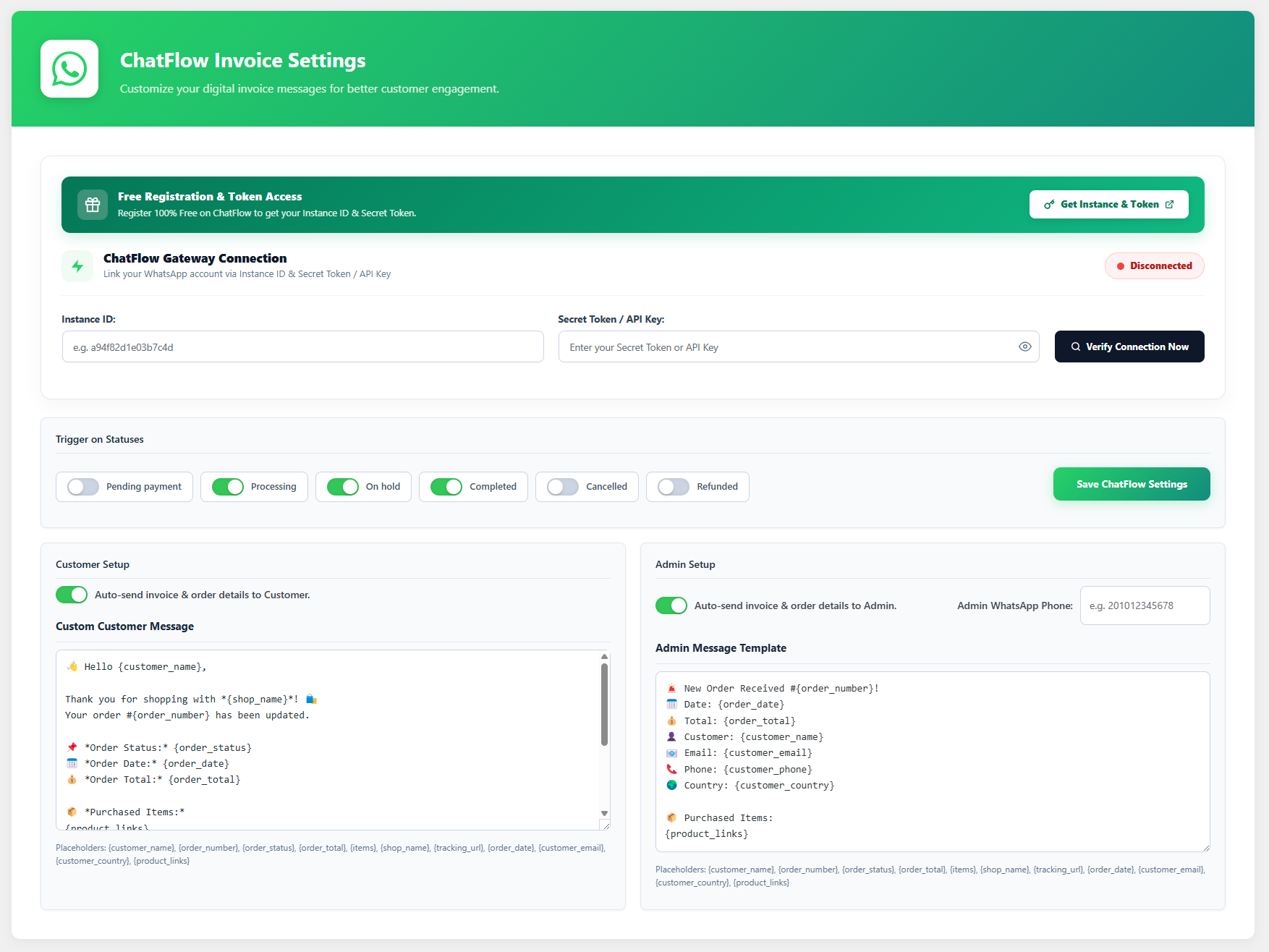
- Custom Message Templates: Create beautiful, customized messages with dynamic placeholders like
{customer_name},{order_number},{order_status},{order_total},{product_links}, and more. - One-Click Send Meta Box: Includes a convenient meta box on the Order Edit screen to manually send a WhatsApp message to the customer with one click.
- Fully Secure & Compliant: Uses native WordPress settings APIs with proper sanitization and data handling.
⚠️ Important: Third-Party Service Disclosure
To successfully dispatch messages to WhatsApp without relying on the browser, this plugin relies on an external Software as a Service (SaaS) provider: ChatFlow Pro.
By using this plugin, you acknowledge and agree that:
1. The plugin communicates with the external ChatFlow SaaS API at https://chatflow-pro.site.
2. Order details (including customer phone numbers and message content) are transmitted securely to this API solely for the purpose of dispatching the WhatsApp message.
3. You must register for a free or premium account on ChatFlow to obtain an Instance ID and Secret Token.
Privacy & Terms:
* Please review the ChatFlow Pro Terms of Service: https://chatflow-pro.site/terms/
* Please review the ChatFlow Pro Privacy Policy: https://chatflow-pro.site/privacy/
Àwọn àwòrán ìbòjú

Ìgbéwọlẹ̀
- Upload the
cfpro-invoice-senderdirectory to the/wp-content/plugins/directory. - Activate the plugin through the ‘Plugins’ menu in WordPress.
- Navigate to WooCommerce > ChatFlow Invoice in your admin dashboard.
- Enter your ChatFlow Instance ID and Secret Token to connect your device.
- Customize your customer and admin message templates and select the trigger statuses.
FAQ
-
Do I need a ChatFlow Pro account?
-
Yes. You need to register on the ChatFlow SaaS platform to get your Instance ID and Secret Token, which links your physical WhatsApp device to your WooCommerce store.
-
Can I use placeholders in the messages?
-
Yes, you can use a variety of placeholders like
{customer_name},{order_status},{order_total}, and{product_links}to dynamically generate rich invoice messages.
Àwọn àgbéyẹ̀wò
Kò sí àwọn àgbéyẹ̀wò fún plugin yìí.
Àwọn Olùkópa & Olùgbéejáde
“CFPro Invoice Sender” jẹ́ ètò ìṣàmúlò orísun ṣíṣí sílẹ̀. Àwọn ènìyàn wọ̀nyí ti ṣe ìkópa sí plugin yìí.
Àwọn Olùkópa
Túmọ̀ “CFPro Invoice Sender” sí èdè rẹ.
Ṣe o nífẹ̀ẹ́ sí ìdàgbàsókè?
Ṣàwárí koodu, ṣàyẹ̀wò ibi ìpamọ́ SVN, tàbí ṣe àgbékalẹ̀ sí àkọsílẹ̀ ìdàgbàsókè nípasẹ̀ RSS.
Àkọsílẹ̀ àwọn àyípadà
1.0.0
- Initial Release.
- Added ChatFlow SaaS Gateway integration.
- Added custom message templates with
{order_status}placeholder. - Added one-click WhatsApp dispatch meta box.
- Full security and code compliance update for WordPress repository.