

Àpèjúwe
WordPress MultisiteÌtumọ̀ Yorùbá: ’s own Network Admin lets you see which plugins are network-activated, but it has no built-in way to see which plugins individual site admins have activated locally, one site at a time, across a whole network. Multisite Matrix closes that gap.
What it does
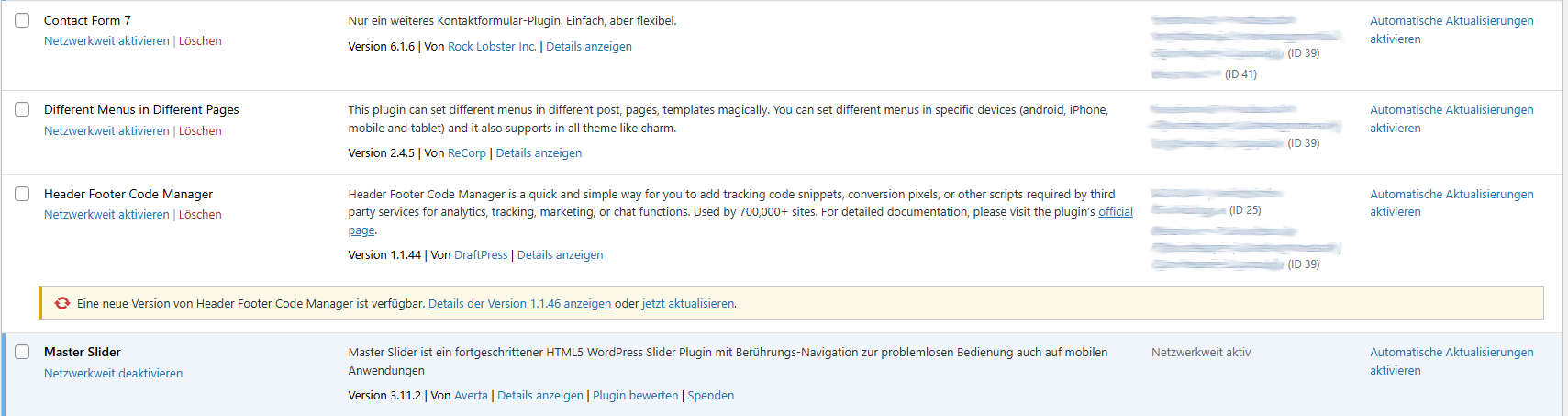
- Adds an “Active on Sites” column directly to the existing Network Admin > Plugins list, showing at a glance which sites have each plugin active locally.
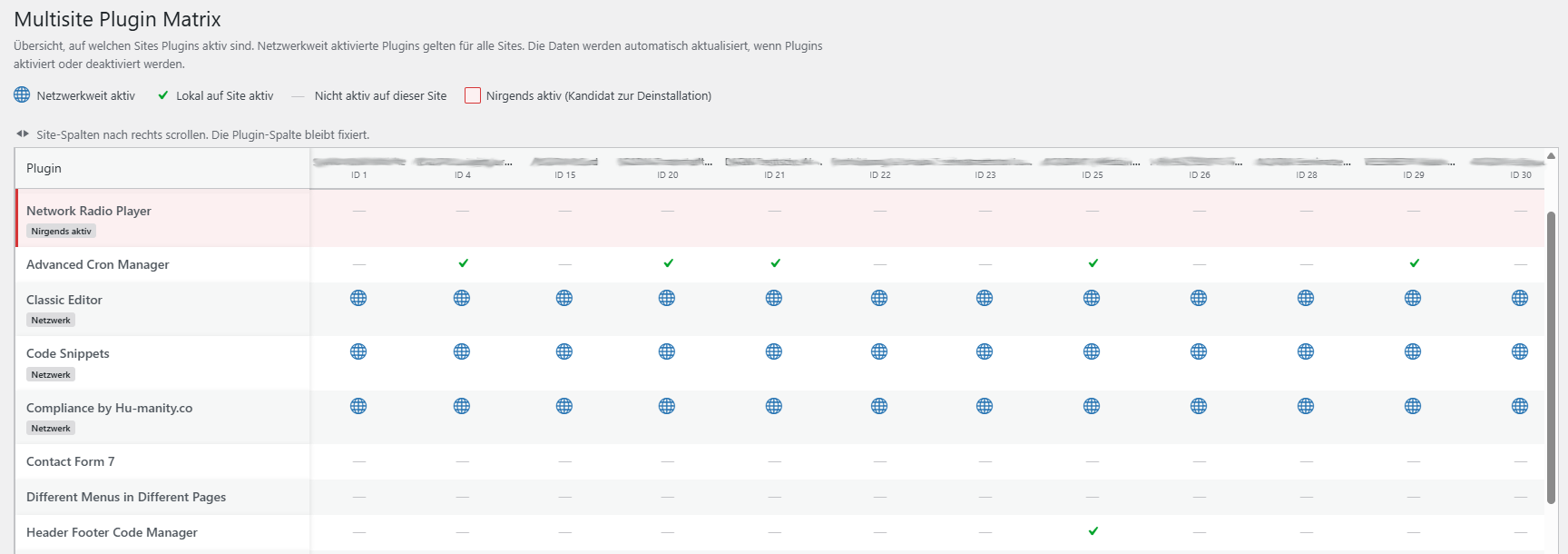
- Adds a dedicated Plugin Matrix page (Network Admin > Plugins > Multisite Matrix) with a full plugins-by-sites table: every installed plugin as a row, every site as a column, so you can scan the whole networkÌtumọ̀ Yorùbá: ’s plugin usage in one screen.
- Flags plugins that are installed but active nowhere in the network — a quick way to spot cleanup candidates before a security or performance audit.
- Distinguishes network-activated plugins (active for every site by definition) from plugins activated locally on individual sites.
- Links straight through to each siteÌtumọ̀ Yorùbá: ’s own Plugins screen from the matrix, so you can act on what you find without hunting for the right site first.
Why
On a network with more than a handful of sites, “which of our 40 sites still has that old SEO plugin turned on” is a real, recurring question that WordPress core simply doesnÌtumọ̀ Yorùbá: ’t answer without opening every single siteÌtumọ̀ Yorùbá: ’s plugin screen by hand. Multisite Matrix answers it in one page load.
How it works
Data is read directly from WordPressÌtumọ̀ Yorùbá: ’s own site and network options — nothing is sent anywhere, no external requests are made, and the plugin makes no changes to which plugins are active. The plugin-to-site mapping is cached for an hour (via a site transient) and automatically refreshed whenever a plugin is activated, deactivated, or a site is added or removed, so the matrix never depends on a manual rebuild.
Requirements
Multisite Matrix only does anything on a WordPress Multisite install — on a single-site install it stays completely inactive. It can only be network-activated (not activated on an individual site), and its screens are only visible to users with the manage_network_plugins capability (network administrators).
Àwọn àwòrán ìbòjú
Ìgbéwọlẹ̀
- Upload the
multisite-matrixfolder to/wp-content/plugins/, or install it through the WordPress plugin screen directly. - Go to Network Admin > Plugins and network-activate Multisite Matrix. It cannot be activated on a single site — this is a Multisite-only plugin.
- Open Network Admin > Plugins > Multisite Matrix to see the full matrix, or just look at the new “Active on Sites” column on the regular Network Admin > Plugins screen.
FAQ
-
Does this work on a normal (non-Multisite) WordPress install?
-
No. Multisite Matrix checks for a Multisite install on load and does nothing at all otherwise.
-
Can it activate or deactivate plugins for me?
-
No. ItÌtumọ̀ Yorùbá: ’s read-only by design — it shows you the current state across the network, but any activation, deactivation, or cleanup still happens the normal way, on the relevant siteÌtumọ̀ Yorùbá: ’s own Plugins screen (which the matrix links to directly).
-
Who can see the Plugin Matrix page?
-
Only network administrators (specifically, users with the
manage_network_pluginscapability). Regular site admins donÌtumọ̀ Yorùbá: ’t see it. -
How current is the data?
-
The plugin-to-site map is cached for up to an hour, but itÌtumọ̀ Yorùbá: ’s invalidated immediately whenever a plugin is activated or deactivated anywhere in the network, or a site is added or removed — so in practice itÌtumọ̀ Yorùbá: ’s always accurate after any relevant change, not just once an hour.
-
Does it send any data anywhere?
-
No. Everything is read from your own WordPress database; the plugin makes no external requests.
Àwọn àgbéyẹ̀wò
Kò sí àwọn àgbéyẹ̀wò fún plugin yìí.
Àwọn Olùkópa & Olùgbéejáde
“Multisite Matrix” jẹ́ ètò ìṣàmúlò orísun ṣíṣí sílẹ̀. Àwọn ènìyàn wọ̀nyí ti ṣe ìkópa sí plugin yìí.
Àwọn Olùkópa
A ti túmọ̀ “Multisite Matrix” sí àwọn èdè agbègbè 6. Ọpẹ́lọpẹ́ fún àwọn atúmọ̀ èdè fún àwọn ìkópa wọn.
Túmọ̀ “Multisite Matrix” sí èdè rẹ.
Ṣe o nífẹ̀ẹ́ sí ìdàgbàsókè?
Ṣàwárí koodu, ṣàyẹ̀wò ibi ìpamọ́ SVN, tàbí ṣe àgbékalẹ̀ sí àkọsílẹ̀ ìdàgbàsókè nípasẹ̀ RSS.
Àkọsílẹ̀ àwọn àyípadà
1.2.5
- Fixed the plugin header Description field, which was still German — now matches the English source strings used everywhere else.
1.2.4
- Source strings switched from German to English (WordPress.org convention) so the plugin can be properly localized.
- Added translations for German, French, Spanish, Italian, Dutch, Portuguese (Brazil), Polish, Russian, Japanese, and Chinese (Simplified).
1.2.3
- Renamed internal function, class, and option/transient names to use a unique “MULTMA”/”multma” prefix, per WordPress.org plugin review feedback.
1.2.2
- First public release on WordPress.org.