

Àpèjúwe
Plugin URL: https://douple.net/shoppable-lookbook-image-hotspots/
Docs: https://douple.net/shoppable-lookbook-image-hotspots/docs.html
Demo: https://douple.net/shoppable-lookbook-image-hotspots/demo.html
GitHub: https://github.com/thiendo/WordPress-Shoppable-Lookbook-Image-Hotspots-Plugin
Support: support@douple.net
Get Pro: https://checkout.freemius.com/plugin/32876/plan/59385/
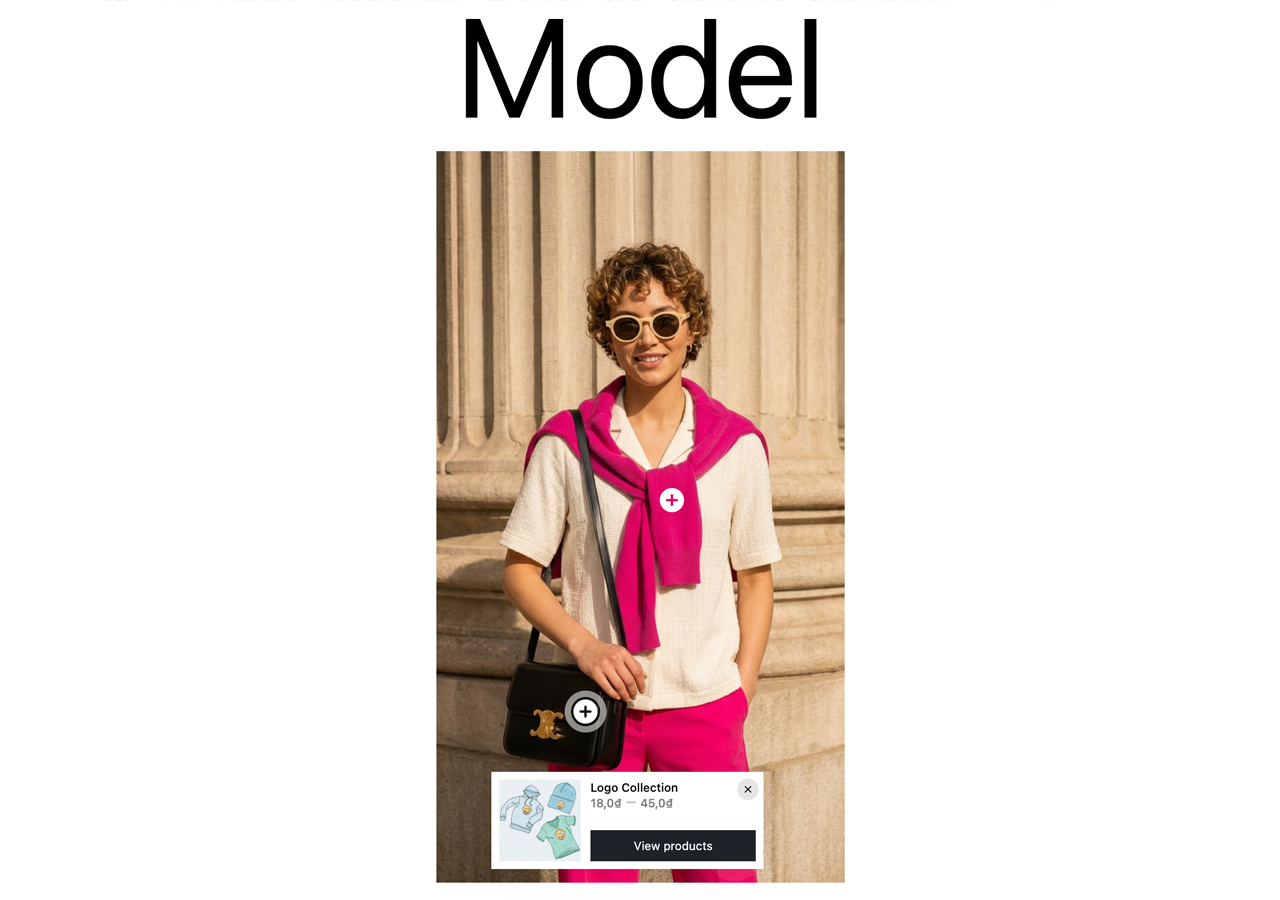
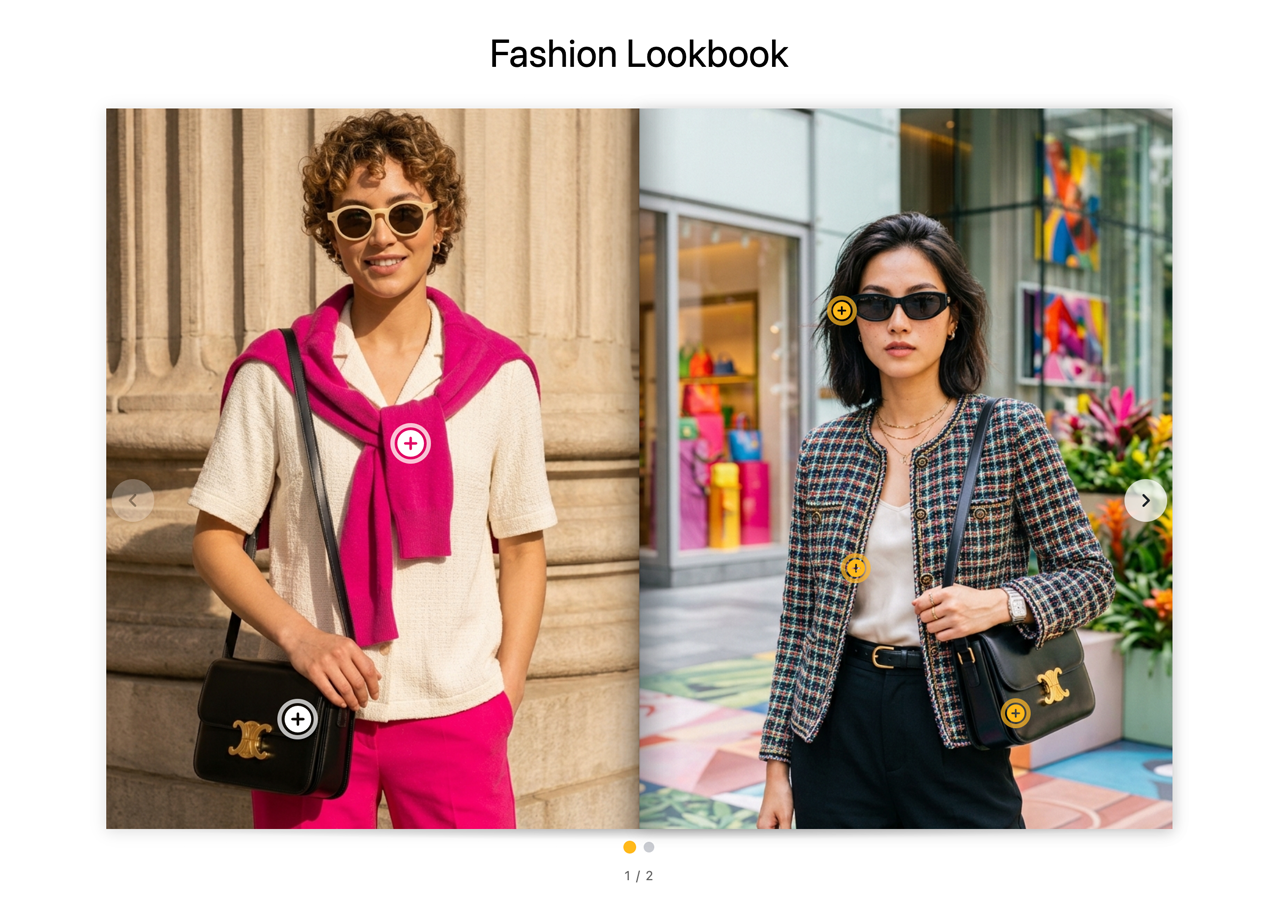
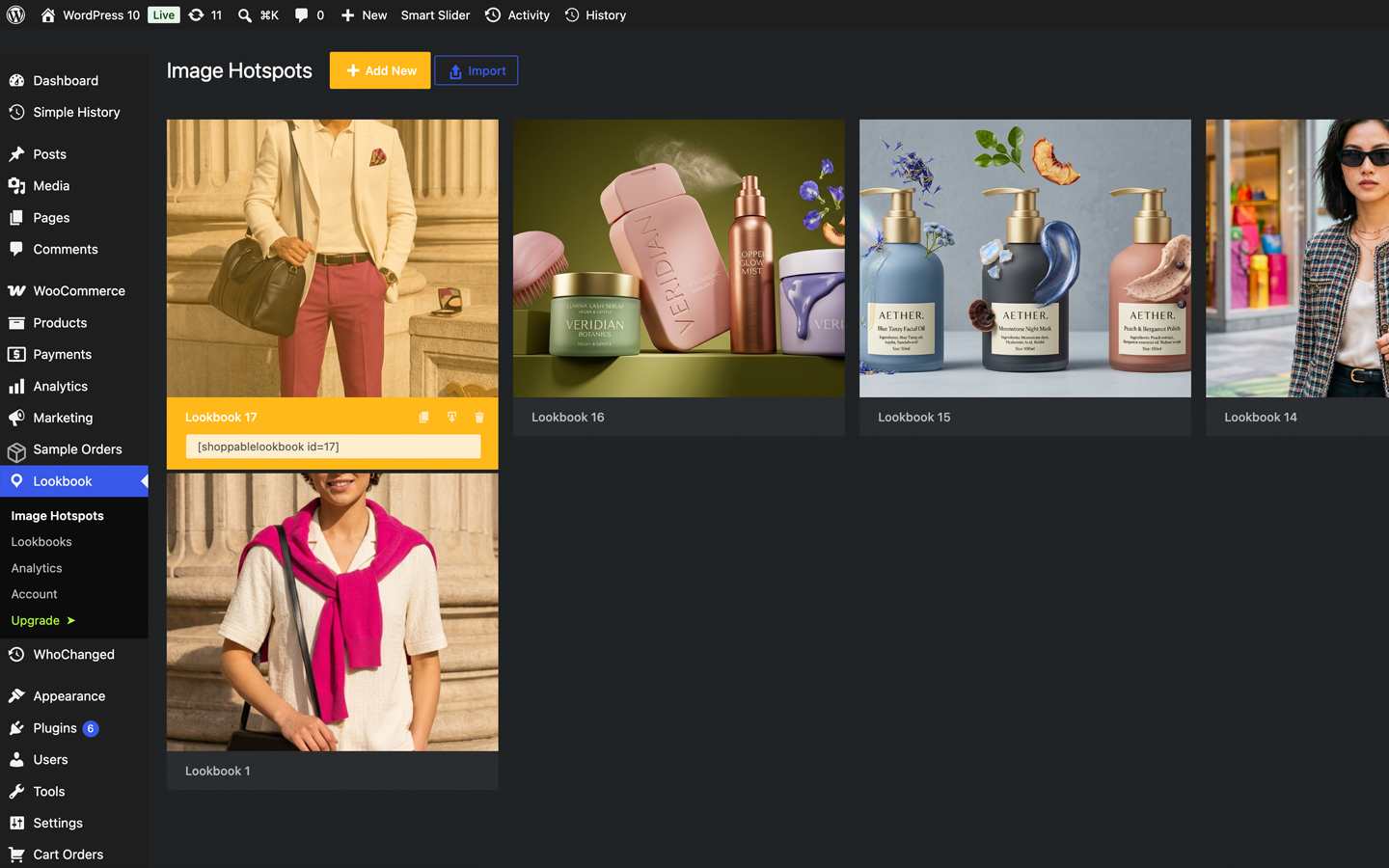
Tag products on your photos to turn them into shoppable images. Supports drag & drop markers so you can place products exactly where they appear in the photo.
Features
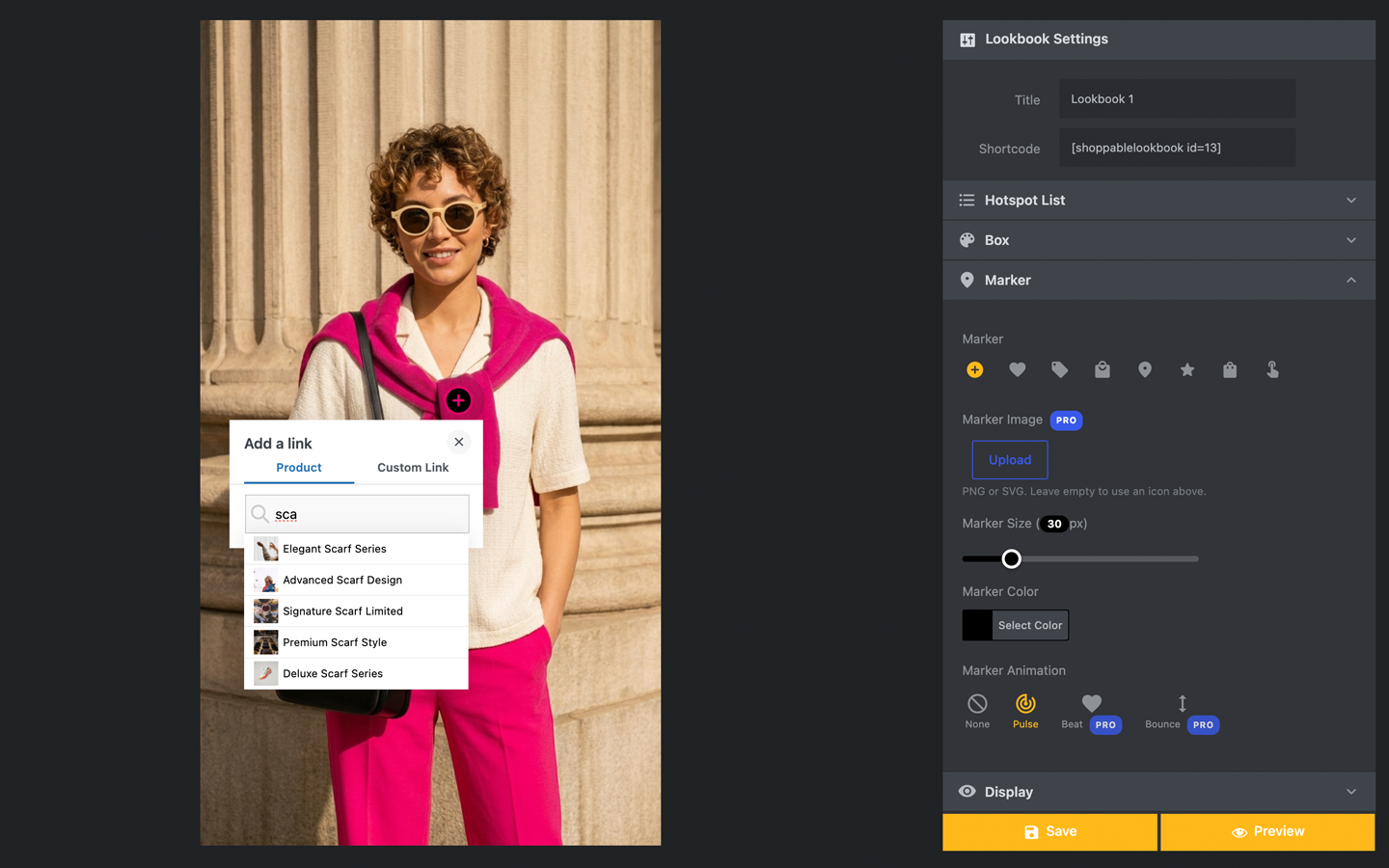
- Click anywhere on the image to create a marker
- Drag and drop markers to reposition them
- Flexible styling — colour, size, icon, open on click / hover / auto
- Smart product search and link products to markers (WooCommerce)
- Link markers to any custom URL with a custom title, image and price (no WooCommerce required)
- Optional AJAX “Add to cart” button on product markers
- Fully translatable — uses WordPress.org language packs (translate.wordpress.org)
- Keyboard and screen-reader accessible markers
- Shortcode plus Gutenberg and Elementor blocks
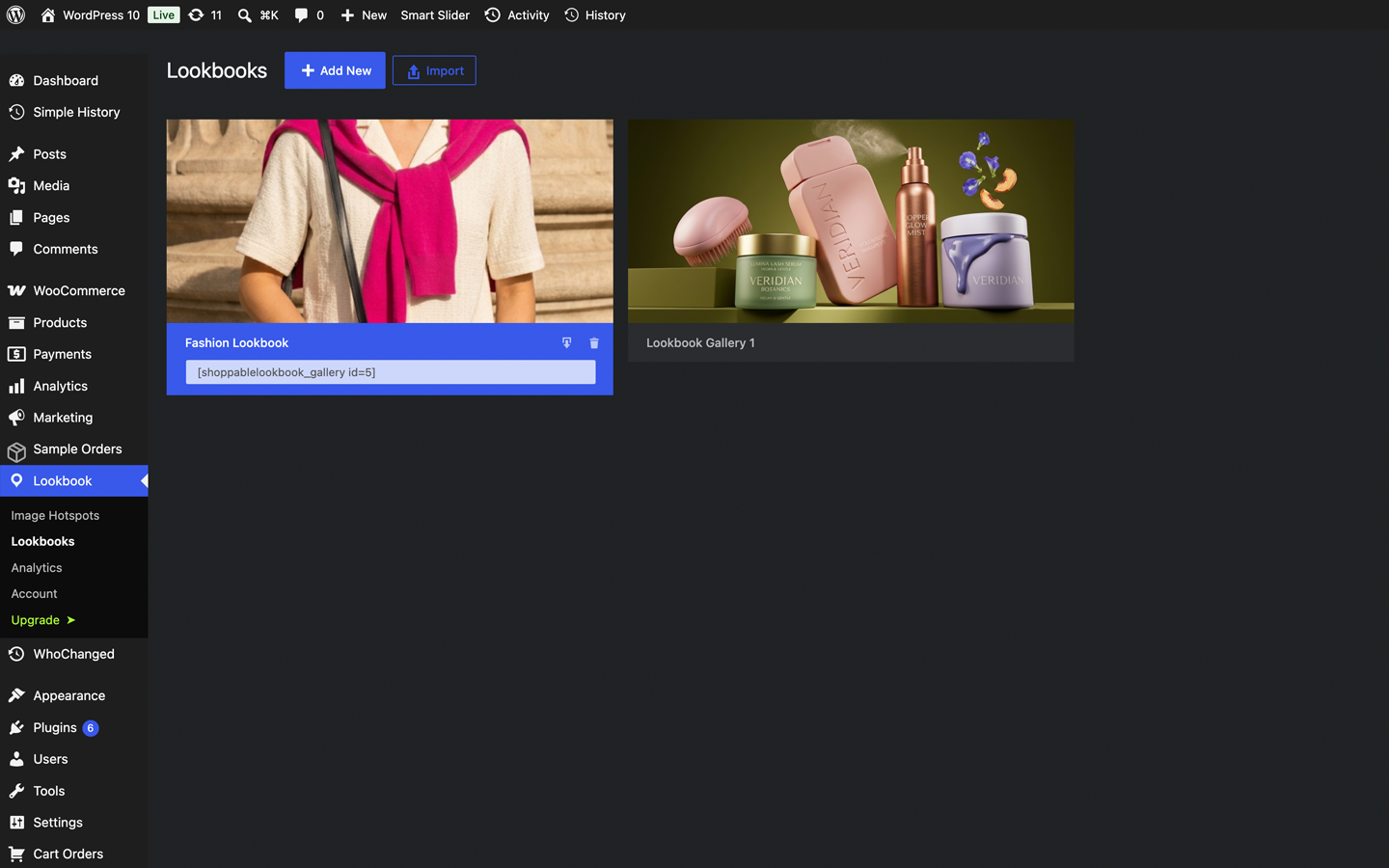
- Create unlimited lookbooks
Compatible with
- Elementor
- Gutenberg (block editor)
- Classic Editor (shortcode)
- WPBakery Page Builder (Pro)
- Fusion Builder (Pro)
Premium features
More info at https://douple.net/shoppable-lookbook-image-hotspots/ — or buy Pro.
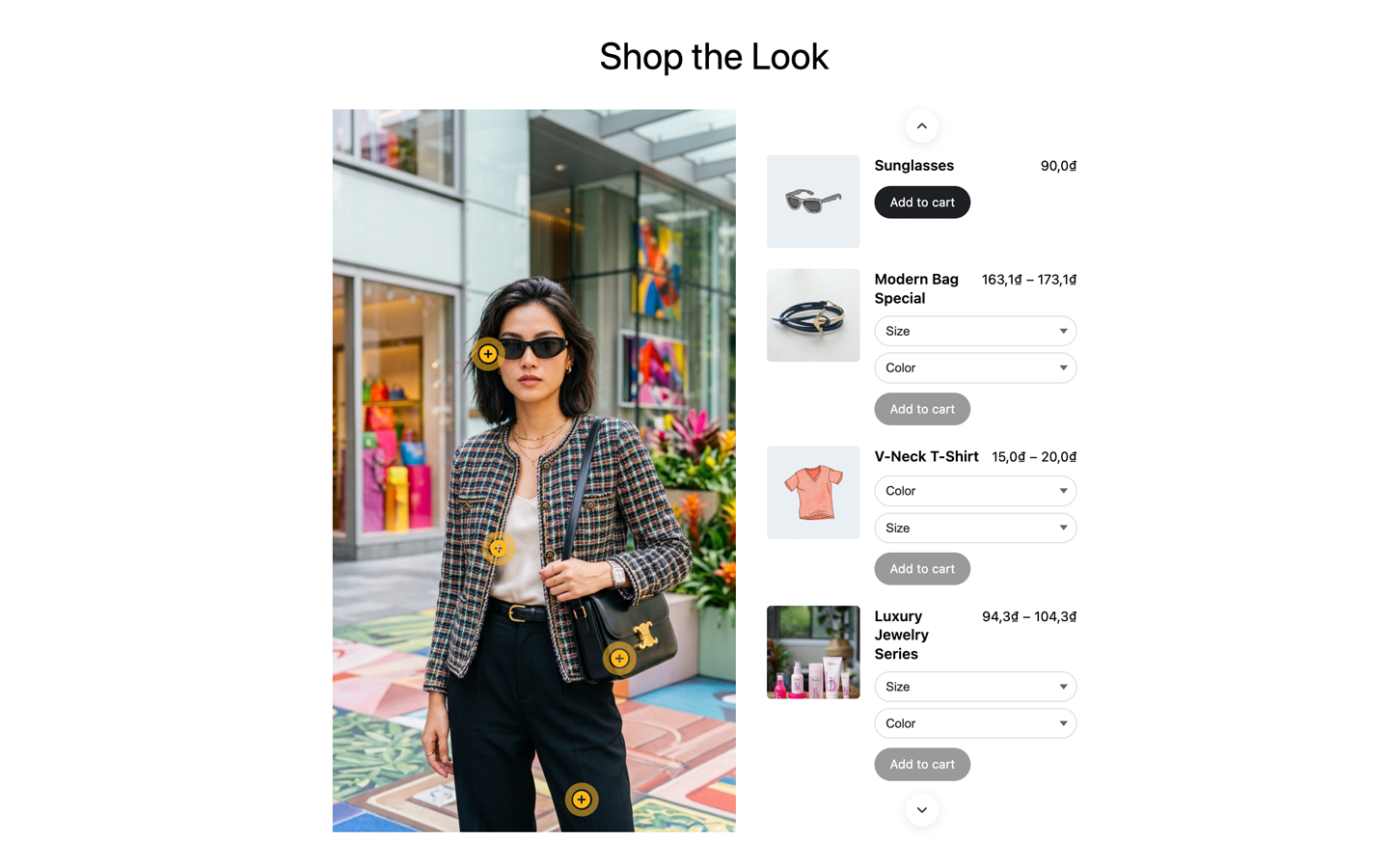
- Product List — tagged products as a shoppable list or carousel, with variation selects and add-to-cart
- Shop the Look — “Add all to cart” bar with live total
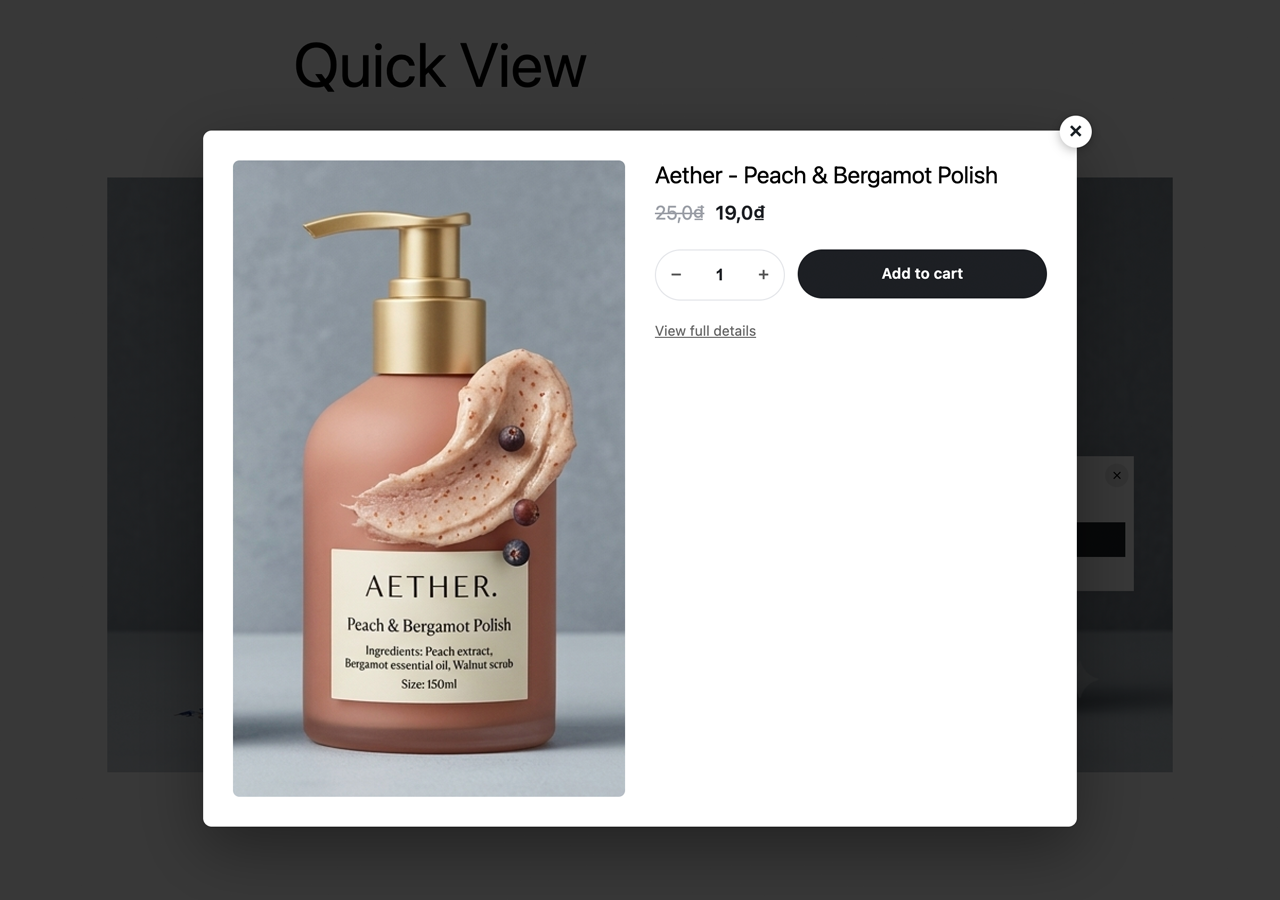
- Quick View — product modal from a marker without leaving the page
- Multi-image Lookbook & Gallery Manager — carousel, grid, masonry or flipbook
- Product page cross-sell — lookbooks containing the viewed product
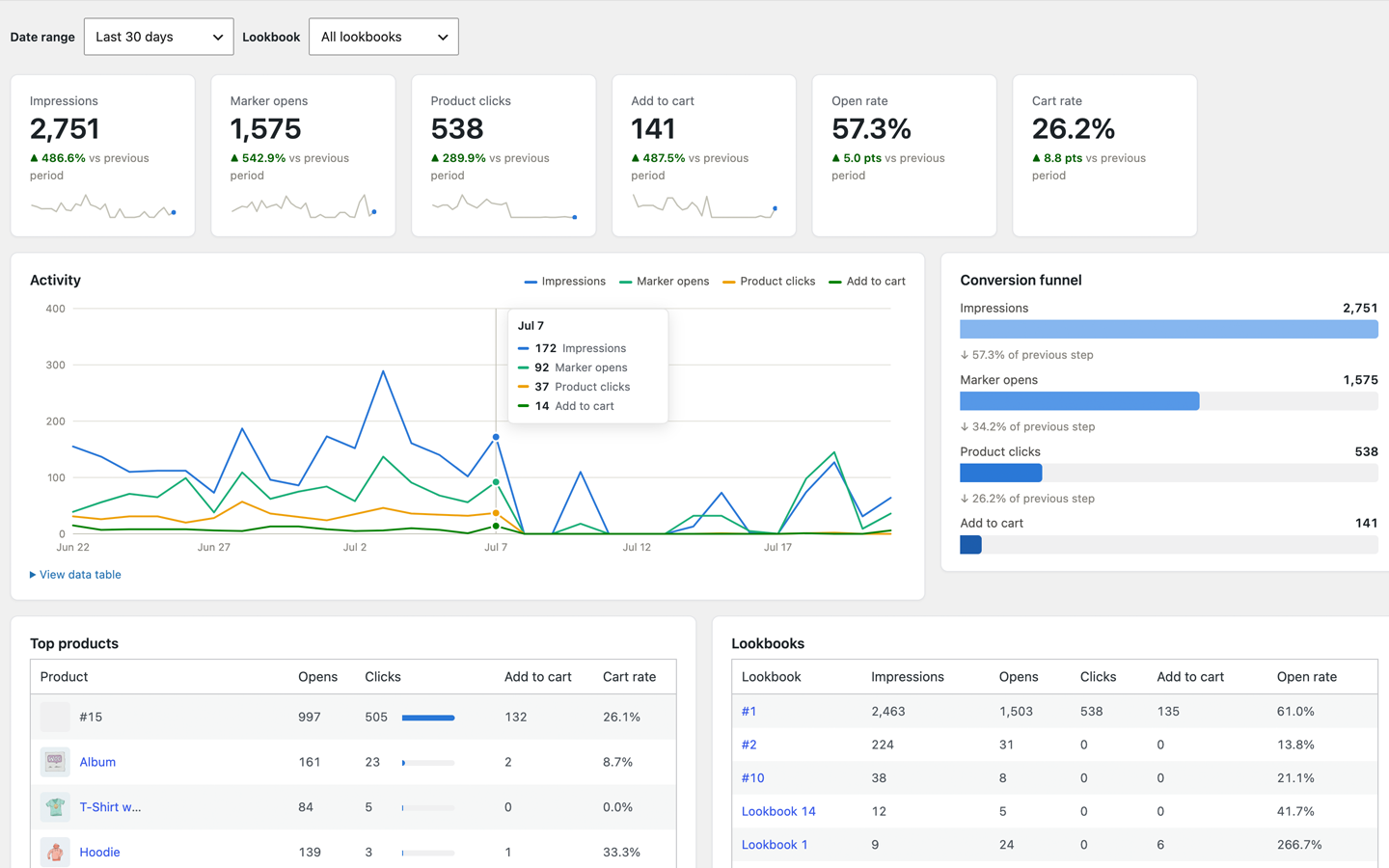
- Analytics — impressions, marker opens, clicks, add-to-carts and conversion funnel
- Custom markers — upload your own PNG/SVG (sanitized)
- Advanced styling — Tag/Bottom box styles, corners, custom colour, opacity
- More marker animations — beat and bounce (free keeps pulse)
- Advanced triggers — open all, open first, or accordion
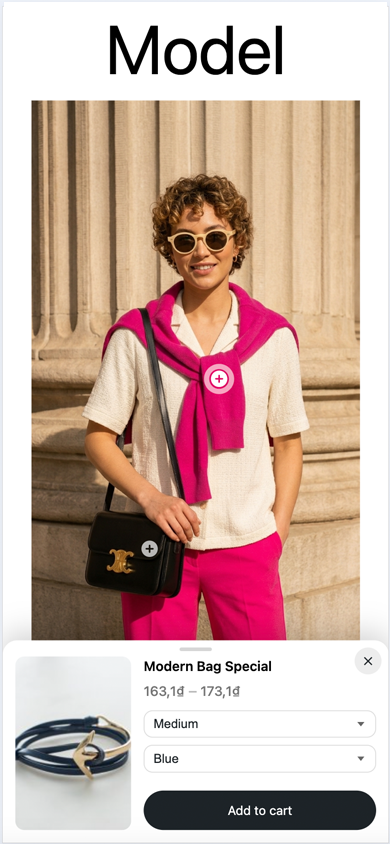
- Bottom-sheet mobile display
- Export / Import & duplicate
- WPBakery & Fusion Builder elements
Requirements
- PHP 7.0 or higher
- WordPress 5.0 or higher
- WooCommerce 3.0 or higher (required only to link WooCommerce products)
Development
Human-readable source for plugin-owned JavaScript and CSS is included in this package under assets/js/, assets/css/, and plugins/*/js|css/ (for example shoppable-lookbook-image-hotspots.js, lookbook-admin.js, Gutenberg block scripts/styles).
Public source repository: https://github.com/thiendo/WordPress-Shoppable-Lookbook-Image-Hotspots-Plugin
No build tools are required to review or modify the plugin-owned admin and frontend scripts and styles shipped in this free package.
Àwọn àwòrán ìbòjú
Àwọn ìdí
Plugin yìí pèsè 1 ìdí.
- Shoppable Lookbook & Image Hotspots
Ìgbéwọlẹ̀
- Upload the
shoppable-lookbook-image-hotspotsfolder to/wp-content/plugins/, or install from Plugins Add New. - Activate the plugin through the Plugins screen in WordPress.
- Go to Lookbook Image Hotspots and create your first lookbook.
- Copy the shortcode (or use the Gutenberg / Elementor block) onto any page.
- Full documentation: https://douple.net/shoppable-lookbook-image-hotspots/docs.html
FAQ
-
Do I need WooCommerce?
-
Only for product markers. Without WooCommerce you can still tag photos with custom links (title, image, price and any URL).
-
Will it work with my theme and page builder?
-
Yes. Lookbooks render through a shortcode, so they work in any theme. Native integrations ship for Gutenberg and Elementor (free) plus WPBakery and Fusion Builder (Pro).
-
How do I upgrade to Pro?
-
Purchase Pro at https://douple.net/shoppable-lookbook-image-hotspots/#pricing and install the Pro ZIP from your purchase email / Freemius customer portal. The free WordPress.org package does not include the Freemius SDK.
-
I bought Pro but the plugin still shows Free
-
Install the Pro ZIP from your Freemius purchase (not only the free WordPress.org package), then activate with the license key from your purchase email.
-
What happens to my data if I deactivate or uninstall?
-
Deactivating keeps all lookbooks intact. Deleting the plugin keeps data by default too — you can opt in to a full data wipe on uninstall from the plugin settings.
-
Does this plugin send data to third parties?
-
No. Lookbook content stays in your WordPress database. This free package does not bundle Freemius or phone home.
Àwọn àgbéyẹ̀wò
Kò sí àwọn àgbéyẹ̀wò fún plugin yìí.
Àwọn Olùkópa & Olùgbéejáde
“Shoppable Lookbook & Image Hotspots” jẹ́ ètò ìṣàmúlò orísun ṣíṣí sílẹ̀. Àwọn ènìyàn wọ̀nyí ti ṣe ìkópa sí plugin yìí.
Àwọn Olùkópa
Túmọ̀ “Shoppable Lookbook & Image Hotspots” sí èdè rẹ.
Ṣe o nífẹ̀ẹ́ sí ìdàgbàsókè?
Ṣàwárí koodu, ṣàyẹ̀wò ibi ìpamọ́ SVN, tàbí ṣe àgbékalẹ̀ sí àkọsílẹ̀ ìdàgbàsókè nípasẹ̀ RSS.
Àkọsílẹ̀ àwọn àyípadà
1.9.3
- Compliance: Free wordpress.org package now ships every built-in lookbook setting unlocked (layout, animations, triggers, mobile sheet, custom colors/markers, export/import). Extra modules stay in a separate Pro ZIP.
- Compliance: Removed Freemius
fs_dynamic_initfrom the free package (is_premiumis no longer present). The SDK is not bundled. - Compliance: AJAX handlers check
current_user_can()andcheck_ajax_referer()in the same function. JS objects use theslbihprefix. - Fix: Open First trigger works on mobile bottom sheet.
- Fix: Mobile Display defaults to Compact (desktop-style); Bottom sheet remains optional.
- Fix: Auto content color follows custom box luminance on mobile sheet (no white-on-white text).
- Fix: Bottom sheet stays full-width in carousel / flipbook contexts.
- Fix: Bottom card (layout 4) stays centred on mobile and after gallery crop remapping.
1.9.2
- Compliance: Renamed plugin to Shoppable Lookbook & Image Hotspots (slug / text domain
shoppable-lookbook-image-hotspots) for wordpress.org resubmission.
1.9.1
- Rename remaining asset/include filenames (JS/CSS/PHP includes/Gutenberg/icons).
- Compliance work toward wordpress.org distinctive naming and Guideline 5 free-package cleanup.
1.9.0
- Compliance: Renamed plugin display name / slug for wordpress.org distinctiveness; free package strips locked Pro features (Guideline 5).
- Compliance: Use
plugin_dir_url()for the plugin URL; escape shortcodedata-variations; removeload_plugin_textdomain()and bundled.po/.mo(translate.wordpress.org). - Compliance: Prefer distinctive constants (
SLBIH_*) and script handles.
1.8.2
- Compliance: Free / wordpress.org package no longer ships the Freemius SDK (avoids plugin_updater_detected). Pro is distributed as a separate Freemius-sold ZIP.
- Compliance: Contributors set to Douple; public GitHub README lists thiendo and Douple-net.
1.8.1
- Compliance: Renamed plugin display name to “Shoppable Lookbook & Image Hotspots” so it matches the folder/slug and Text Domain (avoids Plugin Check TextDomainMismatch from “&” in the old name).
- Compliance: Free / wordpress.org package now keeps human-readable JS/CSS (no terser minify-in-place) and documents the public source repository — matching Guideline 4 lessons from WhoChanged.
- Compliance: Documented Freemius as an external service (terms + privacy) and added FAQ / Development sections to the readme.
- Compliance: Freemius init now sets
is_org_compliant; free zip builder stripswp_org_gatekeeperand Freemius SDK development tooling folders. - Compliance: Free build continues to strip Pro-only teaser UI (Guideline 5 Trialware) and all
__premium_onlymodules.
1.8.0
- New (Pro): Flipbook “Book Size” — choose a portrait (magazine) or landscape (photo album) page shape; photos that do not match the page are centered on it instead of cropped, so markers always stay on their products.
- New (Pro): Flipbook “Photo Fit” — show the whole photo on the page (Fit) or crop it to cover the page edge to edge (Full); markers follow the visible part automatically.
- New (Pro): Carousel “Photo Fit” — Full (crop to fill the frame, as before) or Fit (show the whole photo, letterboxed if it doesnÌtumọ̀ Yorùbá: ’t match the frame). The frame size stays constant either way, so the carousel never jumps height while swiping.
- New (Pro): Carousel “Image Size” — pick 1:1, 4:3, 3:4, 16:9 or 9:16 for the frame (previously fixed at 4:3).
- New (Pro): Grid “Size” — choose 1:1, 4:3 or 3:4 for the grid cells (previously always square).
- Change: Lookbook Settings (galleries) field descriptions now show as hint tooltips (matching the Image Hotspot editor) instead of paragraphs under each field.
- Fix: switching the Lookbooks display to Flipbook or Grid no longer left the Carousel options visible underneath at the same time.
- Fix: the Lookbook Settings hint tooltips were rendered underneath the next fieldÌtumọ̀ Yorùbá: ’s dropdown, effectively invisible; they now always appear on top.
- Fix: the Masonry display no longer shows an “Image Size” control that had no effect (Masonry keeps each photoÌtumọ̀ Yorùbá: ’s natural size; only Grid crops to a fixed ratio).
- Fix: longer hint tooltips in Lookbook Settings could overflow sideways past their own box (and past the screen edge) instead of wrapping onto multiple lines.
- Fix: carousel and grid slides could crop off-center instead of centered (a missing width on the photo broke object-fit centering).
- Change: inside galleries/lookbooks the per-hotspot Photo Width setting is ignored — the gallery layout owns the sizing.
- Fix: the flipbook now renders correctly inside the block editor (static first-spread preview) and no longer shows misaligned pages.
- Change: in the hotspot editor the Marker section now sits above Box and opens by default.
- New: Freemius licensing/upgrade integration — Pro features unlock with a licence key, free version available on wordpress.org.
- Change: Tag/Bottom box styles, box corner radius, bottom-sheet mobile display, custom marker image/SVG upload, custom box colour + opacity, beat/bounce animations, open-all/open-first/accordion triggers, export/import and the WPBakery/Fusion Builder elements are now Pro features (enforced on save and render; locked with a PRO badge in the editor). Existing lookbooks fall back to free styling until upgraded.
- i18n: regenerated the translation template (.pot) covering every string in the plugin (225 strings, previously 64), including the Gutenberg block editor UI.
- i18n: bundled full translations for 7 languages — Spanish, German, French, Italian, Portuguese (Brazil), Japanese and Vietnamese (admin, frontend and block editor).
- i18n: block editor scripts now load their own translations (wp_set_script_translations).
1.7.1
- Fix: the in-editor Preview now loads the Pro styles (Quick View / Shop the Look), so it matches the front-end instead of showing unstyled markup.
- Fix (Pro): styled the “Quick view” button inside the marker box (it previously rendered as an unstyled browser button).
- Fix (Pro): Quick View modal — darker backdrop and vertically-centred dialog so it no longer looks broken when the product summary is short.
- Fix: new lookbooks now use a deterministic default marker colour.
1.7.0
- New (Pro): Multi-image Lookbook — a
[shoppablelookbook_gallery ids="1,2,3" view="carousel"]shortcode combines several lookbooks into one shoppable carousel (swipe, arrows, dots) or responsive grid. Markers, Quick View, Shop the Look and Analytics all keep working inside each slide.
1.6.0
- New (Pro): Analytics — a dashboard (Lookbooks Analytics) tracking impressions, marker opens, product clicks and add-to-cart events per lookbook, with open-rate / cart-rate and a top-products table.
1.5.0
- New (Pro): Shop the Look — a “Add all to cart” bar under the lookbook adds every in-stock product marker to the WooCommerce cart in one click, with a live item count and total. Products are re-validated server-side on add.
1.4.0
- New (Pro): Quick View — a “Quick view” button on product markers opens a modal with the product image, price, variation/quantity selector and add-to-cart, without leaving the page.
1.3.1
- Developer: Added extension hooks (
shoppablelookbook_is_pro,shoppablelookbook_default_options,shoppablelookbook_sanitize_options,shoppablelookbook_settings_{box|marker|display},shoppablelookbook_marker_html,shoppablelookbook_html,shoppablelookbook_enqueue_assets) so the Pro add-on can extend the free plugin cleanly.
1.3.0
- New: Marker animations — Pulse, Beat, Bounce or None — so visitors notice markers are clickable. Pulse uses the marker colour; respects “reduce motion”.
1.2.11
- New: A guided hint (“Click anywhere on the image to add a marker”) appears on a new lookbook and disappears once the first marker is added.
1.2.10
- Removed: The Cream box colour preset.
- Improved: Marker size is now capped on small screens so large markers stay tidy on mobile.
- Improved: Bigger, vertically-centred slider handle.
1.2.9
- Improved: The Opacity slider now tints to match the chosen box colour (and the Marker Size slider matches the marker colour), with an auto-contrast value badge.
1.2.8
- Fixed: The Save and Preview buttons are yellow again.
1.2.7
- Improved: Settings section headers now match the “Lookbook Settings” bar style (grey background, icon, consistent colours).
1.2.6
- Improved: Settings sections now use clean full-width banded headers; Title and Shortcode are always visible at the top.
- Improved: Clearer range sliders with a filled track and a value badge.
1.2.5
- Improved: Redesigned the Lookbook Settings panel into tidy collapsible sections (General, Box, Marker, Display).
- Improved: Custom Color and Opacity now sit side by side; modern slider styling.
- Fixed: Background opacity in the editor preview now fades only the box background, not its content.
1.2.4
- New: Upload a custom marker image (PNG or SVG) via the Media Library; falls back to an icon if removed.
- New: Marker size control (px).
- New: SVG uploads are allowed for administrators and sanitized on upload (scripts, event handlers, foreignObject and javascript: references are stripped).
- Improved: Background opacity now previews live in the editor.
- Removed: The Gray box colour preset.
1.2.3
- New: Box background opacity control.
- New: Custom box colour — pick any colour; text colour auto-adjusts for contrast.
- New: More marker icons (pin, star, shopping bag, tap).
- Improved: Show Price and Add to Cart are now shown side by side.
- Improved: Settings option groups now use a flexbox layout.
- Changed: Removed the “Card” box style (it overlapped with “Pad”); kept the compact “Tag” style.
1.2.1
- Fixed: Bumped asset version so new box styles/colors load instead of a cached stylesheet.
- Fixed: Custom-link tabs (Product / Custom Link) were hidden behind the box background in the editor.
- Improved: Lookbook list now uses a responsive flex grid.
1.2.0
- New: Markers can now link to any custom URL (page, post, external link) with a custom title, image and price — works even without WooCommerce.
- New: Optional AJAX “Add to cart” button on product markers.
- New: Full internationalization — all strings are now translatable and a translation template (.pot) is included.
- New: The Gutenberg block now uses a live server-side preview and a sidebar lookbook selector; markers are clickable inside the editor preview.
- New: Keyboard and screen-reader support for markers (focusable, ARIA labels, Escape to close).
- New: The “Preview” button in the editor now opens a live, interactive preview overlay.
- New: Mobile bottom-sheet — on phones, tapping a marker slides up a full-width product panel (with backdrop) instead of a cramped popover.
- New: More box styles and box colors (Blue, Green, Rose, Cream) for greater variety.
- Fixed: Marker info boxes could be covered by neighbouring markers; the active marker is now always on top.
- Fixed: Elementor and WPBakery elements could fail to register depending on plugin load order; both now register on the correct builder hooks.
- Improved: Marker boxes reposition on window resize / orientation change, after images finish loading, and when page builders (Elementor / WPBakery / Fusion) inject content — so markers work correctly in their live previews too.
- Security: Added nonce verification to the Gutenberg lookbook list AJAX endpoint.
- Fixed: Replaced the deprecated
block_categoriesfilter withblock_categories_all(WordPress 5.8+). - Fixed: Updated Elementor integration for Elementor 3.5+ (
elementor/widgets/register,register(),register_controls()), with fallback for older versions. - Fixed: Multibyte-safe product name truncation (Vietnamese, Chinese, Arabic, etc.).
- Fixed: PHP notices when listing legacy lookbooks without a saved name.
- Improved: Clean uninstall (removes plugin options; optionally removes data).
- Improved: Passes the official Plugin Check (escaping, i18n translator comments, prepared/scoped DB queries, nonce handling, readme compliance).
- Improved: Compatibility with WordPress 7.0 and PHP 8.x.
1.1.4
Apr 15, 2020 Ìtumọ̀ Yorùbá: – Version 1.1.4
* Update: Some small bugs
1.1.3
Apr 8, 2020 Ìtumọ̀ Yorùbá: – Version 1.1.3
* Update: Gutenberg integration
1.1.2
Apr 6, 2020 Ìtumọ̀ Yorùbá: – Version 1.1.2
* Update: Fusion Builder integration
1.1.1
Apr 5, 2020 Ìtumọ̀ Yorùbá: – Version 1.1.1
* Fixed: JS conflicts
* Fixed: More bugs
1.1.0
Apr 2, 2020 Ìtumọ̀ Yorùbá: – Version 1.1.0
* Update: WPBakery integration
1.0.8
Apr 1, 2020 Ìtumọ̀ Yorùbá: – Version 1.0.8
* Update: Elementor integration
1.0.7
Apr 1, 2020 Ìtumọ̀ Yorùbá: – Version 1.0.7
* Fixed: More bugs
1.0.6
Mar 30, 2020 Ìtumọ̀ Yorùbá: – Version 1.0.6
* Improved: New UI/UX
* Improved: Change box style
1.0.5
Mar 27, 2020 Ìtumọ̀ Yorùbá: – Version 1.0.5
* Fixed: JS conflicts
1.0.4
Mar 26, 2020 Ìtumọ̀ Yorùbá: – Version 1.0.4
* Update: Change marker color
* Fixed: More bugs
1.0.3
Mar 25, 2020 Ìtumọ̀ Yorùbá: – Version 1.0.3
* Update: Add more lookbook settings
1.0.2
Mar 21, 2020 Ìtumọ̀ Yorùbá: – Version 1.0.2
* Update: Drag and Drop marker
1.0.1
Mar 18, 2020 Ìtumọ̀ Yorùbá: – Version 1.0.1
* Fixed: JS conflicts
* Fixed: WordPress notices
1.0.0
Mar 15, 2020 – Version 1.0.0
* Version 1.0.0 Initial Release